
christianrowlands/android-network-survey
christianrowlands/android-network-survey has 596 GitHub stars and 83 forks. GitHot measured 0 stars in 24 hours. Last checked 2026-11-20 23:22 UTC. Last push 2026-11-16.
What you can do
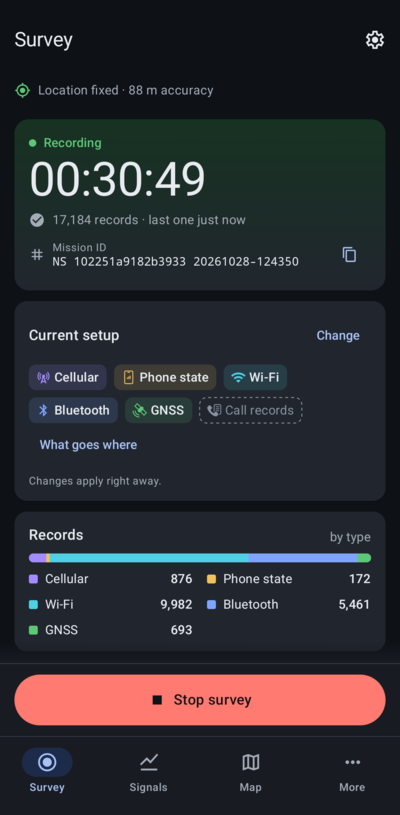
- Survey tab: choose what to survey and where it goes, see "What goes where", and start or stop with one button. Each survey gets its own Mission ID.
- Saved setups: save what to record and where it goes, and switch back to it with one tap.
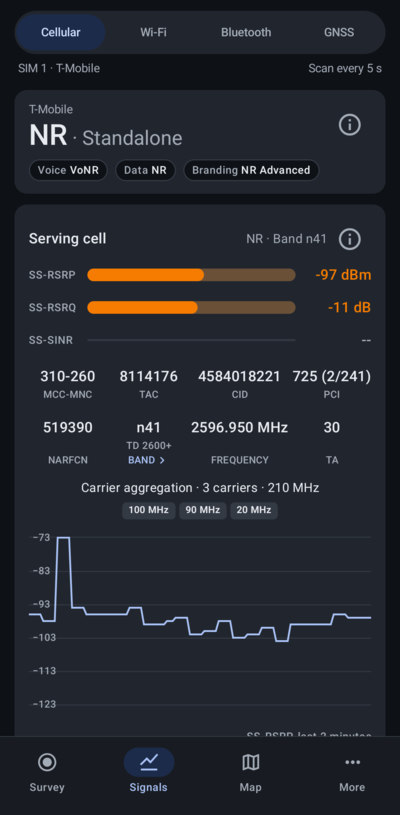
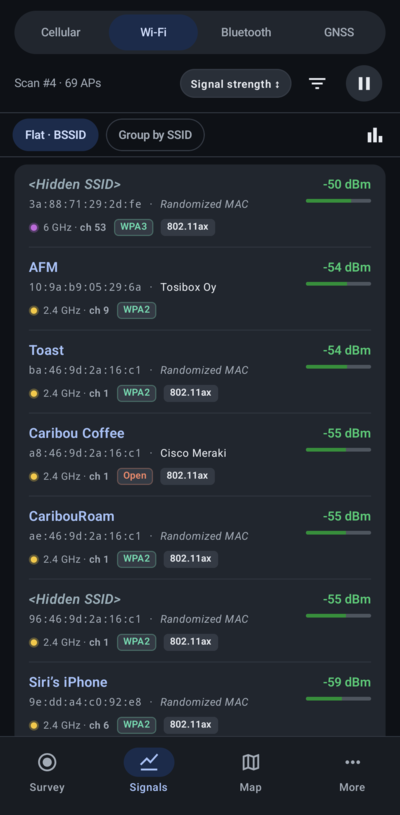
- Signals: live Cellular, Wi-Fi, Bluetooth and GNSS views. Long press copies a value.
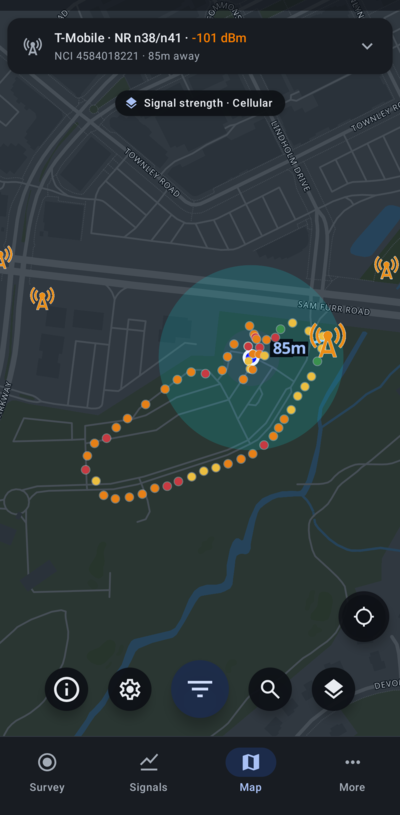
- Map: towers from OpenCelliD and BTSearch, BeaconDB coverage, and My survey points (recorded for surveys that send to NS Analytics or the Community databases).
Measured star growth
- in 24h
- 0
- in 7 days
- Collecting history
- in 15 days
- Collecting history
- in 1 month
- Collecting history
Net star changes over overlapping periods, not daily totals. Missing measurements are left blank. Stars measure attention, not software quality.
About
Cellular Survey Android App
Developer ToolsREADME.md
OriginalNetwork Survey Android App


![Download at https://play.google.com/store/apps/details?id=com.craxiom.networksurvey]](https://play.google.com/intl/en_us/badges/static/images/badges/en_badge_web_generic.png) ](


The Network Survey Android App turns an Android phone into a wireless survey tool for Cellular networks, Wi-Fi networks, Bluetooth devices, and GNSS constellations. A survey has one Start and one Stop. On the Survey tab you pick the record types to survey (Cellular, Phone state, Wi-Fi, Bluetooth, GNSS, and Call records) and the destinations the records go to. Several destinations can run at once, and each one receives every record type it can carry:
- Log files: CSV files on the phone, one per record type. The only destination for Call records.
- NS Analytics: uploads to your team's NS Analytics workspace, connected by scanning a QR code.
- MQTT stream: JSON records to your own MQTT broker.
- gRPC stream: protobuf records to your own gRPC server.
- Community databases: cellular records to OpenCelliD, and cellular and Wi-Fi records to BeaconDB.
The Network Survey user manual can be found here.
Features
- Survey tab: choose what to survey and where it goes, see "What goes where", and start or stop with one button. Each survey gets its own Mission ID.
- Saved setups: save what to record and where it goes, and switch back to it with one tap.
- Signals: live Cellular, Wi-Fi, Bluetooth and GNSS views. Long press copies a value.
- Map: towers from OpenCelliD and BTSearch, BeaconDB coverage, and My survey points (recorded for surveys that send to NS Analytics or the Community databases).
- Watchlist: a notification when a saved Wi-Fi network (SSID or BSSID) is seen, with a history.
- Tools: Cellular tools (LTE and 5G NR bands, channel to band, cell ID decoders), PLMN lookup, OUI lookup, and Wi-Fi spectrum.
- Themes: light, dark or system theme and a choice of accent colors.
- Managed configuration (MDM): each record type and destination can be set to "Operator chooses", "Always on" or "Off", along with the MQTT broker, auto start and other settings.
- Intent API: other apps can start and stop a survey (see Intent API).
- NS Scout (optional): pair an NS Scout, an ESP32 board running receive-only firmware, from More > Hardware > NS Scout. While it is the Wi-Fi source it replaces the phone's Wi-Fi scans (no Android scan limit, more detail per access point) and adds the Wi-Fi clients and Raw frames (pcapng, Log files only) record types. See the NS Scout manual.
CDR Log Files
Introduction: The Network Survey app now includes a feature for logging Call Detail Records (CDR). This functionality provides insight into various interactions your phone has with the cellular network.
What is a CDR? A Call Detail Record (CDR) is a data record that documents specific interactions a phone has with the cellular network. These interactions include phone calls, SMS and MMS messages, and changes in cell tower connections.
Use Cases:
- Monitoring Network Activity: Record and review your phone's cellular network interactions.
- Educational Insight: Gain an understanding of how cellular networks operate.
- Privacy Monitoring: Check if your phone is connecting to unexpected cell towers.
Note on Feature Limitations:
- The regular version of Network Survey does not log SMS or MMS events in the CDR due to Google Play's policy against apps requesting full SMS permissions.
- Logging the "other" phone number associated with call events is also not supported in the regular version.
- RCS chats are not logged by either version. Android only lets the default messaging app see RCS messages, so there is no way for Network Survey to record them.
Alternative Version with Extended Features: If you're interested in CDR logging that includes SMS and MMS events and call details:
- Install from Source: You can build and install the app using the source code available in this repository.
- Download Pre-Built APK: Access the latest "*cdr-release.apk" under the latest release on our GitHub Releases page.
- IzzyOnDroid: Install from IzzyOnDroid.
Tracking And Privacy
The version of this app on the Play Store has Firebase Crashlytics and Analytics set up. This means that app crash logs and analytics are sent off the device to Firebase. If you don't want to participate in this type of tracking then you have three options.
- Install the app from IzzyOnDroid.
- Install the app from the source code in this repo specifying the CDR build variant.
- Install the app using the CDR APK from the Release Page.
The privacy policy for this app contains more information on the data that is sent to Firebase for the Google Play Store version of this app.
Getting Started
To build and install the project follow the steps below:
1) Clone the repo.
2) Open Android Studio, and then open the root directory of the cloned repo.
3) Connect an Android Phone (make sure debugging is enabled on the device).
4) Install and run the app by clicking the "Play" button in Android Studio.
If you want to build using the command line, the apk can be built and installed using the following commands. Make sure your phone is connected to your computer before running the install command.
There are two build variants available for this app. The default build variant is the regular version of the app which is the "Google Play" version. As noted in the privacy section, the "Google Play" version has Firebase Crashlytics and Analytics enabled. The second build variant is the "CDR" version. The "CDR" version does not have Firebase Crashlytics and Analytics enabled, and it has the extended CDR logging features (as discussed above).
Build and Install the Regular Version
NOTE: If building on Windows, replace
./gradlewwithgradlew
./gradlew assembleRegularDebug
./gradlew installRegularDebug
Build and Install the CDR Version
./gradlew assembleCdrDebug
./gradlew installCdrDebug
Run Tests
NOTE: This requires a connected device (physical device or Android Emulator)
./gradlew connectedAndroidTest
Prerequisites
Install Android Studio to work on this code.
gRPC Survey Record Streaming
The gRPC stream destination sends GSM, CDMA, UMTS, LTE, NR, 802.11, Bluetooth, GNSS, Phone State, and Device Status records to a gRPC server, plus Wi-Fi client and probe request records while an NS Scout records Wi-Fi clients. The Network Survey Messaging library can be used to stand up a gRPC server. From there it is up to the implementation to handle the incoming survey messages.
If you want to see how to use the generated Go code to create a gRPC server, check out the code at https://github.com/christianrowlands/ns-messaging-go-grpc-server
The server does not do anything useful, but serves as an example of how one might be created in GoLang.
MQTT Broker Survey Record Streaming
The MQTT stream destination publishes GSM, CDMA, UMTS, LTE, NR, 802.11, Bluetooth and GNSS survey records to a connected MQTT broker on the following MQTT topics:
- gsm_message
- cdma_message
- umts_message
- lte_message
- nr_message
- 80211_beacon_message
- bluetooth_message
- gnss_message
- 80211_client_message and 80211_probe_request_message (Wi-Fi clients, with an NS Scout)
There is also a DeviceStatus and a PhoneState message that is published on
the device_status_message topic.
While "Stream over MQTT" is on (under Watchlist in Settings, on by default), Wi-Fi watchlist events are published too:
- watchlist_match_message (a watched network was seen)
- watchlist_entry_message (the phone's watched networks and their labels)
The MQTT Broker connection supports both plain text and TLS/SSL connections, and the app can save more than one broker.
The survey messages are sent in JSON format following the protobuf definitions from the Network Survey Messaging library. The API documentation is published to a web page here.
MQTT broker QR code
On the MQTT stream page, "Scan a QR code" saves a broker from a QR code that contains a JSON string with the following fields.
The mqtt_client field is optional and will default to the App's auto-generated value.
The mqtt_topic_prefix field is used to prefix the MQTT topics that the survey records are
published to. The default topics are listed above (e.g. lte_message), but if you want to add a
custom prefix, you can use the mqtt_topic_prefix field to change the topic to something like
my/custom/topic/lte_message by setting the value to "mqtt_topic_prefix": "my/custom/topic/"
(notice the trailing slash).
{
  "mqtt_host": "mqtt.example.com",
  "mqtt_port": 8883,
  "mqtt_tls": true,
  "mqtt_client": "aclient",
  "mqtt_username": "auser",
  "mqtt_password": "apassword",
  "mqtt_topic_prefix": "my/custom/topic/path/",
  "mqtt_qos": 1,
  "device_status_stream_enabled": true
}
What gets streamed comes from the record types selected for the survey. A QR code does not choose
record types, so the per-type flags from older versions (cellular_stream_enabled,
phone_state_stream_enabled, wifi_stream_enabled, bluetooth_stream_enabled,
gnss_stream_enabled) are ignored when a code is scanned.
Intent API
The Network Survey app supports an Intent API that allows other apps to start and stop a survey. The Intent API is documented on the Intent API website.
Community Databases
The Community databases destination lets you voluntarily contribute collected cellular and Wi-Fi survey data to public databases. It is optional and off unless you turn it on.
Supported Databases:
- OpenCelliD: a global open cell tower database. Takes cellular records.
- BeaconDB: a crowdsourced geolocation database. Takes cellular and Wi-Fi records.
Records from a survey that sends to the Community databases are kept on the phone and uploaded automatically ("Upload automatically") or when you choose "Upload now". Only cellular and Wi-Fi records are used, and the Mission ID is not sent. No phone numbers or IMEIs are included in uploads, but Wi-Fi uploads include each network's name (SSID) and hardware address (BSSID).
For more details, visit the Network Survey User Manual.
APK Verification
To verify the authenticity of Network Survey, compare the signing certificate
SHA-256 fingerprint using apksigner verify --print-certs <apk-file> or apps
like AppVerifier.
Google Play Store
Package: com.craxiom.networksurvey
SHA-256:
F5:85:5E:DE:9F:51:DD:EF:D7:2B:1C:D5:A2:29:76:1A:B7:35:2B:30:AD:4F:5F:CE:6D:E2:48:73:9F:4B:4C:79
GitHub Releases / Direct APK
Package: com.craxiom.networksurvey
SHA-256:
AB:F5:AD:29:11:FE:31:91:6F:4E:25:5C:17:33:A3:F6:BC:2C:AB:2F:28:16:C9:58:7D:E1:1A:41:58:71:AF:07
Verification info also published at: https://networksurvey.app/manual/permissions/apk-verification/
Translations
Network Survey is localized with the help of the community using Weblate, a libre web-based continuous localization platform. If you would like to help translate the app into your language, you can contribute directly from your browser with no coding required at the Network Survey project on Weblate.
A big thank you to everyone who has helped translate Network Survey.
Credits and Acknowledgements
Credits
This project uses elements from the GPSTest Android app, specifically the GPS user interface components. We appreciate the GPSTest app for making these resources available and acknowledge their contribution to the open source community.
This project also leveraged the code from * Tower Collector* for the upload of survey records to OpenCellID and BeaconDB. We appreciate the Tower Collector app.
Acknowledgements
We would like to express our gratitude to all the contributors who have dedicated their time and skills to this project. Your contributions have been invaluable to the development and success of this application.
Thank you to:
Made with contrib.rocks.
Your commitment and hard work are sincerely appreciated.
Changelog
See the change log for details about each release: CHANGELOG.md
Contact
- Christian Rowlands - Craxiom