
chezou/tabula-py
chezou/tabula-py has 2,314 GitHub stars and 304 forks. GitHot measured 0 stars in 24 hours. Last checked 2026-11-08 20:58 UTC. Last push 2024-12-05.
Simple wrapper of tabula-java: extract table from PDF into pandas DataFrame
Measured star growth
- in 24h
- 0
- in 7 days
- Collecting history
- in 15 days
- Collecting history
- in 1 month
- Collecting history
Net star changes over overlapping periods, not daily totals. Missing measurements are left blank. Stars measure attention, not software quality.
README.md
Originaltabula-py




tabula-py is a simple Python wrapper of tabula-java, which can read tables in a PDF.
You can read tables from a PDF and convert them into a pandas DataFrame. tabula-py also enables you to convert a PDF file into a CSV, a TSV or a JSON file.
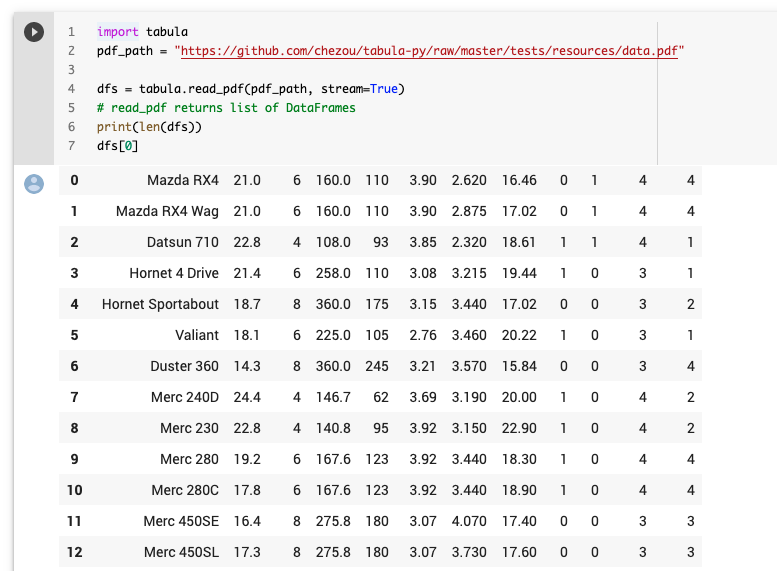
You can see the example notebook and try it on Google Colab, or we highly recommend reading our documentation, especially the FAQ section.
Requirements
- Java 8+
- Python 3.9+
OS
I confirmed working on macOS and Ubuntu. But some people confirm it works on Windows 10. See also the documentation for the detailed installation for Windows 10.
Usage
- Documentation
- FAQ would be helpful if you have an issue
- Example notebook on Google Colaboratory
Install
Ensure you have a Java runtime and set the PATH for it.
pip install tabula-py
If you want to leverage faster execution with jpype, install with jpype extra.
pip install tabula-py[jpype]
Example
tabula-py enables you to extract tables from a PDF into a DataFrame, or a JSON. It can also extract tables from a PDF and save the file as a CSV, a TSV, or a JSON.
import tabula

# Read pdf into list of DataFrame
dfs = tabula.read_pdf("test.pdf", pages='all')

# Read remote pdf into list of DataFrame
dfs2 = tabula.read_pdf("https://github.com/tabulapdf/tabula-java/raw/master/src/test/resources/technology/tabula/arabic.pdf")

# convert PDF into CSV file
tabula.convert_into("test.pdf", "output.csv", output_format="csv", pages='all')

# convert all PDFs in a directory
tabula.convert_into_by_batch("input_directory", output_format='csv', pages='all')
See an example notebook for more details. I also recommend reading the tutorial article written by @aegis4048, and another tutorial written by @tdpetrou.
Contributing
Interested in helping out? I'd love to have your help!
You can help by:
- Reporting a bug.
- Adding or editing documentation.
- Contributing code via a Pull Request. See also for the contribution
- Write a blog post or spread the word about
tabula-pyto people who might be able to benefit from using it.
Contributors
- @lahoffm
- @jakekara
- @lcd1232
- @kirkholloway
- @CurtLH
- @nikhilgk
- @krassowski
- @alexandreio
- @rmnevesLH
- @red-bin
- @Gallaecio
- @red-bin
- @alexandreio
- @bpben
- @Bueddl
- @cjotade
- @codeboy5
- @manohar-voggu
- @deveshSingh06
- @grfeller
- @djbrown
- @swar
- @mvoggu
- @tdpetrou
Another support
You can also support our continued work on tabula-py with a donation on GitHub Sponsors or Patreon.
Explore related projects
codecrafters-io/build-your-own-x
Master programming by recreating your favorite technologies from scratch.
561,067 starspublic-apis/public-apis
A collective list of free APIs
497,307 starsmorluto/rea
Reverse engineer anything with agents, from app behavior down to native binaries.
443,555 starsopenclaw/openclaw
The AI that really does things. Any OS. Any Platform. The lobster way. 🦞
394,216 stars