
chentaymane/ManyFaces
chentaymane/ManyFaces has 30 GitHub stars and 6 forks. GitHot measured 0 stars in 24 hours. Last checked 2026-11-15 23:33 UTC. Last push 2026-11-12.
Measured star growth
- in 24h
- 0
- in 7 days
- Collecting history
- in 15 days
- Collecting history
- in 1 month
- Collecting history
Net star changes over overlapping periods, not daily totals. Missing measurements are left blank. Stars measure attention, not software quality.
About
🎭 Self-hosted anti-detect browser manager with three engines per profile - Camoufox (stealth Firefox), Chromium, and real Android - plus coherent fingerprints, one-click phone profiles, proxy-pool rotation, and cookie management. An open alternative to Multilogin/GoLogin/Dolphin Anty.
Self-hostedREADME.md
Original

ManyFaces
A local browser profile manager for keeping accounts and test environments separate.
Quick start · Browser engines · Build and package · Development
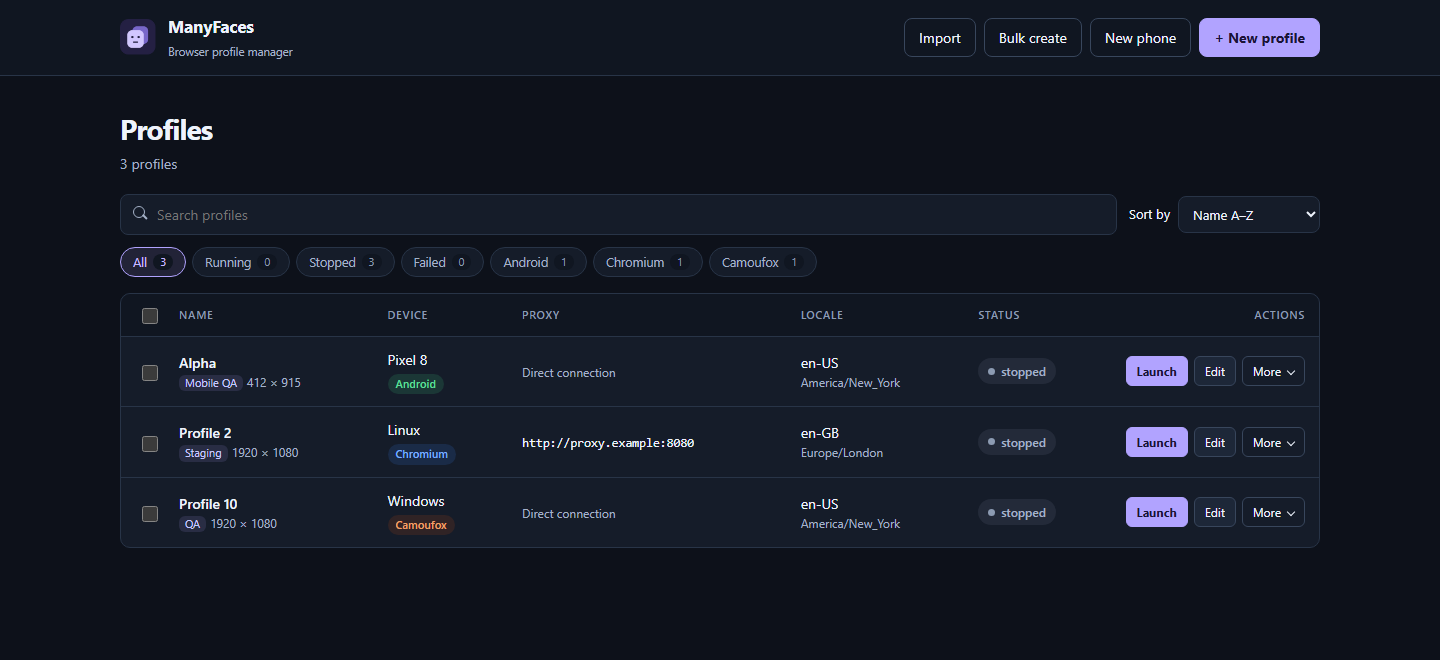
ManyFaces keeps browser storage, proxy settings, and device settings per profile. Use it for accounts you manage, browser QA, and testing across devices and regions. Follow the rules of the sites you access.
Quick start
Install the Python dependencies and start the dashboard on Windows, Linux, or macOS.
python -m pip install -r requirements.txt
python run.py
The dashboard opens in your default browser. Use python run.py --no-open to start
the server without opening a tab. You can also launch it with START.bat on
Windows or ./start.sh on Linux and macOS.
For a desktop window, run python desktop.py. It uses pywebview and requires
WebView2 on Windows or a supported WebView backend on Linux and macOS.
Browser mode works without a desktop WebView.
Browser engines
Choose an engine when creating or editing a profile.
| Engine | Use it for | First-time setup |
|---|---|---|
| Camoufox | Firefox profiles with saved fingerprint settings | Select Download engine in the dashboard or run python -m camoufox fetch. |
| Chromium | Chromium compatibility and emulated phone profiles | Run python -m playwright install chromium. |
| Android | Chrome inside an Android emulator | Select New phone → Android emulator → Create & boot and follow the setup prompt. |
Camoufox requires 0.5.9 or newer in the 0.5.x series, as specified in requirements.txt. The dashboard works before an engine is installed.
Android setup downloads the SDK, a system image, and the scrcpy mirror. Hardware virtualization improves boot and rendering performance. Allow roughly 4–5 GB per Android profile. Android proxy settings support unauthenticated HTTP/HTTPS proxies.
Work with profiles
- Create and launch. Use New profile, New phone, or Bulk create. Phone profiles can use Chromium emulation or the Android emulator.
- Find profiles. Search by name, tag, note, device, timezone, or proxy host. Filter by status or engine and sort by name, creation, or last update. The dashboard remembers your filter and sort choices in the current browser.
- Manage profiles. Launch, stop, or edit a profile from its row. More contains cookie tools, cloning, randomization, and deletion. On smaller screens, each profile appears as a card with the same controls.
- Configure proxies. Set one HTTP, HTTPS, or SOCKS5 proxy, or paste a pool and select random or round-robin assignment. Test a proxy or pool before launch.
- Move settings. Select profiles and choose Export, then use Import to restore the JSON. Export includes settings, fingerprint data, proxy credentials, and staged cookies. Treat it as sensitive. Browser history, logins stored by the browser, and caches stay with the local profile.
Metadata lives in ~/.antidetect/antidetect.db, with browser data under
~/.antidetect/profiles/. Set ANTIDETECT_DATA_DIR to use a different directory.
Build and package
Build on the target operating system.
python -m pip install pyinstaller
pyinstaller build.spec --noconfirm
The standalone app downloads Camoufox on demand. To distribute it with Camoufox bundled, install the engine and build the portable archive.
python -m camoufox fetch
python package_portable.py
Extract dist/ManyFaces-Portable.zip and keep the browser/ directory next to
the executable. The bundled Camoufox binary is specific to the build platform.
Troubleshooting
- Select Failed on a profile to see its launch error. More detail is
available in
~/.antidetect/error.log. - On Linux, Camoufox renders the window at the profile's display scale. If it exceeds the work area, ManyFaces can reduce a desktop window within its supported size range. Phone windows keep their preset dimensions. Use Fit this display when creating a Camoufox desktop profile to select a compatible preset. If none fits, choose another OS or turn off the option.
- For a profile that needs a larger display, use Chromium for interactive
phone emulation or Camoufox's Launch in virtual display for automation.
Virtual display mode needs Xvfb and
setprivon Linux. Camoufox's Xvfb uses software rendering and disables X11 access control. Use it on a machine without untrusted local users. - If Chromium is missing, run
python -m playwright install chromiumin the same Python environment that runs ManyFaces. - Stop a running profile before editing or randomizing it.
- For Android setup and boot errors, check the installer log in the dashboard and confirm virtualization is enabled on your machine.
Development
The dashboard is in web/. The FastAPI server, profile storage, and
engine integrations are in antidetect/. The server exposes
interactive API documentation at /docs.
python -m unittest discover -s tests -v
node --check web/app.js
To include the Chromium dashboard check, install the Playwright browser and
set MANYFACES_BROWSER_TESTS=1 before running the test suite. In PowerShell,
use $env:MANYFACES_BROWSER_TESTS = '1'. The browser test writes screenshots
to .testdata/.
To regenerate the dashboard logo and Windows icon, install Pillow and run
python assets/make_icon.py.
Python automation
Use a saved Camoufox profile from Python. See
antidetect/automate.py for the async entry point.
Use headless="virtual" to run on an Xvfb display on Linux.
from antidetect.automate import launch

with launch("<profile-id>", headless=True) as browser:
    page = browser.new_page()
    page.goto("https://example.com")
    print(page.title())