
chefroger/smart-trade-ai
chefroger/smart-trade-ai has 109 GitHub stars and 14 forks. GitHot measured 0 stars in 24 hours. Last checked 2026-11-17 18:50 UTC. Last push 2026-11-13.
Measured star growth
- in 24h
- 0
- in 7 days
- Collecting history
- in 15 days
- Collecting history
- in 1 month
- Collecting history
Net star changes over overlapping periods, not daily totals. Missing measurements are left blank. Stars measure attention, not software quality.
About
AI assistant for international trade — 45 B2B skills (lead gen, OSINT, email, docs, compliance). End-to-end customer development pipeline. Runs locally. 外贸业务员 AI 助手。
AIREADME.en.md
OriginalSmart Trade AI


Important Notice
This tool requires access to GitHub and PyPI for installation and updates — a stable VPN connection is essential.
Smart Trade AI generates responses using large language models (LLMs). Due to current technological limitations, LLMs may produce hallucinations. All output is for reference only and does not constitute professional advice of any kind. The user is solely responsible for independently verifying accuracy before relying on any information. For critical business decisions involving contracts, pricing, compliance, or due diligence, always consult qualified professionals. Use of this tool is at your own risk.
AI Assistant for International Trade Professionals
Runs on your machine. Your data stays with you.
Cold emails, client research, B2B platform management — this tool handles the repetitive stuff so you don't have to. Bilingual interface (Chinese/English) included — switch anytime.
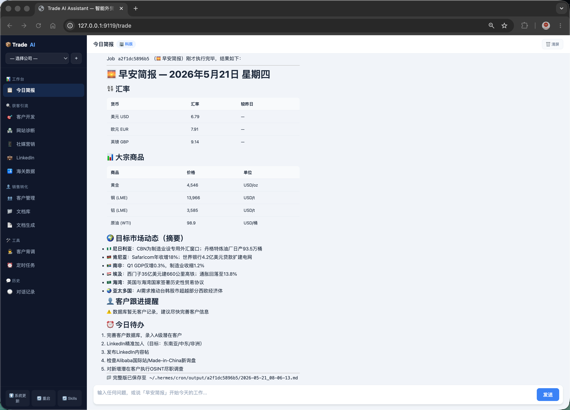
Customer management + Cron task panel
Why do traders need this?
| Pain Point | Without This Tool | With Smart Trade AI |
|---|---|---|
| Morning Brief | Open 5 websites every morning for FX rates / commodity prices / market news | Auto-generated — live rates, commodity prices, market news + client follow-up reminders |
| Due Diligence | Manual Google → LinkedIn → WHOIS | One-click 6-layer verification: email registration check → WHOIS → sanctions screening → MX verification → tech stack → LinkedIn |
| Cold Emails | Write each one from scratch, forget details when clients pile up | Auto-generated from client profiles, with specific pain-point references |
| B2B Platforms | Manually log in to check Alibaba / Made-in-China every day | Scheduled auto-checks — new inquiries and pending quotes at a glance |
| Don't know what to post | AI generates weekly content calendar, rotating between industry insights / product cases / engagement polls | |
| Client Data | Scattered across Excel / WhatsApp / email | Centralized management, A/B/C grading, linked to document libraries |
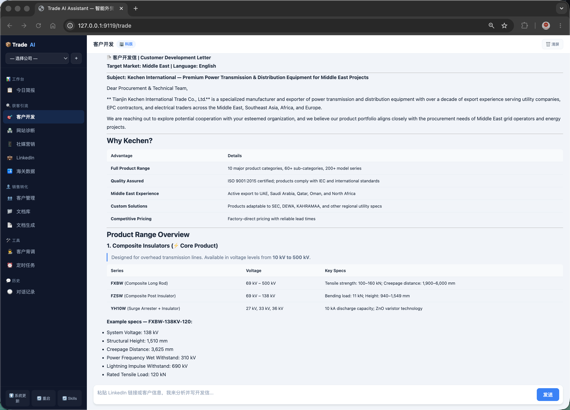
AI Chat — auto-invokes web_search / read_file / database tools
Prerequisite: LLM API Key
Smart Trade AI uses Hermes Agent as its AI engine. You need to register with a model provider and get an API Key.
Recommended plan:
| Plan | Model | Best For | Sign Up |
|---|---|---|---|
| Recommended | deepseek-flash |
Daily chat, doc analysis, cold emails | platform.deepseek.com → Top-up → API Keys |
All testing for this project was done on DeepSeek, so DeepSeek is the only recommended option. The tool itself is compatible with other OpenAI-wire-format models (see Tech Stack), but has not been verified on them.
After getting your API Key, run hermes setup in terminal, choose your provider, and paste the key.
Important Notes
Network Requirements
The installation process clones repositories from GitHub and downloads Python dependencies. You need a stable connection to GitHub. If Hermes installation fails repeatedly, it's almost certainly a network issue:
- Users in mainland China should use a VPN throughout installation, otherwise
git cloneandpip installwill likely time out - If your VPN is unstable, retry the install command — the script supports resuming from where it left off
- Windows users: if the VPN proxy isn't taking effect, set it explicitly in PowerShell first:
$env:HTTPS_PROXY = "http://127.0.0.1:your-proxy-port"
Tavily Search API (Strongly Recommended)
Trade's search and due diligence features rely on Tavily's AI search engine. Sign up for a free account to get 1,000 free searches per month — more than enough for personal use:
- Go to tavily.com and sign up
- Go to Dashboard → API Keys and copy your key
- Run
hermes setup, find the Tavily option, and paste the key
Skipping this won't break chat, but search and due diligence quality will be noticeably degraded.
If Trade Installation Fails
Manual Trade installation involves three steps (git clone + pip install + install-trade-skills), and network fluctuations can cause any one of them to fail. If you've already successfully installed Hermes Agent and configured an LLM but are struggling with the Trade install, simply give the Trade repo URL to Hermes and let it handle the rest:
Tell Hermes directly in chat: "Help me install Trade from https://github.com/chefroger/smart-trade-ai.git"
Hermes will handle cloning, installing dependencies, and registering skills automatically. This approach has a much higher success rate than manual commands.
License and Trial
- New installs get a 30-day trial. The state is stored locally (no online registration); it is a convenience period, not tamper-proof licensing.
- Paid activation codes are bound to the current computer. After moving to a new machine or reinstalling the OS, send the new machine's request code to the author, Roger Lau, for re-issuance.
- During the trial, only free capabilities are shown. These entries are hidden until activated:
- Left sidebar Sales Conversion (Customer Management / Document Library / Document Generation)
- Left sidebar Tools (Customer Due Diligence / Scheduled Tasks)
- Left sidebar History (chat records)
- The ➕ Add Company button next to the company name (the empty-state "Create Company" button stays visible so a trial user can create the first company)
- Bottom-left ⬆️ Update and ℹ️ Upgrade Guide buttons
- Company export/import is a paid feature: in Company Settings pick a company → export a
.zip, then import it on another computer to migrate customers, conversations, orders, memory and agent identity.- Same-name companies are merged, not duplicated; choose "force new" only when it is a different company with the same name.
- The package does not include the license, and desktop library files are not packed (they can be hundreds of GB — copy them yourself); the export prompt lists the directories.
- The package is not encrypted and contains customer data and memory; store it safely.
Get started
Quickest: one command
curl -fsSL https://raw.githubusercontent.com/chefroger/smart-trade-ai/main/scripts/install.sh | bash
The script handles: Python 3.14 check → Hermes Agent check → Smart Trade AI → 44 skills → database init. Hermes Agent must be installed first (the script only checks for it and tells you how to install it if missing).
Prefer to review before running?
curl -fsSLO https://raw.githubusercontent.com/chefroger/smart-trade-ai/main/scripts/install.sh
less install.sh       # review, then
bash install.sh
Or do it step by step
Prerequisites: Python 3.14 · Git · LLM API Key (DeepSeek recommended; OpenAI / Anthropic etc. also compatible)
⚠️ Python must be 3.14 — not 3.11–3.13. Trade embeds Hermes in-process, so both must run on the same Python major version. Since v0.21.6 Hermes ships a 3.14-only dependency set (its declared
>=3.11is just an update bridge for old installs), and on 3.11–3.13 you get a "installs but never starts" failure. The one-click options above use Hermes's own bundled 3.14 automatically.
# 1. Install Hermes Agent (AI engine) — use the official installer; it bundles Python 3.14.
#    Do NOT clone a tag over ~/.hermes/hermes-agent — that overwrites the user's own copy.
curl -fsSL https://raw.githubusercontent.com/NousResearch/hermes-agent/main/scripts/install.sh | bash

# 2. Configure LLM
hermes setup      # Choose provider, paste API key

# 3. Install Smart Trade AI (venv on the 3.14 that Hermes brought)
git clone --branch main https://github.com/chefroger/smart-trade-ai.git ~/.trade/foreign-trade-assistant
cd ~/.trade/foreign-trade-assistant
python3.14 -m venv ~/.trade/venv
~/.trade/venv/bin/pip install -r requirements.txt
~/.trade/venv/bin/pip install -e "." --no-deps

# 4. Install skills and launch
~/.trade/venv/bin/python -c "from trade.post_install import install_skills; install_skills()"
~/.trade/venv/bin/python server.py
# → Open http://127.0.0.1:9119/trade
If Trade shows "Hermes version too old" after launch, your Hermes is below 0.21.6. No manual action needed — Trade upgrades it in the background and shows progress in the UI.
Windows
Both Python and Git need manual install:
- Python — Download Python 3.14 Windows installer (64-bit) from python.org. Check "Add Python to PATH" during install.
- Git — Download from git-scm.com and install with default options. Or run
winget install --id Git.Git -e --silentin PowerShell.
Node.js is handled automatically by Hermes' one-liner installer — no manual setup needed.
After installing Python and Git, reopen PowerShell (to refresh PATH) and run:
# 0. Enable Windows long path support (run PowerShell as Administrator, one-time only)
New-ItemProperty -Path "HKLM:\SYSTEM\CurrentControlSet\Control\FileSystem" -Name "LongPathsEnabled" -Value 1 -PropertyType DWORD -Force
# Reboot after running this command

# 1. Install Hermes Agent (auto-installs Node.js + Git + dependencies)
irm https://raw.githubusercontent.com/NousResearch/hermes-agent/main/scripts/install.ps1 | iex

# 2. Configure LLM
hermes setup

# 3. Install Smart Trade AI
git clone --branch main https://github.com/chefroger/smart-trade-ai.git $env:LOCALAPPDATA\trade\foreign-trade-assistant
cd $env:LOCALAPPDATA\trade\foreign-trade-assistant
py -3.14 -m venv $env:LOCALAPPDATA\trade\venv
$env:LOCALAPPDATA\trade\venv\Scripts\pip.exe install -r requirements.txt
$env:LOCALAPPDATA\trade\venv\Scripts\pip.exe install -e "." --no-deps
$env:LOCALAPPDATA\trade\venv\Scripts\python.exe -c "from trade.post_install import install_skills; install_skills()"
$env:LOCALAPPDATA\trade\venv\Scripts\python.exe -c "from trade import database; database.init_db()"

$env:LOCALAPPDATA\trade\venv\Scripts\python.exe server.py
# → Open http://127.0.0.1:9119/trade
--no-depsis required: Hermes's setup.py refuses to build a wheel, so pip would try to resolve hermes-agent as a dependency and fail.If step 3 fails with
Filename too long, long paths are not enabled. Verify step 0 was run and the machine was rebooted.
Build standalone app (double-click to run, no terminal needed)
pip install pyinstaller
./scripts/build.sh          # macOS → dist/TradeWin.app
The Windows standalone build is temporarily disabled (
scripts/build.ps1only prints a notice). On Windows, runtradewinfrom the venv instead.
Professional Skills
| Skill | Description |
|---|---|
| Platform Diagnostics | Analyze Alibaba / Made-in-China product pages, output optimization suggestions |
| Social Media Marketing | Generate Facebook / Instagram / TikTok / YouTube content calendars |
| LinkedIn Operations | Profile optimization + content strategy + InMail templates |
| Customs Data | Analyze import/export data, identify high-value buyers |
| Lead Generation | Google Maps + LinkedIn + Facebook multi-channel customer discovery, one-click save |
| China Leads | Free public-channel leads: source factories / competitors' domestic factories / domestic buyers (industrial belts + search + customs records + manual verification) |
| Cold Outreach | Product promotion emails / cold emails / follow-ups based on company product data |
| Email Intelligence | 120+ platform email registration check (holehe), social profile discovery |
| Client Management | A/B/C grading, detail panel, document library linking |
| Document Analysis | Complete file-by-file parsing of PDF/Word/Excel/PPT, never skips or truncates |
| Business Doc Generation | One-click quotes, proforma invoices, contracts (DOCX / XLSX / PPTX) |
| Data Directory | Structured knowledge-base management: products / customers / quotes / contracts / certifications / logistics |
| Due Diligence | 6-layer verification: email → WHOIS → sanctions → MX → tech stack → LinkedIn |
| Customer Intel | Single-customer 15-dimension deep profile: decision chain, purchasing preferences, gift advice |
| Customer Finder | 3-question wizard: what to sell → where to sell → find who, auto search + cold email |
| Morning Brief | Live FX rates + commodities + market news + client follow-up reminders |
| Cron Tasks | Workday automations: morning brief / outreach / social posts / daily summary |
| Chat History | Per-company chat memory, searchable and retraceable |
| Email Imitation | Analyze excellent cold email samples → extract AIDA structure and style → generate original emails for your own products |
| Buyer Persona | Role-based buyer analysis (procurement/technical/executive) with FAB value proposition per role |
| Market Analysis | Go-to-market war map: certifications, tariffs, keyword arsenal, 3-second hooks, action roadmap |
| Sales Pipeline | 5-stage customer journey mapping, 30-day follow-up timeline, KPI tracking, pipeline health dashboard |
| Inquiry Training | Dual-AI adversarial training for inquiry responses, buyer persona simulation, objection handling |
| Trade Operations | 11 post-deal scenarios: payment reminders / claims / exhibitions / factory audits / logistics / after-sales / satisfaction surveys / annual reviews |
| Trade Compliance | Cultural taboo check / abbreviation standards / Incoterms 2020 / translation review / bidding / e-commerce listing |
| KOL Style Imitation | Analyze LinkedIn KOL content style (tone/structure/hooks) and apply to your own brand |
| Reddit Engagement | Build trust in Reddit communities via valuable comments, drive B2B leads |
| SEO + AEO Articles | Generate content optimized for both Google search and AI search (Perplexity/Gemini/ChatGPT) |
| Short Video Script | B2B product/factory video scripts (TikTok/YouTube Shorts/Reels) with storyboard |
| Exhibition Manager | Full trade show lifecycle: pre-show invites → on-site records → 48h post-show follow-up |
| Product Description | FAB method product selling points & sales kits (catalog/website/email embedded) |
| Decision Coach | Six Thinking Hats methodology for trade decisions (supplier selection, exhibition, payment terms) |
| Onboarding Wizard | 2-step guided setup: create company → paste customer URL → auto OSINT + cold email |
| Inquiry Meeting | Weekly inquiry review: per-rep analysis, key inquiry deep-dive, follow-up action plan |
| Sales Playbook | Turn top sales experience into SOPs / scripts / onboarding path / pitfall checklist |
| Business Proposal | 3-tier proposal comparison + ROI analysis + implementation roadmap for clients |
| Skill Generator | Describe what you need, auto-generates a new B2B skill + registers it |
| Tech Drawing Analysis | Extract part name / material / dimensions / tolerances from customer engineering-drawing PDFs (experimental — verify manually) |
| Tender Monitoring | Scheduled keyword search of tender notices, produces a filterable lead sheet |
| Tender Mail Archive | Pulls tender emails and attachments from the mailbox into per-project archives without marking them read |
| Inquiry Sheet Generation | Converts tender documents into a fixed 11-column Excel inquiry sheet |
| Tender Package Download | Batch-downloads tender attachments with resumable chunks and size/checksum verification |
| Extract & Archive | Batch-extract 7z/rar/zip/gz, unwrap nested archives, send originals to the recycle bin |
| List-Based Filing | Matches files to tender lists by number and name, packages complete sets |
| Auto Customer Dev | One-click end-to-end pipeline: search → vet → score → email → save → log |
| Company Data Migration | Package one company's customers / conversations / orders / memory / agent identity into a .zip, import and merge on another computer (paid feature) |
Data Security
- Business data is stored locally by default (
~/.trade/), nothing uploaded to any server - With Ollama or other local models, full local operation is possible — no data leaves your machine
- With DeepSeek or other cloud LLMs, your input and necessary context are sent to the chosen provider — client identity data is NOT included
- Multi-company isolation (
X-Company-IDheader) - Bound to
127.0.0.1— only accessible from your local browser; even if you bind another address, session credentials are still handed out to loopback clients only (see Network Exposure Warning below) - Auto-backup before upgrades →
~/.trade/backups/
Network Exposure Warning
Bound to 127.0.0.1 by default. The session token is only issued to loopback (local) browsers: even if you expose the port with --host 0.0.0.0, requests from other devices only receive an explanatory page (HTTP 403) and never the token, so they cannot call the API.
If you really need to reach the UI from another device, set TRADE_ALLOW_REMOTE_UI=1 before starting — this lowers security: any device that can reach the port will be able to obtain the token and act on your behalf. The safer options remain an SSH tunnel or a reverse proxy with an extra authentication layer.
Disclaimer: Alibaba, LinkedIn, Facebook, Instagram, TikTok, YouTube, WhatsApp and other platform names mentioned in this documentation are trademarks of their respective owners. This tool provides analysis assistance for these platforms and is not affiliated with them. Sanctions data is sourced from OFAC/UN/EU public datasets — results are for reference only and do not constitute legal advice. See SECURITY.md for details.
Tech Stack
- AI Engine: Hermes Agent (MIT licensed)
- Backend: FastAPI + SQLite + uvicorn
- Frontend: Vanilla JavaScript SPA (HTML/CSS/JS, zero build dependencies)
- LLM:
deepseek-flashrecommended; compatible with OpenAI / Anthropic / GLM / Kimi / Ollama etc. - Document Parsing: hard dependencies
firecrawl-anydoc+pypdfium2; PyMuPDF / python-docx / openpyxl / python-pptx are an optional[docs]extra
Project Structure
trade/                     B2B business layer
├── api/                   FastAPI routes (12 business domains + license/system)
├── osint/                 Client due diligence module (6-layer verification)
├── company/transfer/      Single-company data export/import (cross-computer migration)
├── skill_router.py        Skill auto-matching engine
├── skill_registry.py      45-entry skill registry (pure data)
├── bootstrap.py            Startup bootstrap (Hermes version check, env loading, skills sync)
├── app.py                  FastAPI app factory
└── ... + 40 business modules

skills/                    45 skills (42 b2b-* + 2 auto-* + 1 chat-memory)
tests/                     Python tests (87 files) + end-to-end document-reading rule tests
tests_js/                  Frontend utility tests (node:test, zero dependencies; run by CI)
server.py                  FastAPI entry point
Development
pip install -e ".[dev,docs]"
python -m pytest tests/ -v                  # Python tests
node --test "tests_js/**/*.test.js"         # Frontend utility tests (zero deps, requires Node)
ruff check trade/ server.py                 # Lint
Both the Python and frontend test suites run in CI (
.github/workflows/test.yml).
Documentation
- User Guide (zh) — getting started, skill quick reference, FAQ
- Windows Installation Guide (zh) — 20-minute setup for beginners
- LinkedIn Guide (zh) — Free / Premium / Sales Navigator (Core · Advanced · Advanced Plus) feature tiers
- COMPATIBILITY.md — Hermes version compatibility
Contact

WeChat · Note "Trade"

For business or support, email [email protected].
Smart Trade AI — an AI assistant for international trade professionals, running locally.