
charmbracelet/freeze
charmbracelet/freeze has 4,907 GitHub stars and 110 forks. GitHot measured +1 stars in 24 hours. Last checked 2026-11-06 16:28 UTC. Last push 2026-09-16.
Generate images of code and terminal output 📸
Measured star growth
- in 24h
- +1
- in 7 days
- Collecting history
- in 15 days
- Collecting history
- in 1 month
- Collecting history
Net star changes over overlapping periods, not daily totals. Missing measurements are left blank. Stars measure attention, not software quality.
README.md
OriginalFreeze


Generate images of code and terminal output.
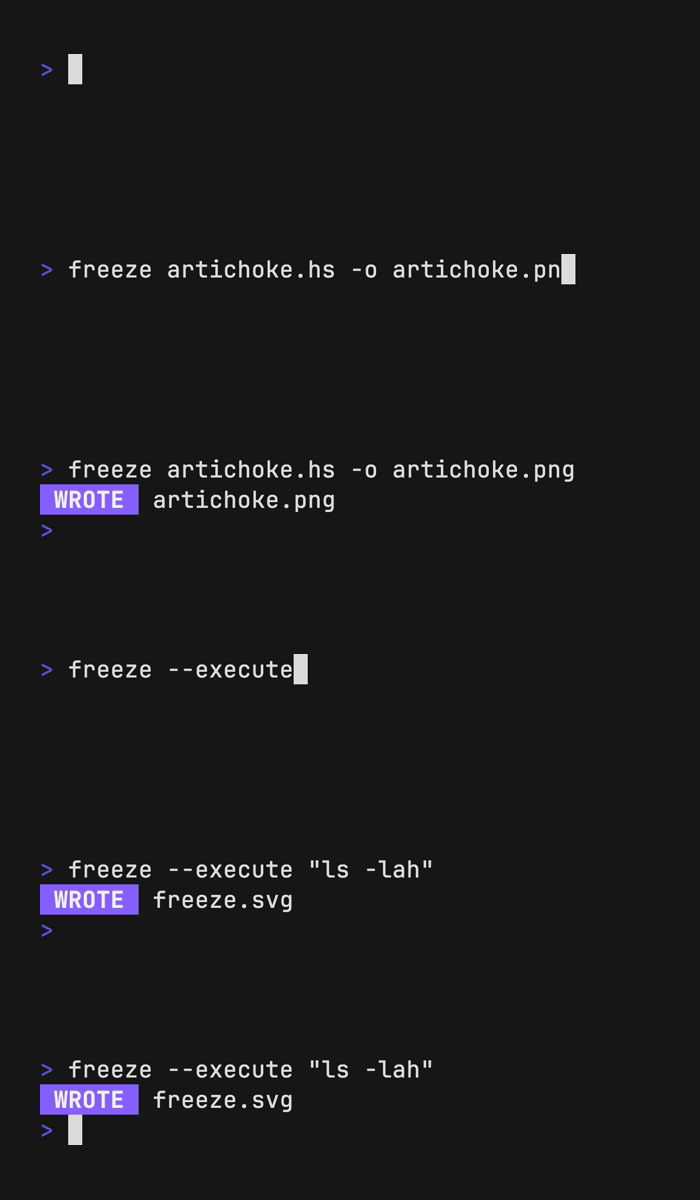
Examples
Freeze generates PNGs, SVGs, and WebPs of code and terminal output alike.
Generate an image of code
freeze artichoke.hs -o artichoke.png

Generate an image of terminal output
You can use freeze to capture ANSI output of a terminal command with the
--execute flag.
freeze --execute "eza -lah"

Freeze is also super customizable and ships with an interactive TUI.
Installation
# macOS or Linux
brew install charmbracelet/tap/freeze

# Arch Linux (btw)
yay -S freeze

# Nix
nix-env -iA nixpkgs.charm-freeze
Or, download it:
- Packages are available in Debian and RPM formats
- Binaries are available for Linux, macOS, and Windows
Or, just install it with go:
go install github.com/charmbracelet/freeze@latest
Customization
Interactive mode
Freeze features a fully interactive mode for easy customization.
freeze --interactive

Settings are written to $XDG_CONFIG/freeze/user.json and can be accessed with
freeze --config user.
Flags
Screenshots can be customized with --flags or Configuration files.
[!NOTE] You can view all freeze customization with
freeze --help.
-b,--background: Apply a background fill.-c,--config: Base configuration file or template.-l,--language: Language to apply to code-m,--margin: Apply margin to the window.-o,--output: Output location for .svg, .png, .jpg.-p,--padding: Apply padding to the code.-r,--border.radius: Corner radius of window.-t,--theme: Theme to use for syntax highlighting.-w,--window: Display window controls.-H,--height: Height of terminal window.--border.width: Border width thickness.--border.color: Border color.--shadow.blur: Shadow Gaussian Blur.--shadow.x: Shadow offset x coordinate.--shadow.y: Shadow offset y coordinate.--font.family: Font family to use for code.--font.ligatures: Use ligatures in the font.--font.size: Font size to use for code.--font.file: File path to the font to use (embedded in the SVG).--line-height: Line height relative to font size.--show-line-numbers: Show line numbers.--lines: Lines to capture (start,end).
Language
If possible, freeze auto-detects the language from the file name or analyzing
the file contents. Override this inference with the --language flag.
cat artichoke.hs | freeze --language haskell

Theme
Change the color theme.
freeze artichoke.hs --theme dracula

Output
Change the output file location, defaults to out.svg or stdout if piped. This
value supports .svg, .png, .webp.
freeze main.go --output out.svg
freeze main.go --output out.png
freeze main.go --output out.webp

# or all of the above
freeze main.go --output out.{svg,png,webp}
Font
Specify the font family, font size, and font line height of the output image.
Defaults to JetBrains Mono, 14(px), 1.2(em).
freeze artichoke.hs \
  --font.family "SF Mono" \
  --font.size 16 \
  --line-height 1.4
You can also embed a font file (in TTF, WOFF, or WOFF2 format) using the
--font.file flag.
To use ligatures in the font, you can apply the --font.ligatures flag.
Line Numbers
Show line numbers in the terminal window with the --show-line-numbers flag.
freeze artichoke.hs --show-line-numbers
To capture only a specific range of line numbers you can use the --lines flag.
freeze artichoke.hs --show-line-numbers --lines 2,3
Border Radius
Add rounded corners to the terminal.
freeze artichoke.hs --border.radius 8

Window
Add window controls to the terminal, macOS-style.
freeze artichoke.hs --window

Background
Set the background color of the terminal window.
freeze artichoke.hs --background "#08163f"
Height
Set the height of the terminal window.
freeze artichoke.hs --height 400
Border Width
Add a border outline to the terminal window.
freeze artichoke.hs --border.width 1 --border.color "#515151" --border.radius 8

Padding
Add padding to the terminal window. You can provide 1, 2, or 4 values.
freeze main.go --padding 20          # all sides
freeze main.go --padding 20,40       # vertical, horizontal
freeze main.go --padding 20,60,20,40 # top, right, bottom, left

Margin
Add margin to the terminal window. You can provide 1, 2, or 4 values.
freeze main.go --margin 20          # all sides
freeze main.go --margin 20,40       # vertical, horizontal
freeze main.go --margin 20,60,20,40 # top, right, bottom, left

Shadow
Add a shadow under the terminal window.
freeze artichoke.hs --shadow.blur 20 --shadow.x 0 --shadow.y 10
Screenshot TUIs
Use tmux capture-pane to generate screenshots of TUIs.
Run your TUI in tmux and get it to the state you want to capture.
Next, use capture-pane to capture the pane and pipe that to freeze.
hx # in a separate pane
tmux capture-pane -pet 1 | freeze -c full

Configuration
Freeze also supports configuration via a JSON file which can be passed with the
--config / -c flag. In general, all --flag options map directly to keys
and values in the config file
There are also some default configurations built into freeze which can be passed by name.
base: Simple screenshot of code.full: macOS-like screenshot.user: Uses~/.config/freeze/user.json.
If you use --interactive mode, a configuration file will be created for you at
~/.config/freeze/user.json. This will be the default configuration file used
in your screenshots.
freeze -c base main.go
freeze -c full main.go
freeze -c user main.go # alias for ~/.config/freeze/user.json
freeze -c ./custom.json main.go
Here's what an example configuration looks like:
{
  "window": false,
  "border": {
    "radius": 0,
    "width": 0,
    "color": "#515151"
  },
  "shadow": false,
  "padding": [20, 40, 20, 20],
  "margin": "0",
  "font": {
    "family": "JetBrains Mono",
    "size": 14
  },
  "line_height": 1.2
}
Contributing
See contributing.
Feedback
We’d love to hear your thoughts on this project. Feel free to drop us a note!
License
Part of Charm.
Charm热爱开源 • Charm loves open source
Explore related projects
codecrafters-io/build-your-own-x
Master programming by recreating your favorite technologies from scratch.
560,452 starspublic-apis/public-apis
A collective list of free APIs
496,767 starsmorluto/rea
Reverse engineer anything with agents, from app behavior down to native binaries.
438,168 starsopenclaw/openclaw
The AI that really does things. Any OS. Any Platform. The lobster way. 🦞
394,078 stars