
cesarferreira/stax has 134 GitHub stars and 19 forks. GitHot measured 0 stars in 24 hours. Last checked 2026-11-16 18:54 UTC. Last push 2026-11-14.
Measured star growth
- in 24h
- 0
- in 7 days
- Collecting history
- in 15 days
- Collecting history
- in 1 month
- Collecting history
Net star changes over overlapping periods, not daily totals. Missing measurements are left blank. Stars measure attention, not software quality.
About
The fastest stacked-branch workflow for Git. Interactive TUI, smart PRs, safe undo. Written in Rust.
Developer ToolsREADME.md
Originalstax
Stacked Git branches and PRs — fast, safe, and built for humans and AI agents.


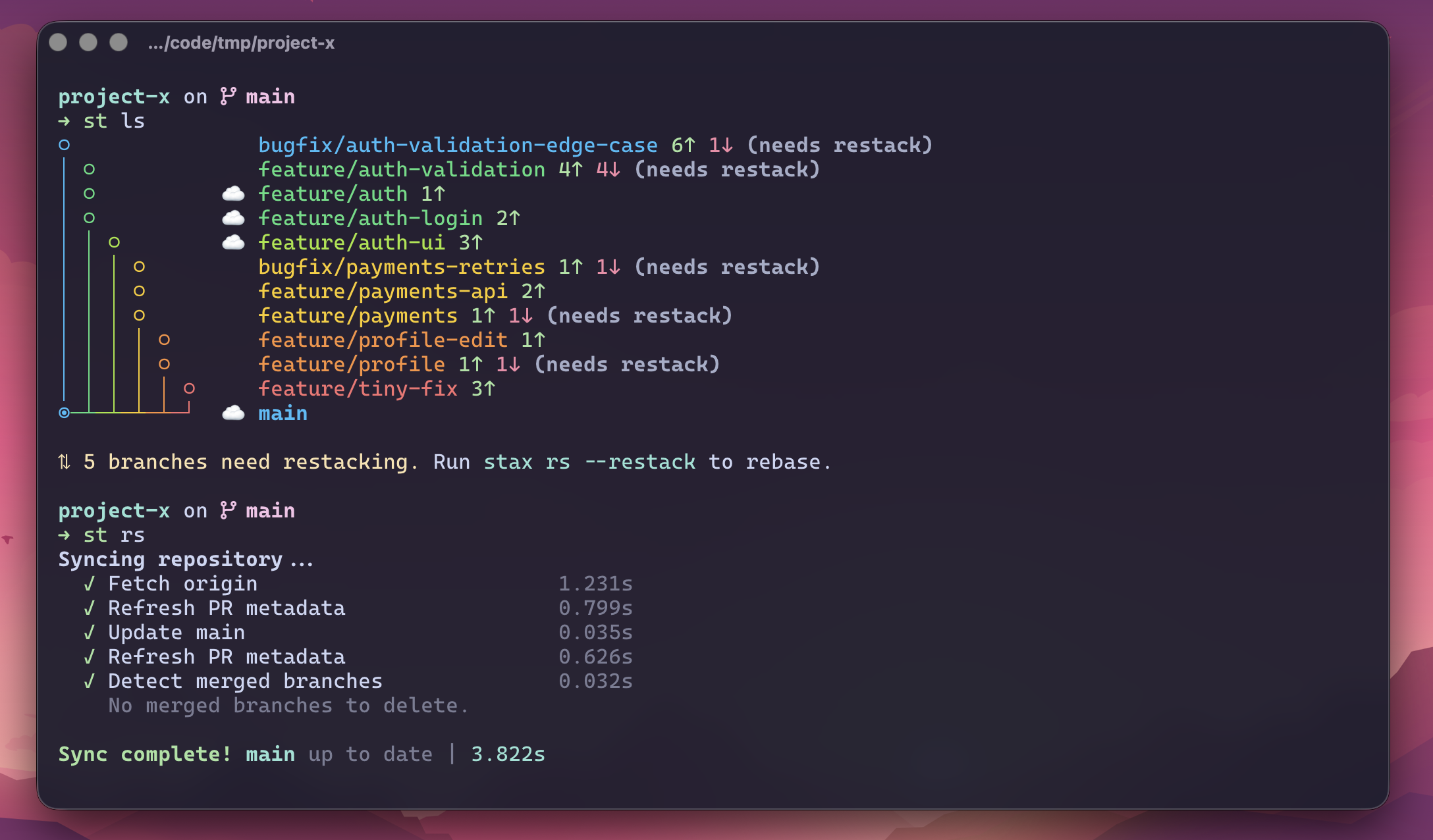
Install · Quickstart · Commands · Docs
Why stax
One giant PR is slow to review and risky to merge. A stack of small PRs is the answer — but managing stacks by hand with git rebase --onto is a footgun. stax makes stacks a first-class Git primitive.
- Stack, don't wait. Keep shipping on top of in-review PRs.
st create,st ss, done. - Native-fast. A single Rust binary that starts in ~25ms.
st lsbenches ~70× faster than Graphite and ~215× faster than Freephite on this repo. - Agent-native. Run parallel AI agents on isolated branches (
st lane), auto-resolve rebase conflicts (st resolve), and generate branch names, commit messages, and PR details from real diffs. - GitHub-native stacks, automatically. When your repo has GitHub's native Stacked PRs enabled and
github/gh-stackis installed,st ssregisters the stack with GitHub under the hood — zero config, zero extra commands. See Native GitHub Stacked PRs. - Undo-first. Every destructive op snapshots state.
st undo/st redorescue risky rebases instantly. - Batteries-included TUI. Run bare
stto browse the stack, inspect diffs, and watch CI hydrate live.
staxinstalls two binaries:staxand the short aliasst. This README usesst.
Install
The shortest path on macOS and Linux:
brew install cesarferreira/tap/stax
Other installation methods — cargo-binstall, prebuilt binaries, Windows, from source
cargo-binstall
cargo binstall stax
Prebuilt binaries
Download the latest binary from GitHub Releases:
# macOS (Apple Silicon)
curl -fsSL https://github.com/cesarferreira/stax/releases/latest/download/stax-aarch64-apple-darwin.tar.gz | tar xz
# macOS (Intel)
curl -fsSL https://github.com/cesarferreira/stax/releases/latest/download/stax-x86_64-apple-darwin.tar.gz | tar xz
# Linux (x86_64)
curl -fsSL https://github.com/cesarferreira/stax/releases/latest/download/stax-x86_64-unknown-linux-gnu.tar.gz | tar xz
# Linux (arm64)
curl -fsSL https://github.com/cesarferreira/stax/releases/latest/download/stax-aarch64-unknown-linux-gnu.tar.gz | tar xz

mkdir -p ~/.local/bin
mv stax st ~/.local/bin/
# Ensure ~/.local/bin is on your PATH:
# echo 'export PATH="$HOME/.local/bin:$PATH"' >> ~/.zshrc
Windows (x86_64): download stax-x86_64-pc-windows-msvc.zip from Releases, extract stax.exe and st.exe, and place them on your PATH. See Windows notes.
Build from source
Prereqs:
- Debian/Ubuntu:
sudo apt-get install libssl-dev pkg-config - Fedora/RHEL:
sudo dnf install openssl-devel - Arch:
sudo pacman -S openssl pkg-config - macOS: OpenSSL included
Then:
cargo install --path . --locked
# or
make install
No system OpenSSL? Use the vendored feature:
cargo install --path . --locked --features vendored-openssl
Verify the install:
st --version
Quickstart
st setup handles shell integration, AI agent skills, and GitHub auth in a single step. When you install skills interactively (or with --yes), stax asks which agent harnesses should receive the skill file, pre-checking the ones it detects on disk. Use --skills all|detected|<ids> for non-interactive control.
st skills update fetches and compares the fully rendered skill file for each selected harness, so it refreshes changed instructions even when the installed package-version marker matches; byte-identical files are left untouched. st skills list reports only those local package-version markers, not whether the remote instructions have changed.
st setup --yes
Alternative auth options
# Import from GitHub CLI
gh auth login && st auth --from-gh

# Enter a token interactively
st auth

# Or via env var
export STAX_GITHUB_TOKEN="ghp_xxxx"
By default stax ignores ambient GITHUB_TOKEN. Opt in with auth.allow_github_token_env = true.
GitHub may report 401 Unauthorized or 404 Not Found when a token is expired
or cannot access a private repository. For repository searches and
already-resolved review/comment reads, stax adds an auth hint; refresh with
st auth --from-gh or check the token's repository access and scopes. The hint
is intentionally not attached to every missing PR or failed mutation, where a
404 can be the expected resource-level error.
Now ship a two-branch stack end-to-end:
# 1. Stack two branches on trunk
st create auth-api
st create auth-ui

# 2. See the stack
st ls
# ◉  auth-ui        1↑
# ○  auth-api       1↑
# ○  main

# 3. Submit the whole stack as linked PRs
st ss

# 4. After the bottom PR merges on GitHub…
st refresh         # sync trunk, restack this stack, update PRs
Picked the wrong trunk? Run st trunk main or st init --trunk <branch> to reconfigure.
Next: Quick Start guide · Merge & cascade workflow
Highlights
Parallel AI lanes
Spin up multiple AI agents on isolated branches, all tracked as normal stax branches:
st lane fix-auth-refresh "Fix the token refresh edge case from #142"
st lane stabilize-ci     "Stabilize the 3 flaky tests in the checkout flow"
st lane api-docs         "Update API docs for the /users endpoint"
Each lane is a real Git worktree with normal stax metadata — it appears in st ls, participates in restack/sync/undo, and re-attaches via tmux any time. No hidden scratch directories, no lost work.
st wt         # open the worktree dashboard
st wt rs      # restack every lane at once when trunk moves
st wt promote # move the current lane branch back to the main worktree
st ss         # submit PRs for the ones that are ready
Lanes start warm: instead of deleting a removed worktree, stax parks it as a reusable warm slot (resetting it to trunk and running git clean -fd, which keeps gitignored dependency directories like node_modules or .venv). The next lane adopts that slot instead of a cold checkout, so agents keep their built deps and don't re-install from scratch. Set worktree.reconcile to re-sync deps on adopt, or worktree.reuse_slots = false to opt out.
→ Agent worktrees · Multi-worktree workflow
Native GitHub Stacked PRs
When a GitHub repo has native Stacked PRs enabled, stax can register your submitted PRs as a native GitHub Stack automatically. This requires GitHub's github/gh-stack CLI extension — install it once:
gh extension install github/gh-stack
# or let stax install it for you:
st doctor --fix
That's it — no config needed. From then on, st ss/st bs auto-link multi-PR stacks under the hood, no extra command required. Existing stax PR body/comment stack links keep working; the native GitHub stack map is added on top. On gh-stack v0.0.8+, stax also prints the repository-scoped Stack number returned by GitHub.
st ss                    # auto-links native stack when available
st stack link            # manually re-link the current stack
st stack unlink 7        # unstack native Stack #7 remotely
Repos without the feature, users without the extension, and non-GitHub remotes keep the existing stax behavior — this is purely additive and never blocks a submit. To turn off gh-stack registration entirely, set native_stack = "off" under [submit] in ~/.config/stax/config.toml, or pass st submit --no-native-stack for a single run (see config reference). gh-stack v0.0.8+ uses GitHub's public Stacks REST API and supports the normal GitHub CLI authentication sources, including GH_TOKEN/GITHUB_TOKEN. For older link-capable versions, stax strips those overrides before gh stack operations so the extension can fall back to an OAuth-authenticated gh login. st doctor always shows the installed version, marks anything below v0.2.1 as out of date (v0.1.0 added gh stack merge, see below; v0.2.1 fixes custom SSH host aliases), and can upgrade it with st doctor --fix. Native Stack updates are append-only; to remove or insert PRs, run st stack unlink <stack-number> and then link again. Argument-free st stack unlink retains the active locally tracked behavior.
Cascade stack merge
Merge from the bottom of the stack up to your current branch, with CI and readiness checks:
st merge                  # local cascade merge
st merge --when-ready     # wait/poll until PRs are mergeable
st merge --ds             # merge ancestors, rebase current branch
st merge --stack          # GitHub/GitLab: preserve lower PR/MR merged state through one tip merge
st merge --stack --full   # stack-merge the full stack even from the middle
st merge --remote         # merge remotely on GitHub while you keep working
st merge --all            # merge the whole stack regardless of position
st merge --ignore-failed-ci  # merge despite a red CI rollup (e.g. only optional checks failed)
On GitHub, if the current stack is a confirmed-enabled native GitHub Stack and
gh-stack v0.1.0+ is installed, st merge --stack delegates to gh stack merge instead — GitHub lands every selected PR up to the tip atomically, or
none of them. Older gh-stack versions fall back to the flow below with a
note: pointing at gh extension upgrade stack.
GitLab stack merge checks project merge settings first, sends squash: false,
and accepts only the default preserving method; explicit stack rebase or
squash is rejected. GitHub also rejects those rewriting methods for multi-PR
stack ranges before mutation because lower PRs could not reach merged state; a
single selected GitHub PR may still use them. Gitea/Forgejo stack merge is not
supported.
AI conflict resolution
When a rebase stops on a conflict, st resolve sends only the conflicted text files to your configured AI agent, applies the result, and resumes the rebase automatically. If the AI returns invalid output, touches a non-conflicted file, or leaves extra conflicts behind, stax bails out and preserves the in-progress rebase so you can inspect or continue manually.
st resolve
st resolve --agent codex --model gpt-5.6-terra
Before each rebase, stax also runs a preflight repair that compares the
stored parent boundary against merge-base(parent, branch). When they diverge
sharply — the “my restack hit conflicts on files I never touched” case — stax
automatically uses the merge-base boundary for that rebase and prints a
one-line notice. Silence the notice with [restack] preflight_warn = false or
--quiet; disable the automatic correction with
[restack] preflight_auto_repair = false.
The same preflight also detects squash-merged parents: if the first commits of a branch already landed on the parent as one squash commit, stax rebases only the commits after them instead of replaying the merged ones and conflicting.
Undo / redo
restack, submit, sync, and reorder each snapshot branch state before they touch anything. Recovery is one command away.
st restack
st undo
st redo
Interactive TUI
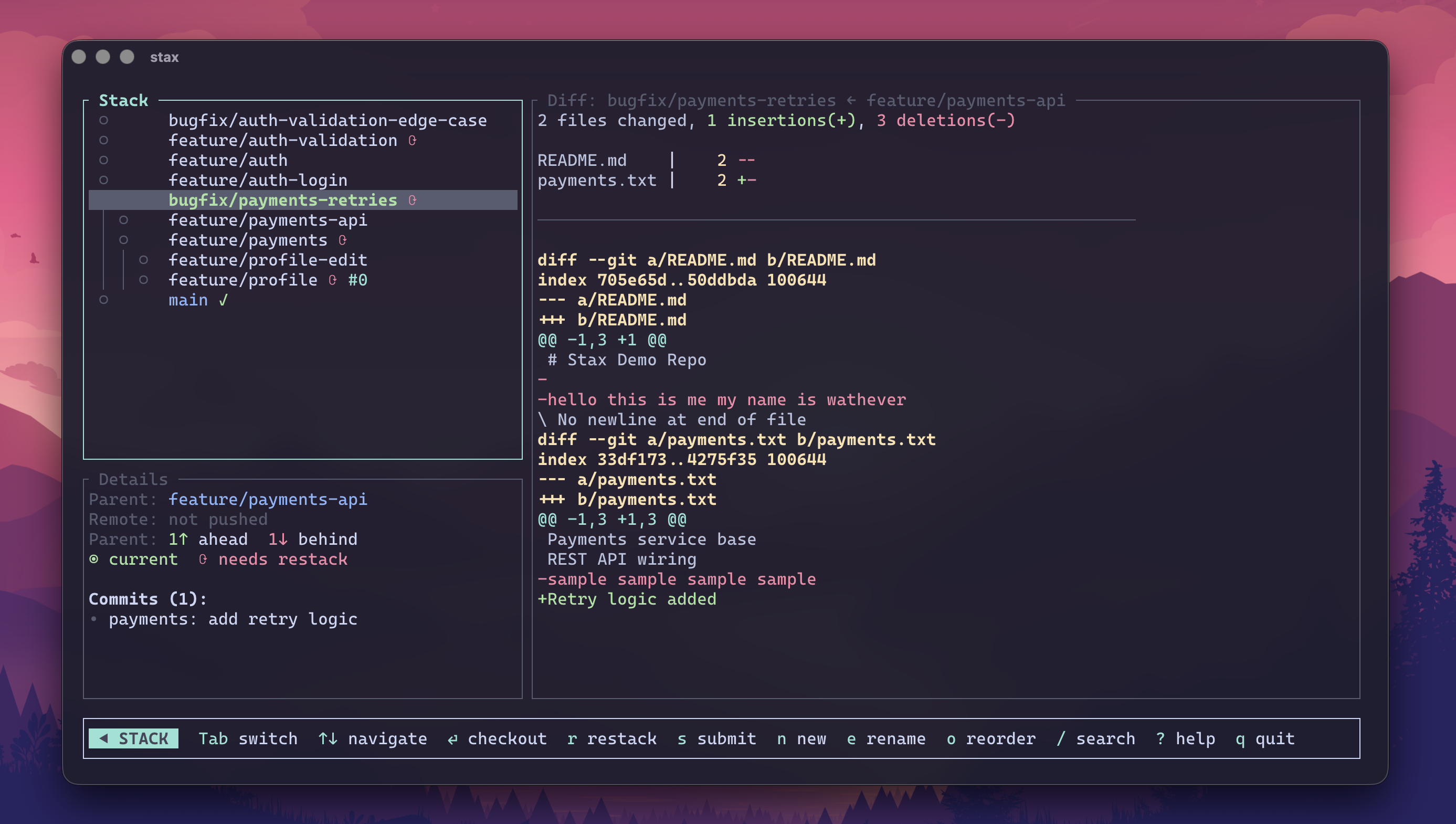
Bare st launches a full-screen TUI for browsing stacks, inspecting branch summaries and cached patches, watching live CI hydrate, and running common ops without leaving the terminal. Stack/Summary/Patch pane visibility is remembered per repo.
Localhost web workspace
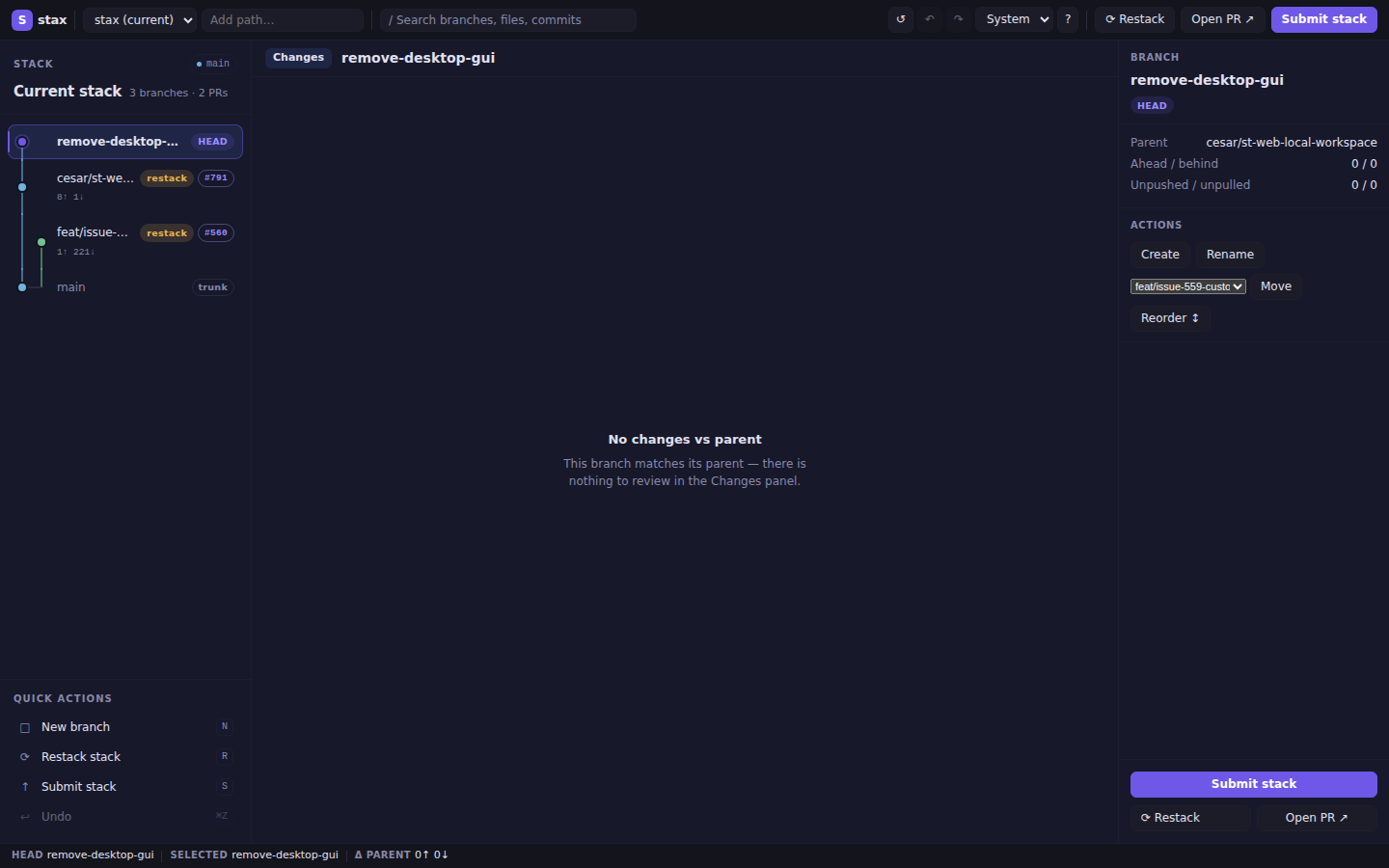
st web starts a secure, browser-based workspace on 127.0.0.1 — the same three-pane layout as the TUI, available everywhere (Linux, macOS, SSH sessions):
st web            # opens port 8787, or warns and uses a free port if busy
st web --port 0   # ephemeral port
st web --no-open  # start without opening browser; prints URL
Run st web from anywhere inside a Git worktree, or pass any path inside one; stax discovers and opens the worktree root automatically.
Binds 127.0.0.1 only with an unguessable session token in the URL, CSRF protection on every mutating POST, and one-mutation-at-a-time enforcement. Requests without an Origin remain supported; when present, Origin must exactly match http://127.0.0.1:<actual-bound-port>. No --host flag — it cannot be exposed to the network.
AI branch names, PR details, and standups
st create --ai -a --yes   # generate branch name + first commit message
st ss --ai --yes          # generate PR titles/bodies during submit
st gen                    # interactive: PR body, PR title, or commit message (AI)
st generate --pr-body     # non-interactive: refresh PR body from branch diff + context
st generate --pr-title    # non-interactive: refresh PR title from branch diff
st generate --commit-msg  # non-interactive: amend HEAD commit message with AI
st standup --ai           # spoken-style daily engineering summary
st standup --ai --style slack  # Slack-ready Yesterday/Today bullets
st standup --ci           # include CI failures for selected stack branches
st standup --ci --json    # activity + explicit signal availability metadata
Each AI feature (generate, standup, resolve, lane) can use a different agent/model. st create --ai, st submit --ai, and st generate / st gen (PR body/title, commit message) share the generate setting. Configure with:
st config --set-ai
Projects can also define PR-specific writing rules in a repo-root stax.toml (or globally in ~/.config/stax/config.toml):
[ai.generate]
title = "Prefix titles with the issue key"
body = "Include testing and rollout sections"
These rules apply to AI-generated PR titles and bodies from generate and submit --ai; commit-message generation is unchanged.
→ PR templates & AI · Reporting
Commands
| Command | What it does |
|---|---|
st |
Launch interactive TUI |
st web [path] |
Start a localhost web workspace in the browser |
| Web stack pane | Automatically fits branch names and topology; drag or use Arrow keys to resize. Manual width persists per repository in browser localStorage; double-click resets automatic sizing. |
| Web Sync | Confirmed browser action: fetches, updates trunk, and cleans merged local branches; requires a clean tree and never stashes or restacks. Refresh only reloads the current snapshot. |
st ls / st ll |
Show stack health and PR status (st ll adds PR URLs/details) |
st watch |
Live auto-refreshing stack status with CI and PR state (adaptive polling: 15s active CI → 60s open PRs → 120s idle) |
st watch --current |
Watch only the current stack |
st watch --iterations <N> |
Run exactly N total refreshes (1 renders exactly once; 0 is invalid), then exit without sleeping; for N > 1, use --interval <seconds> to set the delay between refreshes |
st create <name> / st add <name> |
Create a branch stacked on current |
st create --ai -a --yes |
Generate branch name + first commit message |
st create <name> --below |
Insert a new branch below current, carrying tracked/untracked prepared changes with it |
st branch track --all |
Adopt every untracked non-trunk local branch into stacks using its nearest cycle-safe strict local ancestor |
| `st get [branch | PR]` |
st ss |
Submit the full stack, open/update linked PRs; temporary-publishes branches that need restack |
st submit --no-restack |
Submit using current local branch heads instead of temporary rebased publish heads |
st submit --plan [--json] |
Preview fetch, push, PR, retarget, metadata, and stack-link actions without changing local or remote state |
st branch submit |
Submit only the current branch; can publish a temporary rebased head when needed |
st branch submit --fork |
On a denied-for-lack-of-write-access push, retry from a GitHub fork of the upstream repo (single branch; set [remote] auto_fork = true for always-on) |
st upstack submit |
Submit current branch and descendants, chaining temporary publish heads when needed |
st reviews --stack [--json] |
Stack-wide review/comment inbox, including inline file/line locations on GitHub (st comments remains the current-PR view) |
st next |
Move to the next unmerged branch upstack; fork choices are deterministic |
st merge |
Cascade-merge from bottom to current (--when-ready, --downstack-only/--ds, --stack, --stack --full, --remote, --all, --ignore-failed-ci) |
st ready |
Interactive PR readiness TUI — CI, review approval, and merge state for unmerged tracked PRs; auto-refreshes every 15s and drops remotely merged PRs without cleaning up their local branches (--current/--stack for current stack, --plain for a static table, --json for machine-readable readiness schema) |
st board / st home |
Interactive repository dashboard (GitHub only) — PULL REQUESTS / ISSUES tabs with a detail pane, inline diff/comments, label editing, draft toggle, and API-only merge (--limit, --tab, --interval, --plain for static tables) |
st ci / st ci --oneline |
Live CI status for each PR head — full per-check table, or one compact line per branch across the stack; GitHub statuses and check runs are fetched across all pages before roll-up |
st ci -w --alert |
Watch CI until all checks finish, then play success/error sounds |
st ci -w --strict |
Watch CI but exit as soon as any check fails |
st rs / st rs --restack |
Sync trunk, clean merged branches, report closed-but-unmerged PR branches without deleting them, optionally rebase |
st sweep |
Classify local branches (merged/closed-pr/gone/stale/active); --delete cleans merged and safe upstream-gone branches, while --delete --include-closed explicitly discards closed PR branches |
st stats |
Single-screen, local-only snapshot of stacking health (stack shape, PR mix, restack/parent/dirty health, worktree lanes, hygiene, next action); --current scopes to the current stack, --json for machine output, --ci adds an opt-in CI roll-up |
st refresh / st r |
Sync trunk without merged-branch cleanup, restack current stack, then push/update PRs (pass --delete-merged to opt into sync-style cleanup) |
st refresh --get |
Before restacking, reconcile each branch in the current stack against its remote ref; use this after another machine rebased and force-pushed the stack (multi-machine workflow) |
st refresh --all-stacks |
Sync trunk once, then restack and submit every independent stack; needs a clean tree unless --auto-stash-pop is set and stops at the first conflict |
st refresh --force --yes --no-prompt |
Run refresh without sync or submit prompts |
st refresh --verbose |
Include detailed sync/restack/submit timing |
st restack |
Rebase current stack onto parents locally |
st cascade |
Restack + push + open/update PRs (no trunk fetch; offline-friendly) |
st split |
Split a branch into stacked branches (by commit or --hunk) |
st lane <name> "<task>" |
Spawn an AI agent on a new lane |
st wt |
Open the worktree dashboard |
st wt promote |
Retire the current lane and check its branch out in the main worktree |
st resolve |
AI-resolve an in-progress rebase conflict |
st create --ai |
Generate a branch name from local changes |
st gen / st generate |
AI: interactive picker, or --pr-body / --pr-title / --commit-msg |
st ss --ai |
Submit with AI-generated PR title/body suggestions |
st standup |
Summarize recent engineering activity (--ci opts into live CI checks) |
st tmux status |
Print a tmux-formatted status string (branch, stack position, PR, CI) for status-right |
st tmux popup |
Open stax watch --current in a floating tmux panel |
st undo / st redo |
Recover / reapply risky operations |
st run <cmd> |
Run a command on each branch in the stack |
st run --parallel --jobs 4 <cmd> |
Run checks concurrently in isolated temporary worktrees without switching the main worktree; each command receives STAX_RUN_BRANCH |
st freeze / st unfreeze |
Protect/unprotect a tracked branch from restacks, imported-branch refreshes, and squash-merge cleanup rebases |
st completions <shell> |
Generate completions for Bash, Zsh, Fish, PowerShell, or Elvish |
st doctor --fix |
Check repo/config health and apply safe local repairs after one confirmation |
st update |
Upgrade the stax CLI with the detected install method (skipped if already current, unless --force), then offer to refresh installed AI agent skill files |
st draft [branch] / st draft --stack / st undraft [branch] / st undraft --stack |
Toggle one PR or every PR in the current stack between draft and ready-for-review |
st pr / st pr body / st pr list / st pr list --ready / st issue list |
Open current PR · view/edit PR body · list PRs · live CI/PR readiness · list issues |
Full reference: docs/commands/core.md · docs/commands/reference.md
Performance
Benchmarked with hyperfine on this repo. Absolute times vary by repo and machine; the ratios do not.
Run make benchmark-status for deterministic cold 10/50/100-branch scaling
fixtures, or add global --trace to a command to see instrumented Git
subprocess and wall-clock timings. For st --trace rs, Git fetch and the
remote-head probe have separate timings. Merged-branch cleanup also separates
CI-status fetch time from local CI-history write time.
| Benchmark | stax | vs Freephite | vs Graphite |
|---|---|---|---|
st ls |
baseline | 214.76× faster | 69.72× faster |
st rs (sync) |
baseline | 2.41× faster | — |
stax is wire-compatible with Freephite/Graphite for common stacked-branch workflows.
→ Full benchmarks · Compatibility notes
Configuration
st config                  # open the config editor
st config --set-ai         # pick AI agent + model
st config --reset-ai       # clear saved AI pairing and re-prompt
st --default-config       # print annotated config template (options + allowed values)
st --skill                 # print bundled AI agent skill (SKILL.md format)
Config lives at ~/.config/stax/config.toml. When STAX_CONFIG_DIR is unset,
a repo-root stax.toml overlays only the values it sets:
[submit]
stack_links = "body"   # "comment" | "body" | "both" | "off"
single_stack = "on"    # "on" | "off" — when "off", skip stack-link sync while only one PR exists

[ai.generate]
title = "Prefix titles with the issue key"
body = "Include testing and rollout sections"
Integrations
tmux
stax.tmux is a TPM-compatible plugin that puts your stack in the tmux status bar and adds keybindings for common actions:
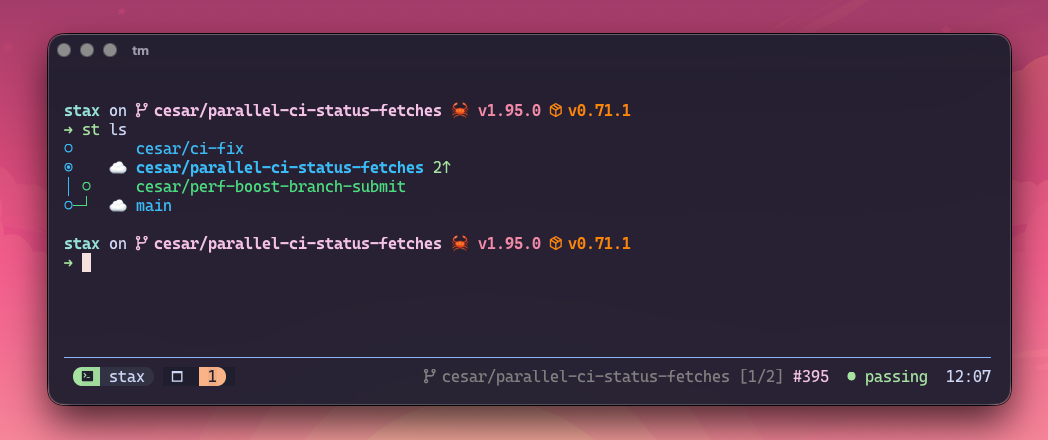
- Live status bar — branch, stack position, PR state, CI state; auto-refreshes in the background
- Keybindings —
prefix + Spopup,prefix + ]/[up/down,prefix + M-ssync - Window auto-rename — tmux window title follows the current branch
Install via TPM:
set -g @plugin 'cesarferreira/stax.tmux'
See the stax.tmux README for full setup and configuration options.
AI and editor integration guides:
Shared skill/instruction file used across agents: skills.md. Print the version bundled with your install: st --skill.
st changelog can generate notes between refs, and st changelog find [query]
or st changelog --find [query] fuzzy-finds commits in the selected range.
Use --path to scope either mode to a subdirectory.
Windows notes — shell integration, worktrees, tmux
stax runs on Windows (x86_64) with prebuilt binaries on Releases. Most commands work identically, with these limitations:
- Shell integration is not available.
st setupsupports bash/zsh/fish only. On Windows:st wt c/st wt gocreate and navigate worktrees but cannot auto-cdthe parent shell.st wt promoteperforms the handoff but likewise requires the printedcdcommand.- The
swquick alias is not available. st wt rm(bare) cannot relocate the shell. Specify:st wt rm <name>.
- Worktree commands still work.
st wt c/go/ls/ll/promote/cleanup/rm/prune/restackall function — only the shell-levelcdis missing. - tmux integration requires WSL or a Unix-like environment. The stax.tmux plugin is Unix-only.
Everything else — stacked branches, PRs, restack, sync, undo/redo, TUI, AI generation — works on Windows without limitation.
Contributing
Before opening a PR, run:
make test
On macOS this uses Docker when available. make test-native is the guarded
fallback: it checks the file-descriptor limit, sanitizes the environment, and
runs nextest with the optimized test profile. Native macOS timings can still
vary substantially with endpoint-security tooling, so Docker remains the
recommended full-suite path.
To cut a release, run:
make release                  # default minor bump
make release LEVEL=patch      # patch bump
make release LEVEL=major      # major bump
Release automation regenerates CHANGELOG.md with git-cliff inside cargo release's pre-release hook, grouping the commits since the latest v* tag under the new version (config in cliff.toml). See docs/workflows/releasing.md.
Project docs and architecture: docs/index.md. Contributor guidelines: AGENTS.md.
License
MIT © Cesar Ferreira