
carloshpdoc/Harbofly
carloshpdoc/Harbofly has 27 GitHub stars and 1 forks. Star changes are not measured yet. Last checked 2026-11-18 05:28 UTC. Last push 2026-11-14.
What you can do
- Per-project DerivedData: each Xcode project's build folder shows up on its own, resolved to the workspace that owns it.
- App uninstaller with last-used dates: lists installed apps with their full footprint (bundle + every leftover it scatters), and when each app was last opened — so the ones you haven't touched in months float up. Sort by size, last used, vendor or category, search by name, and uninstall (to the Trash, restorable).
- Startup items manager: see what launches on its own at login and in the background (Docker, updaters, agents…) and disable the excess — reversible (the agent is moved aside, not deleted; re-enable anytime). System/root daemons are shown read-only.
- Age on every item: each cache/artifact shows how long since it was last touched, so you know at a glance what's abandoned.
Measured star growth
- in 24h
- Update delayed
- in 7 days
- Collecting history
- in 15 days
- Collecting history
- in 1 month
- Collecting history
Net star changes over overlapping periods, not daily totals. Missing measurements are left blank. Stars measure attention, not software quality.
About
Menu bar app that finds and frees the disk space dev build artifacts and caches hog on macOS. Free, open source, notarized, zero telemetry.
Developer ToolsREADME.md
OriginalHarbofly

🇧🇷 Português · 🇺🇸 English
The disk cleaner built for developers. Recover 20-100 GB from node_modules, Docker, Gradle, Xcode and build caches, safely. → harbofly.app
A macOS menu-bar app that finds on its own what's eating your disk and lets you clean it in one click, with zero path configuration.
It was born from a real pain: an iOS/Android dev Mac piles up tens of GB of build artifacts and caches (build/, .build/, node_modules/, DerivedData, SPM/Homebrew/Yarn/pip caches…) that nobody remembers to clean. Harbofly scans those places automatically, shows how much you can recover, and groups everything by risk level, and, by default, sends it all to the Trash (so you can restore it).
Free · Open source · Apple-notarized · Privacy-first (opt-in, anonymous analytics).
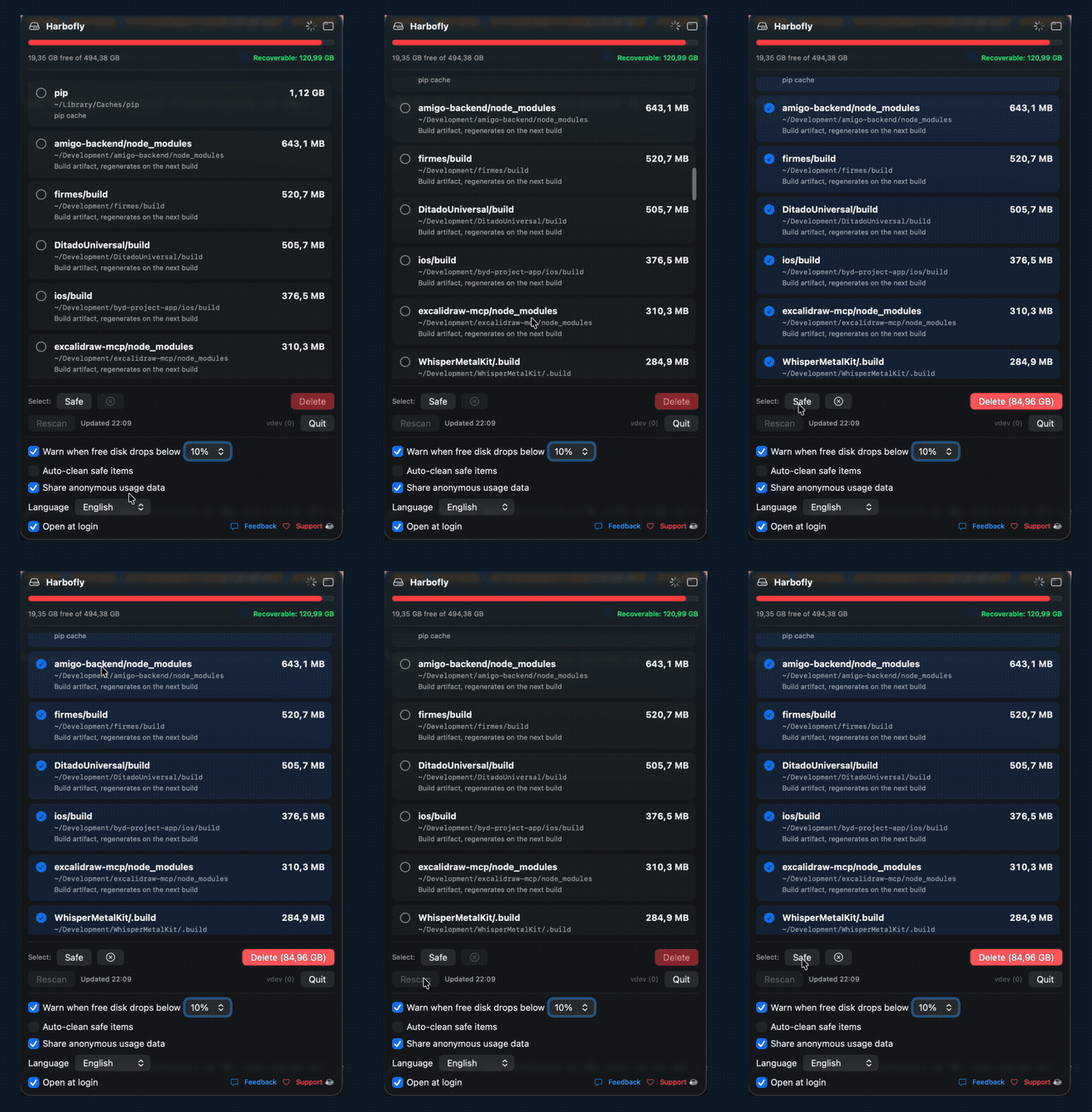
▶ Full demo at harbofly.app
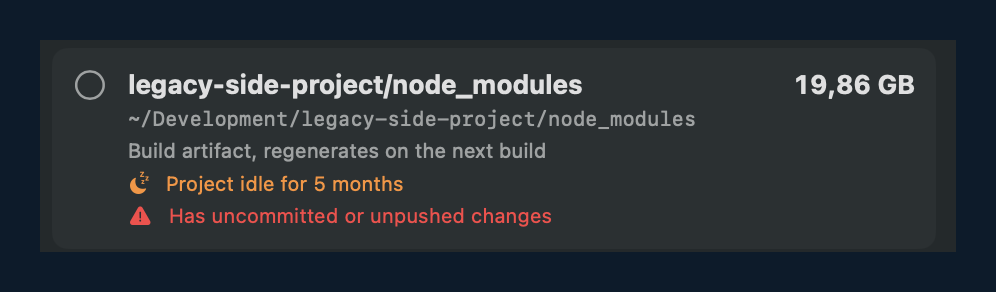
It knows which projects you abandoned — and warns you if they still hold unpushed work.
Featured
Listed on Awesome Mac, the curated directory of standout macOS apps, and shared by its maintainer @jaywcjlove. It's described there as "a menu bar app that auto-discovers and frees the disk space dev build artifacts and caches hog."
Install
brew install --cask carloshpdoc/tap/harbofly
Or download the notarized .dmg at harbofly.app.
CLI
The app binary doubles as a CLI — the Homebrew install exposes it as harbofly:
harbofly scan                # list caches/artifacts with size and risk tier
harbofly scan --json         # machine-readable output
harbofly clean --dry-run     # preview what a safe clean would move to the Trash
harbofly clean               # move every 🟢 safe item to the Trash
harbofly clean --stale-only  # only artifacts from projects idle for 90+ days

harbofly volumes             # every disk plugged in, with size, free space and flags
harbofly index /Volumes/T7   # what's on it: coverage, space, by folder/extension/size
harbofly compare /Volumes/T7 # what already exists on another disk, what repeats
                             #   inside it, what only exists there
harbofly compare /Volumes/T7 --subtrees   # folders duplicated in full
harbofly compare /Volumes/T7 --apply      # remove only what was proven to exist elsewhere
The CLI only ever touches the 🟢 safe tier and always goes through the Trash.
compare refuses read-only, network and Time Machine volumes, and tells you when
a disk has no Trash (deleting there cannot be undone).
Installed from the DMG? Run /Applications/Harbofly.app/Contents/MacOS/Harbofly scan.
Use it with your AI agent
Harbofly ships an agent skill so Claude Code, Codex, or any AGENTS-aware tool
can scan and safely clean your disk for you — handy for a nightly cleanup task.
See skills/harbofly-cleanup/: it wraps the CLI
above, with SKILL.md (Claude Code), AGENTS.md (Codex), and a README covering
install per agent.
Features
- Auto-discovery: scans
~/Developmentfor build artifacts across 20+ stacks —node_modules,.build,target(Rust/Maven/SBT),.gradle,.dart_tool,vendor(Go/PHP),bin/obj(.NET),_build(Elixir),.terraform,.godot,zig-outand more (generic names are guarded by the ecosystem's marker file, so your own folders are never touched), plus 25+ known cache locations — package managers (npm, pnpm, Bun, Gradle, Maven, Cargo, Go, Flutter, pip, uv, CocoaPods, Homebrew…), editors (VS Code, Cursor, JetBrains) and AI tools (Ollama, Hugging Face, LM Studio model weights). Zero path config. - Every disk you plug in: a resizable Disks window lists each mounted volume — external drive, USB stick, card — with its own free space, and reads it to show where the bulk is, by folder, by extension and by size. Then it compares one disk against the others and splits the result in three: what already exists on another disk (proven byte for byte, so freeing it here loses nothing), what repeats inside that same disk, and what only exists there — the part a migration has to carry, not delete. Folders duplicated in full collapse into a single line, because on a backup disk the duplicate is the tree, not the file. Every count closes: files read + skipped + failed = files visited, with the reason for each, so "nothing found" can never be a silent bug.
- Per-project DerivedData: each Xcode project's build folder shows up on its own, resolved to the workspace that owns it.
- Stale project detection: projects with no activity for 90+ days get a badge — and a red warning if they hold uncommitted or unpushed work (read from your local git, fully offline).
- Auto-clean (opt-in, free): let Harbofly do the chore itself — at the end of the day, at the start of the day, when Xcode quits, weekly, or when disk runs low. You pick the scope (tool caches → idle projects → everything 🟢) and the minimum. Only 🟢 safe items, always through the Trash, with a notification and history. After a few manual cleanups it offers to take over in one tap. The automation other cleaners lock behind a paid Pro plan — here it's free.
- Simulators, one or many: delete unavailable simulators in one click, or expand CoreSimulator into a per-simulator list — each with its size — and remove only the ones you select (
simctl delete, two-step confirm). It also lists the simulator runtimes (the iOS images, which live outside that folder and can hold more than the simulators themselves) with size, how many simulators depend on each and when it was last used, so a never-used runtime is easy to spot and delete. It also clears XCTestDevices, the throwaway sim clones that parallel-test / xcodebuildmcp runs pile up. - App uninstaller with last-used dates: lists installed apps with their full footprint (bundle + every leftover it scatters), and when each app was last opened — so the ones you haven't touched in months float up. Sort by size, last used, vendor or category, search by name, and uninstall (to the Trash, restorable).
- Startup items manager: see what launches on its own at login and in the background (Docker, updaters, agents…) and disable the excess — reversible (the agent is moved aside, not deleted; re-enable anytime). System/root daemons are shown read-only.
- Age on every item: each cache/artifact shows how long since it was last touched, so you know at a glance what's abandoned.
- Git worktrees, including the ones AI agents leave behind: every worktree linked to a repo under
~/Development(Claude Code's.claude/worktreesincluded), each a full checkout that quietly takes GBs. The clean ones can be removed withgit worktree remove(never forced; the branch stays in the repo, and you get the commands to bring them back); locked ones and ones with pending files are shown with the reason. Optional weekly reminder for idle worktrees, and opt-in automatic removal inside auto-clean. - Search and sort in the cleaner and apps lists; the cleaner's sections can be collapsed and reordered by dragging.
- macOS purgeable space, explained: shows how much space Time Machine snapshots and system caches hold — the classic "I deleted 20 GB and Finder shows nothing".
- 7 languages: Português, English, Español, Français, Deutsch, 中文, 한국어 — switching instantly.
- In-app feedback: a bug or idea goes straight to the maintainer, no account needed.
- Disk bar at the top, colored by pressure: green → orange (<20%) → red (<10%).
- "Recoverable: X GB": the total you can free right now.
- Risk tiers:
- 🟢 Safe: regenerates itself on the next build.
- 🟡 Caution: rebuilds, but it costs (recompiling from scratch, re-downloading device symbols).
- 🔵 Informative: large folders it shows just so you know where the space is, but never deletes (CoreSimulator, Application Support, Downloads).
- Trash-first by default: restorable. Permanent delete exists, but it's opt-in and you confirm first.
- Each item shows its name, full path, and what it is.
- "Select safe" checks the whole safe tier at once.
- Low-space notification: warns you when free space drops below the threshold you pick (5/10/15/20%).
- Automatic rescan every 30 min + a manual button.
- Auto-update via Sparkle: notifies you when a new version ships (can be turned off).
Safety
Since it's a tool that deletes files, it's built to be trustworthy:
- Default = Trash (restorable); nothing risky is pre-selected; confirmation before any deletion.
- Open source end to end: you can audit exactly what leaves your machine. Analytics is opt-in and off by default; when on, it sends only anonymous, aggregate usage stats (events, GB recovered, cache categories, plus non-identifying device info: Mac model, macOS version, language, country and theme) — never your email, IP, name, paths, or project names. Toggle it anytime in preferences.
- Signed with a Developer ID + notarized by Apple; build provenance (SLSA) on every release, verifiable with
gh attestation verify Harbofly.dmg --repo carloshpdoc/Harbofly.
What it scans
~/Development (auto-discovery, up to depth 3):
build, .build, node_modules, Pods, DerivedData, all classified 🟢 Safe.
~/Library (known targets):
| Path | Tier | What it is |
|---|---|---|
Developer/Xcode/DerivedData |
🟢 | Xcode build intermediates |
Developer/XcodeBuildMCP/workspaces |
🟢 | XcodeBuildMCP workspaces |
Caches/org.swift.swiftpm |
🟢 | Swift Package Manager cache |
Caches/Homebrew |
🟢 | Homebrew downloads |
Caches/Yarn |
🟢 | Yarn cache |
Caches/pip |
🟢 | pip cache |
Developer/Xcode/iOS DeviceSupport |
🟡 | Device symbols (recreated when you plug in an iPhone) |
Caches/ms-playwright |
🟡 | Browsers downloaded by Playwright |
Caches/Google |
🟡 | Google/Chrome cache |
Informative (read-only, never deleted): Library/Developer/CoreSimulator, Library/Application Support, Downloads.
Items under 10 MB are ignored to reduce noise. The targets live in scanDevelopment(), scanLibrary() and scanInfo() in Sources/Harbofly/App.swift, easy to tweak.
Requirements
- macOS 14+ (Sonoma)
- Apple Silicon
- Swift 6 (Xcode toolchain)
Build & Run
# Builds signed Harbofly.app and prints where it landed
./make-app.sh

# Open it (the icon shows up in the menu bar)
open Harbofly.app
To distribute outside the Mac App Store (sign with Developer ID, notarize, staple and build the styled .dmg):
# needs SIGN_ID, ASC_KEY_ID and ASC_ISSUER_ID in the env + the .p8 in ~/.appstoreconnect/private_keys/
./make-dmg.sh   # produces a ready-to-distribute Harbofly.dmg
Official releases go out via GitHub Actions when you push a vX.Y.Z tag: build + notarization + build provenance + .dmg + Sparkle appcast + automatic cask bump in the tap.
During development:
xcrun swift build            # debug
xcrun swift run              # run directly (no .app; Sparkle stays inert)
xcrun swift build -c release # release
Versioning
- User-facing SemVer in the
VERSIONfile (single source of truth). - Monotonic build number = commit count (
git rev-list --count HEAD).
Structure
Harbofly/
├── Package.swift                 # SwiftPM (macOS 14+) + Sparkle dependency
├── Sources/Harbofly/App.swift    # the whole app: scanner + UI (display name in AppInfo.name)
├── Assets/                       # icon art (HarboflyIcon.png) + Harbofly.icns
├── VERSION                       # user-facing SemVer
├── appcast.xml                   # Sparkle update feed (generated on release)
├── make-app.sh                   # builds Harbofly.app (embeds + signs Sparkle)
├── make-dmg.sh                   # signs (Developer ID) + notarizes + builds the .dmg
├── make-icon.sh                  # generates the .icns from the art
├── .github/workflows/release.yml # release CI (tag v* → build/notarize/appcast/cask)
├── SETUP-SPARKLE.md              # how to configure the auto-update keys
└── README.md
Auto-update (Sparkle)
The app checks a signed (EdDSA) appcast and offers the update. It stays inert until the keys are configured, see SETUP-SPARKLE.md. Homebrew users update with brew upgrade.