
camtrik/agent-trail
camtrik/agent-trail has 45 GitHub stars and 7 forks. GitHot measured +1 stars in 24 hours. Last checked 2026-11-15 00:12 UTC. Last push 2026-11-11.
Measured star growth
- in 24h
- +1
- in 7 days
- Collecting history
- in 15 days
- Collecting history
- in 1 month
- Collecting history
Net star changes over overlapping periods, not daily totals. Missing measurements are left blank. Stars measure attention, not software quality.
About
Local dashboard for Claude Code, Codex, OpenCode, OpenClaw and Qoder session history, token usage, cost tracking, tool calls and subagent replay.
AIREADME.md
OriginalAgent Trail
A local AI coding agent observability dashboard for Claude Code, Codex, OpenCode, OpenClaw, Qoder, and Command Code.
Track token usage, estimated cost, tool calls, subagent trees, and replay full coding-agent sessions from local JSONL / SQLite files.
🏠 camtrik.github.io/agent-trail



What it does
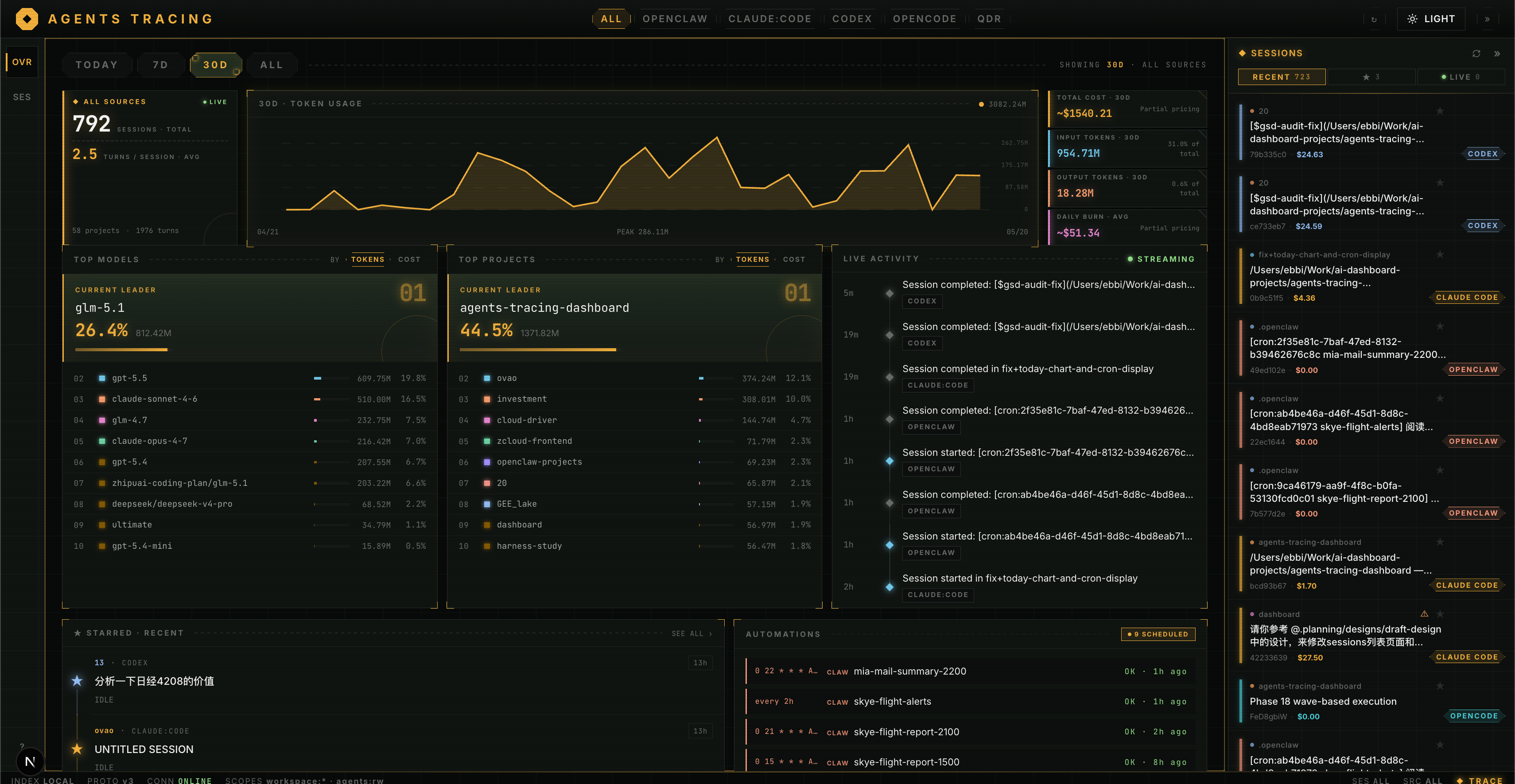
Usage overview across all your agents
A unified dashboard aggregates token consumption and estimated cost across Claude Code, OpenClaw, Codex, OpenCode, and Qoder — broken down by day, session, project, and model. At a glance you can see:
- Total tokens and estimated USD cost for any time window (today / week / all)
- Per-project and per-model breakdowns with trends over time
- Which sessions consumed the most tokens and where your budget is going
- Live activity feed as new sessions are written to disk
Everything is computed locally from the JSONL files your agents already produce.
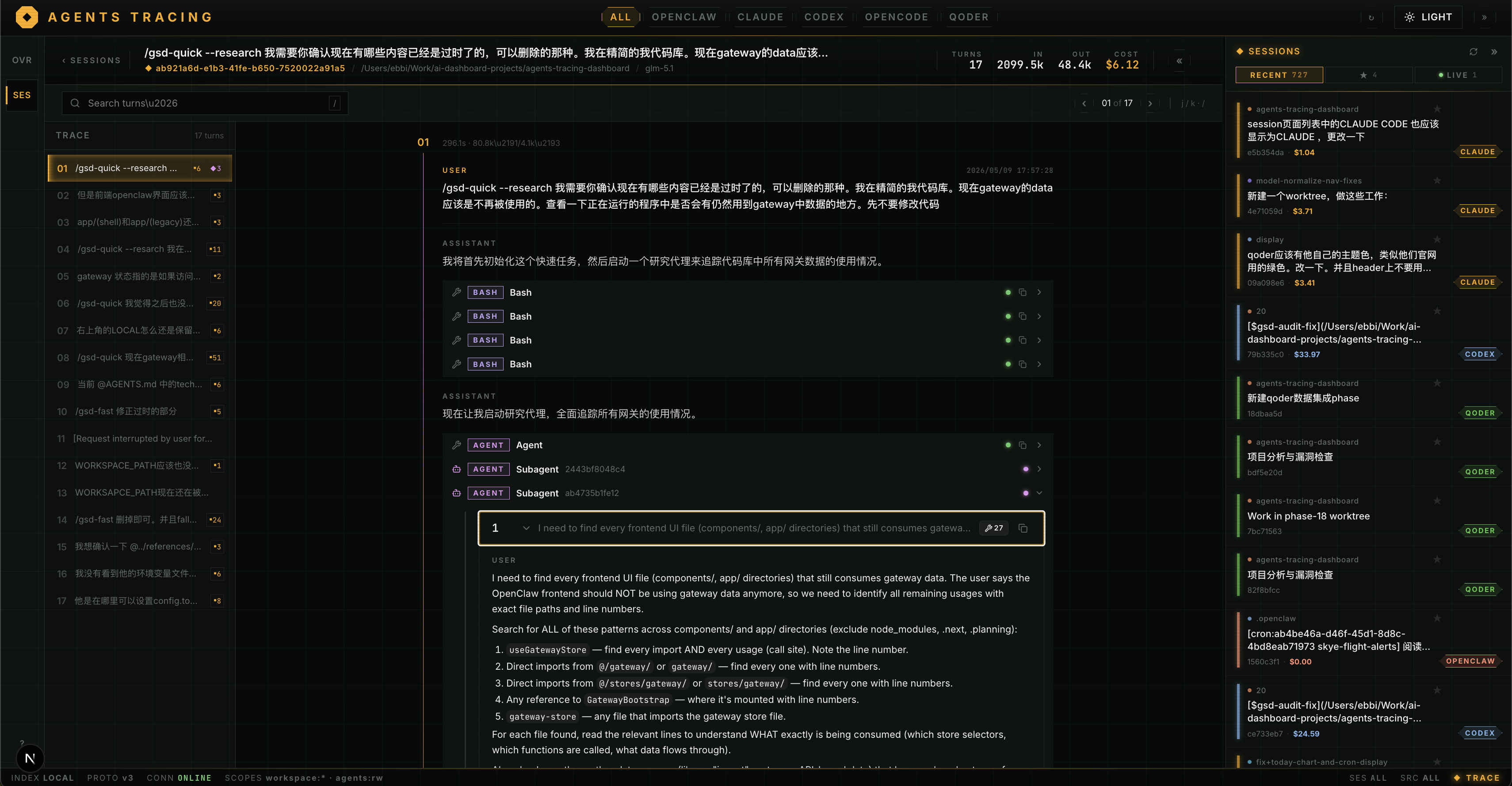
Full session replay with tool and subagent detail
Open any session and step through every turn exactly as it happened. The replay view goes beyond raw text — it surfaces the internal structure of each assistant turn:
- Tool calls: expand any
Bash,Read,Edit,Write, or custom tool invocation to see the exact input arguments and the full output the model received - Subagent spawns: when Claude Code or OpenClaw launches a sub-agent, the dashboard renders the nested agent tree so you can trace which subtask was delegated, what instructions it received, and what it returned
- Injected context and system events: surface hidden context blocks, permission prompts, and synthetic messages that normally live between turns but shape how the model behaves
- Token accounting per turn: see input, output, cache-read, cache-write, and reasoning token counts at the turn level, not just the session level
Let your coding agent search past sessions
Agent Trail ships a bundled agent skill, local-session-search, that teaches an AI coding agent (Claude Code, Codex, etc.) how to find your historical sessions through the local ingest/BFF API — without you knowing the session ID up front.
- Ask your agent something like "find the session where I debugged the WebSocket reconnection bug."
- The skill drives a global message-body search (
GET /api/v1/sessions/search) to surface candidate sessions, then drills down into session detail / turns / messages to answer. - It returns enough metadata —
source,sessionId, title, project,updatedAt, and a matching snippet — for the agent to locate and open the right session.
The skill lives at .agents/skills/local-session-search/SKILL.md.
Install
Option 1 — npm (recommended, any Node.js 22+)
npm install -g @camtrik/agent-trail
agent-trail
Update an existing global install:
npm update -g @camtrik/agent-trail
# Or force the latest published version:
npm install -g @camtrik/agent-trail@latest
Works across Node 22, 24, and newer — npm install resolves native modules (better-sqlite3) for your local ABI. First install takes ~30s while deps are fetched.
Runtime logs are quiet by default. For verbose diagnostics:
AGENT_TRAIL_LOG_LEVEL=debug agent-trail
Option 2 — Docker local build
git clone https://github.com/camtrik/agent-trail.git
cd agent-trail
docker compose up --build
The default Compose file builds the app locally with Node 24 inside Docker, so your host machine does not need Node.js installed.
Open http://localhost:3030.
Option 3 — Docker published image
docker compose -f docker-compose.image.yml up -d
Or run the published image directly:
docker run --rm -p 127.0.0.1:3030:3030 \
  -v "$HOME/.claude/projects:/agents/claude:ro" \
  -e CLAUDE_PROJECTS_DIR=/agents/claude \
  ghcr.io/camtrik/agent-trail:latest
Open http://localhost:3030. Mount additional agent directories with -v and the matching env var (OPENCLAW_DIR, CODEX_SESSIONS_DIR, OPENCODE_DB_PATH).
Option 4 — from source
pnpm install
pnpm dev       # starts Next.js (3029) + ingest service (8078)
See docs/GETTING-STARTED.md for full setup and environment variable reference.
Uninstall
npm global install
npm uninstall -g @camtrik/agent-trail
Optional cleanup for the local index/config created by the packaged app:
rm -rf ~/.agent-trail
This does not delete your original Claude Code, OpenClaw, Codex, OpenCode, or Qoder session files.
Docker Compose
Stop and remove the containers:
docker compose down
# or, if you used the published-image compose file:
docker compose -f docker-compose.image.yml down
Optional cleanup for the Docker volume that stores the dashboard's SQLite index:
docker compose down -v
# or:
docker compose -f docker-compose.image.yml down -v
Optional image cleanup:
docker image rm agent-trail:local
docker image rm ghcr.io/camtrik/agent-trail:latest
Supported AI coding agents
| Agent | Source files | Notes |
|---|---|---|
| Claude Code | ~/.claude/projects/**/*.jsonl |
Full tool-call and subagent replay |
| OpenClaw | ~/.openclaw/agents/*/agent/openclaw-agent.sqlite + archive JSONL |
Active SQLite and legacy archives |
| Codex | ~/.codex/sessions/**/*.jsonl |
Parent-child session tree |
| OpenCode | ~/.local/share/opencode/opencode.db |
Legacy and v2 SQLite schemas |
| Qoder | Legacy IDE local cache DB | Current IDE/Desktop/CLI compatibility still needs validation |
| Command Code | ~/.commandcode/projects/**/*.jsonl |
V3 history and recorded cost; child traces may be unavailable |
Use cases
Agent Trail is useful if you are:
- Inspecting Claude Code tool calls, subagent trees, and injected context
- Replaying Codex, OpenCode, OpenClaw, or Qoder coding sessions turn by turn
- Tracking LLM token usage and estimated cost across multiple agents locally
- Analyzing which sessions or projects consumed the most tokens
- Debugging expensive or failed AI coding agent runs
Compatibility and license
Source development uses Node.js 24, pnpm 11.1.3, frontend port 3029, and ingest port 8078. npm/Docker use frontend port 3030. Configure INGEST_PORT in the parent shell so both services inherit it.
See the compatibility matrix for verified formats, current storage limits, and reindexing. This maintenance batch targets v0.2.0; upgrade existing v0.1.7 installations to receive these changes.
Project-authored source, documentation and brand assets are covered by the MIT License. Third-party dependencies retain their own licenses.
Privacy
This is a local-only tool. No data leaves your machine.
- JSONL files are parsed and indexed into a local SQLite database (
data/ingest.db). - The dashboard is read-only — it replays recorded tool calls, never re-executes them.