
burakgon/ai-usage-menubar
burakgon/ai-usage-menubar has 48 GitHub stars and 18 forks. GitHot measured +1 stars in 24 hours. Last checked 2026-11-09 19:11 UTC. Last push 2026-11-07.
Every AI coding limit in your Mac's menu bar: Claude Code, Codex, Cursor, Antigravity, GitHub Copilot, Devin, Grok, Kiro, and Z.ai. Native, private, and free.
Measured star growth
- in 24h
- +1
- in 7 days
- Update delayed
- in 15 days
- Update delayed
- in 1 month
- Update delayed
Net star changes over overlapping periods, not daily totals. Missing measurements are left blank. Stars measure attention, not software quality.
README.md
Original
AI Usage
Every AI coding limit, right in your menu bar.
See how much of Claude Code, Codex, Cursor, Antigravity, GitHub Copilot,
Devin, Grok, Kiro, and Z.ai you have left, and when it resets.



Free and open source. Notarized by Apple.
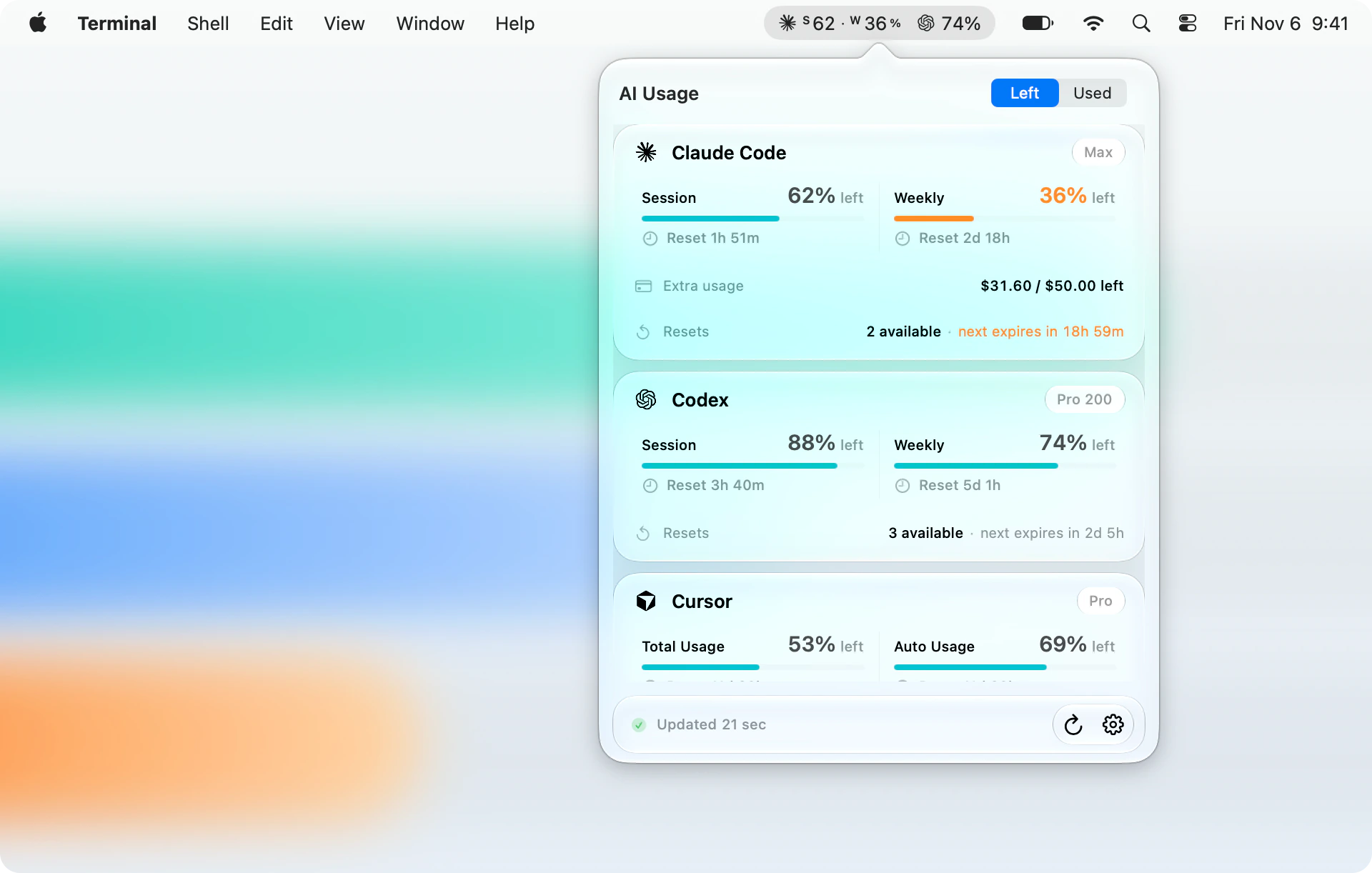
Coding agents stop mid-task when a limit runs out. AI Usage keeps the numbers one glance away: what's left of every session and weekly limit, when each one resets, and how many banked resets you can still spend. It reuses the logins your tools already have, so there is nothing to set up.
- Nothing to set up. No account, API key, or password. If you're signed in to a tool, AI Usage can read its limits.
- Private. It talks only to each provider's own usage endpoint. No analytics, no servers of ours, no usage history.
- Light. Measured at 0.0% CPU between refreshes. The panel is released as soon as it closes.
- Native. SwiftUI and Liquid Glass in light and dark, with signed automatic updates.
Supported tools
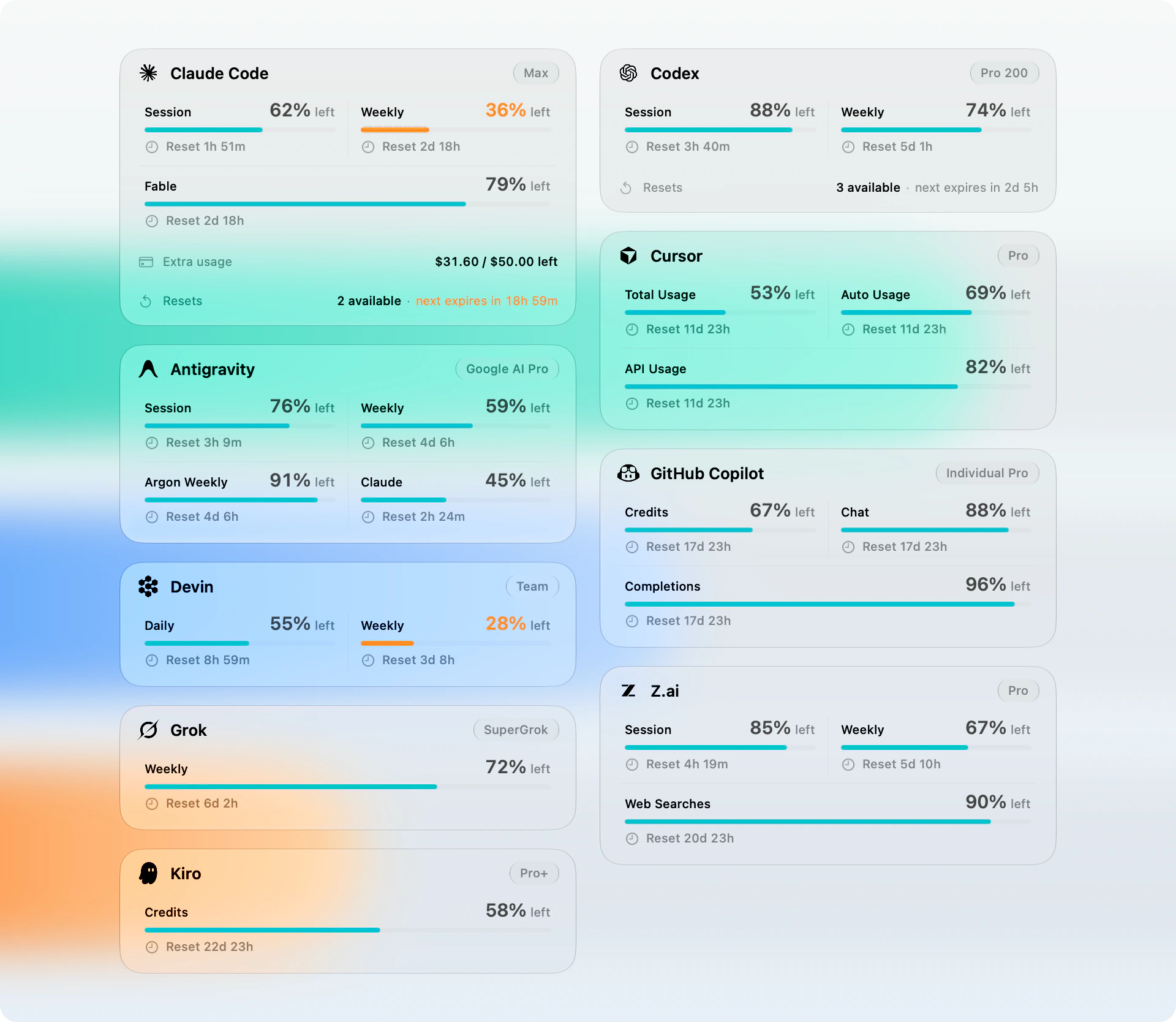
| Tool | What you see | Where the login comes from |
|---|---|---|
| Claude Code | Session, weekly, Sonnet, and Fable limits, extra usage in your billing currency, banked resets | Claude Code's saved login |
| Codex | Session, weekly, and Spark limits, credits, banked resets | Codex's ChatGPT login |
| Cursor | Total, Auto, and API usage, on-demand spend | Cursor's login |
| Antigravity | Gemini session and weekly limits, Argon, Claude pool | Antigravity's Google login, or the running app or agy |
| GitHub Copilot | Credits, chat, and completions | Copilot's editor sign-in or the GitHub CLI |
| Devin | Daily and weekly quota | Devin's login |
| Grok | Weekly quota | Grok CLI's login |
| Kiro | Credits, free-trial credits, and overage spend | Kiro's or kiro-cli's sign-in, or KIRO_API_KEY |
| Z.ai | GLM Coding Plan session, weekly, and web search limits | The key Claude Code or OpenCode uses, or ZAI_API_KEY |
Only tools installed on your Mac get a card. A tool that's signed out stays visible and tells you what to do.
Choose what the menu bar shows
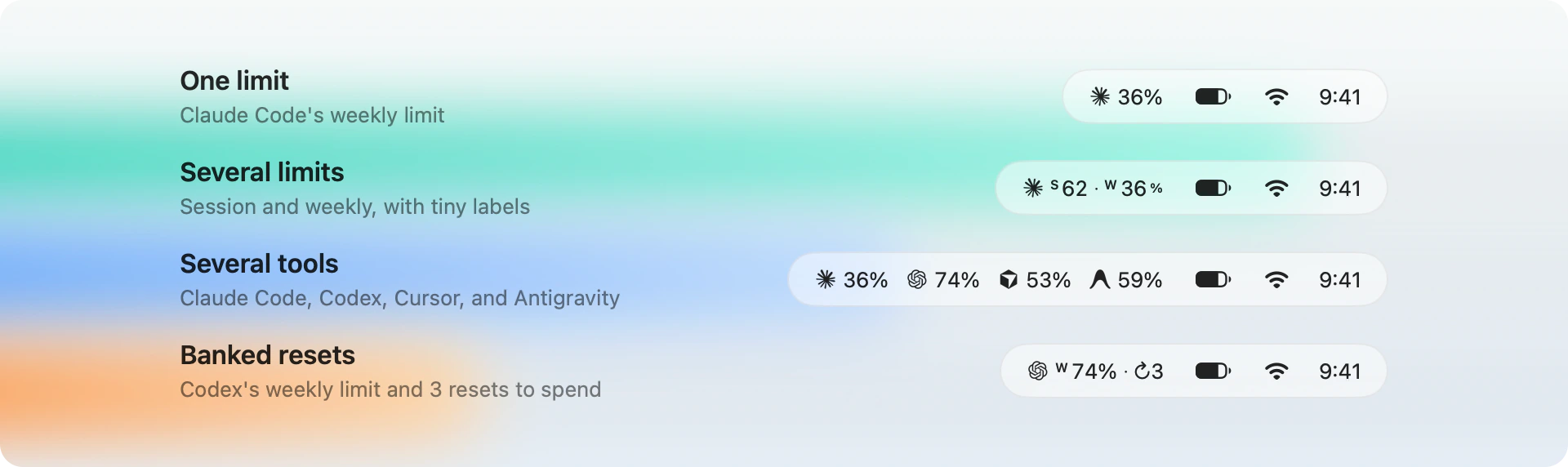
Show any tool and any limit it reports. A single limit shows just its number,
several get tiny labels, and ↻3 counts the resets you have banked. Switch
between what's left and what's used right in the panel.
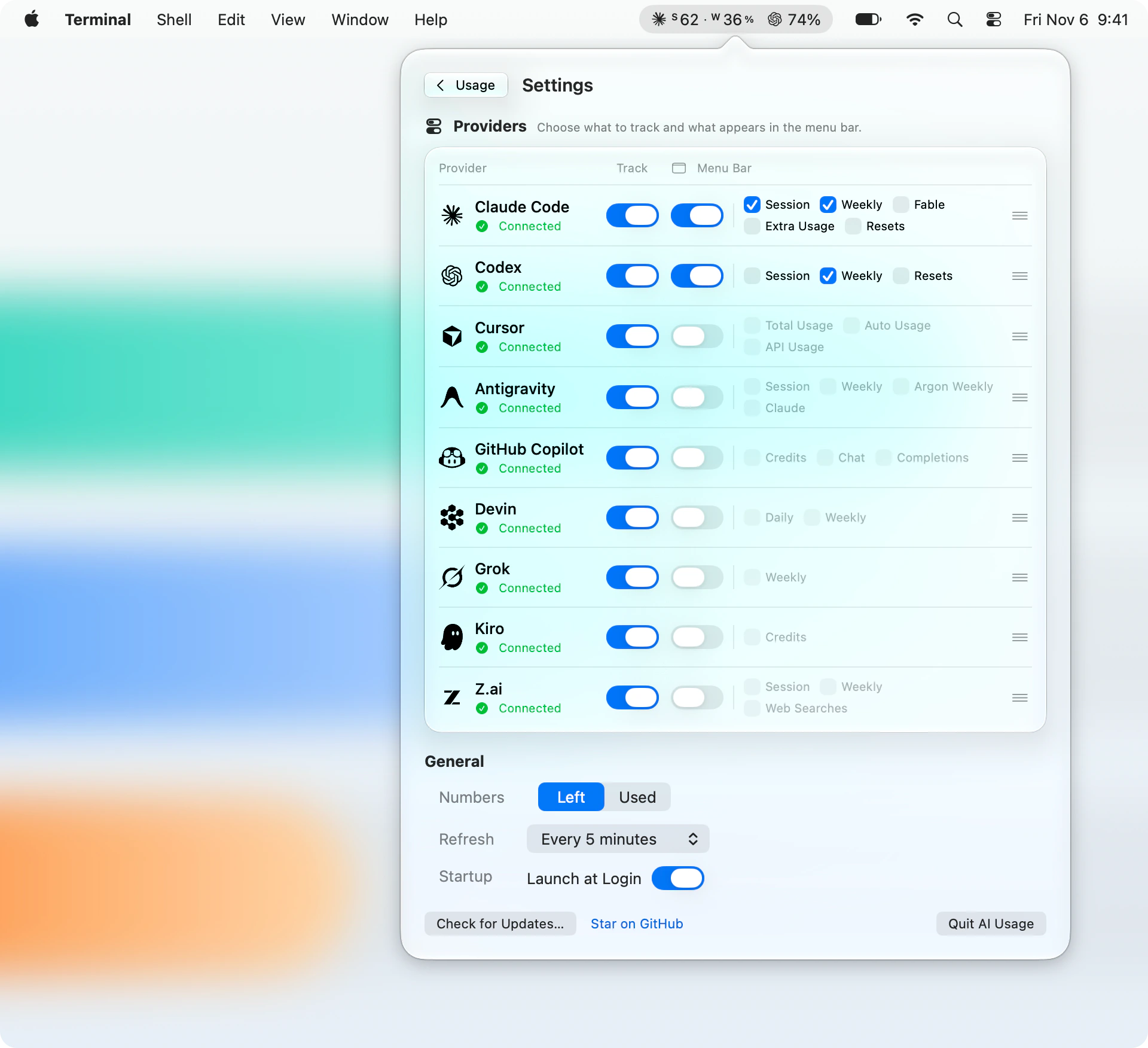
Track every tool you use and choose exactly what reaches the menu bar. Usage refreshes every 1, 5, 15, 30, or 60 minutes, and the refresh button works any time.
How the menu bar decides what to show
- Weekly is selected for Claude Code and Codex at first, and Left is the default number mode.
- When a selected limit is missing, such as Claude's session window on accounts that have none, the tool's default limit is shown instead.
- The panel lists when each banked reset expires and turns the next one orange in its final 24 hours.
- Percentages are shown exactly as the provider reports them. Only the bars are
clamped to
0...100, and a remaining percentage never goes below zero.
Privacy
- AI Usage reads the credentials your tools already saved on this Mac. It never asks for a key, a password, or an account.
- Requests go only to each provider's own usage endpoint. There is no AI Usage server, analytics, or telemetry.
- Tokens are never printed, logged, or sent anywhere else.
- It's read-only. Resets are shown but never redeemed, and nothing in your accounts changes.
- Usage lives in memory and isn't kept across launches. When a refresh fails, the last values stay visible and are marked stale.
The exact provider contracts are documented in docs/provider-contracts.md.
Install
- Download AI-Usage.dmg.
- Open it and drag AI Usage to Applications.
- Launch it. AI Usage lives in the menu bar, not the Dock.
AI Usage needs macOS 26 or later and runs natively on Apple silicon and Intel. Builds are signed with a Developer ID and notarized by Apple. Updates install from the panel and are verified with Sparkle's EdDSA signatures.
FAQ
Which plans work?
Whatever plan you're on. AI Usage shows the limits each provider reports for your account and names the plan when the provider does.
Codex shows no usage.
Sign in to Codex with ChatGPT. API-key-only authentication can't read ChatGPT subscription usage.
Why isn't CLAUDE_CODE_OAUTH_TOKEN used?
Setup tokens don't include the profile scope Claude's usage endpoint requires. Sign in to Claude Code normally and AI Usage picks up that login.
Antigravity shows no quota.
Google doesn't share the quota of some accounts. Open Antigravity or run agy,
and AI Usage reads the quota from it instead.
Can I redeem a reset from AI Usage?
No. Resets are shown read-only. Redeem them in the provider's own app.
Build from source
You need macOS 26 or later and Xcode 27 or later.
git clone https://github.com/burakgon/ai-usage-menubar.git
cd ai-usage-menubar
./scripts/install.sh
The script builds a Release version, installs it to
~/Applications/AI Usage.app, and opens it. To work on the app, open
AIUsage.xcodeproj and run the AIUsage scheme.
Run the tests with:
xcodebuild test \
  -project AIUsage.xcodeproj \
  -scheme AIUsage \
  -destination 'platform=macOS'
The app is SwiftUI and AppKit, with a small provider layer and an in-memory store. Its only dependency is Sparkle, for signed updates.
./scripts/render_readme_images.shrenders the README images from the real views with made-up data../scripts/generate_app_icon.swiftregenerates the icon previews.- docs/releasing.md covers packaging and the update feed.
Contributing
Bug reports, provider fixes, and pull requests are welcome. Please read CONTRIBUTING.md first, and report security issues privately as described in SECURITY.md.
Credits
Provider contracts and parts of the system-boundary implementation were adapted
from OpenUsage, using stable tag
v0.7.6, local language-server discovery from tag v0.7.16, and provider
updates through commit fdf7a234b76b6a71522880cc9ab5b38044471698. See
NOTICE for attribution. Provider names and marks belong to their
owners and don't imply endorsement.
License
AI Usage is available under the MIT License.
If AI Usage saves you a trip to the usage page, a star helps other developers find it.
Explore related projects
codecrafters-io/build-your-own-x
Master programming by recreating your favorite technologies from scratch.
561,580 starspublic-apis/public-apis
A collective list of free APIs
497,899 starsmorluto/rea
Reverse engineer anything with agents, from app behavior down to native binaries.
449,583 starsopenclaw/openclaw
The AI that really does things. Any OS. Any Platform. The lobster way. 🦞
394,300 stars