
bryanroscoe/shield_optimizer
bryanroscoe/shield_optimizer has 1,877 GitHub stars and 54 forks. GitHot measured +2 stars in 24 hours. Last checked 2026-11-06 04:04 UTC. Last push 2026-11-02.
Debloat and tune your Android TV from your computer. Disable bloat, switch launchers, sideload APKs, adjust HDMI-CEC and frame-rate matching, and check device health, all from a desktop app. Works on Nvidia Shield TV, Onn 4K Pro, Chromecast with Google TV, Google TV Streamer and other Android TV devices.
Measured star growth
- in 24h
- +2
- in 7 days
- Update delayed
- in 15 days
- Update delayed
- in 1 month
- Update delayed
Net star changes over overlapping periods, not daily totals. Missing measurements are left blank. Stars measure attention, not software quality.
README.md
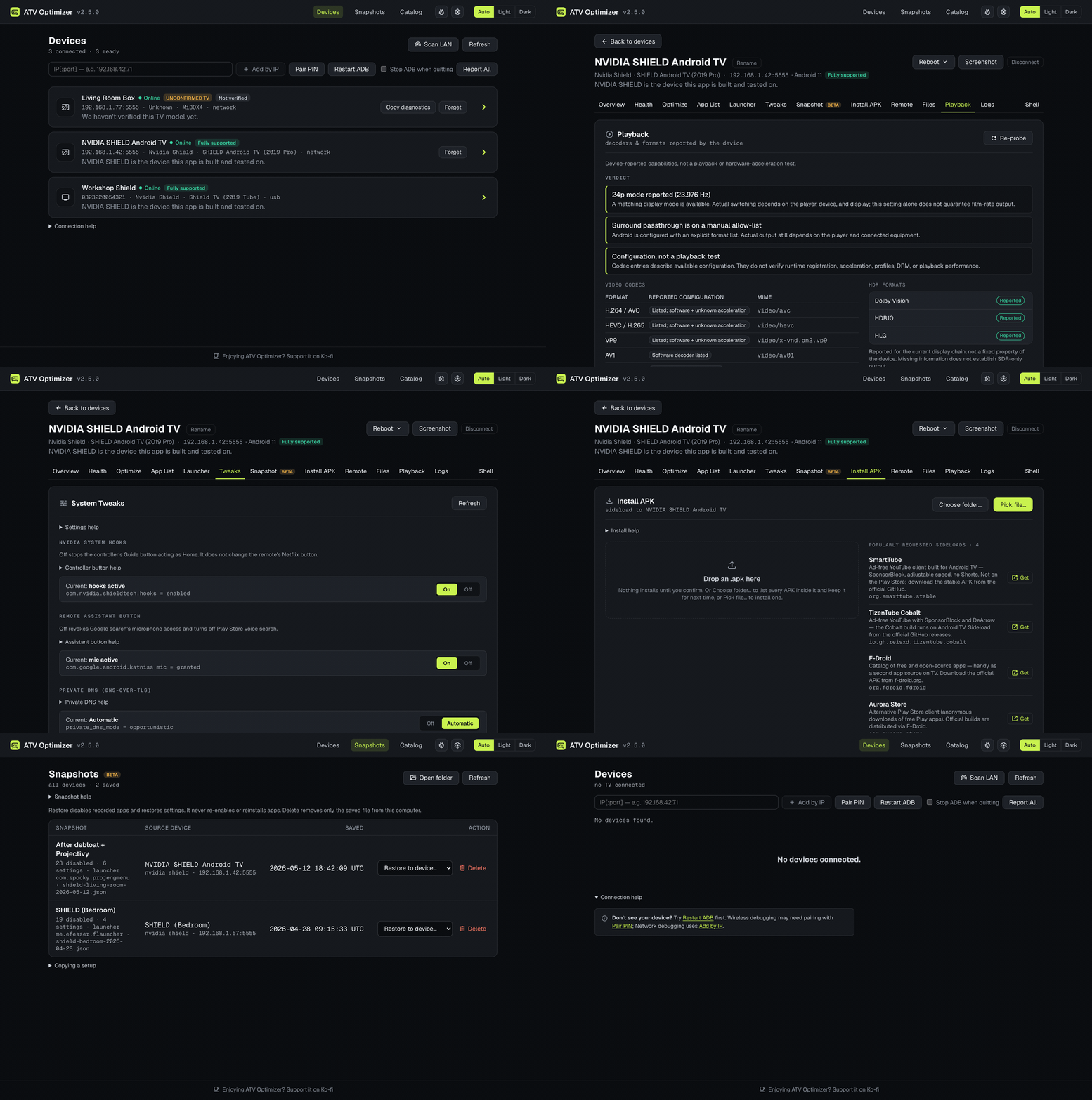
OriginalATV Optimizer
Debloat and tune your Android TV from your computer. Disable bloat, switch launchers, sideload APKs, adjust HDMI-CEC and frame-rate matching, and check device health, all from a desktop app. Works on Nvidia Shield TV, Onn 4K Pro, Chromecast with Google TV, Google TV Streamer and other Android TV devices.
Known ADB issue in 2.4.1: A SHIELD TV Pro on macOS has been reported missing from Scan LAN or going offline until connected with standalone ADB. Workaround and status.
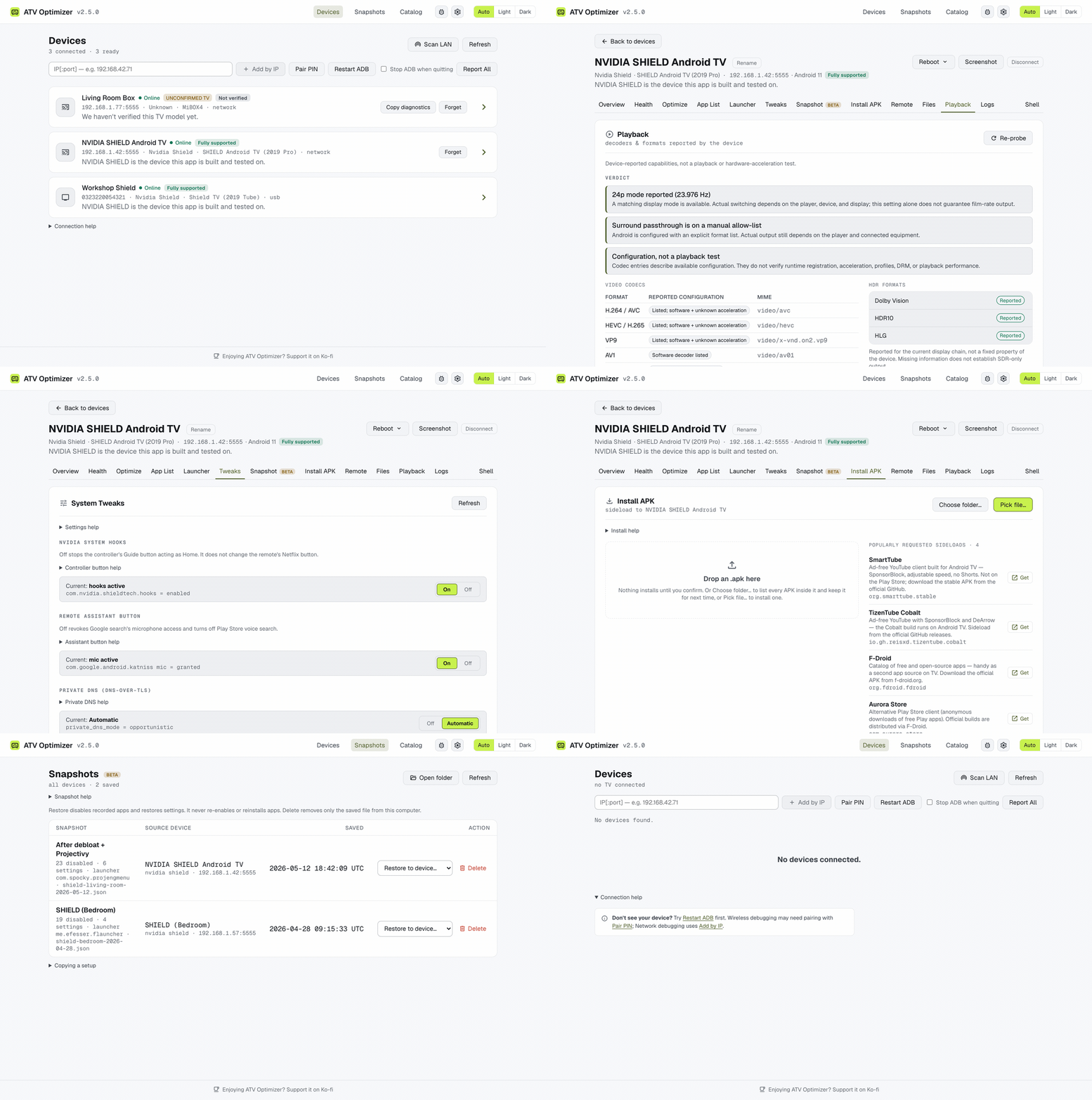
Light theme
It's a native app for macOS, Windows and Linux. It downloads its own adb on first launch, finds
TVs on your network, and updates itself. You don't need a terminal or any scripting.
📱 Coming soon: ATV Optimizer for Android. A phone and tablet version that runs the same cleanup over Wi-Fi, with no computer involved. It's in testing now.
Install
macOS: Homebrew (easiest)
brew tap bryanroscoe/shield-optimizer
brew install --cask atv-optimizer
Homebrew clears the macOS quarantine flag for you, so the app opens with a normal double-click.
Upgrade with brew upgrade --cask atv-optimizer, or let the app update itself.
Any platform: download an installer
Get an installer from the Releases page.
Choose the newest stable v2-* desktop release; v0.* releases contain the legacy PowerShell script:
| OS | File |
|---|---|
| Windows | .msi or _x64-setup.exe |
| macOS | _universal.dmg (Apple Silicon + Intel) |
| Linux | .AppImage, .deb, or .rpm |
First launch
The builds aren't code-signed yet, so your OS may warn you the first time you open the app. You only have to dismiss it once:
- macOS (
.dmgonly, Homebrew skips this): on macOS 15+ the dialog only offers Move to Trash / Done. Click Done, then either go to System Settings → Privacy & Security → Open Anyway, or runxattr -dr com.apple.quarantine "/Applications/ATV Optimizer.app". - Windows (SmartScreen): More info → Run anyway.
- Linux:
chmod +x ATV.Optimizer*.AppImagebefore running the AppImage.
On macOS 15+, also click Allow when macOS asks whether ATV Optimizer can find devices on your local network. Without it, the app can't reach any TV.
Before you start
Turn on ADB on the TV. You only do this once:
- Settings → Device Preferences → About → select Build 7 times to unlock Developer Options.
- Settings → Developer Options → turn on Network debugging, or Wireless debugging if that's what your TV offers. Many Google TV devices only have Wireless debugging.
The first time the app connects, the TV asks "Allow debugging?". Accept it.
Using it
- Launch the app. It scans your network and lists the Android TV devices it finds.
- Accept the debugging prompt on the TV if one appears.
- Click your device. Each tab is a feature:
| Tab | What it does |
|---|---|
| Overview | Model, Android version, build and hardware ID. |
| Health | Temperature, CPU and network sampling, RAM and storage, display mode and HDR, audio, and the apps using the most memory, each with a safety verdict. |
| Playback | What the TV is actually outputting: resolution, refresh rate, HDR and audio passthrough. |
| Launcher | Install a supported launcher, make it the default, and, where the firmware allows it, disable the stock launcher after you confirm. |
| App List | Disable, enable or uninstall any app, or install one from the Play Store. |
| Optimize | The debloat wizard. Review each app's recommended action and RAM use, untick anything you want to keep, then Run. Undo it later with Restore. |
| Tweaks | HDMI-CEC, match-content frame rate, long-press timeout, animation speed, display scaling, audio passthrough, Private DNS. |
| Remote | An on-screen D-pad and live typing over a low-latency channel. Paste a long URL or password instead of typing it on the TV. |
| Files | Browse /sdcard, copy files to and from your computer, and find an app's exported backups. |
| Install APK | Sideload an .apk from a folder. |
| Snapshot | Save a device's state and re-apply it later, to the same device (rollback) or a different one (clone). |
| Shell | Run an ADB shell command directly, for anything the UI doesn't cover. |
Can't find your TV?
Use Scan LAN, Add by IP or Pair PIN.
On a Mac, if nothing is found even by IP while adb connect from Terminal still works, click
Restart ADB first. After an update, macOS cuts off the ADB server the previous version left
running. The app now restarts it by itself when it notices, and a manual restart does the same. If
that doesn't help, macOS may be blocking the app: open System Settings → Privacy & Security →
Local Network and turn ATV Optimizer on. If it already looks on, turn it off and on again. If
it's listed more than once, turn every entry on. Then click Restart ADB again.
Scan LAN looks two ways. It sweeps your subnet on ADB's standard port (5555), which older devices like the Shield use. It also checks the devices ADB has discovered over mDNS. That second check matters on Android 11+, where Wireless debugging listens on a random port that changes every time you toggle it, so a port sweep can't find it. If a TV is only advertising its pairing service, the scan tells you and fills in the pairing address for you.
Pair PIN is for Android 11+ Wireless debugging. On the TV, open Pair device with pairing code and enter the IP:port and code it shows. Pairing makes the TV trust your computer but doesn't connect to it. Go back to the main Wireless debugging screen and enter the IP:port shown there in Add by IP. It's a different port from the pairing one. If ADB connects the paired TV on its own, it shows up when the device list refreshes.
Safety
- Disable, don't uninstall. Disabled apps can usually be re-enabled, but firmware permissions may prevent it. Uninstalling can remove data that Restore can't bring back.
- A curated do-not-disable list blocks disables that would break the device, in every curated action: Optimize, App List, the Launcher wizard and Snapshot apply.
- Recovery asks the TV to re-enable every disabled package and reports any it refused.
- The Shell tab is the exception: it runs whatever you type. Its warnings are there for a reason. A bad command can erase data or leave the device unusable.
Use at your own risk. Changing system apps always carries some risk, but the app favors safe, reversible changes.
Tested devices
| Device | Status |
|---|---|
| Nvidia Shield TV (2015/2017/2019) | Fully tested |
| Onn 4K Pro (Walmart) | Fully tested |
| Chromecast with Google TV | Should work (Google TV profile) |
| Google TV Streamer (2024) | Should work (Google TV profile) |
| TCL Google TV | Beta: limited testing so far |
| Amazon Fire TV | Not supported: Fire OS blocks the changes this app makes (see Known limitations) |
What's available depends on each device's firmware and the permissions it grants ADB. Android version alone doesn't decide it. Discovery and pairing need the firmware to expose a working ADB service, authorize the connection, and be reachable on your network.
The app shows each connected TV's support status next to its name: Fully supported, Supported, Beta, Not supported, or Not verified for a model nobody has checked yet. The status is information only. It never loosens the do-not-disable list, and on an unsupported TV the app warns before making changes but still lets you re-enable apps and run Recovery.
Privacy
The app sends anonymous device and error reports by default, so we can learn which TVs it runs on and where it fails. A report has your TV's make, model and Android version, the app version and your computer's or phone's OS, which actions worked or failed, and error messages with addresses, names and file paths removed. It never includes serial numbers or other hardware IDs, IP addresses, TV names, your list of installed apps, file paths, license details or snapshot contents. Reports go to a server we run on Cloudflare and are kept for 90 days. The server doesn't record where a report came from: no IP address and no location, not even your country.
Turn this off with Share anonymous device and error reports, in the Report a bug dialog on desktop or on the More screen on Android. Turning it off stops sending immediately and discards anything not yet sent; turning it back on starts over under a new random ID. Builds made without a report server configured send nothing.
Known limitations
ADB discovery and reconnection.
Issue #235 reports a SHIELD TV Pro on macOS running 2.4.1 being missed by Scan LAN, or later appearing OFFLINE, until connected with standalone ADB and refreshed in the app. The full cause is still under investigation.
If this happens, try Add by IP with the TV's current address, approve any debugging prompt on the TV, then Refresh. The reporter has not confirmed whether Add by IP avoids this failure; the recovery they verified used standalone ADB. Restart ADB disconnects other tools using the same server, and did not recover the reporter's connection in 2.4.1.
Connection-recovery improvements are merged for the next desktop release and await physical confirmation of this report. They are not included in 2.4.1. Native Rust ADB remains experimental.
Fire TV launcher changes depend on the build. Some Fire OS builds refuse changes to Amazon's protected stock launcher, including attempts to re-enable it. The app recognizing Projectivy or another supported launcher doesn't mean the firmware will let you change Home or disable stock. When a change fails, the app reports three things separately: the command error, whether its precautionary restore worked, and which Home app the TV actually reports. It doesn't try to get around firmware protection. Issue #205 tracks a Toshiba Fire TV report that's still waiting on version and build details.
Unsigned builds. See First launch above.
Renamed from Shield Optimizer. It's the same app with the same update channel. From 2.5.0 it
also uses the new name for its data folder and app identifier: the first launch copies your
settings, snapshots and logs over and leaves the old copies in place. On Windows, the 2.5.0
-setup.exe installer (and an in-app update of a setup install) removes a leftover "Shield
Optimizer" install; the .msi doesn't, so remove that one from Add/Remove Programs yourself. On
macOS, a Shield Optimizer.app renames itself to ATV Optimizer.app when you quit it. If you
have both Shield Optimizer.app and ATV Optimizer.app (for example from installing a DMG beside
an older copy), drag Shield Optimizer.app to the Trash. The Homebrew cask is now
atv-optimizer; shield-optimizer keeps working and brew upgrade moves you over.
ATV Optimizer for Android
Coming soon. A phone and tablet version that drives your TV over Wi-Fi with no computer involved: the same app list, safety checks, launcher switching and tweaks as the desktop app. It's in testing now and hasn't been released. Watch the repo to hear when it ships.
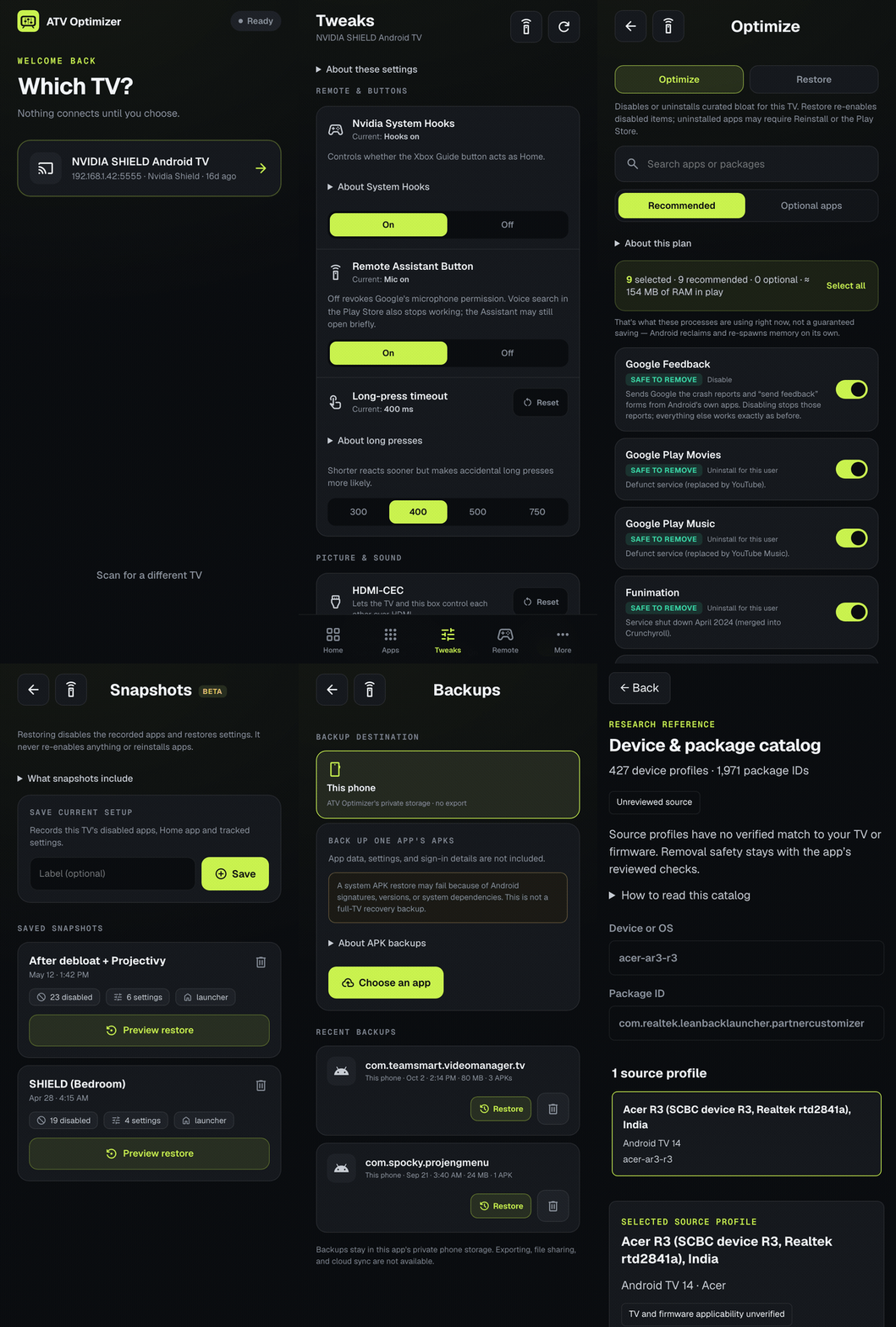
The walkthrough shows demo data, not a live device. Developer notes are in v2/mobile/.
Legacy: PowerShell script (v1)
This project started as a PowerShell script, Shield-Optimizer.ps1. It's now legacy: it still
works and still gets fixes for serious bugs, but new features only go into the desktop app. If you
need a terminal tool for scripting, a headless box or Docker, see
docs/LEGACY-V1.md for setup and usage.
Contributing
Building from source, architecture and release process: v2/README.md.
Credits
- Debloat research from community guides including florisse.nl/shield-debloat
- Built with AI assistance (Gemini Pro and Claude) by an actual software engineer, tested on real devices
Explore related projects
codecrafters-io/build-your-own-x
Master programming by recreating your favorite technologies from scratch.
560,381 starspublic-apis/public-apis
A collective list of free APIs
496,681 starsmorluto/rea
Reverse engineer anything with agents, from app behavior down to native binaries.
437,489 starsopenclaw/openclaw
The AI that really does things. Any OS. Any Platform. The lobster way. 🦞
394,058 stars