
bruli/php-git-hooks
bruli/php-git-hooks has 665 GitHub stars and 106 forks. GitHot measured 0 stars in 24 hours. Last checked 2026-11-15 22:58 UTC. Last push 2020-04-16.
Measured star growth
- in 24h
- 0
- in 7 days
- Update delayed
- in 15 days
- Update delayed
- in 1 month
- Update delayed
Net star changes over overlapping periods, not daily totals. Missing measurements are left blank. Stars measure attention, not software quality.
About
Git hooks for PHP projects
Developer ToolsREADME.md
Originalphp-git-hooks


Git hooks for PHP projects.
Library based in git hook scripts for PHP projects.
Installation
Step 1: Composer
You must add the following line to the composer.json file to use with Symfony 3.0:
{
    "require-dev": {
        "bruli/php-git-hooks": "~4.1"
    }
}
You can use "~2.0" for Symfony version 2.X.
Or you can write in your console:
$ composer require bruli/php-git-hooks --dev
If you don't have composer, you need download the binary file and run it:
$ wget http://getcomposer.org/composer.phar
# or
$ curl -O http://getcomposer.org/composer.phar

$ php composer.phar install
Step 2: Configuration
Using Composer
First, you will need to add the following lines to your composer.json
"scripts": {
    "post-install-cmd": [
      "PhpGitHooks\\Infrastructure\\Composer\\ConfiguratorScript::buildConfig"
    ],
    "post-update-cmd": [
      "PhpGitHooks\\Infrastructure\\Composer\\ConfiguratorScript::buildConfig"
    ]
}
WARNING: "PhpGitHooks\Application\Composer\ConfiguratorScript::buildConfig" is deprecated. You need change by current entry.
Then, launch $ composer install and composer should ask you about configuration

Bin directory configuration.
If your project doesn't have a "bin/" directory, you can add this in your composer.json file.
"config": {
    "bin-dir": "bin"
}
Note: This is not necessary for Symfony projects.
Manual config file for git hooks.
You can configure php-git-hooks, creating a php-git-hooks.yml file with...
pre-commit:
  enabled: true
  execute:
    php-cs-fixer:
        enabled:  true
        levels:
            psr0:       true
            psr1:       true
            psr2:       true
            symfony:    true
        options: "--fixers=short_array_syntax --diff"
    phpunit:
        enabled:     true
        random-mode: true
        options:     '<some options>'
        strict-coverage:
             enabled:       true
             minimum:       90
        guard-coverage:
             enabled: true
             message: 'WARNING!!, your code coverage is lower.'
    phplint:         true
    phpcs:
        enabled:     true
        standard:    PSR2
    phpmd:
        enabled:     true
        options:     '<some options>'
    composer:        true
  message:
    right-message: 'HEY, GOOD JOB!!'
    error-message: 'FIX YOUR CODE!!'
commit-msg:
    enabled: true
    regular-expression: '#[0-9]{2,7}'
pre-push:
    enabled: true
    execute:
      phpunit:
        enabled:     true
        random-mode: true
        options:     '<some options>'
    strict-coverage:
        enabled:       true
        minimum:       90
    guard-coverage:
        enabled: true
        message: 'WARNING!!, your code coverage is lower.'
    message:
      right-message: 'PUSH IT!!'
      error-message: 'YOU CAN NOT PUSH CODE!!'
... or you can copy php-git-hooks.yml.sample from vendor/bruli/php-git-hooks.
Config file for phpunit.
If you want use phpunit tool, you must create a phpunit.xml.dist in your project root directory. Alternatively you can copy from vendor/bruli/php-git-hooks/phpunit.xml.dist in your project root directory.
Config file for phpmd.
The same case that phpunit. You must create a PmdRules.xml in your project root directory or copy from php-git-hook directory.
Step 3: Enabling hooks.
The most easy way to enable hook is copy hook file into your .git/hooks directory.
For pre-commit hook:
You can enable this hooks with composer or manually executing
$ cp vendor/bruli/php-git-hooks/src/PhpGitHooks/Infrastructure/Hook/pre-commit .git/hooks
For commit-msg hook:
$ cp vendor/bruli/php-git-hooks/src/PhpGitHooks/Infrastructure/Hook/commit-msg .git/hooks
For pre-push hook:
$ cp vendor/bruli/php-git-hooks/src/PhpGitHooks/Infrastructure/Hook/pre-push .git/hooks
execute.
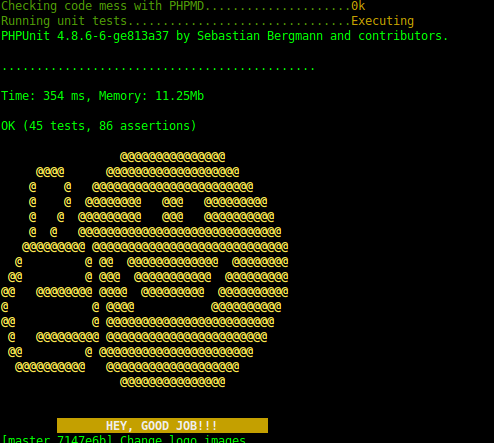
Valid pre-commit.
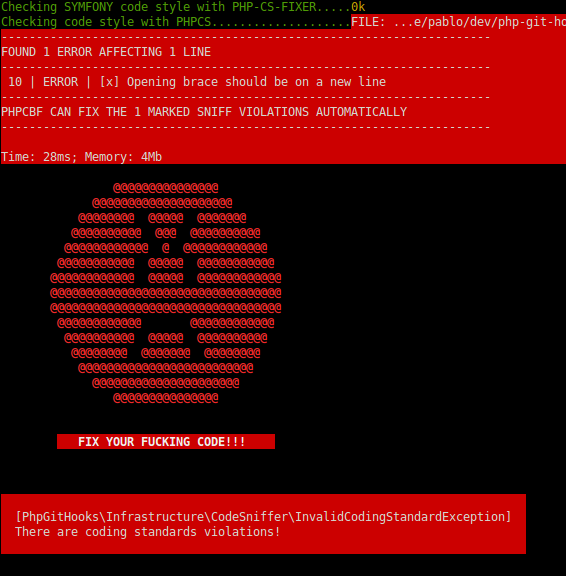
Fail pre-commit.
Credits
- Pablo Braulio (@brulics)
- All contributors
License
php-git-hooks is released under the MIT License. See the bundled LICENSE file for details.