
brotandgames/ciao has 1,981 GitHub stars and 109 forks. GitHot measured 0 stars in 24 hours and -1 in 7 days. Last checked 2026-11-09 22:09 UTC. Last push 2026-10-25.
HTTP checks & tests (private & public) monitoring - check the status of your URL
What you can do
- Check HTTP/S endpoints in an interval
- Use Cron syntax like * * * * * (every minute), */15 * * * * (every 15 minutes), @hourly or @daily etc.
- Keep track of status changes (since version 1.8.0)
- Check TLS certificate expiration once a day and get a notification if it expires in less than 30 days (since version 1.9.0)
Measured star growth
- in 24h
- 0
- in 7 days
- -1
- in 15 days
- Update delayed
- in 1 month
- Update delayed
Net star changes over overlapping periods, not daily totals. Missing measurements are left blank. Stars measure attention, not software quality.
README.md
Originalciao


ciao checks HTTP(S) URL endpoints for a HTTP status code (or errors on the lower TCP stack) and sends a notification on status change via E-Mail or Webhooks.
It uses Cron syntax to schedule the checks and comes along with a Web UI and a RESTful JSON API.
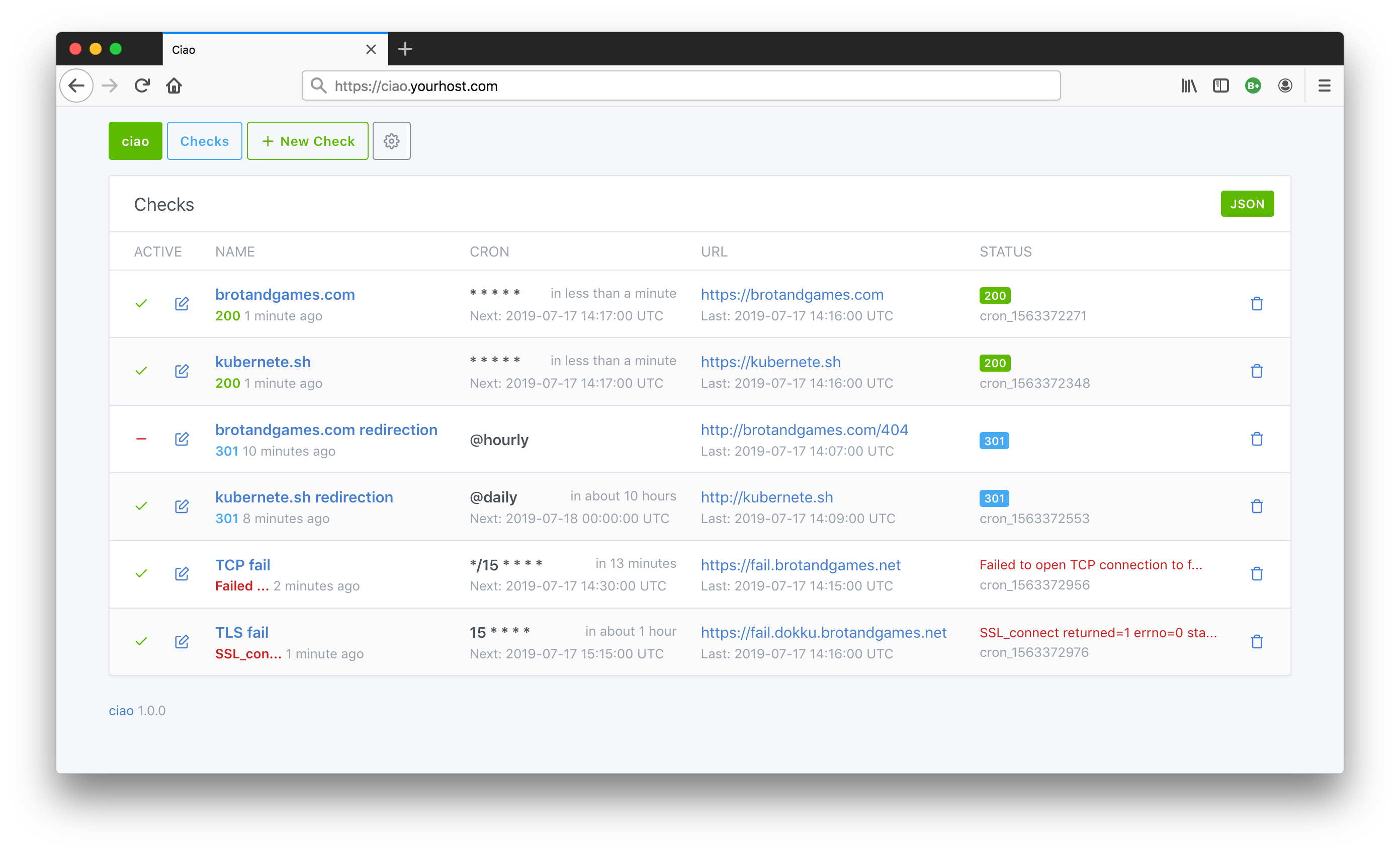 You can find more screenshots on the Homepage.
ciao (/tʃaʊ/) - check in and out - borrowed from Italian ciao for greeting someone.
Motivation: create an open source web application for checking URL statuses with an UI and a REST API which is easy to install and maintain (no external dependencies like Databases, Caches etc.) in public and private environments.
Follow @brotandgames on Twitter to get the latest News like Releases. Use #ciaohttp Hashtag for ciao related stuff.
Quickstart
docker run --name ciao -p 8090:3000 brotandgames/ciao
Open http://localhost:8090 in your webbrowser.
Features
- Check HTTP/S endpoints in an interval
- Use Cron syntax like
* * * * *(every minute),*/15 * * * *(every 15 minutes),@hourlyor@dailyetc. - Keep track of status changes (since version 1.8.0)
- Check TLS certificate expiration once a day and get a notification if it expires in less than 30 days (since version 1.9.0)
- Web UI
- RESTful JSON API
- Get a notification on status change via E-Mail eg. Gmail, Sendgrid, MailChimp etc. (optional)
- Get a notification on status change via Webhooks eg. Rocket.Chat, Slack etc. (optional)
- Configuration via ENVIRONMENT variables (suitable for most runtimes)
- Expose Prometheus Metrics endpoint
/metricswith information to digest by tools like Grafana (optional) - Protect with HTTP Basic auth on application basis (optional, only recommended in combination with TLS)
- Instructions for installing/deploying in/to different Platforms
- Docker Image
- Helm Chart
- Terraform Provider (Maintainer: @autonubil)
Configuration
ciao is configured via ENVIRONMENT variables following the 12-factor app methodology.
SECRET_KEY_BASEwill be auto-generated if you omit it- Time zone is configurable per
TIME_ZONEvariable (default:UTC) eg.TIME_ZONE="Vienna"- you can find all possible values by executingdocker run --rm brotandgames/ciao rake time:zones(since version 1.2.0) - Check SMTP Configuration for all possible configuration variables, notes and example configurations for Gmail, Sendgrid etc.
- Check Webhook Configuration for instructions how to send (webhook) notifications to RocketChat, Slack etc. (since version 1.4.0)
- You can enable HTTP Basic auth for ciao by defining
BASIC_AUTH_USERNAMEandBASIC_AUTH_PASSWORDeg.BASIC_AUTH_USERNAME="ciao-admin"andBASIC_AUTH_PASSWORD="sensitive_password"(since version 1.3.0) - You can enable a Prometheus Metrics endpoint served under
/metricsby settingPROMETHEUS_ENABLED=true- furthermore you can enable HTTP Basic auth for this endpoint by definingPROMETHEUS_BASIC_AUTH_USERNAME="ciao-metrics"andPROMETHEUS_BASIC_AUTH_PASSWORD="sensitive_password"(since version 1.5.0) - besides the number of checks per status it exposes the response time of the last check per active check asciao_check_response_time_seconds{id, name} - Log level is configurable via
CIAO_LOG_LEVELvariable (default:WARN) - levels: DEBUG, INFO, WARN, ERROR, FATAL (since version 1.7.0) - The public URL of ciao is configurable via
CIAO_BASE_URLvariable eg.CIAO_BASE_URL="https://ciao.example.com"- it is used for the__check_absolute_url__webhook placeholder to link to the check in notifications
Install
You can install ciao via the official Docker image brotandgames/ciao (also available as ghcr.io/brotandgames/ciao, for linux/amd64 and linux/arm64) or using Git and installing the dependencies manually.
By mounting a Docker volume you can avoid loosing data on restart or upgrade.
IMPORTANT: Be sure to enable authentication (eg. HTTP Basic auth) and TLS certificates if you serve ciao publicly.
Via Docker image
docker run \
  --name ciao \
  -p 8090:3000 \
  -e SECRET_KEY_BASE="sensitive_secret_key_base" \
  -e SMTP_ADDRESS=smtp.yourhost.com \
  -e SMTP_EMAIL_FROM="[email protected]" \
  -e SMTP_EMAIL_TO="[email protected]" \
  -e SMTP_PORT=587 \
  -e SMTP_DOMAIN=smtp.yourhost.com \
  -e SMTP_AUTHENTICATION=plain \
  -e SMTP_ENABLE_STARTTLS_AUTO=true \
  -e SMTP_USERNAME=ciao \
  -e SMTP_PASSWORD="sensitive_password" \
  -v /opt/ciao/data:/app/db/sqlite \
  brotandgames/ciao
Open localhost:8090 in your webbrowser.
Via Docker-compose
Create docker-compose.yml file
version: "3"
services:
  ciao:
    image: brotandgames/ciao
    container_name: ciao
    ports:
      - '8090:3000'
    environment:
      - SECRET_KEY_BASE=sensitive_secret_key_base
      - SMTP_ADDRESS=smtp.yourhost.com
      - [email protected]
      - [email protected]
      - SMTP_PORT=587
      - SMTP_AUTHENTICATION=plain
      - SMTP_DOMAIN=smtp.yourhost.com
      - SMTP_ENABLE_STARTTLS_AUTO=true
      - SMTP_USERNAME=ciao
      - SMTP_PASSWORD=sensitive_password
    volumes:
      - /opt/ciao/data:/app/db/sqlite/
Pull and run
docker-compose pull
docker-compose up -d
Open localhost:8090 in the webbrowser.
Note: if you have problems with environment variables (quoting, spaces etc), take a look at these GitHub issues (1, 2) and these Stack Overflow questions (1, 2).
Via Git clone
# Clone repo
git clone https://github.com/brotandgames/ciao

cd ciao

# Install all dependencies (rubygems)
RAILS_ENV=production bundle install

# Configure
export SECRET_KEY_BASE="sensitive_secret_key_base" \
  SMTP_ADDRESS=smtp.yourhost.com \
  SMTP_EMAIL_FROM="[email protected]" \
  SMTP_EMAIL_TO="[email protected]" \
  SMTP_PORT=587 \
  SMTP_DOMAIN=smtp.yourhost.com \
  SMTP_AUTHENTICATION=plain \
  SMTP_ENABLE_STARTTLS_AUTO=true \
  SMTP_USERNAME=ciao \
  SMTP_PASSWORD="sensitive_password"

# Precompile assets
rails assets:precompile

# Run start script - basically this is check SECRET_KEY_BASE, database init/migrate and rails server
RAILS_ENV=production ./start.sh
Open localhost:3000 in the webbrowser.
REST API
GET /checks.json
Show collection (array) of all checks
curl -X GET -H "Content-type: application/json" /checks.json
GET /checks/<:id>.json
Show a specific check
curl -X GET -H "Content-type: application/json" /checks/<:id>.json
Checks include the response_time of the last check in seconds (null on errors like timeouts) and their uptime (share of time with status 2xx in percent) for the last 24 hours, 7 and 30 days, eg. "uptime": {"24h": 100.0, "7d": 99.5, "30d": null}. It is calculated from the status changes, null means there is no data for the period.
POST /checks.json
Create a check
curl -X POST -H "Content-type: application/json" /checks.json \
  -d '{ "name": "brotandgames.com", "active": true, "url": "https://brotandgames.com", "cron": "* * * *"}'
PATCH/PUT /checks/<:id>.json
Update a check
curl -X PUT -H "Content-type: application/json" /checks/<:id>.json \
  -d '{ "name": "brotandgames.com", "active": false, "url": "https://brotandgames.com", "cron": "* * * *"}'
DELETE /checks/<:id>.json
Delete a check
curl -X DELETE -H "Content-type: application/json" /checks/<:id>.json
Backup & Restore
State is stored in an internal SQLite database located in db/sqlite/production.sqlite3.
Note: Prior to version 1.1.0 the database was located in db/ (missing sqlite subfolder). From 1.1.0 onwards the location is db/sqlite/ to enable docker to use a volume.
Backup
docker cp ciao:/app/db/sqlite/production.sqlite3 production.sqlite3.backup
Restore
docker cp production.sqlite3.backup ciao:/app/db/sqlite/production.sqlite3
docker restart ciao
Prior to version 1.2.0: visit /checks/admin and recreate the background jobs for active checks.
Upgrade
Deploy
Here you'll find instructions for deploying ciao to different platforms like Kubernetes or Dokku.
By mounting a Docker or Kubernetes volume you can avoid loosing data on restart or upgrade.
IMPORTANT: Be sure to enable authentication (eg. HTTP Basic auth) and TLS certificates if you serve ciao publicly.
Kubernetes
Via Helm
- Install ciao via
helm upgrade --install
Quickstart (without configuring)
helm upgrade --install --namespace ciao --create-namespace ciao oci://ghcr.io/brotandgames/charts/ciao --version 2.2.0
With configuration
helm upgrade --install --namespace ciao --create-namespace ciao oci://ghcr.io/brotandgames/charts/ciao --version 2.2.0 \
  --set env.SECRET_KEY_BASE="sensitive_secret_key_base" \
  --set env.SMTP_ADDRESS=smtp.yourhost.com \
  --set env.SMTP_EMAIL_FROM="[email protected]" \
  --set env.SMTP_EMAIL_TO="[email protected]" \
  --set env.SMTP_PORT=587 \
  --set env.SMTP_DOMAIN=smtp.yourhost.com \
  --set env.SMTP_AUTHENTICATION=plain \
  --set env.SMTP_ENABLE_STARTTLS_AUTO=true \
  --set env.SMTP_USERNAME=ciao \
  --set env.SMTP_PASSWORD="sensitive_password"
With Prometheus Operator (eg. kube-prometheus-stack): --set serviceMonitor.enabled=true creates a ServiceMonitor and enables ciao's /metrics endpoint. Add --set serviceMonitor.labels.release=<your-prometheus-release> if your Prometheus only selects labelled ServiceMonitors.
All env values are stored in a Kubernetes Secret. To keep credentials out of Helm values, create a Secret with the ENV variables yourself and pass --set existingSecret=<secret-name>. See values.yaml for all options.
Via kubectl
The following code snippet will create a Kubernetes
- Namespace
ciao, - Secret
ciao, - Deployment
ciaoand - Service
ciao.
kubectl apply -f k8s.yaml
# k8s.yaml
apiVersion: v1
kind: Namespace
metadata:
  name: ciao
---
apiVersion: v1
kind: Secret
metadata:
  name: ciao
  namespace: ciao
data:
  # all values should be base64 encoded
  # so some_secret would be c29tZV9zZWNyZXQ=
  SECRET_KEY_BASE: some_secret
  SMTP_ADDRESS: smtp_address
  SMTP_EMAIL_FROM: [email protected]
  SMTP_EMAIL_TO: [email protected]
  SMTP_PORT: 465
  SMTP_DOMAIN: mail.somedomain.com
  SMTP_AUTHENTICATION: plain
  SMTP_ENABLE_STARTTLS_AUTO: true
  SMTP_USERNAME: smtp_some_username
  SMTP_PASSWORD: smtp_some_password
  SMTP_SSL: true
  BASIC_AUTH_USERNAME: auth_some_username
  BASIC_AUTH_PASSWORD: auth_some_password
---
apiVersion: apps/v1beta1
kind: Deployment
metadata:
  name: ciao
  namespace: ciao
spec:
  replicas: 1
  template:
    metadata:
      labels:
        app: ciao
    spec:
      containers:
      - image: brotandgames/ciao:latest
        imagePullPolicy: IfNotPresent
        name: ciao
        volumeMounts: # Emit if you do not have persistent volumes
        - mountPath: /app/db/sqlite/
          name: persistent-volume
          subPath: ciao
        ports:
        - containerPort: 3000
        resources:
          requests:
            memory: 256Mi
            cpu: 200m
          limits:
            memory: 512Mi
            cpu: 400m
        envFrom:
        - secretRef:
            name: ciao
---
apiVersion: v1
kind: Service
metadata:
  name: ciao
  namespace: ciao
spec:
  ports:
    - port: 80
      targetPort: 3000
      protocol: TCP
  type: ClusterIP
  selector:
    app: ciao
Dokku
- Create app
dokku apps:create ciao
- Configure
dokku config:set --no-restart ciao \
  SECRET_KEY_BASE="sensitive_secret_key_base" \
  SMTP_ADDRESS=smtp.yourhost.com \
  SMTP_EMAIL_FROM="[email protected]" \
  SMTP_EMAIL_TO="[email protected]" \
  SMTP_PORT=587 \
  SMTP_DOMAIN=smtp.yourhost.com \
  SMTP_AUTHENTICATION=plain \
  SMTP_ENABLE_STARTTLS_AUTO=true \
  SMTP_USERNAME=ciao \
  SMTP_PASSWORD="sensitive_password"
Deploy ciao using your deployment method eg. Dockerfile Deployment, Docker Image Deployment etc.
Protect your ciao instance by enabling HTTP Basic auth (using dokku-http-auth) and installing Lets Encrypt certificates via dokku-letsencrypt.
Contributing
We encourage you to contribute to this project in whatever way you like!
Report bugs/feature requests in the issues section.
When contributing to this repository, please first discuss the change you wish to make via issue with the owners of this repository before making a change.
Versioning
In a nutshell:
Given a version number MAJOR.MINOR.PATCH, increment the:
- MAJOR version when you make incompatible API changes,
- MINOR version when you add functionality in a backwards-compatible manner, and
- PATCH version when you make backwards-compatible bug fixes.
Additional labels for pre-release and build metadata are available as extensions to the MAJOR.MINOR.PATCH format.
License
ciao is released under the MIT License.
Guestbook
Why not reinvent the guestbook?
Maintainer
Explore related projects
codecrafters-io/build-your-own-x
Master programming by recreating your favorite technologies from scratch.
561,398 starspublic-apis/public-apis
A collective list of free APIs
497,679 starsmorluto/rea
Reverse engineer anything with agents, from app behavior down to native binaries.
447,495 starsopenclaw/openclaw
The AI that really does things. Any OS. Any Platform. The lobster way. 🦞
394,261 stars