
bridgedp/hunter_bipedal_control
bridgedp/hunter_bipedal_control has 596 GitHub stars and 106 forks. GitHot measured 0 stars in 24 hours and 0 in 7 days. Last checked 2026-11-21 16:19 UTC. Last push 2024-05-20.
Measured star growth
- in 24h
- 0
- in 7 days
- 0
- in 15 days
- Collecting history
- in 1 month
- Collecting history
Net star changes over overlapping periods, not daily totals. Missing measurements are left blank. Stars measure attention, not software quality.
About
An open source bipedal robot control framework, based on non-linear MPC and WBC, tailered for EC-hunter80-v01 bipedal robot.
Developer ToolsREADME.md
Originalhunter_bipedal_control
An open source bipedal robot control framework, based on non-linear MPC and WBC, tailered for EC-hunter80-v01 bipedal robot. For more information refer to the project's Page.
More detailed hardware information about hunter and bipedal robot communication group
Installation
Install dependencies
LCM (Only required when using mujoco simulation)
Clone and Build
# Clone
mkdir -p <catkin_ws_name>/src
cd <catkin_ws_name>/src
git clone https://github.com/bridgedp/hunter_bipedal_control.git

# Build
cd <catkin_ws_name>
catkin init
catkin config -DCMAKE_BUILD_TYPE=RelWithDebInfo

# for different use build
# 1. gazebo simulation
catkin build legged_controllers legged_hunter_description legged_gazebo

# 2. mujoco simulation
catkin build legged_controllers legged_hunter_description legged_mujoco lcm_msg mujoco
Quick Start
Gazebo Simulation
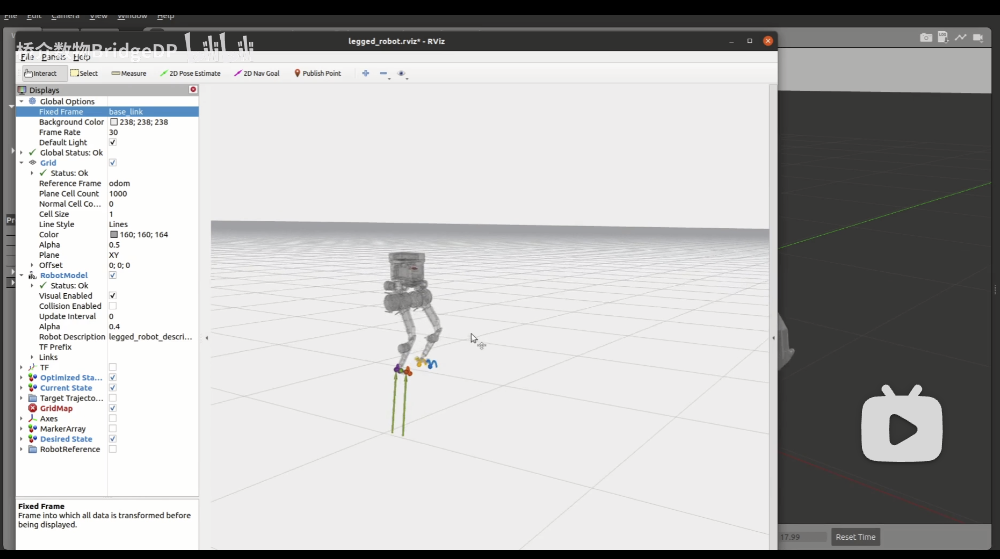
Mujoco Simulation
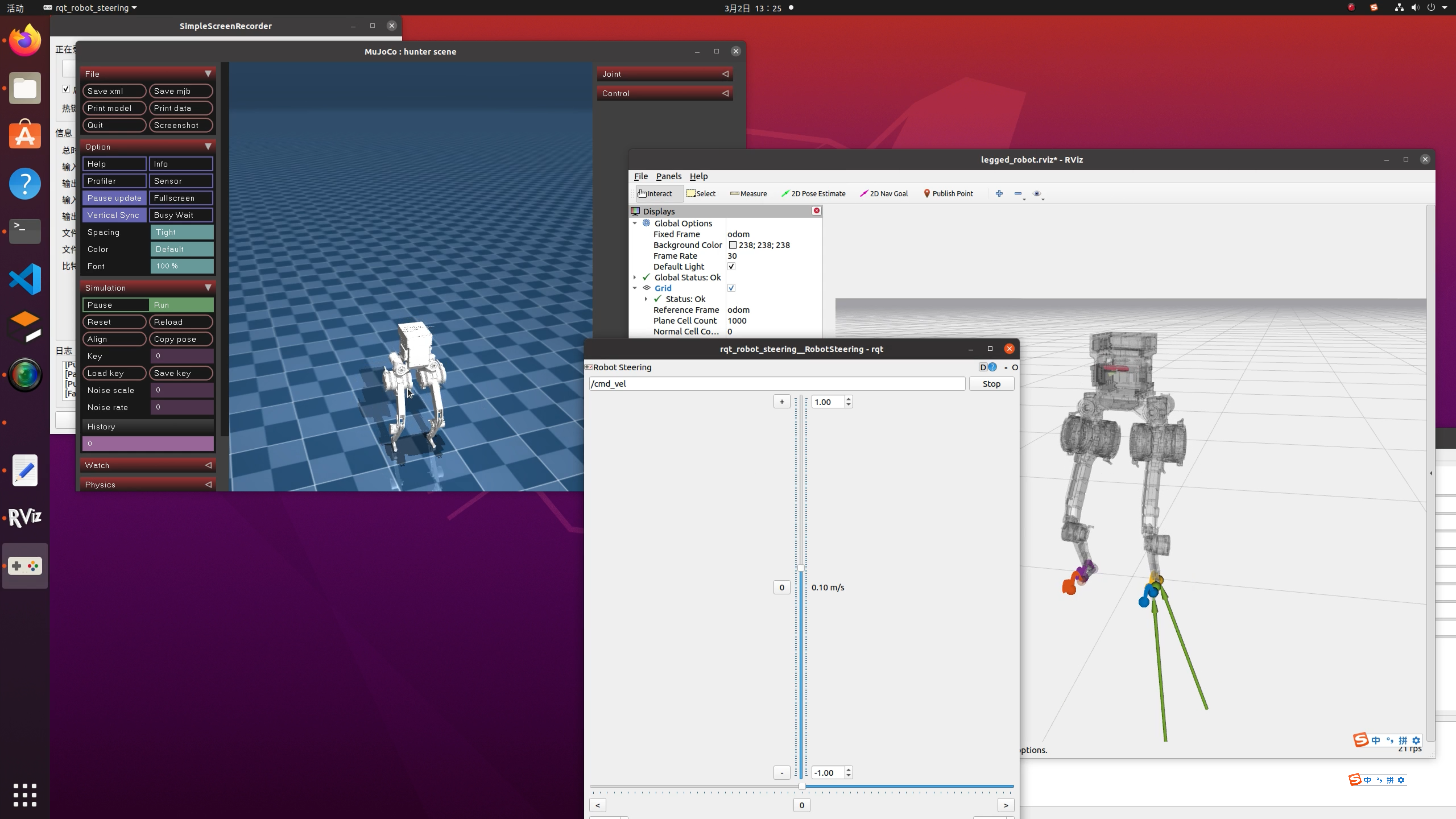
Simulation
- Run the gazebo simulation and load the controller:
roslaunch legged_controllers one_start_gazebo.launch
- Run the mujoco simulation and load the controller:
roslaunch legged_controllers one_start_mujoco.launch
Robot hardware
- load the controller
roslaunch legged_controllers one_start_real.launch
Notes:
After the user starts the simulation, the robot falls down in Gazebo OR Mujoco.
Gazebo First the user needs to set kp_position=100, kd_position=3 in rqt (need refresh) and reset the simulation by pressing Ctrl+Shift+R to make the robot stand up.
Mujoco First the user needs to set kp_position=100, kd_position=3 in rqt (need refresh) and reset the simulation by clicking Reload to make the robot stand up.
Then, send the following commands:
rostopic pub --once /reset_estimation std_msgs/Float32 "data: 1.23"This command will reset the state estimation information because Reload brings mutation effects to the state estimation.
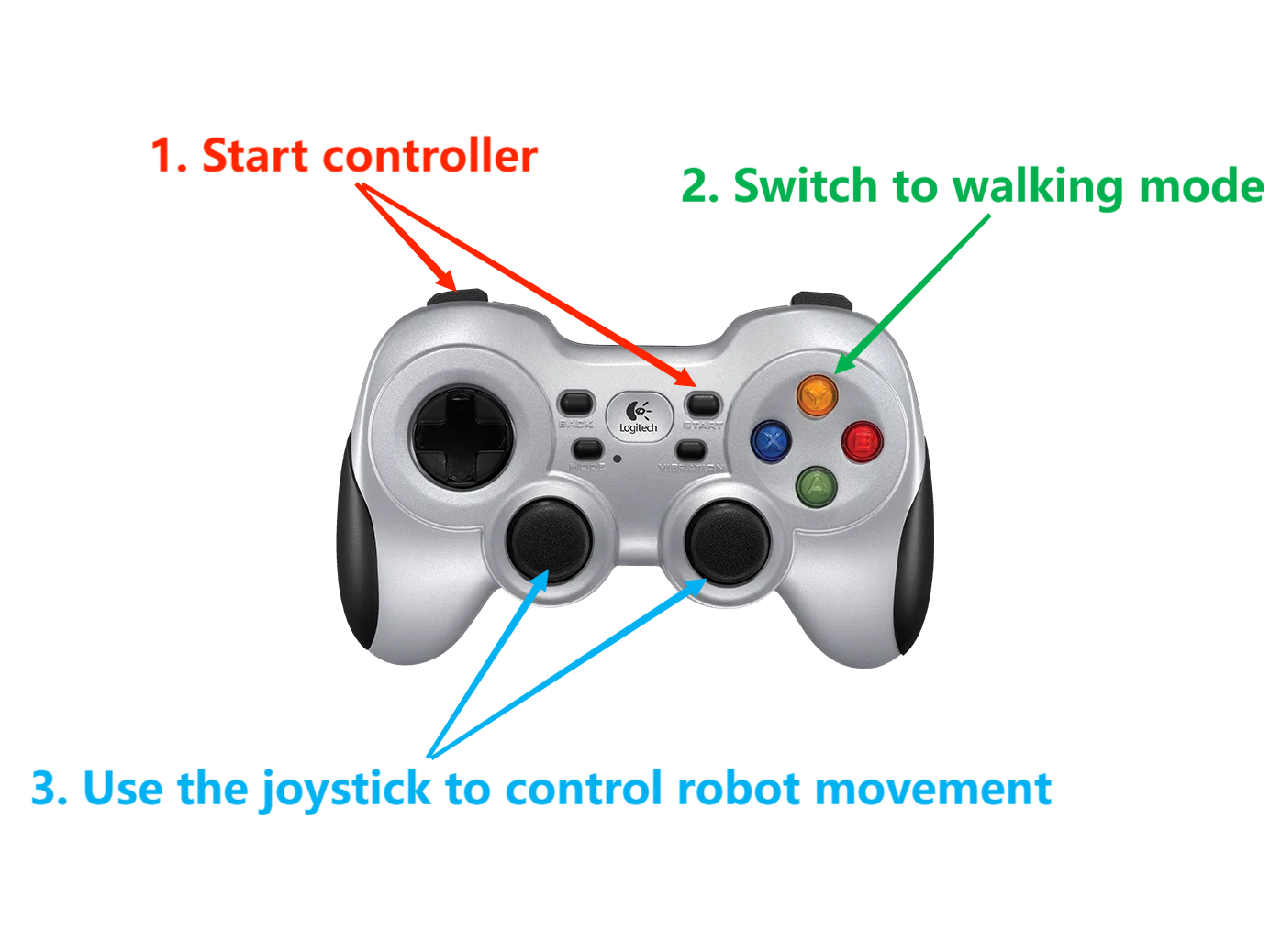
Gamepad Control
- Start controller
L1 + start
- Switch to walking mode
Y
- Use the joystick to control robot movement
The following is a schematic diagram of the handle operation:
Simulation Without Gamepad
Compilation: Only compile the following packages (and their dependencies), there's no need to compile the entire OCS2.
- Gazebo Simulation
catkin build legged_controllers legged_hunter_description legged_gazebo
Execution: If you don't have a gamepad, you need to send the startup commands in order.
First, set kp_position=100 in rqt and reset the simulation by pressing Ctrl+Shift+R to make the robot stand up. Then, send the following commands:
rostopic pub --once /load_controller std_msgs/Float32 "data: 1.23"
rostopic pub --once /set_walk std_msgs/Float32 "data: 1.23"
Before /load_controller, there needs to be a node continuously sending /cmd_vel (10Hz is normal), and it should continue sending during the simulation. Once /cmd_vel stops, the robot may fall.
As a example, here's a Python script that continuously sends /cmd_vel and allows keyboard control. You should start the script before /load_controller.
#!/usr/bin/env python

import rospy
from geometry_msgs.msg import Twist
from pynput import keyboard
import threading

class KeyboardController:
    def __init__(self):
        self.publisher = rospy.Publisher('/cmd_vel', Twist, queue_size=1)
        self.twist_msg = Twist()
        self.rate = rospy.Rate(10)

    def on_press(self, key):
        try:
            if key.char == 'q':
                rospy.signal_shutdown("Quit")
            else:
                if key.char == 'w':
                    self.twist_msg.linear.x = 0.35
                elif key.char == 's':
                    self.twist_msg.linear.x = -0.35
                else:
                    self.twist_msg.linear.x = 0.0

                if key.char == 'a':
                    self.twist_msg.angular.z = 0.35
                elif key.char == 'd':
                    self.twist_msg.angular.z = -0.35
                else:
                    self.twist_msg.angular.z = 0.0
        except AttributeError:
            pass

    def on_release(self, key):
        self.twist_msg.linear.x = 0.0
        self.twist_msg.angular.z = 0.0

def ros_publish():
    while not rospy.is_shutdown():
        controller.publisher.publish(controller.twist_msg)
        controller.rate.sleep()


if __name__ == '__main__':
    rospy.init_node("keyboard_control")
    controller = KeyboardController()

    thread = threading.Thread(target=ros_publish)
    thread.start()

    listener = keyboard.Listener(on_press=controller.on_press, on_release=controller.on_release)
    listener.start()
    while not rospy.is_shutdown():
        pass

    listener.stop()
    listener.join()

    thread.join()
- Mujoco Simulation
catkin build legged_controllers legged_hunter_description legged_mujoco lcm_msg mujoco
Execution: If you don't have a gamepad, you need to send the startup commands in order.
First, set kp_position=100 kd_position=3 in rqt and reset the simulation by clicking Reload to make the robot stand up. Then, send the following commands:
rostopic pub --once /reset_estimation std_msgs/Float32 "data: 1.23"
rostopic pub --once /load_controller std_msgs/Float32 "data: 1.23"
rostopic pub --once /set_walk std_msgs/Float32 "data: 1.23"
and
rosrun rqt_robot_steering rqt_robot_steering
Running on Hardware Headless
Plug a monitor into the onboard mini pc. Login to a local network and double check the computer name and user name.
Power the mini PC from the onboard battery it should automatically connect to the local network.
Open a terminal, power shell, or any ternimal emulator (PuTTY) from another PC on the same network.
ssh <username@hostname>
cd Desktop/hunter_bipedal_control/
sudo su
source devel/setup.bash
roslaunch legged_controllers one_start_real.launch rviz:=false
Hold L1 and slowly push L2 to the end to increase kp_position.
The rest of the steps are the same as controlling in simulation.
Reference
Code Reference
https://github.com/qiayuanl/legged_control
Paper Reference
State Estimation
[1] Flayols T, Del Prete A, Wensing P, et al. Experimental evaluation of simple estimators for humanoid robots[C]//2017 IEEE-RAS 17th International Conference on Humanoid Robotics (Humanoids). IEEE, 2017: 889-895.

[2] Bloesch M, Hutter M, Hoepflinger M A, et al. State estimation for legged robots-consistent fusion of leg kinematics and IMU[J]. Robotics, 2013, 17: 17-24.
MPC
[3] Di Carlo J, Wensing P M, Katz B, et al. Dynamic locomotion in the mit cheetah 3 through convex model-predictive control[C]//2018 IEEE/RSJ international conference on intelligent robots and systems (IROS). IEEE, 2018: 1-9.

[4] Grandia R, Jenelten F, Yang S, et al. Perceptive Locomotion Through Nonlinear Model-Predictive Control[J]. IEEE Transactions on Robotics, 2023.

[5] Sleiman J P, Farshidian F, Minniti M V, et al. A unified mpc framework for whole-body dynamic locomotion and manipulation[J]. IEEE Robotics and Automation Letters, 2021, 6(3): 4688-4695.
WBC
[6] Bellicoso C D, Gehring C, Hwangbo J, et al. Perception-less terrain adaptation through whole body control and hierarchical optimization[C]//2016 IEEE-RAS 16th International Conference on Humanoid Robots (Humanoids). IEEE, 2016: 558-564.

[7] Kim D, Di Carlo J, Katz B, et al. Highly dynamic quadruped locomotion via whole-body impulse control and model predictive control[J]. arXiv preprint arXiv:1909.06586, 2019.