
blackstork-io/blackstork-cli
blackstork-io/blackstork-cli has 72 GitHub stars and 5 forks. GitHot measured 0 stars in 24 hours. Last checked 2026-11-16 03:19 UTC. Last push 2026-11-03.
Measured star growth
- in 24h
- 0
- in 7 days
- Update delayed
- in 15 days
- Update delayed
- in 1 month
- Update delayed
Net star changes over overlapping periods, not daily totals. Missing measurements are left blank. Stars measure attention, not software quality.
About
A source-available command-line tool for cybersecurity reporting
SecurityREADME.md
Original


blackstork-cli
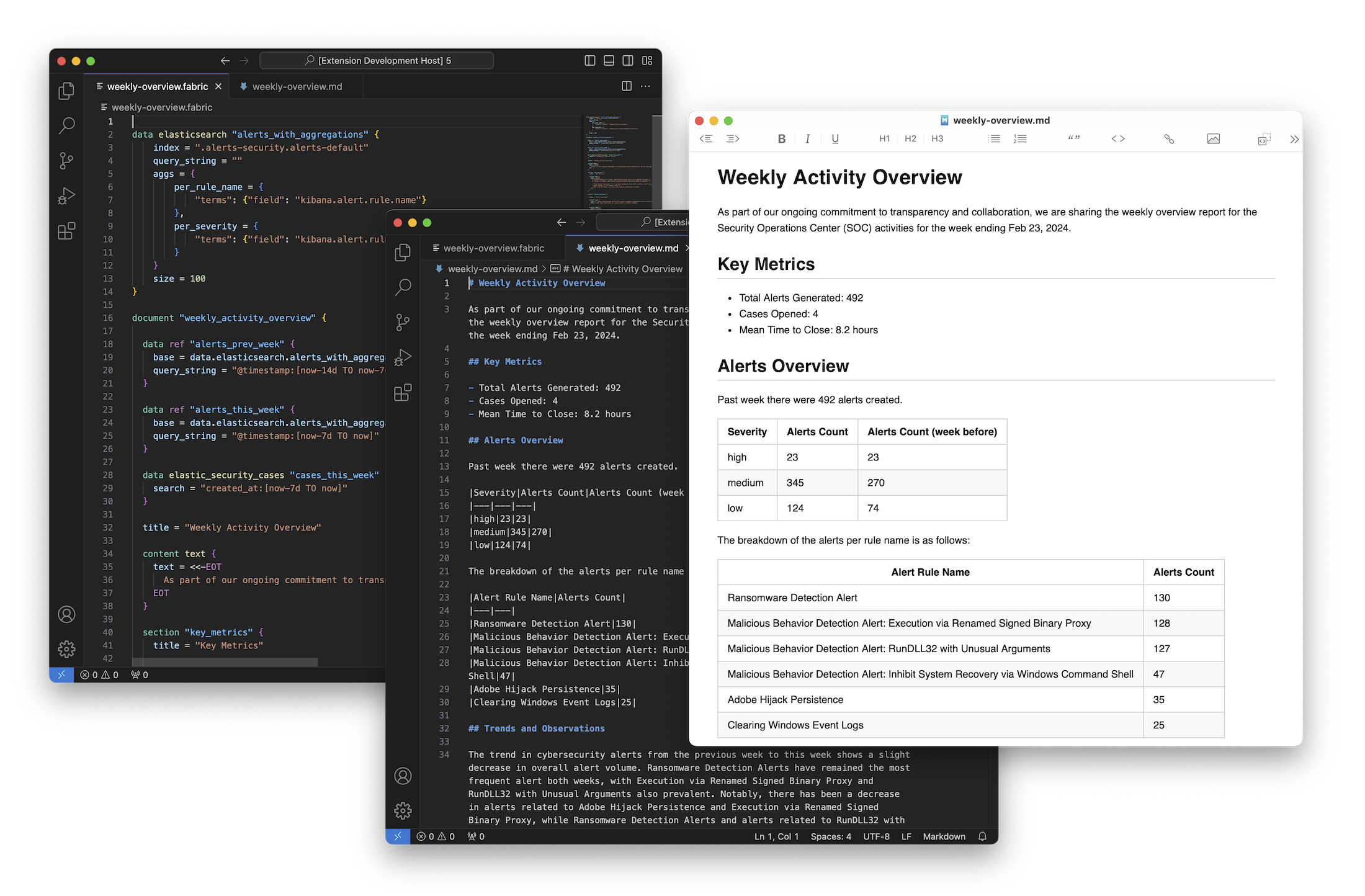
blackstork-cli is the source-available, headless execution engine for
BlackStork templates. It turns structured data into consistent Markdown, HTML,
and plugin-provided document formats without tying collection, analysis,
presentation, and delivery together.
Templates use .blackstork.hcl files to define:
- inputs supplied by people, automation, or AI agents;
- data retrieved from files, APIs, databases, SIEMs, TIPs, and other tools;
- structured transformations and reusable document sections;
- deterministic tables, lists, code, images, and text;
- optional, bounded LLM-generated content;
- presentation through formatters; and
- delivery through publishers.
The same engine powers document generation in BlackStork SaaS. The CLI is designed for local development, CI/CD, Git-based reporting workflows, and environments where sensitive data must stay on your infrastructure.
Why BlackStork templates
Generating a report is more than generating prose. A reliable deliverable also needs required sections, traceable facts, stable tables, consistent branding, and predictable output formats.
BlackStork separates those responsibilities:
structured data → template evaluation → document content → format → publish
This lets an analyst or agent supply current data while the template controls the report structure and presentation. LLMs can be used for focused synthesis without asking them to reproduce the entire document layout or factual data on every run.
Install
Homebrew
brew install blackstork-io/tools/blackstork-cli
blackstork-cli --version
Release binaries
Prebuilt binaries for Linux, macOS, and Windows are available on the GitHub Releases page.
For example, on macOS arm64:
curl -L \
  https://github.com/blackstork-io/blackstork-cli/releases/latest/download/blackstork-cli_darwin_arm64.tar.gz \
  -o blackstork-cli_darwin_arm64.tar.gz
mkdir blackstork-bin
tar -xzf blackstork-cli_darwin_arm64.tar.gz -C blackstork-bin
./blackstork-bin/blackstork-cli --version
Build from source
Use the Go version declared in go.mod:
git clone https://github.com/blackstork-io/blackstork-cli.git
cd blackstork-cli
go build -o ./bin/blackstork-cli .
./bin/blackstork-cli --version
Quick start
Create hello.blackstork.hcl:
document "hello" {
  input "audience" {
    type          = "string"
    default_value = "security team"
    description   = "Audience addressed by the report"
  }

  title = "Hello from BlackStork"

  content text {
    value = "This report was generated for the {{ .inputs.audience }}."
  }
}
Validate and render it:
blackstork-cli lint
blackstork-cli render document.hello --input audience="incident response team"
Markdown is written to standard output by default. A document can also define HTML or plugin-provided formats and publishers for local files, BlackStork SaaS, GitHub Gists, MISP Event Reports, and other destinations.
Continue with the BlackStork tutorial or start from the community template repository.
CLI commands
The CLI provides four main commands:
| Command | Purpose |
|---|---|
blackstork-cli install |
Resolve and install plugins required by templates in the source directory. |
blackstork-cli lint |
Validate template syntax and structure without executing plugins. |
blackstork-cli data TARGET |
Execute selected data blocks and print formatted JSON. |
blackstork-cli render document.NAME |
Evaluate, format, and print or publish a document. |
Install plugins
External plugins are declared in the global blackstork block. Install the
resolved versions before full validation or rendering:
blackstork-cli install
blackstork-cli install --upgrade
The lock file records the selected plugin versions for reproducible execution.
Validate templates
blackstork-cli lint
blackstork-cli lint --full
The default command checks syntax and document structure without executing
plugins. --full also validates plugin block bodies against installed runner
schemas.
Inspect data
Execute a standalone data block:
blackstork-cli data data.http.current_advisories
Or inspect all or part of a document's data layer:
blackstork-cli data document.weekly_report.data
blackstork-cli data document.weekly_report.data.http.current_advisories
Render or publish
# Render with the default Markdown formatter and write to stdout.
blackstork-cli render document.weekly_report

# Use a named formatter.
blackstork-cli render document.weekly_report --format format.html.web

# Render only content containing every requested metadata tag.
blackstork-cli render document.weekly_report --only-with-tags executive,public

# Use a saved JSON document-data layer instead of executing data blocks.
blackstork-cli render document.weekly_report --replace-data-with report-data.json

# Execute publishers defined by the document.
blackstork-cli render document.weekly_report --publish
Pass document inputs with repeatable --input or -i flags:
blackstork-cli render document.weekly_report \
  --input reporting_period=2026-W35 \
  --input include_details=true
Run blackstork-cli <command> --help for the complete, version-specific CLI
reference.
Plugins
Plugins connect templates to external systems and extend the document pipeline through four runner roles:
- data sources retrieve structured data;
- content providers create document content;
- formatters serialize evaluated content; and
- publishers deliver formatted documents.
The official plugins include integrations for Elastic, Splunk, Microsoft Sentinel and Defender, CrowdStrike Falcon, OpenCTI, EclecticIQ, MISP, VirusTotal, Snyk, HackerOne, Jira, GitHub, SQL databases, GraphQL, OpenAI, and other services.
See the plugin reference for current runner schemas and installation instructions. Do not infer arguments from a provider's name: schemas differ across integrations and versions.
Use with AI agents
BlackStork gives agents a predictable document layer. An agent can produce schema-constrained inputs or structured intelligence, while a reviewed template controls required sections, factual tables, formatting, and publishing.
For agents that author BlackStork templates:
- Provide
BLACKSTORK_TEMPLATE_AUTHORING.mdas context. - Ask the agent to inspect the relevant generated schema under
docs/plugins/before using a runner. - Require
blackstork-cli lint --fullbefore accepting a template. - Render a preview with controlled example data.
- Review generated prose and structured evidence independently.
For coding agents modifying this repository, AGENTS.md is the
canonical project guide. It describes package boundaries, validation commands,
generated files, and high-risk parser and plugin conventions. Nested guides add
context under parser/, plugins/, and docs/.
Agents should receive credentials through environment variables or their
execution platform's secret store. Never place credentials in a template,
prompt, fixture, issue, or committed .env file.
Environment variables
The CLI reads the process environment and an optional local .env file.
Templates can access only variables allowed by the global exposure pattern;
the default pattern exposes names beginning with BLACKSTORK_.
Keep .env untracked. Shell environment values override values loaded from
the file.
CLI telemetry is disabled by default. It can be enabled explicitly with
BLACKSTORK_OTELP_ENABLED=true; BLACKSTORK_OTELP_URL selects the endpoint.
Documentation
- Tutorial
- CLI reference
- Template language
- Plugin reference
- Community templates
- Architecture
- Contributing
- Security policy
- Changelog
Development
Common repository checks are available through the Makefile:
go build ./...
make test
make lint
make generate
make generate-docs
make lint formats the repository before running the linter and can therefore
modify files. See CONTRIBUTING.md before submitting a change.
Support and feedback
- Open a GitHub issue for reproducible bugs and focused feature requests.
- Join the BlackStork Community Slack for usage questions and discussion.
- Use the private process in SECURITY.md for vulnerabilities.
License
blackstork-cli is source-available under the Business Source License 1.1.
The Additional Use Grant permits use of the software except to provide a
Managed Service as defined by the license. Each release or commit changes to
the Apache License 2.0 on its applicable change date.
This summary is not a substitute for the license. See LICENSE for the authoritative terms, including the Additional Use Grant and definition of a Managed Service.