
berzniz/react-overdrive
berzniz/react-overdrive has 2,960 GitHub stars and 82 forks. GitHot measured 0 stars in 24 hours. Last checked 2026-11-07 19:08 UTC. Last push 2022-12-08.
Super easy magic-move transitions for React apps
Measured star growth
- in 24h
- 0
- in 7 days
- Collecting history
- in 15 days
- Collecting history
- in 1 month
- Collecting history
Net star changes over overlapping periods, not daily totals. Missing measurements are left blank. Stars measure attention, not software quality.
README.md
Originalreact-overdrive
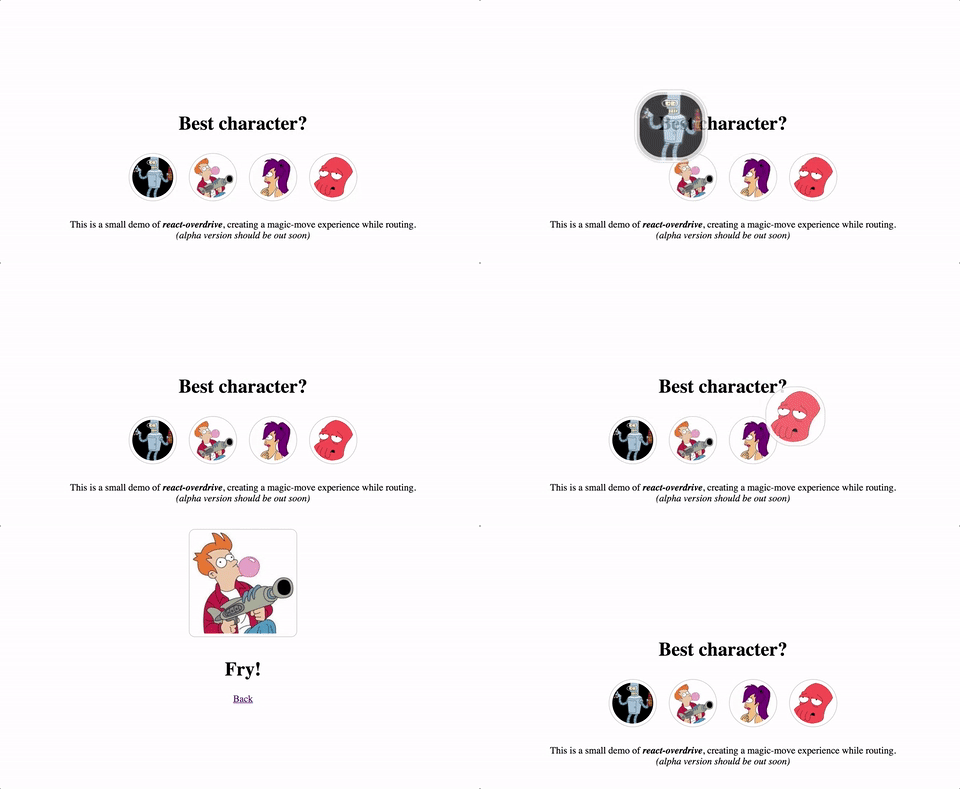
Super easy magic-move transitions for React apps.
Demos


Install
$ npm install react-overdrive --save
Usage
Example with routing
Wrap any element (not just images) in a <Overdrive id=""></Overdrive> component. Add the same id to create a transition between the elements.
On page1.js:
import Overdrive from 'react-overdrive'

const pageA = (props) => (
  <div>
    <h1>Page A</h1>
    <Overdrive id="bender-to-big-fry">
      <img src="bender.png" width="100" height="100"/>
    </Overdrive>
  </div>
);
On page2.js:
import Overdrive from 'react-overdrive'

const pageB = (props) => (
  <div>
    <h1>Page B</h1>
    <Overdrive id="bender-to-big-fry">
      <img src="fry.png" width="300" height="300"/>
    </Overdrive>
  </div>
);
Now route between the pages.
Example without routing
On page.js:
import Overdrive from 'react-overdrive'

const page = (props) => (
  <div>
    {props.loading && <Overdrive id="content"><Loader/></Overdrive>}
    {!props.loading && <Overdrive id="content"><Content/></Overdrive>}
  </div>
);
API
| Prop | Description | Default Value |
|---|---|---|
| id | Required. A unique string to identify the component. | |
| element | Wrapping element type. | 'div' |
| duration | Animation duration (in milliseconds). | 200 |
| easing | Animation easing function. | '' |
| animationDelay | Add delay of calculating the mounted component position. Setting to 1 usually helps avoiding issues with window scrolling. |
null |
| onAnimationEnd | Event dispatched when the animation has finished. | null |
How does it work?
A transition is made when an <Overdrive id="example"/> component is unmounted and another <Overdrive id="example"/> is mounted not later than 100ms.
The transition is made by cloning the unmounted and mounted components, adding them with absolute position and CSS transformed from the source to the target position.
Sponsors
Thanks to the following companies for generously providing their services/products to help improve this project:

Thanks to BrowserStack for providing cross-browser testing.
Who made this?
Tal Bereznitskey. Find me on Twitter as @ketacode.
Explore related projects
freeCodeCamp/freeCodeCamp
freeCodeCamp.org's open-source codebase and curriculum. Learn math, programming, and computer science for free.
458,722 starsdonnemartin/system-design-primer
Learn how to design large-scale systems. Prep for the system design interview. Includes Anki flashcards.
377,263 starsreact/react
The library for web and native user interfaces.
252,365 starsvuejs/vue
This is the repo for Vue 2. For Vue 3, go to https://github.com/vuejs/core
212,629 stars