
beizhu-1209/AIHelms
beizhu-1209/AIHelms has 1,032 GitHub stars and 105 forks. GitHot measured 0 stars in 24 hours. Last checked 2026-11-09 11:53 UTC. Last push 2026-10-26.
企业级 AI 资源纳管平台,提供统一 AI网关、Token调度能力,纳管 OpenAI、Azure、Claude、DeepSeek 等主流模型,并支持 MCP 工具与 Skill 的集中注册分发。具备内外双轨定价、成本归因、统一身份认证、安全审计与效能报表,帮助企业精准控制成本、量化 ROI,高效治理 AI 资产。
Measured star growth
- in 24h
- 0
- in 7 days
- Update delayed
- in 15 days
- Update delayed
- in 1 month
- Update delayed
Net star changes over overlapping periods, not daily totals. Missing measurements are left blank. Stars measure attention, not software quality.
README.en.md
Original
Enterprise AI Resource Management Platform
Built on top of LiteLLM · Model distribution, AI identity, cost control, and governance







| English | 简体中文 |
What Is It · Why AIHelms · Quick Start · Deployment · Cookbook
What Is It
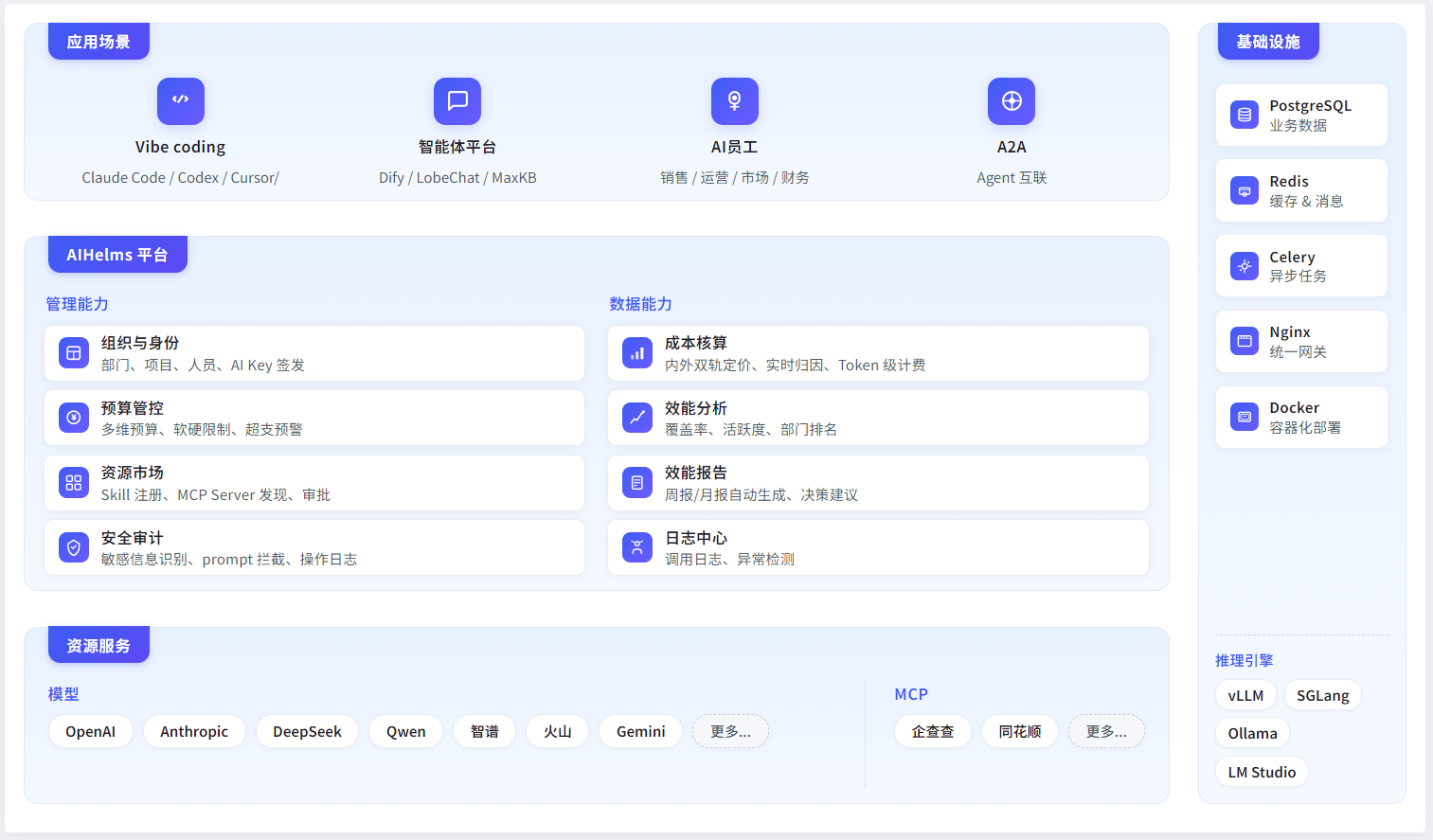
AIHelms is an AI resource management platform for enterprises. It helps companies manage AI assets, control AI spend, and measure the value of AI.
- For leadership — the platform records usage, calculates cost, and generates reports, so the return on your AI investment is visible.
- For administrators — onboard models, assign identities, and set budgets from a single admin console.
- For employees — get an AI identity from the user portal and use it with any client.
Why AIHelms
Cost you can see and control
The biggest worry with enterprise AI is spending money without knowing where it goes. AIHelms builds a full cost model around that:
- Dual pricing, internal and external — external cost (what the provider charges) and internal settlement price (what you bill departments) are tracked separately. Pass cost through as-is, or add a markup for internal settlement.
- Multi-dimensional budgets — set budgets per person, department, project, or model, with soft limits (alerts) and hard limits (cut off on overspend).
- Real-time attribution — every call traces back to a specific person, department, project, and model, down to the token level.
One identity, one entry point
- One AI identity (API key) per employee, one entry point to every AI resource.
- AI employees (in progress).
AI value, quantified
- Coverage — department coverage, activation rate, model usage distribution.
- Activity — daily call volume, tokens per person, usage trends.
- Cost efficiency — department cost ranking, model cost-effectiveness, budget burn, internal vs. external cost gaps.
- Efficiency reports — generated weekly and monthly, with drill-down by department, project, and model.
Security and audit
- Sensitive data detection.
- High-risk prompt interception.
- Admin action tracking.
Centralized resource management
- Model management — onboard multiple providers behind one gateway, load-balance across deployments of the same model, support both OpenAI and Anthropic formats.
- Skill & MCP — register, approve, and distribute internal AI tools in one place.
- Fine-grained permissions — who can use which model, how much quota, and when it expires, all configurable.
Changelog
Recent versions are summarized from GitHub Releases. See the release page for the full changelog.
| Version | Date | Summary |
|---|---|---|
0.1.26 |
2026-10-26 | Added LOG_DETAIL_CONTENT_VISIBLE_TO_ADMIN to control whether regular admins can view request, response and metadata in LLM/MCP log details; super admins can always see them. |
0.1.25 |
2026-09-26 | Fixed saving Anthropic-format model deployments hanging and returning 504. |
0.1.24 |
2026-09-10 | Fixed model publishing authorization: grants now follow the selected department scope, unpublishing revokes access and invalidates approvals, and new users get keys scoped to their visibility. |
0.1.23 |
2026-09-04 | update Hub OpenAPI , plz use V2 endpoint |
0.1.22 |
2026-08-25 | Hub now supports email sign-in; export task history auto-cleanup is now configurable; reworked the MCP log sync window to reuse the LLM config in .env. |
0.1.21 |
2026-08-13 | Fixed user management role/status filter pagination issue. Update export |
0.1.20 |
2026-08-04 | Fixed log sync issues; fixed timestamp display; updated Model Square access info. |
0.1.19 |
2026-07-23 | Added Hunyuan and Grok provider support; reworked static asset (icon) hosting; enhanced batch operations for some APIs; upgraded the LiteLLM model-management base to v1.93. |
0.1.18 |
2026-07-22 | Added a Token column to cost detail by department/project with inline drill-down into members; added Token usage stats and a Top 10 people leaderboard to Efficiency overview, cost, budget and the dashboard; reworked the budget detail "Key budget" tab into "Per-person budget". |
0.1.17 |
2026-07-17 | Unified department and project filters across AI Efficiency and fixed cost details; added fuzzy search to log and admin filters with correct person-to-Key linkage; added Workbuddy to the user-portal client guidance. |
0.1.16 |
2026-07-14 | Added enterprise license management and platform branding customization. |
0.1.15 |
2026-07-013 | Fix bug . |
0.1.14 |
2026-07-07 | AI Policies adds LLM-based review. |
0.1.13 |
2026-07-03 | New AI Policies security review: scan a Skill in one click, flag malicious instructions, data exfiltration, and excessive permissions, and generate a report. |
0.1.12 |
2026-07-01 | Resource requests support batch approval; Skill / MCP add author info, with usage shown in the user portal. |
0.1.11 |
2026-06-29 | Fixed log mismatches for long agent logs such as codex /goal. |
0.1.9 |
2026-06-27 | Added Xiaomi MiMo model onboarding and model logo selection; more complete AI identity rate limiting (total plus per-model). |
0.1.8 |
2026-06-23 | Support for LiteLLM Anthropic-format access through vLLM. |
0.1.7 |
2026-06-23 | Fixed several cost calculation and log statistics issues for more accurate accounting. |
0.1.6 |
2026-06-16 | Improved model connectivity testing. |
0.1.5 |
2026-06-10 | Upgraded the admin dashboard and the cost, efficiency, and budget analysis experience. |
0.1.4 |
2026-06-04 | Fixed several issues and merged community contributions. |
Features
Admin console
For IT administrators and AI owners, covering the full resource management workflow.
 |
 |
|---|---|
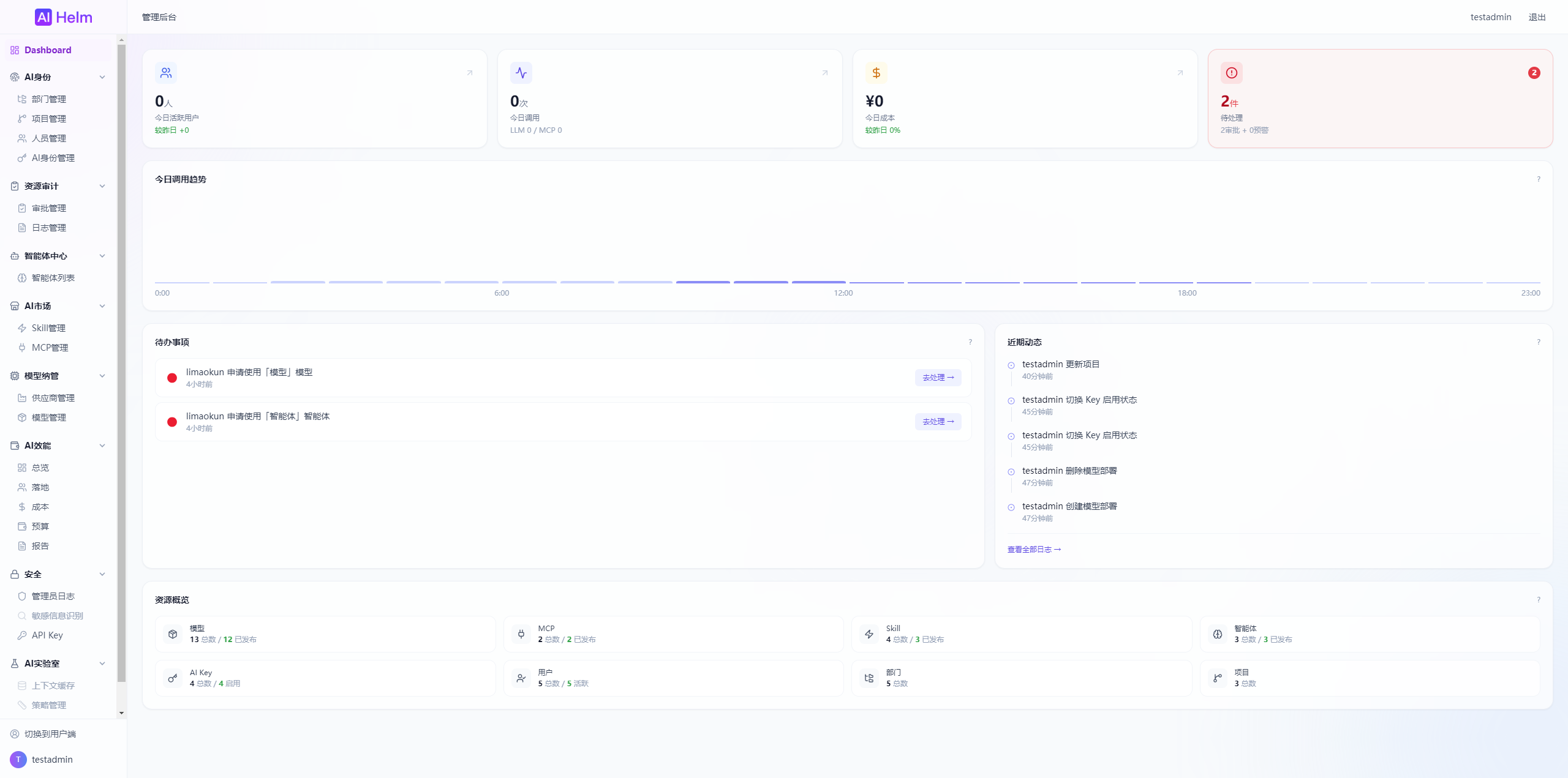
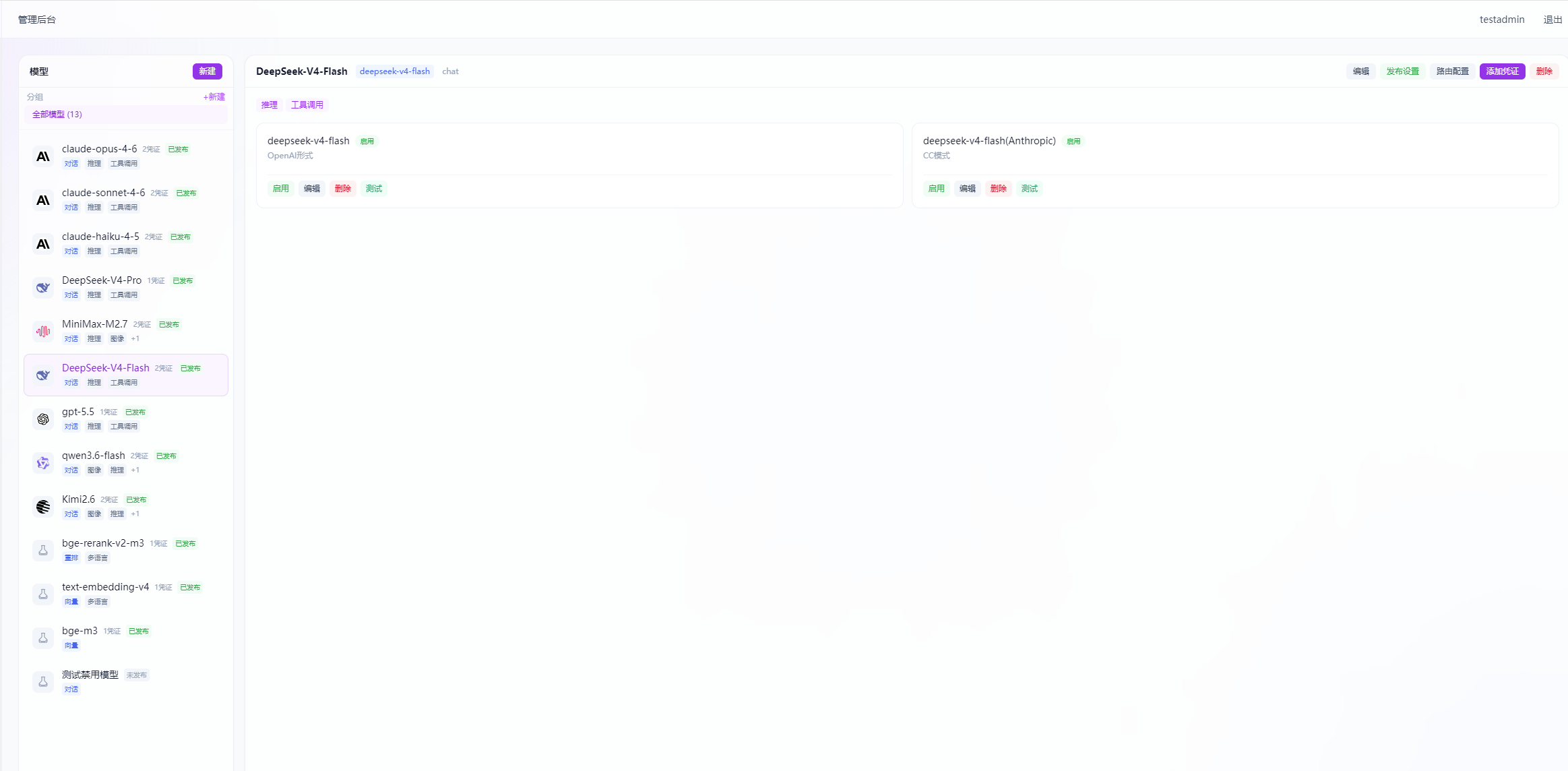
| Dashboard — today's calls, cost, and to-dos at a glance | Model management — provider onboarding, multiple deployments, connectivity testing |
 |
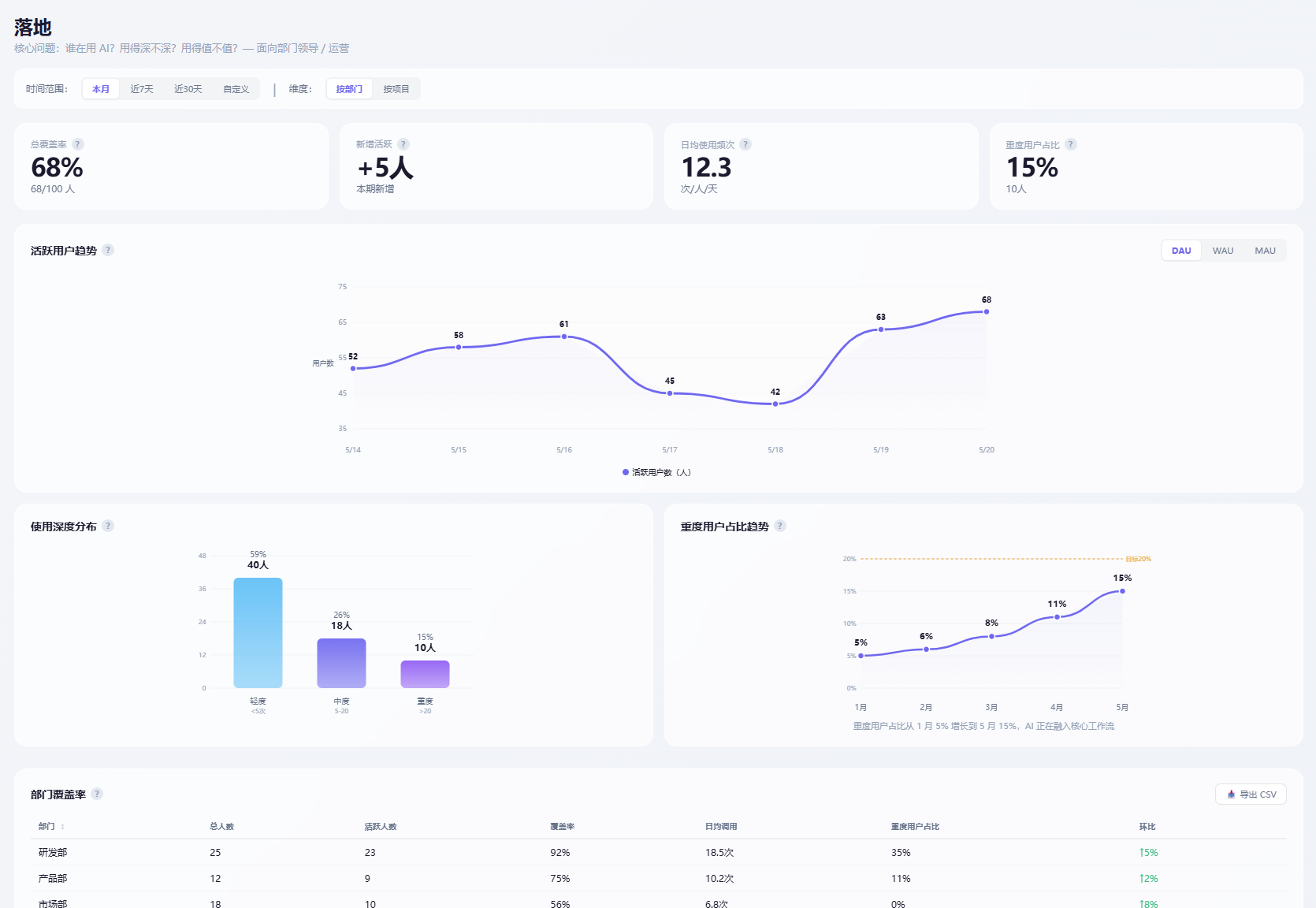 |
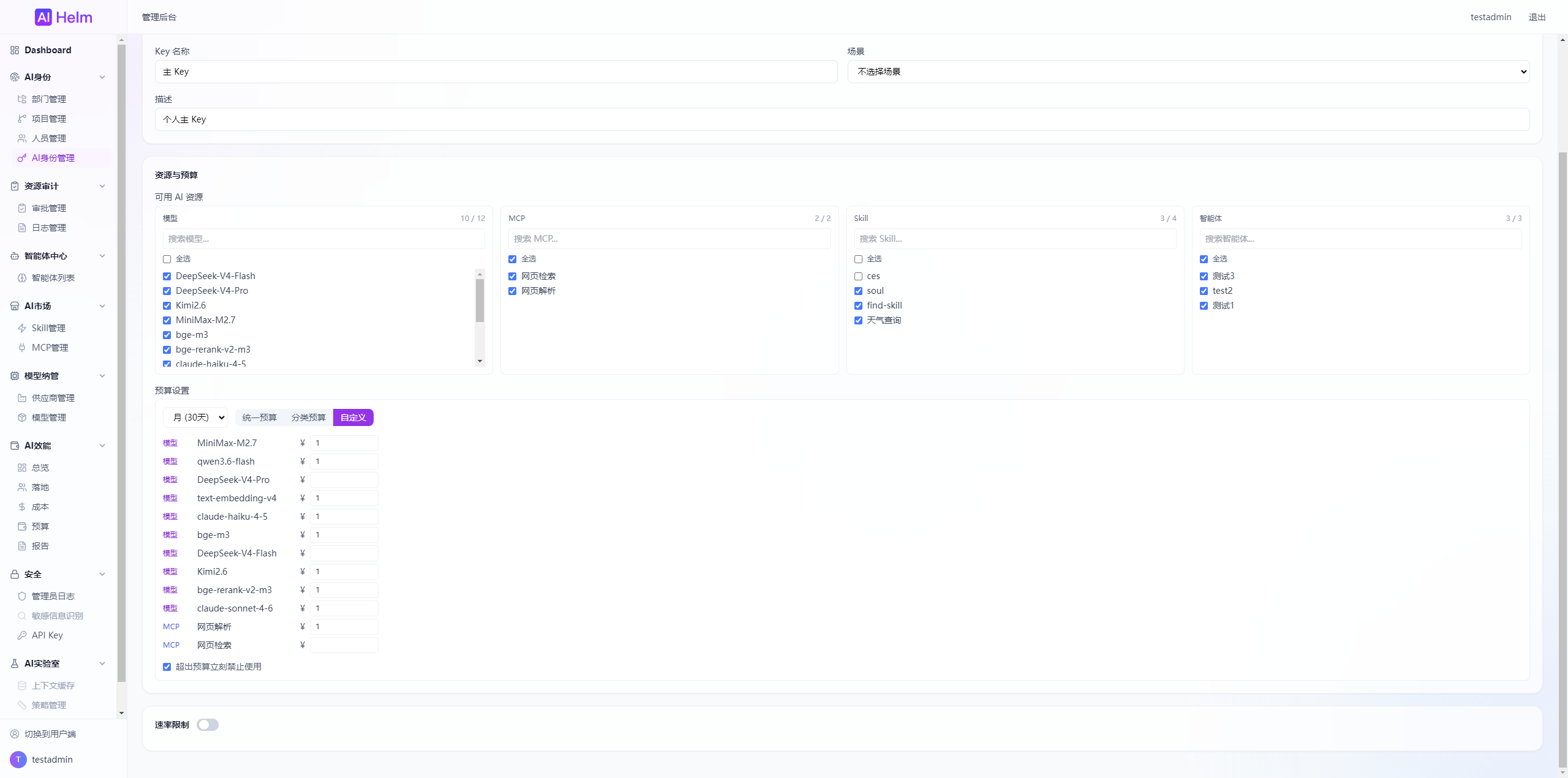
| AI identity — key issuance, budget allocation, lifecycle | AI efficiency — cost analysis, coverage, efficiency reports |
Admin console feature list
| Module | Capabilities |
|---|---|
| Model management | Provider management, credential management, model registration, multi-deployment load balancing, routing strategy, connectivity testing |
| AI identity | Department / project / people management, key issuance, budget quota, rate limiting, model allow-list |
| AI marketplace | Skill publishing, MCP Server registration and discovery, resource request approval |
| AI efficiency | Cost analysis (internal / external), adoption coverage, budget control, efficiency reports |
| Security | Admin audit log, action tracking |
| Agent center | Agent creation, configuration, lifecycle management |
User portal (AI Hub)
For all employees. Simple and direct: get an AI identity and start using it.
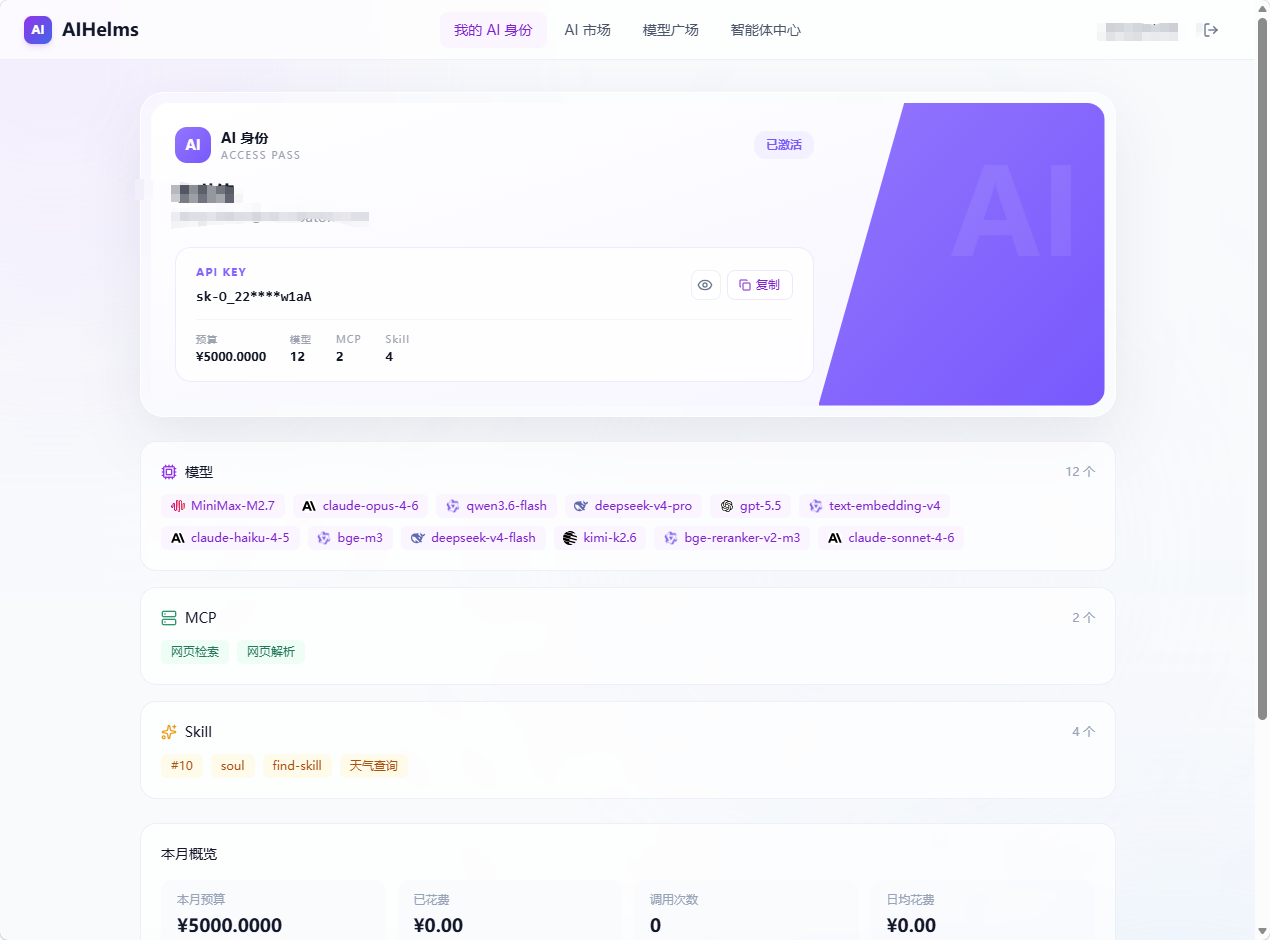
- View your AI identity and copy the key and endpoint in one click.
- Browse the model square and pick a model ID by scenario.
- Browse the AI marketplace and request access to Skills / MCP.
- Check this month's usage and budget burn.
Quick Start
Requirements
- Docker 20.10+ & Docker Compose v2+
- 4 cores, 8 GB RAM (minimum)
Deployment
git clone https://github.com/beizhu-1209/AIHelms.git
cd AIHelms
cp .env.example .env
# Edit .env and fill in your secrets
docker compose up -d
Access
| URL | Description |
|---|---|
http://your-host |
User portal |
http://your-host/admin |
Admin console |
http://your-host/api/docs |
API docs |
Default admin: admin / password is SUPER_ADMIN_PASSWORD in .env.
Three steps to get started
1. Admin console → Providers → Add credential
2. Admin console → Models → Create model → Link credential → Publish
3. User portal → My AI Identity → Copy key and endpoint → Configure your client
Tech Stack
| Layer | Technology |
|---|---|
| Backend | Python 3.11+, FastAPI, Gunicorn, Celery |
| Frontend | Vue 3.4+, TypeScript, Vite 5+, TailwindCSS |
| Database | PostgreSQL 16+ |
| Cache | Redis 7+ |
| Deployment | Docker Compose, Nginx |
Environment variables
| Variable | Description |
|---|---|
POSTGRES_PASSWORD |
Database password |
SECRET_KEY |
JWT signing key |
SUPER_ADMIN_PASSWORD |
Super admin initial password |
WEB_PORT |
Web external port |
See .env.example for the full list.
Development
./dev/setup                 # First-time setup
./dev/start-docker-compose  # Start middleware
./dev/start-api             # Start backend (hot reload)
./dev/start-web             # Start frontend (HMR)
Roadmap
AI Lab
| Feature | Summary |
|---|---|
| Reports | Aggregate AI efficiency, cost, and budget analysis into a management-facing report view. |
| AI health | Monitor MCP upstreams, model deployments, the Docker environment, and efficiency data refresh status in one place. |
| Sensitive data detection | Detect sensitive information in AI interactions to support alerts, audit, and handling. |
| A2A | Plan collaboration, call relationships, and task chaining between agents. |
| Context caching | Cache frequent context and session material to reduce repeated input and call cost. |
| Policy management | High-risk detection, including geo-fencing and prompt injection. |
| File processing | Parse, chunk, index, and preprocess uploaded files for downstream AI capabilities. |
Contributing
- Fork this repository.
- Create a branch:
git checkout -b feature/xxx. - Commit to the dev branch:
git commit -m "feat: describe your feature". - Push and open a Pull Request.
See Development and release workflow for detailed conventions.
Community
WeChat group: scan to join.

Business inquiries: email us
Issues: GitHub Issues
License
AIHelms is licensed under GPL-3.0, and runs on the LiteLLM community edition (MIT License).
If your organization's policies do not allow GPL-3.0 licensed software, or you want to use AIHelms without the obligations of GPL-3.0, email us at Mailfor a commercial license.
Explore related projects
codecrafters-io/build-your-own-x
Master programming by recreating your favorite technologies from scratch.
561,398 starspublic-apis/public-apis
A collective list of free APIs
497,679 starsmorluto/rea
Reverse engineer anything with agents, from app behavior down to native binaries.
447,495 starsopenclaw/openclaw
The AI that really does things. Any OS. Any Platform. The lobster way. 🦞
394,261 stars