
bderenzo/tinymotd
About
Tiny dynamic motd generator (system, disks, network, ...)
Developer ToolsWhat you can do
- Easy configuration and customization
- Tiny (<100kb) optimized scripts
- Minimal dependencies
- Many widgets: docker, lxc, apt, pacman, certificates, disks, ...
Measured star growth
- in 24h
- 0
- in 7 days
- 0
- in 15 days
- Collecting history
- in 1 month
- Collecting history
Net star changes over overlapping periods, not daily totals. Missing measurements are left blank. Stars measure attention, not software quality.
README.md
OriginalTinymotd
Tinymotd generates a dynamic and configurable motd (message of the day) from shell scripts. It assembles widgets (system, disks, containers, packages, certificates, ...) in a layout, and caches slow data.
Features
- Easy configuration and customization
- Tiny (<100kb) optimized scripts
- Minimal dependencies
- Many widgets: docker, lxc, apt, pacman, certificates, disks, ...
- Custom headers and messages
Demo
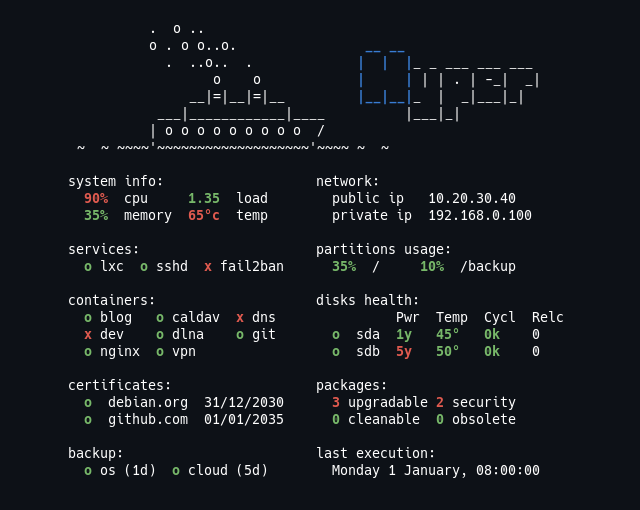
Requirements
Tinymotd requires bash and column from util-linux.
Widgets only need the tools they display (docker, lxc, apt, pacman, ...).
Installation
Clone the repository, then install as root for a given user:
./install -u <user>
The install regenerates the motd with a systemd timer (or cron) and prints it at login through the user's ~/.bashrc:
- every hour for system data (cpu, disks, ...),
- every day for cached data (certificates, packages, ...).
To uninstall:
./install -u <user> --uninstall
Manual installation
Without the install script, generate a motd file:
./generate > ./data/motd
Then schedule this command with the job scheduler of your choice, and print the file at login, for instance in ~/.bashrc.
Usage
Configuration
- Layout:
./config - Widgets:
./widgets/<NAME> - Text above the widgets (ascii art, ...): files in
./headers/ - Text below the widgets (notes, warnings, ...): files in
./messages/
Execution
./generate     # Print the motd
./generate -f  # Force the refresh of cached data
Explore related projects
Loading…