
basetenlabs/loops-cookbook
basetenlabs/loops-cookbook has 8 GitHub stars and 0 forks. GitHot measured 0 stars in 24 hours. Last checked 2026-11-14 16:14 UTC. Last push 2026-11-09.
What you can do
- RL with a verifiable reward (RLVR) - patterns/custom_runtime/in_process_direct - The smallest RL run. The model guesses a hidden answer, and code checks the reply.
- RLVR with held-out evals - examples/sat - The model solves generated 3-SAT problems, and the run scores held-out problems while it trains.
- RLVR on images - examples/counting - A vision model counts overlapping circles, and code checks the count.
- RL with an LLM judge - examples/llm_judge - A judge model ranks each group of answers, and the rank becomes the reward.
Measured star growth
- in 24h
- 0
- in 7 days
- Collecting history
- in 15 days
- Collecting history
- in 1 month
- Collecting history
Net star changes over overlapping periods, not daily totals. Missing measurements are left blank. Stars measure attention, not software quality.
About
Baseten Loops example recipes and patterns
AIREADME.md
OriginalLoops Cookbook




Quickstart · Examples · Loops docs · Changelog · Contributing
The Loops Cookbook is a starting point for post-training models on
Baseten Loops. It gives Loops users working
reinforcement learning (RL) and supervised fine-tuning (SFT) templates to copy and
adapt. Each template is built on top of the
baseten-loops SDK, so you start from code
that already trains instead of from an empty training loop.
Loops runs the GPUs. It trains a low-rank adaptation (LoRA) adapter on your base model, and it serves the latest version of that adapter from a sampler. The cookbook runs everything else on your own machine. For RL, it runs your agent on your tasks, records the exact tokens the model produced, grades each attempt and sends the results to the Loops trainer. For SFT, it turns your conversations into training data with the model's own chat template.
What you can build
Each row below names a goal and the directory to start from. Every directory runs as it is, so you can watch it train before you change it.
| Goal | Start from | What it shows |
|---|---|---|
| RL with a verifiable reward (RLVR) | patterns/custom_runtime/in_process_direct | The smallest RL run. The model guesses a hidden answer, and code checks the reply. |
| RLVR with held-out evals | examples/sat | The model solves generated 3-SAT problems, and the run scores held-out problems while it trains. |
| RLVR on images | examples/counting | A vision model counts overlapping circles, and code checks the count. |
| RL with an LLM judge | examples/llm_judge | A judge model ranks each group of answers, and the rank becomes the reward. |
| An agent that uses tools in a sandbox | examples/tool_agent | A multi-turn agent changes files in a Blaxel sandbox with two tools, and the grader scores what it left there. |
| A coding agent on a real benchmark | examples/terminal_bench | A bash agent works through Terminal-Bench 2.1 tasks in Blaxel sandboxes. |
| A task with several verified steps | examples/multi_step | Each step of a Harbor task is verified as soon as the agent finishes it. |
| Asynchronous RL | examples/async_scheduling | Sampling continues while the trainer updates the policy. A rollout can be up to two policy versions old when it trains. |
| One policy in two roles | examples/critic | The same model proposes an answer, then reviews the proposal and gives the final answer. Both generations train on the reward for the final answer. |
| An agent built on another framework | examples/litellm_streaming | An agent built on LiteLLM streams its replies through the run's OpenAI-compatible endpoint. |
| Your own episodes, step by step | examples/episode_basics | Small episodes show scoring on the host, a shared sandbox and a separate verifier. |
| SFT on tool-use conversations | examples/sft_tool_use | A small synthetic dataset teaches a model to call one tool. |
| SFT on real agent trajectories | examples/sft_toucan | The model trains on 2,000 conversations from Hugging Face, then the base model and the adapter are compared on held-out conversations. |
The examples index lists the model that each example trains.
How an RL run works
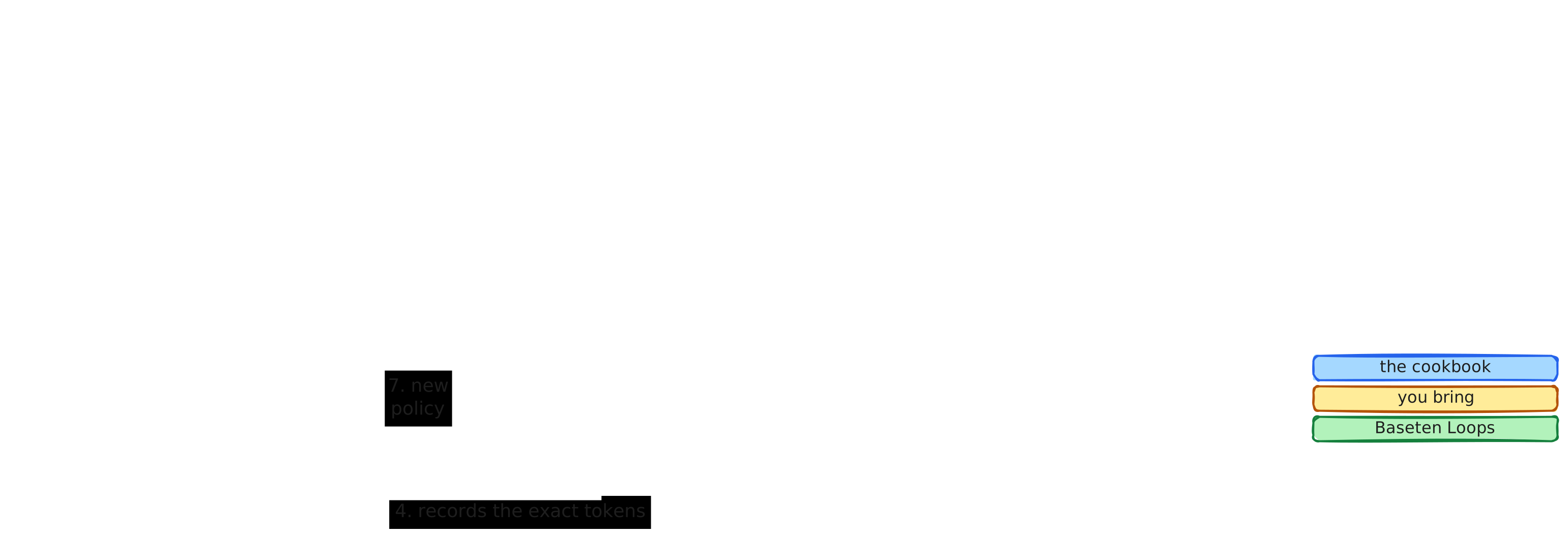
An episode is one attempt by your agent at one task. An RL run repeats these steps:
- The run schedules episodes on the rollout runtime. The rollout runtime is the part that prepares tasks, runs episodes and grades them. It is either Harbor or a custom rollout runtime that you write as a Python class.
- The rollout runtime runs your agent in the task's environment.
- Every model call the agent makes goes through the cookbook's model client to the Loops sampler.
- The model client records the exact tokens that the sampler returned.
- The task's grader scores the episode, and the rollout runtime returns the reward to the run.
- The run combines the recorded tokens and the rewards into training batches and sends them to the Loops trainer.
- The trainer publishes the updated policy to the sampler, and the next episodes use it.
You bring the environment and the agent. The environment is the tasks, any sandboxes the tasks need, and a grader that turns what happened into a reward. The agent decides what to do in the environment, and it owns its prompts, tools, history and stopping rules.
The cookbook brings everything between your agent and Loops. Its model client renders messages with the model's own chat template and keeps the exact token IDs and log probabilities. The cookbook also schedules episodes, either in lockstep with training or asynchronously. It computes advantages with group relative policy optimization (GRPO), which scores each attempt against the mean reward of its group. It also manages checkpoints and reports metrics.
Every run is described by a training config, a TOML file whose recipe key names the
training method: recipe = "rl" or recipe = "sft". The loops command runs both.
Install
You need these before you start:
- uv.
- A Baseten workspace with Loops enabled, and an API key for that workspace.
If your model or its tokenizer is in a gated or private Hugging Face repository, you
also need HF_TOKEN.
To use the cookbook as a dependency of your own project, install it from
PyPI. Add ==X.Y.Z to the package name to
pin a release.
uv add baseten-loops-cookbook # SFT, or RL with a custom rollout runtime
The package includes the examples, patterns and
tasks from this repository. To run one, give its path in this repository,
such as examples/terminal_bench/train.toml. This works from any directory, without a
clone. If a file exists at that path, the cookbook runs it instead, so you can copy an
example and edit it.
uv run loops check examples/terminal_bench/train.toml
A file at that path in your working directory takes precedence over the installed copy.
To change an example, copy its directory to that path in your working directory.
loops check prints the path of the config it read, so it shows you where the
installed copy is. Some examples have scripts that write files beside themselves, such
as sft_toucan, so copy those before you run their scripts too.
To run the examples from source and change them, clone this repository and install the
extras you need. The extras have the same names when you install from PyPI, for
example uv add "baseten-loops-cookbook[harbor-blaxel]".
uv sync                         # the core: SFT, and RL with a custom rollout runtime
uv sync --extra harbor          # + the Harbor rollout runtime on Docker
uv sync --extra harbor-blaxel   # + the Harbor rollout runtime on Blaxel sandboxes
uv sync --extra harbor-daytona  # + the Harbor rollout runtime on Daytona sandboxes
uv sync --extra blaxel          # + the Blaxel provider alone, for a custom rollout runtime (likewise daytona)
uv sync --extra wandb           # mirror metrics to Weights & Biases
uv sync --extra console         # the rich live progress region (--output.console)
uv sync --extra vision          # image inputs for vision models (brings torch)
uv sync --extra custom-loss     # RL: your own loss through forward_backward_custom (brings torch)
Set your API key in the environment before you run anything:
export BASETEN_API_KEY=...
The loops command also reads a .env file if it finds one beside the training config
or in the working directory. A variable that is already set in your environment always
takes precedence over the file. .env.example lists every variable the
cookbook reads. Loops itself needs nothing installed locally, because the trainer and
the sampler run on Baseten.
Serverless or dedicated
Loops can run a model in one of two ways:
- Serverless. The run trains and samples on shared capacity that Baseten keeps ready, so the run starts in minutes. You pay for the tokens it uses.
- Dedicated. The run gets its own trainer and sampler deployments. They take longer to start, and you pay for their GPU time until the run is deactivated.
Every training config chooses one with [compute] scope = "serverless" or
[compute] scope = "dedicated". The scope belongs to the config, not to the model, so
the same model and config can run either way if your workspace has access to both.
Serverless capacity doesn't serve every model or configuration, though, and what it
serves depends on your workspace. A serverless run that it
cannot serve fails when Loops creates the run. It never falls back to a billed
deployment.
Some settings size a deployment, such as the replica counts, spot capacity and reuse of
an earlier run. These settings apply only to a dedicated run, and loops check refuses
them on a serverless run.
loops run leaves the Loops run up when it exits. A dedicated run keeps billing until
you deactivate it, and a later dedicated run can start warm on it. A serverless run
keeps holding a slot in your workspace. Run loops deactivate <run id> to end it later,
or set [compute] keep_run = false to deactivate it on exit. Its checkpoints stay
either way.
The first RL and SFT runs below train Qwen/Qwen3.6-35B-A3B on serverless capacity. Some patterns and examples train other models, and the examples index says which scope each one uses.
[!NOTE] Contact Baseten to get access to serverless capacity, to train a model that serverless capacity doesn't serve, or to get dedicated capacity.
Run your first RL job
The smallest RL run needs only the core install and BASETEN_API_KEY. It needs no
Harbor, Docker or sandbox.
uv run loops check patterns/custom_runtime/in_process_direct/train.toml
uv run loops run   patterns/custom_runtime/in_process_direct/train.toml
Run loops check first. It validates the config and asks Loops whether it serves the
model, but it starts no trainer and no sandbox. It isn't read-only, though. On a first
run it downloads the tokenizer and any remote dataset. It also writes a run directory
under <output_dir>/preflight/, with its own resource journal and whatever the rollout
runtime writes while it prepares.
loops run starts the training run, which uses billable Loops resources. In this run,
each episode asks the model to name a hidden answer and scores the reply itself. The
reward rises within a few steps. You can override any training setting on the command
line, and loops run --help lists every setting with its default.
If your tasks are Harbor tasks, start from
Harbor, in-process, direct instead. It runs the
same one-call agent on the shared hill-climb task. A Harbor task
always starts an environment for the agent and its verifier, so even this small task
runs in a sandbox. Use train.toml to run the sandbox on local Docker, which needs
--extra harbor. Use train_blaxel.toml to run it on Blaxel without Docker, which
needs --extra harbor-blaxel and Blaxel credentials.
If a run crashes, the sandboxes it created on Blaxel or Daytona are listed in the run's
resource journal, and loops cleanup releases them:
uv run loops cleanup patterns/harbor/in_process_direct/train_blaxel.toml --state-dir runs/harbor-direct-blaxel/<run-dir>/state
Harbor creates Docker sandboxes itself, so they aren't in the journal. After a Docker
run crashes, check docker ps.
The training process runs on the machine where you start it. It renders every prompt,
holds the tokens of every live conversation, and opens files and sockets for every live
attempt. Its CPU, memory and open files therefore grow with max_concurrent_rollouts
and with context length, and loops check refuses to start when the open-file limit is
too low. A laptop is enough for the patterns in this repository. Use a dev box for high
concurrency with long contexts, or for a run that has to outlast your laptop.
Run your first SFT job
SFT needs no rollout runtime, pattern or sandbox. It needs only your data and a Loops trainer.
uv run loops check examples/sft_tool_use/sft.toml
uv run loops run   examples/sft_tool_use/sft.toml
loops check renders every row of the data and reports what will train, what is split
per turn and what is refused, with the reason. It launches nothing. loops run starts a
billable Loops trainer.
The data is OpenAI's chat fine-tuning format in JSONL, with messages, tools and a
per-turn weight. For full control, you can provide already tokenized input_ids and
weights instead. Each conversation is rendered with the trained model's chat
template, and the template decides which tokens train. Every trained turn learns its
own stop token, in the context it was generated in.
docs/reference/sft.md has the data contracts, the rules for
which tokens train, the metrics and resuming.
For a larger run, examples/sft_toucan trains on real tool-agent trajectories from Hugging Face, then compares the base model and the adapter on held-out conversations.
Connect your own agent and tasks
Once a first run works, copy the pattern in patterns/ that is closest to your own agent and tasks. A pattern is a runnable directory that you can adapt. patterns/README.md explains how to choose one, and examples/ builds on the patterns with other settings and features.
Use the cookbook as a library
You can check and train a config from your own Python code instead of the loops
command:
import asyncio

from loops_cookbook.project import load


async def main() -> None:
    project = load("train.toml")
    for line in (await project.check()).describe():
        print(line)
    outcome = await project.train()
    print(outcome.status)


if __name__ == "__main__":
    asyncio.run(main())
check() does what loops check does and returns a report. train() does what
loops run does and returns the run's outcome.
docs/reference/library.md explains how load() finds
files, and which packages make up the public API.
Read next
- patterns/README.md describes every pattern and every environment backend.
- examples/README.md lists the examples by the setting or feature each one shows.
- docs/reference/ has the exact rules for the training
loop, evals, model access and token capture, scheduling, resources, failures, the
EpisodeAPI, Harbor, Daytona, renderers and SFT. The knob glossary lists every setting. - docs/README.md explains how the cookbook is built, for developers who change it.
- tests/README.md describes the test layout and the live tests.
Contributing
CONTRIBUTING.md explains how to set up the repository, run the tests and cut a release.