
bardesss/haelan
bardesss/haelan has 43 GitHub stars and 7 forks. GitHot measured 0 stars in 24 hours. Last checked 2026-11-15 02:51 UTC. Last push 2026-11-13.
Measured star growth
- in 24h
- 0
- in 7 days
- Collecting history
- in 15 days
- Collecting history
- in 1 month
- Collecting history
Net star changes over overlapping periods, not daily totals. Missing measurements are left blank. Stars measure attention, not software quality.
About
Self-hosted dashboard and local mirror for your household's Google Health data. One SQLite file, one container, no telemetry.
Self-hostedREADME.md
Original
Hælan
Hælan is Old English for "to heal, to make whole" — the root of both heal and health. The
package, the image and the command are all haelan.
A self-hosted dashboard and local mirror for your own health data, read from Google's Health API or, for an all-Android household, from a companion app that needs no Google Cloud project at all. One household, one instance, no telemetry, no hosted offering.





The reason it is self-hosted is structural rather than ideological. Google caps an unverified OAuth client at 100 users, and clearing verification for health scopes needs a paid third-party security assessment. A hosted dashboard therefore stalls at a hundred signups no matter how good it is. An instance whose only users are the people who own its OAuth client never meets that cap. The direct cost is that every household brings its own Google Cloud project; the direct benefit is that no ceiling exists.
Written by an AI agent
Every line of haelan was written by a coding agent, with a human deciding what got built, what got rejected, and what got merged. That is stated here rather than in a footnote because you are considering pointing this at your own health record, and it should inform that decision rather than surprise you later.
What it means in practice: nothing merges without tests, every pull request is reviewed - by a
second agent and by a human - and the numbers in this README and in ROADMAP.md are measured
against a real instance rather than estimated. The one figure that is not, the time this release's
rebuild will take on a database larger than any that has been timed, is marked as an extrapolation
where it appears. Where something is unverified, it says so.
What it does not mean: no security professional has audited this. It has one household's worth of
production use. CONTRIBUTING.md documents five failure modes that have actually produced wrong
work in this repository - a green test that never failed for the right reason, an assertion matching
a substring instead of a value, a claim about a file nobody opened - because they recur, and
catching them is a standing part of how the project is built rather than a past embarrassment.
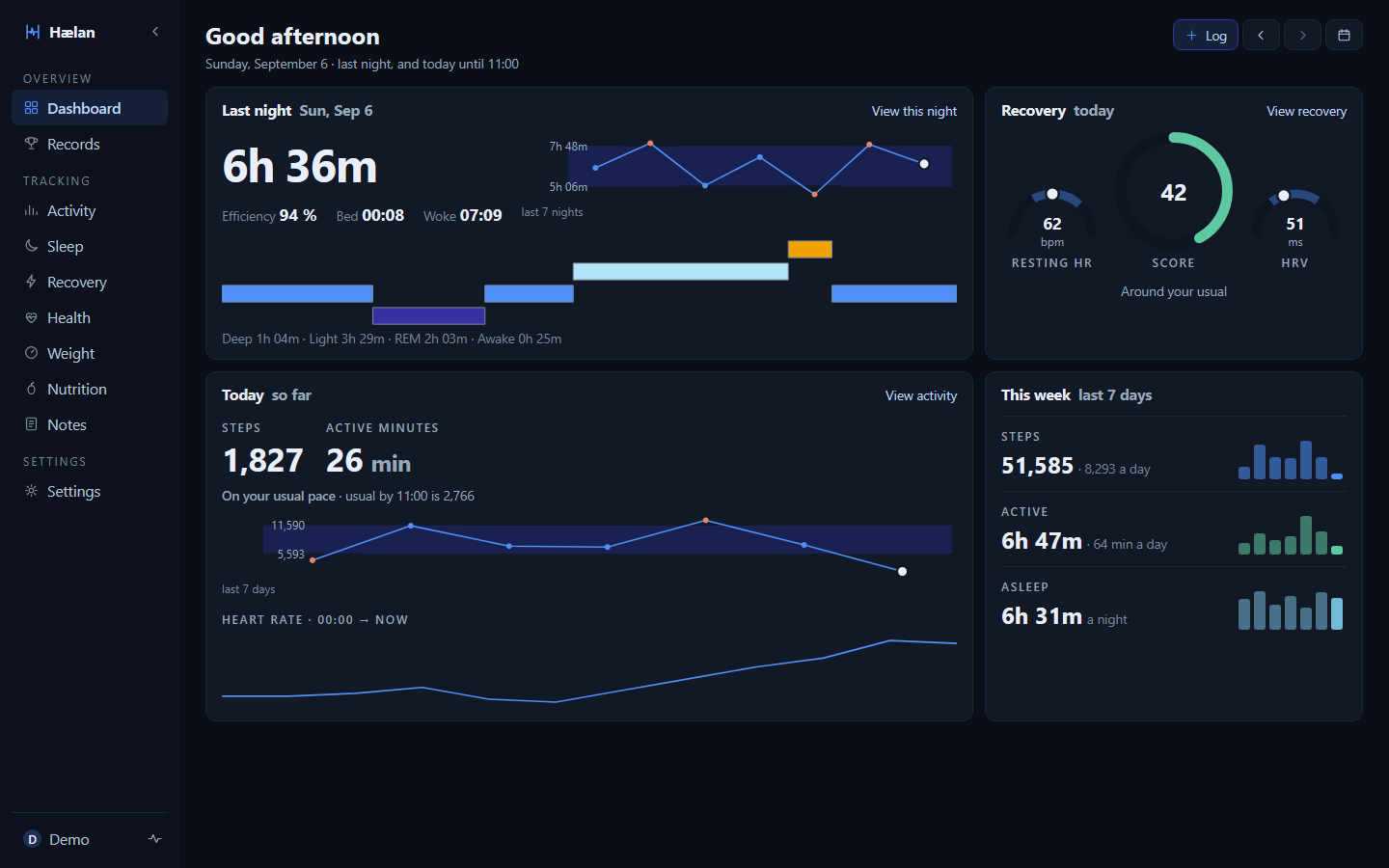
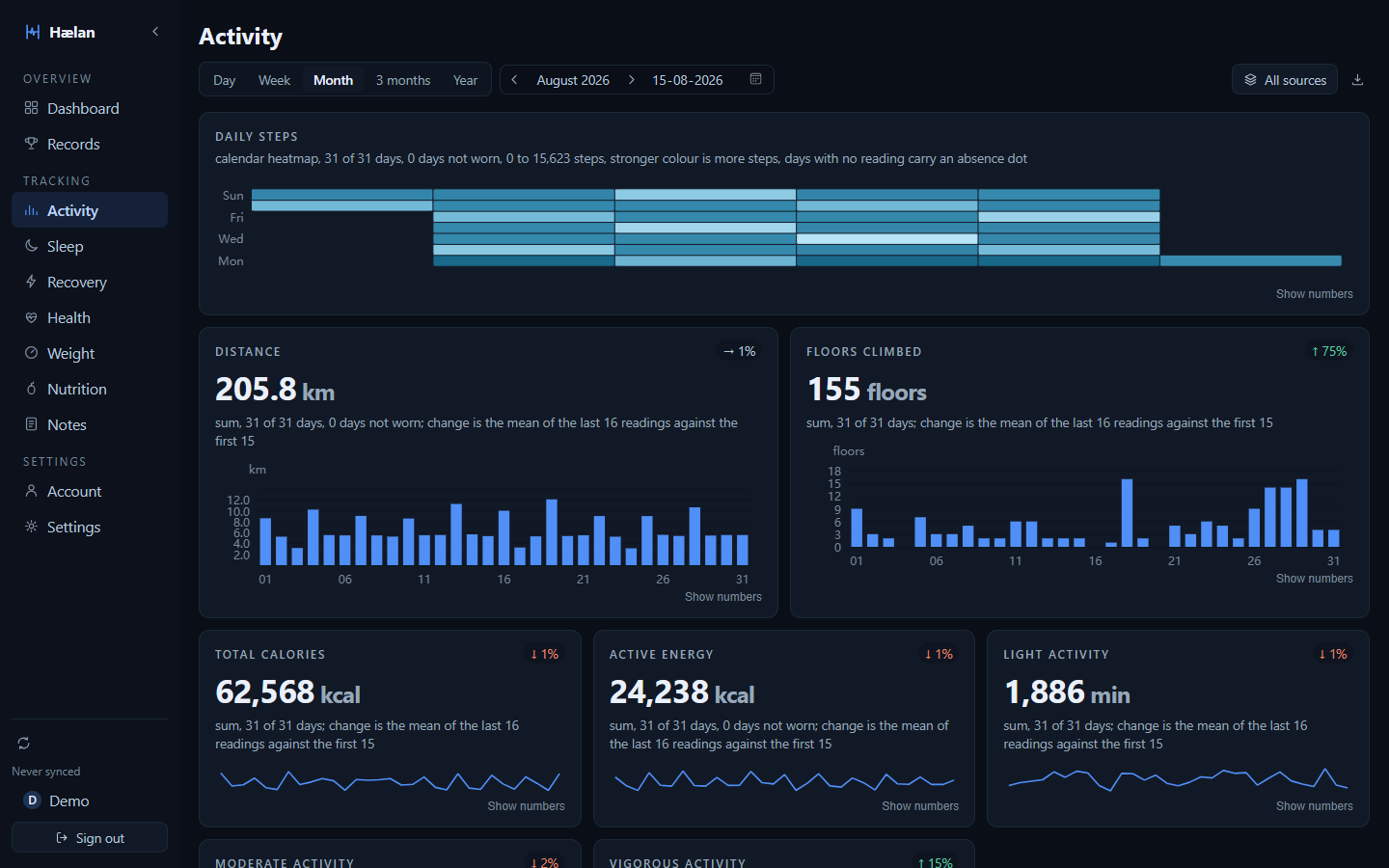
Dashboard and Activity above; Quick logging,
Sleep, Recovery and
Phone glance as well. All six are the demo data
scripts/seed-demo.mjs generates, not anybody's real health history.
What it does
📦 A complete local mirror
Your whole history in one SQLite file, kept past Google's retention windows and surviving you losing access to the API. Intraday samples in particular have a shelf life at the source, so a mirror is the only place minute-level history stays available at that resolution.
📊 Ten pages of it
Dashboard, Records, Activity, Sleep, Recovery, Body age, Health, Weight, Nutrition and Notes: sleep with stages and nap detection, resting heart rate and HRV, SpO2 with its confidence interval, steps, active minutes and every workout, with a page behind each night and each workout. There is also an intraday chart, a weight trend, and period-over-period insight cards that withhold themselves, each with its own reason, when the data behind them is thin.
Sleep, Activity and Recovery read a week, a month, three months or a year as a period. Each figure is the period's average, or its total where a sum means something, set against its usual, with the verdict in words: how many days were usual, lower or higher, the longest night or busiest day, and the change against the period before. On three months and a year the strips draw one point per week. Sleep adds the stages and their shares, the schedule with weekday against weekend, the sleep balance and the mornings after; Activity adds a heatmap of each day's steps on three months and a year, the intensity split, zone minutes, the workouts with each type's count against its usual, cardio load and the VO2 max trend. Recovery sets the recovery index against its usual with its day counts and the input that moved it most, shows resting heart rate, HRV and breathing rate under it, follows HRV's seven-day average against its usual week with the stretches it spent on one side, draws the daily heart rate range, and closes with how the index is worked out.
A night's page sets time asleep, efficiency, deep sleep, REM and bedtime against their usual ranges, and draws the stages on one time axis with the heart rate, HRV and SpO2 traces. It says when the first deep sleep and the first REM began and how many cycles the night held, how far the sleeping heart rate dipped below that day's resting heart rate, and opens the morning after with one sentence naming what sat outside its usual overnight. Each session the night was assembled from has its own exclude control.
A workout's page sets every figure against earlier workouts of the same type, and follows the sport: pace for a run or walk, speed for a ride, pace per 100 m for a swim, with cadence and running form only where they mean something. Heart rate runs through the session with the pace or speed and cadence lines beneath it, heart-rate recovery is read one and two minutes after the end, and the night before sits beside the night after. A workout recorded with a GPS route is also set against earlier times on the same route, and a run names its fastest 1 km, mile and 5 km.
Records is the one page that ignores the range entirely, because the questions on it cannot be asked of a window: the best day on record for each metric, an Eddington number, a timeline of milestones, and one card per sport with its longest, furthest and fastest sessions, from a run's fastest kilometre to its fastest marathon and a ride's fastest 100 km. A treadmill or an indoor bike never sets a distance or speed record, and neither does a distance estimated from a phone's own readings. Each figure states the span it was computed over rather than claiming the whole archive, since a metric's history can begin long after the archive's does. English and Dutch throughout. Nutrition is the one page with nothing on it: this household has never logged food, and the API's Food type carries no timestamp to file a meal under, so the page says so rather than inventing a data model to have something to draw.
📐 Personal baselines
A reading is shown against your own usual, because "96 bpm" carries no information on its own and "1.4 standard deviations above your baseline" does. On the dashboard and a night's page that is your own last 60 days, and the recovery index keeps its 60 day baseline wherever it appears. A workout stands against earlier workouts of the same type. The Sleep, Activity and Recovery pages compare a period with the ones before it: a month with the twelve months before it, a week with the twelve weeks before, three months with the four quarters before them, and a year with the previous year's four quarters, since one year has no spread of its own. An earlier period counts only when at least half of its days have data. A baseline computed from too few days is flagged as thin rather than quietly presented as one.
📝 Context a stateless dashboard cannot have
Daily notes and typed events (illness, travel, alcohol, medication, injury, and any other kind you name) become analysis variables, so "how do I sleep after a late flight" is answerable rather than guessable.
✂️ Corrections that do not rewrite history
A glitching strap reporting 210 bpm is excluded by an override applied at derivation time; the raw payload is never modified, and removing the override restores the original value exactly.
👥 Household multi-user
A few people, one instance, each seeing only their own data. An admin invites a member, the member chooses their own password, and each person connects their own Google account and picks which data types get fetched for them.
🧰 Eighteen typed tools for an agent, read-only and person-bound
They sit over the same person bound query layer the browser reads through, reachable over stdio
from inside the container or over POST /mcp from anywhere else. An HTTP call needs a token
minted from your own account, stored as a digest, and expiring on its own after 30, 90 or 365 days
- there is no permanent one - and every one is logged: when, which token, which tool and how it
ended, with no column for the arguments themselves; a call made over stdio is not logged at all.
sql_querygoes further still, running one read-onlySELECTover a projection database built fresh for the call and thrown away after, holding one person's rows in seven tables and none of the ones that could name a password or another member.
explain answers a question by walking one chain and stopping at the first link that accounts for
it, naming that link and every one it checked. It has five kinds: why a metric has no reading on a
day, what a day's recovery index stands on, what stands out about one workout, what on a finished
day sits away from your usual and what was lived beside it, and why a period comparison came back
as not enough data. Its answers describe the data and stop there: an association at most, never a
cause or advice.
The Android companion app
An instance reads a household's data through Google's Health API. A household where every member uses Android can skip that entirely: the companion app reads Health Connect on the phone and sends readings to the instance directly, with no Cloud project and no console.

Releases tagged android-v carry a signed APK rather than a Google Play listing, so
Obtainium is how updates arrive. The button carries the
release filter it needs, because this repository publishes server releases and app releases into one
stream.
The Android path asks less of the person setting it up, and it gives some things up in exchange, which
apps/android/README.md lists.
The glance on the phone
The app opens on the same glance as the web dashboard, drawn natively: last night, recovery, today and
the week, each against your own usual range, with the day arrows and the month calendar to step back
through any day that has data. It opens at once on the last glance it saw, kept encrypted on the phone,
and refreshes when you pull, come back to it, finish a sync or pass midnight; when the instance cannot be
reached it says since when it is showing what it shows. The + logs how the day felt, what happened and
the day's note, the same panel as on the web, and tapping a card opens the page behind it inside the app,
already signed in. Sync, permissions and signing out sit behind the account icon, where the sync
card also carries Sync Health API: for a household that connects Google as well, it asks the
instance to fetch your Google data now rather than at its next scheduled run, and says when a sync
is already running or when to try again. The glance needs an instance of 2.13.0 or later, and says
so on an older one.
One workout, whichever device sent it
A watch that syncs to both Google and Health Connect sends every workout twice. The instance reads the two copies as one workout: the copy first in your source priority, with any figure it lacks taken from the other.
A workout only the phone has sent so far, because Google's copy has not synced yet, is filled from the phone's own readings in the meantime: steps, distance, energy, average heart rate, the heart-rate zones, and a pace or speed over the elapsed time, since the phone's copy carries no pauses. Each filled figure says it came from your readings, and the workout's page says the watch's figures arrive with the next sync, with a button to start one. Google's figures take over the moment its copy arrives, and a filled distance never sets a record.
Workout routes
The companion app is also the only way a route reaches an instance. Google's Health API returns no route points at all, so a workout synced from Google can say a GPS route was recorded and never show one; a workout synced from a phone carries the track itself, drawn on the workout's page as a line.
Health Connect asks for route access separately from everything else, and a route nobody granted simply does not arrive. The workout page says nothing in that case rather than guessing why.
Coordinates are the most identifying thing an instance stores, so they are treated as such. The line is drawn by the page itself, from the points, with no map library and no request leaving your network. No agent tool returns a route, and the demo below carries a synthetic one that closes on itself in the open ocean rather than anybody's real track.
If you want streets under the line, Settings -> Info -> "Show a basemap under a workout's route" turns it on, and only an admin can. Switched on, the page fetches map tiles from OpenFreeMap, whose map data comes from OpenStreetMap, and draws them in the dashboard's own colours in both themes. OpenFreeMap then sees the coordinates of every route it draws, including where each one starts and ends, which is usually home. It is off by default, switching it back off stops it, and a tab left open on an instance where an admin has just switched it off checks again before it draws anything.
Deploy
compose.yaml at the repository root is eight lines of YAML and carries no
environment variables at all. It needs no editing, because every value the server reads already
has a working default.
docker compose up -d
Then open http://localhost:4235. The database is empty, so the setup wizard runs. It asks for
four things in order: an admin account, the address this instance is reached at, a Google OAuth
client, and consent. After that it asks which data types to fetch and how far back to backfill.
Proxmox LXC
proxmox/ holds a Community Scripts installer. It
builds an unprivileged Debian container from the latest release rather than running the image,
because that catalogue takes bare-metal installs and not Docker. Run it on the Proxmox VE host:
bash -c "$(curl -fsSL https://raw.githubusercontent.com/bardesss/haelan/v2.24.1/proxmox/ct/haelan.sh)"
The command is pinned to the current release, and so are the scripts it fetches in turn.
It creates the container, installs Node, builds the web app, writes a systemd unit and prints the
address to open, which lands on the same setup wizard. Running the same command again updates an
existing container to the latest release. The data directory is /opt/haelan_data, deliberately
outside the tree an update replaces, so the database, the key and the backups survive it. The
service runs as an unprivileged haelan user, and /opt/haelan_data is readable only by it. An
update builds the new release beside the running copy and goes back to that copy if the new one
does not answer.
Nobody has run these on a Proxmox host yet, so compose above is still the path that is tested. #232 is where to report it if you do, and every container the script builds points at that issue too.
They are not in the Community Scripts catalogue and will not be for a while: their bar for a new script is six months of age and 600 stars, and haelan has neither. That changes nothing about running them from here, which is what the command above does - the catalogue is a listing, not a dependency.
The one manual step
Somebody has to create a Google Cloud project and an OAuth client once, in the console. Google exposes no API for that, and the credentials must belong to whoever owns the data, which is precisely what keeps an instance out of the verification ceiling described above. The setup wizard makes that step guided, validated and copy-paste driven. It cannot make it disappear, and any documentation claiming otherwise would be lying.
The wizard walks you through it and prints the exact values to paste. What you do in the console, in the order it asks:
- Open console.cloud.google.com and create a project, or pick an existing one.
- Under APIs and services, enable the Google Health API.
- Configure the OAuth consent screen and declare the eleven read-only scopes the wizard lists, including the data types you do not want today: declaring is once, granting is per person, and a scope you skip now means a second visit later.
- Set publishing status to In production. Leaving it in Testing gives every refresh token a seven day life, and the household's sync stops a week after setup with no obvious cause.
- Create an OAuth client of type Web application and register every redirect URI the wizard shows, in one pass. An unused URI costs nothing; a missing one costs a return trip.
- Copy the client ID and secret into the wizard.
Your client stays unverified, so everyone granting consent sees an unverified app warning. That is expected here and is not a sign anything is wrong: verification exists to lift a hundred user cap a household instance never reaches.
Two things worth knowing before you rely on this
- Consent needs an HTTPS or loopback address. Google's OAuth console refuses a raw IP as a
redirect target and requires HTTPS for anything that isn't localhost, so a browser on the same
machine the instance runs on works out of the box. Reaching consent from another device on the
LAN needs either Tailscale, whose
ts.netnames carry a real certificate, or a reverse proxy holding a certificate for a domain you own. Recorded from a real walk through the console atprobe/findings/console-steps.md. - Leave room for a second copy of the database in free disk. The daily backup and the boot-time reclaim each write a whole new file before anything old is replaced or freed, so each needs room for another copy of what the database holds, with a margin. Neither runs when it cannot: both read free space first and decline, visibly, rather than filling the disk.
Configuration
There is nothing to configure. Every variable below has a working default, and they exist for people who disagree rather than for people installing.
| Variable | Default | What it is for |
|---|---|---|
HAELAN_DATA_DIR |
/data |
Where the database, the key and the backups live |
HAELAN_PORT |
4235 |
The port the server listens on |
HAELAN_HOST |
0.0.0.0 |
The address it binds to |
HAELAN_ENCRYPTION_KEY |
generated | Holding the key yourself instead of in a file beside the database |
Everything above has to be true before the server binds a port or opens the database, which is why it is here rather than on a settings screen. How many backups to keep and how often to take one are not: the process is already running by the time either matters, so both live in Settings, under Database maintenance, beside the buttons that take a backup and reclaim space.
What is in the data directory
haelan.sqlite is the database: the archived payloads, everything derived from them, and every
note, event and override. instance.key is the 44 byte file that decrypts the stored Google
credentials, and it is deliberately not in a backup, so keep a copy of it somewhere separate.
backups/ holds the compacted daily copies.
Storage, and how it grows
Every number below was measured on the author's own instance: one person, 741 days of history. They are here so you can size a volume before you start rather than after the disk fills.
After a reclaim the database holds 247 MB for those 741 days, which is about 120 MB per person-year. Of that, the gzipped raw archive is roughly 122 MB and the derived samples with their two indexes roughly 160 MB - the two overlap somewhat in how they were measured, so they do not sum exactly to the total. Intraday heart rate is the bulk of it: a reading every few seconds, collapsed to three rows a minute.
Backups multiply it. The default keeps seven daily copies, each a compacted copy of the whole
database, so a 247 MB instance carries roughly 1.7 GB of backups on top of it. Settings, under
Database maintenance, changes how many are kept, and 0 turns backups off for an operator who
backs the volume up some other way.
The boot vacuum needs headroom of its own. It declines to run unless free disk exceeds the live
content by 20%, because VACUUM builds a whole new file before the old one is replaced. It says so
in the log rather than filling the disk.
Put together, a realistic steady state for one person after two years, on defaults, is roughly 2 GB - about a quarter of it the database, the rest its backups.
The archive does not shrink to save space, and that is deliberate rather than an oversight: it is the only complete record once Google's own retention window has passed, so pruning it trades away the one thing that makes a rebuild - re-deriving samples and daily rows from scratch - possible at all. Intraday data carries the same asymmetry from the other end: the API itself only retains it briefly, so once a window has aged out at the source it cannot be re-fetched at that resolution no matter how much local disk is free. Growth here is the cost of what this project is for.
Try it without a Google account
scripts/seed-demo.mjs writes a year of generated data into an empty directory and leaves the
setup wizard already finished, so an instance boots straight past it, signed in, with a year of
history to browse. The seed's own span is fixed rather than tied to today - reproducibility over
currency, DEMO_END_DATE in the script says why - so the default landing view can read thin once
real time drifts past it even though the year behind it has not gone anywhere.
pnpm install
pnpm build
node --experimental-strip-types scripts/seed-demo.mjs ./demo-data
HAELAN_DATA_DIR=./demo-data pnpm start
Sign in as demo with the password demodemo. That password is printed by the script and
written down here on purpose: it is correct for a throwaway directory and wrong for anything else,
and the script refuses to run against a directory that already holds a database. The data comes
from a fixed seed, so the data behind the screenshots above regenerates identically. Dashboard,
the log panel, Sleep and Recovery were taken on the week ending 2026-09-06, which is where the
demo's data ends (the log panel after one tap on Caffeine);
Activity was taken on August 2026, because a month is where its bar charts thin their date labels
and a week is not. The phone glance is the Android app on an emulator against the same seed, at
midday on 2026-09-06, shown as it opens and scrolled to its end. A fresh boot opens on the current month instead, so you would have to walk back
to frame the same pictures. The range and the day both live in the URL, which is the quickest way
back: ?range=week&on=2026-09-06.
Backups, and restoring one
An instance takes a compacted copy of its database once a day into backups/ inside the data
directory, keeps the newest seven, and does it while the app is running. Settings, under Database
maintenance, changes how many are kept and how many hours pass between them, and setting the count
to 0 turns backups off for an operator who backs the volume up by other means. The same screen
shows when the last one was taken, can take one now, and can download the most recent one through
the browser, for a household whose instance is not on the machine they are sitting at.
A file appears in backups/ only after it has been written, opened, integrity-checked and
row-counted against the live database. A copy that fails any of those keeps a .part extension,
which nothing restores, nothing counts, and no schedule accepts - so a failed backup is visible as
a symptom and can never be mistaken for a good one. The most recent failure is kept until a later
backup succeeds, so there is always something to look at.
A backup does not contain instance.key. That file, beside the database, encrypts the stored
Google credentials, and a backup that carried it would itself be a credential - and backups are
exactly the files people copy to a NAS, a cloud folder, or a support thread. Keep a copy of the key
somewhere separate. It is 44 bytes.
To restore, with the container stopped:
- move the chosen file from
backups/overhaelan.sqlite - delete any
haelan.sqlite-walandhaelan.sqlite-shmbeside it. They belong to the database you just replaced, and SQLite applying a stale write-ahead log to a restored file is the one way this procedure corrupts the thing it is repairing - leave
instance.keywhere it is - it is not in the backup and is not replaced - start the container
Restoring onto a machine that still has its original instance.key needs nothing further.
Restoring onto one that does not is supported, and it costs exactly what that key was holding: the
household's Google client secret and every person's stored refresh token. The health data is
intact. The instance writes itself a fresh instance.key on that first boot and comes up asking
for the Google client again, because a client secret nobody can decrypt is a client that has to be
set up again. Sign in, paste the client ID and secret back in from your Google Cloud console -
which is where they still are - and then connect each person once, the way setup did the first
time.
Nothing is deleted along the way, so the old key is worth keeping even after you have given up on it. Put it back - container stopped, over the key the instance generated - and every row that was sealed under it opens again.
But only those rows, and that is the catch worth reading twice. Anything you re-entered or re-consented in the meantime was sealed under the new key, and restoring the old one takes it straight back off you: the Google client if you pasted it in again, and every person who reconnected. So putting the original key back is worth doing before you repair anything, and a poor trade afterwards - by then the repair is the thing that works, and the old key undoes it.
Worth doing once, on a copy, before you need it: the procedure is four steps and the day you first run it should not be the day it matters.
If you forget your password
There is no reset link, and there is no route that offers one. An instance with no mail server and no second factor has nothing to prove that a reset request came from the person it names, so the proof is physical access to the machine the container runs on. That is what the console tool is.
docker exec -it haelan node --experimental-strip-types apps/server/src/admin.ts list
docker exec -it haelan node --experimental-strip-types apps/server/src/admin.ts passwd robin
list prints every account with whether it is an admin, whether it is disabled, and whether it is
locked and until when. It never prints a hash. passwd asks for the new password twice on stdin,
echoes neither, and then writes a fresh argon2id hash and clears the lockout that a forgotten
password usually arrives with. unlock <username> clears only the lockout and leaves the password
alone, which is what somebody needs who knows theirs and ran out of attempts: ten wrong ones lock
an account for fifteen minutes.
No password is ever an argument, and the tool refuses one given as such rather than ignoring
it. passwd robin hunter2 would sit in your shell history and be readable in ps by every other
user on that machine.
Outside a container it is the same command against the same data directory:
HAELAN_DATA_DIR=./data node --experimental-strip-types apps/server/src/admin.ts list
It declines rather than waits when a rebuild has the database. An upgrade that changes how data is
derived re-derives each person inside one transaction and holds SQLite's only write lock for as
long as that takes, so passwd and unlock say the database is busy and change nothing instead of
failing somewhere in the middle. list answers throughout, because readers do not queue behind a
writer.
Upgrading
Most upgrades cost nothing. Pull the new image and start it. The schema migrates in milliseconds, the app comes up, and nothing else happens.
An upgrade costs more than that only when a release changes how your data is derived - what a reading means, how a night is assembled, which rows a metric produces. Every person's derived rows carry the mapping and derivation versions that built them, and a release that moves either one rebuilds them from the raw archive, because rows built by the old rules sitting beside rows built by the new ones is the one outcome worth spending minutes to avoid.
Between them those two counters have moved ten times across this project's first hundred merged changes, and some of those were a single change moving both. The other nine in ten boot straight up. Nothing about a release on its own costs you a rebuild; only what is in it does.
When it does happen, this is the shape of it, using the largest one so far as the example.
Upgrading past M5d-A costs one rebuild. Migration 0016 drops samples rather than translating
it, so the first boot after this release rebuilds tier 2 from the archive; measured at 11 minutes
36 seconds on 1.6 million rows over 741 days. The dashboard is reachable while that runs, and its
intraday charts are empty for the duration, which is not distinguishable from a day with no data.
The database file does not shrink: live content falls from 632.4 MB to 246.8 MB measured like for
like, but SQLite keeps the freed pages on its freelist - about 595 MB - and returns them to the
operating system only on a VACUUM. M5d-B/C now runs one, once per boot, when more than a
fifth of the file and more than 64 MiB of it are dead and the disk can hold a second copy while it
works. Measured on the author's database, upgrading from the pre-M5d schema: 21 seconds, and 645
MB handed back, taking the file from 891 MB to 247 MB. The app stalls for those 21 seconds rather
than stopping, and it happens once - the boots after it find too little dead space to bother.
This release costs one rebuild as well. Workout detail pages read fields the session mapper used to drop on the floor - the automatic splits, the pause markers, moving time, the workout's own name - so the mapping version moves from 4 to 5 and every person's derived rows are rebuilt from the raw archive on the first boot after the upgrade. That is the point of spending it: the archive still holds the full payload of every workout you have ever synced, so the runs you recorded last year become as detailed as the ones you record tomorrow, with nothing re-fetched from the provider.
What it costs is set by how much archive you have, not by what changed in this release, because a rebuild reads every archived payload back and re-derives from it either way. One rebuild has ever been timed on this project, the M5d-A one above: 11 minutes 36 seconds on 1.6 million sample rows over 741 days. The author's instance has grown since that measurement was taken and now holds 2,138,327 sample rows, 15,982 archived payloads and 434 sessions - about a third more rows - and no rebuild has been timed at that size. Scaling the one measured figure by that growth puts this one a little over 15 minutes, which is an extrapolation from a single measurement rather than something anybody has observed, and it is the only basis this README has for a number. A smaller history is quicker in proportion; a slower disk is not.
While it runs, that person's sync is paused - the runner skips anyone waiting on a rebuild rather than writing new rows under one set of rules beside old rows written under another - and the dashboard stays reachable with its intraday charts empty, which is not distinguishable from a day with no data. Both come back on their own when it finishes. It happens once: the next boot finds the person stamped at the current version and starts normally.
Knowing there is one
Nothing tells you. That is deliberate: left alone, this program contacts Google on your behalf and nobody else, and a version check that phoned a third party without being asked would quietly end that property for every instance that upgraded into it.
Two settings can widen that, and both are off until an admin turns them on: this one, and the route basemap described above. Neither is on by default, and nothing turns either on for you.
If you want it, Settings -> Info -> "Check GitHub for new releases" turns it on, and only an
admin can. Switched on, the server asks api.github.com for this repository's newest release tag
once every six hours and the page compares it with the version you are running. The request carries
no credential, no identifier, no version and nothing about your household; GitHub learns that
somebody at your address asked for a public tag. Your browser never talks to GitHub - your instance
does, once for everybody on it. An instance with no way out says it could not check rather than
showing an error for ever, and tries again a quarter of an hour later rather than on every page
view.
Switched off - which is how every instance starts - the page keeps no cached answer from before, and the server makes no request at all.
Roadmap
Nine milestones are done: the store and sync engine, the derivation layer, the dashboard pages,
the agent surface, packaging with people, backups and the upgrade path, the all-time Records page,
the small screen, the night and workout detail pages, and the glance with its native screen on the
phone. The agent surface is an MCP server with typed tools, reachable over stdio and over HTTP
behind a per-account token, including sql_query behind its own sandbox. The tenth, M10, is under
way: it redesigns the screens page by page so every figure stands against its usual, and the night
and workout pages and the Sleep, Activity and Recovery pages are done.
ROADMAP.md has the table, every milestone's pull request, and why the order is what it is.
The name
Haelan is Old English hǣlan, "to heal, to cure, to make whole". It shares a root with hāl, "whole, sound, hale", and it is the word English later turned into health by way of hǣlþ, literally the state of being whole.
That is the right idea for this project. A dashboard that shows you today's numbers is reporting on a fragment. The point of keeping a complete local history, with your own notes and events beside it, is to see the whole rather than the reading.
The name also stays deliberately clear of the API it reads. Calling this "Google Health something" would borrow a trademark for no benefit; the positioning is that haelan works with the Google Health API, not that it is part of it.
Non-goals
- A hosted, multi-tenant service. Running one would inherit the exact cap this design exists to avoid.
- Public internet exposure. The instance binds to localhost or a LAN and is reached through a reverse proxy or Tailscale. There is no public deployment story.
- Writing data back to Google. Read only in v1.
Layout
packages/core     the only package that issues SQL or talks to Google
packages/tokens   design tokens, emitted to CSS custom properties
apps/server       Fastify: routes, cookies, the scheduler, the setup wizard's API
apps/web          React and Vite: the dashboard and the setup wizard
scripts/          the demo seed, the enum drift check, the image boot check and the site build
assets/           the screenshots above, listed once in scripts/screenshots.mjs
probe/            M0 throwaway scripts and the findings three plans still cite
probe/ was going to be deleted once M1 landed, and that is now due. It is staying anyway, and
the promise was the wrong one: probe/scripts/ is throwaway and probe/findings/ is not.
Three plans cite the findings, the wizard's console copy is derived from them, and the redirect
URI rules quote them directly. Deleting the measurements to keep a tidying promise would leave
the code asserting things with no recorded source. The scripts go when something needs the
space; the findings stay.
packages/core/README.md documents the store and the API client, apps/server/README.md the
HTTP surface, apps/web/README.md the dashboard and the wizard, and
TOOLS.md the MCP tool surface an agent reads through on either transport, and how to
connect over HTTP.
Specs and plans live under docs/superpowers/ and are deliberately not tracked: they are working
documents for whoever is building, not part of what ships.
Translations
The app ships English and Dutch, both complete at 1550 keys. Locales are plain JSON
(apps/web/src/i18n/en.json, apps/web/src/i18n/nl.json), imported and registered in a
resources map in apps/web/src/i18n/index.tsx; fallbackLng is en. The language is derived
from the browser's navigator.language - there is no in-app language switch.
Adding one is three steps: copy en.json, translate its 1550 keys, then import and register it
beside en and nl. Translate all of them. i18next falls back per key rather than per file, so a
half-finished locale does not show the fallback language throughout - it shows one screen carrying
two languages at once, which is worse than shipping no locale at all.
Development
pnpm install
pnpm test
pnpm typecheck
git config core.hooksPath .githooks
That last line is once per clone. It enables .githooks/commit-msg, which refuses a commit
message carrying a Claude Code session link. CI checks the same rule on every push and pull
request, so the hook is fast feedback rather than the guarantee, and forgetting it costs a red
build instead of a bad commit reaching master.
Two processes in development, in separate terminals. Vite serves the app and proxies /api and
/oauth to Fastify, so the browser sees one origin and the session cookie behaves exactly as it
does in production behind one port.
pnpm dev:server      Fastify on 4235
pnpm dev             Vite, proxying to it
For the single port arrangement production uses, build the bundle first and run the server
alone: it serves apps/web/dist when that directory exists.
pnpm build
HAELAN_DATA_DIR=./.local-data pnpm start
pnpm start runs from the repository root, so a relative HAELAN_DATA_DIR is relative to the
root too. The server prints the resolved absolute path at boot, so there is never a question
about which database an instance opened.
Node 22.14 or later. The suite runs against temporary SQLite databases and needs no credentials: every payload it reads is synthetic, and the one test that speaks HTTP speaks it to a stub on localhost.
License
AGPL-3.0-only. Full text in LICENSE. If you fork haelan and run a modified version as
a network service, the AGPL requires you to publish your changes to the people using that service.
Contributing
The bar is written down in advance rather than decided per pull request: what would be accepted, what would not, the house conventions, and what a change touching derivation or mapping owes. It is all in CONTRIBUTING.md.
haelan is built with a coding agent, and AI-assisted contributions are welcome, held to the same bar as everything else here. CONTRIBUTING.md has a section written to be read by one.
Real health data never gets committed. Archived payloads stay gitignored and every test fixture is
synthetic, generated by packages/core/src/testing/seed.ts, which exists so that nobody is ever
tempted to paste in a real day.