
b310-digital/mindwendel
b310-digital/mindwendel has 142 GitHub stars and 17 forks. GitHot measured 0 in 7 days. Last checked 2026-11-09 21:48 UTC. Last push 2026-10-28.
Brainstorm, organize, and prioritize ideas effortlessly. Use it as a collaborative planning board or for live brainstormings within your team.
What you can do
- 5 minute setup (It is not a joke)
- Anonymously invite people to your brainstormings - no registration needed. Usernames are optional!
- Easily create and upvote ideas, with live updates from your mindwendel members
- Cluster or filter your ideas with custom labels
Measured star growth
- in 24h
- Update delayed
- in 7 days
- 0
- in 15 days
- Update delayed
- in 1 month
- Update delayed
Net star changes over overlapping periods, not daily totals. Missing measurements are left blank. Stars measure attention, not software quality.
README.md
Originalmindwendel

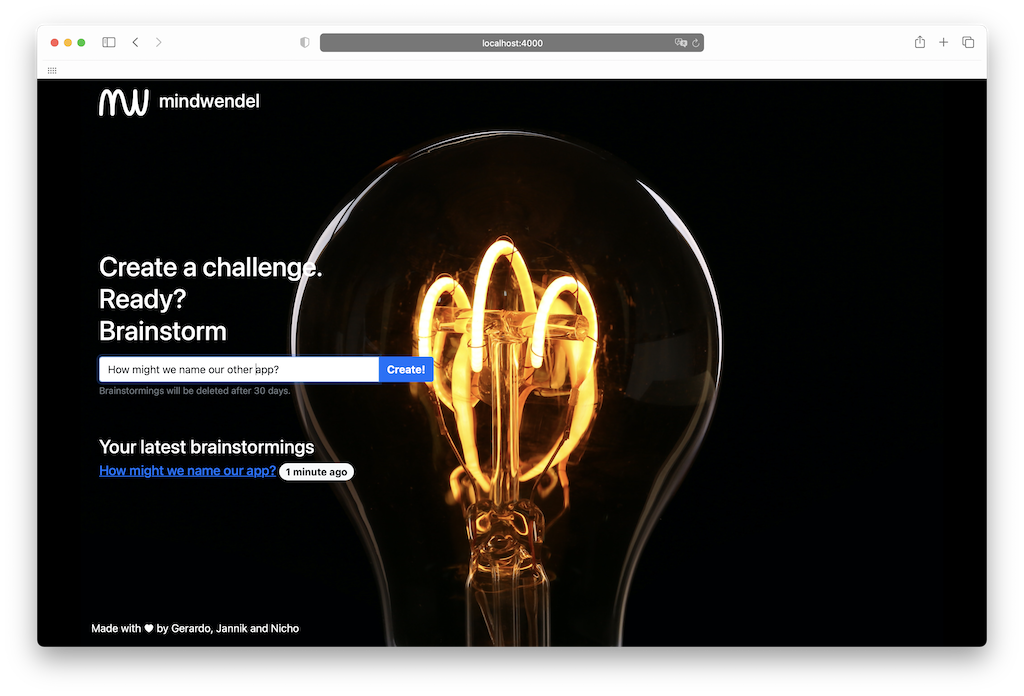
Create a challenge. Ready? Brainstorm. mindwendel helps you to easily brainstorm and upvote ideas and thoughts within your team. Built from scratch with Phoenix.
Features
- 5 minute setup (It is not a joke)
- Anonymously invite people to your brainstormings - no registration needed. Usernames are optional!
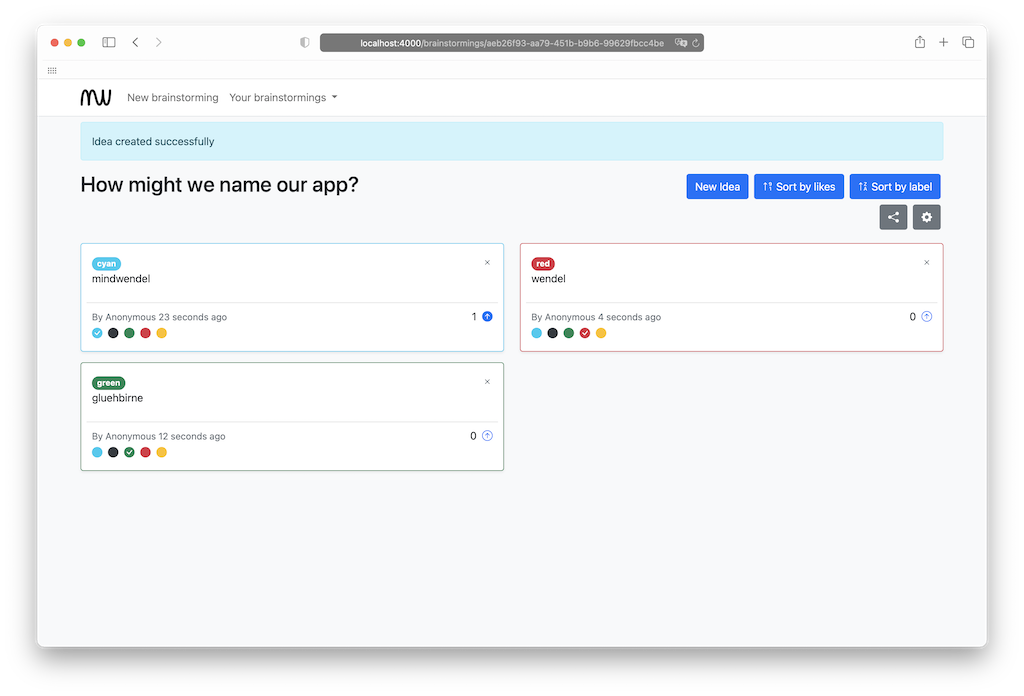
- Easily create and upvote ideas, with live updates from your mindwendel members
- Cluster or filter your ideas with custom labels
- Preview of links to ease URL sharing
- Add automatically encrypted file attachments which are uploaded to an S3 compatible storage backend
- Add lanes, use drag & drop to order ideas
- Add comments to ideas
- AI-powered idea generation using OpenAI-compatible LLM APIs
- Export your generated ideas to html or csv (currently comma separated)
- German & English Translation files
- By default, brainstormings are deleted after 30 days to ensure GDPR compliancy
Use-cases
Brainstorm ...
- ... new business ideas
- ... solutions for a problem
- ... what to eat tonight
- ...
Getting Started
mindwendel can be run just about anywhere. So checkout our Installation Guides for detailed instructions for various deployments. The easiest way to deploy and run mindwendel is using our own docker-compose-prod.yml file. For instructions, see Setup for Production.
If you want to contribute, jump ahead to Development!
Contributing
To get started with a development installation of mindwendel, follow the instructions below.
mindwendel is built on top of:
Workflow
- Fork it (https://github.com/mindwendel/mindwendel/fork)
- Create your feature branch (
git checkout -b fooBar) - Commit your changes (
git commit -am 'Add some fooBar') - Push to the branch (
git push origin fooBar) - Create a new Pull Request
Development
Startup docker compose setup
docker compose up --build -dSetup the database
docker compose exec app mix ecto.setupStart the server
docker compose exec app mix phx.server
Go to http://localhost:4000/
Open you favorite editor and start developing
Open a shell in the docker container to execute tests, etc.
docker compose exec app bashGo to http://localhost:4000/
Localization
You can extract new strings to translate by running:
mix gettext.extract --merge
Testing
Startup docker compose setup
docker compose up --build -dRun the test
docker compose exec app mix test
Setup for Production
Generate self-signed ssl sertificate for the postgres server on the host machine; the generated files are mounted into the docker container
mkdir -p ./ca
openssl req -new -text -passout pass:abcd -subj /CN=localhost -out ./ca/server.req -keyout ./ca/privkey.pem
openssl rsa -in ./ca/privkey.pem -passin pass:abcd -out ./ca/server.key
openssl req -x509 -in ./ca/server.req -text -key ./ca/server.key -out ./ca/server.crt
chmod 600 ./ca/server.key
test $(uname -s) = Linux && chown 70 ./ca/server.key
Duplicate and rename
.env.prod.defaultcp .env.prod.default .env.prodAdjust all configs in
.env.prod, e.g. database settings, ports, disable ssl env vars if necessaryDOCKER_COMPOSE_APP_PROD_OBJECT_STORAGE_USER,DOCKER_COMPOSE_APP_PROD_OBJECT_STORAGE_PASSWORDandDOCKER_COMPOSE_APP_PROD_VAULT_ENCRYPTION_KEY_BASE64are required, docker compose refuses to start without them. The storage credentials are used by both mindwendel and rustfs, so pick a long random password. See File Storage for generating the vault key.
Start everything at once (including a forced build):
docker compose --file docker-compose-prod.yml --env-file .env.prod up -d --build --force-recreateCreate the storage bucket (only once). rustfs is only reachable inside the docker compose network, so the bucket is created through the app container:
docker compose --file docker-compose-prod.yml --env-file .env.prod exec app_prod /app/bin/mindwendel rpc 'ExAws.S3.put_bucket("mindwendel", "local") |> ExAws.request!() |> IO.inspect()'Open the browser and go to
http://${URL_HOST}
Note
- The url has to match the env var
URL_HOST; so http://localhost will not work when yourURL_HOST=0.0.0.0 - The mindwendel production configuration is setup to enforce ssl, see Mindwendel.Endpoint configuration in
config/prod.exs - The mindwendel production configuration supports deployment behind a reverse porxy (load balancer) by parsing the proper protocol from the x-forwarded-* header of incoming requests, see
config/prod.exs - Upgrading from the former MinIO setup: rustfs uses a new docker volume and starts empty. Copy your existing objects (e.g. from
~/minio/data) into themindwendelbucket before switching, otherwise existing attachments can no longer be loaded. - If you are having troubles during setup, please raise an issue.
Build release and production docker image
- Build the docker image based on our Dockerfile
docker build -t mindwendel_prod .
Formatting
We are using Elixir's built-in formatter.
- Check if the code is properly formatted
mix format --check-formatted - Automatically format the code
mix format
Feature flags
Privacy and automatic data removal
Mindwendel includes a job runner that deletes old brainstormings after a defined number of days. This can be controlled with the setting MW_FEATURE_BRAINSTORMING_REMOVAL_AFTER_DAYS, which can be set to for instance to 30.
File Storage
File storage is available through an s3 compatible object storage backend. An encryption key (VAULT_ENCRYPTION_KEY_BASE64) needs to be generated before, e.g.:
iex
32 |> :crypto.strong_rand_bytes() |> Base.encode64()
or
openssl rand -base64 32
Then, object storage and the vault key need to be set:
OBJECT_STORAGE_BUCKET: mindwendel
OBJECT_STORAGE_SCHEME: "http://"
OBJECT_STORAGE_HOST: rustfs
OBJECT_STORAGE_PORT: 9000
OBJECT_STORAGE_REGION: local
OBJECT_STORAGE_USER: ...
OBJECT_STORAGE_PASSWORD: ...
VAULT_ENCRYPTION_KEY_BASE64: ...
There is an example given inside the docker-compose.yml (development) and docker-compose-prod.yml (production) with a docker compose rustfs setup. In production, rustfs publishes no ports and is only reachable by the app over the internal docker compose network, which is why OBJECT_STORAGE_SCHEME is http://. Use https:// only for an external s3 storage that serves TLS.
To deactivate file storage, use MW_FEATURE_IDEA_FILE_UPLOAD (defaults to true) and set it to false.
AI Integration
Mindwendel supports AI-powered idea generation using OpenAI and OpenAI-compatible APIs. To enable AI features:
For OpenAI (default):
MW_AI_ENABLED=true
MW_AI_API_KEY=your-openai-api-key
MW_AI_API_MODEL=gpt-4o-mini           # Optional, defaults to gpt-4o-mini
For OpenAI-compatible endpoints (e.g., local LLMs, Mistral, etc.):
MW_AI_ENABLED=true
MW_AI_API_KEY=your-api-key
MW_AI_API_MODEL=mistral-large-latest  # Or your model name
MW_AI_API_BASE_URL=https://api.mistral.ai/v1  # Required for non-OpenAI endpoints
Optional token limits to control usage:
MW_AI_TOKEN_LIMIT_DAILY=1000000      # Daily token limit (default: 1M)
MW_AI_TOKEN_LIMIT_HOURLY=100000      # Hourly token limit (default: 100K)
MW_AI_TOKEN_RESET_HOUR=0             # Hour of day to reset daily limit (default: 0/midnight UTC)
MW_AI_REQUEST_TIMEOUT=60000          # Request timeout in milliseconds (default: 60000)
AI features are disabled by default. When enabled, users can generate ideas using AI based on their brainstorming context.
Localization
Currently, there are three language files available, german (de), english (en) and italian (it). To set the default_locale, you can set MW_DEFAULT_LOCALE. The default is english.
Testimonials


kits is a project platform hosted by a public institution for quality development in schools (Lower Saxony, Germany) and focusses on digital tools and media in language teaching. mindwendel is used in workshops to activate prior knowledge, and collect and structure ideas. In addition, mindwendel can be found on https://kits.blog/tools and can be used by schools for free. More info on how to use it can be found in this post https://kits.blog/digitale-lesestrategien-brainstorming/
Logos and text provided with courtesy of kits.
Acknowledgements
- https://github.com/JannikStreek
- https://github.com/gerardo-navarro
- https://github.com/nwittstruck
- Lightbulb stock image by LED Supermarket at Pexels: https://www.pexels.com/de-de/foto/die-gluhbirne-577514/
Image Licenses
- Lightbulb, Pexels / CC0: https://www.pexels.com/license/, https://www.pexels.com/terms-of-service/
- GitHub Logo: https://github.com/logos
Explore related projects
codecrafters-io/build-your-own-x
Master programming by recreating your favorite technologies from scratch.
561,666 starspublic-apis/public-apis
A collective list of free APIs
498,055 starsmorluto/rea
Reverse engineer anything with agents, from app behavior down to native binaries.
450,792 starsopenclaw/openclaw
The AI that really does things. Any OS. Any Platform. The lobster way. 🦞
394,315 stars