
awslabs/automated-security-helper
awslabs/automated-security-helper has 710 GitHub stars and 95 forks. GitHot measured 0 stars in 24 hours. Last checked 2026-11-09 20:08 UTC. Last push 2026-11-06.
ASH is an extensible, open source SAST, SCA, and IaC security scanner orchestration engine.
Measured star growth
- in 24h
- 0
- in 7 days
- Update delayed
- in 15 days
- Update delayed
- in 1 month
- Update delayed
Net star changes over overlapping periods, not daily totals. Missing measurements are left blank. Stars measure attention, not software quality.
README.md
OriginalAutomated Security Helper (ASH)
Open-source orchestration for code, infrastructure, secret, and dependency scanners.


Quick start · Reports · Integrations · Configuration · Documentation
Quick start
Use Python 3.10 to 3.14 and pipx. For container mode, also install an OCI-compatible runtime such as Docker, Finch, or Podman.
pipx install git+https://github.com/awslabs/[email protected]

# Run from the project you want to scan
ash --mode container
The first container run builds the image and prepares scanner dependencies.
Open .ash/ash_output/reports/ash.html or run ash inspect findings.
Execution modes
| Mode | Command | Requirements |
|---|---|---|
| Container | ash --mode container |
OCI-compatible runtime |
| Local | ash --mode local |
Local scanner dependencies |
| Pre-commit | ash --mode precommit |
Python-based scanners with simplified output |
Local and pre-commit workflows use uv for managed tool installation. The installation guide covers platform prerequisites and dependency setup.
Other installation methods
Run with uv:
uvx --from git+https://github.com/awslabs/[email protected] ash --help
uvx --from git+https://github.com/awslabs/[email protected] ash --mode container
Install in a Python environment:
pip install git+https://github.com/awslabs/[email protected]
Install with Homebrew:
brew tap awslabs/automated-security-helper https://github.com/awslabs/automated-security-helper.git
brew trust awslabs/automated-security-helper
brew install ash
Homebrew refuses to load a formula by its short name, as in brew install ash, from a tap you have not trusted, so the second line trusts this one; on a Homebrew without brew trust, skip that line. Naming the formula in full needs no brew trust: brew install awslabs/automated-security-helper/ash trusts that one formula as it installs it. The formula builds the tagged release on Homebrew's Python 3.12, with ASH's cdk extra, and installs the dependency versions locked in that release's uv.lock. It downloads them from PyPI during the install, so the install needs network access, and building with HOMEBREW_FORMULA_BUILD_NETWORK=deny is not supported. The formula also installs Node.js, which cdk-nag and npm-audit run on. grype, syft, opengrep and cfn-nag are separate programs that the formula does not install: ash dependencies install adds grype, syft and opengrep, and cfn-nag needs Ruby (gem install cfn-nag). Until they are installed, a default scan reports them MISSING and exits 1. In container mode, a Homebrew install builds its image from the commit the formula built, or, when Homebrew built it from a source tarball with no git metadata, from the release tag of its version, with a warning that this is a guess.
Install from source:
git clone --branch v3.7.1 https://github.com/awslabs/automated-security-helper.git
cd automated-security-helper
pip install .
Pin @v3.7.1 for a reproducible install. The floating @v3 tag follows
stable v3 releases. See the installation guide
for Windows and offline environments.
Reports
- Check the outcome and scanner coverage.
- Review findings by severity.
- Inspect rule IDs, locations, and evidence.
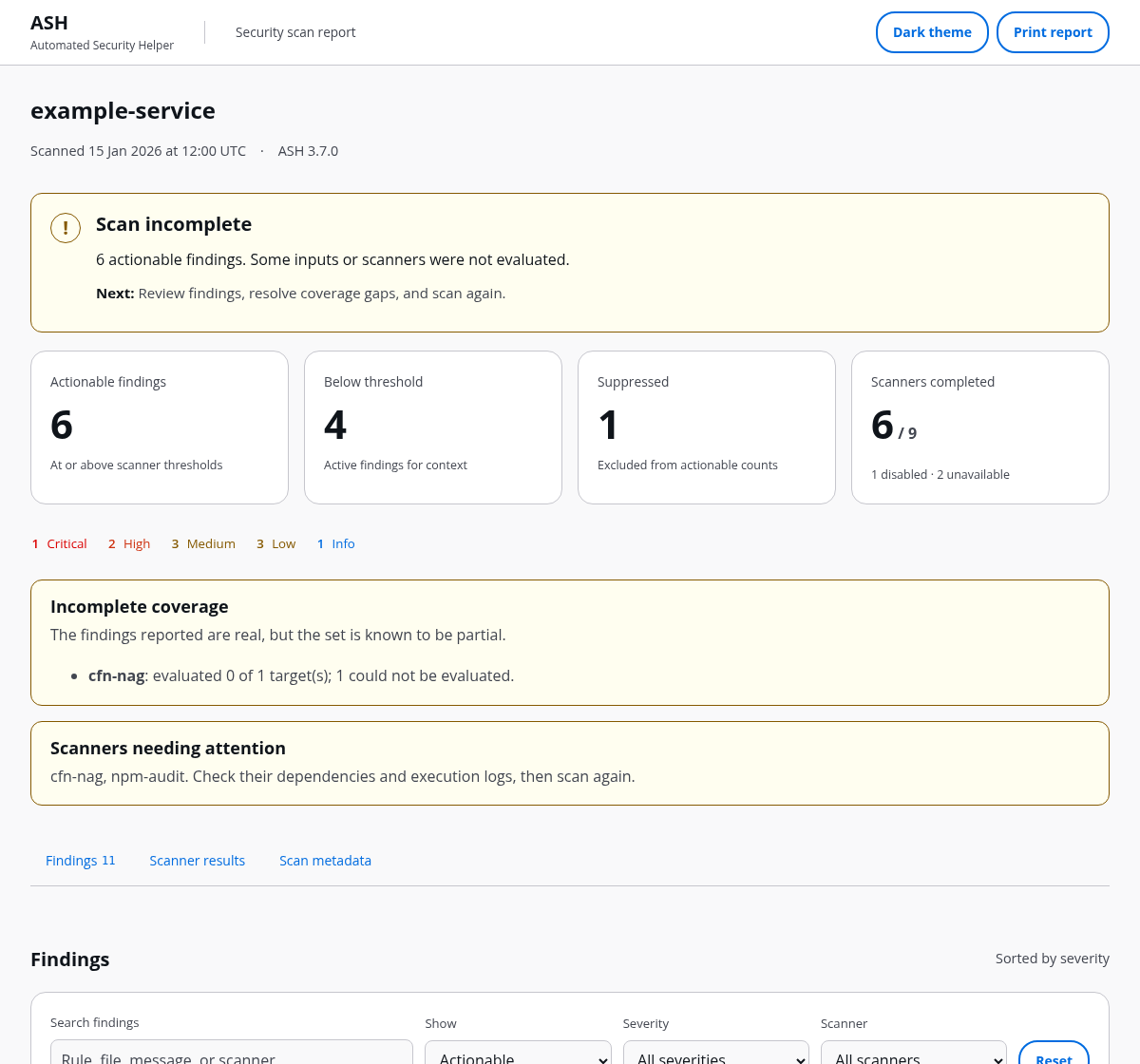
Example scan results.
Offline HTML reports include search, filters, finding details, and printing.
ash inspect findings    # Open the terminal findings explorer
ash report              # Read the text summary of the latest scan
Terminal findings explorer
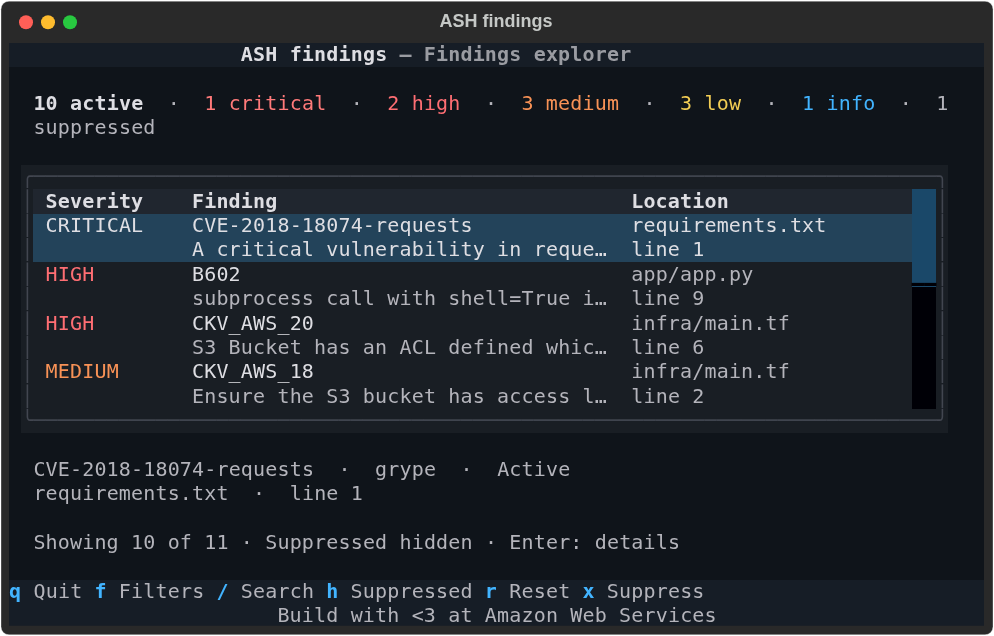
Use the footer shortcuts to search, filter, inspect, and suppress.
Output files
Default output lives in .ash/ash_output/. Enabled reporters write into reports/.
| Artifact | Use it for |
|---|---|
reports/ash.html |
Offline review, filtering, and printing |
reports/ash.summary.md |
Pull request comments and Actions summaries |
reports/ash.summary.txt |
A readable summary in a file or terminal |
reports/ash.sarif |
IDE annotations and SARIF consumers |
reports/ash.flat.json |
Scripts and dashboards |
reports/ash.csv |
Spreadsheet analysis |
ash_aggregated_results.json |
The complete scan record and validation data |
ASH also supports JUnit XML, CycloneDX, SPDX, OCSF, GitLab, YAML, and AWS reporting destinations. See the complete format guide.
Exit status: 0 means no actionable findings, or findings are allowed by
policy; 1 means execution needs attention; 2 means actionable findings with
failure-on-findings enabled; 3 means a configuration ASH cannot use or an
input it refuses; 4 means a workspace definition or policy error; 5 means a
usage error. A scan with incomplete coverage needs follow-up.
Filters change the view; configured thresholds determine the scan gate.
Integrations
| Your workflow | Next step |
|---|---|
| CI and pull requests | Run ASH in CI |
| Before a commit | Set up pre-commit |
| AI coding assistant | Install an editor or agent integration |
| MCP client | Connect a client |
| Multiple projects | Scan a workspace over MCP |
| AWS reporting | Choose an AWS destination |
| A custom scanner or report | Build an ASH plugin |
See integration options.
Connect an AI assistant
After installing ASH, add this server to your MCP client's configuration:
{
  "mcpServers": {
    "ash": {
      "command": "ash",
      "args": ["mcp"]
    }
  }
}
Stop polling on completed, incomplete, failed, or cancelled.
Check scanner coverage before reviewing findings.
For agent instructions, install the ash-mcp skill:
npx skills add awslabs/automated-security-helper
The skill supplies workflow guidance. Configure the MCP server as above, or use a platform integration that includes server wiring. The MCP server guide covers client-specific setup. The HTTP transport guide covers remote source delivery, session handling, and deployment configuration.
MCP tools
| Tool | Action |
|---|---|
get_scan_progress |
Read scan status and partial results |
get_scan_results |
Read results after a completed or incomplete scan |
list_active_scans |
List this session's active and recent scans |
cancel_scan |
Cancel a running scan this session started |
check_installation |
Check ASH and scanner dependencies |
run_ash_scan |
Run a synchronous scan |
get_scan_summary |
Read counts, severity, and scan status |
get_scan_result_paths |
Locate generated report files |
explain_finding |
Look up one finding by ID |
get_config |
Read the resolved configuration |
diff_scan_results |
Compare two aggregated result files |
suggest_suppression |
Draft a suppression for review |
resolve_ash_workspace |
Preview a workspace scan plan |
run_ash_workspace_scan |
Scan workspace projects with their configurations |
list_scanners |
List the built-in and community scanners ASH ships, with metadata |
validate_config |
Check a configuration against the schema |
list_profiles |
List registered configuration profiles |
select_profile |
Apply a profile to the session |
set_source_git |
Clone a repository from a host the operator allowed as the scan target |
set_source_zip_chunk |
Upload a source archive chunk, up to 1 MiB |
set_source_zip_finalize |
Verify and extract the uploaded archive |
clear_source |
Delete the delivered source tree |
See the tool reference for complete
inputs and outputs. Source-delivery tools use the session the server issued on a
network connection, never a client-chosen header; a stateless server issues no
session unless started with --trust-upstream-session-id. A local stdio client
can name local paths directly.
Add a pre-commit check
Add to .pre-commit-config.yaml:
repos:
  - repo: https://github.com/awslabs/automated-security-helper
    rev: v3.7.1
    hooks:
      - id: ash
Run pre-commit run ash --all-files to check the project.
The ash hook runs precommit mode (bandit, detect-secrets, checkov, cdk-nag and npm-audit) and installs the cdk extra into its environment. It needs pre-commit running on Python 3.10 to 3.14, and Node.js and npm on PATH for cdk-nag and npm-audit. ash-simple-scan is the same hook under its earlier id, and ash-full-scan scans in the ASH container image instead. See Run ASH with pre-commit for running without Node.js and for the container hook.
Configuration
Create .ashrc.yaml at the project root to name the project, set the severity
gate, and choose scanner and reporter options (existing configs under the older
.ash/.ash.yaml name keep loading). The schema provides editor validation.
# yaml-language-server: $schema=https://raw.githubusercontent.com/awslabs/automated-security-helper/refs/heads/main/automated_security_helper/schemas/AshConfig.json
project_name: my-project
global_settings:
  severity_threshold: MEDIUM
scanners:
  bandit:
    enabled: true
    options:
      confidence_level: high
reporters:
  markdown:
    enabled: true
    options:
      include_detailed_findings: true
Use the configuration guide for settings and overrides, the suppression guide for an accepted finding with a recorded reason, and plugin development for new capabilities.
Scanner coverage and local setup
| Scanner | Coverage | Local setup |
|---|---|---|
| Bandit | Python code | Managed through uv tool isolation |
| Semgrep | Application code across multiple languages | Managed through uv tool isolation |
| Opengrep | Application code with Semgrep-compatible rules | Managed through uv tool isolation |
| detect-secrets | Secrets in text files | Included with ASH |
| Checkov | Infrastructure and configuration | Managed through uv tool isolation |
| cfn-nag | CloudFormation | Ruby and cfn-nag |
| cdk-nag | CloudFormation | ASH's cdk extra, and Node.js |
| npm-audit | Node.js dependencies | Node.js and npm |
| Grype | Dependency vulnerabilities | Grype |
| Syft | Software bill of materials | Syft |
| gitleaks | Secrets in text files | ash dependencies install (pinned release binary) |
| cfn-lint | CloudFormation | Managed through uv tool isolation |
| cfn-guard | CloudFormation (AWS Guard Rules Registry rules) | ash dependencies install (pinned binary and rules) |
Trivy (trivy fs) |
Dependency vulnerabilities | ash dependencies install (pinned release binary) |
| actionlint | GitHub Actions workflows | ash dependencies install (pinned release binary) |
| zizmor | GitHub Actions workflows and composite actions | Managed through uv tool isolation |
Enabled scanners depend on your execution mode and configuration. Check the scanner catalog for capabilities and the language guide for coverage.
Documentation
| Task | Reference |
|---|---|
| Understand a command | CLI reference |
| Recover from a setup or scan issue | Troubleshooting |
| Understand scanner coverage | Languages and frameworks |
| Read common answers | FAQ |
| Contribute a change | Contributing and development setup |
| Review the interfaces | Design system and all-surface review |
Report bugs and feature requests through GitHub issues. For security concerns, follow Security issue notifications.
Licensed under Apache 2.0. Bundled fonts and icons retain their respective licenses alongside their assets.
Build with <3 at Amazon Web Services
Explore related projects
trimstray/the-book-of-secret-knowledge
A collection of inspiring lists, manuals, cheatsheets, blogs, hacks, one-liners, cli/web tools and more.
257,250 starsHack-with-Github/Awesome-Hacking
A collection of various awesome lists for hackers, pentesters and security researchers
125,103 starsswisskyrepo/PayloadsAllTheThings
A list of useful payloads and bypass for Web Application Security and Pentest/CTF
82,542 starscaddyserver/caddy
Fast and extensible multi-platform HTTP/1-2-3 web server with automatic HTTPS
78,935 stars