
awslabs/AutoHelix
awslabs/AutoHelix has 35 GitHub stars and 5 forks. GitHot measured +1 stars in 24 hours. Last checked 2026-11-15 14:29 UTC. Last push 2026-11-13.
What you can do
- budget.time — caps total wall-clock for the whole run. Checked before each iteration starts; doesn't interrupt one in progress.
- agent.timeout — per-iteration deadline, a hard kill. Where the backend supports it, a hook injects a countdown into the agent's context after each tool call, so it can wrap up and write notes before the deadline hits.
Measured star growth
- in 24h
- +1
- in 7 days
- Collecting history
- in 15 days
- Collecting history
- in 1 month
- Collecting history
Net star changes over overlapping periods, not daily totals. Missing measurements are left blank. Stars measure attention, not software quality.
About
Agent-powered iterative optimization: put an AI agent in a verified improvement loop.
AIREADME.md
Original

Put an AI agent in a verified improvement loop.
Set gates and what to observe; the agent proposes changes in a loop.
Only changes that pass the gates are accepted. Improvements compound across iterations.
works with Claude Code · Codex · OpenCode


How it works · Quick start · Examples · Configuration · Other features · FAQ
 |
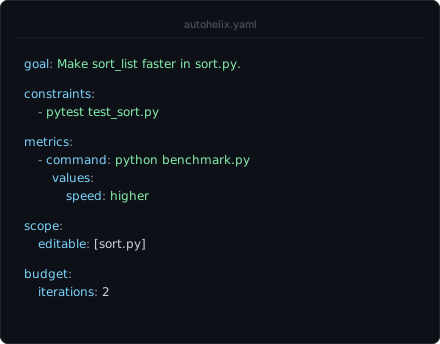 |
AutoHelix is a lightweight harness that lets you point an agent at a goal and leave it looping unattended. It provides the isolation, validation, scope, and budget control to make that safe, and it's general enough for any measurable goal, from optimizing code to training models.
Looping an agent can be far more effective than a single prompt, because later iterations fix and build on what came before, and because it gives you a knob for controlling how much effort (time or cost) to put toward the goal rather than letting the agent decide when it's done. AutoHelix makes this pattern easy to run and customize, so you can let the agent climb for as long as you want.
How it works
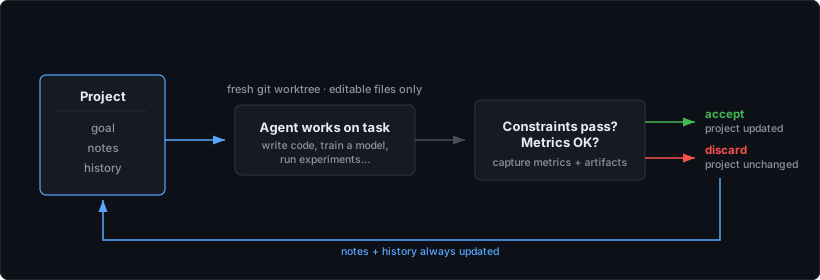
You define a goal, the gates a change must pass, and what to observe (benchmarks, reviews, artifacts). The agent proposes changes and the harness decides if they land.
Core features:
- Isolation. Each iteration runs in fresh private copies of the code. A rejected attempt's code is cleanly discarded, and what was checked is exactly what gets accepted.
- Scope enforcement. Only files marked
editablecan be changed; changes elsewhere are discarded, and the agent is told. - Gates decide. Tests, type-checks, any command that must exit 0, a yes/no question to a read-only agent (
ask:), or a metric compared with the last accepted iteration. Fail a gate and the iteration is rejected; its change is kept aside for the next agent as a patch. - Observations inform. Benchmarks, logs, artifacts and LLM reviews are saved by name and shown to the next iteration; their numbers are the run's metrics.
- Persistent memory. Each iteration is a fresh session, but the agent reads and writes notes that survive across all iterations, including rejected ones.
- Budget control. Cap the run by iterations, time, or cost. Codex cost uses an API-equivalent estimate; see cost tracking.
- Stop conditions. Optional
stop:commands end the run when one exits 0, checked on the baseline and after accepted iterations. Use a script, a metric (jq -e '.missing == 0' "$AUTOHELIX_METRICS") orautohelix ask -- "Is the goal complete?"; see stop conditions.
Quick start
Install from source:
git clone https://github.com/awslabs/AutoHelix.git
cd AutoHelix
python -m venv .venv && source .venv/bin/activate
pip install -e .
Or pip install autohelix for the CLI and portable setup skill, without the
repository's example projects.
AutoHelix uses Claude Code by default (looks for claude on your PATH). Codex and
OpenCode are also supported — see agent setup.
To prepare the experiment with your existing coding agent, install the packaged skill into the target project:
autohelix skill install --agent codex --scope project --path my-project
# Use --agent claude or --agent opencode for those agents.
Your coding agent helps define the experiment. AutoHelix runs repeated attempts using the configured scope, gates, and observe entries.
Prepare and review
Set up AutoHelix to improve [goal]. [Optional instructions.]
The agent shows the complete proposed config and walks through each section: what it controls, why it was chosen, and how to adjust it, including effective defaults. Review it before project files change. Discuss revisions; when you agree to save and commit, it writes, validates, and commits the setup, then gives the launch command.
Run and manage
Run and manage AutoHelix using the existing config. [Optional changes or budget limits.]
The agent applies agreed changes to the configuration and supervises the run through termination.
Replace [goal] with the desired outcome and add any scope, evaluation, or
budget preferences. You can also ask the agent to set up and manage the
experiment in one request.
The complete skill and its references ship with
pip/wheel installs; no AutoHelix checkout is needed. Installation is explicit,
and existing skill folders are preserved unless you pass --force.
See the conversational walkthroughs
and skill installation and export.
Or start from the project itself:
cd my-project
autohelix setup
In a terminal it offers to start Claude Code, Codex or OpenCode with the
bundled setup skill (nothing is installed), or writes the commented template
autohelix.yaml. With an agent, review the proposal before it saves and commits
the agreed setup. With the template, edit it using the
configuration reference and commit the intended setup changes.
Then launch with autohelix run.
For several loops in one project, autohelix setup perf writes
autohelix/perf.yaml, which autohelix run perf runs. Other commands are
described in the CLI reference.
Examples
The examples/ directory includes concrete tasks ranging from
review-driven refinement to workflow and algorithm optimization. To list
what's available:
python examples/setup_example.py --list
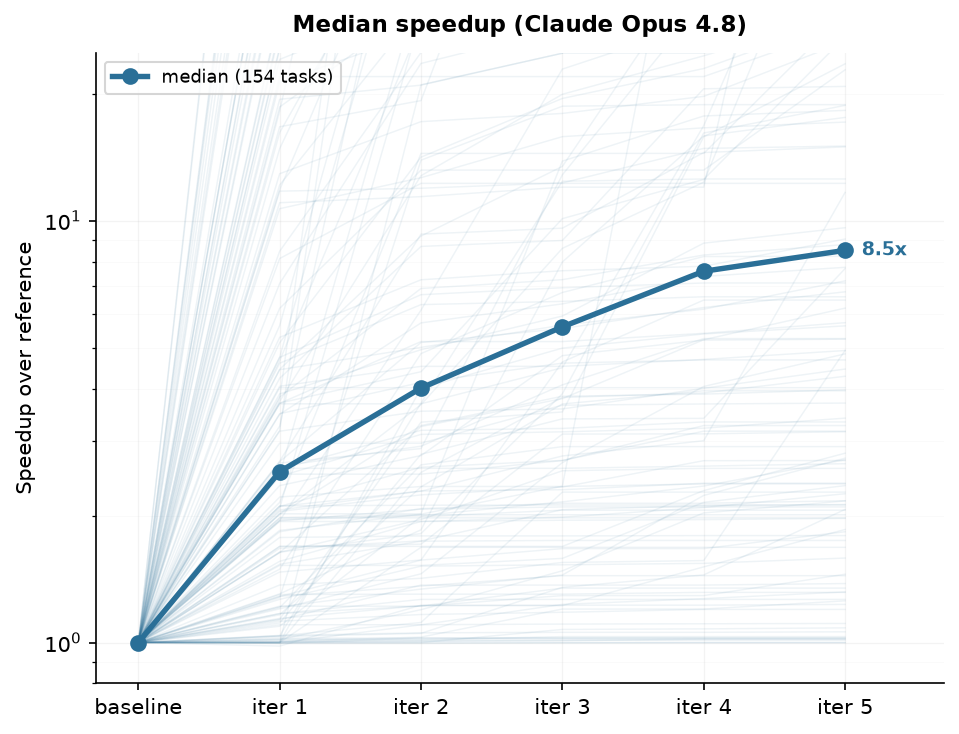
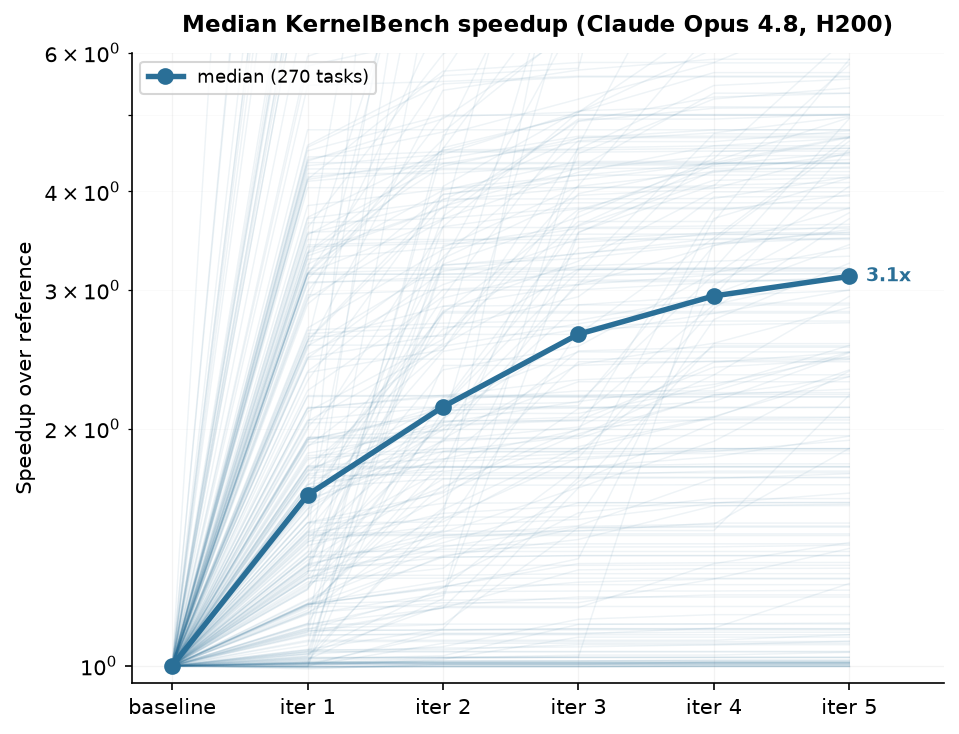
Code optimization. AutoHelix can iteratively improve the performance of existing code while preserving user-defined correctness checks. We tested this capability on two established benchmarks: AlgoTune for CPU algorithms and KernelBench for GPU kernels. In both evaluations, median speedup increased with each iteration, reaching approximately 8.5× across 154 AlgoTune tasks and 3.12× across 270 KernelBench tasks after five iterations.
 AlgoTune · CPU algorithms |
 KernelBench · GPU kernels |
Both runs used Claude Opus 4.8; KernelBench ran on an H200. The AlgoTune result
uses our own evaluation setup, which is not identical to its official harness.
See the examples/algotune and
examples/kernelbench setups, plus the
results/algotune and
results/kernelbench methodology and per-task results.
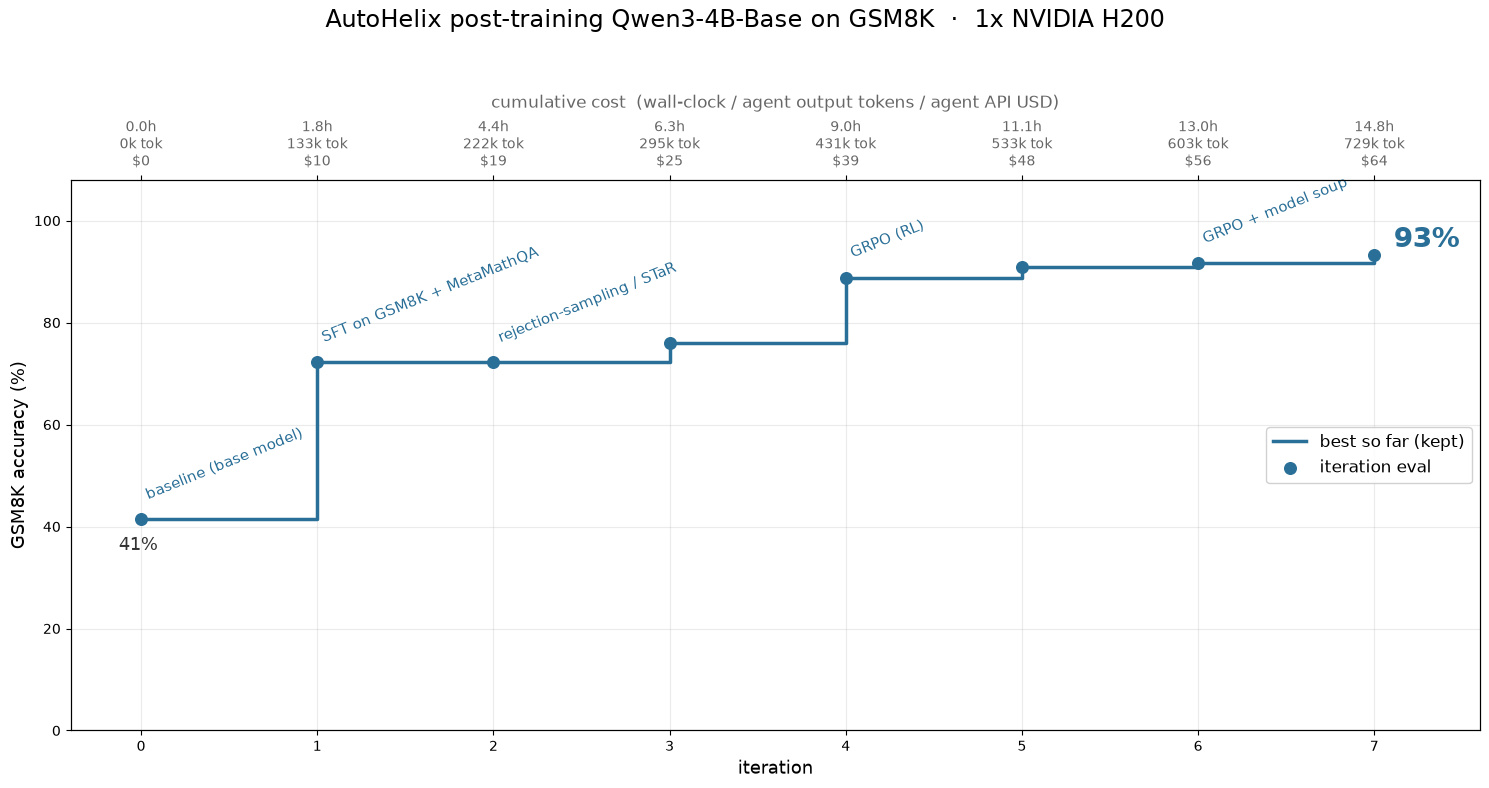
Model training. The same loop works when each iteration is a training run rather than a
code edit: the agent writes the training code and trains a model, and AutoHelix scores the
result with a frozen eval the agent can't modify. In
examples/posttrain
(inspired by PostTrainBench), the agent is asked to post-train
Qwen3-4B-Base on GSM8K. Given an open-ended goal (no method prescribed), the agent
worked its way up from supervised fine-tuning through rejection sampling to reinforcement
learning (GRPO) — reaching 93% accuracy over 8 iterations on one H200. See the
ML Experiments Guide for setup tips.
Advanced agent loops. AutoHelix can also support longer-running autonomous
work. The research example iterates through experiments,
evidence, and reports; task-queue works through a
persistent list of coding tasks; and
workflow-optimization improves a
model-powered workflow's prompts, skills, context, and orchestration against a
frozen evaluator.
In the wild. Beyond the bundled examples, we've used AutoHelix on real projects. In Hybrid Model Factory — an open-source toolkit for training hybrid architectures (Attention + SSMs) from our team — the agent autonomously developed a faster sequence-parallelism implementation. Over multiple runs (with some algorithmic hints in the goal), it arrived at a state-passing approach that propagates recurrent state between GPUs instead of redistributing the full sequence, reaching ~5× faster per layer and 1.6× faster end-to-end training at 128K sequence length on a 27B model.
Configuration
A run is defined by a single config file, autohelix.yaml (or
autohelix/<name>.yaml, one per loop). Every field is documented in
docs/config.md.
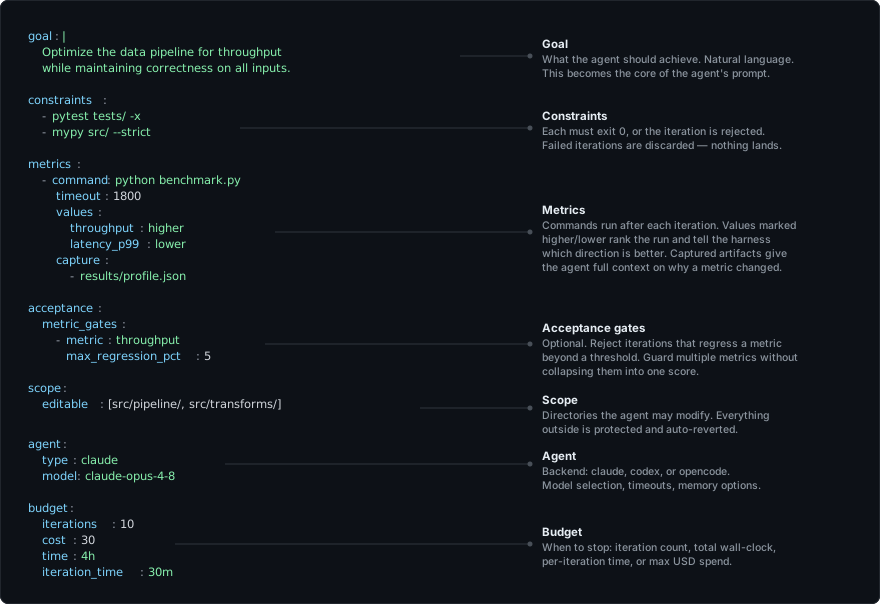
The same config as text
goal: |
  Optimize the data pipeline for throughput
  while maintaining correctness on all inputs.

gates:                       # anything that can reject an iteration
  - pytest tests/ -x
  - mypy src/ --strict
  - metric: throughput
    regress: 5%              # at most 5% worse than the last accepted iteration

observe:                     # feedback for the next agent, numbers for the harness
  - name: bench
    command: python benchmark.py   # prints ##autohelix[throughput=...]
    timeout: 30m
    metrics:
      throughput: higher
      latency_p99: lower
    capture: [results/profile.json]
  - name: review             # a read-only LLM review of the change
    review: What is the most important next fix?

scope:
  editable: [src/pipeline/, src/transforms/]

agent:
  backend: claude
  model: claude-opus-4-8
  timeout: 30m

budget:
  iterations: 10
  cost: 30
  time: 4h
Gates run first, in order; observe entries run next, and a failing one doesn't
reject anything (unless a metric: gate needs its number). Configs from earlier
versions (constraints:, metrics:, reviewer:, ...) are errors that name
their replacement; see Old → new.
Project layout
my-project/
├── autohelix.yaml       # your config (or autohelix/<name>.yaml, one per loop)
└── .autohelix/          # run state (gitignored)
    ├── runs/<id>/       # one persistent state directory per run
    │   ├── run.json     # identity, starting commit, target branch
    │   ├── history.jsonl # one record per iteration: results and each model call's usage/log
    │   ├── notes/       # agent's persistent notes
    │   ├── hints.md     # messages from `autohelix hint`
    │   ├── report.md    # the run summary (and report.html, the run page)
    │   ├── iterations/NNN/ # one folder per iteration (000 is the baseline): record.json,
    │   │                #   prompt.md, agent.log, gates/<k>/, observe/<name>/, stop/<k>/
    │   ├── logs/        # run logs per invocation
    │   └── .internal/   # live status, usage, notes versions, superseded attempts
    └── .internal/       # selected run id, helper scripts and lock files
Temporary per-phase candidate copies live outside the project, in
${XDG_CACHE_HOME:-~/.cache}/autohelix/copies/ (set AUTOHELIX_COPIES_ROOT to move them).
Each autohelix run starts a new run; autohelix resume [<id>] [-n MORE] continues
one, autohelix archive <id> sets one aside and autohelix delete <id> removes it.
Use --land manual to keep validated commits on the run's refs/autohelix/<id> until
autohelix land. By default, accepted changes land on the starting branch when a run
segment (one invocation) ends. A resumed run can coexist with unrelated dirty checkout
files. See CLI reference.
Other features
Report
When a run finishes, an agent reads the run's history, notes, logs and commits and
writes a short summary to .autohelix/runs/<id>/report.md. autohelix report writes it on
demand, e.g. after an interrupted run. See Configuration → Report.
Reviews and progress tracking
Beyond benchmarks, an observe: entry with review: <prompt> gets qualitative feedback
from a read-only LLM on exactly the candidate (autohelix review, also usable by hand).
Each review is saved with the iteration's observations and the next agent reads it. With
previous: true and metrics: {missing: lower}, a review keeps its own status of a
worklist across accepted iterations, and stop: can end the run when the number reaches
zero. See Concepts → Reviews and
Progress tracking.
Viewer and run page
autohelix view follows a run in the terminal: its status and iterations, with the
agent's live output below; autohelix dashboard lists all runs. autohelix view --web
serves a live page for a run on 127.0.0.1: status, metric chart, iterations with gates
(and their output), notes, diffs, observations (reviews included), stop checks and agent activity, and the run summary once it is written. When a run stops, AutoHelix saves the same page as one file,
.autohelix/runs/<id>/report.html, to open in a browser or share. See
Concepts → Run page.
Time limits
Two time controls:
budget.time— caps total wall-clock for the whole run. Checked before each iteration starts; doesn't interrupt one in progress.agent.timeout— per-iteration deadline, a hard kill. Where the backend supports it, a hook injects a countdown into the agent's context after each tool call, so it can wrap up and write notes before the deadline hits.
See Config → Agent and Budget.
Docker sandbox
Optionally run AutoHelix inside Docker for filesystem isolation. The agent can't reach
your home directory, SSH keys, or other projects. Build the image with docker/build.sh
and run via docker/run.sh. See Docker sandbox.
Hints
autohelix hint "..." (run in a second terminal) drops a note the running agent picks up
at the start of its next iteration. Useful to steer a run without stopping it. See
CLI → hint.
Full customization
Beyond the config file, you can replace the full per-iteration prompt template
(prompt_template:, with a documented set of variables) and control how the agent
organizes its persistent notes. See Concepts → Prompt and
Concepts → Notes.
Several runs at once
Runs started with autohelix run --group NAME run side by side in one project and see each
other's notes, history and accepted code at the start of every iteration. Compare them on
autohelix dashboard, autohelix land the winner and autohelix archive the rest. See
CLI → Groups.
FAQ
How does AutoHelix differ from other "agent in a loop" tools?
Running AI agents iteratively is becoming a popular strategy — a kind of test-time scaling
for agents, where more iterations buy more quality. Tools like
autoresearch,
Ralph, and Claude Code's
/goal and /loop commands each implement variations of this pattern.
Compared to other tools, AutoHelix adds a minimal amount of structure to ensure that long-running autonomous loops don't go off track, so you can let your agent work while keeping control over the direction.
| AutoHelix | autoresearch | Ralph | /goal |
/loop |
|
|---|---|---|---|---|---|
| Goal-directed | ✓ any metric(s) | ✓ val loss | ✓ task list | ✓ boolean | ✗ |
| Agent-agnostic | ✓ | ✓ | ✓ | ✗ | ✗ |
| Validation gates | ✓ | ~ self-checks | ✗ | ✗ | ✗ |
| Isolation on failure | ✓ private copy | ~ self-resets | ✗ | ✗ | ✗ |
| Fresh context each iteration | ✓ | ✗ | ✓ | ✗ | ✗ |
| Memory across iterations | ✓ notes, metrics, artifacts | session | progress file | session | session |
| Scope enforcement | ✓ | ~ by instruction | ✗ | ✗ | ✗ |
| Budget control | ✓ iters, time, cost | ✗ | iters only | iters only | ✗ |
| Time-aware agent | ✓ | ✗ | ✗ | ✗ | ✗ |
| Parallel exploration | ✓ | ✗ | ✗ | ✗ | ✗ |
What about reward hacking?
The agent optimizes what you measure: if your benchmark has loopholes, the agent may find and exploit them, and more iterations apply more pressure to do so. Autonomous loops shift the burden from "write perfect code" to "write strong checks."
You can look out for gaming by reading autohelix report, the agent's notes, or a
review's feedback. Then close the loophole with a new
gate and re-run.
Is it safe to run unattended?
AutoHelix isolates the agent at two levels:
- Candidate copies (default) — each phase of an iteration runs in a separate private copy, outside your project, with its own git metadata. Rejected iterations never reach your branch (their trees stay on hidden refs until the run is deleted); accepted ones are recorded on the run ref and landed separately.
- Docker sandbox (optional) — filesystem isolation: the agent can't access your home directory, SSH keys, or other projects. (Network is not isolated, since the agent needs it to reach the model API.)
Copy isolation protects your codebase from bad iterations, but it is not a security sandbox — the agent still runs on your host and could in principle access the filesystem or network. For focused optimization tasks (the typical use case), the agent works toward a narrow goal, not exploring adversarially, so running without a sandbox is usually a reasonable tradeoff. For stronger guarantees, or on sensitive machines, use the Docker mode.
Contributing & feedback
We'd love to hear how you're using AutoHelix — the goals you point it at, patterns you wish it supported, or rough edges you hit. Please open an issue for bugs, ideas, or use cases you'd like to share. Contributions are welcome.
Citation
@software{autohelix2026,
  title   = {AutoHelix: Verified Iteration for AI Agents},
  author  = {Trager, Matthew and Mansimov, Elman and Zhang, Yi and Xia, Wei and Soatto, Stefano},
  year    = {2026},
  version = {0.1.1},
  url     = {https://github.com/awslabs/AutoHelix}
}
License
AutoHelix is licensed under the Apache License 2.0.