
avibecoder42/Zotivity
avibecoder42/Zotivity has 27 GitHub stars and 3 forks. GitHot measured 0 stars in 24 hours. Last checked 2026-11-15 01:48 UTC. Last push 2026-11-12.
Measured star growth
- in 24h
- 0
- in 7 days
- Collecting history
- in 15 days
- Collecting history
- in 1 month
- Collecting history
Net star changes over overlapping periods, not daily totals. Missing measurements are left blank. Stars measure attention, not software quality.
About
Comprehensive scholarly work with your Zotero library: database search, screening, cited answers and checked literature reviews (formerly ZotLLM) – vibe-coded with Claude
AIREADME.md
Original






English · Deutsch
Zotivity (formerly ZotLLM) is a desktop application that works alongside Zotero and enables comprehensive scholarly work: from searching subject databases and screening what you find, through reading and asking about your sources, to checked literature reviews with citations down to the page.
You organise your work in projects, each with its own knowledge corpora: a corpus is a selection of Zotero collections or whole libraries, group libraries included. Zotivity reads the PDFs, Word documents and other texts of the corpora, keeps their page numbers and indexes them on your computer. Questions and literature reviews then draw on exactly the texts that belong to the project. The Guide in the app leads through these steps, with links and the status of the active project.
 Database search From the research question to the selected literature in Zotero: search strings for open databases, RIS import, a de-duplicated pool, screening, full texts and a flow diagram in the style of PRISMA. |
 Ask Questions about your own texts, answered only from the retrieved passages. Every citation opens the passage and its page. |
 Literature review From search strategy to a checked synthesis: every citation and verbatim quotation is verified against the PDFs. |
 Search Fast search across your library and groups, without a language model. Copy references in your citation style or export a selection. |
Language models are your choice: Claude, ChatGPT (OpenAI), Gemini, DeepSeek, Mistral via API, or local models via Ollama. Embedding models also run built in (llama.cpp), entirely on your computer, with a curated model catalog. API keys are stored encrypted in the operating system's key store. Runs on Windows; paths, key storage and start scripts are prepared for macOS and Linux.
Also included: a CSL editor to find a citation style on zotero.org, adapt it by clicking on the preview and install it directly in Zotero. It is a first version and still in development – feedback and contributions are welcome (issues).
New in 1.1: Database search, the step before the literature review, with optional AI suggestions; the decisions are always yours. See Database search.
New in 1.2: Mistral as a language model; database search shows the status and the next step; Search applies to all projects.
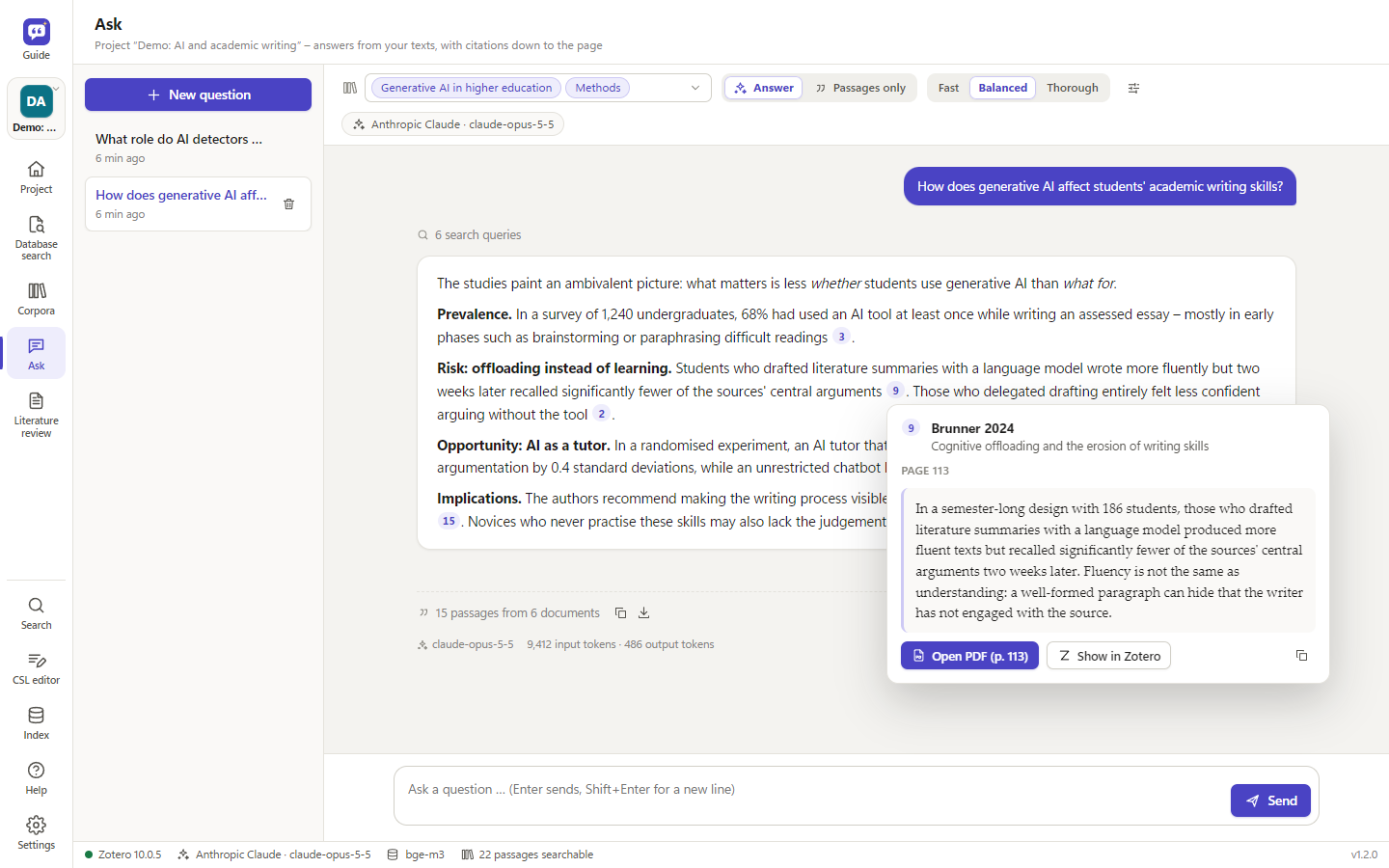
Answers with citations; a click shows the passage and its page. Demo library with fictitious sources.
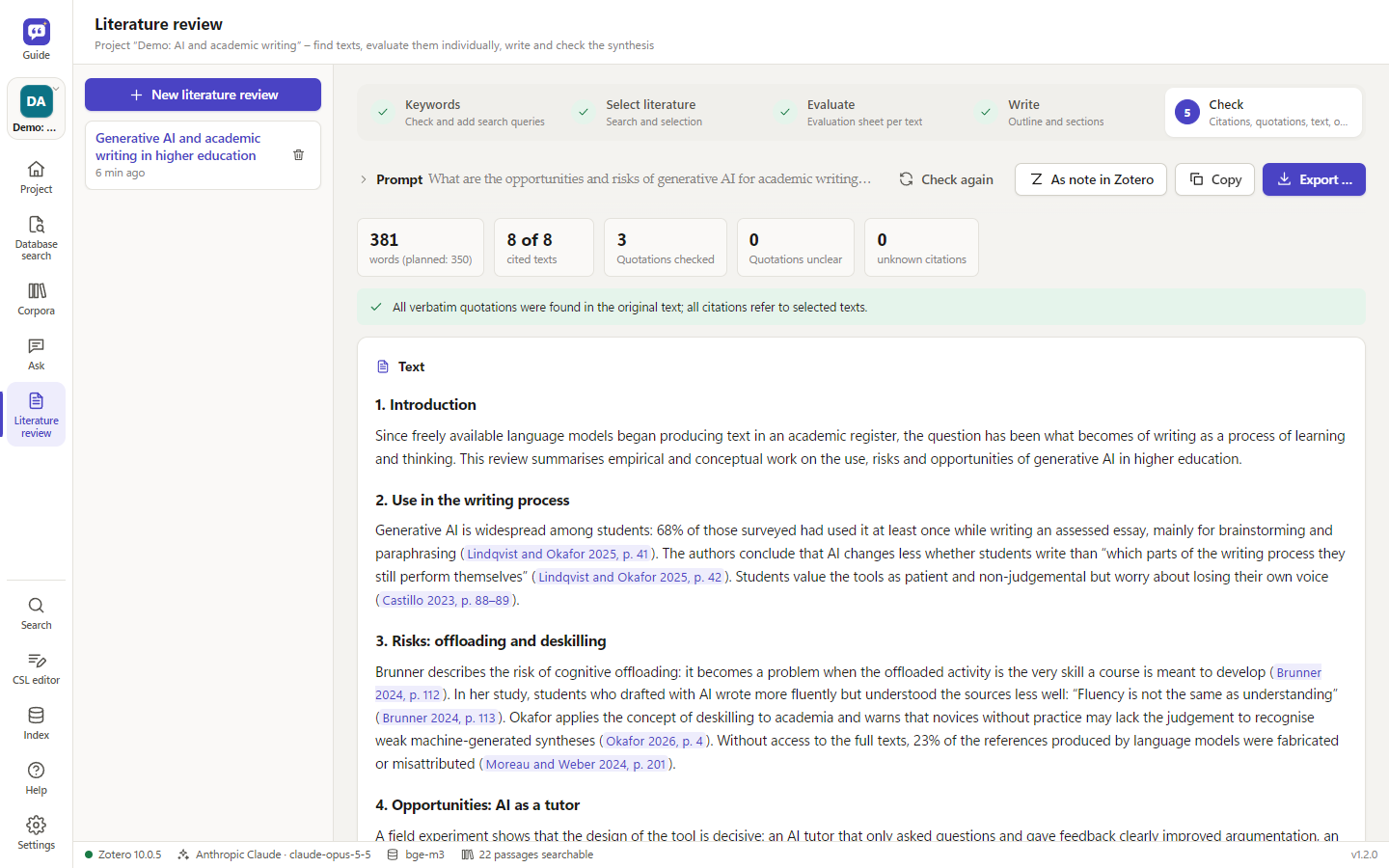 Literature review: every citation and quotation checked against the sources |
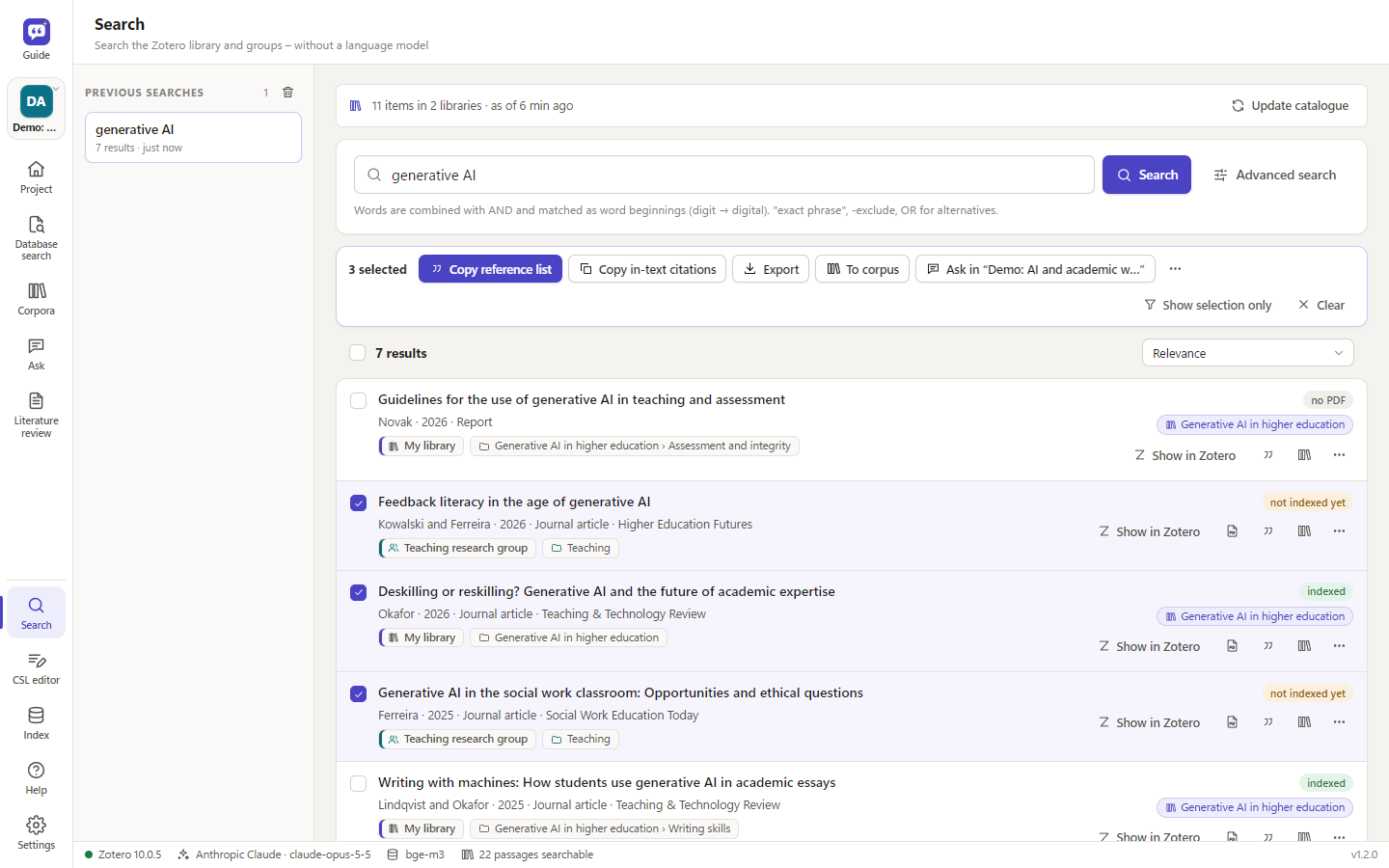 Search without a language model, with a selection to copy, export or ask about |
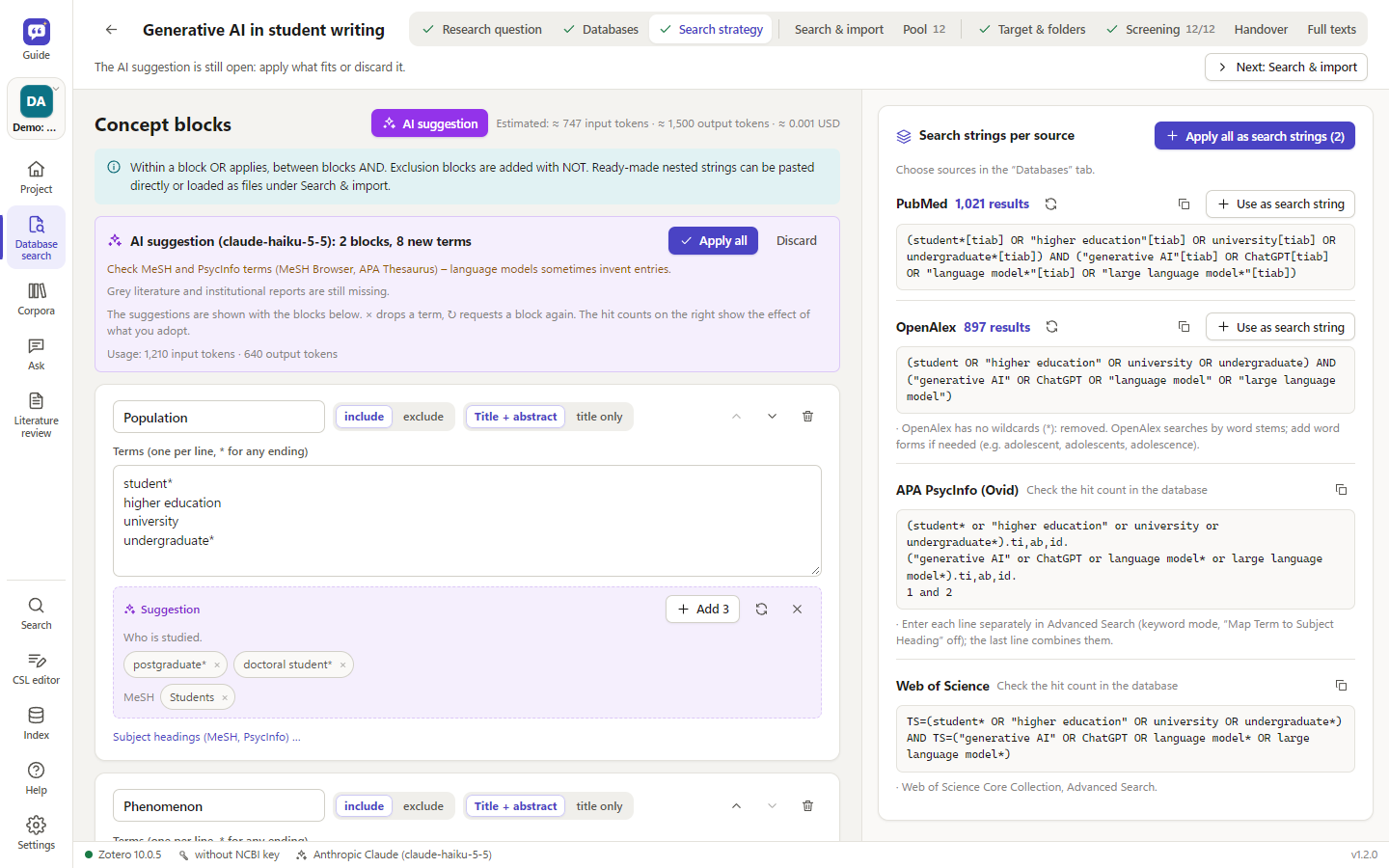 Database search: concept blocks with AI suggestions, search strings and hit counts per database |
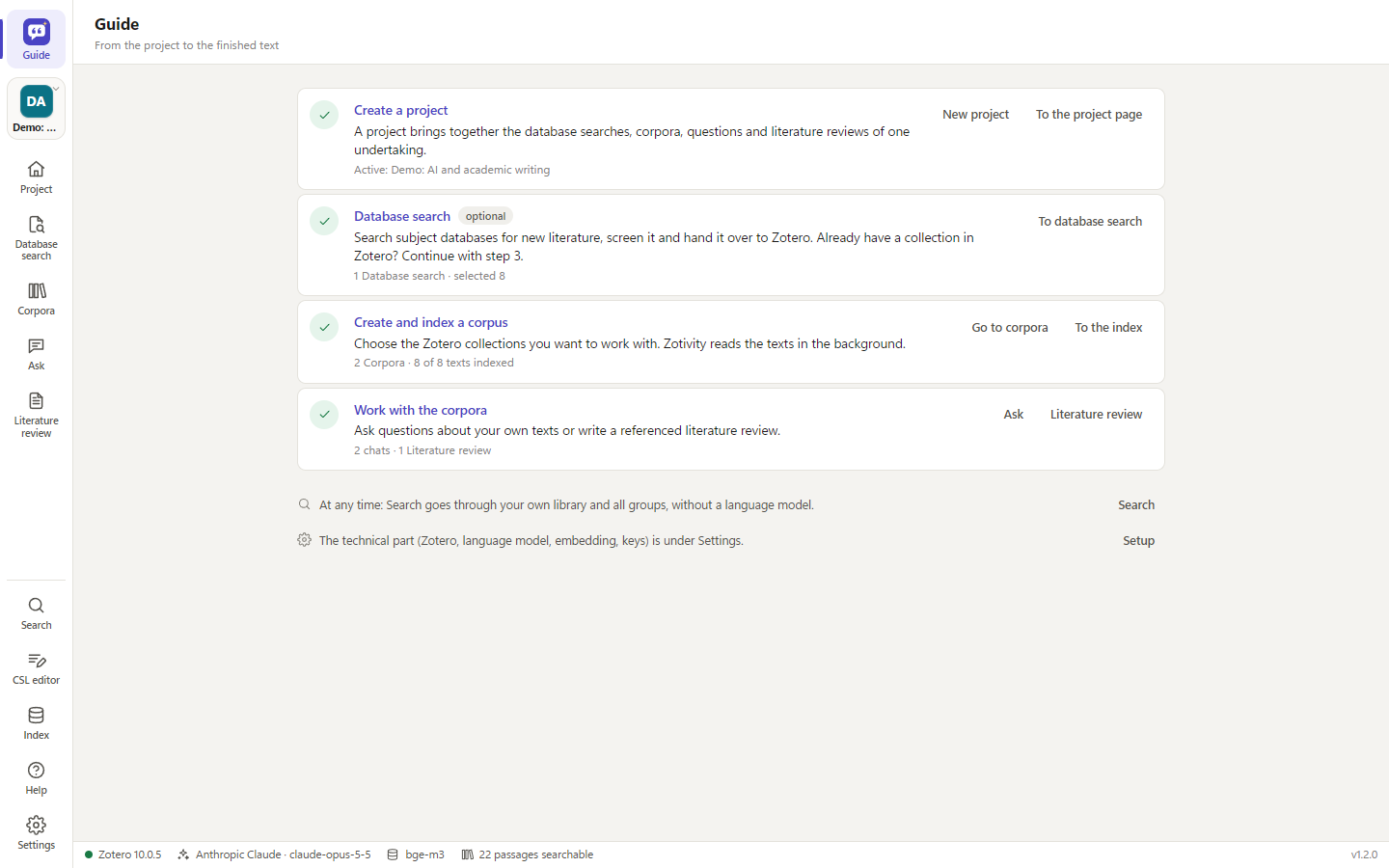 The Guide: four steps with links and the status of the active project |
Vibe-coded. Zotivity was written by Claude (Anthropic's AI model, working in Claude Code) – the application, the Zotero plugin, the installer scripts, the tests and the documentation. The project's initiator, avibecoder, defined what to build, tested every version in day-to-day research and decided on each next step; no code was written by hand. Read the code with that in mind: it is extensively tested (≈ 350 automated tests), but it has not been reviewed line by line by a human developer.
Use it as a tool, not as a replacement for your own scholarly work. See Use it as a tool – the risk of deskilling.
Zotivity is an independent project, not affiliated with or endorsed by Zotero or the Corporation for Digital Scholarship. Zotero is a registered trademark of the Corporation for Digital Scholarship.
Use it as a tool – the risk of deskilling
Zotivity can search, summarise and draft. That is exactly why it can wear down the abilities research depends on: reading closely, weighing evidence, building an argument and writing in your own voice. The more of this you hand over, the less of it you practise.
- Do not hand over your scholarly work. Answers and literature reviews are drafts built from retrieved passages – not finished texts. Do not submit generated text as your own work. Follow your institution's rules on AI use and disclose where you used it.
- Read the sources. Every citation leads to the original passage (a click opens the PDF at the page). Check that the statement is really there and correctly represented: context, hedging, sample, limitations.
- Verify critically. Zotivity checks verbatim quotations against the PDF text – it does not check paraphrases, interpretations or how studies are weighted. Language models misattribute, overgeneralise and leave out contradicting findings. The evidence is limited to your library and to what the search found.
- Keep the thinking yours. Formulate the question, the structure and the argument yourself. Use the tool to find material, to cross-check your reading and to spot what you overlooked – and compare its drafts with your own.
Architecture
Zotero 10 (local API)  ←→  Zotivity service (Python, 127.0.0.1:23120)  ←→  LLM of your choice
  + slim plugin               – text + page numbers from PDF/EPUB/HTML/Word   Claude · GPT · Gemini
    (context menu, autostart) – chunking, reference-list detection            DeepSeek · Mistral · local (Ollama)
                              – embedding: built in (llama.cpp), Ollama, OpenAI …
Browser / app window  ←→      – SQLite index: full-text search + vectors
                              – notes & collections back to Zotero
Claude Desktop (MCP)  ←→      – MCP server
- No direct access to
zotero.sqlite. Everything goes through Zotero's local API (Zotero 10 writes its database in WAL mode; direct readers may see incomplete data). - The index is local (
%LOCALAPPDATA%\Zotivity), not in the synchronised Zotero folder. - The plugin stays slim (menus, autostart). Zotero often changes plugin interfaces between major versions, so the actual work is done by the external service.
Installation (Windows)
- Download
Zotivity-Setup-<version>.exefrom Releases and run it (per-user installation, no administrator rights needed; if a version is already installed, the setup offers update, repair or downgrade). The installer is built by GitHub Actions from the published source code, and each release contains a.sha256file to check the download. It is not code-signed yet, so Windows SmartScreen warns ("Unknown publisher"): click More info → Run anyway. If that option is missing (e.g. on managed PCs), right-click the downloaded file → Properties → tick Unblock → OK, then start it again. - Open Zotivity from the Start menu. The first start leads to Settings → Setup; after that, the Guide shows the workflow.
Zotivity runs embedding models itself (llama.cpp is included in the installer); the models are downloaded later with a button in the settings. Optional: Ollama for local language models. The Microsoft Edge WebView2 runtime is required (included in Windows 10/11; the setup warns if it is missing).
Behaviour: starting it a second time brings the open window to the front. If indexing is still running when you close the window, Zotivity asks whether to continue in the background. If the Zotero plugin starts Zotivity, it runs without a window and ends a few minutes after Zotero; "Open Zotivity" in Zotero shows the window.
Updates: under Settings → Program & data, enter an update source – an HTTPS address or network path to the file
zotivity-update.json that the build creates next to the installer. Zotivity checks at start-up, downloads the
installer, verifies its SHA-256 checksum, installs silently and restarts. Settings, index, corpora and keys are kept
(also when uninstalling).
Building the installer: .\packaging\build.ps1 (tests → icons → PyInstaller → self-test of the EXE including the
window → Inno Setup 6 → update manifest). With -UpdateBaseUrl https://… the download address goes into the manifest.
Releases are built by GitHub Actions (release.yml) when a version tag v* is pushed;
the release notes are the version's section of the changelog plus
packaging/release-footer.md.
Development without an installer: install.bat, then start.bat (browser) or .venv\Scripts\zotivity-app.exe
(window). macOS/Linux: ./install.sh, then ./start.sh.
Preparing Zotero
- Enable the local API: Zotero → Settings → Advanced → "Allow other applications on this computer to communicate with Zotero".
- Install the plugin (optional, recommended): in Zotivity, Settings → Zotero and export → Save plugin, then in
Zotero Tools → Plugins → gear → Install plugin from file …. The plugin adds context menus ("Index collection",
"Ask about selected items", "Create evaluation sheets") and starts the service together with Zotero once it has run.
New plugin versions are installed by installing the
.xpiagain (Zotero only accepts HTTPS update addresses, the local service speaks HTTP). The setup checklist reports an outdated plugin. - Grant write access (for notes and collections): Settings → Zotero and export → Grant write access. Zotero asks for confirmation – choose "Remember my decision", otherwise access lasts only until the next restart. The dialog may be hidden behind other windows; Zotivity tries to bring it to the front, otherwise click Zotero in the taskbar.
Projects
A project bundles knowledge corpora, chats and literature reviews. The switcher at the top of the left bar (Ctrl+P) shows the active project; Project, Database search, Corpora, Ask and Literature review refer to it. Search, CSL editor, Index and Settings apply to all projects.
- Corpora are shared: a corpus can belong to several projects; the index is shared and every text is embedded only once.
- Saving is continuous. "Save as file" exports a project as
.zoty(corpus definitions, chats, literature reviews, evaluation sheets – without index and without keys); "Import project" loads it again, also on another computer. - Manual order and archive: project tiles can be dragged into order; finished projects can be archived (nothing is deleted) and restored at any time.
First steps
The first start leads to Settings → Setup: the technical part, once per computer, and any step can be skipped. From there you go to the Guide, the top entry of the navigation bar: create a project, database search (optional), create and index a corpus, work with the corpora – with links and the status in the active project. After that, Zotivity reopens the last project in the view used last. All side panels can be resized (double-click: default width), and in the program window the whole interface can be zoomed.
- Language models (Settings → Language models): choose a provider and store its key. If the chosen provider has no key but another one has, Zotivity switches automatically. "Test connection" checks key and model.
- Embedding model (Settings → Embedding): default is Built in with
bge-m3. The model catalog shows curated models with strengths, disciplines, time per 100 pages on this computer and memory needs; Download fetches one (resumable, checksum-verified), and a short test then measures speed and retrieval quality. More GGUF models can be found on Hugging Face by name. An existing Ollama index of the same model is adopted after a sample check instead of being recomputed. - Knowledge corpora (Corpora): a mirror of your library and all groups with collections and sub-collections. Tick collections or whole libraries, name the corpus, save. Exactly the union of all corpora is indexed.
- Index: current text, progress, remaining time, next and last processed texts, problems (e.g. scans without text). A queue takes further runs while one is working. Optionally automatic in the background.
- Ask: answers with clickable citations
[3](preview with "Open PDF (p. x)" and "Show in Zotero"); the retrieved passages are listed below, each with a relevance indicator. "Passages only" searches without an LLM.
Keyboard: Ctrl+1–5 project views, Ctrl+6 search, Ctrl+7 CSL editor, Ctrl+8 index, Ctrl+, settings, F1 help, Ctrl+P switch project. Appearance: system, light, grey, dark (the window title bar follows).
Search (without a language model)
Search covers your own library and all groups – fast, free, even without Zotero running. It is based on a local catalog of the metadata of all libraries, which follows changes in Zotero automatically.
- Single field: title, people, publication, tags, abstract, DOI. Words are AND-combined and matched as word starts,
"exact phrase",-exclude,OR. - Advanced: individual fields, full text of indexed texts (with the matching passage), year range, item type, libraries, collection incl. sub-collections, "PDF only", "indexed only".
- Results show where they are in Zotero, their indexing status and the corpora containing them. Actions: show in Zotero, open the PDF, copy the reference in your citation style (formatted for Word), add to a corpus, and more in the ⋯ menu.
- Selection (kept across searches; Shift+click, Ctrl+A, Esc): copy a reference list or in-text citations, export as Word (Zotero fields), BibTeX, RIS or Markdown, add to a corpus, ask questions about exactly these items, file them in a Zotero collection.
Export to Word and LaTeX
Answers, passages and literature reviews can be copied (as text or formatted for Word) and saved:
- Word (.docx): citations and bibliography are Zotero fields (
ADDIN ZOTERO_ITEM CSL_CITATION/ZOTERO_BIBL) with Zotero's document preferences – click "Refresh" in Word's Zotero tab, then edit citations and switch styles as if you had inserted them yourself. - LaTeX (.tex):
\parencite[p.~12]{…}and the BibTeX data from Zotero infilecontents– one file that compiles directly with pdflatex/lualatex and biber. - Markdown (.md). Citation style: Settings → Zotero and export – all styles installed in Zotero.
- Page numbers: citations give the printed page (header/footer, cross-checked against Zotero's "Pages" field), not the file page; sources without page numbers get "o. S." (n.p.), placed according to the style.
Language and help
Interface and help are available in German and English (Settings → Language); the language of the AI output is set
separately. More languages: dictionary server/static/js/i18n/<code>.js (keys are the German texts), service messages
zotivity/locales/<code>.py, manual server/static/help/<code>.md. The help (F1) is a manual with table of
contents and full-text search.
How long does indexing take?
Measured on a reference laptop (Ryzen 7 5800U, 16 GB): bge-m3 built in or via Ollama ≈ 400–470 tokens/s, i.e.
roughly 3 minutes per 100 pages. The model catalog shows this time for every model – from under a minute (Granite 97M)
to about 30 minutes (Qwen3-Embedding 4B) per 100 pages. A library of ≈ 3000 PDFs would need about 30–40 hours locally,
spread over several evenings in the background and resumable at any time. Alternatives: index collection by collection,
use a smaller model from the Fast group, or use cloud embeddings (fast, but all texts go to the provider).
Indexing consists of reading (text, page numbers, passages) and embedding (the embedding model turns each passage into a vector). Switching the model discards nothing: every model has its own vector space, texts are not read again, only embedded for the new model.
Large libraries
- Every text is saved immediately; a crash or cancellation loses at most the current text.
- Texts are read in a separate process with a time limit – a broken PDF is marked as an error, indexing continues.
- Short outages of the embedding service are bridged; the computer stays awake while indexing; disk space is checked.
- Background mode in stages (time window, maximum texts per run), index backups, a queue for further runs.
- Duplicates: the same work in several libraries is recognised by DOI or by title, first author and year; only one copy is read and used. Zotivity asks before a manual run which copy to use.
- Citations of items deleted in Zotero are moved to a remaining copy of the same work.
Database search
The Database search view (Ctrl+2) takes a search from the research question to the selected literature in
Zotero. Every database search belongs to a Zotivity project (the project page shows its status); the data is stored in research.db in the data folder.
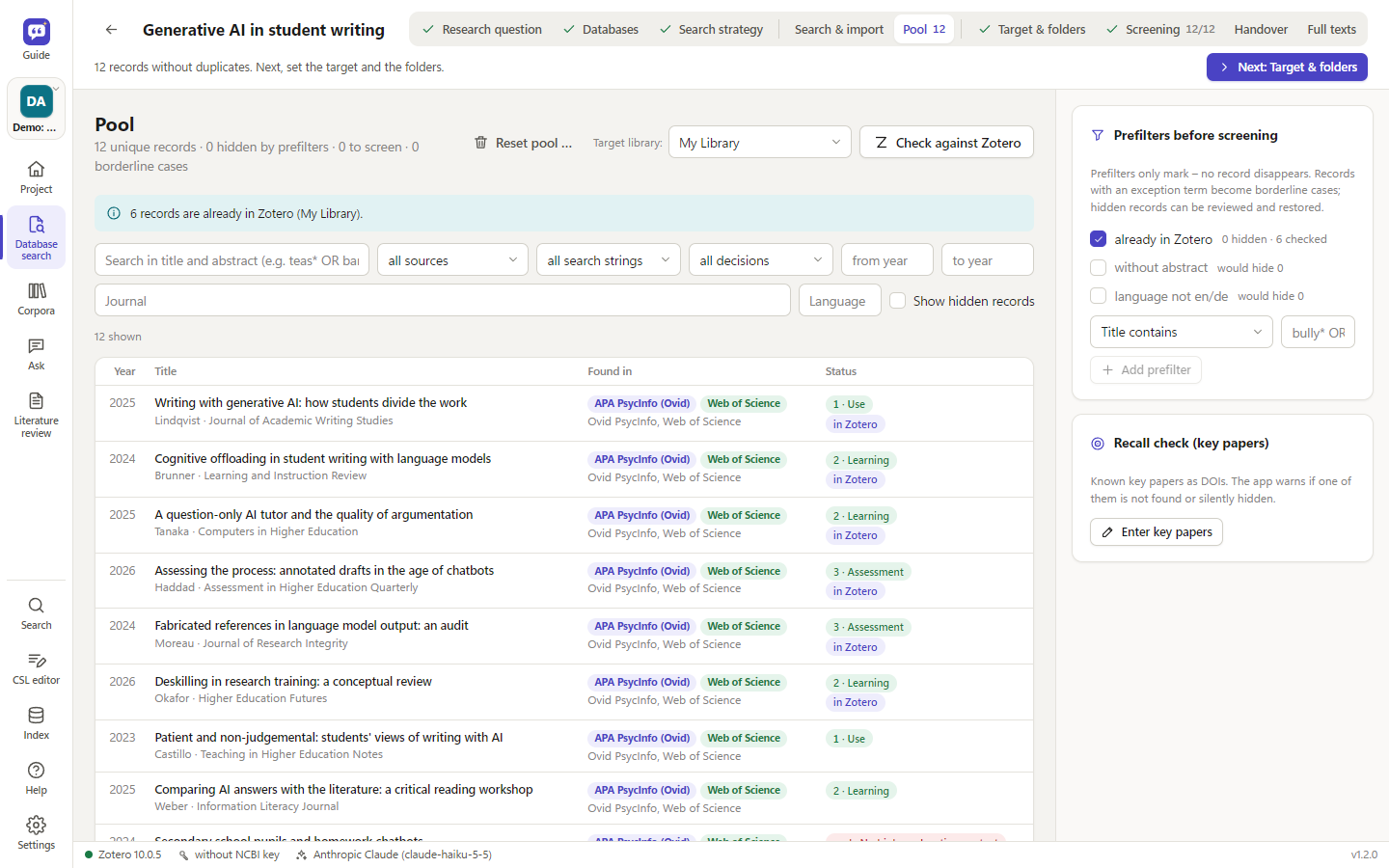 Pool: the list takes the width, prefilters and recall check sit on the right |
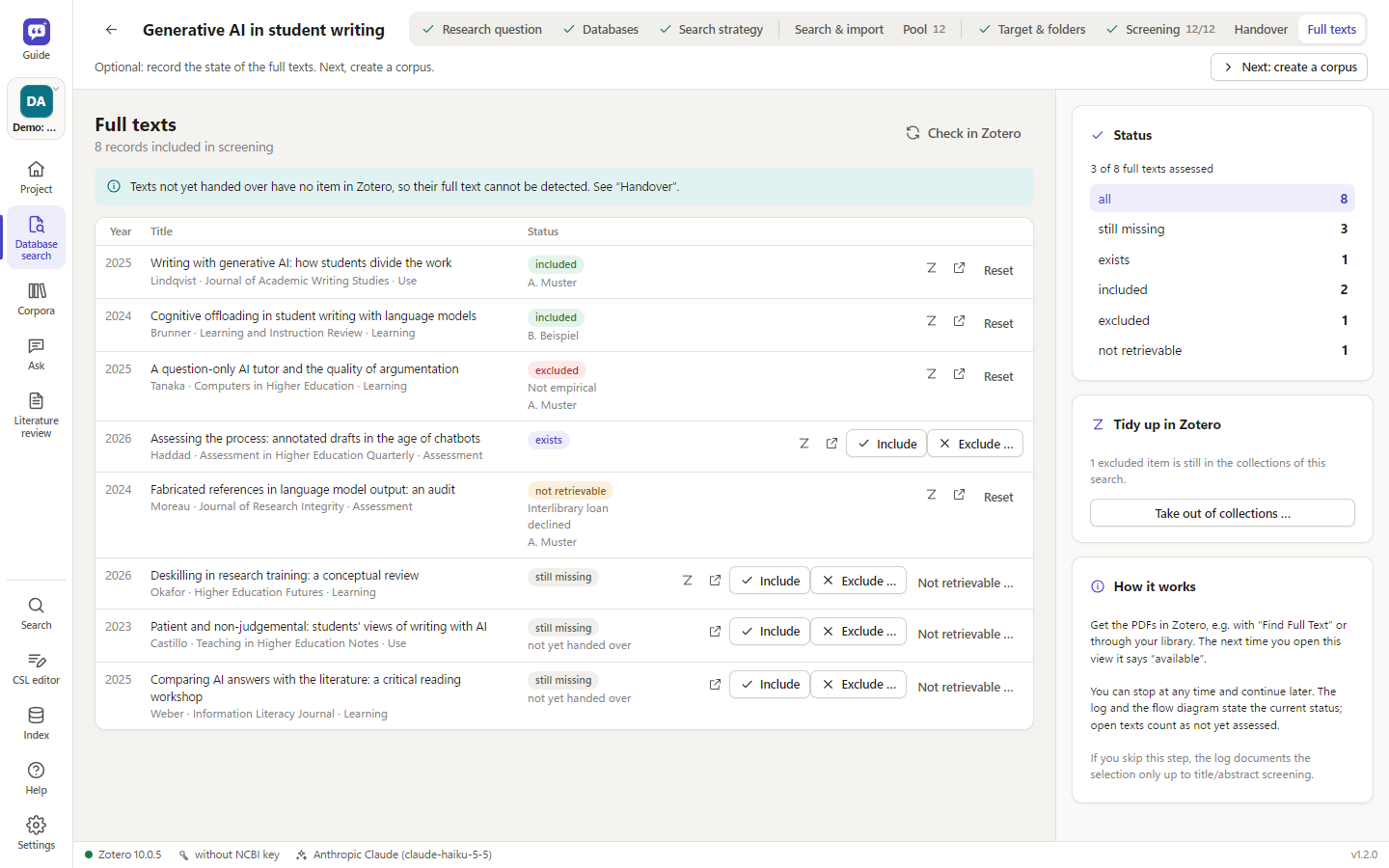 Full texts: status per text; missing PDFs hold nothing up |
| Tab | What happens |
|---|---|
| Research question | research question, short description, inclusion and exclusion criteria, up to three reviewers |
| Databases | choose disciplines; the app suggests databases from its catalog (access, terms of use, keys) |
| Search strategy | concept blocks → search strings for each database, with live hit counts |
| Search & import | versioned search strings; searches in PubMed, OpenAlex, Europe PMC, ERIC, EconBiz, Semantic Scholar, arXiv, OSF Preprints and swisscovery; RIS import from Ovid, EBSCO or Web of Science |
| Pool | de-duplicated records (DOI, PMID, OpenAlex ID, title), check against the Zotero target library, prefilters, borderline cases, missing abstracts fetched, recall check with key papers |
| Target & folders | target library in Zotero; folders 1–20 (shortcuts 1–9), each mapped to a Zotero collection |
| Screening | cards (J/K browse, 1–9 folder, X exclude, ? unsure, G borderline, A accept AI suggestion, Z undo) or a list with bulk apply |
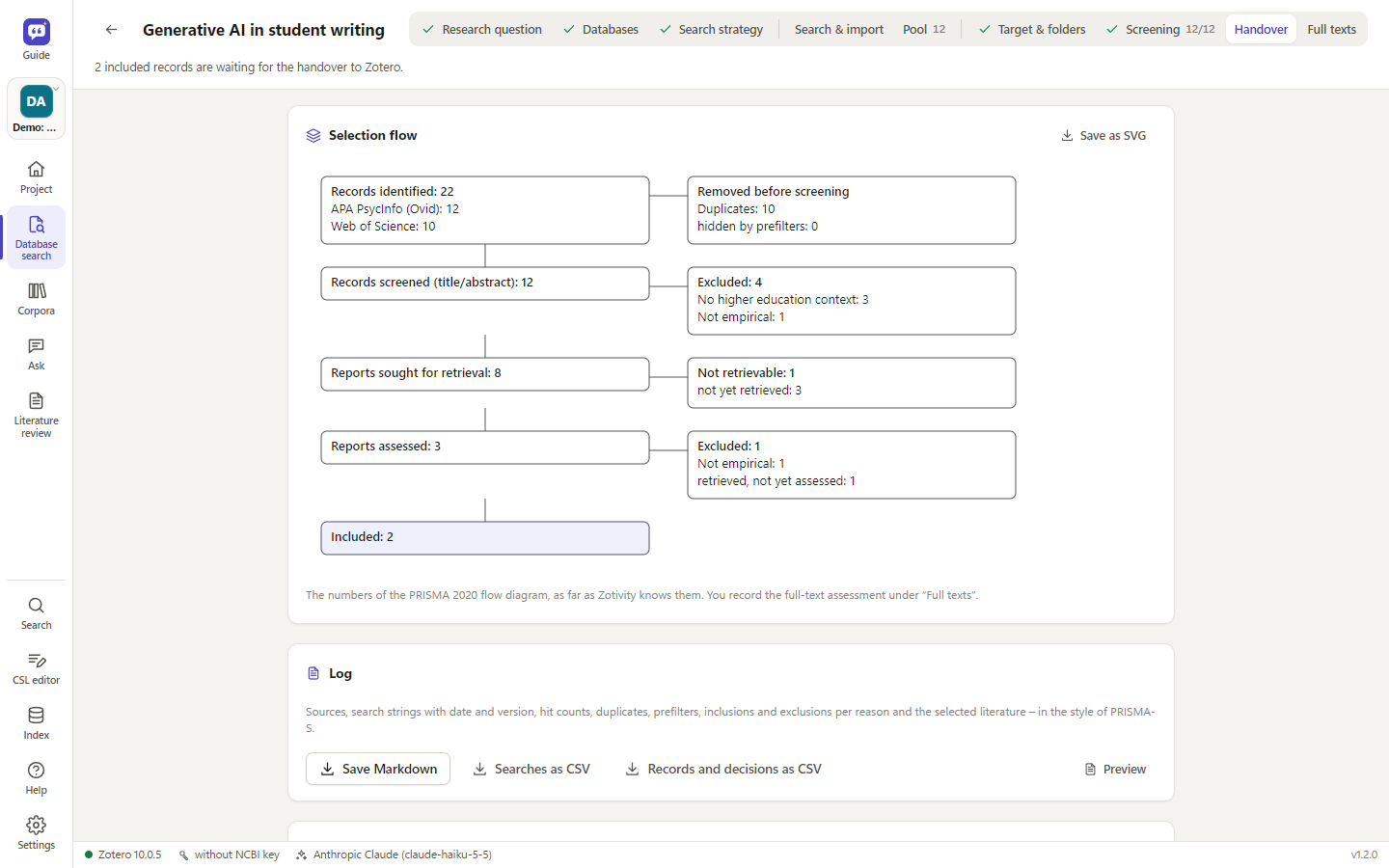
| Handover | plan per folder, then write to Zotero – only after explicit confirmation; flow diagram and search log as Markdown/CSV in the style of PRISMA-S; on request an AI draft for the methods section |
| Full texts | optional: status per text (still missing, available, not retrievable, included, excluded with reason); missing PDFs hold nothing up |
- Status and next step: the tabs show what is done (a tick, numbers for the pool and screening), and the line below says what to do next. Next turns blue once nothing is open in the current tab; nothing is locked.
- Nothing disappears silently: prefilters only mark records; records with an exception term become borderline cases, and hidden records can be reviewed and restored.
- AI suggestions are optional (screening, databases, concept blocks, subfolders) and use the model of the pre-selection in literature reviews (Settings → Expert → Literature review: helper or main model). Only titles, journal, year and abstracts plus the project text are sent; before each run the app shows the estimated tokens and – with prices entered – the costs. Decisions are made by hand; suggestion and decision are both logged.
- Databases only via legal routes: official interfaces, access unlocked by your institution, or RIS export by hand – no browser automation.
- PRISMA: database search covers searching and selection. It does not cover data extraction, risk of bias or synthesis, and each record holds one person's decision (no independent double screening). The log says so.
- Zotero: locally through Zotero's API (write permission as elsewhere in Zotivity) or, with a key, through the Zotero web API.
Keys for the web API and the databases are read from the key store (
zotero-web,openalex– required by OpenAlex since February 2026 –,ncbi,semanticscholar); a settings section for entering them is planned.
Literature review
For requests like "Write the state of research on … in 4000 words", a simple search is not enough. The mode works in five steps:
- Keywords: the helper model suggests search queries (German/English, synonyms, technical terms) that you check, edit, extend or delete – like search strings in literature databases. Hits are counted per document; for each query you see how many texts it found and how many only it found.
- Select literature: the helper model proposes a selection with reasons; you review it yourself, optionally as a Zotero collection.
- Evaluate one by one: an evaluation sheet per text (question, theory, method, sample, country, findings, limitations, key quotations with page numbers) – stored in the index and as a note on the Zotero item. Before you start, input, output and reasoning tokens and – with prices entered – the estimated costs are shown.
- Synthesis: an editable outline, then section-by-section writing with citations
[@KEY, p. x]. - Check: every citation is checked against the selected texts, verbatim quotations against the original text; truncated sections are detected and can be rewritten. Output as Markdown, Word, LaTeX or a note in Zotero, with an appendix documenting the search (corpora, queries, hits).
The result is a cited draft based on your library – weighting, critical appraisal and the final text remain your work (see the risk of deskilling).
Privacy and security
- API keys live in the system key store: Windows Credential Manager (DPAPI, bound to your user account), macOS
Keychain, Linux Secret Service. They never appear in files, logs or the interface (only masked). Without a secure
store they are not saved; use environment variables instead (
ANTHROPIC_API_KEY,OPENAI_API_KEY,GEMINI_API_KEY,DEEPSEEK_API_KEY,MISTRAL_API_KEY). - The service listens on 127.0.0.1 only, checks the host header against DNS rebinding and requires a custom header for writing requests (CSRF protection).
- What leaves your computer: with cloud LLMs, the retrieved passages (for literature reviews, the texts of the selected documents); with cloud embeddings, all indexed texts. With built-in (or Ollama) embeddings and Ollama as LLM, everything stays local. Hugging Face is contacted only for downloads you start and for the model name search. Database search sends search strings to the databases you choose and, for AI suggestions, titles and abstracts of the records plus the project text to the language model.
- Model downloads are pinned to a commit and SHA-256; the built-in runtime only accepts requests carrying Zotivity's random key.
Command line
.venv\Scripts\python -m zotivity serve --open          service + interface
.venv\Scripts\python -m zotivity status                status
.venv\Scripts\python -m zotivity keys set anthropic    enter a key (hidden)
.venv\Scripts\python -m zotivity index --collection users/0:ABCD1234
.venv\Scripts\python -m zotivity search "chatbots adolescents"
.venv\Scripts\python -m zotivity ask "What do my sources say about …?"
.venv\Scripts\python -m zotivity mcp                    MCP server (stdio)
The installed Zotivity.exe understands the same commands (Zotivity.exe mcp, … status, … index).
Claude Desktop (MCP)
In claude_desktop_config.json:
{ "mcpServers": { "zotivity": {
    "command": "C:\\Users\\<name>\\AppData\\Local\\Programs\\Zotivity\\Zotivity.exe",
    "args": ["mcp"] } } }
Tools: search_library, list_collections, get_item, get_sheet – Claude can search repeatedly with its own terms
and cite with page number and Zotero link.
Development
uv pip install --python .venv\Scripts\python.exe -e ".[dev]"
.venv\Scripts\python -m pytest
The tests run without Zotero, without model downloads and without API costs: they simulate Zotero 10's local API
(including write access), generate PDFs, replace LLMs with stubs and llama-server with tests/fake_llama_server.py.
For the built-in runtime during development, run python packaging/fetch_llama.py once.
src/zotivity/
  zotero/      client for the local API (read, write, authorisation)
  extract/     PDF/EPUB/HTML/Word/ODT text with page numbers, chunking, reference-list detection
  embeddings/  built in (llama.cpp: runtime, catalog, download, short test, name search), Ollama, OpenAI, Gemini, …
  llm/         Anthropic, OpenAI/DeepSeek/Mistral/Ollama, Gemini – one interface
  index/       SQLite (FTS5 + vectors per embedding space), indexer, duplicates
  retrieval/   hybrid search (RRF), MMR, reranking
  rag/         questions, literature review, sources
  research/    database search: databases, search strings, pool, screening, handover to Zotero (/api/research/…);
               knows nothing of Zotivity – research_adapters.py connects it (Zotero client, key store, language models)
  server/      FastAPI + interface (static/: js, css, help/<language>.md)
  plugin/      Zotero plugin (served by the service as .xpi)
  locales/     service messages per language
Code comments and the German interface texts (the keys of the translation dictionaries) are in German. Changes per version: CHANGELOG.md.
License
MIT. No warranty – see the license text.