
audiotheme/cue has 31 GitHub stars and 9 forks. GitHot measured 0 stars in 24 hours. Last checked 2026-11-15 04:36 UTC. Last push 2026-11-08.
What you can do
- Create unlimited playlists.
- Embed a player in any post, page, or sidebar using a shortcode or widget.
- Reorder tracks with a simple drag and drop interface.
- Seamlessly integrates with WordPress’ media manager to select audio and images.
Measured star growth
- in 24h
- 0
- in 7 days
- Collecting history
- in 15 days
- Collecting history
- in 1 month
- Collecting history
Net star changes over overlapping periods, not daily totals. Missing measurements are left blank. Stars measure attention, not software quality.
About
Create beautiful, fully responsive audio playlists in WordPress.
Creative & MediaREADME.md
OriginalCue
Delightful and reliable audio playlists.
Contributors: Brady Vercher, Brody Vercher, Luke McDonald
Requires: WordPress 5.6+
License: GPL-2.0+
Cue makes it easy to create and manage beautiful, fully responsive audio playlists. Primarily built with music in mind, Cue can also be used for podcasts, sermons or to showcase voice over samples.
There's no need to fiddle with XML, JSON, or FTP. Just upload audio files with the familiar WordPress Media Manager, then insert them into a playlist with the click of a button. Cue fetches metadata from uploaded files to automatically complete the title, artist, and length for each track.
It works on desktop, tablets, and other mobile devices.
Features
- Create unlimited playlists.
- Embed a player in any post, page, or sidebar using a shortcode or widget.
- Reorder tracks with a simple drag and drop interface.
- Seamlessly integrates with WordPress’ media manager to select audio and images.
- Automatically fetches title, artist, and length from the metadata if it's available.
- Completely responsive to work on any device that supports your audio format.
- Link to external sources like Amazon S3 or other CDNs.
- Customize the player background image.
- Use custom artwork for each track.
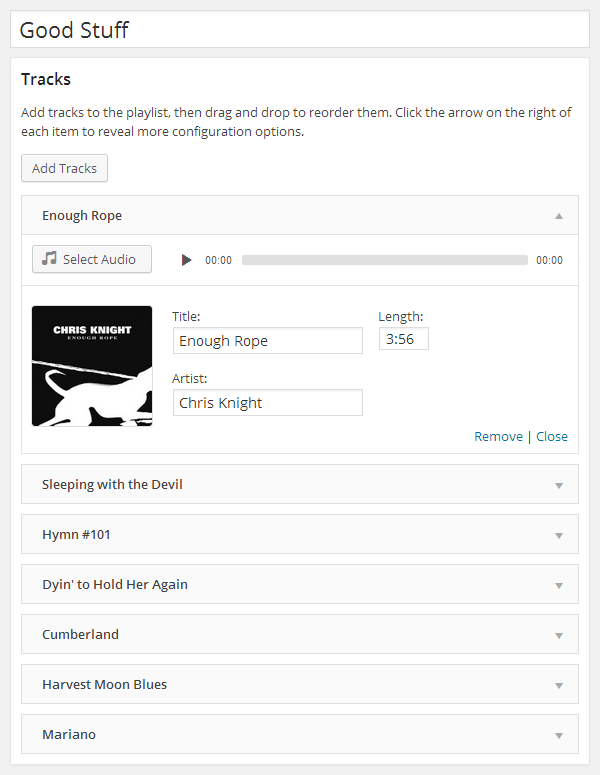
The interface to add, edit and rearrange a playlist's tracks.
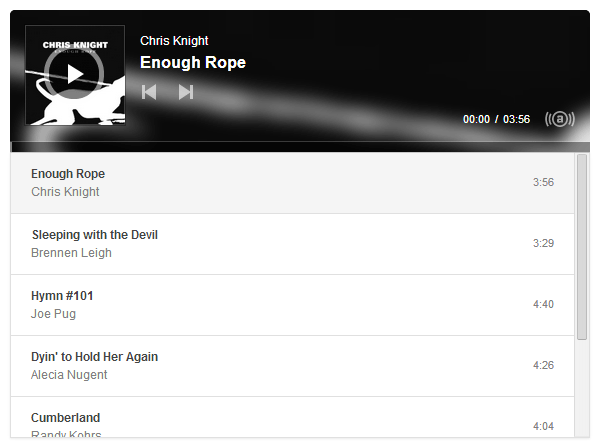
The rendered player on the front end.
Installation
Cue is in the WordPress.org plugin directory and can be installed from your admin panel.
Development
Requires Node.js 22+ and pnpm (run corepack enable to use the pinned version).
pnpm install
pnpm run build
pnpm run package builds a release zip in dist/.
Releasing
Pushing a tag deploys the plugin to WordPress.org with the deploy workflow. It checks the version, builds the package, commits it to SVN trunk and a new tag, updates the directory assets in .wordpress-org, and creates a GitHub release with the zip.
Update
versioninpackage.jsonand add a### x.y.z - Month D, YYYYchangelog entry toreadme.txt.Run
pnpm run package. It copies the version tocue.php(theVersionheader and theCUE_VERSIONconstant used to version scripts and styles) and theStable taginreadme.txt, and builds a zip indist/you can test.Commit, then tag and push:
git tag x.y.z
git push origin develop x.y.z
After the deploy workflow finishes, merge the release into the
trunkbranch.
To try a release without deploying, run the workflow from the Actions tab. Manual runs build everything but don't commit to SVN.
Pushing the trunk branch updates readme.txt and the directory assets on WordPress.org without a release, for changes like bumping "Tested up to".
Both workflows need the SVN_USERNAME and SVN_PASSWORD repository secrets.