
About
0-day malware detection for binaries, source & scripts (that doesn't suck)
Developer ToolsMeasured star growth
- in 24h
- 0
- in 7 days
- +3
- in 15 days
- Collecting history
- in 1 month
- Collecting history
Net star changes over overlapping periods, not daily totals. Missing measurements are left blank. Stars measure attention, not software quality.
README.md
OriginalAtomdrift Scan


Atomdrift Scan is a modern ML-based malware scanner designed to detect 0-day attacks against the software supply-chain.
It's designed to be fast, flexible, and embeddable in any workflow or security tool you have in mind, and can operate against files, archives, URLs, PURLs, or processes. For a given rules version, a verdict is deterministic.
Rather than waiting for someone to report a sample and publish its signature or hash, Atomdrift Scan judges never-before-seen code by what it does. See how it compares with other scanners.
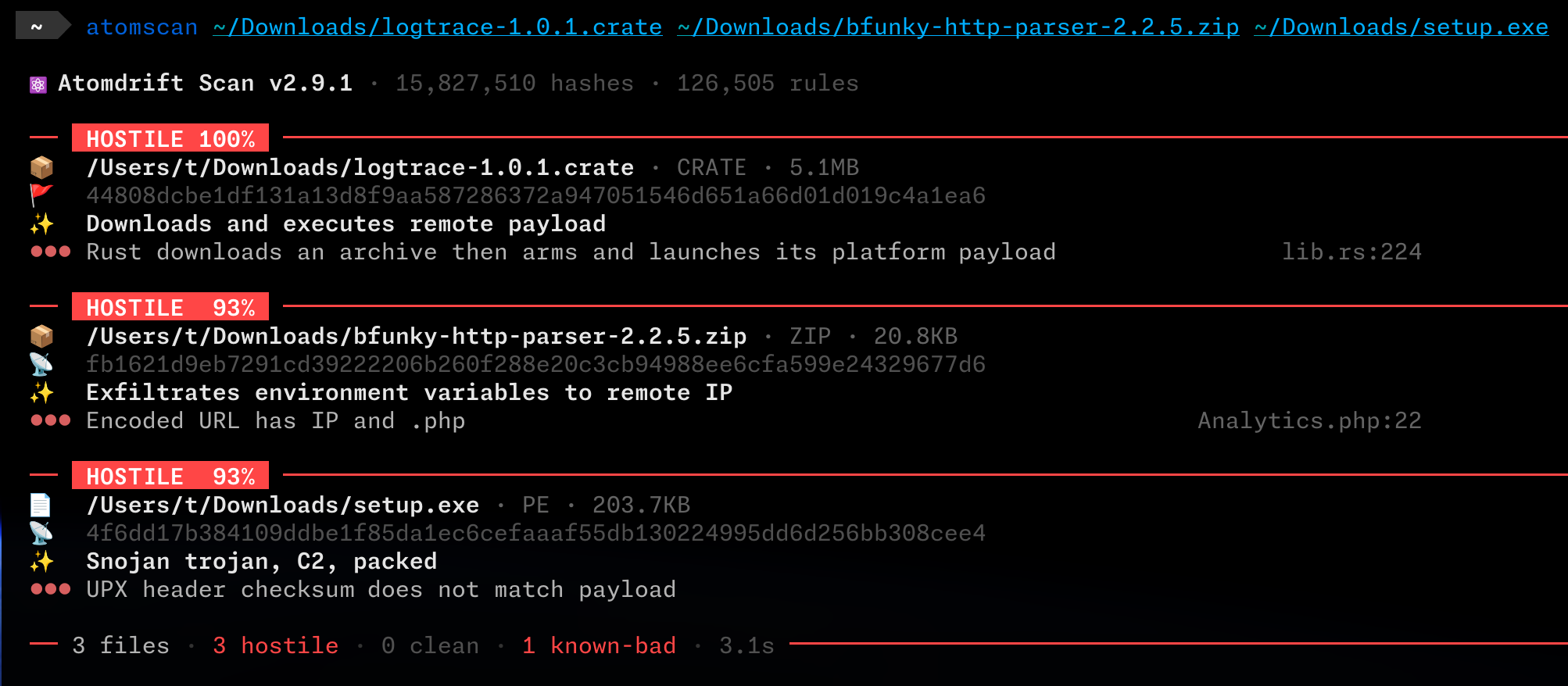
How does Atomdrift get such great results? First, it covers more ground than any other scanner:
- 100+ supported file formats: from C source to ELF to PDF
- 125,000+ detection rules covering malware on every platform from AIX to iOS to Windows
- 15,000,000+ hashes for known good/badware
- Integrated AST analysis using tree-sitter
- Automated binary reverse engineering via binform
Most importantly, rules are constantly refreshed using reinforcement learning against new samples, blogs, and technical articles, resulting in ~1000 updated rules daily.
Install
If you are on a UNIX-flavored host (macOS, Linux, BSD, illumos, Android):
curl -fsSL https://install.atomdrift.org/scan.sh | sh
If you are on Windows:
irm https://install.atomdrift.org/scan.ps1 | iex
Or, if you have Rust installed and just want to build it from source:
make install
If deeper binary analysis is required, you should also install 7-Zip, upx, and innoextract.
On Windows, using winget:
winget install --exact --id 7zip.7zip
winget install --exact --id UPX.UPX
winget install --exact --id dscharrer.innoextract
On Unix-like systems, install upstream 7-Zip (brew install sevenzip, apt install 7zip) rather than p7zip — its 7z cannot read APFS, so .dmg contents go unscanned.
Usage
# Scan a file, directory, or archive recursively:
atomscan ./project
atomscan release.tgz

# Fetch a package from its registry and scan it.
atomscan purl npm/[email protected]

# Fetch and scan a URL.
atomscan url https://example.com/download

# EXPERIMENTAL: Scan running process executables, or triage the wider host
atomscan ps
atomscan sys

# JSON output for programmatic access
atomscan -f json ./project
Exit codes make CI integration trivial:
0: all samples are benign1: hostile sample detected2: suspicious sample detected3: analysis error4: the rule set was incomplete — the scan ran with fewer rules than the trait set defines, so anything short of hostile proves nothing. Re-run it.130: interrupted (Ctrl-C) before every file was analyzed
How it works
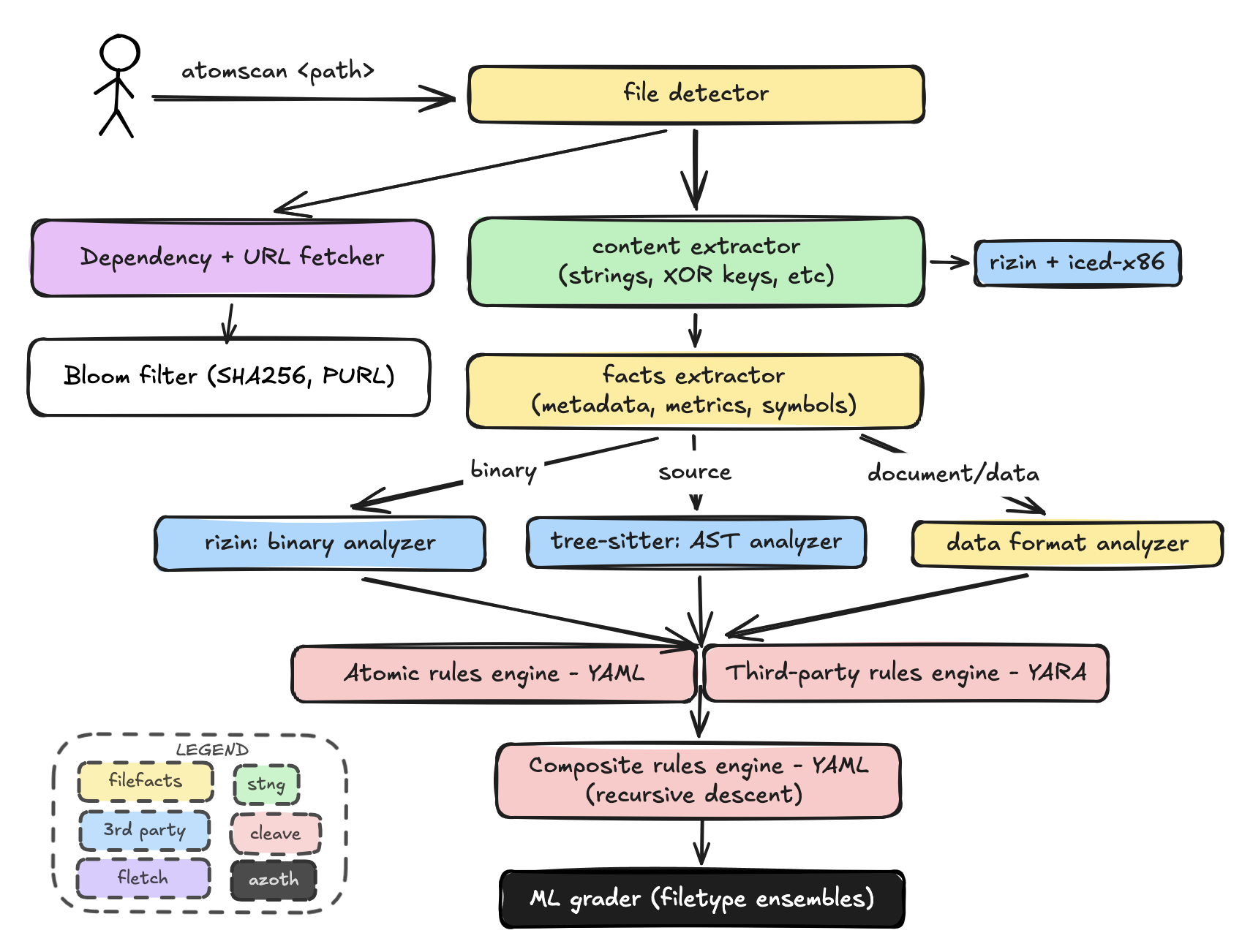
- stng extracts content, even if obfuscated
- cleave unpacks containers and extracts capabilities
- The report is converted into a standardized feature vector, standardized across file types.
- azoth LightGBM model ensembles score the sample.
Networking and privacy
atomscan will never send telemetry data. It will however reach out to the Internet for 4 reasons:
- rule updates: every 24h; disable with
--no-update - release check: once a day, to say a newer atomscan exists; disable with
SCAN_NO_UPDATE_CHECK=1 - following discovered references: to detect if a benign package depends on or downloads a compromised payload. Set
--follow=noneto analyze only the requested artifact. - Atomdrift Uplink lookups: to skip analyzing what the service has already judged. A scan asks
api.atomdrift.orgabout the SHA-256 of each local file of 1 MiB or more, each known-bad, sighted, suspicious or hostile file, and each downloaded dependency, and about the PURLs of packages on mainstream public registries. A sighted file takes the worse of the two verdicts; another flagged file takes Uplink's only if it is newer than the installed traits. No account is needed and nothing identifying is sent: never a path, a file name, a URL or a file's contents. Off when the traits are a git checkout.
Two flags keep a scan to itself. --local (or SCAN_LOCAL=1) keeps analysis on this machine: no Uplink lookups, and no files sent to a hopper or to an LLM other than one on this machine, whatever else is configured. Rules and models still update, and following references still fetches what they name. It is also the reproducible mode. --offline makes no network connection at all, which implies --local; the rules and models must already be installed.
Downloaded dependencies are analyzed under the current rules unless a local analysis report or a matching-analyzer corpus verdict can be reused. A recent clean verdict from another analyzer does not replace analysis of downloaded bytes. Package-coordinate lookups may still use that recent clean verdict to avoid downloading an already-known dependency.
Tune the false-positive level
Use -l to choose a pool-adjusted false-positive level:
-l0: zero observed calibration FPs; the strictest setting.-l1: one FP in the benign calibration pool.-l25: the default; one FP plus an estimated additional 24 per 100 million benign files (approximately “one plus 25 per 100 million”).-l1000: one FP plus an estimated additional 999 per 100 million benign files.
For a pool of N benign files, L0 allows zero observed false positives. Every positive level L has a continuous allowance of 1 + (L - 1) * N / 100_000_000; an integer FP-count budget rounds this down. L1 allows one FP. L25 means one FP plus an estimated additional 24 per 100 million benign files (approximately “one plus 25 per 100 million”). The initial FP belongs to the decision pool, not to each component model or each scan invocation.
These are calibration targets, not guaranteed future rates. Small pools need interpolation or extrapolation to estimate finer rate differences; observed counts, estimated rates, and uncertainty must remain separate. L0 means zero observed calibration FPs, not zero future risk.
The shared definition is in Collimator’s level contract.
Optional local LLM (interpretation)
For additional interpretation, users can provide access to an LLM via the --llm flag. This flag serves two purposes:
- Provides a large-language model text interpretation of the results
- Steer edge cases based on agreement/disagreement with the ML model (up to 33%)
By default, atomscan sends the interpreted evidence (not the original file) to http://localhost:8000/v1 - to be used with a local service like Ollama or vLLM; but it can also be setup to use a remote service like Claude, ChatGPT, or DeepSeek.
No model is hardcoded: unless you pass --llm-model, atomscan asks the endpoint which models it serves and uses the largest one it lists. We recommend serving Qwen/Qwen3.8-27B.
If the endpoint requires a bearer token, put it in ~/.tok/llm (mode 0600) and atomscan sends it automatically; SCAN_LLM_KEY overrides that file.
--llm also takes a comma-separated failover chain, tried in order — --llm 'https://llm.example/v1,openrouter' grades on your own endpoint and reaches for the billed one only when it cannot answer.
atomscan --llm ./project
atomscan --llm http://model-host:8000/v1 --llm-model my-model ./project
atomscan --llm openrouter --llm-model qwen/qwen3.8-27b ./project
--llm openrouter talks to https://openrouter.ai/api/v1. The key comes from SCAN_LLM_KEY or ~/.tok/openrouter (first non-empty line). --llm-model defaults to openrouter/auto (OpenRouter's own auto-router) if omitted — the rest of the catalog is not auto-selected.
Linux make deploy accepts the same names: LLM=openrouter (or LLM_URL=openrouter), and LLM_MODEL=qwen/qwen3.8-27b only to pin a model instead of openrouter/auto. The unit cannot read the operator home (ProtectHome=true), so the deploy script copies ~/.tok/openrouter into the service state dir.
Coverage
The scanner recognizes more than 100 file and container types. Representative coverage includes:
| Category | Formats |
|---|---|
| Binaries and bytecode | Mach-O, ELF, PE, WebAssembly, Android DEX, Java .class, Python .pyc, BEAM |
| Source | Python, JavaScript, TypeScript, Go, Rust, Java, C, C++, C#, Ruby, PHP, Perl, Lua, Swift, Objective-C, Kotlin, Scala, Groovy, Zig, Elixir, Clojure, Shell, PowerShell, Batch, VBScript, AppleScript, JCL |
| Build, manifest, and lock files | package.json, package-lock.json, Cargo.toml, Cargo.lock, pyproject.toml, requirements.txt, Poetry, Pipenv, Composer, Yarn, pnpm, Go modules, binding.gyp, GitHub Actions, systemd units, Makefile, Dockerfile |
| Archives and disk images | ZIP, TAR, gzip, bzip2, XZ, zstd, 7-Zip, RAR, CAB, ASAR, DMG, ISO |
| Packages and containers | deb, rpm, APK, npm, wheel, egg, sdist, gem, crate, conda, NuGet, IPA, CRX, XPI, VSIX, OCI/Docker images, FreeBSD, Arch, Void, and Gentoo packages |
| Documents and data | OLE2, OOXML, OpenDocument, PDF, RTF, Markdown, HTML, XML, SVG, plist, JPEG, PNG, LNK, CHM, Python pickle |
The rule set includes platform-specific behaviors for Linux, macOS, Windows, Android, iOS, the BSDs, AIX, Solaris, QNX, z/OS, ESXi, OpenWrt, VxWorks, RouterOS, FortiOS, PAN-OS, IOS-XE, Junos, NetScaler, and Ivanti appliances.
The default build matrix covers Linux, macOS, FreeBSD, OpenBSD, NetBSD, illumos, and Windows on 64-bit CPUs. Test depth varies by target; see the build workflow for the current matrix.
Rule feeds
Scan's rules come from one of three feeds. They carry the same rules and
differ only in how long a ruleset waits after it passes QA: oss (up to 8
days, no account), supporter (72 hours, an Atomdrift Early Supporter plan),
and zero-day (no delay, a Business or Critical plan).
atomscan login                       # sign this computer in to Atomdrift
atomscan --feed=supporter fs ~/src   # insist on one feed for this run
--feed defaults to auto: the best feed your plan opens, or oss when this
computer is not signed in. A named feed is insisted on: without a sign-in it
shows a link to approve this computer at the Atomdrift console, which takes
care of the subscription, and one your plan does not include stops the run.
SCAN_FEED sets it from the environment. The sign-in is shared with cleave
and hood, and CI can supply a token with SCAN_TOKEN instead.
atomscan version shows the feed in use.
NSRL Modern allowlist
atomscan update-rules installs the NSRL Modern allowlist as its own Bloom
bundle, versioned separately from the daily known-good/known-bad filters. The
first download is about 512 MiB; after that, the daily rules check downloads
filter bytes only when the NSRL manifest changes.
An NSRL SHA-256 hit is an additional good signal. A bad, sighted-hostile, sighted-suspicious, or conflicted match in Scan's primary bundle always takes precedence. The primary SHA-256 revocation filter must be loaded before NSRL can permit skipping. When both PURL and digest are supplied, each key still needs a good match. Slow mode continues to analyze all inputs.
atomscan version reports NSRL separately, and NSRL content changes invalidate cached analysis verdicts.
Documentation
- Integration guide — CLI, server, library, exit codes, and deployment choices
- JSON report schema — machine-readable output fields
- Server API — long-running HTTP service
- Environment variables — the few settings read from the environment
- Dependency storage design — a proposal, not yet implemented, for storing fetched dependencies as independent artifacts
Related projects
- cleave — capability extraction and static analysis
- azoth — model weights, thresholds, and feature specification
- hopper — distributed work queue
- Atomdrift Lab — free sample analysis
License
Atomdrift Scan is available under the Apache License 2.0.
Release binaries also bundle third-party code under its own licenses. That
includes UnRAR (compiled in through the unrar-ng-sys crate), which is
distributed under the UnRAR license: its source may be used to handle RAR
archives, but not to develop a RAR-compatible archiver or to re-create the RAR
compression algorithm.
Contributing
Contributions are welcome; CONTRIBUTING.md covers the
toolchain, make lint and make test. Report security issues as described in
SECURITY.md.
Explore related projects
Loading…