
asxez/DockerDesktop-CN
asxez/DockerDesktop-CN has 10,275 GitHub stars and 557 forks. GitHot measured +6 stars in 24 hours. Last checked 2026-11-06 23:48 UTC. Last push 2026-11-04.
Docker汉化 Docker中文版 Docker汉化包 DockerDesktop汉化 Docker Windows Docker MAC
Measured star growth
- in 24h
- +6
- in 7 days
- Update delayed
- in 15 days
- Update delayed
- in 1 month
- Update delayed
Net star changes over overlapping periods, not daily totals. Missing measurements are left blank. Stars measure attention, not software quality.
README.md
OriginalDocker Desktop 汉化包
本仓库同时提供 Docker Desktop 汉化包与汉化脚本,Release 页面会随 Docker Desktop 版本发布对应平台安装程序和汉化包。
原脚本仓库 asxez/DDCS 已归档,脚本源码已迁移到本仓库,后续维护与发布都在这里进行。
Docker汉化 Docker中文版 Docker Desktop汉化 Docker Windows Docker MAC
Windows x86 / Windows arm / macOS Apple Silicon / macOS Intel / Debian x86 均提供汉化包,以 Release 实际产物为准。
注意: 自 4.39 版本后,汉化包会跟随 Docker Desktop 安装程序一起发布在 Releases 页面。
下载汉化包
Release 中的汉化包为 app-*.zip:
app-Windows-x86.zipapp-Windows-arm.zipapp-Mac-apple.zipapp-Mac-intel.zipapp-Debian-x86.zip
汉化包内容:
- Windows 包含
app.asar、app.asar.unpacked、已同步完整性校验的Docker Desktop.exe,以及一键安装/恢复脚本安装汉化.bat、恢复原版.bat。 - macOS 包含
app.asar、app.asar.unpacked、已同步完整性校验的Info.plist,以及一键安装/恢复脚本安装汉化.command、恢复原版.command。 - Linux 包含
app.asar、app.asar.unpacked,以及一键安装/恢复脚本install.sh、restore.sh。
Docker Desktop 4.74.0 起,Windows 版会校验 app.asar 完整性。只替换 app.asar 会导致 Docker Desktop 无法启动,并出现 Integrity check failed for asar archive。Windows 用户必须同时替换 app.asar、app.asar.unpacked 和汉化包内的 Docker Desktop.exe。
macOS 同样会校验 app.asar 完整性,校验值位于内层 Docker Desktop.app/Contents/Info.plist。macOS 用户必须同时替换 app.asar、app.asar.unpacked 和汉化包内的 Info.plist。
汉化包使用方法
Windows:一键安装(推荐)
- 完全退出 Docker Desktop(托盘图标右键退出)。
- 下载并解压对应架构的
app-Windows-x86.zip或app-Windows-arm.zip。 - 双击压缩包内的
安装汉化.bat。 - Windows 弹出 UAC 提示时选择“是”,等待脚本自动完成备份、替换和校验。
- 完成后按提示启动 Docker Desktop。
安装脚本会自动完成以下操作:
- 定位 Docker Desktop 实际安装目录,支持
C:\Program Files\Docker\Docker和%LOCALAPPDATA%\Programs\DockerDesktop。 - 关闭正在运行的 Docker Desktop。
- 备份
app.asar、app.asar.unpacked和Docker Desktop.exe到%LOCALAPPDATA%\DockerDesktop-CN\backup\<时间戳>。 - 替换
app.asar、app.asar.unpacked和Docker Desktop.exe,并校验app.asar。 - 如版本不一致会提示确认,避免把汉化包用到错误版本。
如需恢复原版,双击压缩包内的 恢复原版.bat,按提示选择备份即可。压缩包内还包含 使用说明.txt。
Windows:手动安装(脚本不可用时)
下文 Windows 示例使用 C:\Program Files\Docker\Docker 作为安装根目录。如果 Docker Desktop 安装在其他位置,请将步骤中的安装根目录替换为实际路径。
在每用户安装场景中,安装根目录也可能是 %LOCALAPPDATA%\Programs\DockerDesktop(参见 #82)。安装在该位置时,需要备份和操作的文件为:
%LOCALAPPDATA%\Programs\DockerDesktop\frontend\resources\app.asar%LOCALAPPDATA%\Programs\DockerDesktop\frontend\resources\app.asar.unpacked%LOCALAPPDATA%\Programs\DockerDesktop\frontend\Docker Desktop.exe
可以查看 Docker Desktop 快捷方式的“目标”确认可执行文件位置,再检查同一目录下的 resources\app.asar 与 resources\app.asar.unpacked。PATH 中的 resources\bin 路径、卸载项的 InstallLocation 也可以作为线索。以实际存在的文件为准,避免把汉化包复制到未使用的旧安装目录。
Windows 手动操作步骤:
- 完全退出 Docker Desktop(建议同时执行
wsl --shutdown)。 - 下载当前 Docker Desktop 版本对应的
app-Windows-*.zip汉化包并解压。 - 备份原文件:
frontend\resources\app.asarfrontend\resources\app.asar.unpackedfrontend\Docker Desktop.exe
- 替换文件:
- 用汉化包内的
app.asar替换frontend\resources\app.asar。 - 用汉化包内的
app.asar.unpacked替换整个frontend\resources\app.asar.unpacked目录。 - 用汉化包内的
Docker Desktop.exe替换frontend\Docker Desktop.exe。
- 用汉化包内的
- 启动 Docker Desktop。
Windows 手动操作请使用管理员权限;恢复原版时,也需要将备份的 Docker Desktop.exe、app.asar 和 app.asar.unpacked 一起恢复。
macOS:一键安装(推荐)
- 完全退出 Docker Desktop(菜单栏 Docker 图标 -> Quit Docker Desktop)。
- 下载并解压对应的
app-Mac-apple.zip或app-Mac-intel.zip。 - 双击压缩包内的
安装汉化.command。- 如果提示“无法打开,因为无法验证开发者”,请右键点击文件,选择“打开”。
- 也可以在终端执行:
chmod +x 安装汉化.command && ./安装汉化.command
- 按提示输入管理员密码(sudo),等待脚本自动完成备份、替换和校验。
- 完成后按提示启动 Docker Desktop。
脚本会备份到 ~/Library/Application Support/DockerDesktop-CN/backup/<时间戳>。如需恢复原版,双击 恢复原版.command,按提示选择备份即可。
Linux:一键安装(推荐)
完全退出 Docker Desktop。
下载并解压
app-Debian-x86.zip。在终端进入解压目录,执行:
chmod +x install.sh
sudo ./install.sh
按提示输入管理员密码,等待脚本自动完成备份、替换和校验。
完成后按提示启动 Docker Desktop。
脚本会备份到 ~/.local/share/DockerDesktop-CN/backup/<时间戳>。如需恢复原版,执行 sudo ./restore.sh,按提示选择备份即可。
macOS / Linux:手动安装(脚本不可用时)
- 完全退出 Docker Desktop。
- 下载对应平台的
app-*.zip汉化包并解压。 - 备份原文件:
- macOS:
/Applications/Docker.app/Contents/MacOS/Docker Desktop.app/Contents/Resources/app.asar - macOS:
/Applications/Docker.app/Contents/MacOS/Docker Desktop.app/Contents/Resources/app.asar.unpacked - macOS:
/Applications/Docker.app/Contents/MacOS/Docker Desktop.app/Contents/Info.plist - Debian/Ubuntu:
/opt/docker-desktop/resources/app.asar - Debian/Ubuntu:
/opt/docker-desktop/resources/app.asar.unpacked
- macOS:
- 文件操作:
- macOS: 将汉化包内的
app.asar、app.asar.unpacked替换到/Applications/Docker.app/Contents/MacOS/Docker Desktop.app/Contents/Resources,将Info.plist替换到/Applications/Docker.app/Contents/MacOS/Docker Desktop.app/Contents/Info.plist。 - Debian/Ubuntu: 将汉化包内的
app.asar和app.asar.unpacked替换到/opt/docker-desktop/resources。
- macOS: 将汉化包内的
- macOS 不要对 Docker Desktop 执行 ad-hoc 重签名。如果之前已经重签过,请先恢复备份或重装原版 Docker Desktop 后再替换。
- 启动 Docker Desktop。
macOS 用户恢复原版时,也需要将备份的 Info.plist、app.asar 和 app.asar.unpacked 一起恢复。
使用汉化脚本
仓库根目录即为汉化脚本源码,ddcs.py 会自动定位本机 Docker Desktop 安装目录,完成解包、替换、重打包和完整性校验同步。
环境需求
- Python >= 3.10
- Node.js >= 22
安装依赖
pip install -r requirements.txt
npm install
执行汉化
Windows 请务必使用管理员权限启动终端,并先完全退出 Docker Desktop,然后进入仓库根目录执行:
python ddcs.py
macOS / Linux 直接执行同一命令即可。
注意:
- Docker Desktop 4.74.0 及以上版本会校验
app.asar完整性。Windows 会在Docker Desktop.exe中记录 asar header hash,macOS 会在Docker Desktop.app/Contents/Info.plist的ElectronAsarIntegrity中记录该 hash。脚本会在替换app.asar后同步更新这些校验信息;如果没有权限,脚本会提前报错,Docker Desktop 将无法正常启动。 - 汉化前请备份
app.asar、app.asar.unpacked和Docker Desktop.exe(Windows)或Info.plist(macOS),方便回滚。
自动提取(翻译者 / 开发者)
通过正则和简单的代码分析,自动提取 Docker Desktop 页面中出现的文本,并保存到 extract_config.py。
Docker Desktop 4.74.0+ 完整性校验
4.74.0 起,Windows 版 Docker Desktop 会在 Docker Desktop.exe 中记录 resources\app.asar 的完整性信息;macOS 会在内层 Docker Desktop.app/Contents/Info.plist 的 ElectronAsarIntegrity 中记录 Resources/app.asar 的完整性信息。这里的 hash 是 app.asar header JSON 的 SHA256,不是整个 app.asar 文件的 SHA256。修改或重新打包 app.asar 后,必须同步更新该 hash,否则 Electron 会报 Integrity check failed for asar archive 并拒绝启动。
提取与翻译流程
运行自动提取(仅在 Docker Desktop 发布新版本后需要):
# 默认与 ddcs.py 一致,自动寻找本机 Docker Desktop app.asar 并解包
python ddcs_extract.py
或手动解包 asar 后指定路径:
python ddcs_extract.py --path xxx进行翻译。
extract_config.py 中的
config是一个Config列表:[Config(src=英文, dst=中文, deleted_at=None), ...]运行自动提取后,新增配置项中:
src:英文文本dst:为空字符串""的中文文本deleted_at:如果旧配置项在当前版本没有提取到,会设置为当前版本号
请在 extract_config.py 中搜索空字符串并进行翻译。
注意事项:
- 英文文本可能为包含 JS 变量的模板字符串,如
Images (${c.images.count}),翻译后的中文应当保留变量,即镜像(${c.images.count})。 - 英文文本可能为包含替换字段(
{0}、{1}等)的格式化字符串,如Select {0} in the {1} column to see it running.,翻译后的中文应当保留替换字段,即在 {1} 列选择 {0} 以查看其运行情况。如果替换字段遗漏,替换阶段会输出警告日志。 - 对于不需要翻译的项目,请不要删除,而是将中文值设为
None,如("Python", None)。 - 对于没有自动提取的文本,请添加到 extract_config_manually.py。
提取示例:
config: List[Config] = [
- Config(src="outdated text", dst="过时文本"),
+ Config(src="outdated text", dst="过时文本", deleted_at="4.50.0"),
+ Config(src="new text in {0}", dst="", deleted_at=None),
+ Config(src="Python", dst="", deleted_at=None),
]
翻译后:
config: List[Config] = [
- Config(src="outdated text", dst="过时文本"),
+ Config(src="outdated text", dst="过时文本", deleted_at="4.50.0"),
+ Config(src="new text in {0}", dst="{0} 中的新文本", deleted_at=None), # 保持模板变量
+ Config(src="Python", dst=None, deleted_at=None), # 专业词汇不需要翻译
]
验证翻译:
python ddcs.py替换后启动 Docker Desktop,逐页验证。自动提取不可能完全精准,可能出现:
- 遗漏部分内容:某些地方仍为英文;将文本添加到
extract_config_manually.py或优化extract.py。 - 错误提取:Docker Desktop 页面出现报错;根据报错定位错误文本并修复(大多出现在
extract_config_manually.py中,如漏掉引号等)。
- 遗漏部分内容:某些地方仍为英文;将文本添加到
发布流程
Release 由 .github/workflows/release.yml 每日检查 Docker Desktop 新版本并自动构建,也可以手动触发。本地构建可执行:
./release.sh
脚本会下载五个平台的安装包,提取 app.asar、执行汉化、重新打包并同步完整性校验,最后通过 gh release create 发布到本仓库 Releases。
Docker Desktop 4.97.0 起,Windows 安装包改为自定义 PE 结构,
app.asar位于 PE 资源DOCKERDESKTOP的内嵌 7z 中。release.sh会调用tools/extract_windows_payload.py自动提取,无需手动处理。
需要重新生成同一版本的 Release 资源时,在 Actions 页面手动触发 Release DockerDesktop package,勾选 force 即可覆盖当前版本资源。
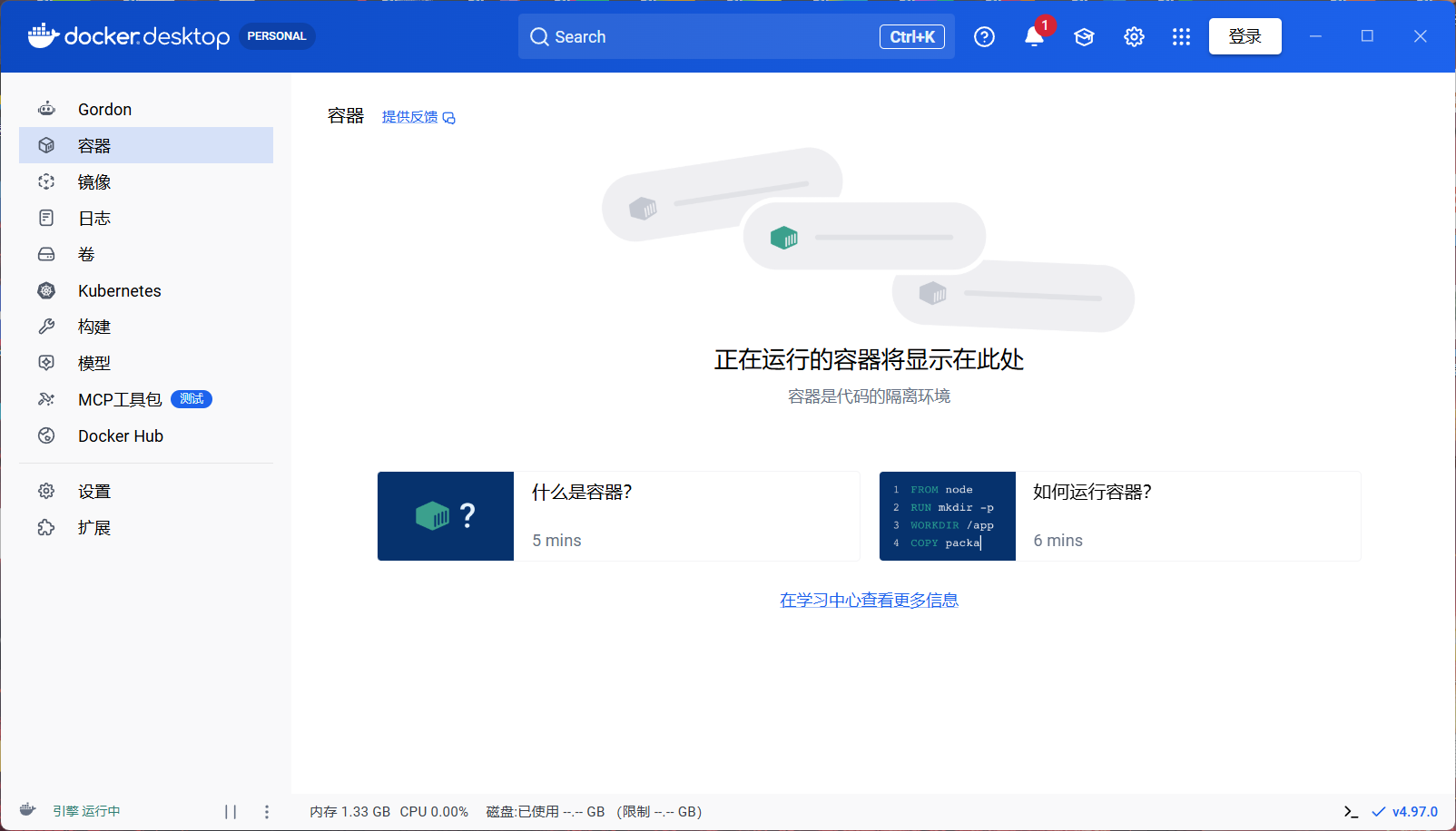
效果图
Windows
更多问题?
有问题的可以扫码加群咨询。

Stars
如果你觉得本仓库对你有用的话,请点上一颗 star。
Explore related projects
codecrafters-io/build-your-own-x
Master programming by recreating your favorite technologies from scratch.
560,627 starspublic-apis/public-apis
A collective list of free APIs
496,884 starsmorluto/rea
Reverse engineer anything with agents, from app behavior down to native binaries.
439,619 starsopenclaw/openclaw
The AI that really does things. Any OS. Any Platform. The lobster way. 🦞
394,106 stars