
asmyshlyaev177/state-in-url
asmyshlyaev177/state-in-url has 420 GitHub stars and 11 forks. GitHot measured +1 stars in 24 hours and +1 in 7 days. Last checked 2026-11-10 23:08 UTC. Last push 2026-10-28.
Store any user state in query parameters; imagine JSON in a browser URL, while keeping types and structure of data, e.g.numbers will be decoded as numbers not strings. With TS validation. Shared state and URL state sync without any hassle or boilerplate. Supports Next.js@14-16, react-router@6-7, and Remix@2.
What you can do
- 🧩 Simple: No providers, reducers, boilerplate or new concepts, API similar to React.useState
- 📘 Typescript validation/autocomplete: State is just an object, automatic static validation in IDE/tests according to Typescript definition
- ✨ Complex data: Nested objects, dates and arrays, works same as JSON, but in URL
- ☂ Default values: Giving you default values if parameter not in url
Measured star growth
- in 24h
- +1
- in 7 days
- +1
- in 15 days
- Update delayed
- in 1 month
- Update delayed
Net star changes over overlapping periods, not daily totals. Missing measurements are left blank. Stars measure attention, not software quality.
README.md
OriginalEnglish · 简体中文 · 日本語 · 한국어 · Русский · Español · Português (BR) · Français · Tiếng Việt

State in url




Don't hesitate to open an issue if you found a bug, or for requesting features
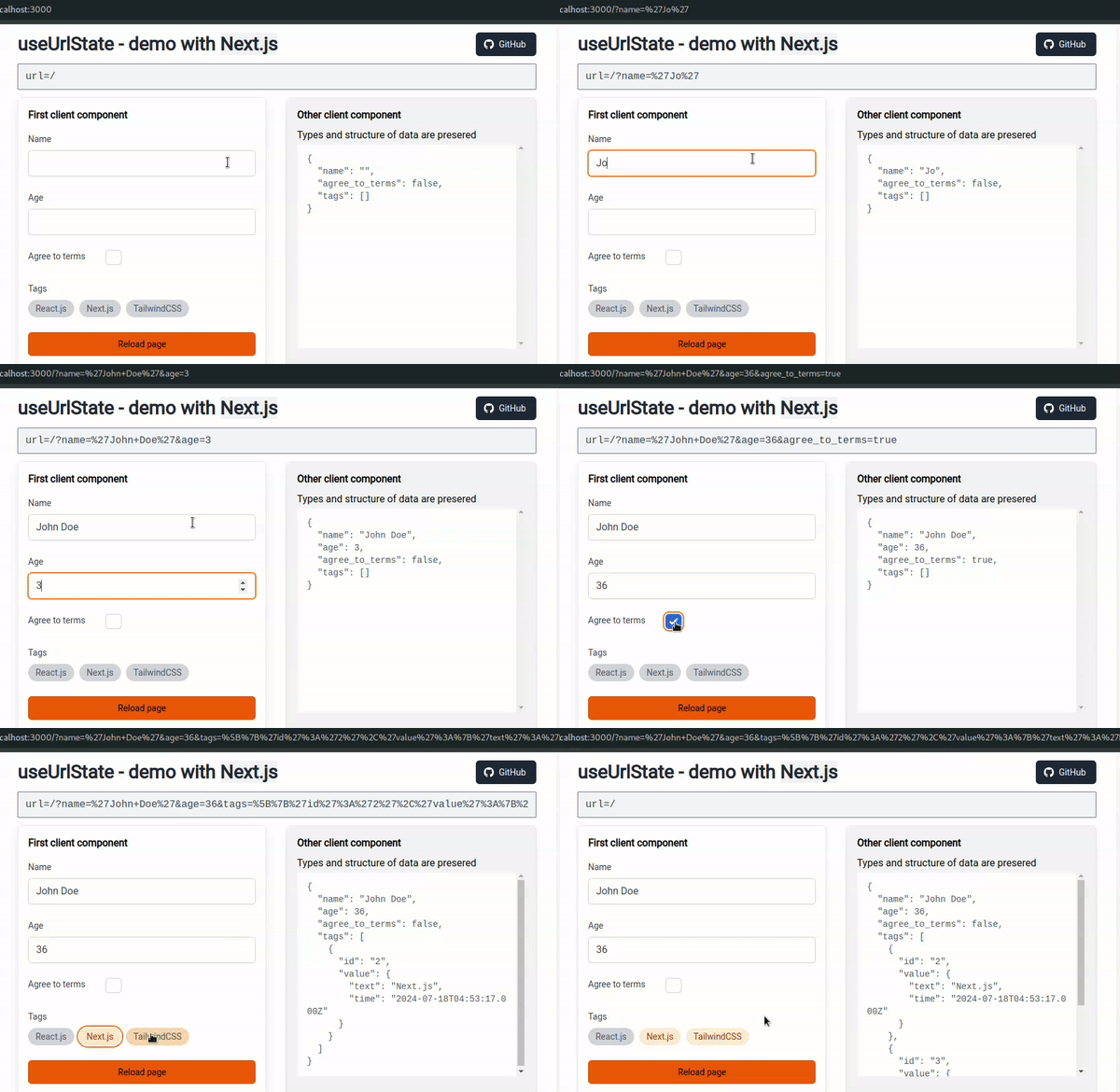
Demo
URI size limitation, up to 12KB is safe
Add a  and follow me to support the project!
Will appreciate you feedback/opinion on discussions
Share if it useful for you. X.com LinkedIn FB VK
Why use state-in-url?
Store any user state in query parameters; imagine JSON in a browser URL. All of it with keeping types and structure of data, e.g. numbers will be decoded as numbers not strings, dates as dates, etc, objects and arrays supported. Dead simple, fast, and with static Typescript validation. Deep links, aka URL synchronization, made easy.
Contains useUrlState hook for Next.js, react-router, Remix and Astro, and helpers for anything else on JS.
Since modern browsers support huge URLs and users don't care about query strings (it is a select all and copy/past workflow).
Time to use query string for state management, as it was originally intended. This library does all mundane stuff for you.
This library is a good alternative for NUQS.
Use cases
- Store unsaved user forms or page filters in URL
- Sync URL with React state
- Just sync data between unrelated client components without touching URI
- Shareable URLs with application state (Deep linking, URL state synchronization)
- Easy state persistence across page reloads
Features
- 🧩 Simple: No providers, reducers, boilerplate or new concepts, API similar to
React.useState - 📘 Typescript validation/autocomplete: State is just an object, automatic static validation in IDE/tests according to Typescript definition
- ✨ Complex data: Nested objects, dates and arrays, works same as JSON, but in URL
- ☂ Default values: Giving you default values if parameter not in url
- ⌨ Organized: All possible values defined at start, protect you from getting non existing key
- compatible: Will keep 3rd party query params as is
- flexible: Can use more than 1 state objects on the same page, just use different keys
- Fast: Minimal rerenders, around 1ms to encode and decode big object
- Server Side Rendering: Can use it in Server Components, Next.js 14, 15, and 16 are supported
- Lightweight: Zero dependencies, library less than 2KB
- DX: Good developer experience, documentation, JSDoc comments, and examples
- Framework Flexibility: Hooks for
Next.js,react-router,RemixandAstro, helpers to use it with other frameworks or pure JS - Well tested: Unit tests and Playwright tests for Chrome/Firefox/Safari
- Permissive license: MIT
Comparison with nuqs
Searching for a nuqs alternative? Both keep typed state in the query string; they differ in how much you set up and what a value can be.
| What | state-in-url |
nuqs |
|---|---|---|
| Setup | None — import the hook and go | Adapter component wraps the app |
| State shape | One typed object, like React.useState |
Per-key values, a parser declared for each |
| Reuse across components | Wrap the hook once — every component shares the state, no props | Extract your own hook around the parser map |
| Nested objects and arrays | Built in — structure and types preserved | JSON parser plus your own runtime validator |
| Dates | Preserved automatically | Built-in parser, declared per key |
| Size, full import | ~2.9 KB gzipped | ~6.7 KB gzipped |
| Runtime dependencies | None | One |
| Routers | Next.js, React Router v6/v7, Remix, Astro, plain JS helpers | Next.js, React Router, Remix, TanStack Router, plain React |
Sizes: whole-library import, esbuild minify + gzip, measured August 2026 against nuqs 2.10.1.
nuqs is a fine library — reach for it when you want each value as its own readable query param, or you are on TanStack Router. Reach for state-in-url when you want a whole typed object in the URL with zero setup.
The full comparison — the same feature built in both, other alternatives (TanStack Router, use-query-params) and migration notes — lives at https://state-in-url.dev/vs/nuqs.
Table of content
- State in url
- Demo
- Why use
state-in-url? - Table of content
- installation
- Using with AI coding agents
- useUrlState
- Recipes - Custom hook to work with slice of state conveniently - With complex state shape - Update state only and sync to URL manually
- Other hooks and helpers
- Best Practices
- Gotchas
- Other
- Roadmap
- Contact & Support
- Changelog
- Mentions
- License
- Hire me
- Inspiration
- Why use
installation
1. Install package
# npm
npm install --save state-in-url
# yarn
yarn add state-in-url
# pnpm
pnpm add state-in-url
2. Edit tsconfig.json
In tsconfig.json in compilerOptions set "moduleResolution": "Bundler", or"moduleResolution": "Node16", or "moduleResolution": "NodeNext".
Possibly need to set "module": "ES2022", or "module": "ESNext"
3. Note: this package resolves as ESM only
Next.js, Vite, Astro and Remix bundle it with no configuration, and require()
from plain Node works on Node ^20.19 or >=22.12, where require(esm) is
unflagged.
A CommonJS build ships in dist/ as .cjs, but the exports map does not point
at it, so nothing resolves to it by accident. It is there for the edge cases —
older Node, or Jest without a flag — and you reach it by explicit path.
Jest needs one line of config either way — see Gotchas item 5.
Using with AI coding agents
state-in-url ships skill files for @tanstack/intent, so AI agents (Claude Code, Cursor, Copilot, Codex, etc.) load the right patterns and avoid common mistakes when using the library. After installing state-in-url, run once in your project:
npx @tanstack/intent@latest install
This wires your installed agent to discover the skills from node_modules/state-in-url/skills/. List available skills with npx @tanstack/intent@latest list.
useUrlState
Main hook that takes initial state as parameter and returns state object, callback to update url, and callback to update only state.
All components that use the same state object are automatically synchronized.
useUrlState hook for Next.js
Usage examples
Basic
- Define state shape with default values
// userState.ts
// Only parameters with value different from default will go to the url.
export const userState: UserState = { name: '', age: 0 }

// use `Type` not `Interface`!
type UserState = { name: string, age: number }
- Import it and use
'use client'
import { useUrlState } from 'state-in-url/next';

import { userState } from './userState';

function MyComponent() {
  // can pass `replace` arg, it's control will `setUrl` will use `rounter.push` or `router.replace`, default replace=true
  // can pass `searchParams` from server components, pass `useHistory: false` if you need to fetch smt in the server component
  const { urlState, setUrl, setState } = useUrlState(userState);

  return (
    <div>
      // urlState.name will return default value from `userState` if url empty
      <input value={urlState.name}
        // same api as React.useState, e.g. setUrl(currVal => currVal + 1)
        onChange={(ev) => setUrl({ name: ev.target.value }) }
      />
      <input value={urlState.age}
        onChange={(ev) => setUrl({ age: +ev.target.value }) }
      />

      <input value={urlState.name}
        onChange={(ev) => { setState(curr => ({ ...curr, name: ev.target.value })) }}
        // Can update state immediately but sync change to url as needed
        onBlur={() => setUrl()}
      />

      <button onClick={() => setUrl((_, initial) => initial)}>
        Reset
      </button>

    </div>
  )
}
With server side rendering
Example
export default async function Home({ searchParams }: { searchParams: object }) {
  return (
    <Form searchParams={searchParams} />
  )
}

// Form.tsx
'use client'
import React from 'react';
import { useUrlState } from 'state-in-url/next';
import { form } from './form';

const Form = ({ searchParams }: { searchParams: object }) => {
  const { urlState, setState, setUrl } = useUrlState(form, { searchParams });
}
Using hook in layout component
Example
That a tricky part, since nextjs with app router doesn't allow to access searchParams from server side. There is workaround with using middleware, but it isn't pretty and can stop working after nextjs update.// add to appropriate `layout.tsc`
export const runtime = 'edge';
// middleware.ts
import type { NextRequest } from 'next/server';
import { NextResponse } from 'next/server';
export function middleware(request: NextRequest) {
const url = request.url?.includes('_next') ? null : request.url;
const sp = url?.split?.('?')?.[1] || '';
const response = NextResponse.next();
if (url !== null) {
response.headers.set('searchParams', sp);
}
return response;
}
// Target layout component
import { headers } from 'next/headers';
import { decodeState } from 'state-in-url/encodeState';
export default async function Layout({
children,
}: {
children: React.ReactNode;
}) {
const sp = headers().get('searchParams') || '';
return (
<div>
<Comp1 searchParams={decodeState(sp, stateShape)} />
{children}
</div>
);
}
With arbitrary state shape (not recommended)
Example
'use client'
import { useUrlState } from 'state-in-url/next';

const someObj = {};

function SettingsComponent() {
  const { urlState, setUrl, setState } = useUrlState<object>(someObj);
}
useUrlState hook for Remix.js
API is same as for Next.js version, except can pass options from NavigateOptions type.
Example
export const form: Form = {
  name: '',
  age: undefined,
  agree_to_terms: false,
  tags: [],
};

type Form = {
  name: string;
  age?: number;
  agree_to_terms: boolean;
  tags: { id: string; value: { text: string; time: Date } }[];
};
import { useUrlState } from 'state-in-url/remix';

import { form } from './form';

function TagsComponent() {
  const { urlState, setUrl, setState } = useUrlState(form);

  const onChangeTags = React.useCallback(
    (tag: (typeof tags)[number]) => {
      setUrl((curr) => ({
        ...curr,
        tags: curr.tags.find((t) => t.id === tag.id)
          ? curr.tags.filter((t) => t.id !== tag.id)
          : curr.tags.concat(tag),
      }));
    },
    [setUrl],
  );

  return (
    <div>
      <Field text="Tags">
        <div className="flex flex-wrap gap-2">
          {tags.map((tag) => (
            <Tag
              active={!!urlState.tags.find((t) => t.id === tag.id)}
              text={tag.value.text}
              onClick={() => onChangeTags(tag)}
              key={tag.id}
            />
          ))}
        </div>
      </Field>

      <input value={urlState.name}
        onChange={(ev) => { setState(curr => ({ ...curr, name: ev.target.value })) }}
        // Can update state immediately but sync change to url as needed
        onBlur={() => setUrl()}
      />
    </div>
  );
}

const tags = [
  {
    id: '1',
    value: { text: 'React.js', time: new Date('2024-07-17T04:53:17.000Z') },
  },
  {
    id: '2',
    value: { text: 'Next.js', time: new Date('2024-07-18T04:53:17.000Z') },
  },
  {
    id: '3',
    value: { text: 'TailwindCSS', time: new Date('2024-07-19T04:53:17.000Z') },
  },
];
useUrlState hook for React-Router
API is same as for Next.js version, except can pass options from NavigateOptions type.
Example
export const form: Form = {
  name: '',
  age: undefined,
  agree_to_terms: false,
  tags: [],
};

type Form = {
  name: string;
  age?: number;
  agree_to_terms: boolean;
  tags: { id: string; value: { text: string; time: Date } }[];
};
import { useUrlState } from 'state-in-url/react-router';
// for react-router v6
// import { useUrlState } from 'state-in-url/react-router6';

import { form } from './form';

function TagsComponent() {
  const { urlState, setUrl, setState } = useUrlState(form);

  const onChangeTags = React.useCallback(
    (tag: (typeof tags)[number]) => {
      setUrl((curr) => ({
        ...curr,
        tags: curr.tags.find((t) => t.id === tag.id)
          ? curr.tags.filter((t) => t.id !== tag.id)
          : curr.tags.concat(tag),
      }));
    },
    [setUrl],
  );

  return (
    <div>
      <Field text="Tags">
        <div className="flex flex-wrap gap-2">
          {tags.map((tag) => (
            <Tag
              active={!!urlState.tags.find((t) => t.id === tag.id)}
              text={tag.value.text}
              onClick={() => onChangeTags(tag)}
              key={tag.id}
            />
          ))}
        </div>
      </Field>

      <input value={urlState.name}
        onChange={(ev) => { setState(curr => ({ ...curr, name: ev.target.value })) }}
        // Can update state immediately but sync change to url as needed
        onBlur={() => setUrl()}
      />
    </div>
  );
}

const tags = [
  {
    id: '1',
    value: { text: 'React.js', time: new Date('2024-07-17T04:53:17.000Z') },
  },
  {
    id: '2',
    value: { text: 'Next.js', time: new Date('2024-07-18T04:53:17.000Z') },
  },
  {
    id: '3',
    value: { text: 'TailwindCSS', time: new Date('2024-07-19T04:53:17.000Z') },
  },
];
useUrlState hook for React (no router)
For a React app with no router — Vite, Create React App, a widget mounted into a page you do not control. The hook writes the URL with window.history and reads it back on back/forward and on any other pushState/replaceState. Every component using the same state object shares it, with nothing to wrap them in and nothing to pass through props.
Example
// useFilters.ts
import { useUrlState } from 'state-in-url/react';

type FiltersState = { sort: 'name' | 'date'; page: number };
const FILTERS_STATE: FiltersState = { sort: 'name', page: 1 };

export function useFilters() {
  return useUrlState(FILTERS_STATE);
}
// FiltersBar.tsx
import { useFilters } from './useFilters';

export function FiltersBar() {
  const { urlState, setUrl } = useFilters();

  return <button onClick={() => setUrl({ page: urlState.page + 1 })}>Page {urlState.page}</button>;
}
state-in-url/astro is this same hook; it is documented separately below because islands also take searchParams as a prop.
useUrlState hook for Astro
For React islands. Astro has no client-side router by default, so the hook writes the URL with window.history and reads it back on back/forward and on any other pushState/replaceState, Astro's own <ClientRouter /> included. Islands on a page share the state, with nothing to wrap them in.
Example
// src/state.ts
export const form: Form = {
  name: '',
  age: undefined,
  agree_to_terms: false,
  tags: [],
};

type Form = {
  name: string;
  age?: number;
  agree_to_terms: boolean;
  tags: { id: string; value: { text: string; time: Date } }[];
};
The page must be rendered on demand (output: 'server', or export const prerender = false on the page, with an adapter): a prerendered page has no request, so the island gets {} and reads the URL after hydration.
---
// src/pages/index.astro
import { Form } from '../components/Form';
import { Status } from '../components/Status';

// The server render matches the URL, so hydration has nothing to correct.
// A plain object: island props are serialized, URLSearchParams is not.
const searchParams = Object.fromEntries(Astro.url.searchParams);
---

<Form client:load searchParams={searchParams} />
<Status client:load searchParams={searchParams} />
// src/components/Form.tsx
import React from 'react';
import { useUrlState } from 'state-in-url/astro';

import { form } from '../state';

export function Form({ searchParams }: { searchParams?: Record<string, string> }) {
  const { urlState, setUrl, setState } = useUrlState(form, { searchParams });

  const onChangeTags = React.useCallback(
    (tag: (typeof tags)[number]) => {
      setUrl((curr) => ({
        ...curr,
        tags: curr.tags.find((t) => t.id === tag.id)
          ? curr.tags.filter((t) => t.id !== tag.id)
          : curr.tags.concat(tag),
      }));
    },
    [setUrl],
  );

  return (
    <div>
      {tags.map((tag) => (
        <Tag
          active={!!urlState.tags.find((t) => t.id === tag.id)}
          text={tag.value.text}
          onClick={() => onChangeTags(tag)}
          key={tag.id}
        />
      ))}

      <input value={urlState.name}
        onChange={(ev) => { setState(curr => ({ ...curr, name: ev.target.value })) }}
        // Can update state immediately but sync change to url as needed
        onBlur={() => setUrl()}
      />
    </div>
  );
}

const tags = [
  { id: '1', value: { text: 'React.js', time: new Date('2024-07-17T04:53:17.000Z') } },
  { id: '2', value: { text: 'Next.js', time: new Date('2024-07-18T04:53:17.000Z') } },
  { id: '3', value: { text: 'TailwindCSS', time: new Date('2024-07-19T04:53:17.000Z') } },
];

// Status.tsx, a second island, reads the same state
export function Status({ searchParams }: { searchParams?: Record<string, string> }) {
  const { urlState } = useUrlState(form, { searchParams });
  return <pre>{JSON.stringify(urlState, null, 2)}</pre>;
}
Preact islands work the same way: with @astrojs/preact and compat: true, react resolves to preact/compat in both the server and the client build, and the import above is unchanged.
Without islands, on a page with no client framework at all, the same state lives in the frontmatter through decodeState and encodeState:
---
import { decodeState, encodeState } from 'state-in-url/encodeState';

import { form } from '../state';

const state = decodeState(Astro.url.searchParams, form);
const withName = encodeState({ ...state, name: 'Alice' }, form, Astro.url.searchParams);
---

<pre>{JSON.stringify(state)}</pre>
<a href={`?${withName}`}>Alice</a>
Recipes
Custom hook to work with slice of state conveniently
Example
'use client';

import React from 'react';
import { useUrlState } from 'state-in-url/next';

const form: Form = {
  name: '',
  age: undefined,
  agree_to_terms: false,
  tags: [],
};

type Form = {
  name: string;
  age?: number;
  agree_to_terms: boolean;
  tags: {id: string; value: {text: string; time: Date } }[];
};

export const useFormState = ({ searchParams }: { searchParams?: object }) => {
  const { urlState, setUrl: setUrlBase, reset } = useUrlState(form, {
    searchParams,
  });

  // first navigation will push new history entry
  // all following will just replace that entry
  // this way will have history with only 2 entries - ['/url', '/url?key=param']

  const replace = React.useRef(false);
  const setUrl = React.useCallback((
      state: Parameters<typeof setUrlBase>[0],
      opts?: Parameters<typeof setUrlBase>[1]
    ) => {
      setUrlBase(state, { replace: replace.current, ...opts });
      replace.current = true;
  }, [setUrlBase]);

  return { urlState, setUrl, resetUrl: reset };
};
With complex state shape
Example
export const form: Form = {
  name: '',
  age: undefined,
  agree_to_terms: false,
  tags: [],
};

type Form = {
  name: string;
  age?: number;
  agree_to_terms: boolean;
  tags: { id: string; value: { text: string; time: Date } }[];
};
'use client'
import { useUrlState } from 'state-in-url/next';

import { form } from './form';

function TagsComponent() {
  // `urlState` will infer from Form type!
  const { urlState, setUrl } = useUrlState(form);

  const onChangeTags = React.useCallback(
    (tag: (typeof tags)[number]) => {
      setUrl((curr) => ({
        ...curr,
        tags: curr.tags.find((t) => t.id === tag.id)
          ? curr.tags.filter((t) => t.id !== tag.id)
          : curr.tags.concat(tag),
      }));
    },
    [setUrl],
  );

  return (
    <div>
      <Field text="Tags">
        <div className="flex flex-wrap gap-2">
          {tags.map((tag) => (
            <Tag
              active={!!urlState.tags.find((t) => t.id === tag.id)}
              text={tag.value.text}
              onClick={() => onChangeTags(tag)}
              key={tag.id}
            />
          ))}
        </div>
      </Field>
    </div>
  );
}

const tags = [
  {
    id: '1',
    value: { text: 'React.js', time: new Date('2024-07-17T04:53:17.000Z') },
  },
  {
    id: '2',
    value: { text: 'Next.js', time: new Date('2024-07-18T04:53:17.000Z') },
  },
  {
    id: '3',
    value: { text: 'TailwindCSS', time: new Date('2024-07-19T04:53:17.000Z') },
  },
];
Update state only and sync to URL manually
Example
const timer = React.useRef(0 as unknown as NodeJS.Timeout);
React.useEffect(() => {
  clearTimeout(timer.current);
  timer.current = setTimeout(() => {
    // will compare state by content not by reference and fire update only for new values
    setUrl(urlState);
  }, 500);

  return () => {
    clearTimeout(timer.current);
  };
}, [urlState, setUrl]);
Syncing state onBlur will be more aligned with real world usage.
<input onBlur={() => updateUrl()} .../>
Other hooks and helpers
useUrlStateBase hook for another router
Use this to build your own useUrlState for a router this package ships no entry point for, e.g. TanStack Router. Pass any memoized object with push(url) and replace(url).
With no router at all, you do not need this — use state-in-url/react, which is this hook already wired to window.history.
import { useUrlStateBase } from 'state-in-url/useUrlStateBase';

type FiltersState = { sort: 'name' | 'date'; page: number };
const FILTERS_STATE: FiltersState = { sort: 'name', page: 1 };

export function useFilters() {
  const router = useYourRouter();
  const nav = React.useMemo(
    () => ({
      push: (url: string) => router.navigate(url),
      replace: (url: string) => router.navigate(url, { replace: true }),
    }),
    [router],
  );

  return useUrlStateBase(FILTERS_STATE, nav, ({ parse }) => parse(window.location.search));
}
Two differences from useUrlState:
- It returns
state,updateUrl,updateState— noturlState,setUrl,setState— andupdateUrldefaults to push, wheresetUrldefaults to replace. - The third argument seeds the initial state. Leave it out and the hook ignores the query string it loaded with, so a shared link opens with defaults.
[!NOTE]
useUrlStateis not exported from the package root — every one of them is tied to a framework, so each lives behind its own entry point (state-in-url/next,/react,/react-router,/react-router6,/remix,/astro). The root entry carries only what is framework-agnostic:useSharedState,useUrlEncode,useUrlStateBase,useLinkProps,encode/decodeandencodeState/decodeState.
useSharedState hook for React.js
Hook to share state between any React components, tested with Next.js and Vite.
'use client'
import { useSharedState } from 'state-in-url';

export const someState = { name: '' };

function SettingsComponent() {
  const { state, setState } = useSharedState(someState);
}
useLinkProps hook for React.js
Hook to carry the state to a link pointing at a different route, e.g. a language switcher. setUrl always writes to the current path; this doesn't.
'use client'
import Link from 'next/link';
import { useRouter } from 'next/navigation';
import { useLinkProps } from 'state-in-url/useLinkProps';

export const form = { name: '' };

function LanguagePicker() {
  const linkProps = useLinkProps(form, useRouter().push);

  return <Link {...linkProps('/de/pricing')}>Deutsch</Link>;
}
The markup keeps the plain href, so crawlers and hreflang see the canonical URL; the state is read on click.
useUrlEncode hook for React.js
encodeState and decodeState helpers
encode and decode helpers
Best Practices
- Define your state shape as a constant
- Use TypeScript for enhanced type safety and autocomplete
- Avoid storing sensitive information in URL parameters (SSN, API keys etc)
- Use this extension for readable TS errors
Can create state hooks for slices of state, and reuse them across application. For example:
type UserState = {
  name: string;
  age: number;
  other: { id: string, value: number }[]
};
const userState = {
  name: '',
  age: 0,
  other: [],
};

export const useUserState = () => {
  const { urlState, setUrl, reset } = useUrlState(userState);

  // other logic

  // reset query params when navigating to other page
  React.useEffect(() => {
    return reset
  }, [])

  return { userState: urlState, setUserState: setUrl };;
}
Gotchas
Can pass only serializable values,
Function,BigIntorSymbolwon't work, probably things likeArrayBufferneither. Everything that can be serialized to JSON will work.Vercel servers limit size of headers (query string and other stuff) to 14KB, so keep your URL state under ~5000 words. https://vercel.com/docs/errors/URL_TOO_LONG
Tested with
next.js14/15/16 with app router, no plans to support pages.Vitest + react-router 7: if a test rendering a component inside
<BrowserRouter>throwsuseNavigate() may be used only in the context of a <Router> componentwith the provider right there, either upgrade toreact-router@8or inline this package:// vitest.config.ts test: { server: { deps: { inline: ['state-in-url'] } } }Vitest externalizes
node_modules, so Node loadsstate-in-urlwhile Vite loads your test file. Inreact-router@7thenodeexport condition pointsmodule/module-syncatindex.mjsanddefaultatindex.js, and the two resolvers pick different ones — so react-router loads twice, its React context exists twice, and the provider writes to the copy the hook does not read. Inlining puts both sides on Vite's resolver.react-router@8pointsdefaultandmodule-syncat the same file, so no resolver can disagree and nothing is needed. The error never namesstate-in-url, which is why this is here.Jest: this package resolves as ESM only, and Jest runs tests as CommonJS by default, so a bare
require()fails withMust use import to load ES Module. Jest does not inherit Node's unflaggedrequire(esm)— it uses its own synchronousvmAPI — so on Node 24.9+ give it the flag:// package.json "scripts": { "test": "NODE_OPTIONS=--experimental-vm-modules jest" }If you would rather not pass a flag,
dist/also ships a CommonJS build. It is deliberately absent from theexportsmap, so nothing resolves to it by accident — point Jest at it explicitly:// jest.config.js moduleNameMapper: { '^state-in-url$': '<rootDir>/node_modules/state-in-url/dist/index.cjs', '^state-in-url/utils$': '<rootDir>/node_modules/state-in-url/dist/utils.cjs', '^state-in-url/(.*)$': '<rootDir>/node_modules/state-in-url/dist/$1/index.cjs', },That substitutes the CJS build for the whole test process, which is safe. Do not mix the two in one process — this package keeps its shared-state store in module scope, so two copies means two stores and
useSharedStatequietly stops sharing.One more difference:
jest.mock()does not apply to ES modules. Usejest.unstable_mockModule()if you mock this package.Vitest, Next.js, Vite, Astro and Remix all need none of this Jest setup. Vitest's one extra step is the
server.deps.inlineabove, and only withreact-router@7.
Other
Contribute and/or run locally
See Contributing doc
Roadmap
- hook for
Next.js - hook for
react-router - hook for
remix - hook for
svelte - hook for
astro - hook for store state in hash ?
Contact & Support
- Create a GitHub issue for bug reports, feature requests, or questions
Changelog
Mentions
License
This project is licensed under the MIT license.
Hire me
I'm Aleksandr Smyshliaev — sole author and maintainer of this library. Senior frontend engineer (React / Next.js / TypeScript, 8+ years), and available for full-time remote work right now.
This library is the short version of what I'm good at: a typed API over a messy browser primitive, zero dependencies, and stability across Next.js, Remix and React Router through several React majors.
- Best at — component libraries, state management, and test suites that survive a refactor.
- Also mine — react-horizontal-scrolling-menu (~84k weekly installs), test-proxy-recorder (record/replay for Playwright), llm-queue.
- Where — Tbilisi, Georgia (GMT+4), full CET overlap. Registered contractor entity, so B2B engagement needs no employer-of-record setup.
- Reach me — asmyshlyaev177.dev · [email protected] · LinkedIn · Telegram @asmyshlyaev177
Inspiration
Explore related projects
freeCodeCamp/freeCodeCamp
freeCodeCamp.org's open-source codebase and curriculum. Learn math, programming, and computer science for free.
459,008 starsdonnemartin/system-design-primer
Learn how to design large-scale systems. Prep for the system design interview. Includes Anki flashcards.
377,623 starsreact/react
The library for web and native user interfaces.
252,531 starsvuejs/vue
This is the repo for Vue 2. For Vue 3, go to https://github.com/vuejs/core
212,532 stars