arminfabritzek/WatchMyBirds
arminfabritzek/WatchMyBirds has 29 GitHub stars and 6 forks. GitHot measured 0 stars in 24 hours and 0 in 7 days. Last checked 2026-11-15 08:36 UTC. Last push 2026-11-02.
What you can do
- 🐦 Spots and names birdsA bird detector and a species classifier with 964 bird taxa watch the camera around the clock. - 🏠 Local by designNo cloud and no account. Optional reports are off by default. - 🍓 Ready-made Pi imageFlash, boot and set up WiFi from your phone. Docker works too.
- ✅ You stay in controlConfirm, correct or reject every suggestion in a fast review queue. - 📊 Statistics and best shotsActivity patterns, species galleries and automatic photo-quality ranking. - 🔄 Looks after itselfUpdates from the browser, USB backups, storage rules and system status.
- Live view - Species overview - Analytics
Measured star growth
- in 24h
- 0
- in 7 days
- 0
- in 15 days
- Collecting history
- in 1 month
- Collecting history
Net star changes over overlapping periods, not daily totals. Missing measurements are left blank. Stars measure attention, not software quality.
About
WatchMyBirds is a lightweight, customizable object detection application designed for real-time monitoring and birdwatching. Leveraging state-of-the-art AI models and supporting a variety of video sources—including web- and IP-cams and RTSP streams—WatchMyBirds transforms any camera into a powerful detection system.
Machine LearningREADME.md
Original

WatchMyBirds
English · Deutsch
Your own bird-watching station, running entirely at home.
Point a camera at a feeder. WatchMyBirds spots every visitor, names the species and keeps the best shots.




Quickstart · Features · How it works · FAQ · Privacy · Docs
WatchMyBirds turns a camera and a Raspberry Pi (or any Docker host) into a self-contained bird-watching station. Flash the image, connect the camera, and watch the species list grow. You review the suggestions in your browser and correct what is wrong. No cloud account, no subscription: detection, identification and all your pictures stay on your own hardware.
Features
| 🐦 Spots and names birds A bird detector and a species classifier with 964 bird taxa watch the camera around the clock. |
🏠 Local by design No cloud and no account. Optional reports are off by default. |
🍓 Ready-made Pi image Flash, boot and set up WiFi from your phone. Docker works too. |
| ✅ You stay in control Confirm, correct or reject every suggestion in a fast review queue. |
📊 Statistics and best shots Activity patterns, species galleries and automatic photo-quality ranking. |
🔄 Looks after itself Updates from the browser, USB backups, storage rules and system status. |
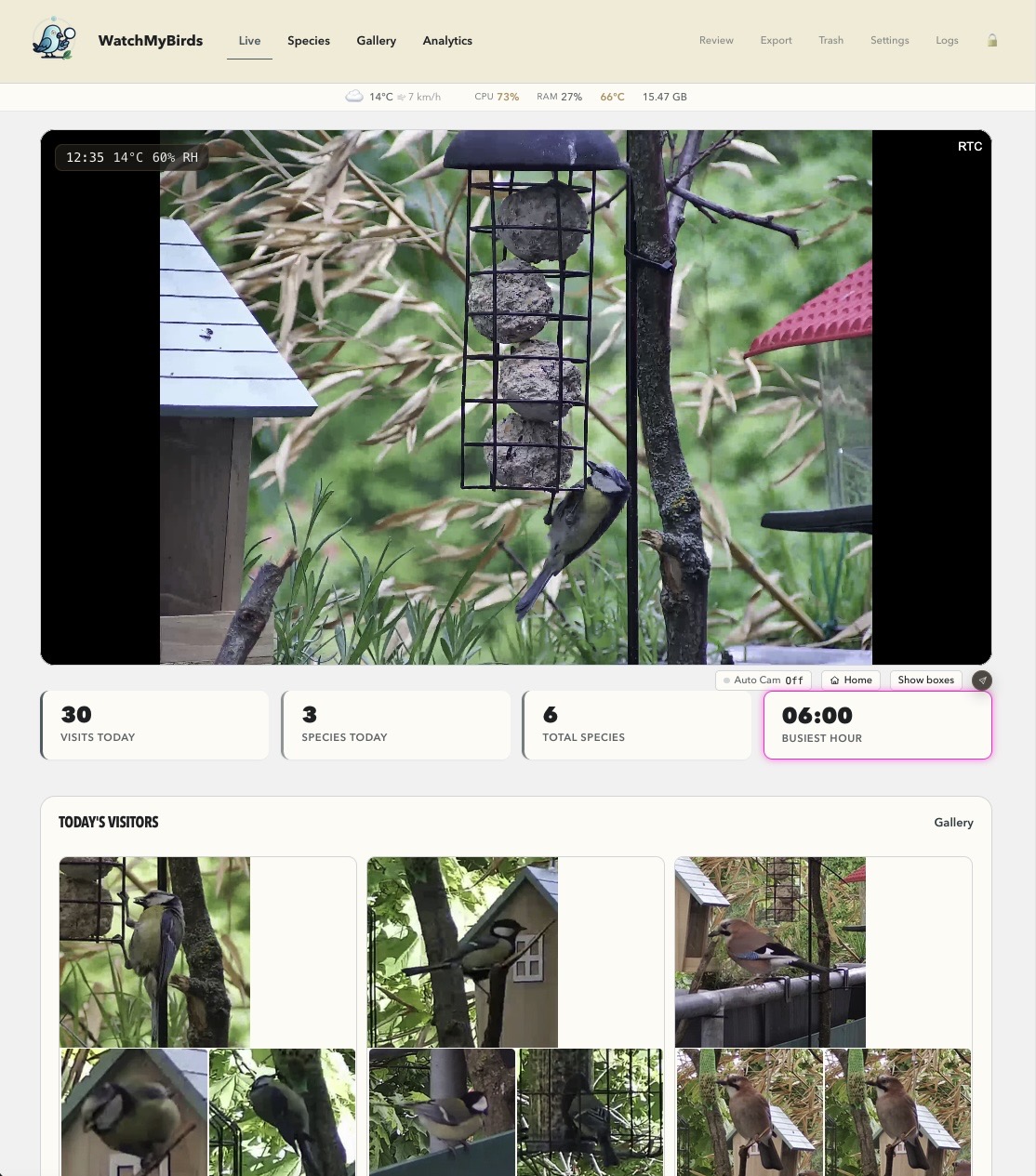 Live view |
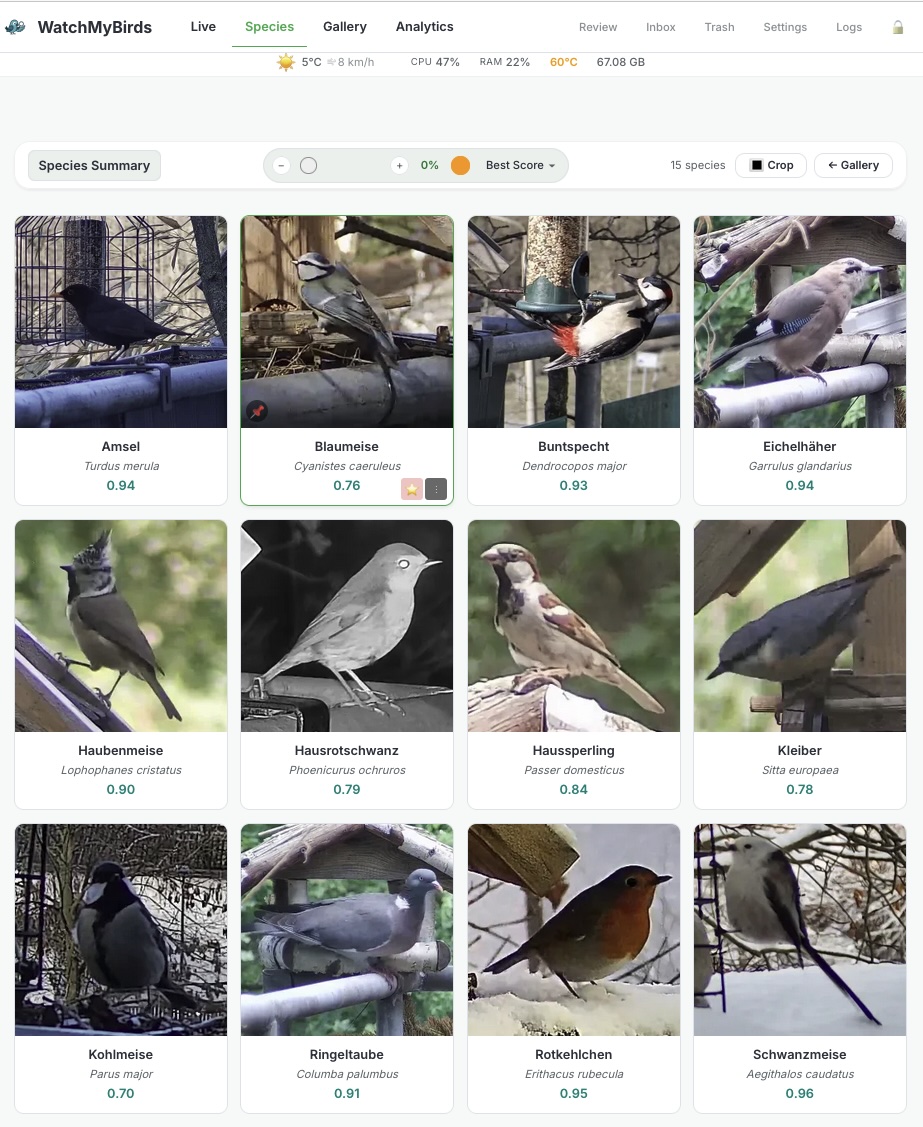 Species overview |
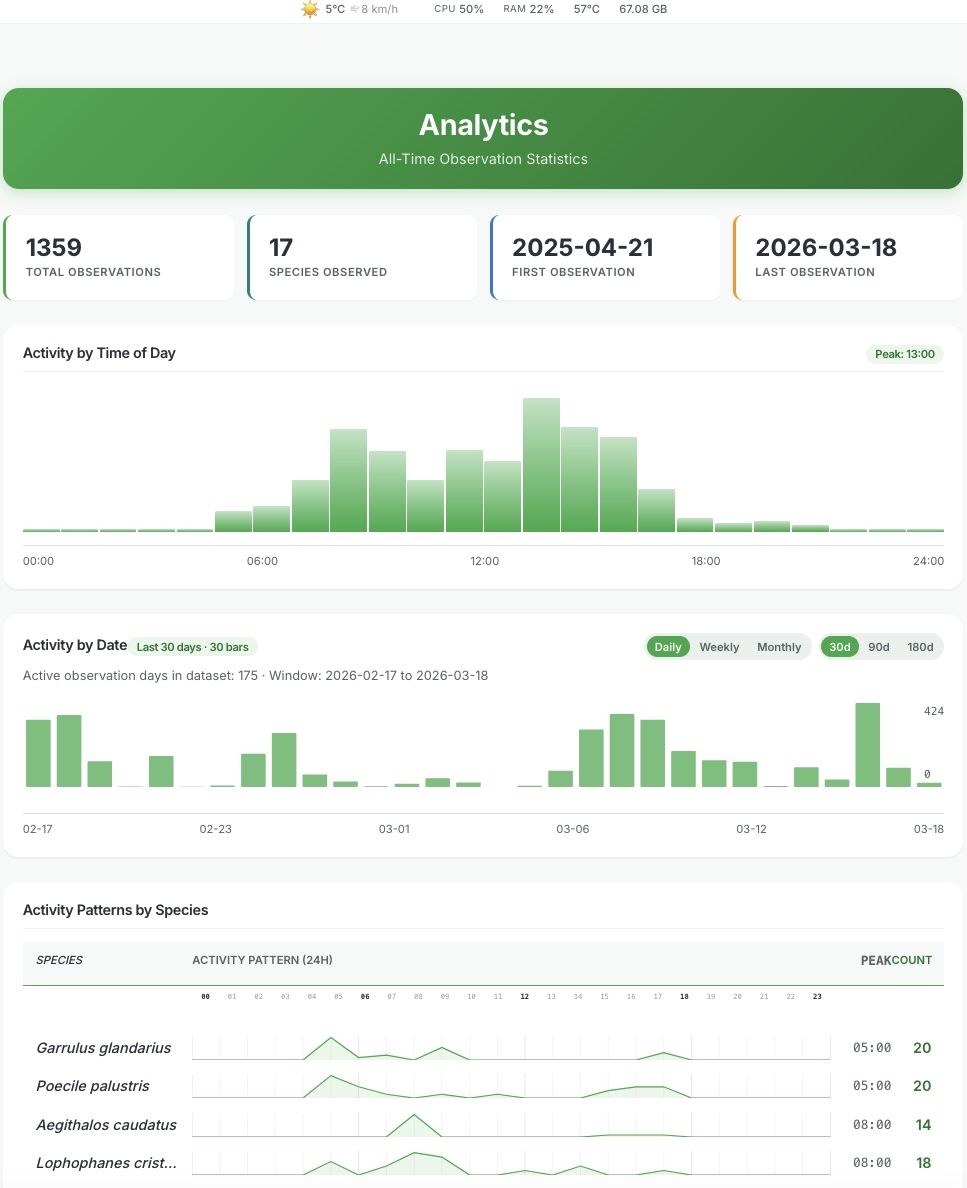 Analytics |
Full feature list
👀 Watch
- Low-latency live view in the browser (WebRTC through go2rtc), with optional detection boxes
- Today's visits, species count and busiest hour at a glance
- Current weather in the live ticker, plus weather history
- Several saved cameras, ONVIF discovery, PTZ and focus control
- Auto-PTZ: the camera turns towards detected birds and returns to its overview position
✅ Review
- Review queue: confirm or correct the suggested species, or mark false alarms
- Check detection boxes and add a missed bird on a stored original image
- Trash with restore, so nothing is lost by accident
- Export reviewed labels and images as training data
🔍 Explore
- Species overview with species names in your language and links to Wikipedia
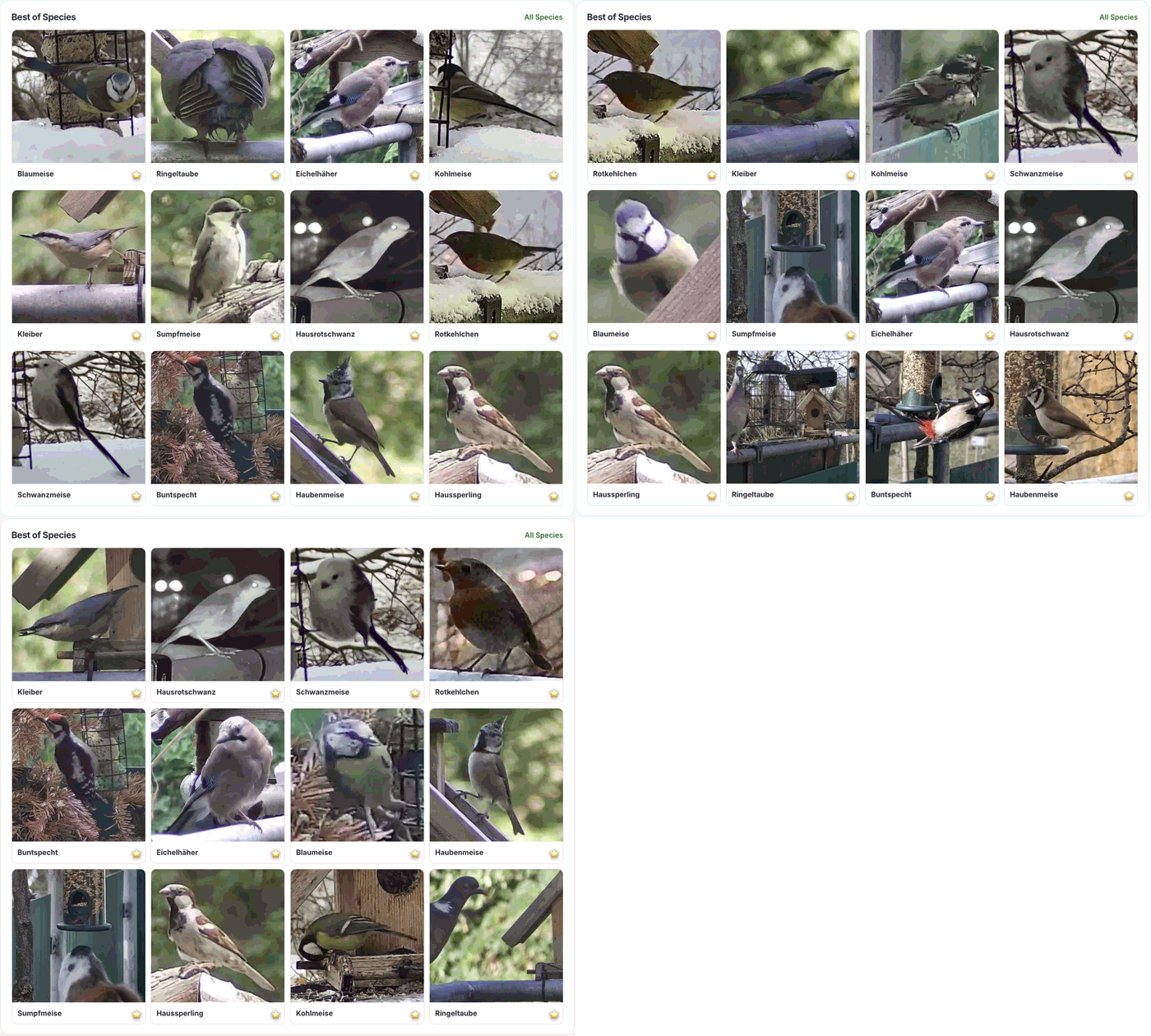
- Gallery by day, with the best shots ranked by a nightly photo-quality score
- Favorites that become the cover image of each species
- Analytics: activity patterns and species statistics over time
⚙️ Run the station
- Updates from the browser (Raspberry Pi)
- Automatic USB backups with guided recovery and migration
- Telegram alerts and daily reports, and MQTT events for Home Assistant or Node-RED
- Choose and switch the detection and classification models in Settings
- Photo-retention rules, storage overview, logs, CPU, RAM and temperature
- Hardened appliance image: sandboxed system service, locked root account, password-protected admin pages
Quickstart
🛒 What you need
| Item | Notes | |
|---|---|---|
| 🍓 | Raspberry Pi 5 | Tested with 8 GB; 4 GB should work. A Pi 4 works for quiet feeders but is much slower (see Performance). |
| 🔌 | Official 27 W USB-C power supply | The Pi 5 needs 5 V / 5 A to run stably under load. |
| 💾 | microSD card | A fast (A2) card. The larger it is, the more photos the station keeps. |
| ❄️ | Active cooler | Recommended, because detection keeps the CPU busy. |
| 📷 | Camera | An RTSP camera from the tested list, for example TP-Link Tapo C110/C120 or D-Link DCS-6100LH, or a Raspberry Pi camera module. |
| 🔁 | USB stick (optional) | For automatic backups; at least twice the size of the SD card. |
| 🎯 | PTZ camera (optional) | For auto-PTZ, for example the SV3C PTZ from the tested list. |
Already have a server or NAS? Skip the Pi and use Docker. Whether a camera works depends on its model, firmware and stream settings.
🍓 Raspberry Pi: the standalone station
- Download the image from the latest release and write it to an SD card with the Raspberry Pi Imager.
- Boot the Pi. Without a configured WiFi it opens its own network,
WatchMyBirds-XXXX, with the passwordwatchmybirds. - Connect to it and open http://192.168.4.1:8050/setup.
- Enter your WiFi credentials and choose an admin password.
- After the reboot, open http://watchmybirds.local:8050 (or the Pi's IP address) from your home network.
The setup network's WiFi password is not your admin password. Public pages stay visible without a login; settings, review and delete actions are protected. More in the Raspberry Pi guide.
🐳 Docker: on a machine you already have
git clone https://github.com/arminfabritzek/WatchMyBirds.git
cd WatchMyBirds
cp docker-compose.example.yml docker-compose.yml
Edit docker-compose.yml before the first start:
CAMERA_URL: your camera's stream addressEDIT_PASSWORD: replace the placeholder with your own admin password/your_path/outputand/your_path/models: writable folders on your machine (WatchMyBirds and go2rtc share the output folder)TZand the location settings: set them for your stationTELEGRAM_ENABLED: leave itFalseuntil Telegram is configured
docker compose up -d
Open http://<your-machine-ip>:8050. The template uses host networking and
starts WatchMyBirds together with go2rtc; it
also explains a bridge-network alternative. See the
configuration reference and the
streaming guide.
🐍 Running from source
python -m venv venv && source venv/bin/activate
pip install -r requirements.txt
pip install -r requirements-aesthetic.txt
python main.py
Use Python 3.12. The app is then available at http://localhost:8050. Contributor setup: development guide.
Your first observations
- In Settings, enter the camera source and check the live image.
- Set your real location so species are weighted by where and when they occur.
- Open Review: confirm the species you are sure about, correct wrong ones and mark false alarms.
- Mark your best shots as favorites and watch the species overview fill up.
How it works
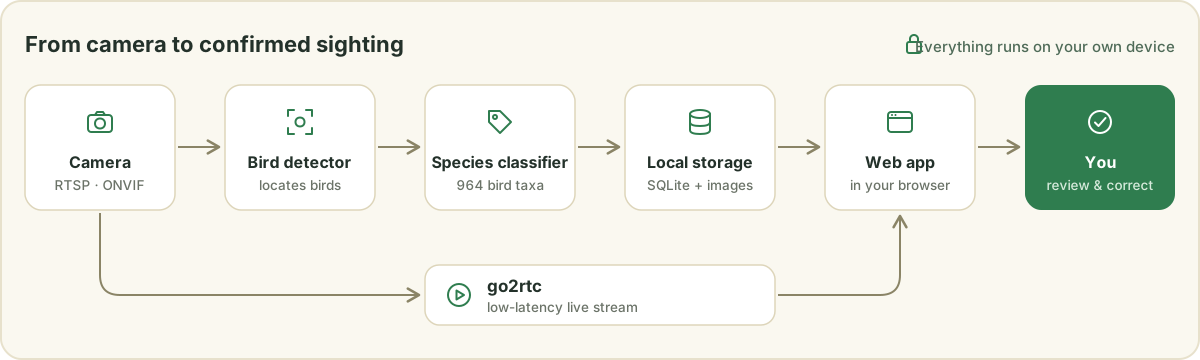
In every detection cycle, an object detector looks for birds in the current camera frame. Eligible bird crops then go to a separate species classifier: by default the iNaturalist classifier with 964 bird taxa plus a background class, optionally the WMB ONNX model. If you set your location, suggestions are weighted by local, seasonal occurrence. Observations land in a local SQLite database next to the original images.
What to expect. Finding a bird and naming its species are separate steps, so a correctly found bird can still get the wrong species. Small, hidden or blurry birds and look-alikes are the hardest cases, and the classifier cannot name a species outside its list. A suggestion is therefore not a confirmed observation; reliable species lists come from reviewed identifications. Model options: configuration reference.
Performance
On a Raspberry Pi 5, one bird goes from camera frame to species name in about two seconds. A Pi 4 needs about ten, which is still enough for a quiet feeder.
| Detection | Classification (per bird) | Reported pipeline time (1 bird) | |
|---|---|---|---|
| Raspberry Pi 5 (8 GB) | ~450–500 ms | ~300–400 ms | ~1.5–2.0 s |
| Raspberry Pi 4 (4 GB) | ~3.8–5.3 s | ~5.0–7.0 s | ~10–11 s |
Notes on these numbers
- Historical measurements with a 2560 x 1920 RTSP stream, taken before the current inference thread budgets; they are not benchmarks of the current defaults. Times vary with model, thread settings, resolution, scene and the number of birds.
- The Pi 5 with 4 GB is untested but should come close to the 8 GB model, since inference is compute-bound rather than RAM-bound here.
- Classification time grows linearly with the number of birds: ten birds take roughly 3–5 s on a Pi 5, and well over a minute on a Pi 4.
- The Pi 4 figures are single cycles with one bird, the YOLOX-S detector and the active classifier (full cycles of 9993–11224 ms).
Privacy
Detection and identification run locally. Images and observations stay on your station unless you set up an outbound integration such as Telegram or MQTT, or share an export yourself.
Optional installation reports and usage or diagnostic summaries are off by
default; you decide in Settings → Privacy. They are separate from a
manual image export. Details: docs/PRIVACY.md, also available
as /privacy in your running installation.
Community and what's next
WatchMyBirds aims to support citizen science and ecological monitoring on affordable hardware that anyone can run:
🏡 Backyard bird monitoring · 🌿 Biodiversity observation · 🎓 Educational projects · 🔬 Ecological research setups · 📈 Long-term wildlife monitoring
Next, we want better species coverage and reliability across regions. Reviewed observations that people choose to share could help train better models, and every model improvement has to prove itself on other stations before it ships as an update. Your station never uploads images on its own; you can already export reviewed observations yourself, see Training-data exports.
FAQ
Do I need an internet connection?
For setup, and to download models and updates. Detection and identification run on the device itself. Weather data and Wikipedia links also use the internet.
Which camera should I buy?
Any camera that delivers an RTSP stream is a good candidate. The tested cameras list shows models that other users run successfully, from affordable TP-Link Tapo cameras to PTZ cameras and the Raspberry Pi camera module. Place it close to the feeder: the bigger the bird is in the picture, the better the identification.
Does it work at night?
Detection runs around the clock by default. Birds are rarely active at night,
so you can pause detection between dusk and dawn: set Night Mode Capture to
Daylight Only in Settings (or DAY_AND_NIGHT_CAPTURE=False). The pause
needs your location to be set. See the
configuration reference.
Is anything uploaded?
No. Images and observations stay on your station. Only integrations you set up yourself (Telegram, MQTT) and the optional reports you switch on in Settings → Privacy send anything. Details in docs/PRIVACY.md.
How many species does it know?
The default classifier knows 964 bird taxa. If you set your location, it prefers species that actually occur in your region and season. The final word is yours: every suggestion can be confirmed or corrected in the review queue.
Can I watch on my phone?
Yes. The web interface runs in any browser on your home network, including phones and tablets.
Can I reach it from outside my home?
This is not built in. Use a VPN into your home network instead of opening a port on your router, and read the security policy before exposing the station to other networks.
Can I use more than one camera?
You can save several cameras and switch between them in Settings. One camera is analyzed at a time.
Is it free?
Yes. WatchMyBirds is open source under the Apache 2.0 license. If you would like to support its development, you can do so through GitHub Sponsors.
Documentation
| You want to … | Go to |
|---|---|
| Check whether your camera works | Tested cameras |
| Set up or maintain the Pi station | Raspberry Pi guide |
| Understand settings and model options | Configuration |
| Narrow down streaming problems | Streaming |
| Back up or restore data via USB | USB backup |
| Understand privacy and sharing | Privacy |
| Report a bug or ask a question | GitHub Issues |
| Work on the code | Contributing and development guide |
| Understand the technical structure | Architecture and Invariants |
| Report a security problem | Security policy |
Contributing and support
Camera tests, clear bug reports, suggestions, translations and code contributions are welcome. Discuss larger changes in an issue first and keep pull requests focused. If you would like to support the project financially, you can do so through GitHub Sponsors.
How WatchMyBirds is built
The maintainer sets the product goals, architecture, requirements and acceptance criteria. The implementation is produced largely by AI coding agents. Automated tests, linting, dependency audits, static security analysis and pre-release checks are there to catch problems early.
These checks guarantee neither freedom from defects nor security, and the project has not had an independent security audit. Follow the security policy when deploying in a sensitive or directly internet-exposed environment.
Third-Party Tools & Data Sources
Data sources
- Wikipedia: linked from each species for further reading. Wikipedia content is available under CC BY-SA 4.0.
- Open-Meteo: weather data via the Open-Meteo API, available under CC BY 4.0.
- iNaturalist: localized common-name enrichment for the extended bird species catalog. See
docs/EXTENDED_SPECIES_CATALOG_POLICY.mdfor the taxonomy policy.
Software and tools
- Label Studio: annotation tool by HumanSignal, Inc., used through the Label Studio Academic Program (free access to Enterprise Cloud for non-commercial teaching and research).
- go2rtc: WebRTC/RTSP relay for low-latency camera streaming, licensed under MIT.
License
WatchMyBirds is licensed under the Apache License 2.0. Integrated services, models, media and datasets have their own licenses and terms. See NOTICE and the Third-Party Tools & Data Sources section.
Star History
Still Watching