
arijit-debug/LyricalStudio
arijit-debug/LyricalStudio has 9 GitHub stars and 1 forks. GitHot measured +1 stars in 24 hours. Last checked 2026-11-09 18:44 UTC. Last push 2026-11-04.
Open-source music player with Cotodama-style kinetic lyric animations and Apple-inspired design
Measured star growth
- in 24h
- +1
- in 7 days
- Update delayed
- in 15 days
- Update delayed
- in 1 month
- Update delayed
Net star changes over overlapping periods, not daily totals. Missing measurements are left blank. Stars measure attention, not software quality.
README.md
Original
LyricalStudio
A free, open-source music player for the web that turns lyrics into kinetic typography. Every word moves in time with the song, in bold type colored from the album art.


▶ Open LyricalStudio: lyricalstudio.vercel.app
Nothing to install, no account, no sign-up. Open the link, search for a song, and watch the lyrics move.
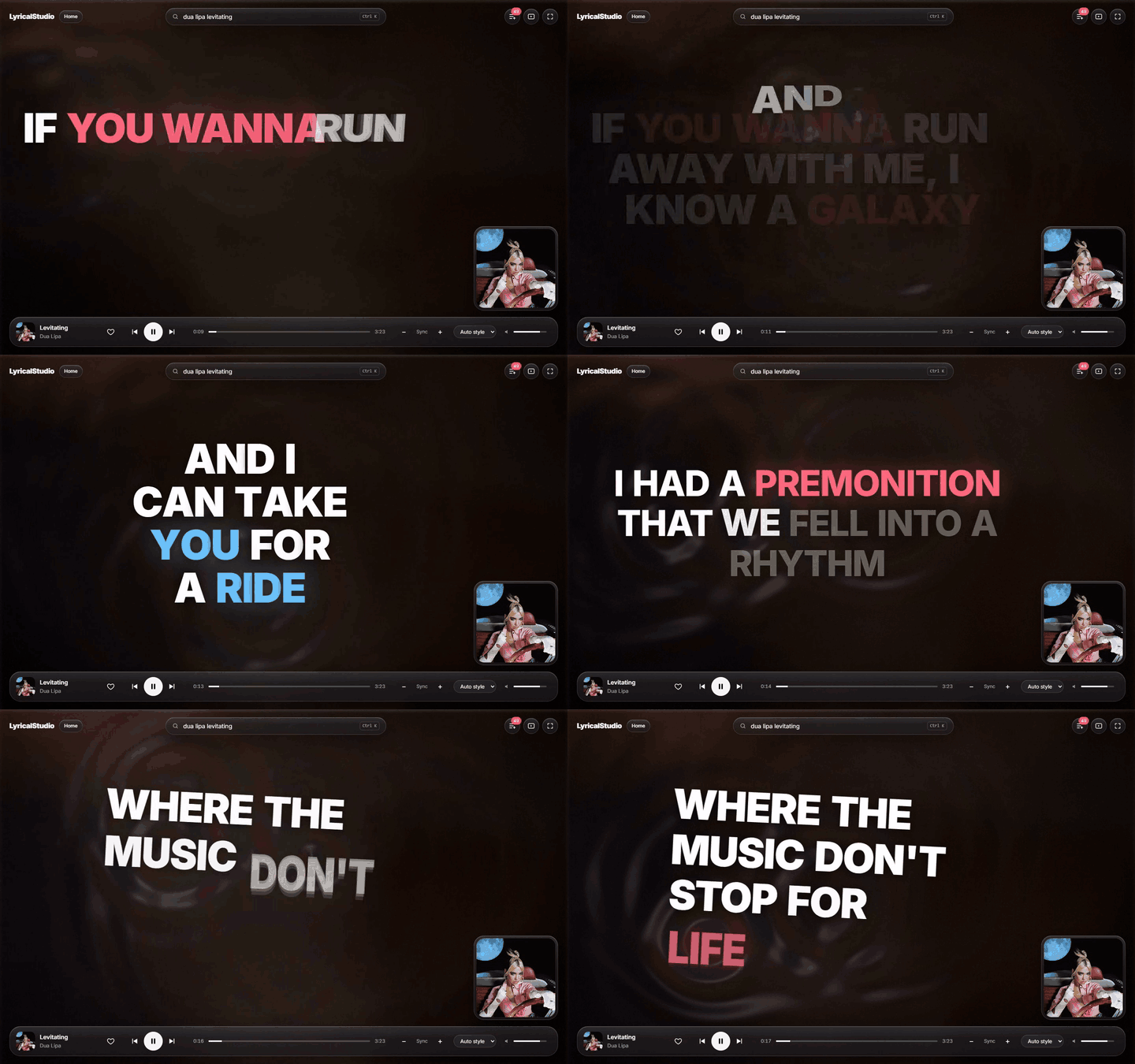
Inspired by the Cotodama Lyric Speaker. Not affiliated with Cotodama, Apple, YouTube or Google.
Contents
- What it does
- See it in action
- Using LyricalStudio
- Install and run it on your computer
- Settings (environment variables)
- Getting a YouTube Data API key
- Putting it online (Vercel)
- How it works
- Limits and known issues
- Troubleshooting
- Privacy
- Contributing
- Credits and license
What it does
- Search and play almost any song. Playback goes through YouTube's official embedded player, shown as a small video tile.
- Lyrics that move with the music: synced line by line, and word by word where the lyrics source has word timings.
- Seven text layouts: Stack, Slide, Zoom, Letters, Scatter, Graph and Flow. "Auto style" picks one for each line from the song's genre, pace and chorus, or you can choose one yourself.
- Graph draws one continuous vine: each new line grows out of the last one, the camera follows it, and the previous two lines linger above, dimmed and softly blurred. While Graph plays, the controls and cursor fade away after 3 seconds without input (move the mouse to bring them back); the video tile stays visible and moves down into the corner.
- Always gently in motion: the lyrics float a little all the time, even between words and during instrumental parts.
- YouTube captions for songs without lyrics: when no lyrics are found, a button turns on the video's own captions (when YouTube has them), and the video grows so they're readable.
- Colors from the album art: white lyrics with vivid highlights on a few words per line, picked at random every time the song plays.
- A flowing "liquid glass" background drawn on the GPU (WebGL), with ripples from each word as it's sung.
- Smooth, crisp motion: springy word entrances and motion blur. Text stays sharp once it settles, and lines always fit on screen. Animations run on the GPU, and on slower computers a lighter mode switches on by itself so motion stays smooth.
- English, Japanese (日本語) and Hindi (हिन्दी), with romanized lines shown as subtitles when the source has them.
- Up next: related songs line up automatically and keep playing when your queue ends.
- Home screen: recently played songs, liked songs and "Made for you" suggestions.
- Sync nudge: if lyrics run early or late, shift them with
[and]. The fix is saved for that song. - No account needed. Likes, history and settings are saved in your browser.
- Respects "reduce motion" in your operating system's accessibility settings.
See it in action
| Japanese | Hindi |
|---|---|
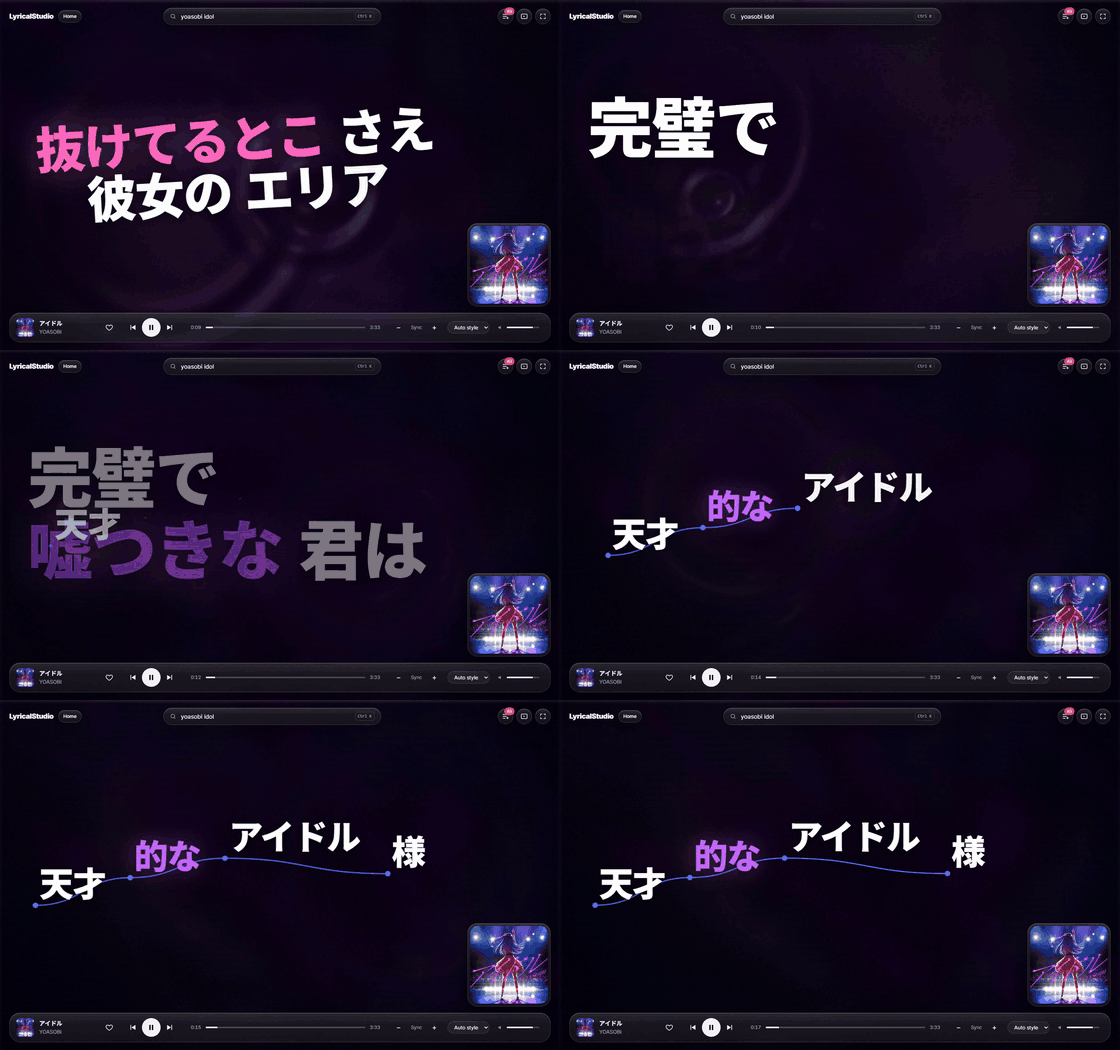 |
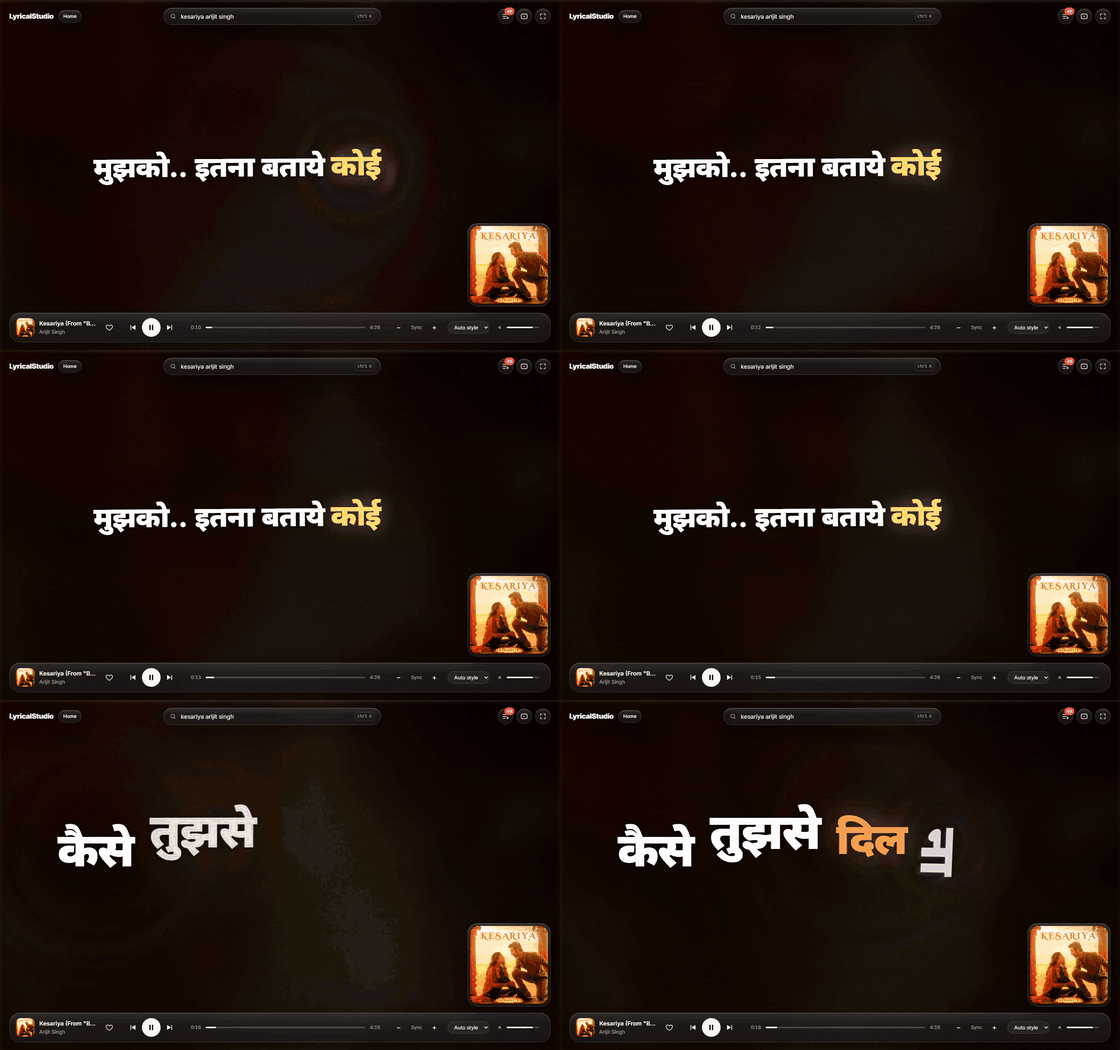 |
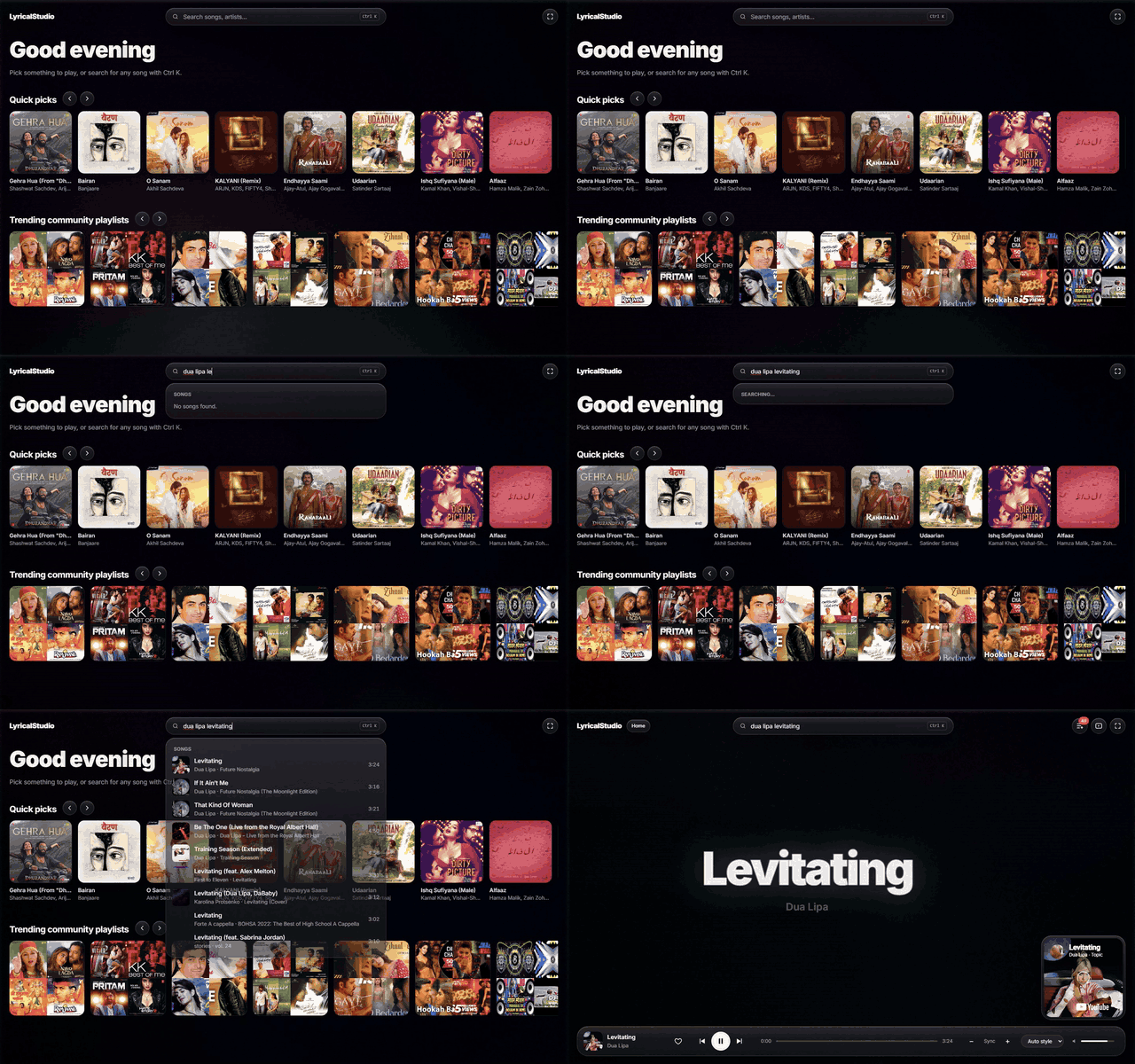
Search as you type, then play:
Using LyricalStudio
- Open lyricalstudio.vercel.app in a desktop browser.
- Press Ctrl K (or /) and type a song or artist.
- Click a result. The song starts and the lyrics stage opens.
- Use the bar at the bottom to play or pause, skip, seek, like a song (♥), nudge the sync or pick a lyric style.
- The buttons at the top right open Up next, enlarge the video, or go full screen.
LyricalStudio is designed for desktop and laptop browsers (Chrome, Edge, Firefox, Safari). On phones it shows a "best on a bigger screen" notice, which you can dismiss.
Keyboard shortcuts
| Key | Action |
|---|---|
| Ctrl K or / | Search |
| Space | Play / pause |
| ← / → | Back / forward 5 seconds |
| [ / ] | Lyrics earlier / later by 0.25 s |
| F | Full screen |
| Shift F | Frame-rate meter |
| Esc | Close search, shrink the video |
Install and run it on your computer
Just want to use the app? You don't need any of this. Open lyricalstudio.vercel.app.
This section is for running your own copy, for example to change the code or contribute.
You don't need any accounts or keys to run LyricalStudio locally.
1. Install the tools
| Tool | Version | Get it |
|---|---|---|
| Node.js | 20 or newer (22 LTS recommended) | nodejs.org (the installer includes npm) |
| Git | any recent version | git-scm.com |
Check that they're installed by opening a terminal (PowerShell on Windows, Terminal on macOS or Linux) and running:
node -v   # should print v20 or higher
git --version
2. Download the code
git clone https://github.com/arijit-debug/LyricalStudio.git
cd LyricalStudio
Prefer not to use Git? Click Code → Download ZIP on GitHub, unzip it, and open a terminal in the unzipped folder.
3. Install the dependencies
npm install
This takes a minute or two the first time.
4. Start it
npm run dev
Open http://localhost:3000 in your browser. That's it: search for a song and press play.
To stop the server, press Ctrl C in the terminal.
Optional: run the faster production version
npm run dev is for development: it reloads when you edit code, but it's slower. To run the optimized version:
npm run build
npm start
Then open http://localhost:3000.
Settings (environment variables)
Everything is optional. To change a setting, copy the example file and edit the copy:
# macOS / Linux
cp .env.example .env.local
# Windows (PowerShell)
Copy-Item .env.example .env.local
Restart npm run dev after editing .env.local. Git ignores this file, so your keys never get committed.
| Variable | What it does | Default |
|---|---|---|
YOUTUBE_API_KEY |
Uses the official YouTube Data API for search. See the next section. | Not set: search uses youtubei.js |
YOUTUBEI_ENABLED |
Set to false to never use youtubei.js, the unofficial YouTube Music client. Turns off the YouTube Music home feed and playlists. Recommended for public sites, together with YOUTUBE_API_KEY. |
On |
YOUTUBE_SEARCHES_PER_IP_PER_DAY |
How many official-API searches one visitor can trigger per day. Cached searches don't count. Stops one person from using up the whole site's quota. | 25 |
UPSTASH_REDIS_REST_URL, UPSTASH_REDIS_REST_TOKEN |
Shares the per-visitor rate limits across all server instances, using a free Upstash Redis database. | Each instance counts on its own |
RATE_LIMIT |
Set to off to disable rate limiting. |
On |
Which search should I use?
- On your own computer: leave everything unset. youtubei.js has no daily limit and gives the richest home screen.
- On a public website: set
YOUTUBE_API_KEYandYOUTUBEI_ENABLED=false. youtubei.js is unofficial and isn't allowed by YouTube's Terms of Service, and YouTube often blocks it on cloud servers. The official API has a free daily quota instead (see Limits).
Getting a YouTube Data API key
The key is free. Google doesn't charge for YouTube Data API usage: when the daily quota runs out, search simply pauses until the next day.
Go to the Google Cloud Console and sign in.
Create a project: click the project picker at the top → New project → name it (e.g.
lyricalstudio) → Create.Open APIs & Services → Library, search for YouTube Data API v3, and click Enable.
Open APIs & Services → Credentials → Create credentials → API key.
Click the new key and, under API restrictions, choose Restrict key → YouTube Data API v3 → Save. Restricting it means a leaked key can't be used for any other Google API.
Put it in
.env.local:YOUTUBE_API_KEY=your-key-here
Keep the key secret. Never commit it, paste it into an issue, or put it in a variable starting with
NEXT_PUBLIC_(those are sent to the browser). You don't need a billing account for this API, so don't add one to the project.
Putting it online (Vercel)
LyricalStudio is a standard Next.js app. Vercel's free Hobby plan is the simplest way to host it (non-commercial use only).
- Push your copy of the code to GitHub (or fork this repository).
- Sign in to vercel.com with GitHub → Add New → Project → import the repository.
- Under Environment Variables, add:
YOUTUBE_API_KEY= your keyYOUTUBEI_ENABLED=false- Optional:
UPSTASH_REDIS_REST_URLandUPSTASH_REDIS_REST_TOKEN
- Click Deploy. Every push to
maindeploys automatically after that. - If you host your own copy, update the links and contact details on the privacy page (
src/app/privacy/page.tsx).
Other Node.js hosts work too: run npm run build, then npm start (it listens on port 3000; set PORT to change that). Put it behind a reverse proxy (e.g. Nginx or Caddy) that sets X-Real-IP and X-Forwarded-For itself; otherwise visitors can fake those headers to get around the rate limits.
How it works
Browser                                    Server (Next.js API routes)
───────                                    ───────────────────────────
Search box ──────────────────────────────▶ /api/search  → YouTube Data API or youtubei.js
YouTube IFrame player (plays the song)
Lyrics stage ◀── synced lyrics ─────────── /api/lyrics  → LRCLIB (+ lrcmux word timing)
Background colors ◀── artwork ──────────── /api/image   (artwork proxy for color extraction)
Genre (picks styles) ◀─────────────────── /api/meta    → iTunes Search API
Up next ◀────────────────────────────────── /api/radio
Likes, history, settings → browser localStorage (no database, no accounts)
| Part | Source |
|---|---|
| Playback | The official YouTube IFrame Player API. The video tile always stays visible, as YouTube requires. |
| Search | YouTube Data API v3 when a key is set, otherwise youtubei.js |
| Synced lyrics | LRCLIB, the main source (line-by-line timing) |
| Word-by-word timing | lrcmux, used only when its timing matches LRCLIB's |
| Artwork and genre | iTunes Search API |
LyricalStudio never downloads, stores or redistributes audio.
Project layout
| Folder | What's there |
|---|---|
src/app/api/ |
Server routes: search, lyrics, meta, image, radio, home, playlist |
src/app/privacy/ |
Privacy policy and terms page |
src/proxy.ts |
Per-visitor rate limits on /api/* |
src/components/ |
The app shell, player, lyrics stage, search panel and home screen |
src/templates/ |
The lyric animation layouts, one per file. chooseTemplate() in index.ts picks one per line. |
src/lib/lyrics/ |
LRC parsing, word-timing estimates, the lyrics cache |
src/lib/search/ |
Search backends (official API and youtubei.js) |
src/lib/clock/ |
Smooths the YouTube player's coarse time reports, so lyrics stay in sync |
Limits and known issues
- Search quota (official API only): the free 10,000 units a day buys about 100 new searches a day for the whole site. Repeated searches come from a cache. After the quota runs out, search shows a message until the next day (midnight Pacific time). To share it fairly, each visitor can trigger up to 25 of those searches a day (
YOUTUBE_SEARCHES_PER_IP_PER_DAY). - Some songs won't play because the label blocks embedding. LyricalStudio tries another upload of the same song, then skips it.
- YouTube may show ads before songs, as in any embedded YouTube player.
- Captions depend on YouTube. Many videos have none, and auto-generated ones can be wrong.
- Lyrics aren't guaranteed. They come from free community services, so some songs have none, only approximate timing, or mistakes. When a service is down, recently played songs still have lyrics from the browser cache.
- The tab must stay open for music to play. There's no background or offline playback.
- Desktop-first. Phones work, but the layout is made for larger screens.
- Likes and history stay in one browser. They don't sync between devices, and clearing site data removes them.
Troubleshooting
| Problem | Fix |
|---|---|
node: command not found or an old version |
Install Node.js 20 or newer from nodejs.org, then open a new terminal. |
npm install fails |
Delete the node_modules folder and run npm install again. On Windows, keep the project in a normal folder (e.g. Documents), not inside C:\Program Files. |
| Port 3000 is already in use | Run npm run dev -- -p 3001 and open http://localhost:3001. |
| "Search is unavailable" | youtubei.js may be temporarily blocked by YouTube. Wait a bit, or set YOUTUBE_API_KEY. |
| "Today's search limit has been reached" | The official API quota is used up. It resets at midnight Pacific time. |
| "Search isn't configured on this server" | YOUTUBEI_ENABLED=false is set but YOUTUBE_API_KEY isn't. Add a key. |
| No lyrics for a song | The lyrics services don't have it yet. LyricalStudio checks again every minute while the song plays. |
| Lyrics are early or late | Press [ or ] (0.25 s steps). The fix is saved for that song. |
A style or CSS change doesn't show up in npm run dev |
Stop the dev server and start it again. |
| "Too many requests" | You hit the per-minute rate limit. Wait a minute. |
Privacy
There are no accounts. Likes, history, cached lyrics and settings stay in your browser. The hosted site counts visits with Vercel Web Analytics, which is cookieless and anonymous. The server sends only song details (title, artist, album, length) to the lyrics and artwork services, never anything about you. The YouTube player is run by Google under the Google Privacy Policy. Read the full privacy policy and terms.
Contributing
Pull requests are welcome! See CONTRIBUTING.md for setup, good first contributions and the ground rules. A new lyric layout in src/templates/ is a great first project.
After changing a layout, run the fit check: with npm run dev running, open http://localhost:3000/dev/fit. It renders every line of ten songs in every layout and reports any word that would be cut off. Expect 0 failures.
Found a security problem? Please report it privately, as described in SECURITY.md.
Credits and license
- Lyrics: LRCLIB and lrcmux. Song lyrics belong to their writers and publishers.
- Playback: YouTube. Search: YouTube Data API and youtubei.js.
- Artwork and genres: iTunes Search API.
- Fonts: system fonts, with Inter, Noto Sans JP and Noto Sans Devanagari.
- Design inspiration: the Cotodama Lyric Speaker and Apple's design language.
The demo GIFs show short excerpts of songs and their artwork for illustration only. All rights belong to their owners.
Released under the MIT License.
Explore related projects
freeCodeCamp/freeCodeCamp
freeCodeCamp.org's open-source codebase and curriculum. Learn math, programming, and computer science for free.
458,945 starsdonnemartin/system-design-primer
Learn how to design large-scale systems. Prep for the system design interview. Includes Anki flashcards.
377,579 starsreact/react
The library for web and native user interfaces.
252,488 starsvuejs/vue
This is the repo for Vue 2. For Vue 3, go to https://github.com/vuejs/core
212,625 stars