
aregtech/areg-sdk
aregtech/areg-sdk has 369 GitHub stars and 145 forks. GitHot measured 0 stars in 24 hours. Last checked 2026-11-18 00:41 UTC. Last push 2026-11-17.
Measured star growth
- in 24h
- 0
- in 7 days
- Collecting history
- in 15 days
- Collecting history
- in 1 month
- Collecting history
Net star changes over overlapping periods, not daily totals. Missing measurements are left blank. Stars measure attention, not software quality.
About
Fast, embedded-friendly C++ framework for multithreading and IPC: services that don't care where they run
Developer ToolsREADME.md
Original
C++ multithreading, IPC and distributed services
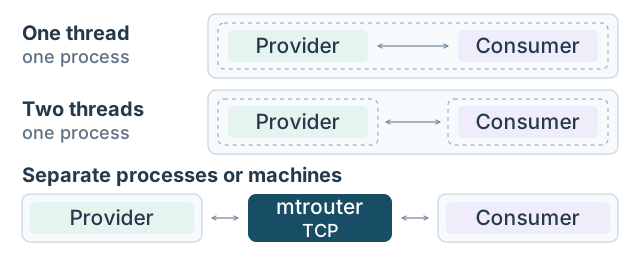
C++ services that don't care where they run. Write a service once; run it in a thread, in a process or on another machine. The service code stays, the application model decides.


C++17 · Linux · macOS · Windows · embedded Linux
Run it in 2 minutes · Measure your machine · Let an AI agent build an app
| ~9.9 µs | ~6 GB/s | 288 KB | 28 of 28 |
|---|---|---|---|
| one-way latency, P50 | sustained throughput | code of a static service on ARMv7 | AI-agent runs passed every hidden test (gRPC: 12 of 15) |
Latency and throughput: full API call over TCP loopback, laptop Core i7, Linux; 204-byte messages for latency, ~3 MB for throughput. Performance · Embedded ready · Agentic coding
The hard part of a C++ system is rarely the algorithm. It is the threads, the IPC and the integration code. Areg takes that work off your hands.
Describe a service interface once. The code generator writes the proxies, serialization and dispatch; the framework finds services and runs every call in the thread that owns the component. You write the logic.
The code you write. No socket, no address, no lock:
// Consumer: send the request once the provider is connected, wherever it runs
request_hello_service(role_name());

// Provider: answer the request
void ServiceComponent::request_hello_service(const areg::String & client)
{
    std::cout << "'Hello Service!' from " << client << std::endl;
    response_hello_service(true);
}

// Consumer: receive the answer, asynchronously
void ClientComponent::response_hello_service(bool success)
{
    std::cout << (success ? "Succeeded" : "Failed") << " to output message." << std::endl;
}
You decide where it runs. Two threads in one process, from 03_helloservice:
areg::Model model("ServiceModel");
model.add_thread("Thread1")
     .add_component<ServiceComponent>("ServiceComponent")
     .add_supported_service(HelloService::ServiceName, HelloService::InterfaceVersion);
model.add_thread("Thread2")
     .add_component<ClientComponent>("ServiceClient")
     .add_dependency_service("ServiceComponent");
Move it, don't rewrite it. Put both components in one thread, or each in its own process
or machine behind mtrouter, the multi-target message router: the two classes above do not change.
For C++ on devices, desktops and servers in private networks. Not for web services or public internet endpoints.
Three things to try, each a few commands:
| Run it | Measure your machine | Let an AI agent build an app |
|---|---|---|
| One provider and one consumer in one thread, two threads and two processes. Same classes, three deployments. | How fast is your PC? Latency in microseconds and throughput in GB/s, from two short benchmarks. | Twelve ready prompts, scored by hidden tests the agent never sees. The dry run costs nothing. |
Quick start
Build 03_helloservice: one provider and one consumer, compiled into three deployments.
You need Git, a C++17 compiler, CMake 3.20+ and Java 17+ (details).
git clone https://github.com/aregtech/areg-sdk.git && cd areg-sdk
cmake -B build -DAREG_OUTPUT_LAYOUT=OFF
cmake --build build --config Release -j --target 03_onethread 03_twothreads 03_pubservice 03_pubclient mtrouter
1. One process. Run the one-thread and the two-thread deployment:
./build/bin/03_onethread.elf
./build/bin/03_twothreads.elf
Both print the same round trip:
'Hello Service!' from ServiceClient
Succeeded to output message.
2. Two processes. Same classes, now through the router:
./build/bin/mtrouter.elf        # the router, in the background
./build/bin/03_pubservice.elf   # the provider
./build/bin/03_pubclient.elf    # the consumer
The greeting crosses the process boundary. Start the provider and the consumer in any order; on Windows, use one terminal
for each of the three programs. For two machines, set the router address in areg.init. Binaries end in .elf on Linux, .mac on macOS and .exe on Windows.
3. See what changed. Only the model: one thread · two threads · two processes · the shared classes · step-by-step walkthrough
What next? Measure your machine · let an AI agent build an application · start your own project
Not using it today? ⭐ Star Areg to keep it in your C++ toolbox and help other developers find it.
Table of Contents
Start here
Evaluate
Build and reference
Use cases
Patterns you can picture in your own system. Click a diagram to open it full size.
 IoT to Cloud (Nebula). Devices expose typed services, an edge application decides locally and sends only results upstream. Areg runs on every node of the trusted network; the cloud link and its security are the application's. Device services · original illustration |
 Imaging and inference pipelines. A camera collects, a service analyzes, a service stores. Start in one process; give a stage its own process or machine later, without touching its class. Imaging · edge AI |
 Software before hardware. Register a simulation under the role name the consumer expects; develop and test before the device exists, then swap in the real provider. Simulation and hardware-in-the-loop |
 Many frontends, one backend. Operator UI, monitoring and test tools consume the same service: requests for commands, subscribed attributes for state, no protocol per frontend. Multi-UI architectures |
Also: industrial automation and robotics · digital twins · decomposing a C++ monolith · process-based plugins · all use cases
Why Areg
- Less infrastructure code to write and maintain in every project (estimated time savings).
- No locks for a component's own state: every call runs in the thread that owns the component.
- No startup-order logic: start the processes in any order, with no retry loops.
- Recovery built in: the watchdog restarts a stuck component thread; consumers are notified when a service disappears and reconnect when it returns.
- Debug many processes as one:
logcollectorgathers the logs of every thread, process and device; Lusan shows them live in one view and changes log priorities in the running applications, with no restart. - Test before hardware exists: register a simulation under the same service name and the rest of the system never notices. No conditional compilation, no mock frameworks.
How it works
Three steps: define the interface, generate the code, choose the deployment.
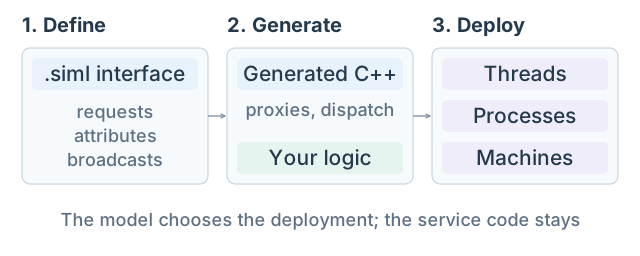
1. Define. A service offers requests with their responses, attributes (data whose every change reaches the consumers that subscribe)
and broadcasts (events with parameters). The interface is a .siml document, designed in Lusan
or edited as XML. This is the request of the example above:
<Method ID="2" Name="hello_service" MethodType="Request" Response="hello_service">
    <ParamList><Parameter ID="51" Name="client" DataType="String"/></ParamList>
</Method>
2. Generate. One CMake line runs the generator and links the result. You derive from the generated provider and consumer bases:
addServiceInterface(MyServiceLib ./services/MyService.siml)
3. Deploy. The model names the threads, the components and their dependencies. Inside a process, calls are dispatched
between threads; across processes and machines the interface is Public, and mtrouter carries the calls over TCP.
Details: Service interface guide · Code generator · What changes between deployments.
Performance
Microsecond latency and gigabytes per second, with the full stack on a laptop.
Measured on mobile-class consumer hardware with the full stack active: serialization, event dispatching and multithreading. These are not raw socket numbers. Raw data is published: latency dataset.
Latency: TCP localhost, full API call, 204-byte messages. OWT = one-way (2 hops); RTT = round trip through mtrouter (4 hops).
| Platform | CPU | OWT Min | OWT P50 | RTT Min | RTT P50 |
|---|---|---|---|---|---|
| Linux Ubuntu | i7-13700H (DDR4) | 9.6 µs | ~9.9 µs | 19.1 µs | ~19.5 µs |
| macOS | M3 Pro (LPDDR5) | 21.6 µs | 31.4 µs | 46.0 µs | 62.5 µs |
| Windows 11 | i7-13700H (DDR4) | 32.5 µs | 40.3 µs | 64.0 µs | 82.5 µs |
Throughput: TCP localhost, 1:1, measured at mtrouter. Sustained = 5+ min run; peak = best short run.
| Platform | CPU | ~3 MB, GB/s | ~0.5 KB, msg/s |
|---|---|---|---|
| Linux Ubuntu | i7-13700H (DDR4) | ~6.0-6.5 sust. / ~8.0 peak | ~2.0M sust. / ~2.5M peak |
| macOS | M3 Pro (LPDDR5) | ~6.7-7.0 sust. | ~2.5M sust. |
| Windows 11 | i7-13700H (DDR4) | ~2.2 sust. / ~3.0 peak | ~1.8M sust. / ~2.5M peak |
Latency is payload-insensitive up to 4 KB: Min rises 1.0 µs across a 20× size increase. Linux latency is measured with pinned cores, throughput unpinned: two configurations, not one. For context only (third-party, 2021, different hardware): gRPC C++ sequential RTT ~116–167 µs over a Unix domain socket (MPI-HD, F. Werner).
Logging: a log call takes ~0.3 µs in the application; 150K logs/s reach a log observer over TCP and are saved to SQLite without loss (Linux in WSL2). Details
Measure your machine
How fast is your PC? Build the two benchmarks without logging, then start the router and leave its console visible:
cmake -B build -DAREG_OUTPUT_LAYOUT=OFF -DAREG_LOGGING=OFF
cmake --build build --config Release -j --target mtrouter 30_pubprovider 30_pubconsumer 23_pubservice 23_pubclient
cd build/bin && ./mtrouter.elf --console                    # terminal 1
Latency, 30_publatency: three runs of 20 000 messages, then both programs exit.
./30_pubprovider.elf -n &                                   # terminal 2
./30_pubconsumer.elf -m=bc64 -c=20000 -w=2000 -s=3          # one-way; -m=pp64 for the round trip
Each run prints one line: min, p50, p95, p99 and max in microseconds, and the message rate.
Throughput, 23_pubdatarate: ~3 MB frames; the mtrouter console shows the live data rate.
./23_pubclient.elf                                              # terminal 2
./23_pubservice.elf -w=1024 -h=1024 -l=1024 -t=25 -c=20 -s      # terminal 3: starts at ~2.4 GB/s; raise -c
These settings are a starting load, not the limit: raise -c step by step. Type -q in the provider to stop. Past your machine's ceiling the consumer's memory grows: that point is the result.
More recipes, small messages included, are in each example's guide; 35_loglatency measures logging.
Share your numbers: post them in this discussion, with your CPU, OS and compiler. ARM boards and servers are the most wanted.
📈 Full data and methodology · vs ZMQ/NanoMsg/NNG · Framework rankings
Agentic coding
Areg ships what a coding agent needs to build a working C++ application: the guide, the generators and the checks.
Coding agents barely know Areg from training, and don't need to. AGENTS.md routes the agent to the one page its task needs;
it declares services, state machines and data types, generators write the plumbing, a checker rejects invented API names,
and one command builds, runs and proves the application.
Measured against gRPC, which every model knows: same task, agent and model, scored by hidden tests the agent never sees (peer loss, either start order, no busy-wait, repeats).
| Areg | gRPC | |
|---|---|---|
| runs passing every hidden test | 100% (28 of 28) | 80% (12 of 15) |
| C++ written by hand | 50-75% less | reference |
| agent requests | 35% fewer | reference |
| fix cycles per run | over 80% fewer | reference |
| price | same, with more requirements met | reference |
8 tasks in 9 task-and-model pairs, two baselines merged (Claude Code, Sonnet 5.5, Copilot CLI, GPT-5.6 Terra). With Terra, the Areg tasks also required exact output lines and a declared state machine.
The guide makes the difference: without it, the coffee-machine task cost 5x and did not work (details).
An AI agent drew this state machine. Lusan opened it unedited, valid and ready for the generator. Only the layout is rough.

Try it with Claude Code, Copilot CLI, Codex or Gemini on twelve ready prompts, from a temperature monitor to a three-program charging station. Each run is cold, isolated and scored by the hidden tests:
mkdir -p ~/runs && cd ~/runs
/path/to/areg-sdk/examples/ai-benchmark/run-benchmark.sh --task examples/ai-benchmark/prompt-elevator.md --dry-run
--dry-run stages the run and prints the prompt at no cost; remove it to start the agent on your own account.
Add --framework grpc for the same task on gRPC, and apply the method to your own project:
how the benchmark works.
Build your own application: start your agent in an empty folder, point it to AGENTS.md and describe what you need
(workflow). Share your runs, passed or failed,
in this discussion; a failed run helps the most.
Embedded ready
Embedded Linux on a 32- or 64-bit CPU -- ARM64, ARMv7, x86_64 and x86. If the target runs Linux with sockets and pthreads, Areg runs on it: NXP i.MX, TI AM62/AM335x, Rockchip RK3588, STM32MP1, Raspberry Pi, Intel Atom.
Framework code (text), GCC 15.2.0, Release, measured with tools/intern/footprint.py -- x86_64 natively,
ARM64 and ARMv7 cross-compiled with the toolchain files the SDK ships:
| What a device stores | x86_64 | ARM64 | ARMv7 |
|---|---|---|---|
shared libareg.so, stored once for every service |
1.26 MB | 1.18 MB | 0.74 MB |
| a self-contained service, static, logging off | 526 KB | 487 KB | 288 KB |
| a service binary against the shared framework | 43 KB | 42 KB | 26 KB |
mtrouter |
285 KB | 255 KB | 171 KB |
RAM on x86_64: a service holds 5.6 MB resident, and each client connected to mtrouter adds ~7 KB (RAM details).
Scope today: embedded Linux only. Bare metal, RTOS and 16-bit targets are not supported; Zephyr is planned after 2.0.0.
📊 What "embedded ready" means, tuning, and where the line is
Areg vs. alternatives
| Areg SDK | gRPC | DDS | |
|---|---|---|---|
| Service model | requests, attributes, broadcasts | RPC from .proto |
typed topics |
| Generated code | proxies, base classes, dispatch | stubs, service bases | types, readers, writers |
| Threading | calls run in the owning thread | yours to synchronize | yours to synchronize |
| Discovery | by service name | DNS or xDS resolvers | built in |
| Thread, process, network | same classes; the model decides | same stubs; you pick the channel | same API |
| Fault recovery | watchdog restart, reconnect | retries, health checks | liveliness QoS |
| Logging and tracing | distributed logs, viewer | OpenTelemetry plugin | vendor tools |
Choose something else when you need RPC across languages or over the public internet (gRPC), interoperability with DDS systems and their QoS model (DDS), or only a messaging transport under an architecture of your own (ZeroMQ, NNG: see the transport benchmark). Actor frameworks (CAF, SObjectizer) and Qt queued connections also run calls in the owner's thread; Areg adds generated interfaces, discovery by name and IPC.
Sources: gRPC name resolution · in-process channel · retry · health checking · OpenTelemetry; DDS (OpenDDS) discovery · QoS.
Getting started
| Requirement | Supported | Notes |
|---|---|---|
| C++ standard | C++17 | |
| Compilers | GCC, Clang, MSVC | on Windows also clang-cl, Cygwin GCC and MinGW |
| Operating systems | Linux, macOS, Windows 10+ | embedded Linux included |
| CPU | x86, x86_64, ARMv7 (32-bit), ARM64 | ARM64 includes Apple Silicon |
| Build system | CMake 3.20+ | or the Visual Studio 2019+ solution |
| Java | 17+ | build time only: runs the bundled code generator |
| Python | 3.10+ | agentic coding only; not needed to build or run |
CI builds and tests every change on Linux (GCC and Clang on x86_64, GCC on x86 and ARM64; ARMv7 cross-built), macOS (Clang, Apple Silicon) and Windows (MSVC, clang-cl, Cygwin GCC; Win32 built with MSBuild).
Setting up a machine from scratch? tools/setup-environment.sh (.bat on Windows) installs the build tools from a menu;
Build environment has every step by hand.
Your own project, built and running, with myapp as its name, from the folder that holds areg-sdk:
sh areg-sdk/tools/setup-project.sh --name myapp --root myapp --mode local --sdk-root areg-sdk
cd myapp && cmake -B build && cmake --build build -j
./build/bin/myapp.elf
--mode ipc creates the provider and the consumer as two processes with a run.sh that starts them with mtrouter;
--mode pubsub adds attributes and broadcasts. On Windows: setup-project.bat.
All options · existing CMake project: CMake integration ·
the whole SDK: CMake, Visual Studio, WSL.
Learning path. Three examples show the whole idea:
- 01_minimalrpc: a provider and a consumer in two threads of one process.
- 02_minimalipc: the same pair in two processes, through
mtrouter. - 03_helloservice: the same classes in one thread, two threads and two processes; only the model changes.
Then: 16_pubmesh, a mesh of local and public services discovering each other · 33_tempalarm and 34_coffeemachine, built by an AI agent, with attributes, broadcasts and a generated state machine · all examples.
Documentation. The Wiki covers building and integration, networking, logging, tools, troubleshooting and benchmarks. Practical tasks: HOWTO. Building with a coding agent: AGENTS.md.
Tools
| Tool | What it does |
|---|---|
codegen.jar |
generates the service infrastructure from .siml and state machines from .fsml |
mtrouter |
routes messages between processes and machines |
logcollector |
collects logs from many processes, optionally recorded into SQLite |
logobserver |
captures, stores and controls log scopes from the console |
| Lusan | GUI for designing service interfaces, live log collection and log analysis |

Libraries: areg (core framework), aregextend (extended utilities, SQLite wrapper), areglogger (log observer API).
Project status and roadmap
| Build |   |
| Quality |    |
| Release | v2.0.0-rc1, the first 2.0 release candidate. Supported: 2.0.0-rc1 and newer, and master. Release 1.5.0 and earlier use a different API and are not supported. |
| Packages | Build from source, or let CMake fetch Areg. |
| Security | mtrouter connections are plain TCP, with no encryption or authentication today: run Areg in trusted networks. |
Next: the 2.0.0 release and the vcpkg port · RTOS support, starting with Zephyr.
Planned: shared memory transport (zero-copy on one machine) · optional TLS for mtrouter connections.
Open for community input: language bindings (Python, Rust) · WebSocket transport · cloud-native deployment patterns.
License and community
Areg SDK is released under the Apache License 2.0, a permissive license for open-source and commercial use. Commercial support: enterprise licensing, training and dedicated support. Visit areg.tech or email info[at]areg[dot]tech.
Issues · Discussions · Contributing guide
Built something with Areg? Open a discussion and tell us about it, and add the badge to your project:

Did the benchmarks run on your machine? Post your numbers, and leave a ⭐ so the next C++ developer finds Areg.
Areg (Արեգ) – Old Armenian: the Sun.