
apache/phoenix-adapters
apache/phoenix-adapters has 121 GitHub stars and 14 forks. GitHot measured 0 stars in 24 hours, 0 in 7 days, and 0 in 15 days. Last checked 2026-11-13 17:53 UTC. Last push 2026-08-13.
Measured star growth
- in 24h
- 0
- in 7 days
- 0
- in 15 days
- 0
- in 1 month
- Collecting history
Net star changes over overlapping periods, not daily totals. Missing measurements are left blank. Stars measure attention, not software quality.
About
Apache Phoenix Adapters
DataREADME.md
Original🔄 Phoenix-Adapters: NoSQL Database Adapters using Apache Phoenix
Phoenix-Adapters provides adapters for various NoSQL databases (e.g., DynamoDB) backed by Apache Phoenix (on HBase) as the persistent store.
📖 Overview
It can be challenging for applications/services to maintain different codebases for different substrates/cloud providers if they use the substrate-native NoSQL databases.
This is where Phoenix-Adapters comes in. It allows developers to write new services (or port their existing services with minimal code changes) using familiar NoSQL semantics while leveraging the scalability, fault-tolerance and predictable performance of Apache Phoenix/HBase.
🧩 Supported Database Adapters
DynamoDB
How to use Phoenix-Adapters to port their DynamoDB based service to Apache Phoenix?
- A RESTful API Server that accepts JSON payloads similar to DynamoDB.
By using REST Service, client applications already using any AWS SDKs to connect with DynamoDB does not need to perform any code change. The client application only needs to update the REST endpoint.
Production-ready and horizontally scalable. The REST process is 100% stateless — all state lives in the underlying HBase cluster. Spawn as many instances (containers / VMs / pods) as you need and put any load balancer in front of them; no session affinity, no inter-instance coordination required.
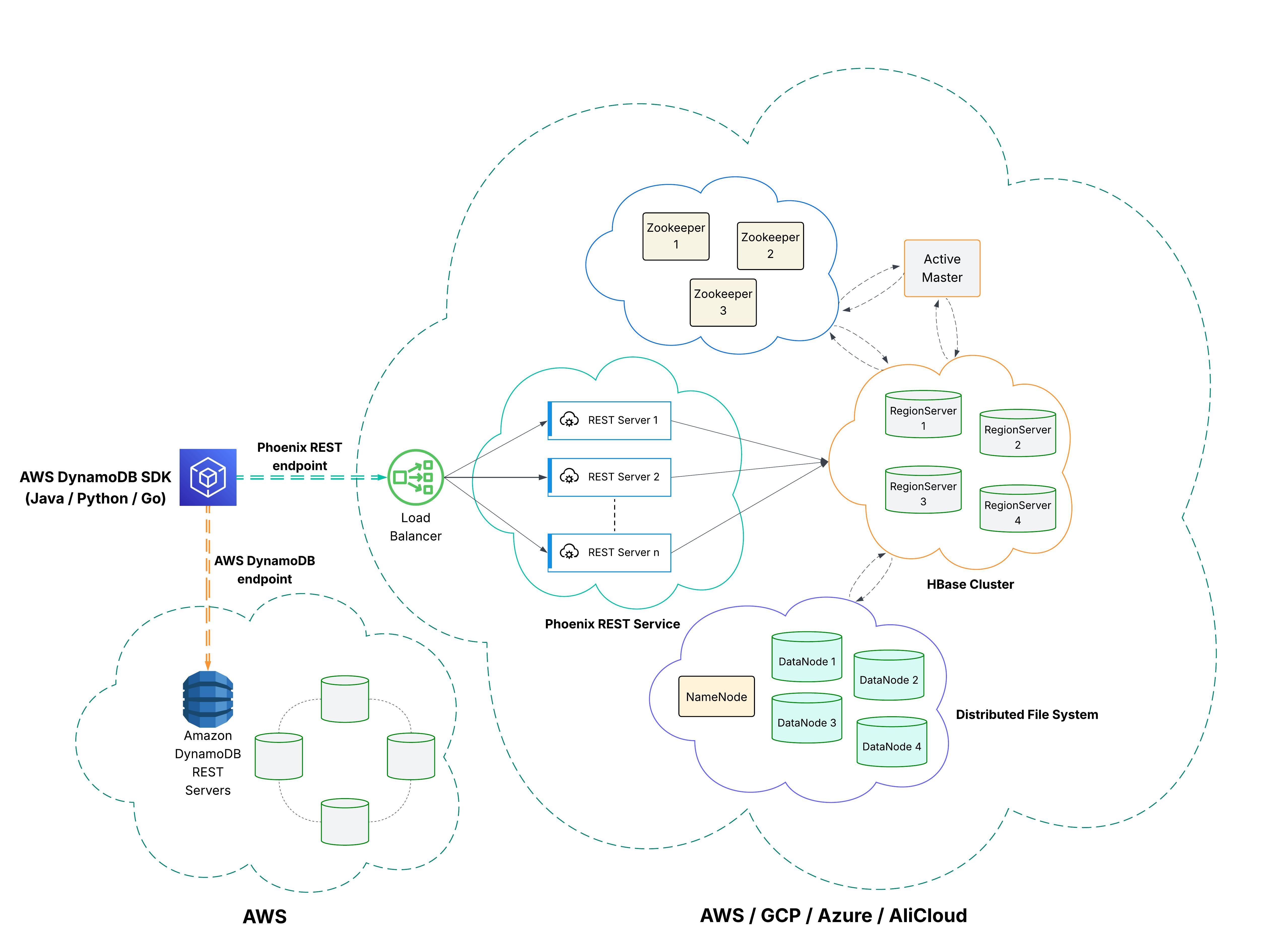
Supported DynamoDB APIs
- DDL:
- CreateTable
- DeleteTable
- DescribeTable
- ListTables
- UpdateTable
- UpdateTimeToLive
- DescribeTimeToLive
- DQL:
- Query
- Scan
- BatchGetItem
- GetItem
- DML:
- PutItem
- UpdateItem
- BatchWriteItem
- DeleteItem
- Change Stream:
- ListStreams
- DescribeStream
- GetShardIterator
- GetRecords
For detailed project overview and API reference (including request/response parameters, validations, and examples), see the DynamoDB API Reference
Connecting with AWS SDK
The Phoenix DynamoDB REST service is fully compatible with AWS SDKs. You can connect to it by simply configuring the endpoint URL to point to your Phoenix REST service instead of the standard DynamoDB endpoint.
📖 For detailed examples and configuration instructions, see the Phoenix DynamoDB REST Service README
How to bring up REST Server in dev env?
- Bring up HBase cluster locally. Refer to https://hbase.apache.org/book.html#quickstart
- Bring up Phoenix system tables using sqlline (bin/sqlline.py). Refer to https://phoenix.apache.org/installation.html.
- Clone phoenix-adapters repo.
- Build the project with:
mvn clean install -DskipTests - Start the REST Server with:
bin/phoenix-adapters rest start -p <port> -z <zk-quorum>e.g.bin/phoenix-adapters rest start -p 8842 -z localhost:2181to start the server at port 8842 with zk-quorum localhost:2181. Alternative to-z <zk-quorum>is env variableZOO_KEEPER_QUORUM.
One-shot Docker setup (recommended for first-time users)
Skip steps 1-2 above with the bundled Docker cluster. From a fresh clone:
Prerequisites: Docker Desktop running; jq and curl on PATH
(brew install jq on macOS).
# 1. Bring up the full stack at the versions pinned in pom.xml and BLOCK
#    until every container reports healthy (REST is ~30-60s on cold start).
#    First time: ~8-12 min total -- most of that is Maven downloading
#    ~1.5 GB of dependencies into the BuildKit cache mount. Subsequent
#    runs reuse the cache and rebuild in seconds.
docker compose -f docker/docker-compose.yml up -d --build --wait

# 2. Validate it works end-to-end (CRUD + UpdateItem + BatchWriteItem + streams).
bash docker/scripts/smoke.sh
# -> "Result: 21 checks PASSED across 18 API calls"

# 3. Use it. The DynamoDB-compatible endpoint is at http://localhost:8842 .
#    Point any AWS SDK at it (Java/Python/Node.js snippets in
#    phoenix-ddb-rest/README.md), or hit it with curl:
curl -s -X POST http://localhost:8842/ \
    -H 'Content-Type: application/x-amz-json-1.0' \
    -H 'X-Amz-Target: DynamoDB_20120810.ListTables' -d '{}'

# 4. Tear down when you're done.
docker compose -f docker/docker-compose.yml down -v
See docker/README.md for the full reference: port
mappings, the developer inner loop for code changes, the smoke-test
breakdown, troubleshooting, and how to run the REST server outside
Docker against the dockerized cluster.
Building Distribution Tarball
To build a distribution tarball that includes all components:
mvn clean package
This will generate a tarball in phoenix-ddb-assembly/target/phoenix-adapters-*-bin.tar.gz
Installation
- Extract the distribution tarball:
tar xzf phoenix-adapters-<version>-bin.tar.gz
cd phoenix-adapters-<version>
- Configure the environment variables in
conf/phoenix-adapters-env.sh:
export JAVA_HOME=/path/to/java
export PHOENIX_ADAPTERS_HOME=/path/to/extracted/phoenix-adapters
Configuration
Environment Variables
The following environment variables can be configured:
JAVA_HOME: Path to Java installationPHOENIX_ADAPTERS_HOME: Path to Phoenix Adapters installationPHOENIX_ADAPTERS_CONF_DIR: Configuration directory (default: $PHOENIX_ADAPTERS_HOME/conf)PHOENIX_ADAPTERS_LOG_DIR: Log directory (default: $PHOENIX_ADAPTERS_HOME/logs)PHOENIX_ADAPTERS_PID_DIR: PID directory (default: /var/run/phoenix-adapters)PHOENIX_REST_HEAPSIZE: Maximum heap size (e.g., "2g")PHOENIX_REST_OFFHEAPSIZE: Maximum off-heap memory size (e.g., "1g")PHOENIX_REST_OPTS: Additional JVM optionsPHOENIX_DDB_REST_OPTS: Additional JVM options for REST server
Logging Configuration
Logging can be configured in conf/log4j.properties. The default configuration includes:
- Console logging
- File logging with rotation
- GC logging
- Heap dumps on OutOfMemoryError
Running the Server
Starting the Server
To start the REST server as a daemon:
bin/phoenix-adapters rest start
To start in foreground mode (for debugging):
bin/phoenix-adapters rest foreground_start
Checking Server Status
To check if the server is running:
bin/phoenix-adapters rest status
Stopping the Server
To stop the server:
bin/phoenix-adapters rest stop
Restarting the Server
To restart the server:
bin/phoenix-adapters rest restart
Logs
Logs are stored in the following locations:
- Main log:
$PHOENIX_ADAPTERS_LOG_DIR/rest.log - GC log:
$PHOENIX_ADAPTERS_LOG_DIR/gc.log - Heap dumps:
$PHOENIX_ADAPTERS_LOG_DIR/(on OutOfMemoryError)
DynamoDB-Compatible Alternatives
Phoenix-Adapters is one of several open-source projects that expose a DynamoDB-compatible API on non-AWS infrastructure. The two most prominent alternatives are:
- ScyllaDB Alternator — DynamoDB API embedded in ScyllaDB.
- ExtendDB — DynamoDB API on PostgreSQL.
📊 For a detailed feature-by-feature comparison — API coverage, expressions, scalability, design philosophy, and a "when to use what" guide — see ALTERNATIVES.md.
Explore related projects
Asabeneh/30-Days-Of-Python
The 30 Days of Python programming challenge is a step-by-step guide to learn the Python programming language in 30 days. This challenge may take more than 100 days. Follow your own pace. These videos may help too: https://www.youtube.com/channel/UC7PNRuno1rzYPb1xLa4yktw
78,703 starsgrafana/grafana
The open and composable observability and data visualization platform. Visualize metrics, logs, and traces from multiple sources like Prometheus, Loki, Elasticsearch, InfluxDB, Postgres and many more.
77,890 starsredis/redis
For developers, who are building real-time data-driven applications, Redis is the preferred, fastest, and most feature-rich cache, data structure server, and document and vector query engine.
77,493 starsapache/superset
Apache Superset is a Data Visualization and Data Exploration Platform
75,519 stars