
apache/age-viewer
apache/age-viewer has 393 GitHub stars and 267 forks. GitHot measured 0 stars in 24 hours. Last checked 2026-11-09 05:23 UTC. Last push 2026-05-15.
Graph database optimized for fast analysis and real-time data processing. It is provided as an extension to PostgreSQL.
Measured star growth
- in 24h
- 0
- in 7 days
- Update delayed
- in 15 days
- Update delayed
- in 1 month
- Update delayed
Net star changes over overlapping periods, not daily totals. Missing measurements are left blank. Stars measure attention, not software quality.
README.md
Original


What is Apache-Age Viewer
Apache-Age Viewer is a web based user interface that provides visualization of graph data stored in a postgreSQL database with AGE extension. It is graph visualisation tool, for Apache AGE.
This is a sub-project of the Apache AGE project.
Recommend Node Version & install module
Node version - ^14.16.0
Node Module - pm2
Install latest pm2 with :
npm i pm2
pm2 is an NPM module to run the project in production mode, and hence is optional for getting started with setting up development environment for Age-Viewer
Running Age-Viewer
- Install the required node modules using :
npm run setup - Run Age-Viewer using :
npm run start
This will start the age-viewer on http://localhost:3000 if port 3000 is free.
How to build using command
- Build the front-end :
npm run build-front
- Build the back-end :
npm run build-back
Start the project in production mode :
  pm2 stop ag-viewer-develop

  pm2 delete ag-viewer-develop

  pm2 start ecosystem.config.js
How to start using Age-Viewer
To start using Age-Viewer we need to have a running postgreSQL database server with Apache Age Extension
Setting up the PostgreSQL server with AGE extension
- Easiest way for Windows, Mac-OS and Linux Environment using Docker
Install docker in advance (https://www.docker.com/get-started), install the version compatible with your OS from the provided link.
Run Using Docker :
- Get the docker image -
docker pull apache/age- Create AGE docker container
docker run --name myPostgresDb -p 5455:5432 -e POSTGRES_USER=postgresUser \
-e POSTGRES_PASSWORD=postgresPW -e POSTGRES_DB=postgresDB -d apache/age
Docker variables Description --nameAssign a name to the container -pPublish a container’s port(s) to the host -eSet environment variables -dRun container in background and print container ID To Get the running log of the docker container created -
docker logs --follow myPostgresDbTo Get into postgreSQL Shell (There are two ways this can be done) -
- First get into docker shell using -
docker exec -it myPostgresDb bash
Then get into postgreSQL shell using -psql -U postgresUser postgresDB
OR
- Alternatively postgres shell can also be assessed directly (without getting into the docker shell) -
psql -U postgresUser -d postgresDB -p 5455 -h localhostand put inpostgresPWwhen prompted for password.
- First get into docker shell using -
After logging into postgreSQL shell follow the Post-Installation instruction to create a graph in the database.
Connect Apache Age-Viewer to PostgreSQL Database
Initial Connection Layout
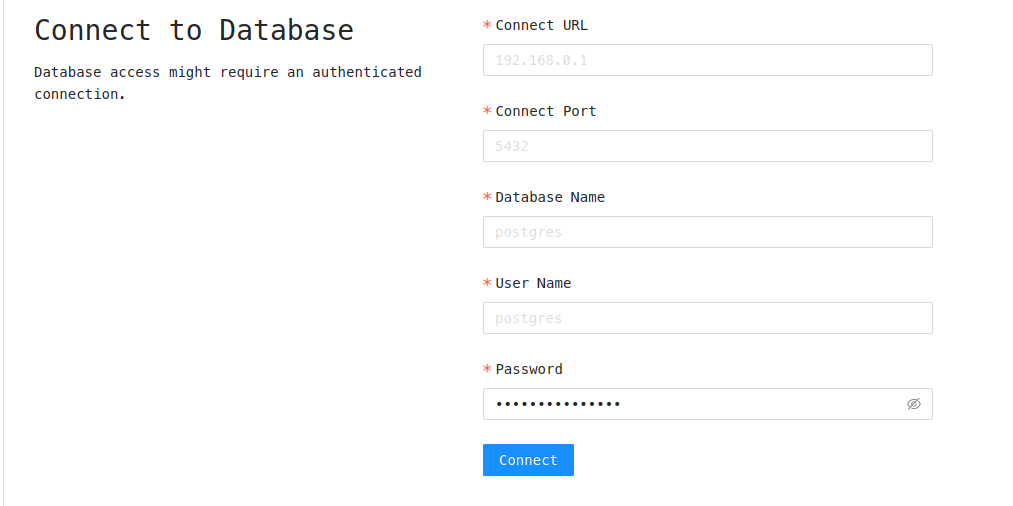 To Connect to postgreSQL server running from Docker Container
- Connect URL - localhost
- Connect Port - 5455
- Database Name - postgresDB
- User Name - postgresUser
- Password - postgresPW
The following field is same as used to make the docker container specified above as flags.
License
Apache AGE Viewer is licensed under the Apache License, Version 2.0. See LICENSE for the full license text.
Explore related projects
Asabeneh/30-Days-Of-Python
The 30 Days of Python programming challenge is a step-by-step guide to learn the Python programming language in 30 days. This challenge may take more than 100 days. Follow your own pace. These videos may help too: https://www.youtube.com/channel/UC7PNRuno1rzYPb1xLa4yktw
78,423 starsgrafana/grafana
The open and composable observability and data visualization platform. Visualize metrics, logs, and traces from multiple sources like Prometheus, Loki, Elasticsearch, InfluxDB, Postgres and many more.
77,790 starsredis/redis
For developers, who are building real-time data-driven applications, Redis is the preferred, fastest, and most feature-rich cache, data structure server, and document and vector query engine.
77,309 starsapache/superset
Apache Superset is a Data Visualization and Data Exploration Platform
75,455 stars