
aosama/astronomical
aosama/astronomical has 28 GitHub stars and 8 forks. GitHot measured 0 stars in 24 hours. Last checked 2026-11-15 16:41 UTC. Last push 2026-11-13.
Measured star growth
- in 24h
- 0
- in 7 days
- Update delayed
- in 15 days
- Update delayed
- in 1 month
- Update delayed
Net star changes over overlapping periods, not daily totals. Missing measurements are left blank. Stars measure attention, not software quality.
About
Set one RAM ceiling. Run bigger sparse language and vision models on Apple Silicon — experts stream from SSD when they don't fit, without hidden quantization. https://aosama.github.io/astronomical/ Join Discord Server https://discord.gg/dc4E6r4WD
Developer ToolsREADME.md
OriginalAstronomical


Run large AI models privately on your Mac, including models bigger than the memory you can spare.
Astronomical is a free app for Apple silicon Macs. You tell it how much memory it may use, pick a model, and start chatting. When a model is too big for that memory, Astronomical keeps part of it on your SSD and reads it as needed, so the rest of your Mac stays usable. Nothing you type leaves your Mac.
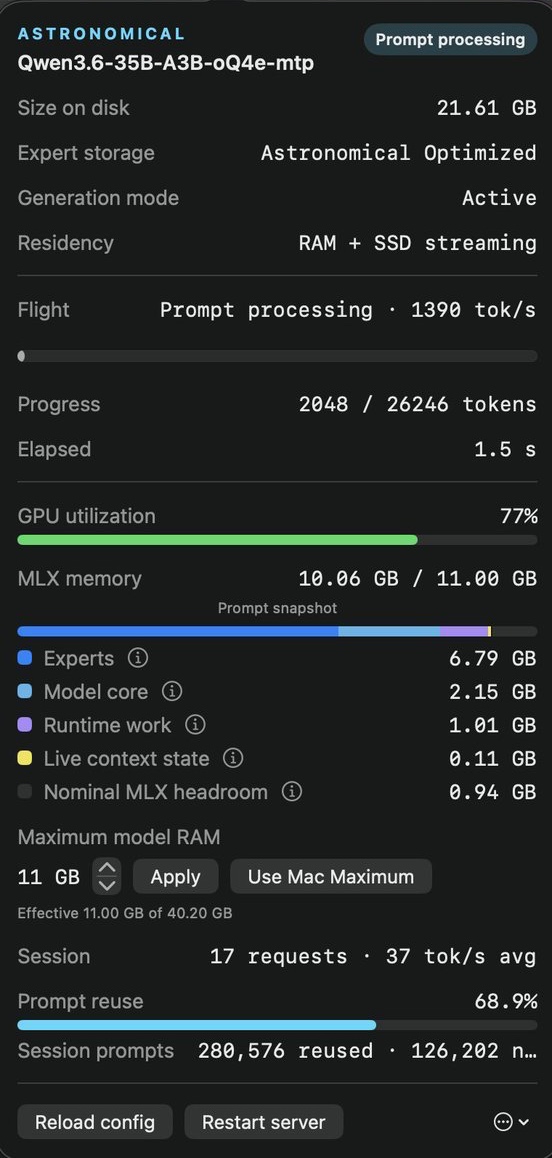
A 21.6 GB model running with an 11 GB memory limit. Click the picture for a 25-second demo. This is a captured run; speed varies by model, prompt length, storage and Mac.
What you need
- A Mac with Apple silicon (any M-series chip).
- macOS 14 (Sonoma) or later.
- Free disk space for models. They range from under 1 GB to about 38 GB each.
Get started
- Install the app. Download the disk image with the button above or from the latest release, open it, and drag Astronomical into Applications. The app is signed and notarized by Apple.
- Open Astronomical. A chat window opens with a welcome, and an Astronomical item appears in the menu bar. The menu-bar item keeps models available while you work, even after you close the chat window.
- Download a model. Click Get started. Astronomical suggests a model for your Mac: click Download, or Choose a different model to pick from the full list. It checks the download before using it.
- Chat. When the download finishes, click Start chatting and type your first message. The model loads when you send it.
- Say how much memory it may use (optional). In the Astronomical menu at the top of the screen, choose Open Observatory. It opens the app's control page in your browser. Go to Settings and set Maximum model RAM. On a 32 GB Mac, for example, 16 GB leaves room for macOS and your other apps.
To add more models, open Models in Observatory and click Get beside one. To remove a model you downloaded there, use Remove on its line; it goes to the Trash.
Use it with your coding tools
Astronomical can stand in for a cloud model in tools that speak the OpenAI or Anthropic API.
First, add the astronomical command to Terminal: click the menu-bar item, click the ⋯ button, and choose Install “astronomical” command in terminal…. Then start a coding agent that uses the model on your Mac:
astronomical launch claude
astronomical launch codex
astronomical launch opencode
For any other tool, point it at http://127.0.0.1:6732/. The local API page has the settings for each client.
Use it from Terminal
astronomical respond "Explain what a mutex is in two sentences"
astronomical models list
astronomical models supported
astronomical models download MODEL_ID
astronomical image "A lighthouse at dusk"
astronomical speak "Hello from my Mac"
astronomical status
Run astronomical --help for the full list.
Good to know
- Private by design. Prompts, replies and models stay on your Mac. The app only accepts connections from your own Mac.
- Your model's quality is not reduced. Astronomical never lowers a model's precision to save memory.
- You can see what is happening. The menu-bar item and Observatory show memory in use, progress and speed.
- Models are downloaded, not bundled. Each model has its own license, which must allow your intended use.
- It is experimental. One person, one conversation at a time. Supported models today are chat and coding models built on Qwen3.5 and Qwen3.6, FLUX.2 Klein and Qwen-Image for images, Kokoro and Phonon for speech, ModernBERT for embeddings, and small decision models.
Learn more
- How Astronomical works: memory, speed, precision and current scope.
- Configuration: every setting, for people who want to edit the file by hand.
- Neural Engine prefill: an experimental speed-up for some models.
- Building and developing: build from source and run the tests.
- Product story and engineering reports on the website.
- Measured: a 22 GB model under a 12 GB memory ceiling, with a short video and the limits of the measurement.
- Discord for questions and help, and the support page.
Contributing
Issues and pull requests are welcome. Read CONTRIBUTING.md before submitting changes and SECURITY.md before reporting a vulnerability.
License
Astronomical is licensed under Apache License 2.0. See THIRD_PARTY_NOTICES and RUST_DEPENDENCY_NOTICES for complete distribution terms.