
anuragxxd/conops
anuragxxd/conops has 43 GitHub stars and 1 forks. GitHot measured 0 stars in 24 hours and 0 in 7 days. Last checked 2026-11-09 18:53 UTC. Last push 2026-09-22.
GitOps controller for Docker Compose - Self-healing, Git-driven deployments without Kubernetes
What you can do
- Git-driven deployments — push to your branch, ConOps handles the rest
- Continuous reconciliation — configurable loop that keeps desired state in sync
- Self-healing — detects missing, exited, or unhealthy containers and recovers
- Docker preflight + fallback toolchain — checks Docker API compatibility before sync
Measured star growth
- in 24h
- 0
- in 7 days
- 0
- in 15 days
- Collecting history
- in 1 month
- Collecting history
Net star changes over overlapping periods, not daily totals. Missing measurements are left blank. Stars measure attention, not software quality.
README.md
Original

ConOps
GitOps for Docker Compose. Like Argo CD, but without Kubernetes.


Point ConOps at a Git repo containing a docker-compose.yaml.
It clones, pulls, deploys, watches for new commits, detects container drift, and self-heals.
One binary. No cluster required.
Quick Start · Features · Usage Guide · Configuration · API
Quick Start
Run ConOps with a single command:
docker run \
  --name conops \
  -p 127.0.0.1:8080:8080 \
  -e CONOPS_RUNTIME_DIR=/tmp/conops-runtime \
  -v /tmp/conops-runtime:/tmp/conops-runtime \
  -v conops_data:/data \
  -v /var/run/docker.sock:/var/run/docker.sock \
  anurag1201/conops:latest
Open http://localhost:8080 and click New App.
Note: For production use, we recommended using Docker Compose.
Security: The port is bound to
127.0.0.1because ConOps has no built-in authentication and mounts the Docker socket. Reach it remotely over an SSH tunnel (ssh -L 8080:127.0.0.1:8080 host) or a private network, rather than publishing it.
Features
- Git-driven deployments — push to your branch, ConOps handles the rest
- Continuous reconciliation — configurable loop that keeps desired state in sync
- Self-healing — detects missing, exited, or unhealthy containers and recovers
- Docker preflight + fallback toolchain — checks Docker API compatibility before sync
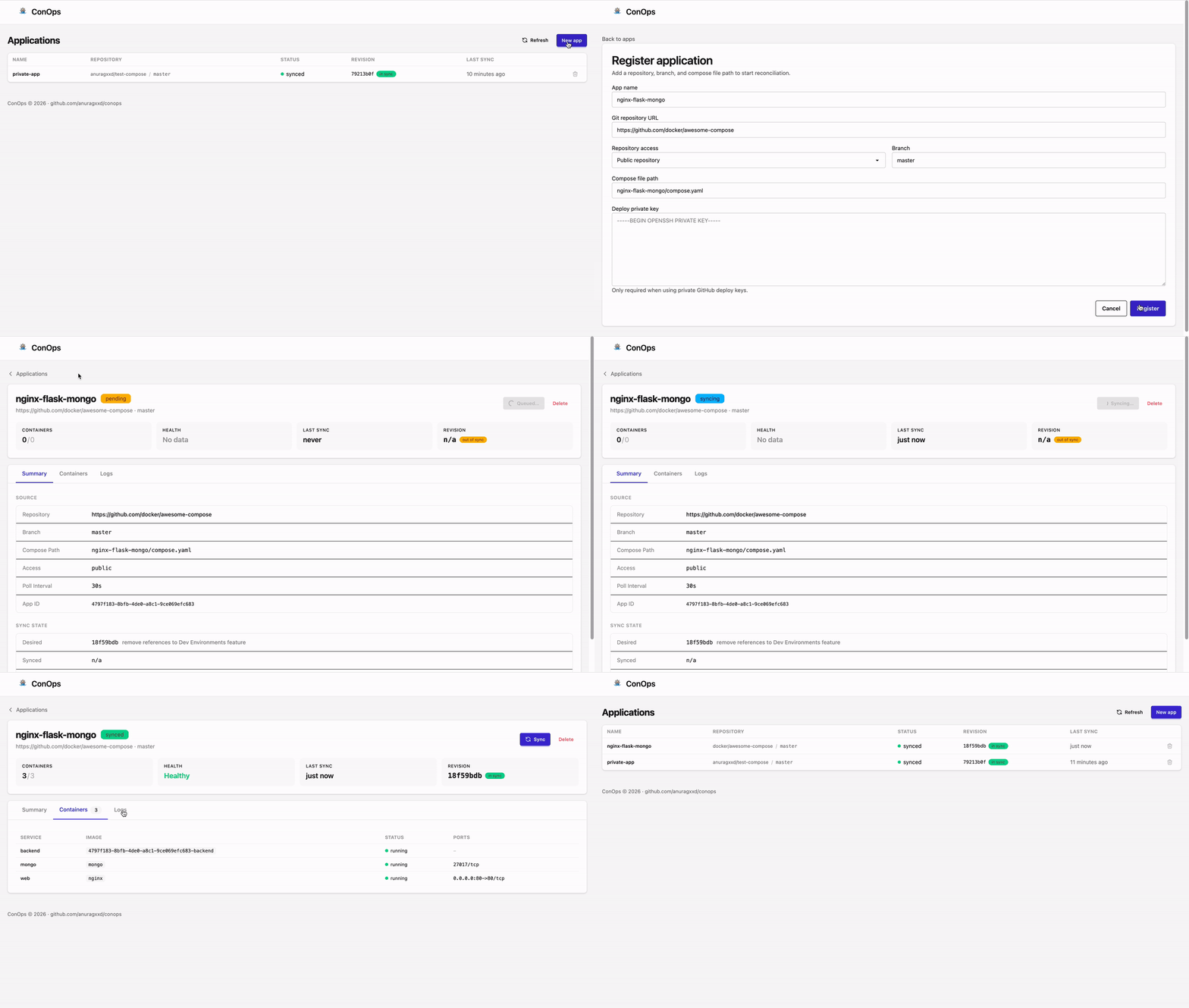
- Web UI — register apps, inspect status, view containers, trigger syncs, read logs
- REST API + CLI — automate everything; nothing in the UI that the API can't do
- Private repo support — GitHub deploy keys with AES-GCM encryption at rest
- SQLite or PostgreSQL — SQLite for single-node, Postgres for production
- Single binary — no runtime dependencies beyond Docker and Git
Usage Guide
ConOps can be managed in two ways: via the Web Dashboard or the REST API / CLI.
Method 1: Web Dashboard
The easiest way to get started. Navigate to http://localhost:8080.
- Dashboard: View all registered applications and their current status (
synced,syncing,pending,error). - New App: Click the button to register a repository. You'll need the Git URL, branch name, and path to the Compose file.
- App Details: Click on any app to see its sync history, container health, and logs.
- Actions: You can manually trigger a sync or delete an app directly from its card.
Method 2: REST API & CLI
ConOps is API-first. Every action available in the UI can be performed via the REST API.
CLI Tool (conops-ctl)
The conops-ctl CLI helps you manage applications from your terminal.
Installation:
# Install the latest version to /usr/local/bin
curl -sfL https://raw.githubusercontent.com/anuragxxd/conops/master/install.sh | sudo sh
Or download pre-built binaries from the Releases page.
Configuration:
Set the controller URL if running remotely (defaults to http://localhost:8080):
export CONOPS_URL="http://conops.example.com:8080"
Commands:
# List all apps
./conops-ctl apps list

# Register an app (supports private repos via JSON)
./conops-ctl apps add app.json

# Get detailed status
./conops-ctl apps get <app-id>

# Update configuration (partial updates supported)
./conops-ctl apps update <app-id> --branch feature/login --poll-interval 1m

# Force immediate sync
./conops-ctl apps sync <app-id>
REST API
You can interact directly with the API using curl.
1. Register an App
curl -X POST http://localhost:8080/api/v1/apps/ \
  -H "Content-Type: application/json" \
  -d '{
    "name": "Example App",
    "repo_url": "https://github.com/docker/awesome-compose",
    "repo_auth_method": "public",
    "branch": "master",
    "compose_path": "fastapi/compose.yaml",
    "poll_interval": "30s"
  }'
2. List Apps
curl http://localhost:8080/api/v1/apps/
3. Get App Details
curl http://localhost:8080/api/v1/apps/{id}
4. Force Sync
curl -X POST http://localhost:8080/api/v1/apps/{id}/sync
5. Update App
curl -X PATCH http://localhost:8080/api/v1/apps/{id} \
  -H "Content-Type: application/json" \
  -d '{ "poll_interval": "1m" }'
6. Delete App
curl -X DELETE http://localhost:8080/api/v1/apps/{id}
Configuration
All configuration is via environment variables.
| Variable | Default | Description |
|---|---|---|
DB_TYPE |
sqlite |
Storage backend: sqlite or postgres |
DB_CONNECTION_STRING |
— | Required when using postgres |
CONOPS_RECONCILE_INTERVAL |
10s |
How often the reconciler runs |
CONOPS_SYNC_TIMEOUT |
5m |
Max duration for a single sync operation |
CONOPS_RETRY_ERRORS |
false |
Auto-retry apps that entered error status |
CONOPS_RUNTIME_DIR |
./.conops-runtime |
Runtime checkout directory used for compose execution |
CONOPS_TOOLS_DIR |
./.conops-tools |
Cache directory for managed Docker CLI and Compose plugin downloads |
CONOPS_ENCRYPTION_KEY |
— | 32-byte key (raw or base64) for deploy key encryption |
CONOPS_ENCRYPTION_KEY_FILE |
/data/conops-encryption.key |
Path to read/write the encryption key |
Production Setup
For production, we recommend running ConOps with Docker Compose to handle persistence and networking cleanly.
services:
  conops:
    image: anurag1201/conops:latest
    ports:
      - "127.0.0.1:8080:8080"
    environment:
      - CONOPS_RUNTIME_DIR=/tmp/conops-runtime
      - DB_TYPE=sqlite
    volumes:
      # Persist SQLite DB and encryption keys
      - conops_data:/data
      # Allow ConOps to manage sibling containers
      - /var/run/docker.sock:/var/run/docker.sock
      # Runtime directory for checkouts
      - /tmp/conops-runtime:/tmp/conops-runtime

volumes:
  conops_data:
Private Repositories
ConOps supports private GitHub/GitLab repositories via SSH deploy keys.
When registering an app via the API, set repo_auth_method to deploy_key and provide the private key:
curl -X POST http://localhost:8080/api/v1/apps/ \
  -H "Content-Type: application/json" \
  -d '{
    "name": "Private App",
    "repo_url": "[email protected]:my-org/private-repo.git",
    "repo_auth_method": "deploy_key",
    "deploy_key": "-----BEGIN OPENSSH PRIVATE KEY-----\n...\n-----END OPENSSH PRIVATE KEY-----",
    "branch": "main",
    "compose_path": "docker-compose.yml"
  }'
Security: Deploy keys are encrypted at rest using AES-GCM. ConOps auto-generates an encryption key on first run, or you can provide your own via
CONOPS_ENCRYPTION_KEY.
How It Works
                    ┌─────────────┐
                    │  Git Repo   │
                    └──────┬──────┘
                           │ poll
                    ┌──────▼──────┐
                    │ Git Watcher │──── new commit? ──→ mark pending
                    └─────────────┘
                           │
                    ┌──────▼──────┐
                    │ Reconciler  │──── clone/fetch → compose pull → compose up
                    └──────┬──────┘
                           │
                    ┌──────▼──────┐
                    │Drift Checker│──── container missing/exited/unhealthy? → requeue
                    └─────────────┘
Status flow: registered → pending → syncing → synced.
ConOps separates change detection (Git watcher) from state application (reconciler). This keeps the control loop predictable and easy to reason about.
Development
# Run the controller locally
go run ./cmd/conops

# Build the CLI
go build -o bin/conops-ctl ./cmd/conops-ctl

# Run tests
go test ./...
License
MIT — see LICENSE.
Explore related projects
awesome-selfhosted/awesome-selfhosted
A list of Free Software network services and web applications which can be hosted on your own servers
335,557 starsimmich-app/immich
High performance self-hosted photo and video management solution.
118,645 starsStirling-Tools/Stirling-PDF
#1 PDF Application on GitHub that lets you edit PDFs on any device anywhere
96,149 starslouislam/uptime-kuma
A fancy self-hosted monitoring tool
93,425 stars