
antgroup/hugescm
antgroup/hugescm has 131 GitHub stars and 7 forks. GitHot measured 0 stars in 24 hours. Last checked 2026-11-18 07:59 UTC. Last push 2026-11-13.
What you can do
- cdc.md - CDC Chunking - Content-Defined Chunking implementation and configuration
- hot.md - hot command - Git repository maintenance tool for cleanup, migration, and optimization
Measured star growth
- in 24h
- 0
- in 7 days
- Collecting history
- in 15 days
- Collecting history
- in 1 month
- Collecting history
Net star changes over overlapping periods, not daily totals. Missing measurements are left blank. Stars measure attention, not software quality.
About
HugeSCM - A next generation cloud-based version control system
Developer ToolsREADME.md
OriginalHugeSCM - A next generation cloud-based version control system


Overview
HugeSCM (codename zeta) is a cloud-native version control system designed for large-scale repositories. By separating metadata from file data, it overcomes storage and transmission limitations of traditional VCS like Git and SVN. Ideal for AI model development, game development, and monorepo scenarios.
Key features:
- Data separation: Stores metadata in distributed database, file content in object storage
- Efficient protocol: Optimized transmission reduces bandwidth and time costs
- Fragment objects: Handles large binary files (AI models, dependencies) efficiently
Built on Git's principles without its historical constraints.
Use Cases
AI Model Development
- Store checkpoint files (tens to hundreds of GB)
- Model version management and incremental updates
- Multi-team collaboration
Game Development
- Large binary resource management
- Art asset version control
Dataset Storage
- Large-scale dataset version management
- Data annotation collaboration
Documentation
Design & Architecture
| Document | Description |
|---|---|
| design.md | Design Philosophy - Core design concepts, architecture overview, differences from Git |
| object-format.md | Object Format - Binary formats for Blob, Tree, Commit, Fragments objects |
| pack-format.md | Pack File Format - Object packaging mechanism and index format |
| protocol.md | Transport Protocol - HTTP/SSH protocols, authorization, metadata and file transfer |
| version-negotiation.md | Version Negotiation - Baseline management, checkout, pull, push workflows |
Configuration Reference
| Document | Description |
|---|---|
| config.md | Configuration File - Supported configuration options and environment variables |
Feature Guides
| Document | Description |
|---|---|
| switch.md | Branch Switching - switch command details for switching branches and commits |
| stash.md | Stash Feature - stash command for temporarily saving work progress |
| sparse-checkout.md | Sparse Checkout - On-demand checkout of specified directories |
| pull-strategy.md | Pull Strategy - merge, rebase, fast-forward strategy details |
Advanced Features
| Document | Description |
|---|---|
| cdc.md | CDC Chunking - Content-Defined Chunking implementation and configuration |
| hot.md | hot command - Git repository maintenance tool for cleanup, migration, and optimization |
Build
After installing the latest version of Golang, developers can build HugeSCM client using bali (build packaging tool).
bali -T windows
# create rpm,deb,tar,sh pack
bali -T linux -A amd64 --pack='rpm,deb,tar,sh'
The bali build tool can create zip, deb, tar, rpm, sh (STGZ) compression/installation packages.
Windows Installation Package
We provide an Inno Setup script. You can use Docker + wine to generate an installation package without Windows:
docker run --rm -i -v "$TOPLEVEL:/work" amake/innosetup xxxxx.iss
Before running this, build the Windows binary first: bali --target=windows --arch=amd64.
Note: On macOS with Apple Silicon, you can use OrbStack with Rosetta to run this image.
Usage
Users can run zeta -h to view all zeta commands, and run zeta ${command} -h to view detailed command help. We try to make it easy for git users to get started with zeta, and we will also enhance some commands. For example, many zeta commands support --json to format the output as json, which is convenient for integration with various tools.
Config
zeta config --global user.email '[email protected]'
zeta config --global user.name 'Example User'
Checkout
The process to obtain a remote repository in git is called clone (or fetch). In zeta, we use checkout, abbreviated as co. Below is how to checkout a repository:
zeta co http://zeta.example.io/group/repo xh1
zeta co http://zeta.example.io/group/repo xh1 -s dir1
Track and Commit
We have implemented git-like status, add, and commit commands, usable except in interactive mode. Use -h for help. On properly configured systems, zeta displays the corresponding language version.
echo "hello world" > helloworld.txt
zeta add helloworld.txt
zeta commit -m "Hello world"
Push and Pull
zeta push
zeta pull
Features
Download Acceleration
Supports direct, dragonfly, and aria2 accelerators via core.accelerator or ZETA_CORE_ACCELERATOR env var.
| Accelerator | Description |
|---|---|
direct |
Download directly from OSS via signed URLs (recommended for AI scenarios) |
dragonfly |
Use dragonfly cluster for P2P acceleration |
aria2 |
Use aria2c for multi-threaded downloads |
zeta config --global core.accelerator direct
zeta config --global core.concurrenttransfers 8  # parallel downloads (1-50)
One-by-One Checkout
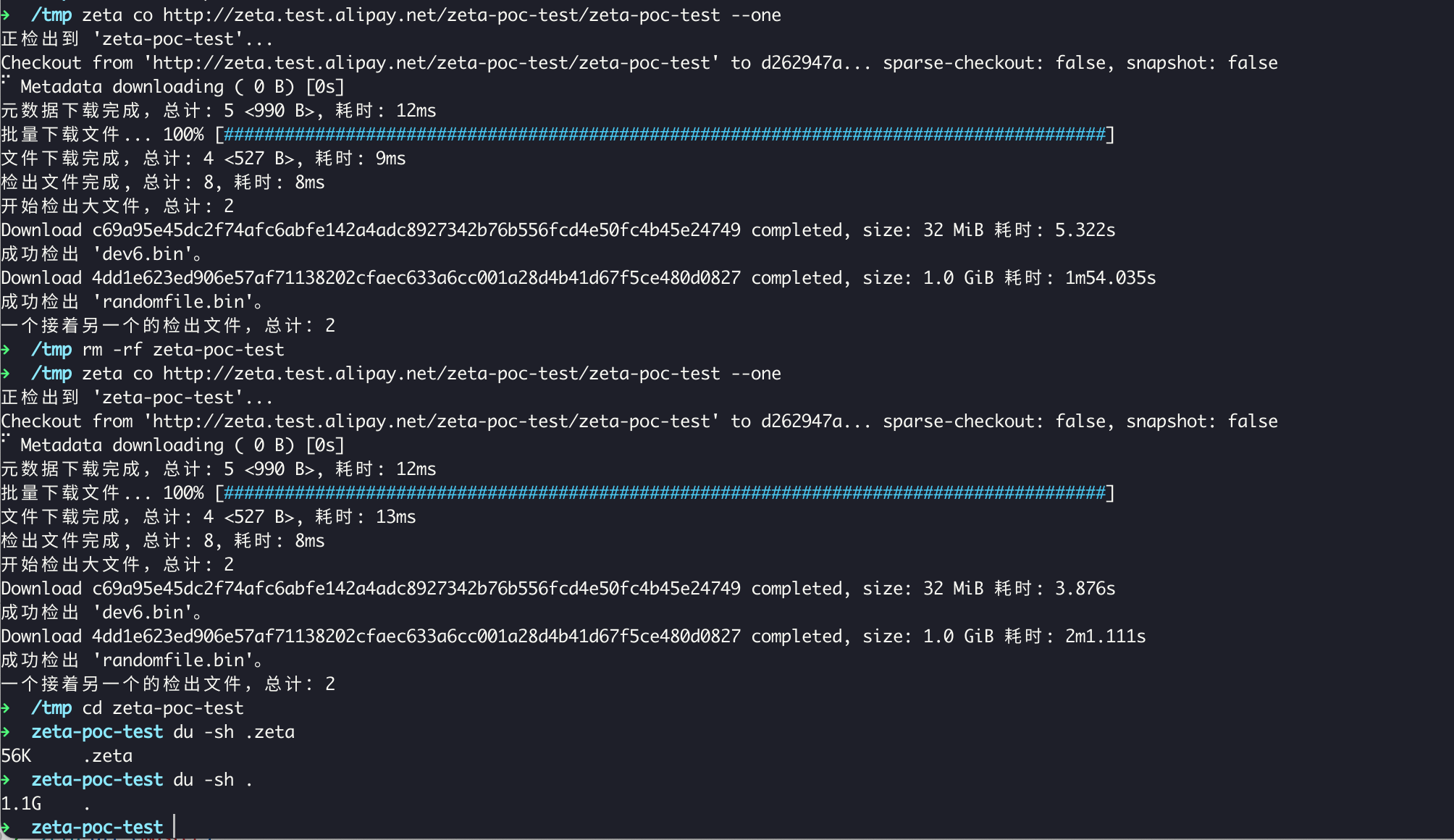
Checkout files one at a time and immediately release blob objects, saving 60%+ disk space for large repositories.
zeta co http://zeta.example.io/zeta-poc-test/zeta-poc-test --one
On-demand Access
Automatically downloads missing objects when needed (e.g., zeta cat, merge). Disable with ZETA_CORE_PROMISOR=0.
Sparse Checkout
Sparse checkout allows users to check out only specific directories instead of the entire repository. This is especially useful for large repositories:
# Check out specific directories
zeta co http://zeta.example.io/group/repo myrepo -s src/core -s src/utils
Checkout Single File
In zeta, you can checkout a single file by adding --limit=0 during the checkout process, which excludes all files except empty ones. Then, use zeta checkout -- path to check out the specific file.
zeta co http://zeta.example.io/zeta-poc-test/zeta-poc-test --limit=0 z2
zeta checkout -- dev6.bin
Update Partial Files
Some users may only want to modify specific files, which can be done by using checkout single file to checkout the desired file and then making the modifications.
zeta add test1/2.txt
zeta commit -m "XXX"
zeta push
Pull Strategies
HugeSCM supports three pull strategies:
- merge - Create a merge commit (default)
- rebase - Rebase local commits on top of remote
- fast-forward only - Only allow fast-forward merges
zeta pull                    # merge strategy (default)
zeta pull --rebase           # rebase strategy
zeta pull --ff-only          # fast-forward only
Stash
Stash allows temporarily saving work progress:
zeta stash                   # stash all changes
zeta stash save "WIP: feature"  # stash with message
zeta stash list              # list all stashes
zeta stash pop               # apply and remove latest stash
Switch Branches
Switch between branches or commits:
zeta switch feature          # switch to branch
zeta switch -c new-feature   # create and switch to new branch
zeta switch abc123           # switch to specific commit
Migrate Repository from Git to HugeSCM
zeta-mc https://github.com/antgroup/hugescm.git hugescm-dev
CDC (Content-Defined Chunking)
HugeSCM introduces CDC for efficient handling of large files. Unlike traditional fixed-size chunking, CDC determines chunk boundaries based on content, achieving better deduplication:
| Scenario | Fixed Chunking | CDC Chunking |
|---|---|---|
| Local modification | All subsequent chunks change | Only 1-2 chunks change |
| Incremental sync | Transfer complete file | Transfer only changed chunks |
| Deduplication | Low | High |
Enable CDC in configuration:
[fragment]
threshold = "1GB"      # File size threshold
size = "1GB"           # Target chunk size (fixed chunking)
enable_cdc = true      # Enable CDC chunking
Comparison with Git
| Feature | Git | HugeSCM |
|---|---|---|
| Architecture | Distributed | Centralized |
| Clone method | Full clone | On-demand checkout |
| Hash algorithm | SHA-1/SHA-256 | BLAKE3 |
| Large file support | Git LFS | Built-in Fragments |
| Data storage | Local filesystem | DB + OSS |
Command Comparison
| Git Command | HugeSCM Command | Description |
|---|---|---|
git clone |
zeta checkout (co) |
Checkout repository, not full clone |
git fetch |
zeta pull --fetch |
Fetch data only |
git pull |
zeta pull |
Pull and merge |
git switch |
zeta switch |
Switch branches |
Additional Tools - hot command
hot is a Git repository maintenance tool for cleaning up, migrating, and optimizing Git repositories.
Common Use Cases
| Task | Command |
|---|---|
| Find large files | hot size / hot smart -L20m |
| Remove sensitive data | hot remove path/to/secret.txt --prune |
| Migrate SHA1 → SHA256 | hot mc https://github.com/user/repo.git |
| Clean stale refs | hot prune-refs "feature/deprecated-" |
| Linearize history | hot unbranch --confirm |
| Inspect objects | hot cat HEAD --json |
See docs/hot.md for full documentation.
License
Apache License Version 2.0, see LICENSE