
animede/Realtime_Narration_Video
animede/Realtime_Narration_Video has 43 GitHub stars and 9 forks. GitHot measured 0 stars in 24 hours. Last checked 2026-11-15 00:16 UTC. Last push 2026-10-19.
Measured star growth
- in 24h
- 0
- in 7 days
- Collecting history
- in 15 days
- Collecting history
- in 1 month
- Collecting history
Net star changes over overlapping periods, not daily totals. Missing measurements are left blank. Stars measure attention, not software quality.
About
Real-time talking character on a single RTX 5090 — LTX-2.5 22B + local LLM + TTS, fully local. First video ~2.6s after Enter.
Machine LearningREADME.en.md
OriginalRealtime Narration Video
English | 日本語
A fully local-capable, full-frame conversational character pipeline built on the general-purpose LTX video diffusion model. The best observed time from user submission to the first completed video was approximately 2.6 seconds on an RTX PRO 6000 Blackwell (48 GB class) test environment.
This proof-of-concept application sends chat input to an OpenAI-compatible Gemma 4 endpoint, converts the streaming response to speech with AivisSpeech, and feeds approximately five-second audio chunks to LTX-2.5. Completed videos are played in sequence. Audio generated by LTX is discarded and the original TTS waveform is muxed into the final MP4.
A companion app, Realtime_Conversation_Video, turns this into a voice conversation client — mic VAD feeding the LLM's input_audio directly, ROLE injection, and rolling history summarization — using this app as a headless character-rendering service.
The underlying video-generation technology comes from my diffusers-based engines Diffusers-LTX2.5 and Diffusers-MinimaxH3. See those repositories for the quantization / low-VRAM / realtime techniques and for running them as standalone servers.
See Development History and Measurements for the latency, resolution, step-count, and photorealistic lip-motion experiments. See the Technical Guide for the architecture, API, parameters, and operations.
Demo
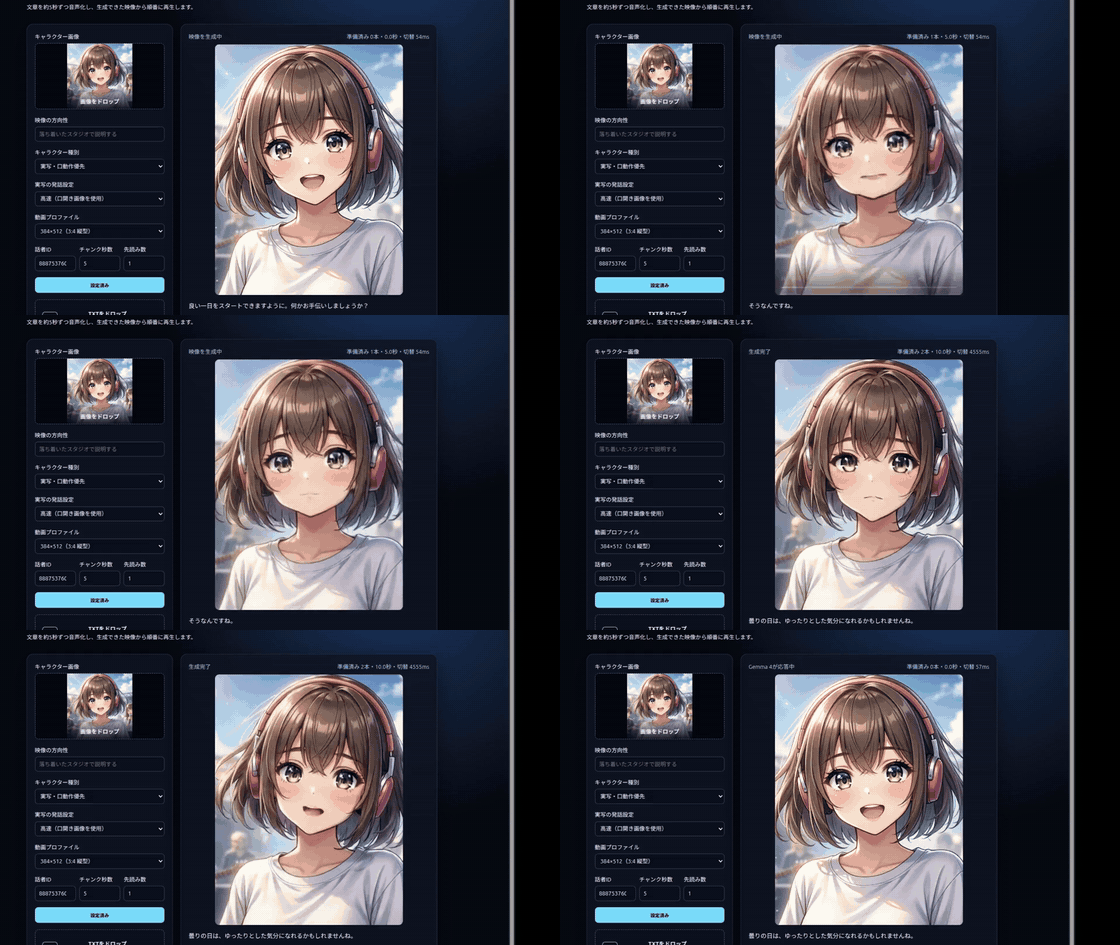
The GIF above is a 12-second excerpt at real speed. Click it to open the full 57-second demonstration of streaming LLM output being converted to speech and video. You can also open the MP4 directly (1.8 MB).
Real-time conversation demo (real speed, 60 s, generated under a 32 GB-class VRAM budget)
https://github.com/user-attachments/assets/de1c4714-00a0-4342-a8cc-ed683af00a8b
An unedited, real-speed recording of a real-time conversation with a photorealistic character, generated with free VRAM capped at 31 GB (headless RTX 5090 equivalent) using the nvfp4-32gb configuration, with TTS (AivisSpeech) running on a second GPU. It starts the moment Enter is pressed on the text input, and playback is fully continuous from there. The character speaks Japanese — the pipeline is language-agnostic and works with any local TTS. The MP4 file (5.2 MB) is also available directly.
The video was compressed for GitHub and therefore looks slightly worse than the original generated and displayed output.
Current MVP
- Sentence/clause segmentation and sentence-level TTS
- Streaming chat with conversation history through an OpenAI-compatible Gemma 4 endpoint
- TTS starts for finalized clauses while the LLM response is still streaming
- Dynamic video chunks that start TTS at sentence endings, line breaks, colons, and natural Japanese clause boundaries without forcing splits where punctuation is absent
- Pipelined TTS audio preparation and LTX video generation
- Drag-and-drop character images and TXT files
- Live video-direction text incorporated into generation prompts
- A leading
[video direction]in a chat message is not spoken and applies only to that turn - Direct narration without the LLM, accepting pasted, typed, or dropped TXT content
- Japanese/English UI switching plus an independent Auto/Japanese/English conversation-language setting
- Chunk assembly based on actual WAV duration
- LTX-2.5 Audio-to-Video generation
- 24 landscape, 4:3, and portrait profiles across 16/20/24 fps
- A generated speaking anchor is reused for every photorealistic chunk to avoid a closed-mouth reference
- During character registration, LTX is preloaded and a high-quality open-mouth anchor is generated at the selected resolution with eight steps
- Original TTS audio replaces the LTX-generated audio
- Playback starts with one available chunk; two alternating video elements preload the next clip
- Dynamic startup buffering and measured transition-gap display
- Short utterances are generated as five-second clips and advance after speech when the next clip is ready. Speech longer than five seconds keeps the final video frame visible while the original TTS audio finishes
- The first clip of every turn uses a lower resolution with the same framing; later clips use the selected resolution. Steps are configurable in the UI (default 4; the first clip uses
min(4, steps)) - Idle playback is a playlist: setup always generates three clips, then grows one at a time to the configured 3–7 (default 5); pools of six or seven use randomized playback. Conversation blocks replenishment across all sessions, incoming chat interrupts every in-flight idle job across sessions, and replenishment pauses while hidden or after five minutes of inactivity
- Optional turn continuity: start the turn from the frozen idle frame captured at send time, and/or FLF-anchor the final chunk back to the idle start pose — with both enabled the idle→talk→idle cycle is pose-continuous (defaults keep the classic lip-motion-first behaviour)
- A well-tuned character can be saved as a preset (settings + idle pool + speaking anchors) and restored instantly from a thumbnail gallery with zero regeneration
- Seed 1004, the most reliable observed photorealistic articulation seed, is the default and can be changed in the UI for every photorealistic chunk
- Photorealistic anchor preparation always uses
modality_scale=1.3; applying it during conversation is a UI toggle ("Mouth emphasis", default off for speed — distilled 4-step generation was verified to keep mouth articulation) - At the beginning of each turn, the original character image covers the previous turn until the new video starts
- User-selectable generation policy: Standard varies each chunk from the selected base seed and chains frames within a turn; Photorealistic reuses the speaking anchor and selected seed
- Gateway jobs are polled every 100 ms
- SSE status updates and LLM/TTS/LTX timestamps are recorded
- Gateway and TTS errors are shown and persisted
On a single GPU, generation can occasionally be slower than playback. When the buffer is exhausted, the application retains the current clip until the next one is ready; this is therefore a near-real-time system rather than a hard real-time guarantee.
Indicative Hardware Configurations
| GPU configuration | Assessment |
|---|---|
| 48 GB class (RTX PRO 5000 / 6000 Blackwell) | Real-time operation (all-resident nvfp4-fast configuration, ~33 GB resident, measured) |
| RTX 5090 32 GB alone | Real-time operation (32 GB-oriented all-resident nvfp4-32gb configuration: ~28.8 GB resident, 4-step chunks in 3.8 s = 0.79x real time, measured). The GPU must be dedicated to the video engine — run TTS and the LLM on the CPU or another host (headroom is only ~2 GB). Upsamplers are not loaded, so upscale/t2i are unavailable |
| RTX 4090 24 GB | Unsupported by the FP4 kernel; NF4 can run but is slower |
These figures are based on measurements of the FP4 (nvfp4) configuration. The 32 GB row comes from a VRAM-capped test with free VRAM limited to 31 GB (headless RTX 5090 equivalent): the nvfp4-32gb preset (skips the unused latent/temporal upsamplers, −1.2 GB, and moves the Text Encoder's embedding table to CPU while removing the unnecessary logits computation, −2.4 GB) fits the all-resident real-time configuration into the 32 GB class — steady-state 3.5-4 s per 512×384 / 20 fps / 97-frame / 4-step chunk, with output quality equivalent to the 48 GB configuration. Note that the 32 GB configuration keeps CUDA Graph disabled: multi-shape real workloads (conversation) accumulate per-capture memory that does not fit the 31 GB budget, and the graph's speed gain at these resolutions is marginal — realtime is sustained without it. Actual memory consumption and speed vary with the video profile, model placement, concurrent processes, and driver environment.
Running
Requires Python 3.11 or newer, FFmpeg, a running diffusers-movie-server Gateway, and AivisSpeech Engine.
python3 -m venv .venv
.venv/bin/pip install -e '.[dev]'
cp .env.example .env
PATH="$PWD/.venv/bin:$PATH" ./run.sh
Open http://localhost:8782 in a browser.
Configure the LLM, Gateway, and TTS endpoints in .env. The included .env.example uses localhost and should be adapted to your environment. If LLM_MODEL is empty, the application queries /v1/models, prefers a model whose name contains 44b, and otherwise uses the first model.
The Gateway manages backends exclusively. Unmanaged H3/LTX processes on ports 8631/8632 can cause generation requests to return HTTP 409.
API
POST /api/sessions— submit the character, text, concept, and settings as multipart dataPATCH /api/sessions/{id}/settings— update live settings such as video directionPOST /api/sessions/{id}/messages— submit a user message and start streaming generationPOST /api/sessions/{id}/narrations— split and narrate supplied text directly without the LLMPOST /api/presets/GET /api/presets/POST /api/presets/{id}/restore/DELETE /api/presets/{id}— save, list, instantly restore (zero regeneration), and delete character presetsPOST /api/sessions/{id}/regenerate-idle— reset the idle pool and rebuild with the current settingsPOST /api/sessions/{id}/idle-pool— append one clip to the idle pool (oldest is deleted)GET /api/sessions/{id}/idle-video/{n}— fetch a pooled idle clipGET /api/sessions/{id}— retrieve session and chunk statusDELETE /api/sessions/{id}— cancel after the current chunk finishesGET /api/sessions/{id}/chunks/{index}/video— retrieve the MP4 with replaced audioGET /api/sessions/{id}/chunks/{index}/audio— retrieve the original TTS WAVGET /healthz— application, Gateway, TTS, and LLM health
Tests
.venv/bin/pytest -q
License
Application code in this repository is released under the Apache License 2.0.
Python packages, FFmpeg, AivisSpeech, LTX-2.5, Gemma, other dependencies, external services, models, and model weights are not covered or relicensed by this project's license. Follow the licenses, terms of use, and distribution conditions of their respective providers. No model or model weights are included in this repository.
Commercial use
If you plan to use this project commercially, please contact us through GitHub Issues so that we can understand deployment use cases and offer technical assistance where appropriate.
This is a voluntary request for coordination and does not add a condition to or restrict commercial use permitted by the Apache License 2.0. Separately verify whether commercial use is permitted for every dependency, model, weight, and external service you use.