
andes90/collabmd
andes90/collabmd has 292 GitHub stars and 25 forks. GitHot measured 0 stars in 24 hours. Last checked 2026-11-19 02:41 UTC. Last push 2026-10-29.
What you can do
- No migration — point CollabMD at an existing markdown folder, diagram workspace, Obsidian-style vault, or git-backed docs repo
- Local-files-first — your filesystem remains the source of truth
- Realtime collaboration — multiple people can edit the same file at the same time via Yjs
- External edit sync — changes made from tools like Obsidian or direct file writes are reflected back into open documents and the file explorer
Measured star growth
- in 24h
- 0
- in 7 days
- Collecting history
- in 15 days
- Collecting history
- in 1 month
- Collecting history
Net star changes over overlapping periods, not daily totals. Missing measurements are left blank. Stars measure attention, not software quality.
About
Realtime collaboration for markdown folders, diagrams, and git-backed docs.
Creative & MediaREADME.md
OriginalCollabMD
Realtime collaboration for Markdown folders, diagrams, and git-backed docs, without migrating your files.

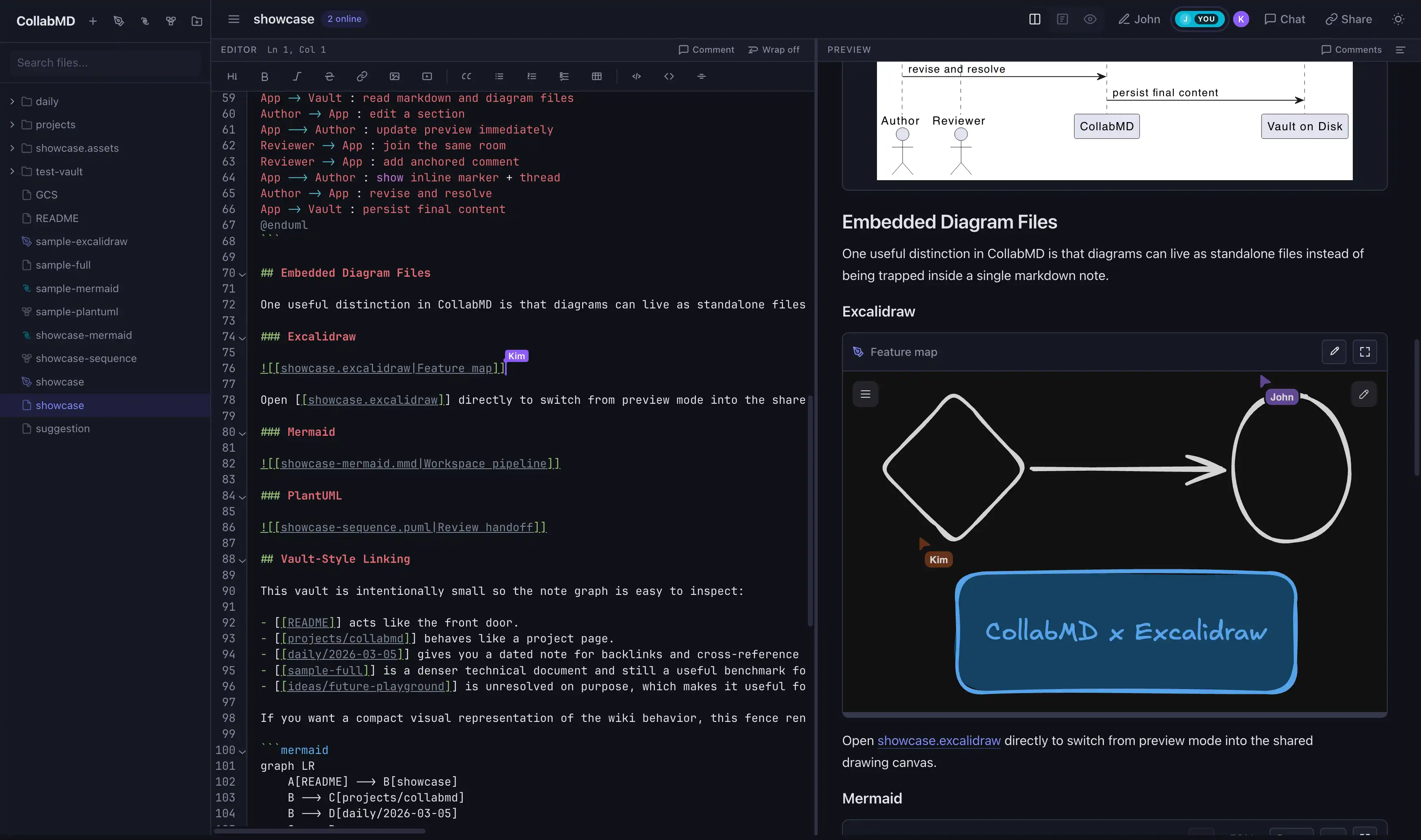
Turn an existing markdown-and-diagram workspace into a realtime collaborative web app.
CollabMD turns a local Markdown folder, Obsidian-style vault, or docs repo into a collaborative workspace you can open in the browser.
Throughout this guide, vault simply means a regular folder on your computer that contains Markdown, diagram, and attachment files.
- No migration: your files stay on disk
- Your filesystem stays the source of truth: CollabMD does not move, rename, or delete files unless you explicitly do that in the app
- Realtime editing with Yjs
- External filesystem edits sync back into the app and connected browsers
- Mermaid, PlantUML, Structurizr DSL, Excalidraw, and draw.io support
- Source-anchored comments, chat, and presence
- Works with plain folders, Obsidian-style vaults, and git-backed docs
Requirements for the fastest first run:
- Node.js 26.12.1 or newer for
npxand source installs - ripgrep for global text search (
rg; included in the Docker image) - Homebrew only if you want the
brew installpath
Quick start
# Run locally first, no Cloudflare tunnel required
npx collabmd@latest ~/my-vault --no-tunnel
Open http://localhost:1234.
Expected startup output:
CollabMD v0.x.y
Vault:  /path/to/your-vault
Local:  http://localhost:1234
Tunnel: disabled
Ready for collaboration. Press Ctrl+C to stop.
Prefer Homebrew or source install? Jump to Installation options.
See it in action
See CollabMD editing the same workspace from two browsers in realtime:
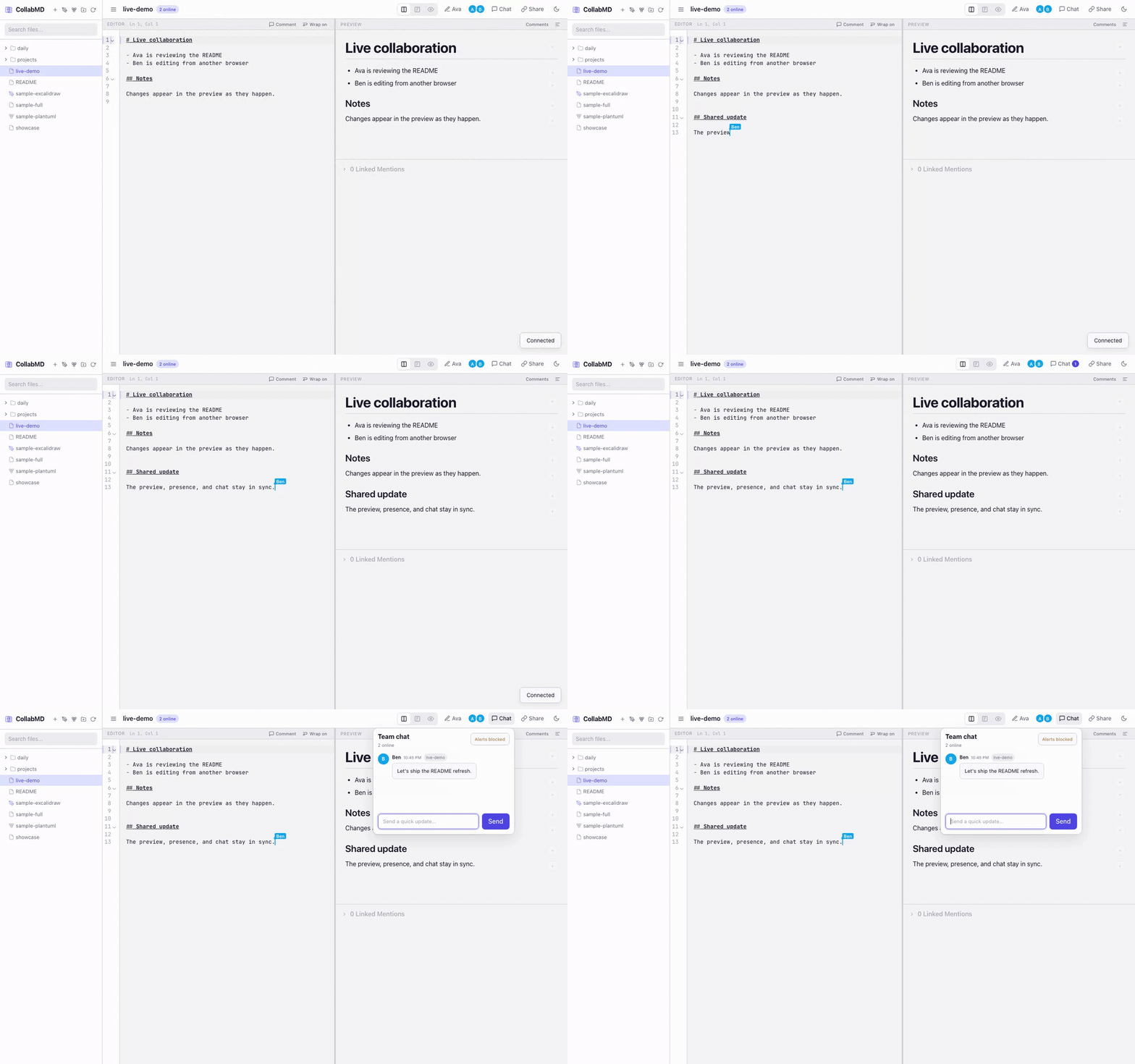
Prefer video? Open the WebM demo.
Features
- No migration — point CollabMD at an existing markdown folder, diagram workspace, Obsidian-style vault, or git-backed docs repo
- Local-files-first — your filesystem remains the source of truth
- Realtime collaboration — multiple people can edit the same file at the same time via Yjs
- External edit sync — changes made from tools like Obsidian or direct file writes are reflected back into open documents and the file explorer
- Git review — review an open file's changes, include them in the next commit, and commit with a message from the browser
- Experimental WebMCP workspace access — supported browser agents can use the same Vault search, read, exact-edit, document-creation, syntax, and Excalidraw tools as remote MCP while acting as the logged-in collaborator
- Remote AI agent access — connect any Streamable HTTP MCP client to search, cite, edit, and create supported Vault Content; protected workspaces use scoped, revocable Agent Connections
- File upload — import multiple supported Markdown, HTML, Base, diagram, image, and PDF files into the vault from the file explorer
- Markdown with context — live preview, wiki-links, backlinks, outline, quick switcher, and scroll sync
- Global text search — search text across supported vault files with ripgrep-backed results grouped by file
- Source-anchored comments — comment on lines or selected text with inline markers and preview bubbles, or pin threads to Excalidraw elements
- Collaboration built in — collaborator presence, follow mode, and team chat
- Diagram-friendly — Mermaid fences and standalone
.mmd/.mermaid, PlantUML.puml/.plantuml, Structurizr.dslC4 workspaces,.excalidraw,.drawio, readonly PDF previews, and public video embeds in Markdown - Easy browser access — optional Cloudflare Tunnel support makes a running session easy to share
Best fit for
- Collaborating on an existing Obsidian-style vault without migrating files
- Reviewing RFCs, product docs, architecture notes, and runbooks in real time
- Reviewing drafts and diagrams with anchored comment threads instead of side-channel feedback
- Sharing markdown-heavy knowledge bases with remote teammates
- Editing notes and diagrams together while keeping everything as plain files on disk
- Giving browser access to collaborators who do not use your local markdown setup
Share with a collaborator
If you want to share the workspace over the internet, start with password auth:
collabmd ~/my-vault --auth password
Then share the printed URL and password with your collaborator. If cloudflared is installed, CollabMD will start a quick tunnel automatically unless you pass --no-tunnel.
Safety first
- Treat the URL as write access to the vault unless you enable auth
--auth passwordprotects/api/*and/ws/*with a host password and signed session cookie--auth oidcsigns users in with Google and uses the verified Google name/email as the in-app identity and git commit author- Hosted workspace mode requires Google OIDC plus active team membership; Google sign-in alone does not grant hosted workspace access
- Set
AUTH_SESSION_MAX_AGE_MSif you want auth sessions to stay valid longer and survive browser restarts until that expiry - If
cloudflaredis installed, CollabMD may expose the app through a Cloudflare Quick Tunnel unless you pass--no-tunnel --auth oidcrequires a stablePUBLIC_BASE_URL; Quick Tunnel URLs are not supported for OIDC
Current limitations
- Single-instance deployment only: collaboration room state is kept in-process and is not shared across replicas
oidccurrently supports Google only- Hosted workspace mode now includes a basic Team Settings UI (collaborators, pending invitations, roles, and access history) plus claim, setup, and invitation-acceptance screens; invitation email delivery, GitHub callback redirect polish, and GitHub App checkout/publish wiring are still pending
- Text-anchored comments support markdown, Mermaid, PlantUML, and Structurizr DSL files. Excalidraw supports element-anchored threads; draw.io comments are not supported
- WebMCP requires experimental browser support and an active CollabMD tab; for local Chrome testing, enable
chrome://flags/#enable-webmcp-testing. It uses the browser session rather than an Agent Connection and does not provide remote access, per-agent scopes, delete, rename, attachments, Git, commit, or publish tools - Windows use is supported via WSL2 rather than native Windows execution
How it works
collabmd ~/my-vault --no-tunnel
CollabMD starts a local server, scans the vault, and opens a browser-based editor with:
- File explorer sidebar — upload, browse, create, rename, and delete
.md,.markdown,.mdx,.html,.htm,.base,.mmd,.mermaid,.puml,.plantuml,.dsl,.excalidraw,.drawio,.pdf, and supported image files plus folders - Live preview — rendered as you type, with sandboxed static HTML, syntax-highlighted code blocks, public video embeds, KaTeX math (
$...$and$$...$$), plus Mermaid, PlantUML, and Structurizr diagrams - Anchored comments and diagram links — add comments from the editor or selected Excalidraw elements, reopen threads in context, and link Excalidraw elements to other vault diagrams with focused navigation
[[wiki-links]]+ backlinks — jump between notes and inspect linked mentions- Room chat — discuss changes without leaving the workspace
- Presence + follow mode — see who is online and follow another collaborator's active cursor
- Quick switcher, global text search, and outline — move around large vaults and long documents faster
- Document export — download individual Markdown notes as self-contained HTML or DOCX, print/save notes or whole folders as PDF, export folders as one offline HTML document, or download their source files and assets as ZIP
- Standalone diagram files — open
.mmd/.mermaid,.puml/.plantuml, or.dslfiles in side-by-side editor + preview; Structurizr workspaces provide context → container → component navigation;.excalidrawfiles support frame-based presentations with arrow-key navigation andEscapeto exit,.drawiofiles use an embedded diagrams.net editor/viewer, and.pdffiles use a readonly browser preview
Text comment threads are source-anchored for markdown, Mermaid, PlantUML, and Structurizr DSL files. You can comment on a whole line or a text selection, then reopen the thread from either the editor marker or preview bubble. Excalidraw threads attach to selected canvas elements and also appear in the workspace overview. Draw.io comments are not supported.
Draw.io files use the diagrams.net embed/runtime. Opening a .drawio file directly mounts an interactive editor in the preview pane. Markdown embeds such as ![[architecture.drawio]] use the diagrams.net viewer for a lighter inline preview and include an Open action to jump into the full file view.
Draw.io collaboration is intentionally conservative in this release: one connected client holds the edit lease for a .drawio file, while other viewers open it read-only and refresh after saves land. This avoids silent overwrite races without claiming true realtime canvas co-editing.
HTML files open in preview mode by default, with split view still available from the view toggle and a preview-header action for maximizing the iframe. Scripts are disabled until each viewer explicitly runs the current version; any content change resets that consent. Enabled scripts run inside an opaque-origin sandbox without same-origin access, while a restrictive CSP blocks API connections, forms, workers, nested frames, external subresources, popups, and top-level navigation. Inline CSS, fragment links, and self-contained data:/blob: images, fonts, and media remain supported.
Markdown video embeds are opt-in and use standard image syntax such as  or . The preview currently supports public YouTube URLs plus direct public https video files ending in .mp4, .webm, or .ogg. The editor toolbar also includes a Video action that inserts the same Markdown syntax for you.
Your filesystem is the source of truth. CollabMD reads files from disk, uses Yjs for realtime collaboration, and continuously writes plain text back to disk as you type. External changes from tools like Obsidian, direct file writes, or git-driven file updates are watched and reconciled back into live rooms and the explorer. The file explorer can import multiple supported vault files at once; uploads preserve their names and bytes, reject duplicates, and include PDF files for readonly preview.
Docs
- Installation — requirements, npx, Homebrew, and source installs
- Configuration — CLI usage and environment variables
- Auth and access — password, Google OIDC, and hosted workspaces
- Deployment — Docker, Coolify, Helm, and private git
- AI agents — MCP and WebMCP access
- Development — architecture, dev commands, and tests
- Troubleshooting
License
MIT