
anandpawara/Real_Time_Image_Animation
anandpawara/Real_Time_Image_Animation has 3,243 GitHub stars and 520 forks. GitHot measured 0 stars in 24 hours. Last checked 2026-11-08 16:59 UTC. Last push 2021-10-27.
The Project is real time application in opencv using first order model
Measured star growth
- in 24h
- 0
- in 7 days
- Collecting history
- in 15 days
- Collecting history
- in 1 month
- Collecting history
Net star changes over overlapping periods, not daily totals. Missing measurements are left blank. Stars measure attention, not software quality.
README.md
OriginalReal time Image Animation
The Project is real time application in opencv using first order model
Steps to setup
Step 1: Create virtual environment
Python version : python v3.7.3 or higher
create virual environment : pip install virtualenv
activate virtual environment : virtualenv env
Step 2: Activate virtual environment
For windows : env/Script/activate
For Linux : source env/bin/activate
Step 3 : Install required modules
Install modules : pip install -r requirements.txt
Install pytorch and torchvision : pip install torch===1.0.0 torchvision===0.2.1 -f https://download.pytorch.org/whl/cu100/torch_stable.html
Step 4 : Download cascade file ,weights and model and save in folder named extract
gdown --id 1wCzJP1XJNB04vEORZvPjNz6drkXm5AUK
The file is also availible via direct link on Google's Drive:
https://drive.google.com/uc?id=1wCzJP1XJNB04vEORZvPjNz6drkXm5AUK
On Linux machine : unzip checkpoints.zip
If on windows platfrom unzip checkpoints.zip using unzipping software like 7zip.
Delete zip file : rm checkpoints.zip
Step 5 : Run the project
Run application from live camera : python image_animation.py -i path_to_input_file -c path_to_checkpoint
Example : python .\image_animation.py -i .\Inputs\Monalisa.png -c .\checkpoints\vox-cpk.pth.tar
Run application from video file : python image_animation.py -i path_to_input_file -c path_to_checkpoint -v path_to_video_file
Example : python .\image_animation.py -i .\Inputs\Monalisa.png -c .\checkpoints\vox-cpk.pth.tar -v .\video_input\test1.mp4
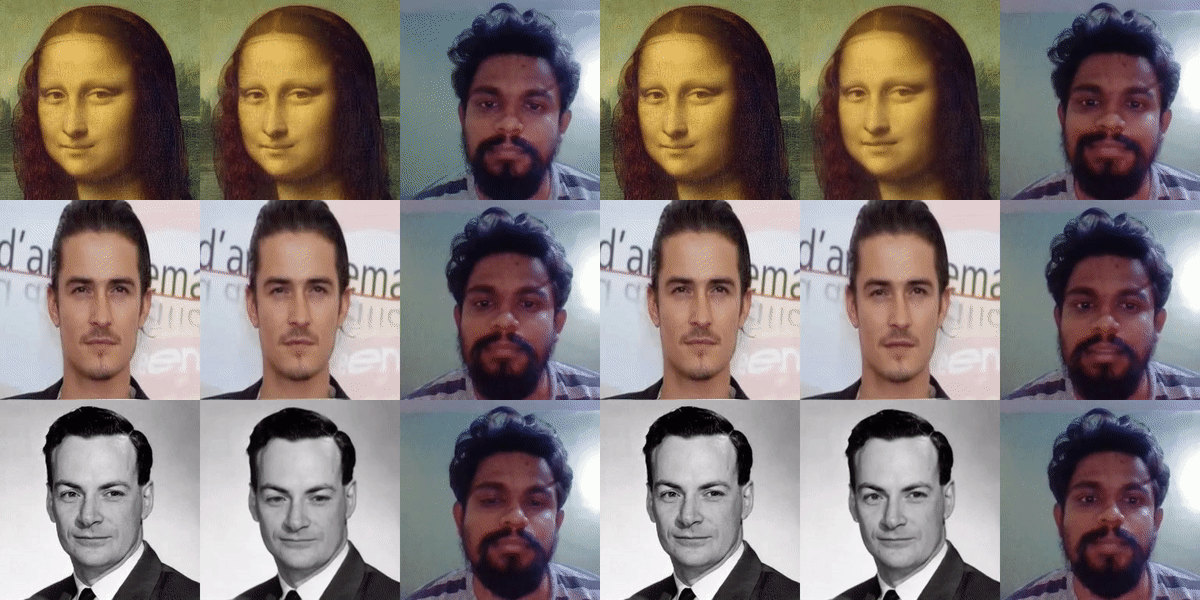
TODO:
Tkinter version
Need work on face alignments
Future plans adding deepfake voice and merging with video
Credits
@InProceedings{Siarohin_2019_NeurIPS,
  author={Siarohin, Aliaksandr and Lathuilière, Stéphane and Tulyakov, Sergey and Ricci, Elisa and Sebe, Nicu},
  title={First Order Motion Model for Image Animation},
  booktitle = {Conference on Neural Information Processing Systems (NeurIPS)},
  month = {December},
  year = {2019},
  url = {https://github.com/AliaksandrSiarohin/first-order-model}
}
Original Project
If you like this project give your support to original author of this project by giving github star to author's project
video explanation to the project
try project on google colab
For any valueable feedback feel free to contact me on linkedin
Explore related projects
codecrafters-io/build-your-own-x
Master programming by recreating your favorite technologies from scratch.
561,113 starspublic-apis/public-apis
A collective list of free APIs
497,347 starsmorluto/rea
Reverse engineer anything with agents, from app behavior down to native binaries.
444,174 starsopenclaw/openclaw
The AI that really does things. Any OS. Any Platform. The lobster way. 🦞
394,208 stars