
alfg/ffmpegd
alfg/ffmpegd has 82 GitHub stars and 14 forks. GitHot measured 0 stars in 24 hours. Last checked 2026-11-15 05:38 UTC. Last push 2026-09-28.
Measured star growth
- in 24h
- 0
- in 7 days
- Collecting history
- in 15 days
- Collecting history
- in 1 month
- Collecting history
Net star changes over overlapping periods, not daily totals. Missing measurements are left blank. Stars measure attention, not software quality.
About
FFmpeg websocket server and API for FFmpeg Commander.
Creative & MediaREADME.md
Originalffmpegd
FFmpeg websocket server and API for FFmpeg Commander.




How It Works
ffmpegd connects FFmpeg Commander to ffmpeg by providing a websocket server to send encode tasks and receive realtime progress updates back to the browser. This allows using ffmpeg-commander as a GUI for ffmpeg.
The goal is to provide a simple interface for sending FFmpeg tasks from the browser (and other supported clients in the future) to your local machine.
See Usage for more details.
Versions
ffmpegd and ffmpeg-commander share version numbers: releases with the same major.minor version (2.1.x with 2.1.x) speak the same payload format. Update ffmpegd when ffmpeg-commander moves to a new minor version.
          process              websocket
[ffmpeg] <-------> [ffmpegd] <-----------> [ffmpeg-commander]
Install
Homebrew
Installs ffmpegd along with ffmpeg:
$ brew install alfg/tap/ffmpegd
Go
Requires Go 1.26 or newer:
$ go install github.com/alfg/ffmpegd@latest
Download
Release binaries for your platform at: https://github.com/alfg/ffmpegd/releases
Docker
A Docker image with an alfg/ffmpeg build installed is available on the GitHub Container Registry:
$ docker run -it -p 127.0.0.1:8080:8080 -v /tmp/:/home ghcr.io/alfg/ffmpegd
Or using the Docker Compose example:
$ docker compose up ffmpegd
Usage
- ffmpeg must be installed and available on your
$PATH. - Run
ffmpegd:
$ ffmpegd
This will start the websocket server in your current working directory and wait for a connection. Input and output paths are relative to this directory.
- Go to https://ffmpeg-commander.com/ in the browser
- Enable
ffmpegdin Options. - Once connected, you can start sending encode jobs to ffmpegd!
Options
$ ffmpegd help

Usage:
  ffmpegd [--host address] [port]   Run server on localhost:8080 by default.
  ffmpegd version                   Print version.
  ffmpegd help                      This help text.

Options:
  --host address   Address to listen on. Use 0.0.0.0 to let other machines on
                   your network connect. Can also be set with $FFMPEGD_HOST.
By default ffmpegd only accepts connections from your own machine. Only listen on other addresses on a network you trust: anyone who can reach ffmpegd can run encodes and list files in its directory.
Example
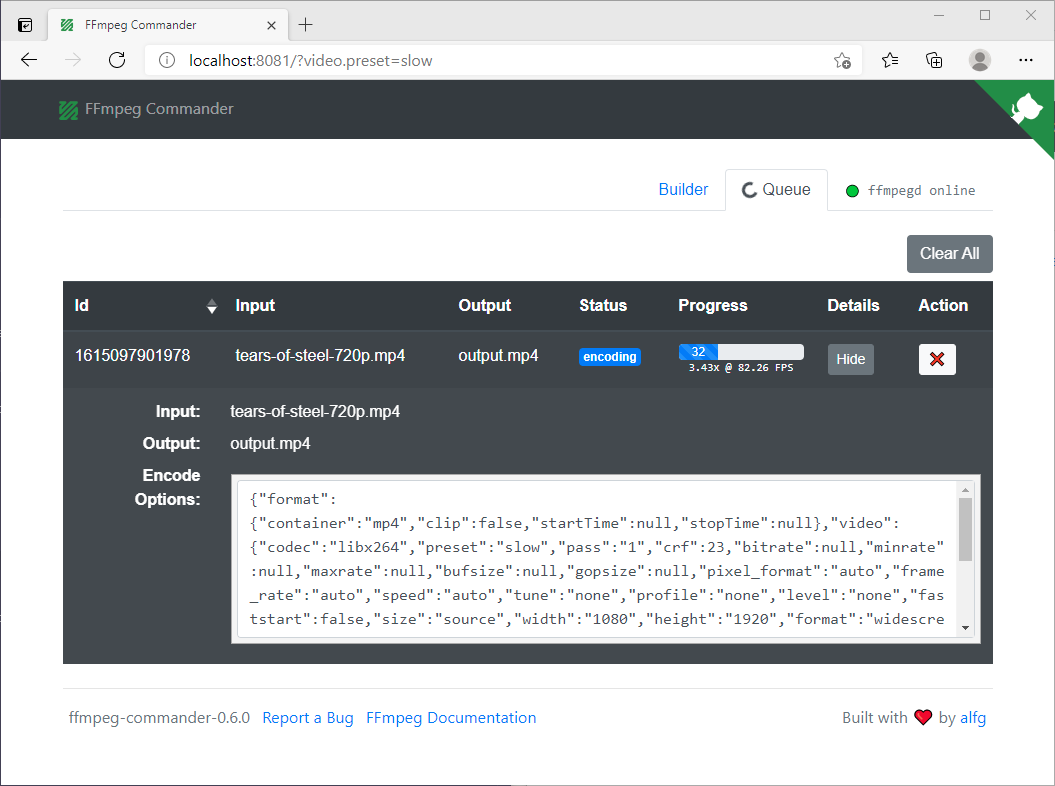
ffmpegd with a job in progress from ffmpeg-commander
$ ffmpegd

███████╗███████╗███╗   ███╗██████╗ ███████╗ ██████╗ ██████╗
██╔════╝██╔════╝████╗ ████║██╔══██╗██╔════╝██╔════╝ ██╔══██╗
█████╗  █████╗  ██╔████╔██║██████╔╝█████╗  ██║  ███╗██║  ██║
██╔══╝  ██╔══╝  ██║╚██╔╝██║██╔═══╝ ██╔══╝  ██║   ██║██║  ██║
██║     ██║     ██║ ╚═╝ ██║██║     ███████╗╚██████╔╝██████╔╝
╚═╝     ╚═╝     ╚═╝     ╚═╝╚═╝     ╚══════╝ ╚═════╝ ╚═════╝
                                                      v2.1.0

[ffmpegd] - websocket server for ffmpeg-commander.

  Checking FFmpeg version....9.0.1
  Checking FFprobe version...9.0.1

  Server started on http://localhost:8080.
  - Go to https://ffmpeg-commander.com to connect!
  - ffmpegd must be enabled in ffmpeg-commander options.

Encoding tears-of-steel.mp4 -> tears-of-steel-720p.mp4
Encoding... 34.68% 3.37x @ 80.77 fps
WebSocket Demo
See demo for a websocket client example.
Develop
Requires Go 1.26 or newer and ffmpeg/ffprobe on your $PATH.
go build -v
./ffmpegd
Tests
go test ./...
TODO
- Logging levels and output
License
MIT