
alexta69/metube
alexta69/metube has 15,204 GitHub stars and 1,137 forks. GitHot measured +10 stars in 24 hours. Last checked 2026-11-06 12:36 UTC. Last push 2026-11-01.
Self-hosted video downloader for YouTube and other sites (web UI for yt-dlp)
Measured star growth
- in 24h
- +10
- in 7 days
- Collecting history
- in 15 days
- Collecting history
- in 1 month
- Collecting history
Net star changes over overlapping periods, not daily totals. Missing measurements are left blank. Stars measure attention, not software quality.
README.md
OriginalMeTube


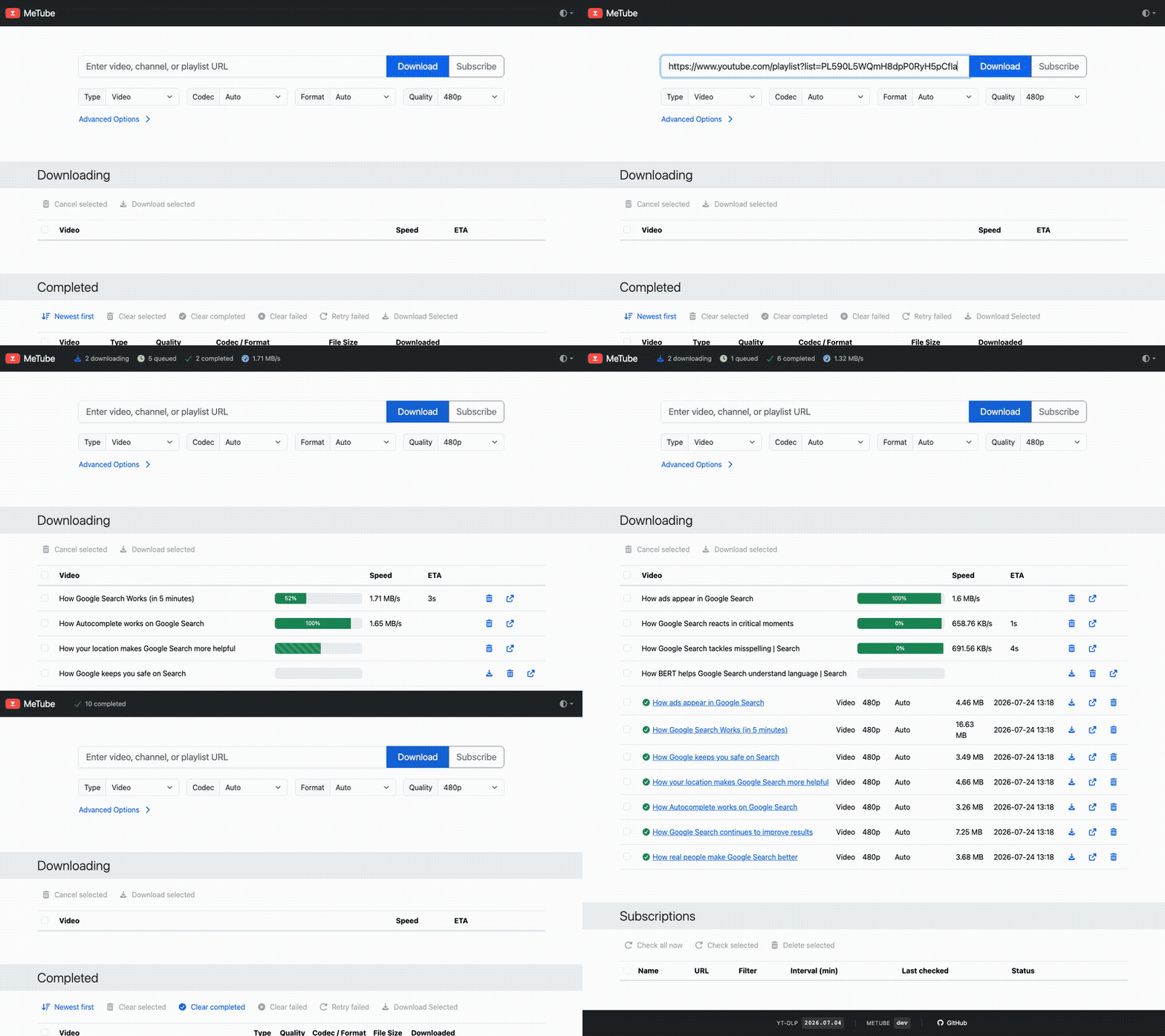
MeTube is a self-hosted web UI for yt-dlp. Paste a link from YouTube or hundreds of other sites, and it downloads to your server:
- Video, audio, subtitles and thumbnails — from single videos, whole playlists or entire channels.
- Subscriptions to channels and playlists, which queue new uploads as they appear.
- Per-download choices of quality, format and folder, plus server-wide yt-dlp options and presets.
📖 Guides, recipes and a troubleshooting FAQ live in the wiki — many feature requests are already a recipe there, so check it before filing one.
Quick start
docker run -d -p 8081:8081 -v /path/to/downloads:/downloads ghcr.io/alexta69/metube
Or with Docker Compose:
services:
  metube:
    image: ghcr.io/alexta69/metube
    container_name: metube
    restart: unless-stopped
    ports:
      - "8081:8081"
    volumes:
      - /path/to/downloads:/downloads
Then open http://<host>:8081 in your browser. Images are multi-arch (amd64/arm64), and also published on Docker Hub as alexta69/metube.
Configuration
MeTube is configured with environment variables: -e NAME=value on the docker run command line, or the environment: section in Compose. Defaults are the Docker image's; outside Docker, the directories default to the working directory.
Runtime and permissions
| Variable | Default | Description |
|---|---|---|
PUID / PGID |
1000 |
User and group MeTube runs as and writes files with. Legacy UID/GID also work. |
UMASK |
022 |
Umask for the files MeTube creates. |
CHOWN_DIRS |
true |
Make PUID:PGID the owner of the download, state and temp directories at startup. With false, MeTube's user must already have access. |
LOGLEVEL |
INFO |
DEBUG, INFO, WARNING, ERROR, CRITICAL or NONE. |
ENABLE_ACCESSLOG |
false |
Log every HTTP request. |
DEFAULT_THEME |
auto |
UI theme: light, dark, or auto to follow the system. |
Downloads
| Variable | Default | Description |
|---|---|---|
MAX_CONCURRENT_DOWNLOADS |
3 |
Downloads that run at once; the rest wait their turn. |
DEFAULT_OPTION_PLAYLIST_ITEM_LIMIT |
0 |
Default for the Items Limit field: how many entries of a playlist or channel to download (0 = all). |
CLEAR_COMPLETED_AFTER |
0 |
Seconds before finished and failed downloads leave the Completed list (0 = never). |
DELETE_FILE_ON_TRASHCAN |
false |
Also delete the file from disk when its entry is removed from Completed. ask prompts each time. |
SUBSCRIPTION_DEFAULT_CHECK_INTERVAL |
60 |
Default minutes between checks of a subscription. |
SUBSCRIPTION_SCAN_PLAYLIST_END |
50 |
Newest entries fetched each time a subscription is checked. |
SUBSCRIPTION_MAX_SEEN_IDS |
50000 |
Video IDs remembered per subscription, to bound the state file's size. |
Directories
| Variable | Default | Description |
|---|---|---|
DOWNLOAD_DIR |
/downloads |
Where downloads are saved. |
AUDIO_DOWNLOAD_DIR |
same as DOWNLOAD_DIR |
Where audio-only downloads are saved, to keep them apart from video. |
TEMP_DIR |
/downloads |
Where files are written while downloading. An SSD or tmpfs is faster, but on a RAM disk interrupted downloads can't resume. |
STATE_DIR |
/downloads/.metube |
Where MeTube keeps its queue, history, subscriptions and uploaded cookies. |
CUSTOM_DIRS |
true |
Show a Download Folder field under Advanced Options, to save into a subfolder of the download directory. |
CREATE_CUSTOM_DIRS |
true |
Let that field create folders that don't exist yet. |
CUSTOM_DIRS_EXCLUDE_REGEX |
(^|/)[.@].*$ |
Folders left out of the field's suggestions; the default hides names starting with . or @. Empty hides none. |
DEFAULT_FOLDER |
Folder the field starts with, relative to the download directory. Requires CUSTOM_DIRS. |
|
DOWNLOAD_DIRS_INDEXABLE |
false |
Serve browsable listings of the download directories. |
File naming
Templates use yt-dlp's output template syntax. How MeTube applies them is explained in Output templates.
| Variable | Default | Description |
|---|---|---|
OUTPUT_TEMPLATE |
%(title)s.%(ext)s |
Filename for downloads. |
OUTPUT_TEMPLATE_PLAYLIST |
%(playlist_title)s/%(title)s.%(ext)s |
Filename for items added from a playlist. Empty means OUTPUT_TEMPLATE. |
OUTPUT_TEMPLATE_CHANNEL |
%(channel)s/%(title)s.%(ext)s |
Filename for items added from a channel. Empty means OUTPUT_TEMPLATE. |
OUTPUT_TEMPLATE_CHAPTER |
%(title)s - %(section_number)02d - %(section_title)s.%(ext)s |
Default filename for each chapter when Split by chapters is on. |
yt-dlp
| Variable | Default | Description |
|---|---|---|
YTDL_OPTIONS |
{} |
Options for every download, as a JSON object — see yt-dlp options. |
YTDL_OPTIONS_FILE |
Path to a JSON file of such options. Reloaded when it changes; wins over YTDL_OPTIONS for the same key. |
|
YTDL_OPTIONS_PRESETS |
{} |
Named option bundles, picked per download in the UI. |
YTDL_OPTIONS_PRESETS_FILE |
Path to a JSON file of presets. Reloaded when it changes; wins over YTDL_OPTIONS_PRESETS for the same name. |
|
ALLOW_YTDL_OPTIONS_OVERRIDES |
false |
Show a field for per-download yt-dlp options in the UI. Trusted users only: it allows running commands in the container. |
YTDL_NIGHTLY_UPDATE_TIME |
Use nightly yt-dlp builds, upgrading and restarting daily at this time (HH:MM, 24-hour). |
Web server and network
| Variable | Default | Description |
|---|---|---|
HOST |
0.0.0.0 |
Address to listen on. The default is every IPv4 interface; * (or empty) adds IPv6; :: is IPv6 only. |
PORT |
8081 |
Port to listen on. |
URL_PREFIX |
/ |
Base path, for serving MeTube under a subpath of a reverse proxy. |
HTTPS |
false |
Serve HTTPS directly, using CERTFILE and KEYFILE. |
CERTFILE / KEYFILE |
Paths to the HTTPS certificate and key. | |
PUBLIC_HOST_URL |
download/ |
Base URL for the links to completed files. The default is relative to MeTube itself; set a full URL if the files are served from elsewhere. |
PUBLIC_HOST_AUDIO_URL |
audio_download/ |
The same, for audio downloads. |
CORS_ALLOWED_ORIGINS |
Comma-separated origins allowed to call MeTube from other sites, as browser extensions and bookmarklets do. * allows any site, so prefer naming them. |
|
ALLOW_PRIVATE_ADDRESSES |
false |
Allow URLs on private and internal addresses, turning off SSRF protection. Needed for Fake-IP proxy clients, not for ordinary proxies — details. |
ROBOTS_TXT |
Path to a robots.txt file to serve, mounted into the container. |
yt-dlp options
yt-dlp options are JSON objects keyed by yt-dlp's API option names, which differ from its command-line flags (converter). They apply at three levels, and for an option set at more than one, the more specific level wins:
- Global —
YTDL_OPTIONSandYTDL_OPTIONS_FILE, for every download. - Presets —
YTDL_OPTIONS_PRESETSandYTDL_OPTIONS_PRESETS_FILE, picked per download under Advanced Options. - Overrides — typed into the UI for a single download, when
ALLOW_YTDL_OPTIONS_OVERRIDESis on.
environment:
  - 'YTDL_OPTIONS={"writesubtitles": true, "subtitleslangs": ["en", "de"], "updatetime": false}'
The yt-dlp options guide covers presets, overrides and option files in detail, and the YTDL_OPTIONS Cookbook has ready-made recipes.
Guides
The wiki covers everything beyond the reference above:
- Subscriptions — download new uploads from channels and playlists automatically.
- yt-dlp options and the YTDL_OPTIONS Cookbook — notifications, embedded metadata, subtitles and more.
- Output templates and the OUTPUT_TEMPLATE Cookbook — how files are named and sorted into folders.
- Using browser cookies — for private, age-restricted and "confirm you're not a bot" videos.
- Sending links to MeTube — browser extensions, bookmarklets, iOS and Android apps, Raycast.
- HTTPS and reverse proxies — NGINX, Apache, Caddy and swag examples, and adding authentication.
- Hardware-accelerated transcoding — re-encode downloads on an Intel or AMD GPU.
- yt-dlp plugins — extend yt-dlp, e.g. to accept links from Invidious or Piped.
- Troubleshooting FAQ — common problems and how to diagnose them.
Keeping yt-dlp up to date
Sites change constantly, and yt-dlp keeps up with frequent releases. A new MeTube image is published automatically for every yt-dlp stable release, so keep your container updated — watchtower can do it for you. To follow yt-dlp's nightly builds instead, set YTDL_NIGHTLY_UPDATE_TIME.
Troubleshooting and support
MeTube is only a UI for yt-dlp, so most download failures are yt-dlp's. Reproduce them with yt-dlp inside the container, and once a set of options works there, carry it over to YTDL_OPTIONS:
docker exec -ti metube sh
cd /downloads
yt-dlp <url>
The Troubleshooting FAQ covers common problems. Ask questions in Discussions; issues are for bugs in MeTube itself.
Scope and contributing
MeTube's scope is deliberately narrow: it downloads well, and stops once the file is written. Tagging and library organization belong to dedicated tools — point beets (headless, scriptable), MusicBrainz Picard (GUI, acoustic fingerprinting) or Lidarr (full library manager) at your AUDIO_DOWNLOAD_DIR.
Feature requests that fit this scope are welcome, and so are pull requests — for a change that isn't obvious, start a discussion first. CONTRIBUTING.md has the scope policy and how to build and run MeTube locally.
Explore related projects
awesome-selfhosted/awesome-selfhosted
A list of Free Software network services and web applications which can be hosted on your own servers
334,385 starsimmich-app/immich
High performance self-hosted photo and video management solution.
118,364 starsStirling-Tools/Stirling-PDF
#1 PDF Application on GitHub that lets you edit PDFs on any device anywhere
95,811 starslouislam/uptime-kuma
A fancy self-hosted monitoring tool
93,303 stars