
alexeyw/knotwork
alexeyw/knotwork has 52 GitHub stars and 7 forks. GitHot measured 0 stars in 24 hours. Last checked 2026-11-15 04:27 UTC. Last push 2026-11-13.
What you can do
- On-device inference through LiteRT-LM: faster with a GPU, slower on CPU alone. Cloud providers (OpenAI, Anthropic, Google Gemini, DeepSeek, OpenRouter, Groq) and a server you run (Ollama, or any OpenAI-compatible one — vLLM, LM Studio, llama.cpp) are optional and use your own key. Test connection checks a provider or an MCP server without sending a prompt.
- A share target, launcher shortcuts and a Quick Settings tile run the pipeline you choose. Triggers (time, charging, Wi-Fi, network) start a pipeline on their own and report back with a notification. None of these does anything until you bind a pipeline to it.
- Tasker, MacroDroid or a script over adb can ask the agent to run one pipeline you nominate. It is off by default and behind a consent dialog, and a request naming any other pipeline is refused. Every request, accepted or refused, lands in a journal you can export.
- The database is encrypted with SQLCipher, and API keys are sealed with AES-GCM under an Android Keystore key. Usage statistics, journal and chat exports have no network path, and a build check keeps it that way. Images you attach never go to a cloud model, and voice input is transcribed on the phone. The FOSS build has no proprietary dependencies.
Measured star growth
- in 24h
- 0
- in 7 days
- Collecting history
- in 15 days
- Collecting history
- in 1 month
- Collecting history
Net star changes over overlapping periods, not daily totals. Missing measurements are left blank. Stars measure attention, not software quality.
About
An AI agent you build, not just prompt. Local-first Android agent with on-device inference (LiteRT-LM), pipelines you assemble yourself, MCP tool calling, and your confirmation before any risky action.
AIREADME.md
OriginalKnotwork — on-device AI agent for Android





An AI agent you build, not just prompt. A local-first Android agent whose behaviour you assemble from explicit, verifiable blocks — and by default every risky action waits for your confirmation. Its model runs on the phone, so a typical conversation never leaves the device.
What it is
Knotwork is an Android app that runs a language model on your phone and lets you decide what happens to a request on the way to an answer. Inference runs on-device through LiteRT-LM (Google's on-device runtime, formerly TensorFlow Lite); a cloud model is used only once you add its key.
Every conversation goes through a pipeline — what Tasker, n8n or Zapier would call a workflow: a graph of typed nodes (input, on-device LLM, optional cloud LLM, tool calls, routing, decomposition, evaluation, clarifications, output) that you edit in the app or in a standalone browser editor. By default, a sensitive or destructive tool call — writing a file, calling a tool on an MCP server — shows you the call and waits for your answer.
Who it's for
Knotwork is for someone with a recent Android phone who already uses Tasker, Obsidian, Home Assistant or a local model, and who wants to see and change what their agent does with their data.
It is deliberately not a mass-market "ask a question, get an answer" assistant. Gemini already does that for free and is built into the OS.
When Knotwork is not the right tool
- You want a chat window onto a model running on your own server. Knotwork can use that server, but the server's own client is simpler if the chat is all you need.
- You want quick answers to questions. The assistant built into your phone is free and already there.
- Your phone cannot spare about 2 GB of RAM for a model. The app still works with a cloud provider or your own server, but then the main reason to use it is gone.
- You want an agent that writes and runs its own code, or operates other apps' screens for you. Knotwork does neither, and neither is planned.
Known limitations
What the app does not do, and what would change each item, is kept in one list: docs/faq.md § Known limitations.
See it work
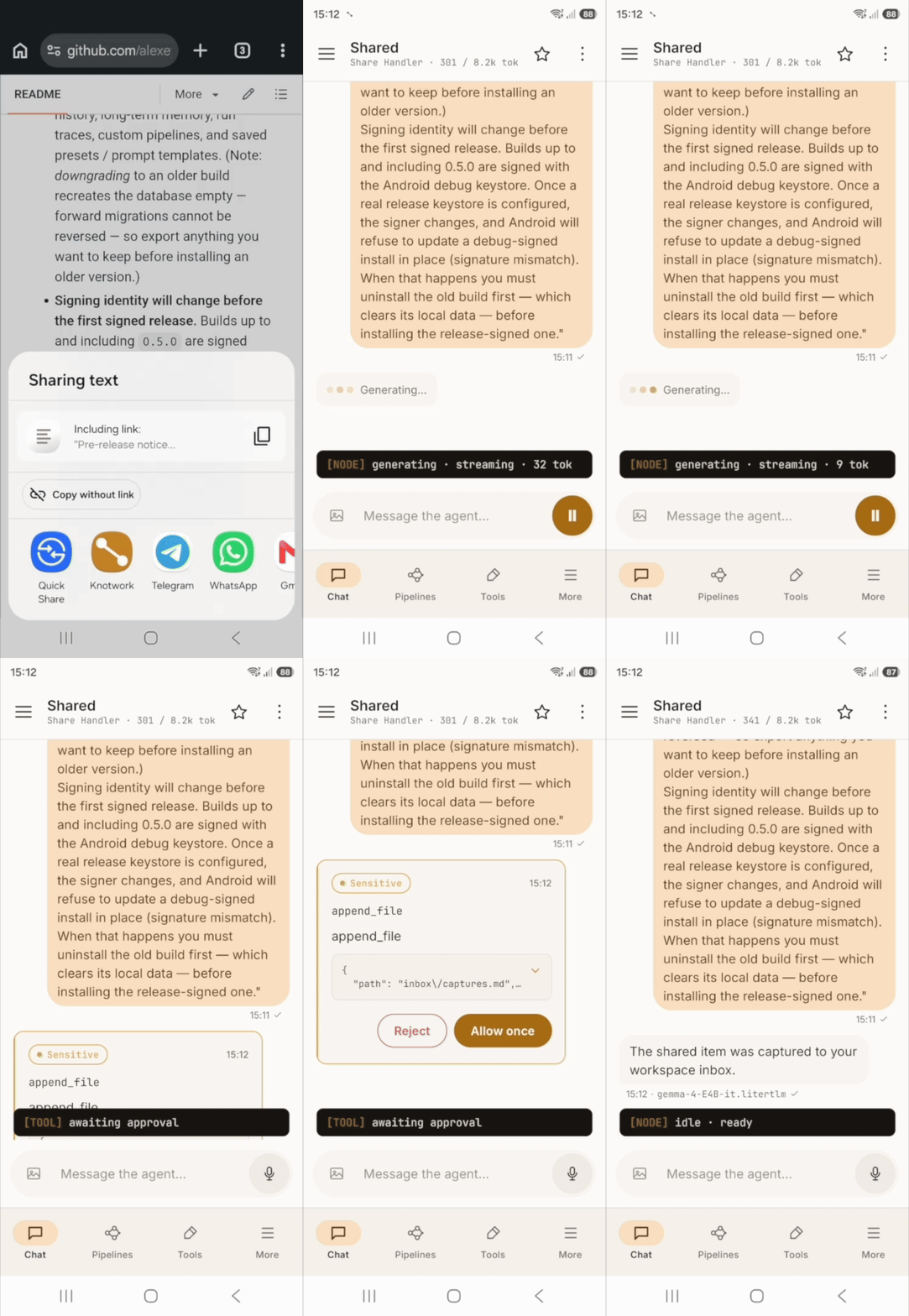
The Share Handler scenario is a good one-glance picture of the whole idea: share an article, a message, or a screenshot to Knotwork from any app, and an on-device model turns it into a clean, structured note in your inbox — pausing to ask before it writes the file.
On first launch you pick a ready-made scenario. Knotwork makes its pipeline your default, sets up the entry point it uses and downloads the model it needs, showing the size and progress, then opens a working chat. Start from scratch skips this.
https://github.com/user-attachments/assets/2ea06de5-6832-4e0c-ad48-430f375d8b72
The animation at the top is a screen recording from a phone.
Highlights
- On-device inference through LiteRT-LM: faster with a GPU, slower on CPU alone. Cloud providers (OpenAI, Anthropic, Google Gemini, DeepSeek, OpenRouter, Groq) and a server you run (Ollama, or any OpenAI-compatible one — vLLM, LM Studio, llama.cpp) are optional and use your own key. Test connection checks a provider or an MCP server without sending a prompt.
- A pipeline editor with 14 node types, a searchable list for adding them,
auto-layout and inline validation — in the app, and as a
browser editor in one HTML file that opens from disk
with no network. Prompt variables such as
$DATE,$TOOLSor$MEMORY_SUMMARYare filled in fresh on every run. Prompts import and export as Markdown files; a prompt file brings wording only and cannot add tools or steps. - Built-in tools, such as Wikipedia search, files in the app's own workspace, scheduling and HTTP requests to hosts you allow, and tools from Model Context Protocol (MCP) servers you connect, plus reusable skills (an instruction with a tool allowlist). By default a sensitive or destructive call stops for your confirmation, and the card shows what you asked next to what the agent wants to run. The allowlist is enforced where the tool runs.
- A share target, launcher shortcuts and a Quick Settings tile run the pipeline you choose. Triggers (time, charging, Wi-Fi, network) start a pipeline on their own and report back with a notification. None of these does anything until you bind a pipeline to it.
- Tasker, MacroDroid or a script over
adbcan ask the agent to run one pipeline you nominate. It is off by default and behind a consent dialog, and a request naming any other pipeline is refused. Every request, accepted or refused, lands in a journal you can export. - The database is encrypted with SQLCipher, and API keys are sealed with AES-GCM under an Android Keystore key. Usage statistics, journal and chat exports have no network path, and a build check keeps it that way. Images you attach never go to a cloud model, and voice input is transcribed on the phone. The FOSS build has no proprietary dependencies.
- Structured steps check the model's output and ask it to fix a malformed answer, and cloud calls retry transient failures. An interrupted run resumes from its last completed node. A run nobody is watching stops at step and token limits counted across the whole run tree, and says why it stopped.
- Every run records its seed, sampler, versions and the SHA-256 of each model file it used. From the console you can verify a finished run — its on-device calls are repeated from their recorded prompts and compared byte for byte, and tools never run again — run it again with the same seed, or export its trace as one JSON file. Promised on CPU, and on GPU at the same context window, on the same device; not on another phone, and nothing is signed.
- Long-term memory: facts extracted from conversations or saved by hand, found by meaning when a step reads memory, with a manager for search, provenance, compaction and JSON export and import. Memory search works in English — see Known limitations.
- A chat exports as one JSON file, to the share sheet or saved straight to a folder you pick, and imports back as a new chat. Archiving a chat takes it out of the drawer without deleting it. It stays readable and exportable on its own screen until you restore it.
- Back up and restore what you made — chats, memory, pipelines, run history, triggers, settings and files — as one file locked with a password you choose, saved wherever you pick; restore it on this phone or a new one. API keys go in only if you tick the box; model files stay out, and the restored app offers to download them again. The format is public.
- Settings with a number, a borrowed term or a side effect explain themselves in one sentence behind the ⓘ next to the label. The reference table in the user guide is generated from the same strings.
- More → Help lists the user guide, FAQ, cookbook, troubleshooting page and automation contract. The FAQ and the troubleshooting page ship inside the app and read offline; the rest open in a browser at the tag of the version you installed. The build fails if a link points at a heading that no longer exists.
- In English, Russian and Spanish: the screens, the bundled pipelines and the in-app help. Pick the language in Settings → About → Language, or follow the phone's. What a model reads stays in English, and so do the documents that open in a browser.
The full feature tour lives in the user guide.
Screenshots
The pipeline editor below is a capture from a phone running the app. The other
three are rendered at 1080 × 2400 from a Roborazzi baseline
(./gradlew :catalog:recordRoborazziDebug --tests "*HeroSnapshotTest*"), which
keeps them and the design-system regression suite in sync — the editor canvas is
an app screen rather than a design-system component, so it has no baseline to
render from. Hover over (or tap) an image to see the dark variant via your
browser's prefers-color-scheme.
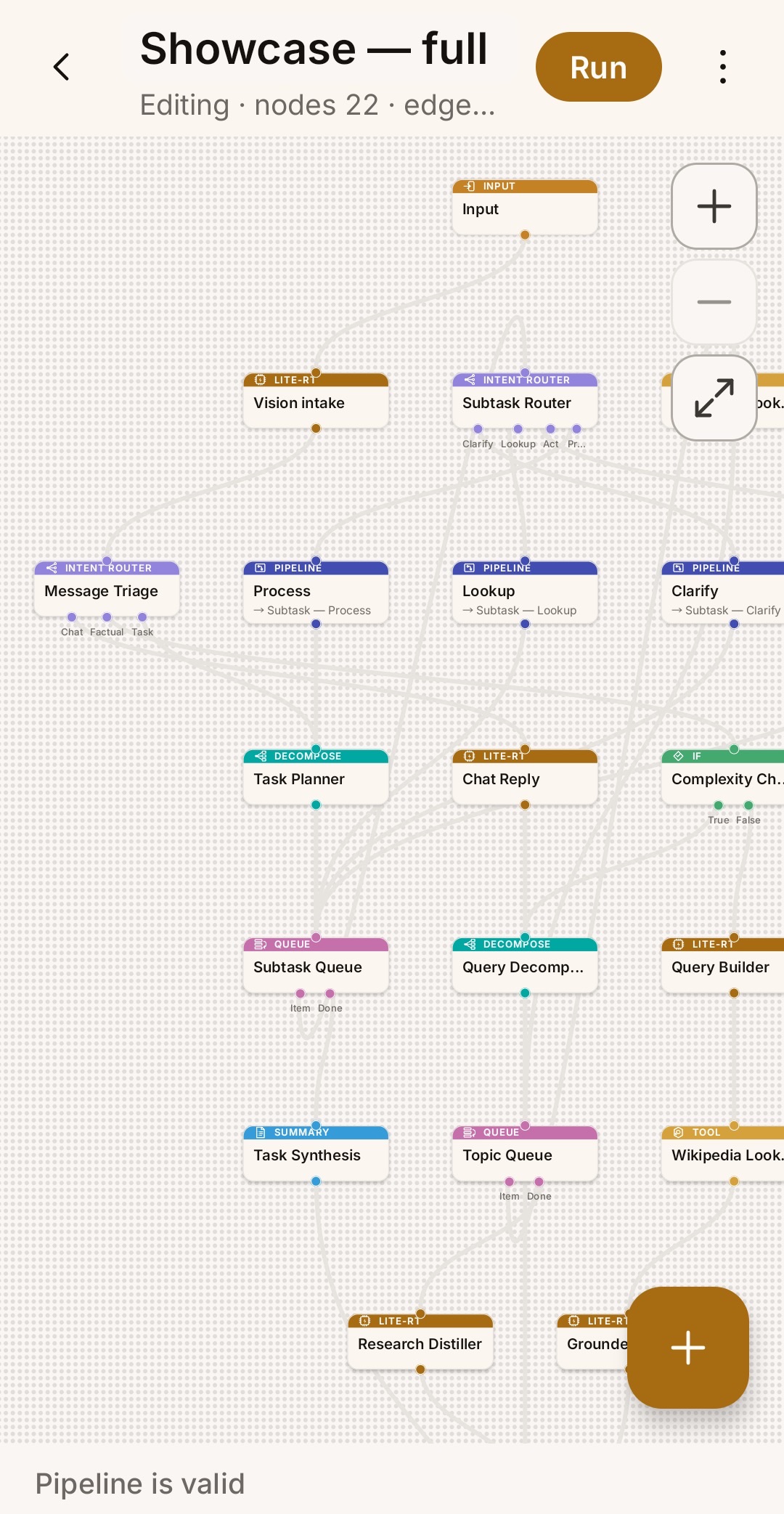
Pipeline editor — a 22-node pipeline on the canvas: routers, nested sub-pipelines, queues, tools, on-device and cloud steps |
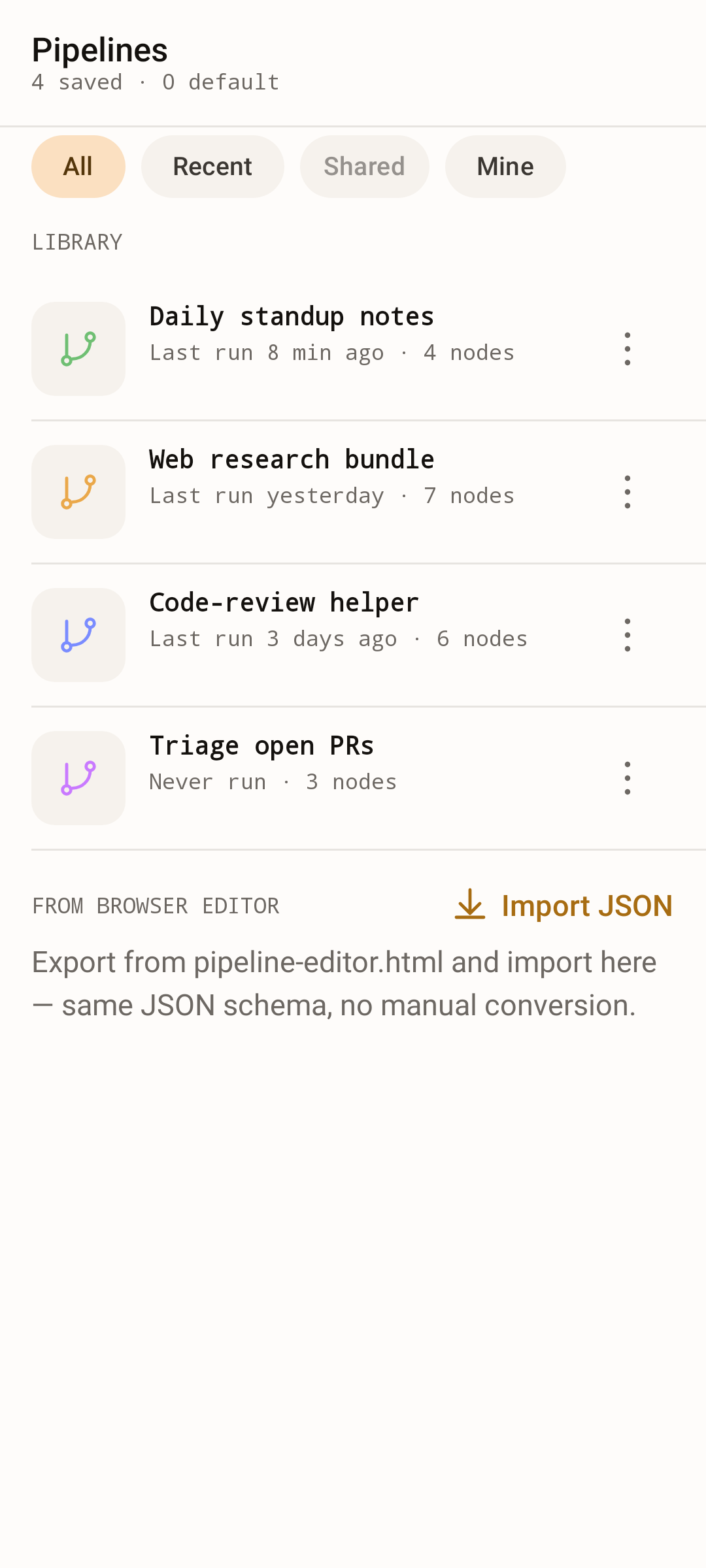
Pipeline library — saved pipelines + import-from-browser-editor JSON |
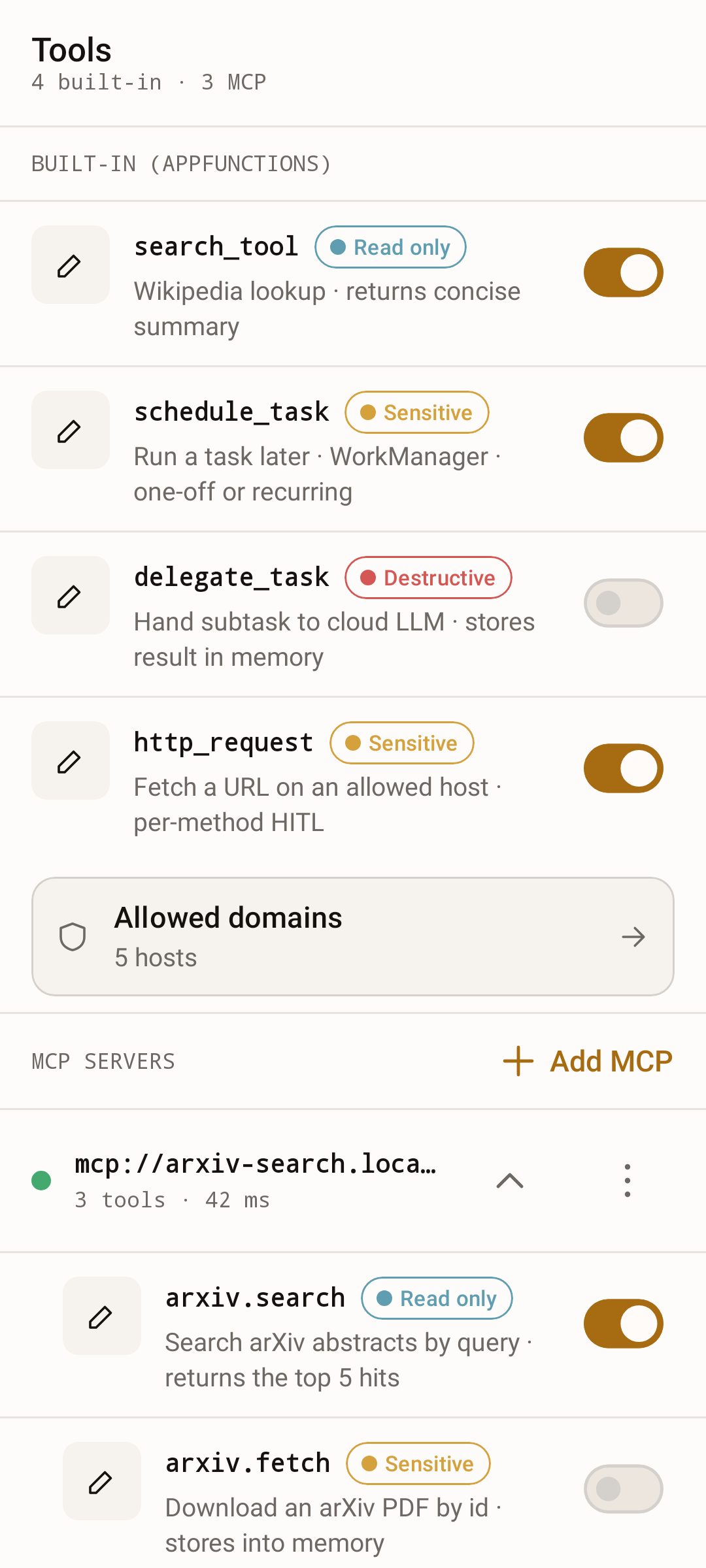
Tools — built-in AppFunctions + MCP servers with per-tool risk + toggle |
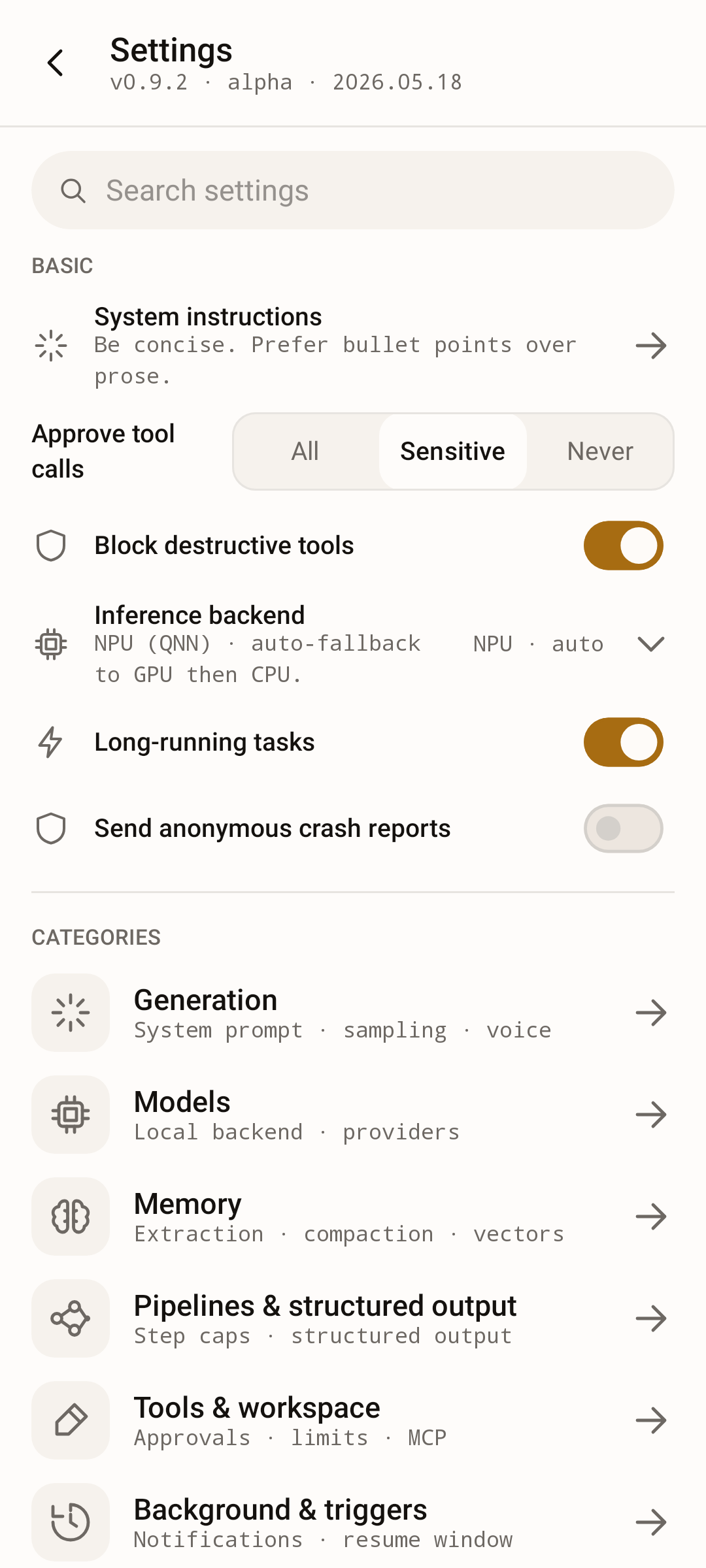
Settings — searchable hub with inline Basic controls over eight category sub-screens |
Requirements
- Android 14 or newer (API level 34+). One OS-integration feature needs Android 16: the strict intent-matching rules that harden the external-automation entry point. On Android 14 and 15 everything else — local models, cloud providers, MCP servers, triggers, scheduled tasks — works unchanged. (Calling AppFunctions that other apps expose is not on this list at any API level: it needs a permission Android grants to privileged system apps only, so an ordinary install cannot do it. Publishing them, which this app does, is open to any app.)
- Approximately 2 GB of free RAM available for the LLM at runtime.
- Optional: GPU acceleration for noticeably faster inference. CPU-only operation works but is slower. The NPU is not used: LiteRT-LM needs a vendor dispatch library and a model compiled for the chip, and the app ships neither.
- Optional: location permission, requested only if you scope a Wi-Fi trigger to specific network names (Android ties the Wi-Fi name to location). Nothing else uses it, and the name never leaves the device.
- To build from source: JDK 21 and the Android SDK (the Android Studio bundled JBR already ships JDK 21). See CONTRIBUTING.md for the full dev setup.
Install
From Google Play
Knotwork on Google Play — the simplest route, and the one that updates itself. Requires Android 14+.
The Play build is the full flavour described below. Google Play signs the
copies it delivers with its own key; the APKs on the Releases page and on
F-Droid carry this project's key. Android will not update one with the other,
so moving between Google Play and either of them means making a backup,
uninstalling, installing from the other channel and restoring the backup.
Which channel is signed by which key is set out in
docs/release.md.
From F-Droid
Knotwork on F-Droid
— the foss flavour, built by F-Droid from source. Requires Android 14+.
F-Droid publishes a version only when its own build matches the APK on the Releases page, and then ships that APK. So the F-Droid copy and the release APKs carry the same key and update each other in place. A new version reaches F-Droid after the Releases page, once F-Droid's next build has run.
From a release build
Grab the latest APK from the Releases page and install it on an Android 14+ device. Two flavours are published:
full— the standard build, with opt-in Firebase Crashlytics for anonymous crash reporting (off by default, never collects message content).foss— zero proprietary dependencies and no crash reporting, the build F-Droid distributes. See docs/release.md § FOSS / F-Droid build.
Upgrading from
0.6.0or earlier requires a clean install. Those builds were signed with the Android debug keystore;0.7.0is the first release signed with a real release key. Android refuses to update an install whose signer changed, so you must uninstall the old build — which clears its local data — before installing0.7.0. Export anything you want to keep first. This is a one-time break; later releases update in place.
Build from source
git clone https://github.com/alexeyw/knotwork.git
cd knotwork
./gradlew assembleFullDebug
adb install app/build/outputs/apk/full/debug/app-full-debug.apk
First run
Launch the app and let scenario onboarding guide you: pick a scenario and Knotwork sets up its pipeline and downloads exactly the model it needs, then opens into a working chat once the model has warmed. Prefer to wire things up yourself? Choose Start from scratch, then open Models, download a LiteRT model through the built-in manager (or paste a custom URL), and send your first message once it loads.
Stuck on which buttons to press, or wondering whether something is supported at all? docs/faq.md answers both, briefly.
Tech stack
| Layer | Technology |
|---|---|
| Language | Kotlin |
| UI | Jetpack Compose + Material Design 3 |
| Design system | Knotwork (in-tree :catalog library) |
| Brand fonts | Inter + JetBrains Mono (bundled TTF, SIL OFL 1.1) |
| LLM engine | LiteRT-LM (Google Edge AI / ex-TensorFlow Lite) |
| Tool calling | AppFunctions Jetpack |
| MCP & cloud LLM | Koog (MCP transport + cloud-LLM client only) |
| Architecture | Clean Architecture + MVVM |
| DI | Hilt |
| Async | Coroutines / Flow |
| Serialization | kotlinx.serialization (structured-output validation) |
| Network | OkHttp + Ktor (via Koog) |
| Image loading | Coil 3 (attachment thumbnails / viewer) |
| Local storage | Room + DataStore |
| Backup archive | Argon2id (Bouncy Castle, MIT) + AES-256-GCM; format |
| Crash reporting | Firebase Crashlytics (full flavour) / none (foss) |
| Distribution | full (Play / direct APK) + foss (F-Droid, no Google) |
| Testing | JUnit + MockK; instrumented suite on an emulator matrix in CI |
| Architecture tests | Konsist (Clean-Architecture layer guard, in check) |
Privacy
Knotwork has no account, no sign-in, and no server of its own. There is nothing to log into, and nothing is uploaded for the app to work.
- Conversations stay on the device by default. Inference runs locally
through LiteRT-LM. Data leaves the phone only along the paths listed in
PRIVACY.md § 3: a cloud LLM node
or memory embedding with your own API key,
delegate_task, an MCP server you added, a model download, anhttp_requestcall to a host you allowed, and (in thefullbuild) the crash reports below — all opt-in — plus the built-insearch_tool, which is on from the first launch and looks topics up on Wikipedia for the pipeline the app starts you with. Its switch is on the Tools screen, and Block network from local model withholds it too. - Usage statistics are local-only. The in-app statistics are computed and stored on the device and are never transmitted; a build-time architecture guard fails the build if any network dependency reaches that code. Exporting them is a manual action you take.
- Crash reporting is opt-in and off by default. In the
fullflavour you can enable anonymous crash reports (stack traces, device model, Android and app version, the active pipeline and model identifiers). Message content, prompts, memory, and API keys are never included. Thefossflavour has no crash-reporting dependency at all and hides the setting. - Sensitive data is encrypted at rest. The local database — chats, long-term memory, run traces — is SQLCipher-encrypted, and API keys, the Hugging Face token, and MCP credentials are sealed with AES-GCM under a dedicated Android Keystore key.
- Downloaded models are checked. When Hugging Face names a model file's SHA-256 in its answer to the download, the file must match it or it is deleted. A file with no hash named — from another host, for instance — is installed but marked Not verified.
- The agent asks before it acts. By default, destructive and sensitive tool calls stop at a confirmation, including when a pipeline runs in the background from a trigger. A destructive call asks under every setting.
What the agent can reach on the phone, and how to check its traffic yourself, is in SECURITY.md.
The policy in full — what is stored on the device, every path that can send data off it, and how to switch each one off — is PRIVACY.md. The threat model behind it, including what is explicitly out of scope, is in SECURITY.md; the per-feature behaviour is in the user guide.
Documentation
The FAQ and the troubleshooting guide also ship inside the app and read with no network: open More → Help. The other documents are listed there too and open in a browser.
- Architecture overview — docs/architecture.md.
- User guide — docs/user-guide.md.
- Pipeline cookbook — what every node type does, which of its settings actually change a run, and importable recipes — docs/cookbook.md.
- Frequently asked questions, and the standing list of what the app deliberately does not do — docs/faq.md.
- Troubleshooting — docs/troubleshooting.md.
- External-automation contract (calling the agent from Tasker, MacroDroid or
adb) — docs/external-automation.md. - Extending the agent (new node types, tools, providers, prompt variables) — docs/extending.md.
- Code style — docs/code-style.md.
- Testing strategy and coverage — docs/testing.md.
- API & integration conventions — docs/api-conventions.md.
- Release-build playbook (R8, signing, AAB, APK size) — docs/release.md.
- Decisions that constrain contributions — docs/decisions/.
- Roadmap — docs/roadmap.md.
- Contributing guide — CONTRIBUTING.md.
- Code of Conduct — CODE_OF_CONDUCT.md.
- Privacy policy — PRIVACY.md.
- Security policy and threat model — SECURITY.md.
- Release notes and version history — CHANGELOG.md.
Pre-release notice
This project is currently at version 0.14.0 and is published for review and experimentation. Expect rough edges:
- There are no stability guarantees for the public surface (Kotlin APIs, pipeline JSON schema, settings layout) between versions.
- On-device storage formats (encrypted preferences, exported pipeline JSON) may still change between versions.
- Shared pipeline files are not yet a compatibility contract. Exports carry
a version stamp (
schemaVersion: 1,bundleVersion: 1), but before 1.0 it is only a marker: the format can change without a new stamp, and nothing migrates an old file on import. A file whose stamp does not match is imported on a best-effort basis behind a warning, and every import names the settings it could not read. Keep the original file. From 1.0, a breaking change will mean a new majorschemaVersionand a migration on import. - Upgrades preserve local data. Every Room schema-version bump ships with an explicit migration, so an in-place update keeps your chat history, long-term memory, run traces, custom pipelines, and saved presets / prompt templates. (Note: downgrading to an older build recreates the database empty — forward migrations cannot be reversed — so export anything you want to keep before installing an older version.)
This README describes the main branch, which can be ahead of the latest
release; see Unreleased in CHANGELOG.md for what is not
released yet.
License
Released under the Apache License 2.0. See LICENSE for the full text.