
alebeck/boring
alebeck/boring has 1,701 GitHub stars and 58 forks. GitHot measured 0 stars in 24 hours. Last checked 2026-11-08 02:23 UTC. Last push 2026-10-23.
The `boring` SSH tunnel manager
What you can do
- Ultra lightweight and fast
- Local, remote and dynamic (SOCKS5) port forwarding
- Works with SSH config and ssh-agent
- Supports Unix sockets
Measured star growth
- in 24h
- 0
- in 7 days
- Collecting history
- in 15 days
- Collecting history
- in 1 month
- Collecting history
Net star changes over overlapping periods, not daily totals. Missing measurements are left blank. Stars measure attention, not software quality.
README.md
OriginalThe boring tunnel manager

A simple command line SSH tunnel manager that just works.


Get it: brew install boring
Demo
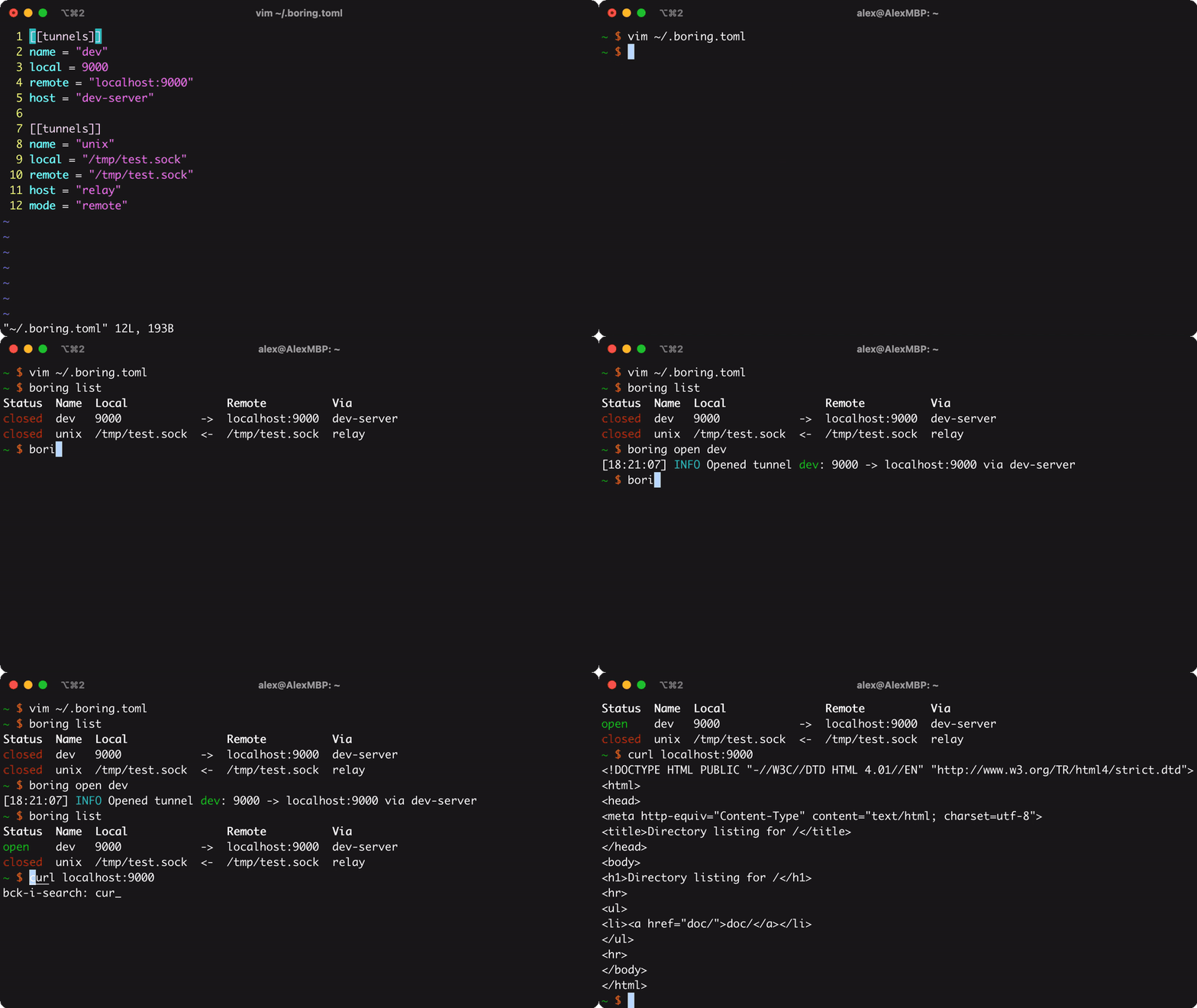
Features
- Ultra lightweight and fast
- Local, remote and dynamic (SOCKS5) port forwarding
- Works with SSH config and
ssh-agent - Supports Unix sockets
- Automatic re-connection and keep-alives
- Human-friendly TOML configuration
- Cross platform support
- Smart shell completions
Usage
Usage:
  boring list, l [-g <group>]    List all tunnels
  boring open, o (-a | -g <group> | <patterns>...)
    <patterns>...                Open tunnels matching any glob pattern
    -a, --all                    Open all tunnels
    -g, --group <group>          Open all tunnels in a group
  boring close, c                Close tunnels (same options as 'open')
  boring edit, e                 Edit the configuration file
  boring version, v              Show the version number
  boring help, h                 Show this help message
Configuration
By default, boring reads its configuration from ~/.boring.toml on macOS and Windows, and from $XDG_CONFIG_HOME/boring/.boring.toml on Linux. If $XDG_CONFIG_HOME is not set, it defaults to ~/.config. The location of the config file can be overriden by setting $BORING_CONFIG. The config is a simple TOML file describing your tunnels:
# simple tunnel
[[tunnels]]
name = "dev"
local = "9000"
remote = "localhost:9000"
host = "dev-server"  # automatically matches host against SSH config

# example of an explicit host (no SSH config)
[[tunnels]]
name = "prod"
local = "5001"
remote = "localhost:5001"
host = "prod.example.com"
user = "root"
identity = "~/.ssh/id_prod"  # will try default ones if not set

# ... more tunnels
Currently, supported options at tunnel level are:
| Option | Description |
|---|---|
name |
Alias for the tunnel. Required. |
local |
Local address. Can be a "$host:$port" network address or a Unix socket. Can be abbreviated as "$port" in local and socks modes. The port can be a list of ports and ranges, e.g. "8000-8010,8080", paired by position with those in remote. Required in local, remote and socks modes. |
remote |
Remote address. As above, but can be abbreviated in remote and socks-remote modes. Required in local, remote and socks-remote modes. |
host |
Either a host alias that matches SSH configs or the actual hostname. Required. |
mode |
Mode of the tunnel. Can be either "local", "remote", "socks" or "socks-remote". Default is "local". |
user |
SSH user. If not set, tries to read it from SSH config, defaulting to $USER. |
identity |
SSH identity file. If not set, tries to read it from SSH config and ssh-agent, defaulting to standard identity files. |
port |
SSH port. If not set, tries to read it from SSH config, defaulting to 22. |
group |
Group that the tunnel is assigned to. Groups are only shown in list view if at least one tunnel has a group assigned. Can be used for grouped open, close, and list. |
Options that can be provided at global and tunnel level (tunnel level takes precedence):
| Option | Description |
|---|---|
keep_alive |
Keep-alive interval in seconds. Default: 120 (2 minutes). |
You can influence the behavior of boring via a couple of environment variables:
Show
| Variable | Description | Default |
|---|---|---|
$BORING_CONFIG |
Config file location | ~/.boring.toml (Mac & Windows) and $XDG_CONFIG_HOME/boring/.boring.toml(Linux) |
$BORING_LOG_FILE |
Log file location | /tmp/boringd.log |
$BORING_SOCK |
Socket location | /tmp/boringd.sock |
$DEBUG |
Enable verbose logging | |
Installation
Homebrew
brew install boring
Pre-built
Get one of the pre-built binaries from the releases page. Then move the binary to a location in your $PATH.
Build yourself
git clone https://github.com/alebeck/boring && cd boring
make
Then move the binary in dist to a location in your $PATH.
Note for Windows users
Windows is fully supported since release 0.6.0. Users currently have to build from source, which is very easy. Make sure Go >= 1.25 is installed and then compile viagit clone https://github.com/alebeck/boring && cd boring
.\build_win.bat
Then, move the executable to a location in your %PATH%.
Shell completion
Shell completion scripts are available for bash, zsh, and fish.
If boring was installed via Homebrew, and you have Homebrew completions enabled, nothing needs to be done.
Otherwise, install completions by adding the following to your shell's config file:
Bash
eval "$(boring --shell bash)"
Zsh
source <(boring --shell zsh)
Fish
boring --shell fish | source
Further Links
- pkg.go.dev: https://pkg.go.dev/github.com/alebeck/boring
- Coveralls: https://coveralls.io/github/alebeck/boring?branch=main
Credits
Go gopher logo by Renee French.
Explore related projects
codecrafters-io/build-your-own-x
Master programming by recreating your favorite technologies from scratch.
560,833 starspublic-apis/public-apis
A collective list of free APIs
497,067 starsmorluto/rea
Reverse engineer anything with agents, from app behavior down to native binaries.
441,433 starsopenclaw/openclaw
The AI that really does things. Any OS. Any Platform. The lobster way. 🦞
394,155 stars