
akelabs/antigravity-pulse
akelabs/antigravity-pulse has 34 GitHub stars and 4 forks. GitHot measured +16 stars in 24 hours. Last checked 2026-11-15 20:21 UTC. Last push 2026-11-13.
Measured star growth
- in 24h
- +16
- in 7 days
- Update delayed
- in 15 days
- Update delayed
- in 1 month
- Update delayed
Net star changes over overlapping periods, not daily totals. Missing measurements are left blank. Stars measure attention, not software quality.
About
Live tok/s and context-capacity capsule beside Turbo in Google Antigravity 2.0
Developer ToolsREADME.md
Original
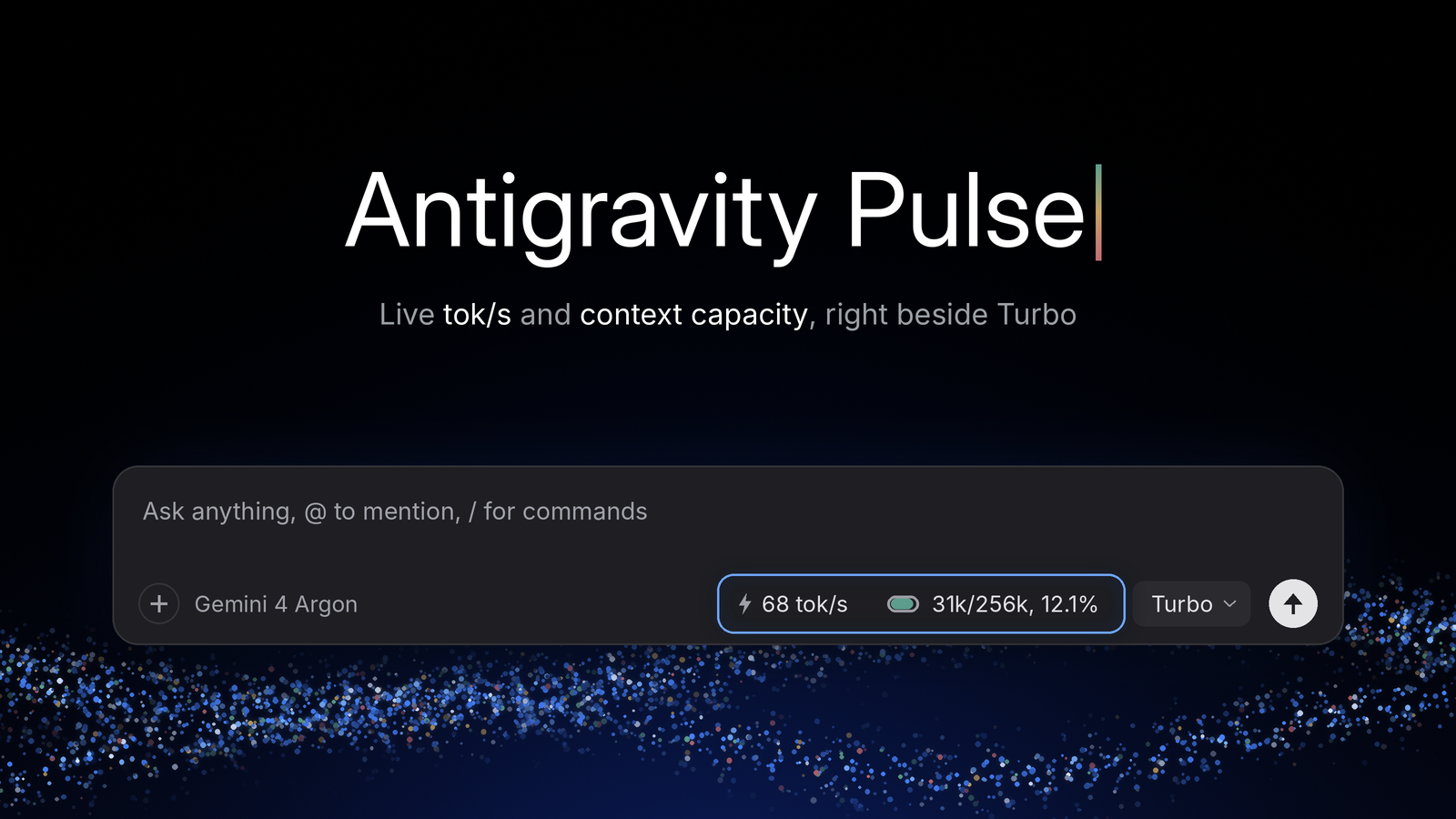
Antigravity Pulse
Native composer-bar telemetry for Google Antigravity 2.0.
Live tok/s, a context-capacity capsule, prompt cache hit ratio and the 5-hour quota countdown, right beside Turbo.


Quick Start · Features · Privacy · Download
English · 简体中文

Why Antigravity Pulse
Existing context monitors sit in the legacy bottom status bar as plain text and fail when switching between multiple chat panes, Remote Agent cloud workspaces, or the browser web client.
Antigravity Pulse (AGY-Pulse) lives directly inside .agy-composer-footer with native typography, spacing, and elevation:
- Native Composer-Bar Layout:
⚡ XX tok/s➔Morandi Runway Capsule (31k/256k, 12.1%)➔Turbo. - Official
TurboPopover Aesthetics: Zero emojis, inherited UI sans-serif withtabular-nums,500/400font weights,6pxradius, Tailwindshadow-md, and instant Light/Dark theme adaptation. - Per-Pane Isolation: Reads React Fiber state per composer instance so side-by-side chat panes track their own independent context and model limits (
256kfor Gemini / Claude,80kfor GPT-OSS, with background shadow/image sub-models filtered out). - True End-to-End
tok/s& Hybrid Delta Estimation: Measures full output tokens (thinking + response) over real generation wall time, plus character-level live delta estimation between snapshots and>5,000token auto-compaction detection (Undo-immune). - 5-Hour Quota Pool & Reset Countdown: Accurately decodes Protobuf
Timestampobjects and sharedgemini/premium5h quota pools (Resets in 2h 40m). - 3-Habitat Engine: Works identically across Desktop Local Projects, Desktop Remote Agent (Cloud Workspaces), and Browser Web.
- Near-Compaction Warning: When context usage reaches
>= 85%, the popover shows a quiet warning that automatic compaction is about to kick in. - 1-Click
EN⇄中文Toggle: Follows your system language on first run, and a click on the capsule switches popover language anytime (your choice is remembered).
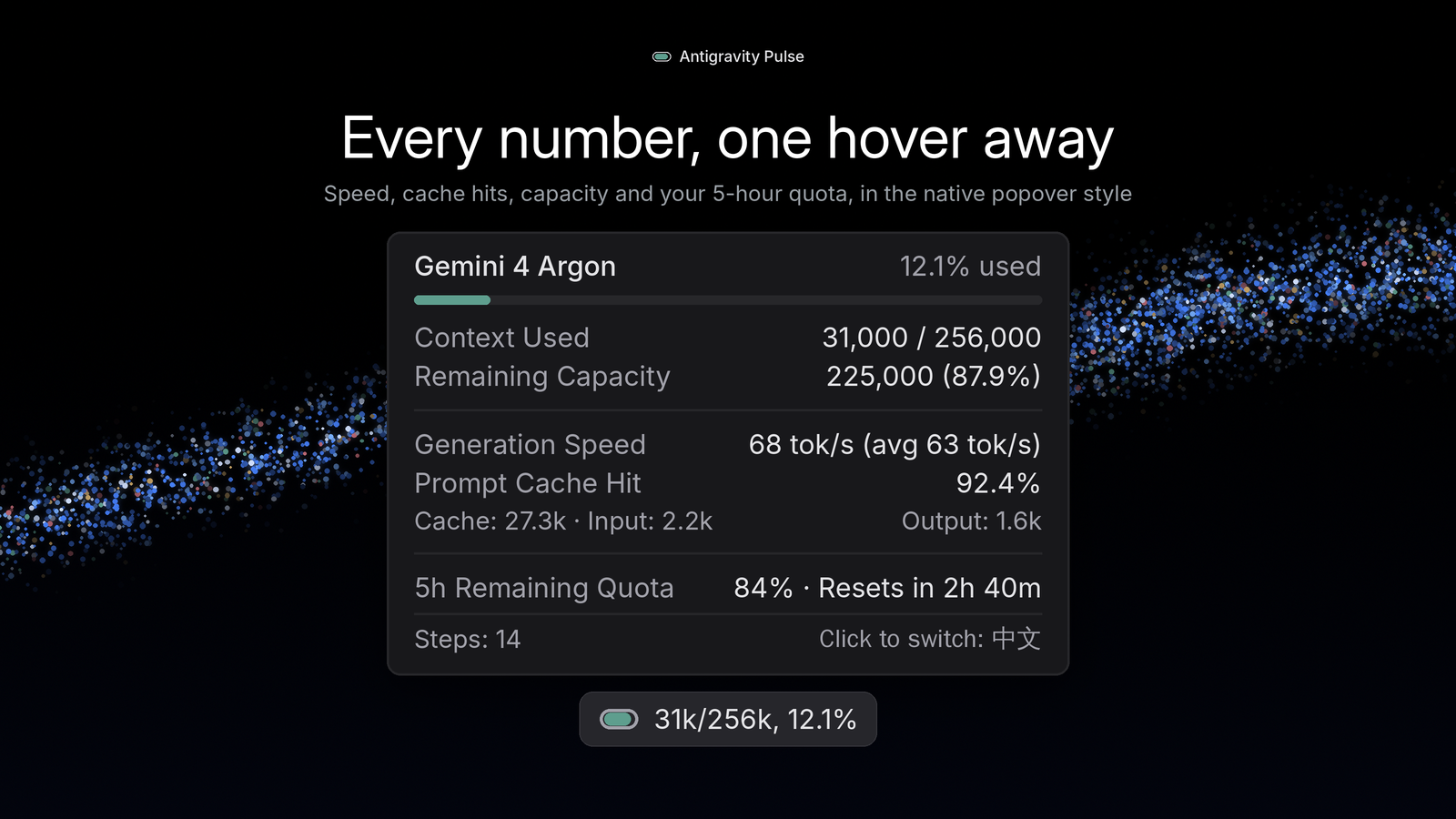 Every number, one hover away |
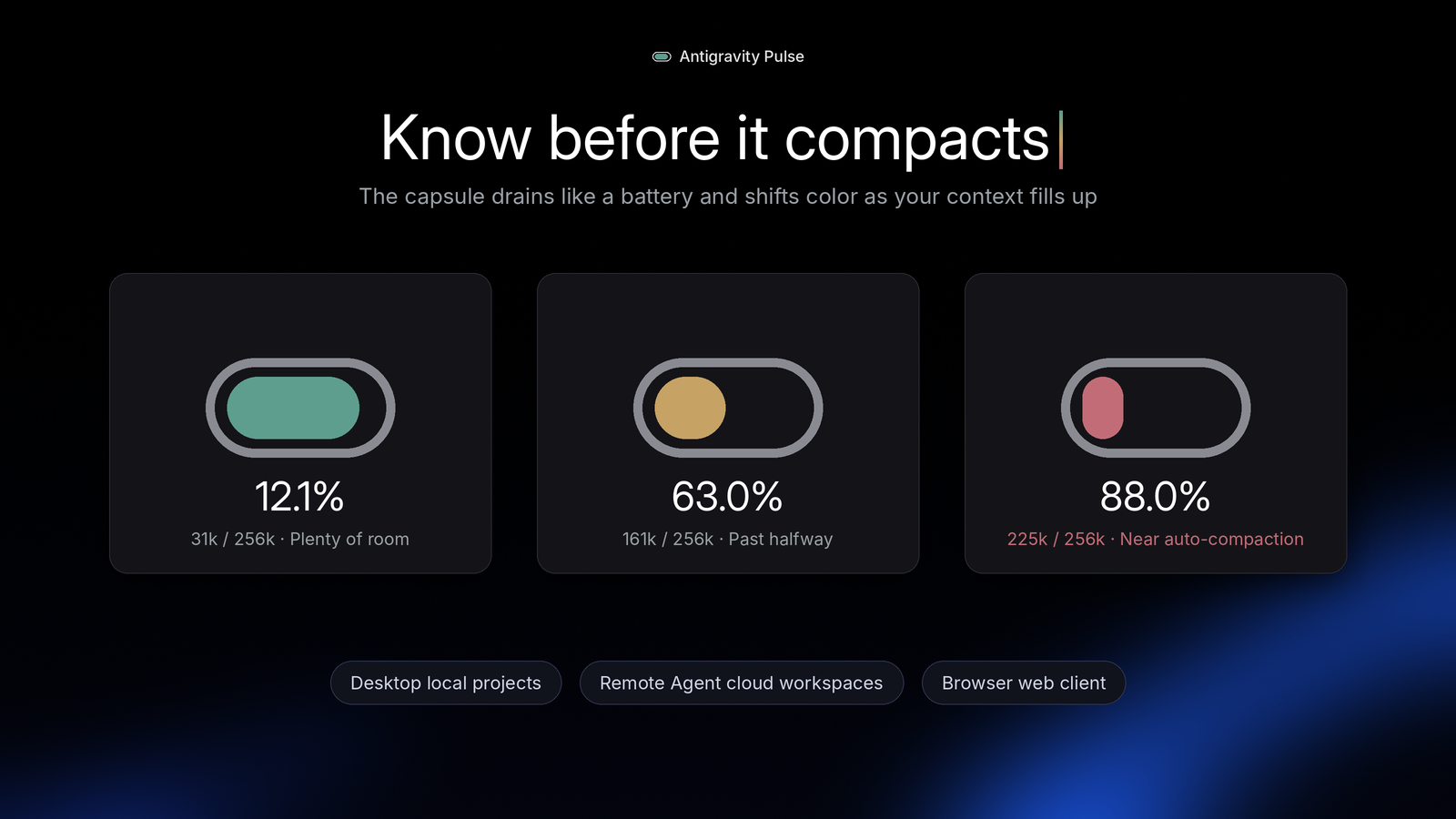 Know before it compacts |
Quick Start
1. Desktop Client (Windows)
One-line setup (recommended): open PowerShell and paste this line. It downloads setup.ps1, which checks for Node.js 18+ (and offers to install the LTS version with winget if it is missing), fetches the latest install-context-capsule.js and context-capsule-payload.js into %USERPROFILE%\.gemini\tools\, backs up the original app.asar, patches app.asar atomically in ~20ms, and restarts Antigravity cleanly:
$s = "$env:TEMP\agy-pulse-setup.ps1"; Invoke-WebRequest "https://github.com/akelabs/antigravity-pulse/releases/latest/download/setup.ps1" -OutFile $s -UseBasicParsing; powershell -NoProfile -ExecutionPolicy Bypass -File "$s"; Remove-Item $s -ErrorAction SilentlyContinue
Antigravity restarts automatically during setup (append
-Confirmif you prefer an interactive prompt before closing it), so save your work first. If you are connected through remote desktop, the connection will drop only if you run inside an Antigravity terminal.
Prefer clicking or offline install? Download setup.ps1, setup.cmd, install-context-capsule.js, and context-capsule-payload.js from Releases into one folder and double-click setup.cmd (it automatically detects the local .js files and installs offline without re-downloading).
Check status in < 5ms (useful after silent Antigravity client updates — re-run the install command anytime an official update overwrites app.asar):
$s = "$env:TEMP\agy-pulse-setup.ps1"; Invoke-WebRequest "https://github.com/akelabs/antigravity-pulse/releases/latest/download/setup.ps1" -OutFile $s -UseBasicParsing; powershell -NoProfile -ExecutionPolicy Bypass -File "$s" -Action check; Remove-Item $s -ErrorAction SilentlyContinue
Manual setup (if you'd rather not run the script)
- Install Node.js LTS (18 or newer), or run
winget install OpenJS.NodeJS.LTS. Open a new PowerShell window and check withnode --version. - Create
%USERPROFILE%\.gemini\tools\and putinstall-context-capsule.jsandcontext-capsule-payload.jsfrom Releases in it. - Run:
node "$HOME\.gemini\tools\install-context-capsule.js"            # install or update (add --confirm to prompt before restart)
node "$HOME\.gemini\tools\install-context-capsule.js" --check    # status
2. Desktop Client (macOS — Apple Silicon: M1 / M2 / M3 / M4 · ARM64)
One-line setup (recommended): open Terminal and paste this line. If your shell is running under Rosetta 2, it automatically switches back to native arm64, prioritizes /opt/homebrew/bin for Node.js 18+ (offering to install LTS with Homebrew if missing), downloads install-context-capsule.js and context-capsule-payload.js into ~/.gemini/tools/, verifies Apple Silicon architecture compatibility, backs up the original app.asar and Info.plist, patches Antigravity.app atomically in ~20ms, updates ElectronAsarIntegrity, clears stale caches, performs local ARM64 ad-hoc re-signing (codesign), and restarts Antigravity cleanly:
s="$(mktemp -t agy-pulse.XXXXXX)" && curl -fsSL https://github.com/akelabs/antigravity-pulse/releases/latest/download/setup.sh -o "$s" && bash "$s" --arch arm64; rm -f "$s"
If
/Applications/Antigravity.apprequires administrator write permission, Terminal will prompt for your macOS login password (sudo). Append--confirmif you want a confirmation prompt before closing Antigravity. For routine payload updates later, pressCmd+Shift+Pand runDeveloper: Reload Windowto hot-reload in ~1 second without restarting the app.
Check status in < 5ms (useful after silent Antigravity client updates):
s="$(mktemp -t agy-pulse.XXXXXX)" && curl -fsSL https://github.com/akelabs/antigravity-pulse/releases/latest/download/setup.sh -o "$s" && bash "$s" --arch arm64 --check; rm -f "$s"
Prefer offline or double-click install? Download setup.command, setup.sh, install-context-capsule.js, and context-capsule-payload.js from Releases into one folder. Because browser-downloaded scripts do not carry macOS executable permissions by default, run chmod +x setup.command setup.sh && xattr -c setup.command setup.sh once in Terminal to enable double-clicking setup.command (or simply run bash setup.sh --offline --arch arm64 directly in Terminal).
Manual setup (if you'd rather not run the script)
- Install Node.js LTS (18 or newer), or run
/opt/homebrew/bin/brew install node. Open a new Terminal window and check withnode --version. - Create
~/.gemini/tools/and putinstall-context-capsule.jsandcontext-capsule-payload.jsfrom Releases in it. - Run:
node ~/.gemini/tools/install-context-capsule.js --arch arm64            # install or update
node ~/.gemini/tools/install-context-capsule.js --arch arm64 --check    # status
3. Desktop Client (macOS — Intel x86_64)
One-line setup (recommended): open Terminal and paste this line. It prioritizes /usr/local/bin for Node.js 18+ (offering to install LTS with Homebrew if missing), downloads install-context-capsule.js and context-capsule-payload.js into ~/.gemini/tools/, verifies Intel architecture compatibility, backs up the original app.asar and Info.plist, patches Antigravity.app atomically in ~20ms, updates ElectronAsarIntegrity, clears stale caches, performs local ad-hoc re-signing (codesign), and restarts Antigravity cleanly:
s="$(mktemp -t agy-pulse.XXXXXX)" && curl -fsSL https://github.com/akelabs/antigravity-pulse/releases/latest/download/setup.sh -o "$s" && bash "$s" --arch intel; rm -f "$s"
If
/Applications/Antigravity.apprequires administrator write permission, Terminal will prompt for your macOS login password (sudo). Append--confirmif you want a confirmation prompt before closing Antigravity. For routine payload updates later, pressCmd+Shift+Pand runDeveloper: Reload Windowto hot-reload in ~1 second without restarting the app.
Check status in < 5ms (useful after silent Antigravity client updates):
s="$(mktemp -t agy-pulse.XXXXXX)" && curl -fsSL https://github.com/akelabs/antigravity-pulse/releases/latest/download/setup.sh -o "$s" && bash "$s" --arch intel --check; rm -f "$s"
Prefer offline or double-click install? Download setup.command, setup.sh, install-context-capsule.js, and context-capsule-payload.js from Releases into one folder. Run chmod +x setup.command setup.sh && xattr -c setup.command setup.sh once in Terminal to enable double-clicking setup.command, or run bash setup.sh --offline --arch intel directly in Terminal.
Manual setup (if you'd rather not run the script)
- Install Node.js LTS (18 or newer), or run
/usr/local/bin/brew install node. Open a new Terminal window and check withnode --version. - Create
~/.gemini/tools/and putinstall-context-capsule.jsandcontext-capsule-payload.jsfrom Releases in it. - Run:
node ~/.gemini/tools/install-context-capsule.js --arch intel            # install or update
node ~/.gemini/tools/install-context-capsule.js --arch intel --check    # status
4. Browser Web Client (Chrome / Edge / Tampermonkey)
Every desktop setup run on Windows or macOS also writes the browser version to ~/.gemini/tools/antigravity-pulse-web/ (%USERPROFILE%\.gemini\tools\antigravity-pulse-web\ on Windows). Only need the web version (including Linux)? Append -Action web on Windows, or on macOS / Linux run bash setup.sh --web (needs Node.js 18+ and exports to ~/.gemini/tools/antigravity-pulse-web/).
- Chrome / Edge Extension (Recommended): open
chrome://extensions/(oredge://extensions/), enable Developer mode, click Load unpacked, and select theantigravity-pulse-webfolder. - Tampermonkey: Install
antigravity-pulse.user.jsfrom that folder into Tampermonkey. The userscript runs on Google-hosted Antigravity pages only; for a web client served fromlocalhost/127.0.0.1, use the extension.
Zero Noise Guarantee: On non-Antigravity pages (Gmail, Google Search, Docs, YouTube, Cloud Console, or unrelated
localhostapps), the script exits immediately without hookingfetchor running background timers.
5. Uninstall & Full Recovery
Restore the unpatched app.asar (and Info.plist on macOS) from .orig.bak backup — or strip the hook cleanly if no backup exists — clean up local Pulse files in ~/.gemini/tools/, and restart Antigravity:
Windows (PowerShell):
$s = "$env:TEMP\agy-pulse-setup.ps1"; Invoke-WebRequest "https://github.com/akelabs/antigravity-pulse/releases/latest/download/setup.ps1" -OutFile $s -UseBasicParsing; powershell -NoProfile -ExecutionPolicy Bypass -File "$s" -Action uninstall; Remove-Item $s -ErrorAction SilentlyContinue
macOS — Apple Silicon (Terminal):
s="$(mktemp -t agy-pulse.XXXXXX)" && curl -fsSL https://github.com/akelabs/antigravity-pulse/releases/latest/download/setup.sh -o "$s" && bash "$s" --arch arm64 --uninstall; rm -f "$s"
macOS — Intel (Terminal):
s="$(mktemp -t agy-pulse.XXXXXX)" && curl -fsSL https://github.com/akelabs/antigravity-pulse/releases/latest/download/setup.sh -o "$s" && bash "$s" --arch intel --uninstall; rm -f "$s"
Or, with the files already on disk (works completely offline): node ~/.gemini/tools/install-context-capsule.js --uninstall --clean (node "$HOME\.gemini\tools\install-context-capsule.js" --uninstall --clean in Windows PowerShell; omit --clean if you want to keep the .js files in ~/.gemini/tools/).
In the browser, remove the extension from chrome://extensions/ (or edge://extensions/), or delete the script in Tampermonkey.
macOS Signature Note: Because Electron verifies
app.asarintegrity against the app bundle signature on macOS, patching applies a local ad-hoccodesignsignature. Uninstalling restores the originalapp.asarandInfo.plistso Antigravity launches normally, but cannot locally recreate Apple's original Developer ID certificate (which may affect built-in auto-updates or macOS TCC permission prompts). To restore the official vendor signature at any time, drag a freshAntigravity.appfrom the official.dmginto/Applications— all chats, sign-in state, and settings in~/Library/Application Support/Antigravityremain untouched.
Privacy & Security
- 100% Local & Same-Origin: Reads telemetry strictly from your own active Antigravity session in memory, using pure DOM construction (no
innerHTMLor global Trusted Types overrides). Zero external network requests, zero analytics, zero telemetry servers. - Atomic Backup & Surgical
~20msPatch: Automatically saves a clean.orig.bakbackup before modifyingdist/preload.jsinsideapp.asarvia atomic temp-file rename, keeping all other 760+ application files untouched. On macOS, it updatesElectronAsarIntegrityinContents/Info.plistlocally and invokes the built-incodesigntool for local ad-hoc re-signing without uploading any data.
License
Copyright © 2026 Antigravity Pulse Authors. All rights reserved.
Release packages are provided free of charge for personal and individual developer use only. Redistribution, re-hosting, modified re-publishing, or commercial bundling without prior written permission is prohibited.
Antigravity Pulse is an independent community project and is not affiliated with or endorsed by Google.