
ahnafnafee/local-llm-pdf-ocr
ahnafnafee/local-llm-pdf-ocr has 132 GitHub stars and 19 forks. GitHot measured 0 stars in 24 hours and +1 in 7 days. Last checked 2026-11-17 02:04 UTC. Last push 2026-10-24.
What you can do
- 🧠 AI-Powered Vision — Advanced VLMs transcribe text with high accuracy, even on complex layouts or noisy scans.
- 🎛️ Fully Configurable — CLI and Web — Pick the engine, choose the model (auto-discovered from your running server), point at any endpoint, and tune every advanced knob. The web UI now exposes the same surface the CLI does (#21).
- 🤝 DP-Based Text↔Box Alignment — Surya detects layout boxes; a local LLM transcribes the whole page; a Needleman–Wunsch dynamic-programming aligner binds LLM lines to the correct boxes in reading order, with a per-box crop re-OCR fallback for boxes the DP can't confidently populate.
- 🛰️ Grounded Path (opt-in) — Use a vision model with a supported grounding format to obtain text and coordinates without Surya or DP alignment. Incomplete or malformed responses receive bounded recovery on smaller source regions.
Measured star growth
- in 24h
- 0
- in 7 days
- +1
- in 15 days
- Collecting history
- in 1 month
- Collecting history
Net star changes over overlapping periods, not daily totals. Missing measurements are left blank. Stars measure attention, not software quality.
About
Convert scanned PDFs and images into searchable documents with any OpenAI-compatible vision server. Run locally with a Web UI or CLI.
Developer ToolsREADME.md
Original
📄 Local LLM PDF OCR
Turn scanned PDFs and images into fully searchable, selectable documents — with a local vision LLM.
Connect any OpenAI-compatible vision server. Run it locally to keep documents on your machine.






Features · Getting Started · Usage · Architecture · Performance
Local LLM PDF OCR uses vision models such as
olmOCR,Qwen3-VL, orGLM-OCRto transcribe documents and add a selectable text layer to the original page images. Choose a server that exposes an OpenAI-compatible vision API, then use the web UI or CLI. Python applications can inject their own inference client.
📑 Table of Contents
✨ Features
- 🧠 AI-Powered Vision — Advanced VLMs transcribe text with high accuracy, even on complex layouts or noisy scans.
- 🎛️ Fully Configurable — CLI and Web — Pick the engine, choose the model (auto-discovered from your running server), point at any endpoint, and tune every advanced knob. The web UI now exposes the same surface the CLI does (#21).
- 🤝 DP-Based Text↔Box Alignment — Surya detects layout boxes; a local LLM transcribes the whole page; a Needleman–Wunsch dynamic-programming aligner binds LLM lines to the correct boxes in reading order, with a per-box crop re-OCR fallback for boxes the DP can't confidently populate.
- 🛰️ Grounded Path (opt-in) — Use a vision model with a supported grounding format to obtain text and coordinates without Surya or DP alignment. Incomplete or malformed responses receive bounded recovery on smaller source regions.
- ⚡ Text-Only Fast Path (opt-in) — OCRs each page's full text and dumps it as plain text: no Surya, no alignment, no detection-model load. Trades searchable-PDF positioning for raw text at a fraction of the time.
- 🖼️ PDF or Raw Image Input — Accepts
.pdf,.jpg,.jpeg,.png,.bmp,.webp,.tif/.tiff,.avif— in both the CLI and the web UI. Multi-frame TIFFs become multi-page output. - 🔒 Local & Private — Run offline with your own vision model server. Ollama, vLLM, llama.cpp, and other servers can provide the OpenAI-compatible API; no particular application is required.
- 🔍 Four Output Formats — Searchable sandwich PDF (default), HTML overlay, plain Markdown, or plain text. Pick via
--format, the output extension, or the web dropdown. - 📚 Dense-Page Mode — Auto-detects densely-laid-out pages (default > 60 boxes) and switches to per-box OCR — bypassing the loops / hallucination that full-page OCR exhibits on dense handwritten content.
- 🧪 Tested — Local unit and Surya integration tests cover alignment, crop handling, embedding geometry, native model formats, evaluation metrics, CLI dispatch, and server options. Opt-in live tests exercise actual recognition; see the 2026 model comparison.
🖥️ The Interface
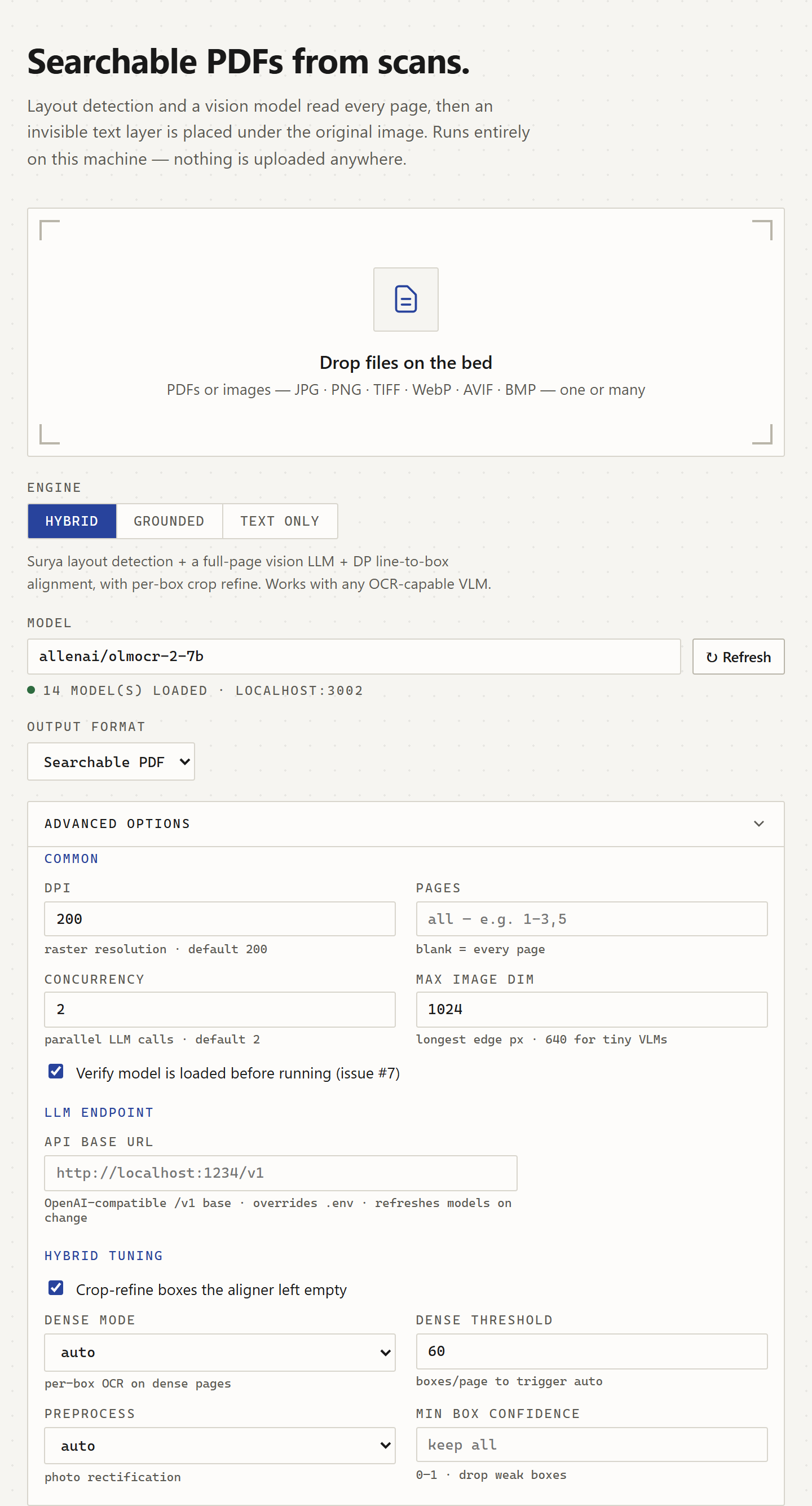
The web UI stays clean by default — drop a file, pick an engine, run — with the full CLI option surface one click away under Advanced. Dark mode included.


Engine · model · endpoint · DPI · pages · concurrency · dense-mode · preprocessing · HTML tuning — all of it, progressively disclosed.
🏗️ Architecture
The tool has two execution paths behind OCRPipeline (src/pdf_ocr/pipeline.py). The default hybrid path combines layout detection with vision transcription; the opt-in grounded path requests text and coordinates together, with bounded region recovery when needed. LightOnOCR-3 shares a source-region recovery layer across both paths: detector-guided crops recover dense handwriting and text inside diagrams, while local coordinates anchor to detected lines. Other model presets retain their existing alignment and recovery strategies.
Both paths use an injectable VisionClient for inference. OpenAICompatibleClient owns the HTTP/SDK integration, while OCRProcessor and PromptedGroundedOCR own prompts and response parsing. LLMConfig resolves endpoint, model, and authentication consistently for the CLI, web UI, and model discovery. See inference configuration and extension points.
graph TD
    A[Input: PDF / JPEG / PNG / TIFF / AVIF] --> B[Render selected pages]
    B -->|--grounded| Z[Grounded VLM: text+bbox<br/>bounded region recovery]
    Z --> EMB

    B -->|default| C[Surya DetectionPredictor<br/>batch, detection-only]
    C --> NM{Native model coordinates?}
    NM -->|yes| NG[Page OCR with coordinates<br/>bounded recovery]
    NG --> NA[Anchor unambiguous lines<br/>retain text and table cells]
    NA --> EMB
    NM -->|no| DM{Dense?<br/>boxes/page > threshold}
    DM -->|sparse| D[LLM full-page OCR<br/>OlmOCR / GLM-OCR / etc.]
    DM -->|dense| P[Per-box OCR<br/>each Surya box → LLM crop]
    D --> F[Plain text with line breaks]
    C --> E[Layout boxes in reading order]
    E --> G[Needleman-Wunsch DP aligner<br/>line ↔ box, auto row/column-major]
    F --> G
    G --> H{Boxes the DP<br/>left empty?}
    H -->|yes| R[Per-box crop re-OCR<br/>refine stage]
    H -->|no| EMB[Sandwich PDF writer]
    R --> EMB
    P --> EMB
    EMB --> L[Searchable PDF output]
How It Works
Input — PDFs or raw images. Multi-frame TIFFs expand to one page per frame. Images skip the PDF round-trip and feed straight into the pipeline.
Batch Layout Detection (hybrid path) — Surya's
DetectionPredictorprocesses selected page images in one call, ~10-21× faster than running full recognition.LLM Text Extraction (hybrid path) — LightOnOCR-3 reads the page with native coordinates and bounded recovery, preserving the context around handwriting and form fields. Other presets use full-page transcription, with automatic per-box OCR for dense pages (> 60 detected boxes by default). On dense machine-print pages, crops mask neighboring boxes to prevent duplicated text. Handwriting retains neighboring strokes, and overlapping detections are deduplicated afterwards.
Text Placement (hybrid path) — Native page coordinates anchor to Surya lines when overlap or nearby single-column row order is unambiguous; unmatched content keeps its model coordinates. For recognizers without native coordinates, Needleman-Wunsch alignment compares character-count fit under row-major and column-major orderings. Unmatched lines attach to the nearest matched box, and uncertain alignments can request crop recognition.
Refine Fallback (hybrid path, optional) — Any sizeable box the DP couldn't populate gets its image crop re-OCR'd individually. A pre-OCR blank-crop check (pixel stddev) skips dotted notebook backgrounds to avoid the model's "The quick brown fox..." pangram fallback. Disable with
--no-refine.Grounded Path (opt-in alternative) — A vision model returns text and boxes without DP alignment. LightOnOCR-3 also uses Surya line geometry to select and place recovery regions. Other grounded profiles do not require a detector. Malformed, truncated or severely incomplete responses are retried on smaller source regions within the page deadline. See generation limits and recovery.
Sandwich PDF — The page is rasterized as a background image and invisible text is overlaid at the recognized positions. Table cells retain separate columns, and supported LaTeX expressions become searchable Unicode text. Font fallback preserves Greek letters and mathematical operators during PDF extraction.
🚀 Getting Started
Prerequisites
- Python 3.10+
- A vision model served through an OpenAI-compatible API. Choose your server and use the defaults below or configure its endpoint and model ID. Examples include Ollama, vLLM, and llama.cpp. The model must accept image inputs; grounded mode also requires text and bounding boxes in its response.
Configuration
LightOnOCR-3 is the default recognition model. The local endpoint remains unchanged:
| Setting | Default |
|---|---|
| API base URL | http://localhost:1234/v1 |
| Hybrid and text-only model | lightonai/LightOnOCR-3-4B |
| Grounded model | lightonai/LightOnOCR-3-4B |
The October 2026 comparison includes LightOnOCR-3, PaddleOCR-VL-1.6, Unlimited-OCR, Chandra OCR 2 and Qwen3.5-9B. Those results preserve the earlier configurations and their recognition errors. The LightOnOCR-3 validation records the current native-layout pipeline, repeated live tests, and PP-DocLayoutV3 experiments. Model defaults can be overridden independently of the server application.
For LightOnOCR-3, serve the official chat template
with thinking disabled. The model expects an image followed by either an empty
transcription prompt or grounding; the built-in preset supplies these conventions.
Some GGUF conversions inherit a thinking template from their base model. With
llama.cpp, use --chat-template-file path/to/chat_template.jinja --reasoning off
and --alias lightonai/LightOnOCR-3-4B. Otherwise OCR may arrive in the server's
reasoning field with no normal content. A custom served name can select the same
conventions with --model-profile lightonocr-3.
These are configurable connection settings, with no dependency on a particular server application. To use another endpoint or model, copy .env.example to .env and uncomment the relevant overrides. For example, a local Ollama configuration is:
LLM_API_BASE=http://localhost:11434/v1
LLM_MODEL=qwen3-vl:8b
# LLM_API_KEY=your-key-if-required
The CLI (--api-base / --model) and web UI (Model picker + Advanced → Endpoint) override the environment per run, and environment settings override the built-in defaults. LLM_MODEL applies to every OCR mode when set. LLM_API_KEY supplies optional bearer authentication without putting secrets in command-line arguments.
The preflight check verifies that the endpoint advertises the model; it does not assume that weights are already in memory. Use --no-verify-model or untick verification in the UI when a server does not expose a model catalog.
Installation
Managed with uv for lightning-fast dependency management.
Install
uv(if not installed):# macOS / Linux curl -LsSf https://astral.sh/uv/install.sh | sh # Windows powershell -c "irm https://astral.sh/uv/install.ps1 | iex" # …or, if you already have Python: pip install uvClone the repository:
git clone https://github.com/ahnafnafee/local-llm-pdf-ocr.git
cd local-llm-pdf-ocr
Sync dependencies:
uv sync                       # CLI only
uv sync --extra web           # CLI + FastAPI server
Heads up: Surya downloads its detection model from Hugging Face Hub on first run (~500 MB, cached afterwards). Start your configured vision inference server before running OCR.
📖 Usage
1. 🌐 Web Interface (Recommended)
A modern dashboard with dark mode, live per-page progress, a text preview, and the full option surface.
uv run local-llm-pdf-ocr-server --port 8000
Open http://localhost:8000, then:
- Drop a PDF or image (one or many).
- Pick an engine — Hybrid · Grounded · Text-only. The panel adapts to show only the relevant options.
- Choose a model — auto-discovered from your running endpoint (or type any name). Point at a different endpoint under Advanced.
- Tune DPI, pages, concurrency, dense-mode, preprocessing, HTML overlay options — or just hit Run OCR.
- Download each result, or click View text to inspect the raw extraction.
2. 💻 Command Line Interface (CLI)
Perfect for developers, scripting, and batch automation.
uv run local-llm-pdf-ocr input.pdf output_ocr.pdf
Options:
| Option | Description |
|---|---|
input |
Path to a PDF or image file (.jpg/.jpeg/.png/.bmp/.webp/.tif/.tiff/.avif). Required. Multi-frame TIFFs expand to multiple output pages. |
output |
Path to output file (optional). Format is inferred from the extension: .pdf (default, searchable PDF), .html / .htm (HTML overlay), .md / .markdown (Markdown text), .txt (plain text). Defaults to <input_stem>_ocr.<format>. |
--format {pdf,html,md,txt} |
Output format. Used to pick the extension when output is omitted, OR to override an unrecognized extension. If output has a recognized extension, the extension wins. --text-only defaults this to txt. |
--html-mode {letter-spacing,full-height,scaled} |
Sizing strategy for HTML overlay spans (ignored for pdf/md). scaled (default) fits the font to the box server-side, then a page-load script measures each span in its rendered font and stretches it to the exact box width via CSS scaleX (the PDF.js textLayer approach); without JavaScript the server-side fit still applies. letter-spacing stretches glyphs to fill the bbox via letter-spacing. full-height uses natural monospace width — text may overflow the bbox right edge. |
--html-inline-images |
Embed page images as base64 data: URLs inside the HTML (single self-contained file at ~35% size inflation). Default behaviour writes external images: a relative reference to the input file for single-frame browser-native images, or sidecar JPEGs named <output_stem>_p<N>.jpg next to the output HTML for PDFs and multi-frame inputs. |
--html-invert-dark |
Invert page images in dark mode (HTML output only). Adds CSS filter: invert() hue-rotate(180deg) that activates when the OS / browser is in dark colour scheme. |
--html-hover-text |
Reveal the invisible OCR text on hover/focus (HTML output only): hovering a region shows its bound text white on a dark backdrop, for inspecting the OCR layer. |
-v, --verbose |
Enable debug logging (alignment details, box counts) |
-q, --quiet |
Suppress all output except errors |
--dpi <int> |
DPI for image rendering (default: 200) |
--pages <range> |
Pages or image frames to OCR, e.g., 1-3,5 (default: all). Selection occurs before OCR rendering in hybrid, grounded, and text-only mode. PDF/HTML output retains all source pages; only selected pages receive OCR text. Markdown/text contain selected pages only. |
--concurrency <int> |
Parallel in-flight LLM requests (default: 2), including grounded mode. Queuing servers hold excess requests; servers that run requests in parallel need more KV-cache memory. Raise cautiously when your server has headroom. |
--no-refine |
Skip per-box crop re-OCR (faster, less robust on tables/multi-column) |
--text-only |
Fast path: OCR each page's full text and write it as plain text, skipping Surya layout detection, DP alignment, and crop re-OCR entirely (no detection-model load). Naturally parallel (raise --concurrency). Output defaults to <input_stem>_ocr.txt. |
--max-image-dim <int> |
Longest-edge px cap for page images (default: 2048; see note below) |
--dense-mode {auto,always,never} |
auto (default) switches to per-box OCR for dense pages, table/diagram layouts, or ambiguous alignment. Single-column pages retry after any alignment gap; column layouts retry below half their boxes matched (both require at least eight boxes). always forces per-box OCR; never keeps the full-page path. Region OCR costs more requests but avoids shifting text into neighboring form fields. |
--dense-threshold <int> |
In auto dense-mode, pages with more than this many detected boxes use per-box OCR (default: 60). |
--min-box-confidence <float> |
Drop detected layout boxes below this confidence before alignment and per-box OCR (hybrid path only; default: keep all). Surya's confidence is normalized per page. Cuts junk detections that mislead alignment and burn LLM calls in dense mode. |
--preprocess {auto,always,never} |
Photo rectification (hybrid path). auto (default): pages with a confidently-detected tilted page outline are perspective-corrected and illumination-flattened for recognition, then mapped back onto the original photo for output. always rectifies whenever a page outline is found; never disables. |
--grounded |
Request text and coordinates together, skipping Surya and DP. Uses bounded source-region recovery when needed. Requires a supported grounding format via --model. |
--api-base <url> |
Override LLM API base URL |
--model <name> |
Override LLM model name |
--model-profile <name> |
Select native prompt/output conventions for a custom server alias: auto, generic, olmocr, qwen3-vl, qwen3.5, lightonocr-3, or paddleocr-vl. Also available under Advanced → Model preset. |
--no-verify-model |
Skip checking the server's advertised model catalog. Use when the server lacks /models or does not advertise every usable model. |
Examples:
# Basic (auto-generates scan_ocr.pdf, uses your configured server and model)
uv run local-llm-pdf-ocr scan.pdf

# Specific pages, higher rendering DPI
uv run local-llm-pdf-ocr document.pdf output.pdf --pages 1-5 --dpi 300

# Explicit endpoint and model: Ollama + GLM-OCR
uv run local-llm-pdf-ocr scan.pdf \
    --api-base http://localhost:11434/v1 \
    --model glm-ocr:latest --max-image-dim 640

# Grounded path: bbox-native VLM (Qwen2.5-VL / Qwen3-VL)
uv run local-llm-pdf-ocr scan.pdf --grounded \
    --api-base http://localhost:11434/v1 --model qwen3-vl:8b --pages 1-3

# Raw image input — JPEG/PNG/BMP/WebP/AVIF, and multi-page TIFFs
uv run local-llm-pdf-ocr scan.png scan_ocr.pdf
uv run local-llm-pdf-ocr photo.avif photo_ocr.pdf

# Dense handwriting: force per-box OCR everywhere with extra concurrency
uv run local-llm-pdf-ocr notes.pdf --dense-mode always --concurrency 5

# HTML overlay, self-contained single file
uv run local-llm-pdf-ocr scan.pdf --format html --html-inline-images

# Text-only fast path (no Surya load)
uv run local-llm-pdf-ocr scan.pdf --text-only --concurrency 8
Note on
--max-image-dim: the default 2048-pixel cap preserves detail for LightOnOCR-3. Smaller models or servers with limited context may need a lower cap; choose it for the model and server you run.
Two pipeline paths
| Path | Flag | Detection | Text | Alignment | Refine | When to use |
|---|---|---|---|---|---|---|
| Hybrid / native (default) | none | Surya | Page and contextual regions | Native coordinates anchored to detected lines | Shared region recovery | LightOnOCR-3 |
| Hybrid / plain text | --model … |
Surya | LLM full-page | DP (auto row/column-major) | Per-box crop (with blank-skip) | Plain-text model profiles such as olmOCR and GLM-OCR |
| Hybrid + dense (auto) | --dense-mode |
Surya | LLM per-box (each Surya box → one crop call) | — | — | Dense handwriting / multi-column where full-page OCR loops or hallucinates |
| Grounded | --grounded |
Surya for native region recovery | VLM returns text and coordinates | Native coordinates | Bounded recovery | Supported JSON or native grounding models |
LightOnOCR-3 uses native coordinates and shared source-region recovery in both paths; hybrid mode reuses its existing line detections. Other hybrid profiles accept plain text and use DP alignment. Grounded mode requires a supported grounding format: prompted {"bbox_2d": [...], "content": "..."} JSON, LightOnOCR-3 grounding markers, or PaddleOCR-VL spotting tokens. Model profiles select those conventions independently of the serving application. See inference configuration for server requirements and bounded recovery when a response is truncated or malformed.
If any selected page returns no grounded text blocks, processing stops with an error before writing output. This includes empty or unparseable model responses and blank pages, so an empty grounded result cannot silently produce an image-only PDF. The error lists the original source page numbers. Ranges that select no valid pages fail before OCR rendering or inference. For models that return only plain text or Markdown, use hybrid mode: omit --grounded in the CLI, select Hybrid in the web UI, or send engine=hybrid to /process.
📁 Project Structure
local-llm-pdf-ocr/
├── src/pdf_ocr/
│   ├── cli.py                 # CLI entry point (`local-llm-pdf-ocr`)
│   ├── server.py              # FastAPI web server (`local-llm-pdf-ocr-server`, requires [web] extra)
│   ├── pipeline.py            # OCRPipeline orchestration seam (hybrid + grounded + text-only)
│   ├── output.py              # Output-format dispatch (pdf / html / md / txt)
│   ├── core/
│   │   ├── aligner.py         # HybridAligner: Surya detect + Needleman-Wunsch DP
│   │   ├── ocr.py             # OCRProcessor: OpenAI-compat LLM client + crop OCR
│   │   ├── pdf.py             # PDFHandler: PDF/image I/O + sandwich-PDF embedding
│   │   ├── html.py            # HTMLHandler: invisible-text overlay writer
│   │   └── grounded.py        # Grounded backends (PromptedGroundedOCR, …) + parsers
│   ├── static/                # Web UI assets bundled into the wheel
│   └── utils/                 # Crop / preprocess / image helpers
├── promo/                     # Remotion promo video (isolated Node subproject)
├── tests/                     # 455 fast + 29 Surya-integration tests
├── examples/                  # Sample PDFs + UI screenshots
└── pyproject.toml             # PEP 621 metadata, build backend, console scripts
🛠️ Tech Stack
- Backend — FastAPI (async web framework) + WebSocket progress
- Frontend — Vanilla JS + CSS variables (no build step)
- PDF Processing — PyMuPDF (Fitz)
- Layout Detection — Surya OCR (detection-only mode)
- AI Integration — OpenAI client (compatible with any local LLM server)
- CLI UI — Rich (terminal formatting)
- Promo — Remotion (see
promo/)
⚡ Performance
Timing depends on the model, page density and server capacity. LightOnOCR-3 reads each page and may make additional region calls for dense text or diagrams. Start with --concurrency 1 on a server with one inference slot, and increase it only when the endpoint can process requests in parallel. The current validation report records actual runs and their limits.
The table below retains historical measurements with OlmOCR-2-7B on a single GPU and Surya already loaded. Its per-box strategy describes that earlier model profile.
| Phase | Time / page | Notes |
|---|---|---|
| Rasterize PDF → image | ~0.3 s | Linear in pages |
| Surya batch detection | ~0.5 s | Amortized across all pages in one call |
| LLM full-page OCR (sparse pages) | ~2–4 s | Dominant sparse-page cost in that run |
| Per-box OCR (dense pages, auto-mode) | ~0.2–0.4 s × box count | Historical 150-box run: ~30 s at concurrency 5 |
| Per-box refine (sparse pages, if needed) | ~0.5–1 s × empty boxes | Typically 0–2 s; blank-crop check skips most empties; --no-refine to disable |
| PDF assembly | ~0.2 s | Linear in pages |
| Cold-start Surya load | +5–10 s (once) | Hybrid and native LightOn grounding load a detector; other grounded profiles can skip it |
On the three example PDFs (hybrid path, allenai/olmocr-2-7b, warm): digital ≈ 14 s, hybrid ≈ 5 s, handwritten ≈ 4 s.
🧪 Testing
uv run pytest -m "not live_llm"               # offline suite, including Surya integration
uv run pytest -m "not slow and not live_llm"  # fast tier
uv run pytest tests/test_aligner.py -v
Confidence evaluation (needs a live LLM endpoint):
uv run scripts/confidence_eval.py --path both \
    --grounded-model lightonai/LightOnOCR-3-4B \
    --hybrid-model lightonai/LightOnOCR-3-4B \
    --baseline-dir .cache/lightonocr-3-baselines
Scores either path against the fixtures in tests/fixtures/ground_truth_*.json, decomposed by axis: geometry (block recall/precision/hmean via optimal Hungarian matching), text (per-match CER + assignment-free bag-of-words F1), structure (split/merge-tolerant pseudo-character coverage), and per-document content checks. Runs append to evals/history.csv and compare compatible per-document baselines where available; missing baselines do not imply a regression pass. Failed content checks and missing pages return nonzero. The latest live validation records the actual LightOnOCR-3 results and their limitations. The existing olmOCR controls are incompatible with this model; select a separate --baseline-dir for a content-check run without that cross-model comparison.
🤝 Contributing
Contributions are welcome! Please feel free to submit a Pull Request — see the issues for ideas, or open a new one to discuss.
License: MIT