
adriankarlen/textfox
adriankarlen/textfox has 1,706 GitHub stars and 57 forks. GitHot measured 0 stars in 24 hours and 0 in 7 days. Last checked 2026-11-09 01:33 UTC. Last push 2026-10-23.
firefox theme for the tui enthusiast
Measured star growth
- in 24h
- 0
- in 7 days
- 0
- in 15 days
- Collecting history
- in 1 month
- Collecting history
Net star changes over overlapping periods, not daily totals. Missing measurements are left blank. Stars measure attention, not software quality.
README.md
Original __ __ ____
/ /____ _ __/ /_/ __/___ _ __
/ __/ _ \| |/_/ __/ /_/ __ \| |/_/
/ /_/ __/> </ /_/ __/ /_/ /> <
\__/\___/_/|_|\__/_/ \____/_/|_|
a firefox theme for the tui enthusiast
Preview
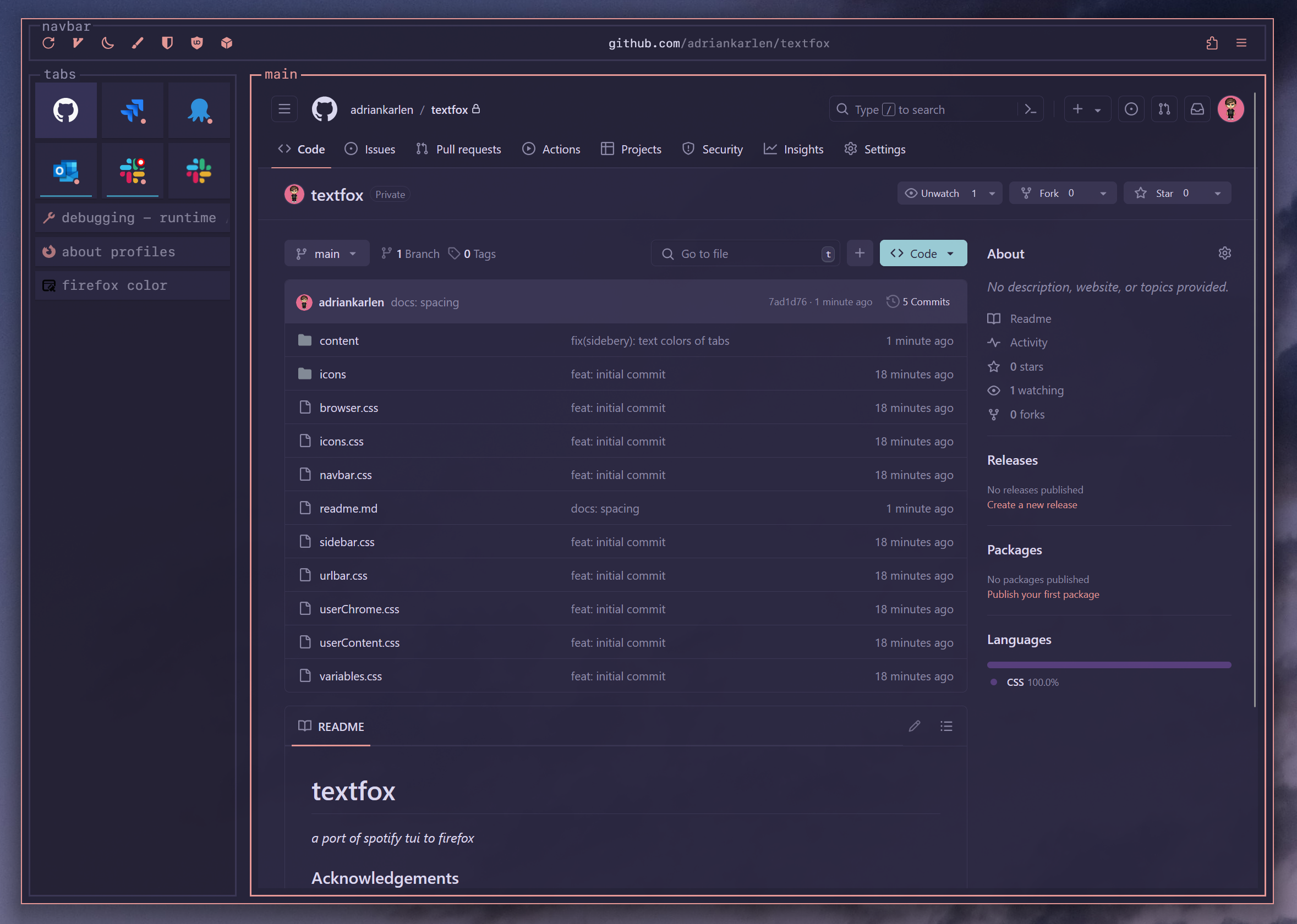
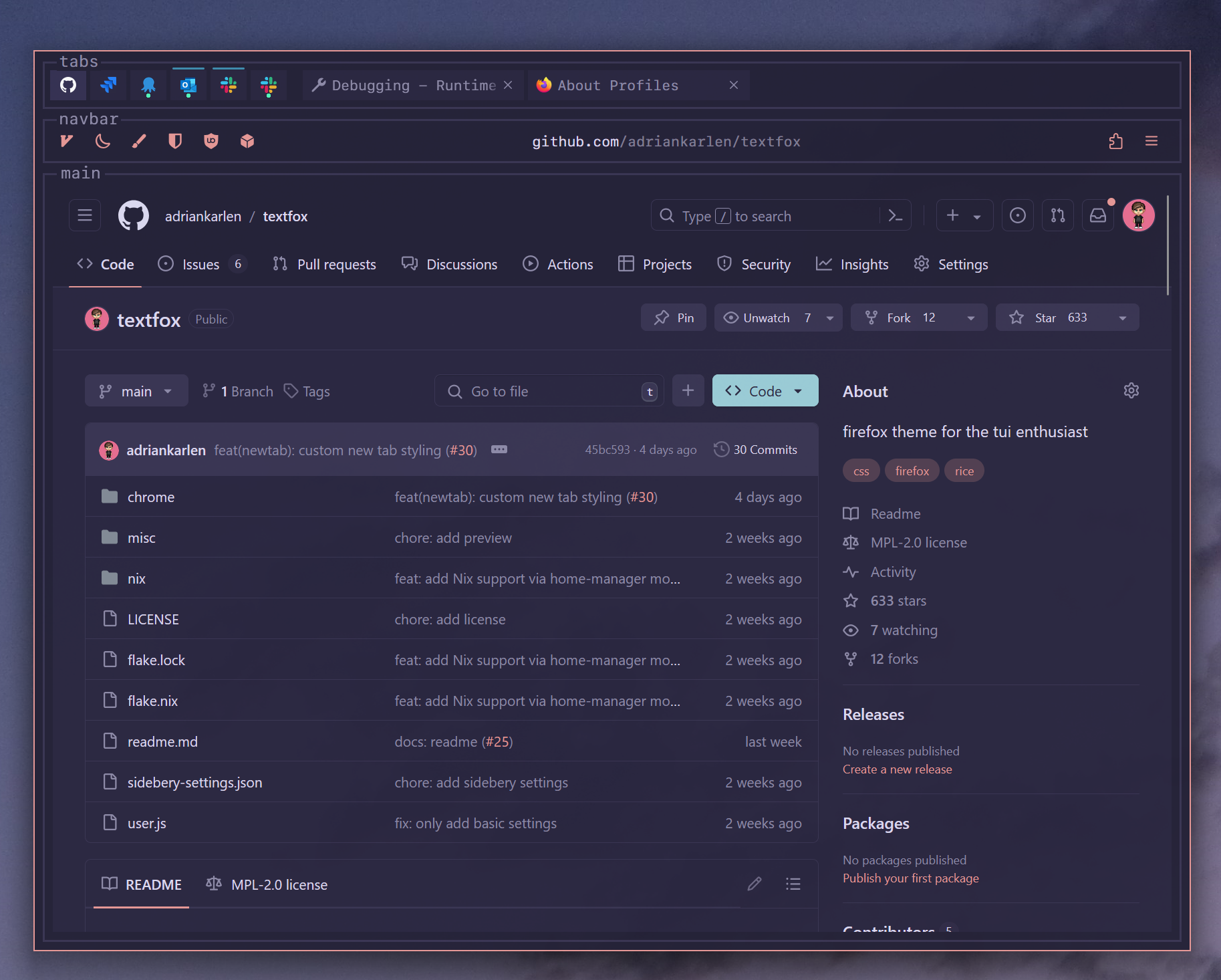
[!NOTE] The color scheme used in the pictures is Rosé Pine Moon.
textfoxtries to not hard code any colors, Firefox Color extension is the recommended approach to coloring Firefox withtextfox.
Installation
[!WARNING] textfox does not yet support Firefox's new "Nova" UI. Until it does, set
browser.nova.enabledtofalseinabout:config(the provideduser.jsand the Nix modules do this for you), then restart Firefox.
Installation script
- Download/clone the repo.
- Inside the download run
sh tf-install.shand follow the script instructions.
[!IMPORTANT] This script automates file writes, use with caution.
[!NOTE] The installation script copies to contents of the repos
chromedirectory to the path specified, this way yourconfig.cssor any othercss-files not part of the repo will be kept.
Manual
- Download the files
- Go to
about:profiles - Find the names of target profiles (ex:
Profile: Default) - Open the profile's root directory
- Move the files chrome directory and user.js there
- Restart Firefox
[!IMPORTANT] textfox now supports horizontal tabs, to enable them change the
--tf-display-horizontal-tabsvariable in yourconfig.csstoblock. See CSS configurations for more info.
[!NOTE] If you don't want to use the provided user.js, please read through it and apply the settings in
about:configmanually. These are needed for the css to work.
Nix
This repo includes a Nix flake that exposes a home-manager module that installs textfox.
To enable the module, add the repo as a flake input, import the module, and enable textfox.
Install using your home-manager module defined within your `nixosConfigurations`:
  # flake.nix

  {

      inputs = {
         # ---Snip---
         home-manager = {
           url = "github:nix-community/home-manager";
           inputs.nixpkgs.follows = "nixpkgs";
         };

         textfox.url = "github:adriankarlen/textfox";
         # ---Snip---
      }

      outputs = {nixpkgs, home-manager, ...} @ inputs: {
          nixosConfigurations.HOSTNAME = nixpkgs.lib.nixosSystem {
            specialArgs = { inherit inputs; };
            modules = [
            home-manager.nixosModules.home-manager
              {
               # Must pass in inputs so we can access the module
                home-manager.extraSpecialArgs = {
                  inherit inputs;
                };
              }
           ];
        };
     }
  }
# home.nix

imports = [ inputs.textfox.homeManagerModules.default ];

textfox = {
    enable = true;
    # Replace with the names of profiles, defined in home-manager, or find existing ones in `about:profiles`
    profiles = ["profile_1" "profile_2"];
    config = {
        # Optional config
    };
};
Install using `home-manager.lib.homeManagerConfiguration`:
  # flake.nix

  {
    inputs = {
       # ---Snip---
       home-manager = {
         url = "github:nix-community/home-manager";
         inputs.nixpkgs.follows = "nixpkgs";
       };

       textfox.url = "github:adriankarlen/textfox";
       # ---Snip---
    }

    outputs = {nixpkgs, home-manager, textfox ...}: {
        homeConfigurations."user@hostname" = home-manager.lib.homeManagerConfiguration {
            pkgs = nixpkgs.legacyPackages.x86_64-linux;

            modules = [
                textfox.homeManagerModules.default
                # ...
            ];
        };
    };
  }
# home.nix

textfox = {
    enable = true;
    # Replace with the names of profiles, defined in home-manager, or find existing ones in `about:profiles`
    profiles = ["profile_1" "profile_2"];
    config = {
        # Optional config
    };
};
Configuration options:
All configuration options are optional and can be set as this example shows (real default values can be found below):
  textfox = {
      enable = true;
      # Replace with the names of profiles, defined in home-manager, or find existing ones in `about:profiles`
      profiles = ["profile_1" "profile_2"];
      config = {
        background = {
          color = "#123456";
        };
        border = {
          color = "#654321";
          width = "4px";
          transition = "1.0s ease";
          radius = "3px";
        };
        displayWindowControls = true;
        displayNavButtons = true;
        displayUrlbarIcons = true;
        displaySidebarTools = false;
        displayTitles = false;
        newtabLogo = "   __            __  ____          \A   / /____  _  __/ /_/ __/___  _  __\A  / __/ _ \\| |/_/ __/ /_/ __ \\| |/_/\A / /_/  __/>  </ /_/ __/ /_/ />  <  \A \\__/\\___/_/|_|\\__/_/  \\____/_/|_|  ";
        font = {
          family = "Fira Code";
          size = "15px";
          accent = "#654321";
        };
        tabs = {
          horizontal.enable = true;
          vertical.enable = true;
        };
        navbar = {
          margin = "8px 8px 2px";
          padding = "4px";
        };
        bookmarks = {
          alignment = "left";
        };
        icons = {
          toolbar.extensions.enable = true;
          context.extensions.enable = true;
          context.firefox.enable = true;
        };
        textTransform = "uppercase";
        extraConfig = "/* custom css here */";
      };
  };
Uninstallation
Uninstall script
- Inside the cloned repo run
sh tf-uninstall.shand follow the script instructions.
[!IMPORTANT] This script automates file removal, use with caution.
[!NOTE] The uninstall script will offer to restore the most recent backup created by the install script (e.g.
chrome-YYYYMMDD_HHMMSS.bak) if one is found in your Firefox profile directory.
Manual
- Go to
about:profiles - Open the root directory of the profile textfox was installed to
- Delete the
chromedirectory - Delete
user.js(only if it was placed there by textfox) - Restart Firefox
[!NOTE] If you had a previous
chromedirectory before installing textfox, the install script backed it up aschrome-YYYYMMDD_HHMMSS.bak. You can restore it by renaming it back tochrome.
Customization
The icon configuration utilizes code that is originally from ShyFox, therefore the same settings are used (these can be set in about:config).
| Setting | true | false (default) |
|---|---|---|
shyfox.enable.ext.mono.toolbar.icons |
Supported extensions get monochrome icons as toolbar buttons | Standard icons used |
shyfox.enable.ext.mono.context.icons |
Supported extensions get monochrome icons as context menu items | Standard icons used |
shyfox.enable.context.menu.icons |
Many context menu items get icons | No icons in context menus |
CSS configurations
The theme ships with a defaults.css, this file can be overridden by creating a
config.css inside the chrome directory.
Defaults
:root {
  --tf-font-family: "SF Mono", Consolas, monospace; /* Font family of config */
  --tf-font-size: 14px; /* Font size of config */
  --tf-accent: var(--toolbarbutton-icon-fill); /* Accent color used, eg: color when hovering a container  */
  --tf-bg: var(--lwt-accent-color, -moz-dialog); /* Background color of all elements, tab colors derive from this */
  --tf-border: var(--panel-border-color, var(--toolbar-field-background-color)); /* Border color when not hovered */
  --tf-border-transition: 0.2s ease; /* Smooth color transitions for borders */
  --tf-border-width: 2px; /* Width of borders */
  --tf-rounding: 0px; /* Border radius used through out the config */
  --tf-text-transform: none; /* Text transform to use */
  --tf-display-horizontal-tabs: none; /* If horizontal tabs should be shown, none = hidden, block = shown */
  --tf-display-window-controls: none; /* If the window controls should be shown (won't work with sidebery and hidden horizontal tabs), none = hidden, flex = shown */
  --tf-display-nav-buttons: none; /* If the navigation buttons (back, forward) should be shown, none = hidden, flex = shown */
  --tf-display-urlbar-icons: none; /* If the icons inside the url bar should be shown, none = hidden, flex = shown */
  --tf-display-sidebar-tools: flex; /* If the "Customize sidebar" button on the sidebar should be shown, none = hidden, flex = shown */
  --tf-display-titles: flex; /* If titles (tabs, navbar, main etc.) should be shown, none = hidden, flex = shown */
  --tf-newtab-logo: "   __            __  ____          \A   / /____  _  __/ /_/ __/___  _  __\A  / __/ _ \\| |/_/ __/ /_/ __ \\| |/_/\A / /_/  __/>  </ /_/ __/ /_/ />  <  \A \\__/\\___/_/|_|\\__/_/  \\____/_/|_|  ";
  --tf-navbar-margin: 8px 8px 2px; /* navbar margin */
  --tf-navbar-padding: 4px; /* navbar padding */
  --tf-bookmarks-alignment: center; /* alignment of bookmarks in the bookmarks toolbar (if you have many bookmarks, left is recommended) */
}
Changing the new tab logo
The new tab logo can be any string you want, to create a string with line breaks
add a \A at every line break, also make sure to break any backslashes, eg. if
you want a \, you need to write \\. I used this tool
to create the current logo.
Wanna hide the logo? Simply pass an empty string as the logo.
Recipes
Here are some example changes that you can do to achieve different looks.
Swap positions of tabs and window controls when using horizontal tabs
/* path: chrome/config.css */
:root {
  --tf-display-horizontal-tabs: inline-flex;
  --tf-display-window-controls: flex;
}
Rounded borders
/* path: chrome/config.css */
:root {
  --tf-rounding: 4px;
}
Align bookmarks to the left
/* path: chrome/config.css */
:root {
  --tf-bookmarks-alignment: left;
}
Adjust title margins
The titles (e.g. "tabs", "navbar", "main") are ::before pseudo-elements positioned on the border of each container. Override the margin per selector to reposition them.
/* path: chrome/config.css */
/* These are just the default values, change them to fit your needs */

/* main title */
#tabbrowser-tabbox::before {
  margin: -1.75rem 0rem !important;
}

/* navbar title */
#nav-bar::before {
  margin: -16px 8px !important;
}

/* bookmarks title */
#PersonalToolbar::before {
  margin: -1.25rem 0.4rem !important;
}

/* tools title */
.buttons-wrapper::before {
  margin: -0.85rem 0.85rem !important;
}

/* tool title */
#sidebar-box::before {
  margin: -0.85rem 0.85rem !important;
}

/* vertical tabs title */
box#vertical-tabs::before {
  margin: -1.75rem .4rem !important;
}

/* horizontal tabs title */
#TabsToolbar::before {
  margin: -1rem .75rem !important;
}

/* findbar title */
findbar::before {
  margin: -1.75rem .75rem !important;
}

/* split view panel title */
.split-view-panel::before {
  margin: -1.75rem 0rem !important;
}
Do you have a banger recipe?
Feel free to open a PR and add it here!
Tooling
The repo ships a small toolkit under tools/firefox-chrome/ (also
symlinked into .claude/skills/ so AI agents pick it up automatically). It
exists to solve the hardest part of maintaining a userChrome theme: Firefox's
internal UI is real DOM with its own CSS, and the selectors/IDs change between
versions — the number one cause of theme breakage.
These scripts are plain shell/Python and work on their own, no agent required.
sf-search.sh — find real selectors in the latest Firefox
Searches the latest Firefox release source (via searchfox) so you can confirm a selector actually exists before writing CSS against it.
# Where is .urlbar-background styled?
sh tools/firefox-chrome/sf-search.sh "urlbar-background" "*.css"

# Find an element in the browser DOM
sh tools/firefox-chrome/sf-search.sh "nav-bar" "*.xhtml"
Output is path:line: matched line. Zero matches for a selector textfox already
uses is a strong hint that Firefox renamed or removed it.
firefox-live.sh — inspect the live browser UI
Launches a throwaway Firefox (with textfox applied) and inspects the actual
rendered chrome DOM, then cleans up after itself. Handy on its own to identify
an element's real id/classes, its runtime state attributes ([open],
[focused], …), and the computed styles that won the cascade.
# Inspect the nav bar
sh tools/firefox-chrome/firefox-live.sh nav-bar

# A specific selector + the computed properties you care about
sh tools/firefox-chrome/firefox-live.sh --selector "#urlbar .urlbar-background" \
   -- --computed background-color,border,box-shadow

# Bare Firefox, without textfox applied
sh tools/firefox-chrome/firefox-live.sh --vanilla nav-bar
[!NOTE] Requires
python3and a Firefox install. The first run creates a small virtualenv at~/.cache/textfox-firefox-live/venvformarionette_driver. Live inspection needs a display; on headless Linux prefix the command withxvfb-run -a.
Community
Join #textfox:matrix.org for support and discussion.
Acknowledgements
Naezr - Icon logic and some sidebery logic.
Explore related projects
codecrafters-io/build-your-own-x
Master programming by recreating your favorite technologies from scratch.
561,205 starspublic-apis/public-apis
A collective list of free APIs
497,419 starsmorluto/rea
Reverse engineer anything with agents, from app behavior down to native binaries.
445,329 starsopenclaw/openclaw
The AI that really does things. Any OS. Any Platform. The lobster way. 🦞
394,226 stars