
adisreyaj/compito
adisreyaj/compito has 240 GitHub stars and 52 forks. GitHot measured 0 stars in 24 hours. Last checked 2026-11-18 03:40 UTC. Last push 2024-04-20.
Measured star growth
- in 24h
- 0
- in 7 days
- Collecting history
- in 15 days
- Collecting history
- in 1 month
- Collecting history
Net star changes over overlapping periods, not daily totals. Missing measurements are left blank. Stars measure attention, not software quality.
About
Compito is a simple and easy to use project management application with support for Multiple orgs.
Developer ToolsREADME.md
Original

Compito - Tasks Done Right ✔️
A simple and user friendly project management application with support for multiple Orgs and RBAC
View Demo
·
Report Bug
·
Request Feature
·
Blog







Compito is a simple and easy to use project management application with support for Multiple orgs. Each org can have multiple projects in it. Users can be then given access to the org or the project by assigning them different roles.
Each project can have multiple boards to manages different parts of the project. Making it easy to maintain.
Home Page
The home page gives you an overview of the tasks, and projects the user has access to. The user can see tasks that were recently created and the high priority tasks as well.
There are quick links to get to projects and boards from the home page.

Boards Page
With a simple Kanban board, you can easily track your tasks and assign it to different users within the project. You can create new tasks with ease. Cards can be dragged and dropped as you progress.

Add attachments to task
Attachment can be added to task by just dragging and dropping in to the modal.

Orgs Page
User can be part of multiple orgs. User can view all the orgs he/she is part of. The user can only access the data of an org. When the user logs in, If they are part of multiple orgs, they will be asked to select an org to log in to.

Users Page
List the members in the org/project based on the role. Admin users can invite new users to the org. The list of pending user invites are also shown in the users page.

Projects Page
Shows the list of projects in the org the user have access to. Clicking on the project would take you to the detail page where the boards, and members within the project can be seen. Users with admin access will be able to update the project details and add/remove members to/from the project.

Role Hierarchy
Users are assigned Admin role when they signup to the application. While inviting other users to the org, a role can be specified. The role will be deciding the level of access that particular user have.

Built With
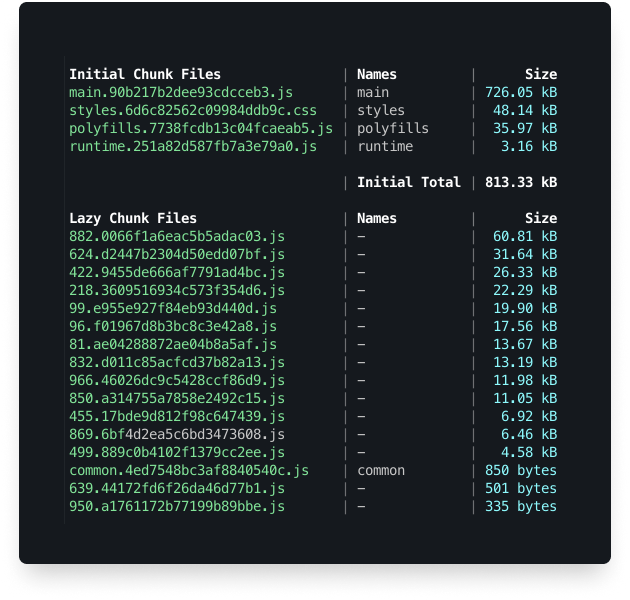
Bundle Size
The bundle size is pretty slim for the kind of application we have. You can also see that the styles css is around ~50KB thanks to Tailwind
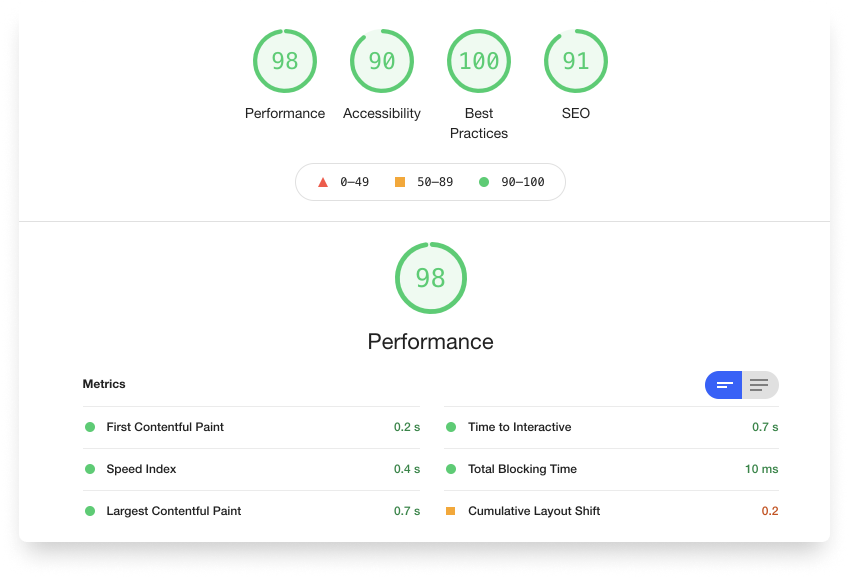
Lighthouse Score
The scores are pretty good too with a lot of room for improvements.
Getting Started
To get a local copy up and running follow these simple steps.
Installation
Clone the repo
git clone https://github.com/adisreyaj/compito.gitInstall NPM packages
npm installRun the docker-compose script to initialize the local db
sudo docker-compose up -dConfigure the environment variables
DATABASE_URL=postgresql://<username>:<password>@localhost/compito
ADMIN_PASS=<admin_pass>

AUTH0_AUDIENCE=<audience>
AUTH0_ISSUER_URL=https://<your_domain>.us.auth0.com/
AUTH0_DB=<database_name>
AUTH0_DOMAIN=<your_domain>.us.auth0.com
AUTH0_CLIENT_ID=<machine_to_machine_client_id>
AUTH0_CLIENT_SECRET=<machine_to_machine_client_id>
# for dev env
AUTH0_MANAGEMENT_TOKEN=<managment_api_token>

# secret used to encode the session token in Auth Action
SESSION_TOKEN_SECRET=<action_secret>
Run the UI
npm startRun the API server
npm start api
Setting up Auth0
Auth0 is used for authenticating the users. You'll need to setup few things in Auth0 before running the application.
Login/Signup to Auth0
Create two applications:
- A Single Page application
- A Machine to Machine application
In the Single page application make sure to provide the urls:
Allowed Callback URLshttp://localhost:4200Allowed Web Originshttp://localhost:4200Allowed Logout URLshttp://localhost:4200/auth/login
Create an API in Auth0
The identifier that of the API will be the
audienceUnder the
Machine to Machine Applicationstab, make sure our M-M application is enabled.Under
Authentication>Database, make sure in theApplicationstab, both the Application has been enabled.
Blog
Read more about this project and how to setup here: https://blog.sreyaj.dev/compito-project-management-app-angular-nestjs-auth0
Roadmap
See the open issues for a list of proposed features (and known issues).
License
Distributed under the MIT License. See LICENSE for more information.
Show your support
Please ⭐️ this repository if this project helped you!