
a1anyip/AYVibrantButton
a1anyip/AYVibrantButton has 1,126 GitHub stars and 66 forks. GitHot measured 0 stars in 24 hours. Last checked 2026-11-09 09:33 UTC. Last push 2016-10-09.
A stylish button with iOS 8 vibrancy effect
Measured star growth
- in 24h
- 0
- in 7 days
- Update delayed
- in 15 days
- Update delayed
- in 1 month
- Update delayed
Net star changes over overlapping periods, not daily totals. Missing measurements are left blank. Stars measure attention, not software quality.
README.md
OriginalAYVibrantButton
AYVibrantButton is a stylish button with iOS 8 vibrancy effect. It is a subclass of UIButton that has a simple yet elegant appearance and built-in support for UIVisualEffectView and UIVibrancyEffect classes introduced in iOS 8. Yet, it can be used on iOS 7 without the vibrancy effect.
Configurations
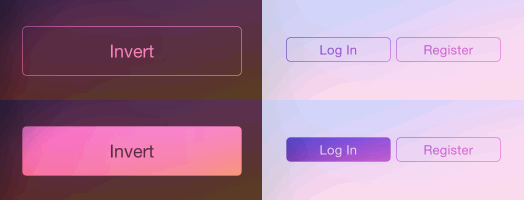
Vibrant buttons can be configured with one of the three supported button styles, invert, translucent and fill (see examples below).
Some basic properties like icon, text, font, alpha, corner radius, border width and background color (for no vibrancy effect) can all be changed easily.
The default vibrancy effect is for blur effect UIBlurEffectStyleLight. It could be set to any UIVibrancyEffect instance. For today extensions, it should be set to [UIVibrancyEffect notificationCenterVibrancyEffect].
Note
Though vibrant buttons can be placed anywhere, it is recommended that vibrant buttons with vibrancy effects should be placed in the contentView of UIVisualEffectView (except in today view).
UIVisualEffectView can be created as follows.
UIVisualEffectView *effectView = [[UIVisualEffectView alloc] initWithEffect:[UIBlurEffect effectWithStyle:UIBlurEffectStyleExtraLight]];
effectView.frame = self.view.bounds;
[self.view addSubview:effectView];
Installation
CocoaPods
Add the following line to the Podfile.
pod "AYVibrantButton"
Manual Installation
Simply add AYVibrantButton.h and AYVibrantButton.m to your project.
Examples
The following images show the normal and highlighted (being pressed) button appearances.
Invert style with vibrancy effect


AYVibrantButton *invertButton = [[AYVibrantButton alloc] initWithFrame:CGRectZero style:AYVibrantButtonStyleInvert];
invertButton.vibrancyEffect = [UIVibrancyEffect effectForBlurEffect:[UIBlurEffect effectWithStyle:UIBlurEffectStyleExtraLight]];
invertButton.text = @"Invert";
invertButton.font = [UIFont systemFontOfSize:18.0];
[effectView.contentView addSubview:invertButton];
```
### Translucent style with vibrancy effect


````objective-c
AYVibrantButton *translucentButton = [[AYVibrantButton alloc] initWithFrame:CGRectZero style:AYVibrantButtonStyleTranslucent];
translucentButton.vibrancyEffect = [UIVibrancyEffect effectForBlurEffect:[UIBlurEffect effectWithStyle:UIBlurEffectStyleExtraLight]];
translucentButton.text = @"Translucent";
translucentButton.font = [UIFont systemFontOfSize:18.0];
[effectView.contentView addSubview:translucentButton];
```
### Translucent style without vibrancy effect


````objective-c
AYVibrantButton *button = [[AYVibrantButton alloc] initWithFrame:CGRectZero style:AYVibrantButtonStyleTranslucent];
button.vibrancyEffect = nil;
button.text = @"Any Color";
button.font = [UIFont systemFontOfSize:18.0];
button.tintColor = [UIColor blackColor];
[effectView.contentView addSubview:button];
```
## Changelog
### 1.0.4
* Added `invertAlphaHighlighted` property
* Changed the super class from `UIButton` to `UIControl`
* Changed `backgroundColor` to `tintColor`
### 1.0.3
* Added a new button style `AYVibrantButtonStyleFill`
* Fixed an issue that setting button alpha removes the vibrancy effect
### 1.0.2
* Support setting icon image
## Creator
**Alan Yip**
* [http://alanyip.me](http://alanyip.me)
* [@tweakcc](https://twitter.com/tweakcc)
## License
```
The MIT License (MIT)
Copyright (c) 2014 Alan Yip
Permission is hereby granted, free of charge, to any person obtaining a copy
of this software and associated documentation files (the "Software"), to deal
in the Software without restriction, including without limitation the rights
to use, copy, modify, merge, publish, distribute, sublicense, and/or sell
copies of the Software, and to permit persons to whom the Software is
furnished to do so, subject to the following conditions:
The above copyright notice and this permission notice shall be included in all
copies or substantial portions of the Software.
THE SOFTWARE IS PROVIDED "AS IS", WITHOUT WARRANTY OF ANY KIND, EXPRESS OR
IMPLIED, INCLUDING BUT NOT LIMITED TO THE WARRANTIES OF MERCHANTABILITY,
FITNESS FOR A PARTICULAR PURPOSE AND NONINFRINGEMENT. IN NO EVENT SHALL THE
AUTHORS OR COPYRIGHT HOLDERS BE LIABLE FOR ANY CLAIM, DAMAGES OR OTHER
LIABILITY, WHETHER IN AN ACTION OF CONTRACT, TORT OR OTHERWISE, ARISING FROM,
OUT OF OR IN CONNECTION WITH THE SOFTWARE OR THE USE OR OTHER DEALINGS IN THE
SOFTWARE.
```
Explore related projects
codecrafters-io/build-your-own-x
Master programming by recreating your favorite technologies from scratch.
561,375 starspublic-apis/public-apis
A collective list of free APIs
497,650 starsmorluto/rea
Reverse engineer anything with agents, from app behavior down to native binaries.
447,211 starsopenclaw/openclaw
The AI that really does things. Any OS. Any Platform. The lobster way. 🦞
394,260 stars