
ZiChuanLan/agent-purge
ZiChuanLan/agent-purge has 1,706 GitHub stars and 993 forks. GitHot measured +68 stars in 24 hours. Last checked 2026-11-13 00:43 UTC. Last push 2026-11-09.
One persona, many coding agents. Replace or inject system prompts across codex, claude, opencode, grok, omp, hermes, pi, zcode - with a local web console.
Measured star growth
- in 24h
- +68
- in 7 days
- Collecting history
- in 15 days
- Collecting history
- in 1 month
- Collecting history
Net star changes over overlapping periods, not daily totals. Missing measurements are left blank. Stars measure attention, not software quality.
README.en.md
Originalagent-purge
One persona to govern multiple coding agents.


Quick Start · Personas & Modes · Application Scopes · Supported Harnesses · Pause & Uninstall · Legal & Disclaimer
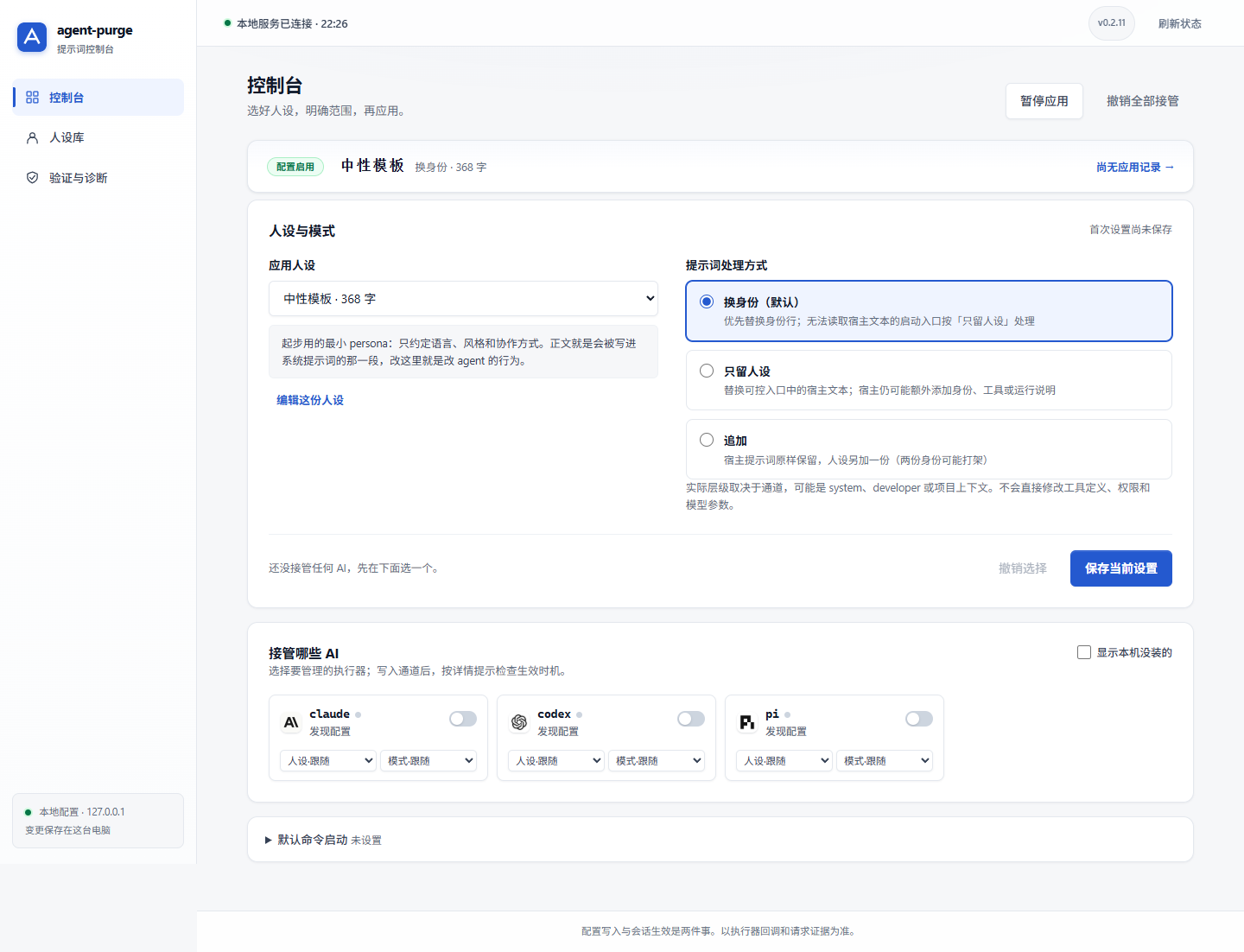
agent-purge is a local prompt configuration and persona orchestration tool that provides a unified persona gateway for coding agents such as Codex, Claude Code, OpenCode, pi, DeepSeek Harness, WorkBuddy, and Kilo Code. You can configure everything through a modern Web dashboard or launch agents directly via CLI; each harness retains its native tools, models, and workflows.
Key Capabilities
- Single configuration, multiple entry points: CLI and Web dashboard share unified persona and armed state, supporting single-shot launches, persistent host configs, session extensions, and project-level rule files.
- Per-harness autonomy: Harnesses follow global settings by default, or can be assigned individual personas and injection modes.
- Hot-switching with transparent boundaries: Harnesses with per-turn dynamic callbacks reflect prompt updates on the next turn; static configuration entry points require a new session.
- Traceable and reversible changes: Complete ledger tracking of managed files and stashed backups. User modifications are preserved and recovery conflicts produce explicit reports without data corruption.
- Local-first, zero production dependencies: No external cloud service required. Personas and states are stored locally; updates never overwrite user configurations.
Quick Start
Requires Node.js 20+ and your target coding agents installed locally.
npm install -g agent-purge
agent-purge web
Or run directly without global installation:
npx agent-purge web
- Edit the starter persona template or create a new one in the Persona Library.
- Go to the Console, select your active persona and mode, save, and arm target harnesses.
- Follow the harness-specific guidance to reload plugins or start a new session.
The default console runs at http://127.0.0.1:7788. On first launch, it will not automatically arm any harness.
Other Installation Methods: Windows Installer, Portable Package, Headless Environments
| Format | Requirements | Typical Use Case |
|---|---|---|
| npm | Node.js 20+ | Standard cross-platform installation and updates |
agent-purge-<version>-setup.exe |
Windows, external Node.js 20+ | GUI installer and uninstaller |
agent-purge-<version>.zip |
Windows, external Node.js 20+ | Portable archive |
agent-purge.exe |
Windows x64, standalone runtime | Fully self-contained portable executable without Node installed |
Download binaries from GitHub Releases. Check SHA-256 digests before running. For headless/SSH/WSL environments, run with agent-purge web --no-open. The Web interface binds exclusively to loopback (127.0.0.1).
Personas and Modes
Persona markdown files define prompts delivered to agents. Name and descriptions are for management purposes.
agent-purge ls                       # List available personas
agent-purge use <id>                 # Switch active persona and sync armed scopes
agent-purge mode append              # Change global injection mode
agent-purge use <id> --for codex     # Assign persona specifically to Codex
agent-purge use follow --for codex   # Restore Codex to follow global persona
Four Injection Modes
| Mode | Behavior | Notes |
|---|---|---|
replace (Default) |
Replaces host identity lines while preserving other instructions | Approximate detection; launch-arg harnesses without prompt-reading fall back to strict |
strict |
Replaces controllable host prompt with persona text | Clears existing host instructions; host may still prepend wrapper prompts |
append |
Appends persona text while retaining host instructions | Retains original identity; watch out for conflicting instructions |
off |
Disables prompt injection for target entry points | Global pause vs single-shot flags operate on different scopes |
Strict does not guarantee the model only receives your persona. The effective role may be system, developer, or project context depending on the harness and channel. When in doubt, try append first.
Application Scopes
For one-off tasks, run agents directly via agent-purge without registering persistent channels:
agent-purge codex --mode append
agent-purge pi --ask "Explain this repository"
agent-purge codex -- --help          # Arguments after -- are passed to the host agent
To arm regular agent launches with your persona, choose from the four available channels:
| Channel | Function | Effective Timing |
|---|---|---|
install |
Writes managed configs, plugins, or identity context | Static configs take effect on next session; dynamic plugins read on next turn |
shim |
Forwards execution via prepended PATH shim command | Takes effect on next command invocation |
slash |
Registers in-session /purge command extension |
Available within active session according to host extension lifecycle |
project |
Writes managed rules block into project rule files (AGENTS.md / CLAUDE.md) |
New sessions started within that project directory |
agent-purge install codex
agent-purge arm pi --slash
agent-purge project on pi --dir /path/to/project
agent-purge status
arm <h> attempts to enable all compatible persistent, shim, and slash channels for that harness. Project-level rule channels are managed separately.
Supported Harnesses
The following table summarizes verification status across supported agents. Request-level verification confirms prompt presence in actual outgoing network requests under isolated providers.
| Harness | Verified Version | In-Session Hot-Switching |
|---|---|---|
| pi / omp | 1.4.0 / 18.14.1 | Verified (Dynamic extension callback) |
| OpenCode 1.x / 2.x | 1.19.5 / 2.2.5 | Verified |
| DSH (DeepSeek Harness) | 0.2.1-rc.5 | Verified (SDK in-session; Headless, Web, and Desktop all verified via live request capture) |
| Codex / Claude Code | 0.166.0 / 2.1.316 | Launch entry verified; hot-switching unverified |
| CodeBuddy / Grok | 2.179.0 / 1.0.73 | Launch entry verified; hot-switching unverified |
| Kilo Code | @kilocode/cli 7.8.18 | All 4 modes verified via live capture; marker confirmed in system layer |
| WorkBuddy / WorkBuddy AI | 5.9.3 / 5.9.4 | Identity context verified (IDENTITY.md, SOUL.md, USER.md & customPrompt; the international build stores it in app/app-config.json); hot-switching unverified |
Detailed compatibility notes, request role mappings, and known limitations are documented in docs/compatibility.md.
Pause and Uninstall
| Goal | Command | User Personas |
|---|---|---|
| Temporarily pause / resume all channels | agent-purge pause / agent-purge resume |
Retained |
| Uninstall single harness persistent config | agent-purge uninstall dsh |
Retained, other channels untouched |
| Disarm all channels for a harness | agent-purge disarm dsh |
Retained |
| Clean up all registered managed takeovers | agent-purge clean |
Retained |
When uninstalling npm package, clean up managed hooks first:
agent-purge clean
npm uninstall -g agent-purge
The Windows installer uninstaller also cleanly restores original configurations and preserves user personas.
Privacy and Usage Boundaries
- Local governance: Data defaults to
~/.agent-purge/(Windows:C:\Users\<User>\.agent-purge\). Configurable viaAGENT_PURGE_HOME. Software upgrades never overwrite user data. - Model requests still connect to the network: When armed, persona text is sent alongside agent prompts to your configured upstream model provider. Local configuration does not mean offline AI execution.
- No privilege escalation or security bypass: This tool manages configuration entry points and prompts; it does not tamper with host licenses or bypass upstream security controls.
Legal and Disclaimer
- Authorized Use Only: Comply with applicable laws and the terms of service of your host tools and model providers. Do not use for unauthorized access, data exfiltration, or illegal activities.
- Assess Risks Before Use: Prompt modifications alter model behavior and tool invocations. Always test in isolated environments and verify critical outputs.
- Provided AS-IS: Licensed under the MIT License. Refer to docs/LEGAL.md for full legal statements.
License and Community
Licensed under the MIT License. Full legal statements are in docs/LEGAL.md.
Special thanks to the LINUX DO community and all contributors who report issues and enhance compatibility.
Explore related projects
freeCodeCamp/freeCodeCamp
freeCodeCamp.org's open-source codebase and curriculum. Learn math, programming, and computer science for free.
459,070 starsdonnemartin/system-design-primer
Learn how to design large-scale systems. Prep for the system design interview. Includes Anki flashcards.
377,731 starsreact/react
The library for web and native user interfaces.
252,565 starsvuejs/vue
This is the repo for Vue 2. For Vue 3, go to https://github.com/vuejs/core
212,527 stars