Yue-plus/hexo-theme-arknights
Yue-plus/hexo-theme-arknights has 880 GitHub stars and 95 forks. Star changes are not measured yet. Last checked 2026-11-14 18:20 UTC. Last push 2026-11-05.
Measured star growth
- in 24h
- Collecting history
- in 7 days
- Collecting history
- in 15 days
- Collecting history
- in 1 month
- Collecting history
Net star changes over overlapping periods, not daily totals. Missing measurements are left blank. Stars measure attention, not software quality.
About
明日方舟罗德岛阵营的 Hexo 主题,支持数学公式、Mermaid图表、多种评论系统(Valine、Gitalk、Waline、Artalk、Utterances、Giscus)
Creative & MediaREADME.en.md
Originalhexo-theme-arknights
Preview
Here are all the friendship links of this theme:
Dr.Yue_plus: http://arknights.theme.hexo.yue.zone/
Dr.Ocatator https://ocatator.github.io/
- Dr.Ye: https://laurenfrost.github.io/
- Dr.tyqtyq https://tyq0712.github.io/
- Dr.Angine https://angine.tech/
- Dr.sjfhsjfh https://sjfh.top/
- Dr.Voilone https://note.voiblog.top/
- Dr.yuanli-LFSWhttps://blog.yuanli-lfsw.com/
- Dr.Laplacian: https://rhinelab.kr
- Dr.Chen: https://light-of-hers.github.io
- Dr.Linyee https://linyee.world/
- Dr.Flacier https://flacier.us.kg/
- Dr.LZW https://lzwnb.github.io/blog/
- Dr.GrandpaFox https://grandpafox.online/
- Dr.未雨屏 https://weiyuping.top/
- 飞龙project https://schale.top/
- tomorinao-www https://ghpage.wwnao.xyz
- Mornikar https://mornikar.github.io/Mornikar/
If you're using this theme, we warmly welcome you to initiate Pull Requests to post friends' links here.
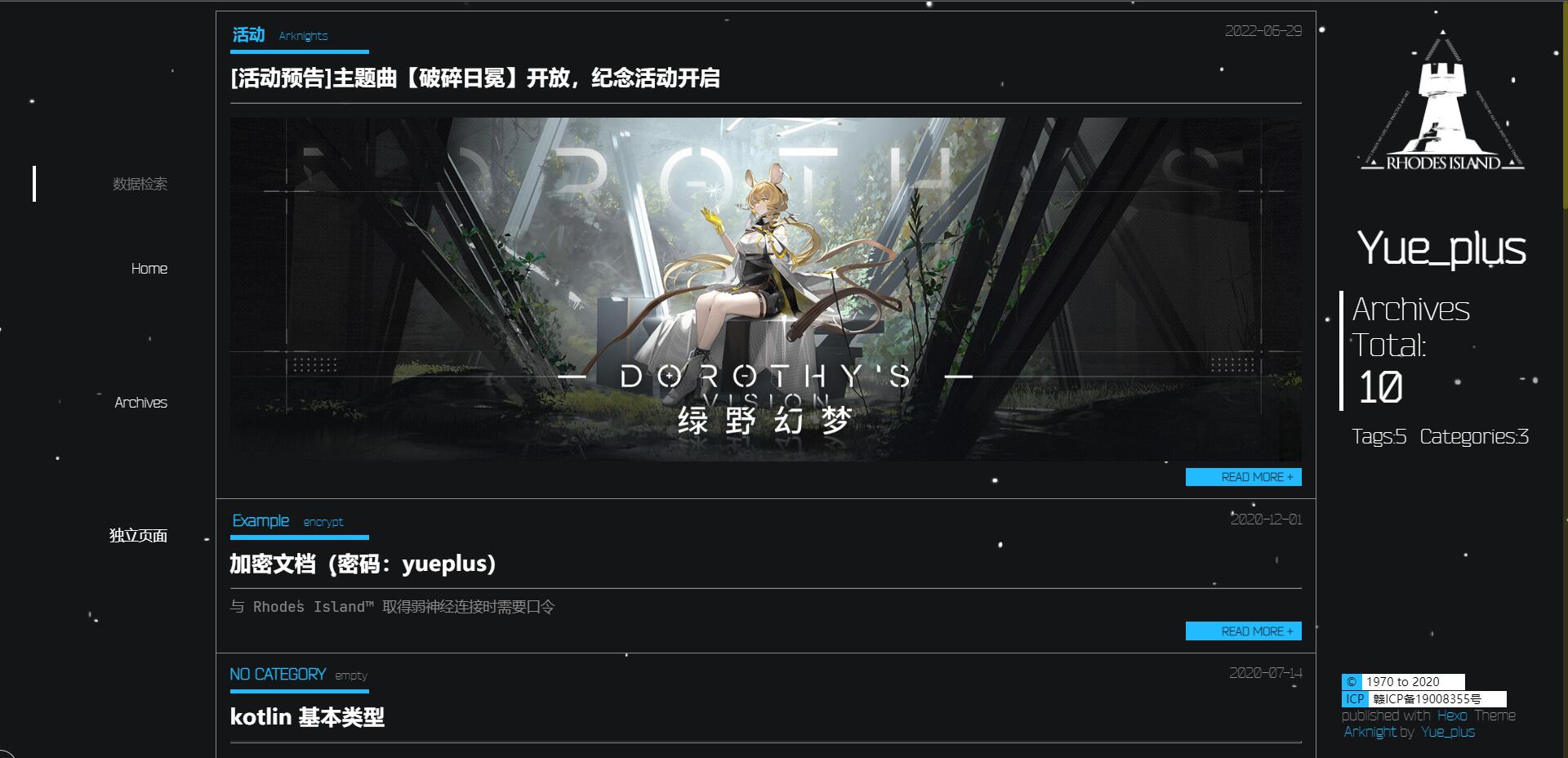
Install
System requirements
- Node.js >=
16.13.x - Newest Hexo
Hexo >=
6.0.0; hexo-cli >=4.3.0;
Use hexo-cli to create a new blog project
hexo init Hexo
cd Hexo
npm install
git clone https://github.com/Yue-plus/hexo-theme-arknights.git themes/arknights --depth=1
Install dependencies
For npm users:
npm install hexo-server hexo-browsersync hexo-renderer-pug --save
For yarn users:
yarn add hexo-server hexo-browsersync hexo-renderer-pug
Edit configurations
Edit
_config.ymlunder folderHexo/. You can refer to Hexo.Change the default value of
theme:fromlandscapetoarknightsEnable code highlighting:
highlight:
  hljs: true
Move
Hexo/themes/arknights/_config.ymlto the root directory of Hexo, and rename it to_config.arknights.yml.Please refer to:
The configuration file of the theme can be modified by referring to the Chinese comments.
Referrer policy (external images)
Set referrer in Hexo/_config.arknights.yml to control the referrer information sent by the browser in the Referer header when requesting resources and following links. It is empty by default: the theme emits no referrer meta tag and leaves the browser's existing policy in place.
Some image hosts, such as web.hycdn.cn, restrict hotlinking based on the referrer. An image may open on the original site but fail to load in your blog. In this case, you can try omitting referrer information:
referrer: no-referrer
This adds <meta name="referrer" content="no-referrer"> to the page's <head>, covering article images as well as full-size images and thumbnails loaded by lightgallery. Regenerate and deploy the site for the change to take effect; restart the service if you use hexo server.
no-referrerapplies to the entire page, not just images: outgoing links also omit referrer information. Third-party services that rely onReferer, such as comment systems with referrer-based domain checks, may be affected. Leavereferrerempty to restore the previous policy.
See MDN's Referrer-Policy documentation for other supported values and their behavior.
Edit asset files
The following files can be added to the Hexo/source directory as needed:
CNAME: Custom domain name when GitHub Pages is deployed- The
Alipay.pngandWeChat.pngin theimg/directory are your own QR codes (1:1 scalepngimages);
You can modify the Hexo/themes/arknights/source/ directory as needed:
favicon.ico: Icons on browser tabs (64*64, not displayed if the resolution is high)README.md: README for deployment repository
Writing
Please refer to Hexo | Writing.
There are some sample texts available in the Hexo branch.
To add tags and categories, or for more features, please refer to Hexo | Front-matter. Example:
---
title: 'Hello World !'
date: 2020-04-15 21:54:02
tags: code
category: Example
---
The content before
<!-- more -->is called a summary. It will be displayed on the home page, and you can set whether it is also displayed in the main body of the article.
Custom pages in the top navigation bar
Example: Creating an
aboutpage- Run the commands
hexo new page 'about'inHexodirectory - Hexo will create an
aboutfolder inHexo/source/
- Run the commands
Edit file
Hexo/source/about/index.mdEdit
_config.arknights.yml, and add a link there:menu: About: /about
Disable Archive Page Turning
This setting is located in the Hexo configuration file _config.yml about line 88.
# Pagination
## Set per_page to 0 to disable pagination
per_page: 10
pagination_dir: page
Change per_page: to 0.
Comment systems
Valine
The theme supports Valine.
Please refer to Valine Quick Start and edit _config.arknights.yml in your Hexo directory:
valine:
  enable: false
  app_id: # APP ID
  app_key: # APP KEY
  server_url: # APP DOMAIN (LeanCloud international version requires this)
  avatar: 'retro' # (''/mp/identicon/monsterid/wavatar/robohash/retro/hide)
  avatar_cdn: 'https://dn-qiniu-avatar.qbox.me/avatar/' # Custom avatar cdn
For notifications with email: zhaojun1998 / Valine-Admin
Note!
server_url:is ONLY required when using LeanCloud international version. This setting can be found in the LeanCloud application inSettings -> Application Credentials -> Domain Whitelist -> Request Domainfor the domain name ending in '.api.lncldglobal.com' and add the 'https:' prefix.
Gitalk
The theme supports Gitalk .
Please refer to gitalk/readme.md and edit _config.arknights.yml in your Hexo directory:
gitalk:
  enable: false
  client_id: # GitHub Application Client ID
  client_secret: # GitHub Application Client Secret
  repo: # GitHub repository
  owner: # GitHub repository owner
  admin: [] # GitHub repository owner and collaborators (Users who having write access to this repository)
            # Example: [adminA,adminB]
  id: # The unique id of the page
      # Example: location.pathname
Waline
The theme supports Waline.
Please refer to Waline docs and edit _config.arknights.yml in your Hexo directory
waline:
  enable: false
  server_url: #Server_Url
  locale:
  placeholder: "Looking forward to your comments~"
    # sofa: "Be the first to comment~"
    # nick: "Nickname"
    # mail: "Email"
    # link: "Link"
    # submit: "Submit"
Waline provides a locale option for customizing the interface language and displayed text. By default, Waline uses built-in multilingual texts. If the current language is not supported, it will automatically fall back to en-US (American English).
You can override the default displayed text by setting specific fields. In the locale option, all fields are optional, and unspecified fields will retain their default values
Level Related:
level${number}: Text for level number
Reaction Related:
reactionTitle: Reaction Title
reaction0: Reaction 1 Text
reaction1: Reaction 2 Text
reaction2: Reaction 3 Text
reaction3: Reaction 4 Text
reaction4: Reaction 5 Text
reaction5: Reaction 6 Text
reaction6: Reaction 7 Text
reaction7: Reaction 8 Text
reaction8: Reaction 9 Text
UI Related:
nick: Nickname
mail: Email
link: Link
placeholder: Default comment box text
sofa: Text displayed when comment area is empty
submit: Submit button text
comment: Comment button text
refresh: Refresh button text
more: Load More button text
uploading: Text displayed during upload
login: Login button text
admin: Admin label
sticky: Pinned text
word: Word
anonymous: Default name for anonymous user
optional: Text indicating an optional field
gifSearchPlaceholder: GIF search placeholder text
oldest: Oldest comments
latest: Latest comments
hottest: Hottest comments
The text for the settings above will be displayed on the page.
Notification Related:
nickError: Error message for invalid nickname
mailError: Error message for invalid email
wordHint: Error message for comment word count. $0, $1, $2 will be automatically replaced with the minimum allowed words, maximum allowed words, and current word count respectively.
Comment Time Related:
seconds: seconds ago
minutes: minutes ago
hours: hours ago
days: days ago
now: Just now
Moderation Related:
approved: Approved
waiting: Pending Review
spam: Spam
unsticky: Unpin
Accessibility Related (For enhancing accessibility services only, not displayed on the page):
like: Like text
cancelLike: Cancel Like text
reply: Label text for reply button
cancelReply: Label text for cancel reply button
preview: Label text for preview button
emoji: Label text for emoji button
gif: Label text for GIF button
uploadImage: Label text for upload image button
profile: Label text for profile page
logout: Label text for logout button
Artalk
The theme supports Artalk.
Please refer to Artalk docs and edit _config.arknights.yml in your Hexo directory.
artalk:
  enable: false
  server: https://artalk.server.instance/ # 你的 Artalk 服务地址
  site_name: My Blog # 站点名称,用于区分多个站点(可选)
Utterances
The theme supports Utterances.
Please refer to Utterances docs and edit _config.arknights.yml in your Hexo directory:
utterances:
  enable: false
  repo: # GitHub repository owner and name, format: owner/repo
  issue_term: pathname # Options: pathname | url | title | og:title
  theme: github-light # Options: github-light | github-dark | preferred-color-scheme | github-dark-orange | icy-dark | dark-blue | photon-dark | boxy-light
Before using, you need to:
- Ensure the GitHub repository is public
- Install the utterances app in your repository
- Ensure Issues are enabled for the repository
Giscus
The theme supports Giscus comment system.
Please refer to Giscus official documentation and edit _config.arknights.yml in your Hexo directory:
Basic Configuration
giscus:
  enable: false
  repo: # GitHub repository owner and name, format: owner/repo
  repo_id: # Repository ID, get it from giscus page
  category: # Discussion category name
  category_id: # Category ID, get it from giscus page
  mapping: pathname # Page ↔️ discussion mapping
  strict: 0 # Enable strict title matching: 0 | 1
  reactions_enabled: 1 # Enable reactions on main post: 0 | 1
  emit_metadata: 0 # Emit discussion metadata: 0 | 1
  input_position: bottom # Comment input position: top | bottom
  lang: en # Language
  loading: lazy # Lazy loading: lazy | leave empty to disable
  crossorigin: anonymous # CORS setting
Theme Configuration (Choose One)
Option 1: Single Theme (Fixed theme, doesn't follow site theme)
giscus:
  theme: preferred_color_scheme # or other theme name
Option 2: Separate Light/Dark Themes (Recommended, supports auto theme switching)
giscus:
  theme_light: light # Light mode theme
  theme_dark: dark # Dark mode theme
Option 3: Custom CSS (Advanced usage)
giscus:
  theme: https://your-domain.com/path/to/custom-giscus-theme.css
Available Theme Options
- GitHub Theme Series:
light,dark,dark_dimmed,dark_high_contrast,dark_tritanopia,light_high_contrast,light_tritanopia,light_protanopia,dark_protanopia - Special Themes:
preferred_color_scheme,transparent_dark - Borderless Themes:
noborder_light,noborder_dark,noborder_gray - Third Party Themes:
gruvbox,gruvbox_dark,gruvbox_light,purple_dark,cobalt - Catppuccin Themes:
catppuccin_latte,catppuccin_frappe,catppuccin_macchiato,catppuccin_mocha - Others:
fro
Mapping Options
giscus:
  mapping: pathname # Available options:
    # pathname - Use page path
    # url - Use full URL
    # title - Use page title
    # og:title - Use og:title meta tag
    # specific - Use specific string (requires term)
    # number - Use specific discussion number (requires discussion_number)

  # Used when mapping is specific
  term: "your-specific-term"

  # Used when mapping is number
  discussion_number: 123
Advanced Configuration Options
giscus:
  # Custom discussion description
  description: "Comments"

  # Domain restriction
  origin: "https://your-domain.com"

  # Custom backlink
  backlink: "https://your-domain.com"
For better security control, create source/giscus.json file in your site root:
{
  "origins": ["https://your-domain.com"],
  "originsRegex": ["http://localhost:[0-9]+"],
  "defaultCommentOrder": "newest"
}
Domain validation priority: YAML config > JSON exact match > JSON regex match > default allow
Message Events API
// Listen to message events
giscusManager.addMessageHandler((data) => {
  console.log('Giscus message:', data)
})

// Update configuration
giscusManager.sendMessage({ setConfig: { theme: 'dark' } })

// Sync theme
giscusManager.syncTheme()
Before using, you need to:
- Ensure the GitHub repository is public
- Install the giscus app in your repository
- Ensure Discussions are enabled for the repository
Mathematical formulas
The theme supports two scenarios for displaying math formulas:
Option 1: Static rendering
You can use hexo-filter-mathjax filter to render math formulas statically:
It is recommended to replace the markdown renderer hexo-renderer-pandoc that can better handle mathematical formulas first.
Run the following commands in your Hexo directory:
# Install hexo-filter-mathjax
cnpm install hexo-filter-mathjax --save
# Clean the cache
hexo clean
Add the following into
Hexo/_config.yml:mathjax: tags: none # or 'ams' or 'all' single_dollars: true # use single '$' as inline math formula delimiter cjk_width: 0.9 # Relatively CJK character width normal_width: 0.6 # Relatively normal width append_css: true # Add CSS to every pages every_page: false # If true, then every page will be rendered by mathjax, regardless of the `mathjax` setting in the front-matter of each articleAdd
mathjax: truein the Front-matter of article that requires mathjax to be enabled:--- title: On the Electrodynamics of Moving Bodies categories: Physics date: 1905-06-30 12:00:00 mathjax: true ---Then, you can use LaTeX in your articles.
Please note that inline math formulas (…
$<math formula>$...) cannot have spaces after the opening$and before the closing$! For example:- $ \epsilon_0 $ + $\epsilon_0$ - $ \frac{\partial}{\partial t} $ + $\frac{\partial}{\partial t}$Be aware of the conflict between LaTeX and Markdown syntax. Use
\to escape if necessary:- $\epsilon_0$ + $\epsilon\_0$ - \begin{eqnarray*} + \begin{eqnarray\*}
Option 2: Dynamic rendering
The theme also supports MathJax, to dynamically render formulas as the user browses:
First, uninstall the hexo-renderer-marked renderer that comes with Hexo by default, and replace with hexo-renderer-kramed with better MathJax support:
npm uninstall hexo-renderer-marked --save
npm install hexo-renderer-kramed --save
Edit
_config.arknights.ymlin your Hexo directory:# Formula support mathjax: - enable: false + enable: true version: '2.6.1' # importantThen, you can use LaTeX in your articles:
% Single-line inline formula
% Note that you need to put "`" on both sides, and there can be no space between "`" and "$"
`$\sigma$`

% Multi-line formula
$$
\begin{aligned}f(x) &= \sum_{i=1}^{\infty}{\frac{x}{2^i}} \\
&= x\end{aligned}
$$
With this scheme, there will be no conflict between LaTeX and Markdown syntax. Escaping is not required to use LaTeX syntax in the text.
The following formulas can be used directly without any problems:\epsilon_0 \begin{eqnarray*}
The hexo-renderer-kramed plugin has other configurable items, please refer to the plugin documentation: https://github.com/sun11/hexo-renderer-kramed
Advantages and disadvantages of these formula display schemes:
- Dynamic rendering does not require escaping, and can better support Markdown files exported from other places. But since it needs to be rendered in the browser, the page display will be slightly delayed.
- The static rendering compiles the formula directly into the static file, which has better display performance, but the syntax needs to be escaped.
- hexo-renderer-pandoc quickly displays formulas without having to go through the hassle of escaping syntax, but requires Pandoc to be installed.
Chart support
Edit _config.arknights.yml in your Hexo directory:
  # Chart support
  mermaid:
-   enable: false
+   enable: true
    version: '8.13.5'
The theme renders various charts via mermaid-js. Examples
Supports: Flow Chart | Sequence Diagram | Class Diagram | State Diagram | Entity Relationship Diagram | User Journey Map | Gantt Chart | Instruction Map | Pie Chart
Syntax:
<div class="mermaid">
  graph LR
  A[Hard edge] -->|Link text| B(Round edge)
  B --> C{Decision}
  C -->|One| D[Result one]
  C -->|Two| E[Result two]
</div>
It is also fully supported if you are used to using
code blocks.
Word count & Reading time statistics
Depends hexo-wordcount:
For npm users:
cnpm install hexo-wordcount --save
For yarn users:
yarn add hexo-wordcount
Then edit _config.arknights.yml in your Hexo directory:
post:
  count: true # Display word count
  time: true # Display reading time statistics
Views statistics
Use Vercount for page view statistics. Due to instability of the original Busuanzi service, it has been replaced with the more reliable Vercount service.
Modify the _config.arknights.yml file in the Hexo directory to enable this feature:
vercount:
  enable: false
  sitePV: true # Total Site Visits
  siteUV: true # Number of site visitors
  pagePV: true # Page Views
Document encryption
The modified hexo-blog-encrypt plugin has been adapted and integrated into this theme (currently only the default and up themes are supported).
If previously installed, please remove the
hexo-blog-encryptdependency inpackage.jsonunder the hexo directory and execute the following commandpnpm i hexo cleanFor detailed configuration reference hexo-blog-encrypt
Add the following to the Hexo/_config.yml file:
# Security
encrypt: # hexo-blog-encrypt
  abstract: Password required for weak neural connection to Rhodes Island™
  message: Please enter password for weak neural connection to Rhodes Island™
  tags:
  - {name: tagName, password: PassowrdA}
  - {name: tagName, password: PasswordB}
  wrong_pass_message: Failed to verify password with Rhodes Island™, please try again.
  wrong_hash_message: Failed to validate password with Rhodes Island™, currently viewing with temporary privileges.
Or Set the following in Front-matter of the artical:
---
title: Hello World
tags:
- Encrypted as a diary
date: 2016-03-30 21:12:21
password: mikemessi
abstract: Password required for weak neural connection to Rhodes Island™
message: Please enter password for weak neural connection to Rhodes Island™
wrong_pass_message: Failed to verify password with Rhodes Island™, please try again.
wrong_hash_message: Failed to validate password with Rhodes Island™, currently viewing with temporary privileges.
---
Searching
Searching is enabled by default. To disable it, edit your Hexo/_config.arknights.yml file:
search:
  enable: false
Build time display
You can choose to add a build time display in the sidebar. It is disabled by default. To enable it, add the following to Hexo/_config.arknights.yml:
build_time: true
Front-matter
In addition to Front-matter supported by Hexo, the theme also supports:
# Article Published/updated date
post-time: true/false

# Article reading time/word count statistics
post-count: true/false

# Article vercount counter
vercount: true/false

# Turn on/off all of the above
post-info: true/false

# Sidebar table of contents
post-index: true/false

# Rewards
reward: true/false
extra label
admonition
{% note/warning/success/failure/detail [title] [open/fold] [color] %}
content
{% end[note/warning/success/failure/detail] %}
Add block based content such as note, warning, error, etc. with icons for note/warning/success/failure and no icons for detail.
hide
{% hide content %}
Hidden content, supports markdown rendering, can have spaces, and does not require quotation marks.
link card/linkc
{% linkcard %}
Title1:
    avatar: https://someLink/someAvatar.png
    src: https://someLink/
    img: https://somelink/somePicture.png
    descr: someDescr
    style:
    	color: someColor
Title2:
    avatar: https://someLink/someName.png
    src: https://someLink/
{% endlinkcard %}
A set of friendly links can be generated, with the title and link (src) as mandatory options. Style follows CSS format.
Monaco Editor
In addition to Hexo's built-in code blocks, this theme also supports the VS Code-style Monaco Editor.
{% editor javascript %}
/* global hexo */

'use strict';

function render(data) {
    return hexo.render.renderSync({ text: data, engine: 'markdown' });
}

hexo.extend.tag.register('hide', (args) => {
    let content = ''
    args.forEach((item) => {
        content += ' ' + item
    });
    return `<span class="hide"><object>${render(content.slice(1)).trim()}</object></span>`;
})
{% endeditor %}
The editor tag supports the following parameters:
[language, [theme, [readOnly, [height]]], [...extras(key:value)]]
languagedefaults toplaintext;themedefaults tovs-dark;readOnlydefaults totrue;heightdefaults to300px.
Less commonly used options can be passed through the extras field. For example, the following example enables word wrapping when the line exceeds 40 columns:
{% editor javascript hc-black wordWrap:`wordWrapColumn` wordWrapColumn:40 wrappingIndent:`indent` %}
/* global hexo */

'use strict';

function render(data) {
    return hexo.render.renderSync({ text: data, engine: 'markdown' });
}

hexo.extend.tag.register('hide', (args) => {
    let content = ''
    args.forEach((item) => {
        content += ' ' + item
    });
    return `<span class="hide"><object>${render(content.slice(1)).trim()}</object></span>`;
})
{% endeditor %}
For more construction options see the Monaco Editor documentation; for concrete styling examples see PR #215.
Import custom CSS/JS files
You can put your own CSS snippets into Hexo/source/css/;
put JavaScript file into Hexo/source/js/;
Then edit Hexo/_config.arknights.yml:
  # Include CSS stylesheets inside `<head>` tags
  stylesheets:
  - //unpkg.com/@highlightjs/[email protected]/styles/atom-one-dark-reasonable.min.css
+ - /css/custom.css

  # Introduce JavaScript at the end of `<body>`
  scripts:
  - //unpkg.com/@highlightjs/[email protected]/highlight.min.js
+ - /js/custom.js
The resource folder is where a user stores his resources.
With the exception of the_postsfolder, files/folders and hidden files named starting with_(underscore) will be ignored. Markdown and HTML files will be parsed and put into thepublicfolder, while other files are copied over there.-- From Hexo Official Documentation
Participate in the development
Welcome to submit Issues and PR
Branch description
| Branch | Illustrate |
|---|---|
| main | A relatively stable version |
| gh-pages | gh-page hosting |
| hexo | Hexo directory, where you can fine .md files to test your theme |
Bugs and solutions that may encounter during development
Modified TS file does not take effect
TypeScript needs to be compiled manually, please install typescript globally and execute tsc in the arknights\source\js\_src directory to compile it.
Long articles are not fully rendered when running 'hexo serve --debug'
This is caused by hexo-browsersync, and will not affect the release.
Workaround: Disable the plugin. (Anyway, it doesn't affect the release, no matter what)
Documentation that may be required to participate in the development
Also quote a few big guy blogs
Developers
- ToUNVRSe
- Yue_plus
- TTsdzb
- arkerny
- DarkLingYun
- Laurenfrost
- 安擎Angine
- 飞龙project
- sjfhsjfh
- Thexvoilone
- RyoJerryYu
- wmz1024
- madisontanle
- SherkeyXD
- soundofautumn
- LongFengShuanWu
- Zhongye1
- ChisatoNishikigi73
Reward
If you enjoy this theme:
- give me a star
(/▽\)- √
ヾ(✿゚▽゚)ノ100star for a new theme~ - New theme developing:
- √
- Arknights ID of the developer:
24444750(Chinese Bilibili server) - Join Tencent QQ discussion group: 618221514
- reward/sponsor: