
YoMosa2009/Axiom
YoMosa2009/Axiom has 28 GitHub stars and 4 forks. GitHot measured 0 stars in 24 hours. Last checked 2026-11-14 09:15 UTC. Last push 2026-10-12.
Measured star growth
- in 24h
- 0
- in 7 days
- Collecting history
- in 15 days
- Collecting history
- in 1 month
- Collecting history
Net star changes over overlapping periods, not daily totals. Missing measurements are left blank. Stars measure attention, not software quality.
About
A local-first Windows AI assistant with a multi-model council pipeline, Python sandbox, web search, and cloud AI support. Free. Private. No subscriptions.
AIREADME.md
OriginalAxiom
A free, local-first AI assistant and agentic workspace for Windows.
Run GGUF models on your own hardware, point Axiom at a self-hosted endpoint, or use cloud models with your own key. Your chats, models, and data stay on your computer unless you deliberately reach out to a cloud model or a connected service.




⬇ Download Axiom for Windows
Free · Windows 10/11 (64-bit) · one-click installer
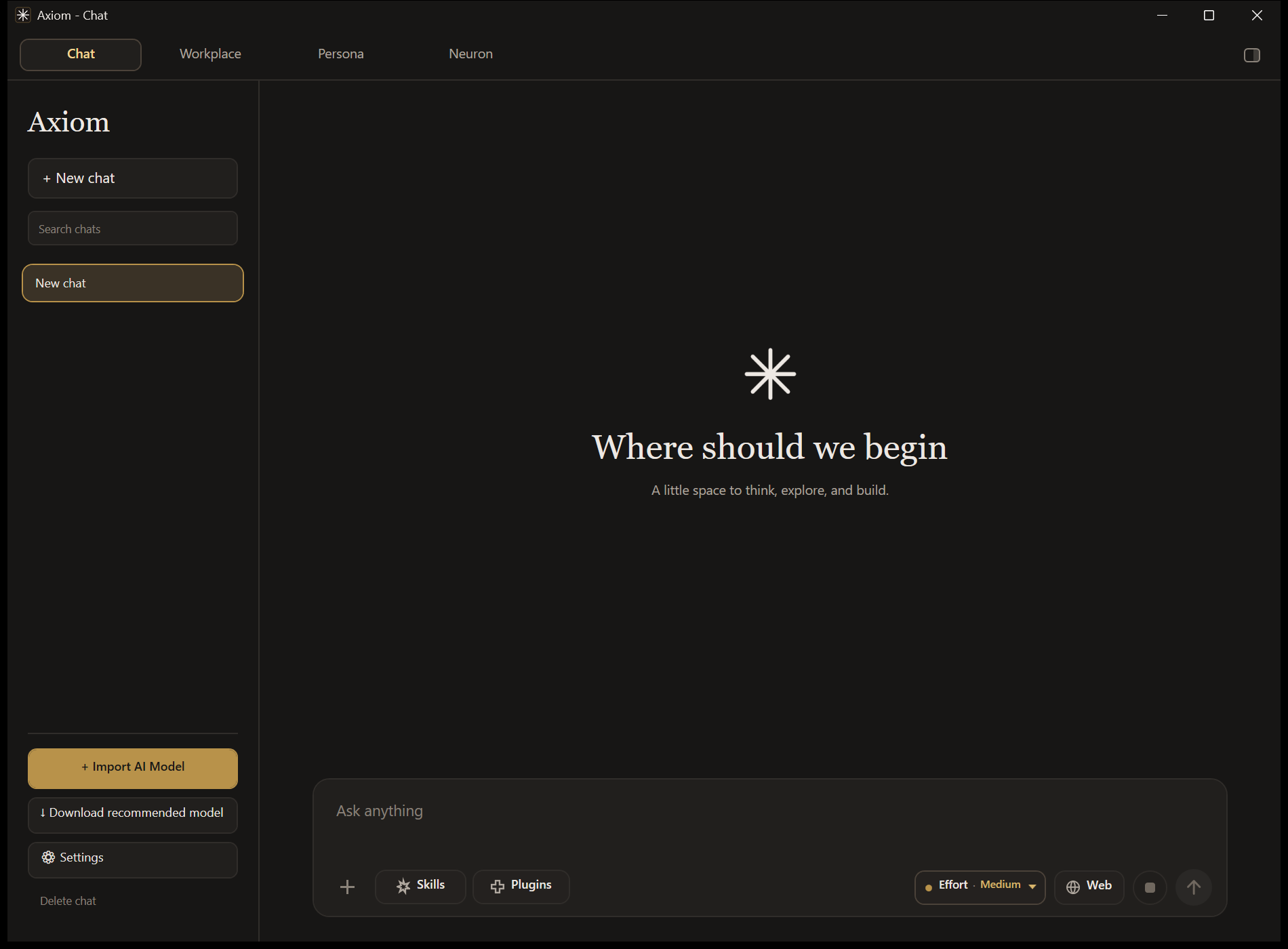
Three ways to run a model
Axiom treats all three as first-class. Attachments, Skills, tools, Project Canvas, and memory behave the same way regardless of which one is selected.
| Runs on | You need | Good for | |
|---|---|---|---|
| Local | Your GPU/CPU via llama.cpp | A GGUF model | Full privacy, offline work, no per-token cost |
| Hybrid Local | Your own server | An OpenAI-compatible endpoint | Your own hardware, accessed from anywhere |
| Cloud | OpenRouter | Your own API key | Frontier-class models when you want them |
Axiom adapts to the model it is given. It measures a local model's parameter count and scales context budgets, tool routing, and prompt complexity accordingly — so a 0.5B model and a 70B model both produce usable results instead of the small one collapsing.
Chat
The everyday surface: one conversation, one model, every tool available.
- Attachments with previews — drop in documents, spreadsheets, presentations, e-books, notebooks, source code, subtitles, or images and see a thumbnail of each one above the composer before you send.
- Positional references — say "in the 3rd attached image" or "the first PDF" and Axiom resolves which attachment you mean, on every model size.
- Tools — Python sandbox, calculator, web search, and Java execution, exposed according to the selected mode.
- Project Canvas — type
@ProjectCanvasto render the answer as a live artifact in a resizable side pane: HTML, SVG, Markdown, or interactive JavaScript. - Effort control — dial reasoning, generation, and tool budgets up or down per turn.
- Markdown and LaTeX that stay stable while you scroll, plus local chat history, persona memory, and document retrieval.
Workplace
A multi-agent workspace for work that takes more than one pass.
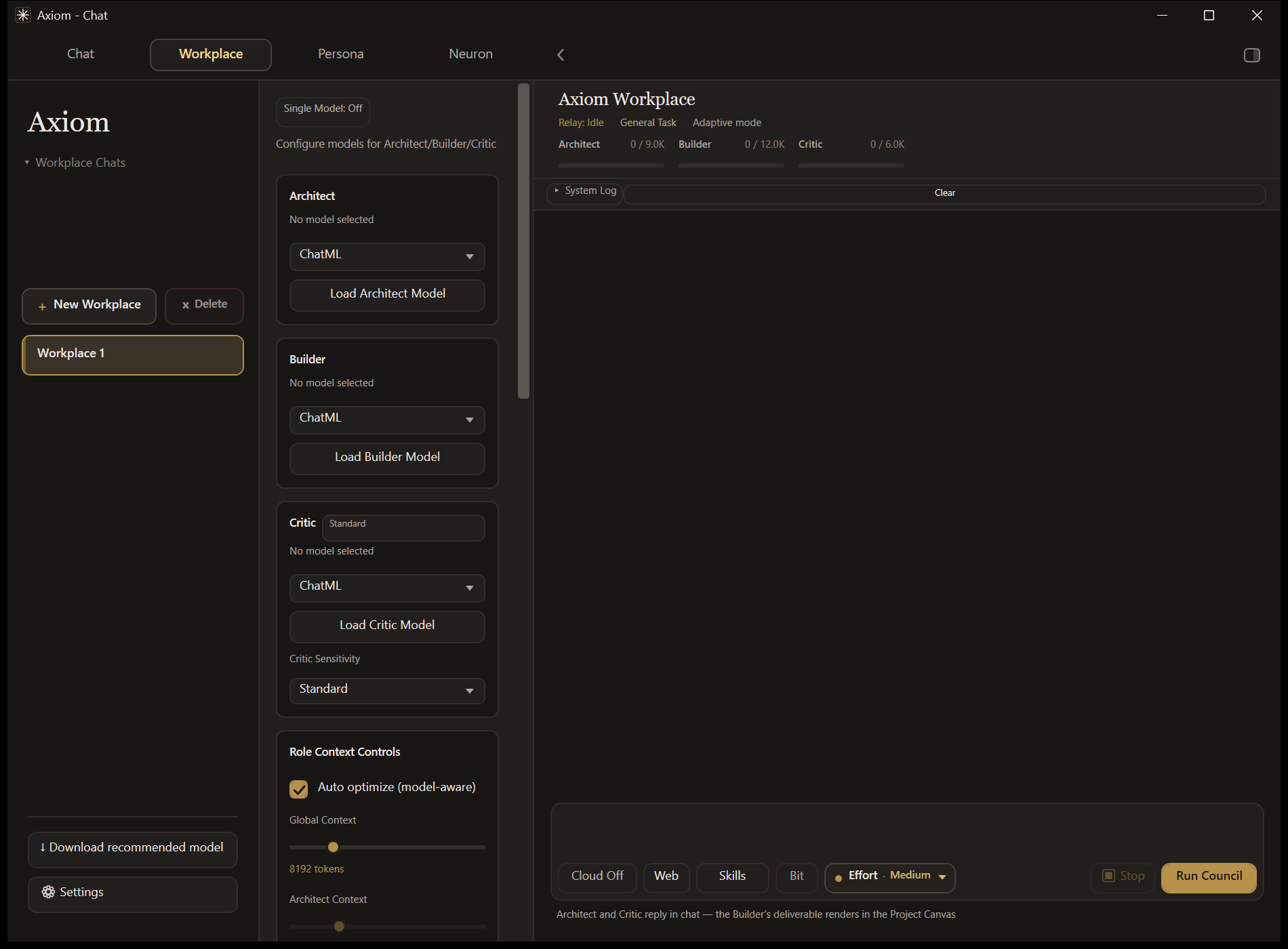
Council mode runs three roles in sequence:
- Architect plans the task.
- Builder produces the deliverable.
- Critic reviews it and can send it back for a targeted revision.
Single Model mode collapses those handoffs into one agent that plans, uses tools, executes, and verifies its own result. Switch between them from the Workplace header whenever a run isn't active.
Also in Workplace: persistent sessions, study and document preprocessing, task history, per-role context controls, live activity, completion notifications, and the Project Canvas the Builder writes into.
Files in Project Canvas
Put @ProjectCanvas in a Workplace prompt and ask for a file — "make me a requirements.txt",
"a docker-compose.yml", "the results as a csv" — and it is presented in the canvas under its
real name, with the pane opening on its own. Save offers that filename too.
Any text format works: .md, .txt, .csv, .json, .yaml, .sql, source code, and so on.
CSV renders as a table, Markdown renders, HTML and SVG keep their visual preview, and everything
else gets a monospace view. Images and other binary formats are refused with an explanation
rather than failing quietly.
Computer Use
Type @ComputerUse followed by a goal in the Workplace composer and Axiom will drive the
desktop directly — screen capture, planning, mouse and keyboard, and verification that
the action actually landed.
@ComputerUse open Notepad and type hello
It needs a vision-capable model (a cloud vision model, or a local GGUF with a projector). Axiom probes the active model first and tells you plainly why a run can't start rather than failing halfway through. Sessions run in a dedicated window with a visible pointer overlay, an action log, and safety checks on navigation and target selection.
Computer Agent
Turn it on in the Workplace sidebar and the model operates your machine the way a terminal coding agent does — running commands, reading and writing files, searching the disk — then answers from what it actually found.
It has eight tools: run_command, read_file, write_file, append_file, edit_file,
list_directory, find_files, and search_text. Long files are written in parts
(write_file, then append_file), so no single reply is cut off at the model's output limit.
Each run appears as one Agent card in the chat that fills in live — every step shows up with ✓ or ✗ the moment it finishes — and then becomes the final answer with the step list underneath. Before a run may finish, Axiom checks the claimed result against the disk: a summary that lists files that were never written, or a page that links to missing files, is sent back to the agent to fix.
You choose how much rope it gets:
| Mode | Behaviour |
|---|---|
| Manual | Stops before every command and file change. An approval bar offers Approve, Always allow this, or Deny. |
| Auto | Runs without stopping to ask. |
And how far it can reach — a folder you pick, or the entire computer. Whole-computer scope and Auto mode each need an explicit confirmation before they turn on.
Works on Local, Hybrid Local, and Cloud. Capable models get JSON tool calls and a long step budget; sub-4B models get a flat text protocol they can actually produce, with a shorter budget and trimmed tool output, so the feature still works on a small local model.
What it refuses, in both modes: formatting a drive, repartitioning, deleting a drive root,
rewriting the boot configuration, wiping free space, shutting the machine down, and writing into
Windows system folders. The patterns are narrow — rm -rf ./build and git reset --hard run
normally.
While a step is in flight, a quiet line above the composer names it with a live timer ("Thinking · 12s", "Writing a file · 3.2 KB"), and clears when the run finishes.
Skills
Skills are reusable procedures you attach once. They apply everywhere — Local, Cloud, Hybrid Local, Council, and Single Model — instead of being tied to one chat.
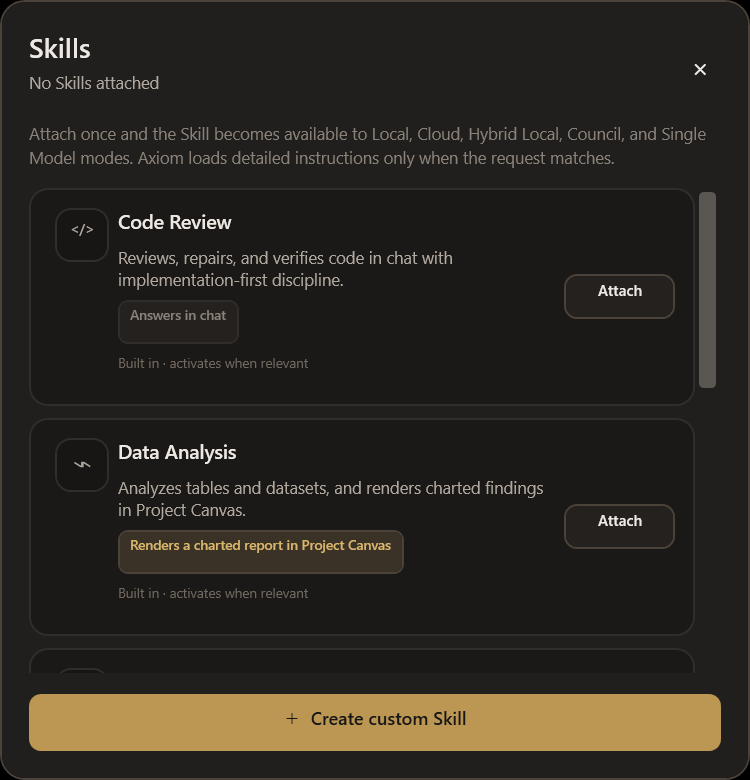
The important part is what a Skill delivers. Some answer in chat. Others produce a rendered artifact in Project Canvas:
| Skill | Delivers |
|---|---|
| Slide Deck Studio | A navigable slide deck — 16:9 stages, arrow-key navigation, speaker notes |
| PDF Studio | A print-ready document with a proper @media print layout |
| Data Analysis | A charted report with inline SVG charts and the figures beneath them |
| Document Summarizer | A traceable summary in chat |
| Code Review | A review in chat |
Ask for a slide deck with Slide Deck Studio attached and you get an actual deck, not a
description of one — no @ProjectCanvas needed.
This works on small models too. A sub-4B model can't author a correct self-contained HTML document, so Axiom doesn't ask it to. Below that threshold the model supplies a short structured outline and Axiom builds the artifact itself. Above it, the model authors the artifact directly. Either way the deliverable is the same.
You can also write your own Skills — a name, a procedure, activation terms, and whether it renders or answers in chat. Custom Skills are instructions, not scripts; they never execute arbitrary code.
Plugins
Plugins package capabilities Axiom already has, so a model uses them consistently: Web Research, Data Lab, File Intelligence, Connected Apps, and Creator Studio.
A Plugin never grants a capability the current model or host doesn't actually expose. Connected Apps uses only the MCP connectors you configured in Settings.
Themes
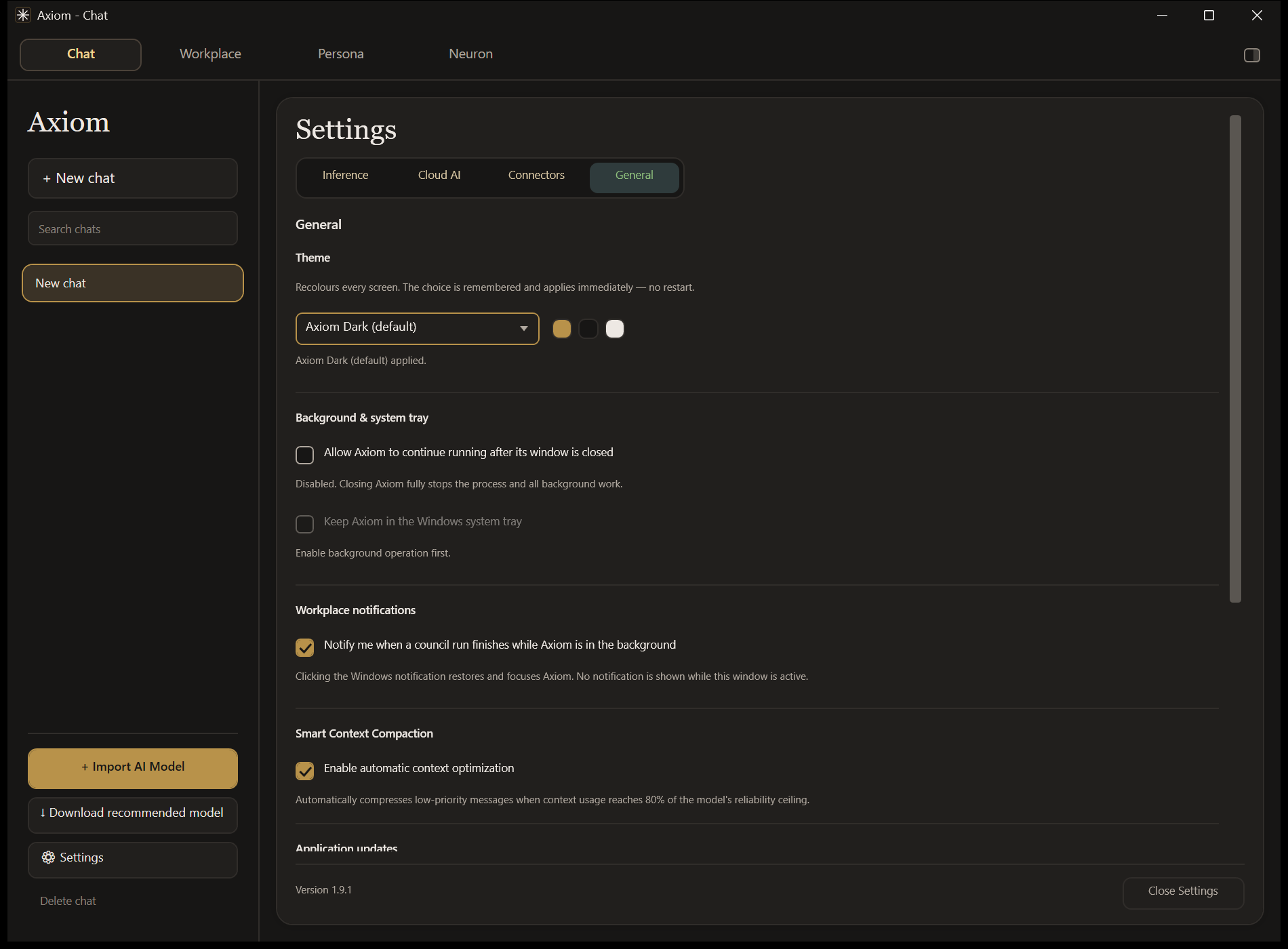
Settings → General switches the whole app between themes. The change applies instantly — no restart — and is remembered.
 |
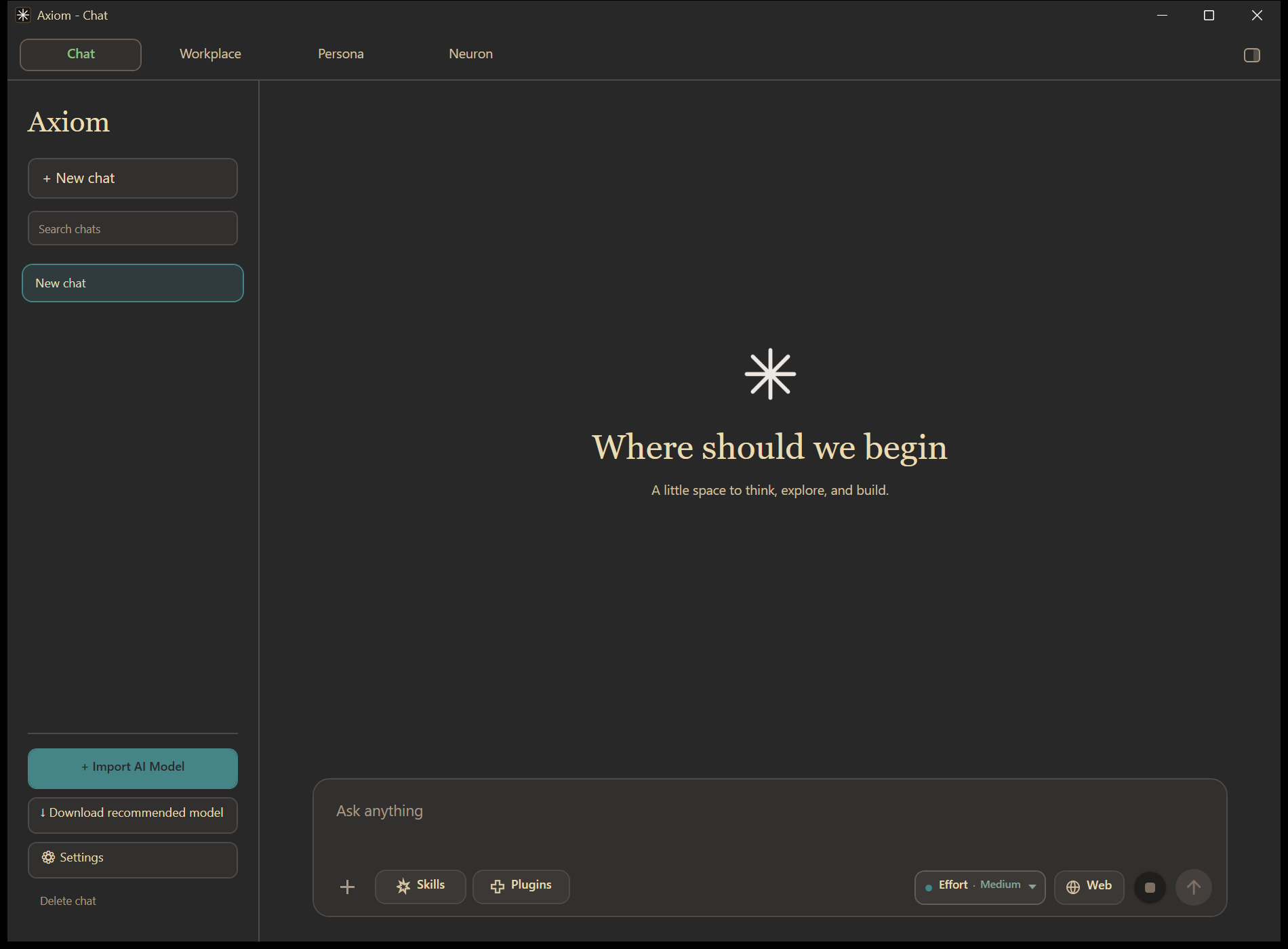 |
| Axiom Dark (default) | Gruvbox Dark |
Theming reaches every surface: both chats, dialogs, the Effort picker, rendered chat bubbles, and the native Windows title bar.
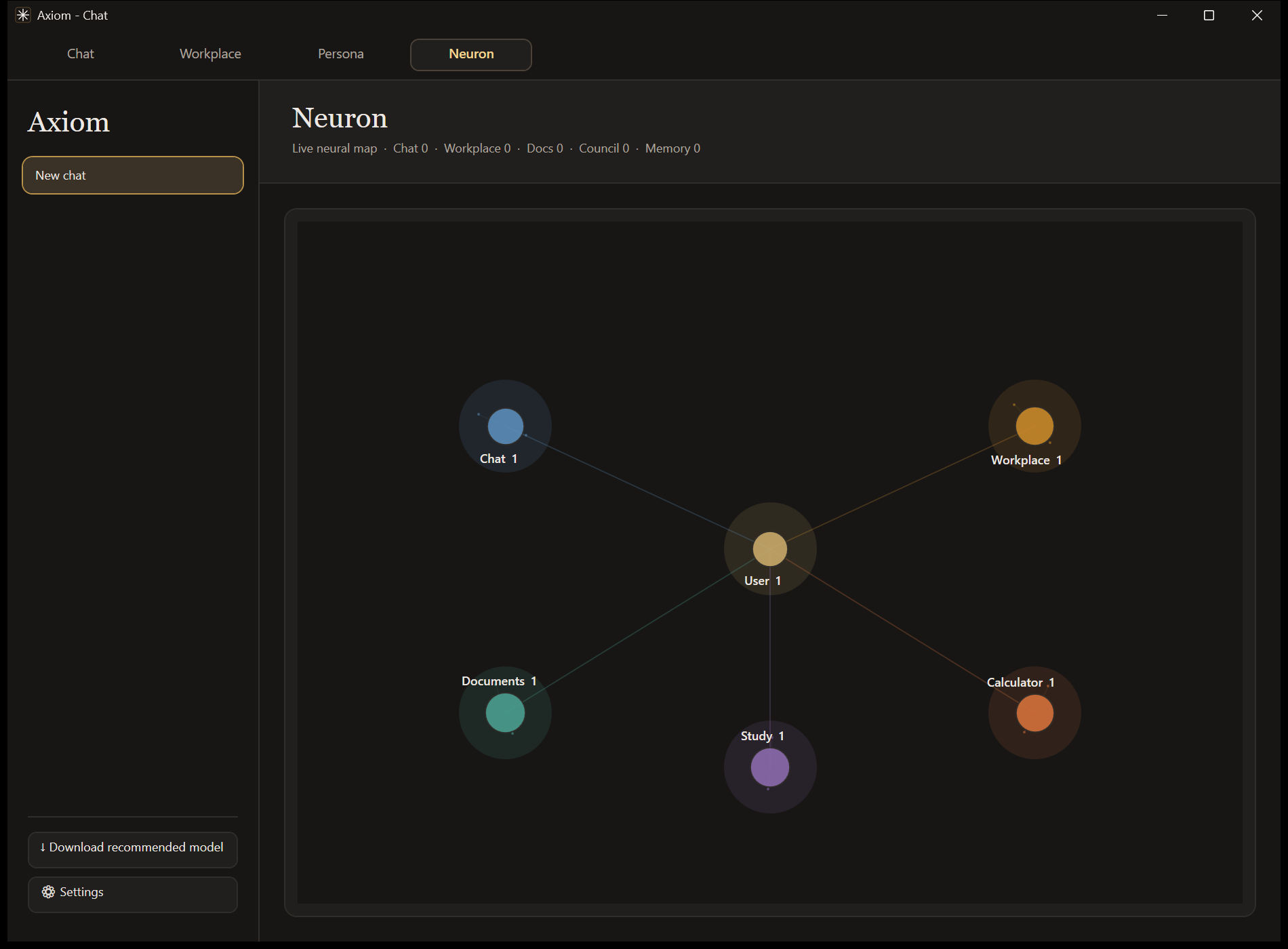
Neuron
A live map of what Axiom is doing — active sessions, tool usage, and activity across Chat, Workplace, Documents, Study, and Calculator.
Models
Local mode accepts any compatible GGUF and can install one for you. Cloud mode uses OpenRouter with your own key.
| Axiom profile | Model | Intended use |
|---|---|---|
| Edios 1.5 | Google Gemma 4 31B (free) | General chat, reasoning, documents, tool use |
| Hepha 2.5 Coder | NVIDIA Nemotron 3 Ultra (free) | Repository-aware coding |
| Workplace cloud model | Dots Studio Dots3-Note Preview (free) | The one model behind every Workplace cloud run: Council, Single Model, Agent Access, and Computer Use. Text + image input, 51[...] |
| Kestral 1 | Your self-hosted endpoint | Hybrid Local inference |
The Workplace deliberately runs on exactly one cloud model, with no silent fallback to another: council roles build on each other's output, and Computer Use and image attachments need a model that can see.
Cloud availability and routing depend on OpenRouter and its providers. Axiom reports exhausted keys and rate limits directly instead of dressing them up as answers.
Tools, memory, and privacy
| Calculator | Scientific expressions and unit conversions |
| Python sandbox | Persistent session, bounded execution, chart capture |
| Java sandbox | Compile and run Java for supported Workplace tasks |
| Web search | Multi-source querying, deduplication, trust scoring, synthesis |
| Codebase access | Inspect and patch an explicitly connected workspace, with validation |
| Session memory | In-session episodic context for Workplace roles and study sessions |
| Persona memory | Persistent preferences stored locally |
| Context compaction | Keeps important requirements intact as conversations grow |
Your data lives in %LOCALAPPDATA%\Axiom; debug runs use a separate %LOCALAPPDATA%\Axiom-Dev
profile. Chats, API keys, connector tokens, local models, and Workplace sessions are never
placed inside release packages.
Background and system tray
Settings has separate switches for background operation and the system tray. With both on, closing the window hides Axiom in the tray instead of ending work in progress; Axiom stops UI activity while hidden and releases heavy model caches once work finishes. Exit Axiom in the tray menu stops the process completely. With either switch off, closing the window exits normally.
Getting started
- Download
Axiom-Setup-…-win-x64.exefrom the latest release and run it. It installs for your Windows account only (no admin prompt) and adds Axiom to the Start menu. Prefer no installer? Download the…-win-x64-clean.zipinstead, extract the whole folder, and runMalx_AI.exe. - Launch Axiom.
- The first-run guide asks how you want to run AI. For a local model it checks your processor, memory and graphics card, shows which models fit, and downloads the one it recommends. You can also pick a cloud key or your own server, or skip and set things up later (reopen the guide from Download a model in the sidebar).
- Open Chat, or head to Workplace.
To uninstall, use Settings → Apps in Windows. Your chats and settings in
%LOCALAPPDATA%\Axiom are kept unless you delete that folder too.
"Windows protected your PC"? Axiom isn't code-signed yet, so Windows SmartScreen shows this warning for new downloads it hasn't seen often. Click More info, then Run anyway. The release ZIP is built and published by this repository's own GitHub Actions workflow, and the in-app updater verifies each update package before installing it.
Updating
V1.7.0 and newer check the stable GitHub Releases feed at startup. Use the in-app notification or Settings → General → Check for updates. Axiom downloads and verifies the package, stages it outside the install directory, replaces only package-managed files after shutdown, and restarts in place. Obsolete files, backups, and staging folders are cleaned up afterwards.
Settings, chats, local models, connectors, and Workplace data are left untouched. Manual ZIP installation still works for first-time setup and recovery.
Set AXIOM_UPDATE_DIR to an absolute path to stage downloads outside %LOCALAPPDATA%.
Maintainers: see RELEASING.md — update ZIPs need a matching version tag,
packaged executable version, and AXIOM_UPDATE_MANIFEST.txt.
System requirements
| OS | Windows 10 or 11 (64-bit) |
| RAM | 4 GB minimum; 16 GB recommended for local models |
| CPU | Modern x64 |
| GPU | Optional NVIDIA CUDA acceleration |
| Runtime | Self-contained release; .NET 10 SDK only for development |
Built with
C# · WPF · .NET 10 · LLamaSharp / llama.cpp (CUDA 12) · Python.Included · Markdig · KaTeX · HtmlAgilityPack · AvalonEdit · UglyToad.PdfPig · SQLite · WebView2
Feedback
I'd love to hear from you. Bug, feature request, or just how it's going:
- In the app: Settings → General → Send feedback. It can attach your app version and recent error lines, never your chats, files or keys.
- On GitHub: open an issue (bug report or feature request). Issues are public, so leave out keys and personal files.
- By email: [email protected].
Your input genuinely shapes what gets built next.
Contributing
Contributions are welcome. Fork the repo, make your change on a branch, and open a pull request; every change is reviewed and only merged with the maintainer's approval. See CONTRIBUTING.md for setup, testing and what makes a pull request easy to accept. Found a security problem? Please report it privately (see SECURITY.md).
License
PolyForm Noncommercial 1.0.0. You may use, study, change and share Axiom for any noncommercial purpose, including personal use, research, education and nonprofit work, as long as you keep the license and copyright notice with it. Commercial use needs the author's written permission. Releases before V1.11.0 were published under CC BY-NC-ND 4.0.
Author
Built by YoMosa2009
Explore related projects
affaan-m/ECC
The agent harness performance optimization system. Skills, instincts, memory, security, and research-first development for Claude Code, Codex, Opencode, Cursor and beyond.
302,615 starsNousResearch/hermes-agent
The agent that grows with you
263,276 starsmultica-ai/andrej-karpathy-skills
A single CLAUDE.md file to improve Claude Code behavior, derived from Andrej Karpathy's observations on LLM coding pitfalls.
233,002 starsfirecrawl/firecrawl
Supercharge your AI agents with data from the web and beyond. Building the library for superintelligence. 🔥
201,659 stars